

What Is an AI Agent? Workflows, Agents and Deciding You Don't Need One
An agent is a system where the model directs the control flow; in a workflow, code draws the path. We run three Bookstore scenarios (order status, a return, find a book and add it to the cart) on the same code with qwen3:4b, measure model calls, tokens and time, and derive the price of an agent and the criteria for deciding you don't need one.
Version note: The code in this post was built with .NET 10, Microsoft.Extensions.AI 10.11.0 and OllamaSharp 5.5.2 and run against the qwen3:4b model on a local Ollama 0.34.4.
Guess First
Three messages land in Bookstore's support inbox on the same day:
- "Where is my order 1043?"
- "The cover of Coffee and Compilers arrived torn. I want to send order 1040 back."
- "I like quiet novels. Find me one under 20 dollars that is in stock and add one copy to my cart."
All three can be handled with an LLM (Large Language Model). The question is: which one actually needs an agent? For each, guess how many times the model is called, how many tokens are spent and how many seconds the answer takes. At the end of the post we run all three scenarios on the same code base and put the numbers side by side. Hint: the third one turns out far more expensive than the first two combined.
Workflow and Agent: Two Definitions
Over the last two years the word "agent" has been stuck on almost every LLM feature: I've seen chatbots called agents, single prompts called agents, even a cron job called an agent. To talk engineering we need a narrower definition. In this series we use the distinction from Anthropic's "Building effective agents" (December 19, 2024), because it is the most cited and the most useful one in the industry:
- Workflow: LLMs and tools are orchestrated through code paths drawn in advance in your code. Code chooses the next step.
- Agent: the LLM dynamically directs its own steps and tool use. The model decides which tool to call, in which order, how many times and when to stop.
Both definitions share the same building block: an LLM call augmented with tools, retrieval and memory. We covered the mechanics of that call in posts 11 and 12 of the LLM Fundamentals series: the model doesn't run a function, it asks for a call; your code runs the call and hands the result back to the model. What separates an agent from a workflow is not tool use but who holds control. In a workflow the control flow lives in C# code; in an agent it lives in the decisions the model makes every turn.
This distinction has a practical consequence: you know what a workflow will do by reading it, you only see what an agent does by running it. Testing, debugging and cost estimation all follow from that difference.
The Autonomy Spectrum
Real systems rarely sit exactly at either end; they sit on a spectrum. The further right you go, the more decisions you leave to the model:
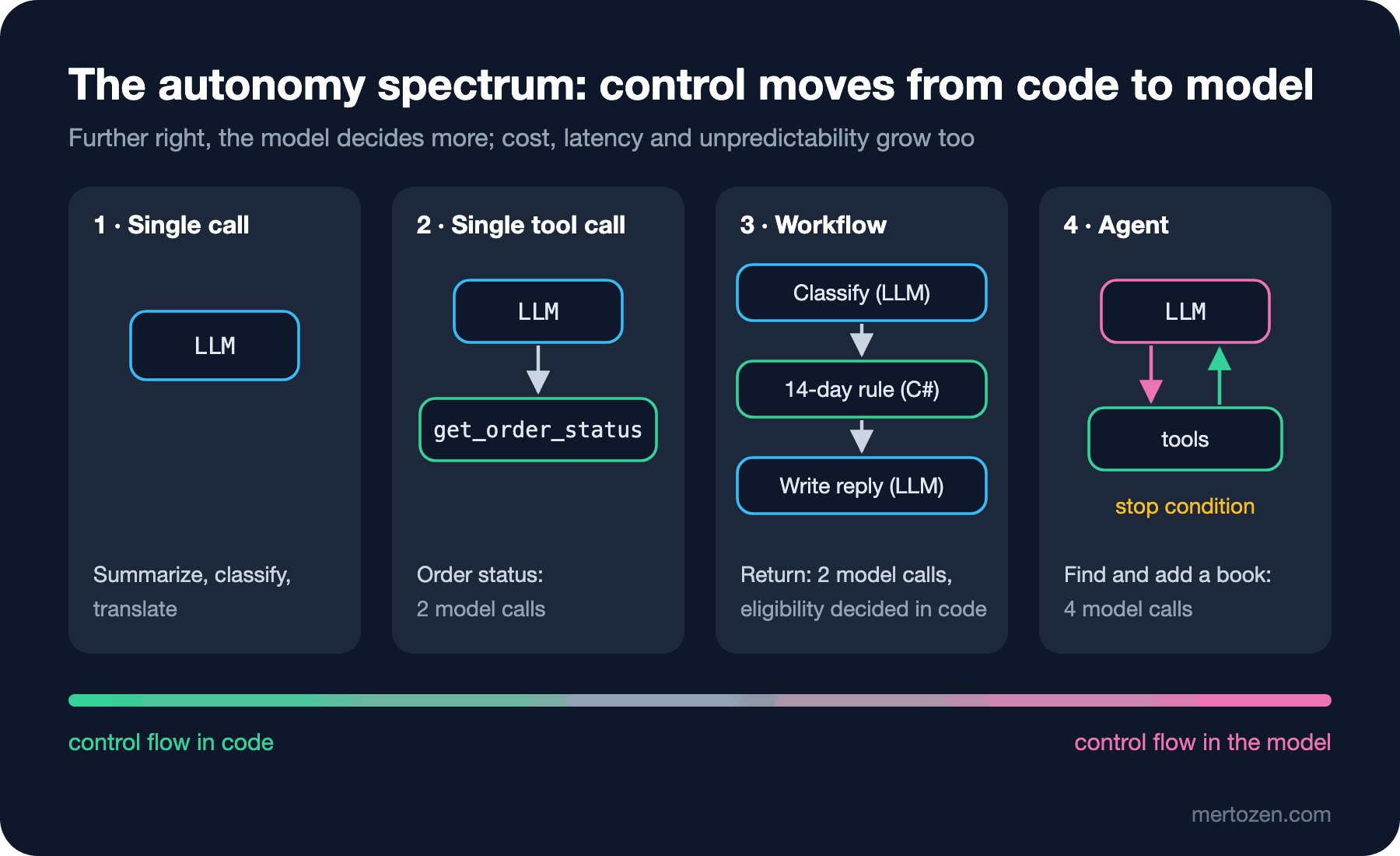
On the far left is a single model call: summarize, classify, translate. One step right is a single tool call: the model chooses which tool to call with which arguments, but the flow is still one round. In the middle is a workflow: several LLM steps, but their order and branching are in code. On the far right is an agent: the model calls tools in a loop, observes the results, picks the next step itself and stops when it says "done".
The most important sentence in Anthropic's article, in my view, isn't a definition but advice: look for the simplest solution possible and add complexity only when it brings a measurable gain. Agents trade latency and cost for better results; don't assume that trade makes sense in every scenario. Every step to the right on the spectrum has a price, and the rest of this post is about measuring it.
Shared Code: Bookstore Tools and a Meter
The three scenarios use the same data and the same tools: an eight-book catalog, a few orders and a cart (the data stays the same throughout the series). The tools are methods on a class; AIFunctionFactory.Create gives them snake_case names, because we use the same names in the series' MCP (Model Context Protocol) posts:
public AIFunction[] ReadTools() =>
[
    AIFunctionFactory.Create(SearchBooks, name: "search_books"),
    AIFunctionFactory.Create(CheckStock, name: "check_stock"),
    AIFunctionFactory.Create(GetOrderStatus, name: "get_order_status"),
];

public AIFunction AddToCartTool() => AIFunctionFactory.Create(AddToCart, name: "add_to_cart");
To measure the price we put a meter in front of the model. This client, derived from DelegatingChatClient, counts every model call that passes through it, sums the token counts Ollama returns and measures time:
public sealed class MeteringChatClient(IChatClient inner) : DelegatingChatClient(inner)
{
    public int Calls { get; private set; }
    public long InputTokens { get; private set; }
    public long OutputTokens { get; private set; }
    public TimeSpan Elapsed { get; private set; }

    public override async Task<ChatResponse> GetResponseAsync(
        IEnumerable<ChatMessage> messages, ChatOptions? options = null, CancellationToken cancellationToken = default)
    {
        Stopwatch sw = Stopwatch.StartNew();
        ChatResponse response = await base.GetResponseAsync(messages, options, cancellationToken);
        Calls++;
        InputTokens += response.Usage?.InputTokenCount ?? 0;
        OutputTokens += response.Usage?.OutputTokenCount ?? 0;
        Elapsed += sw.Elapsed;
        return response;
    }

    // Reset() and ToString() omitted here
}
The meter's position in the pipeline matters. UseFunctionInvocation is the layer that runs the tool loop; because we put the meter underneath it, every model call the loop makes is counted separately:
HttpClient http = new() { BaseAddress = new Uri("http://localhost:11434"), Timeout = TimeSpan.FromMinutes(5) };
MeteringChatClient meter = new(new OllamaApiClient(http, "qwen3:4b"));
IChatClient toolClient = new ChatClientBuilder(meter)
    .UseFunctionInvocation(configure: f => f.MaximumIterationsPerRequest = 8)
    .Build();
Order Status: A Single Tool Call
For the first message we give the model only the get_order_status tool:
// 1) Single tool call: the model only picks get_order_status
ChatOptions options = new() { Temperature = 0, Seed = 42, Tools = [tools.ReadTools()[2]] };
ChatResponse r = await toolClient.GetResponseAsync("Where is my order 1043?", options);
Real output:
--- order status
model calls=2, input tokens=501, output tokens=405, time=25,4s, tool calls=1
Your order #1043 is currently **Shipped** with tracking number **TRK-88213**. You can use this tracking number to monitor the delivery status with the carrier.
Even a single tool call means two model calls: one to ask for the call, one to turn the result into a sentence. Most of the 405 output tokens are the reasoning text qwen3:4b produces before answering; you see one sentence on the screen, but the model thought for hundreds of tokens. Part of the 25 seconds also comes from sharing this machine's Ollama with other work; look at the ratios between scenarios, not the absolute numbers.
This scenario sits on the left of the spectrum and should stay there. It can even move further left: if the order number already comes from a form field or the URL (Uniform Resource Locator), no model is needed at all, GetOrderStatus(1043) is a database query. The model's only contribution is pulling the order number out of free text and phrasing the answer.
Return Request: Code Draws the Path
The steps for the second message are known up front: classify the return reason, check eligibility, write a reply to the customer. There's no point making the model discover steps that are already known. Code draws the path; the model only fills two boxes:
// 2) Workflow: the path is fixed in code, the model fills two steps
string message = "The cover of Coffee and Compilers arrived torn. I want to send order 1040 back.";
ChatResponse<ReturnReason> classified = await meter.GetResponseAsync<ReturnReason>(
    $"Classify the return reason of this customer message: {message}",
    new ChatOptions { Temperature = 0, Seed = 42 });
ReturnReason reason = classified.Result;

Order order = data.Orders.Single(o => o.Id == 1040);
DateOnly today = new(2026, 11, 8);
bool eligible = order.DeliveredOn is { } d && today.DayNumber - d.DayNumber <= 14
    && reason.Category != ReturnCategory.ChangedMind;

ChatResponse reply = await meter.GetResponseAsync(
    $"Write a two sentence reply to a customer. Return {(eligible ? "approved" : "rejected")}, reason: {reason.Category}.",
    new ChatOptions { Temperature = 0, Seed = 42 });
public enum ReturnCategory { Damaged, WrongItem, ChangedMind, Other }
public sealed record ReturnReason(
ReturnCategory Category,
[property: Description("One short sentence quoting the customer's problem.")] string Summary);The key point is that the model doesn't decide whether the return is eligible. The 14-day rule is a business rule; it's written in C#, unit tested and goes through code review when it changes. The model only does the two things it is good at: turning free text into an enum (structured output) and writing the reply. Output:
--- return workflow (category=Damaged, eligible=True)
model calls=2, input tokens=69, output tokens=1412, time=84,0s, tool calls=0
Your return has been approved because the item was damaged. Please send the damaged item back using the return label we provided in your email.
Two model calls, zero tool calls. Input tokens are this low because we send no tool definitions; on the other hand there are 1412 output tokens, again because of reasoning. For classification and short texts like these, a smaller model without reasoning is often enough; the routing pattern in the fifth post does exactly that. Notice one more thing: the model says "return label we provided in your email", yet no such email exists. In a workflow this is easy to catch, because there is exactly one step that produces the reply and you know where it is; adding "do not promise anything not listed" to the prompt or generating the reply from a template is enough.
"Find Me a Book and Add It to My Cart": An Agent
For the third message the number of steps isn't known in advance. How many searches, whose stock to check, what to do if it's out of stock: it all depends on what the search returns. Here we hand control to the model: four tools, an instruction and at most eight rounds:
// 3) Agent: the model decides which tools to call and in which order
ChatOptions options = new()
{
    Temperature = 0,
    Seed = 42,
    Instructions = "You are the Bookstore shopping assistant. Use the tools. Never add a book that is out of stock.",
    Tools = [.. tools.ReadTools(), tools.AddToCartTool()],
};
ChatResponse r = await toolClient.GetResponseAsync(
    "I like quiet novels. Find me one under 20 dollars that is in stock and add one copy to my cart.", options);
--- shopping agent
model calls=4, input tokens=7422, output tokens=2342, time=287,2s, tool calls=3
tool: search_books(query: quiet novel, genre: novel, maxPrice: 20)
tool: check_stock(bookId: 7)
tool: add_to_cart(bookId: 7, quantity: 1)
Your cart now includes **The Quiet Orchard** (Mira Holt) at $16.50. ✅
This book is in stock and has been added to your cart. Let me know if you'd like to proceed with checkout!
cart: The Quiet Orchard x1Four model calls, three tool calls. The model narrowed the search itself (genre: novel, maxPrice: 20), checked the stock of the book at the top of the list and added it. We didn't write this order anywhere in code; the model chose it on this run and may choose differently on another.
The catalog has two novels under 20 dollars: The Last Lighthouse at 18.90 (0 in stock) and The Quiet Orchard at 16.50 (15 in stock). On this run The Quiet Orchard came first in the search result, so the model never went near the trap. Had the search put The Last Lighthouse first, the stock check and the error reply from add_to_cart would have come into play; we run exactly that case in the second post. The agent's value is resolving this kind of uncertainty on its own; the price is in the table below.
Production Notes: Measuring the Price
The numbers for the three scenarios side by side:
| Scenario | Model calls | Tool calls | Input tokens | Output tokens | Time |
|---|---|---|---|---|---|
| Order status (single tool) | 2 | 1 | 501 | 405 | 25.4 s |
| Return (workflow) | 2 | 0 | 69 | 1412 | 84.0 s |
| Find and add a book (agent) | 4 | 3 | 7422 | 2342 | 287.2 s |
The agent's input tokens are more than ten times the other two combined. The reason is the nature of the loop: every turn resends the whole history (instructions, tool definitions, earlier tool calls and their results) to the model. As the number of turns grows, the cost doesn't grow linearly, it accumulates. With a cloud provider that is literally the bill; with a local model it's latency and shared GPU (Graphics Processing Unit) time.
Besides cost there are three more prices. The first is reliability: in a chain where every step is 95% correct, the probability that all ten steps go right is 0.95 to the tenth power, about 60%. Errors compound in agents; Anthropic also writes that agents carry higher cost and the risk of compounding errors, and therefore call for extensive testing in sandboxes and guardrails. The second is latency: the user waits for every turn. The third is debuggability: in a workflow an error tells you which step it happened in; in an agent you first have to find out which path the model chose that day. That's why the first thing we do when writing the loop in the second post is to log every step.
Don't guess these numbers in production, measure them. A layer like this MeteringChatClient (or the OpenTelemetry integration in the AI (Artificial Intelligence) with .NET series) should record model calls, tokens and time for every request. When releasing an agent the question isn't "does it work" but "how many turns and how many tokens per request, on average and in the worst case".
Here is the short checklist I use to decide. If the steps are known up front, write a workflow. If the number of steps varies with input but the paths can be enumerated (three or four branches), write a workflow with routing. Move to an agent only when the number and order of steps are genuinely unpredictable, when the cost of a mistake is low or can be bounded by a human approval, and when the budget can afford paying per turn. In this series we write the agent loop from scratch (02), discuss tool design (03) and context management (04), move to workflow and multi-agent patterns (05, 06) and human-in-the-loop (07); in the second half we publish the same tools as MCP servers in C# and TypeScript and close with security and evaluation.
Common Pitfalls
Calling every LLM feature an "agent". An endpoint that generates a product description with one prompt is not an agent; name it that way and the team starts treating it like one, adding unnecessary loops and frameworks. Name things for what they are.
Starting with a framework. Frameworks such as Microsoft Agent Framework (MAF) make setup easier but hide prompts and responses behind an abstraction layer. Anthropic's advice points the same way: start with the LLM's API (Application Programming Interface) directly, and if you use a framework, know what it does underneath. That's why in the next post we first write the loop without a framework.
Leaving business rules to the model. Decisions such as return eligibility, discount rates and permission checks stay in code. The model's answer is an input; the decision is yours.
No stop condition. An agent loops as long as it doesn't say "done". Don't put an agent into production without an upper bound like MaximumIterationsPerRequest and a token/time budget.
Trying only the happy path. The agent above picked the right book on this run; try the same prompt with changed stock data, with an ambiguous request or with a misspelled author name. An agent's quality isn't measured in one run; we make that systematic in the fourteenth post.
A Small Experiment
★☆☆ Write the order status scenario without a model: pull the order number from the user message with a regular expression, call GetOrderStatus directly and build the answer with string interpolation. Note the difference in time and tokens; for which messages does this approach break?
★★☆ In the return workflow, run the classification step with gemma3:4b and the reply step with qwen3:4b. How do output tokens and time change? Does classification quality drop? Try a message like "I just don't like it anymore" too.
★★★ In the agent scenario, change add_to_cart to return an empty object instead of error when it fails, and phrase the request as "add The Last Lighthouse". What does the model tell the user? Then lower MaximumIterationsPerRequest to 2 and look at how the agent reports unfinished work.
In this post we left the loop to UseFunctionInvocation and never looked inside. In the next post we write the same loop by hand, without a framework: plan, tool call, observation, stop condition, step budget and a trace of every step; then we do the same job with FunctionInvokingChatClient and MAF's ChatClientAgent and see what is abstracted away.