

Writing an Agent Loop from Scratch: Plan, Tool Call, Observation and Stop Condition
We write an agent loop in C# without a framework: returning tool results and errors to the model, step/token/time budgets, blocking repeated calls and tracing every step. A real run shows tokens piling up turn by turn; then we do the same job with FunctionInvokingChatClient and MAF's ChatClientAgent and compare what each layer abstracts away.
Version note: The code in this post was built with .NET 10, Microsoft.Extensions.AI 10.11.0, OllamaSharp 5.5.2 and Microsoft.Agents.AI 1.28.0 and run against the qwen3:4b model on a local Ollama 0.34.4.
Guess First
A customer writes: "Add The Last Lighthouse to my cart. If it is not available, add another novel by the same author." In the catalog The Last Lighthouse has 0 copies, and the only other in-stock novel by the same author is The Quiet Orchard. The agent has four tools: search_books, check_stock, get_order_status and add_to_cart.
Guess two things. First, how many model calls does this take? Second, does the number of tokens sent to the model stay the same from turn to turn, or does it grow? In this post we write the loop without a framework and log every step; the answer is in the trace.
The Parts of an Agent Loop
In the previous post we defined an agent as "a system where the model calls tools in a loop, observes the results and chooses the next step itself". In code, that definition has four parts:
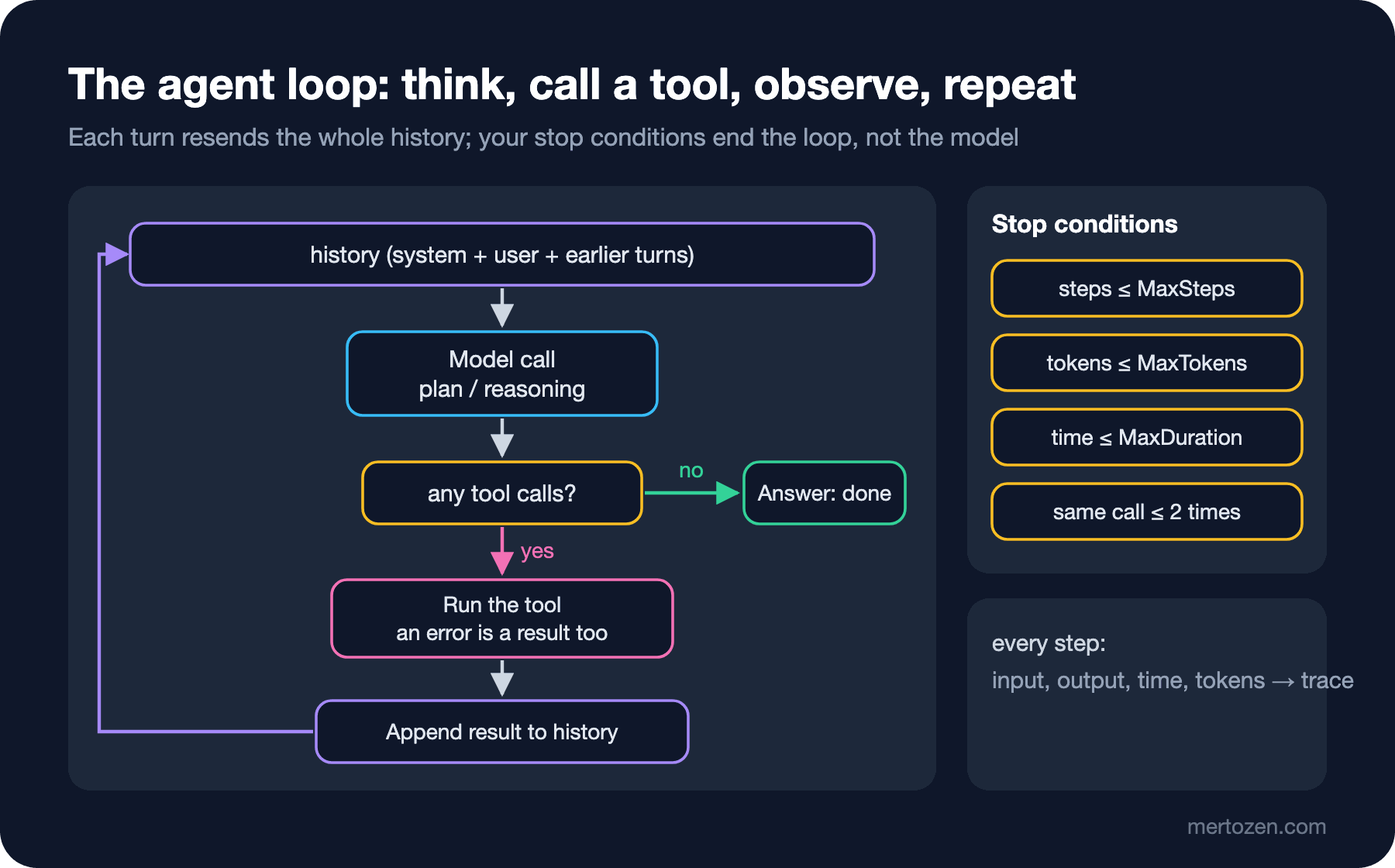
Plan: the model looks at the history and decides what to do. Reasoning models such as qwen3:4b also return that decision as separate reasoning text. Tool call: the model returns one or more FunctionCallContent items. Observation: your code runs the tool and appends the result (errors included) to the history as a message with the tool role. Stop condition: the job ends when the model returns text without asking for a tool; but that can't be the only condition, because the model may never stop.
In post 11 of the LLM (Large Language Model) Fundamentals series we wrote a single tool round by hand. The difference here is that the number of rounds is unknown, and the limits that make that uncertainty safe.
A Loop Without a Framework: AgentLoop
The whole loop is one class. It takes an IChatClient, a tool list and limits:
public sealed record AgentLimits(int MaxSteps = 6, long MaxTokens = 20_000, TimeSpan? MaxDuration = null);

public sealed record AgentResult(string StopReason, string? Answer, int Steps, long Tokens);

public sealed class AgentLoop(IChatClient client, IReadOnlyList<AIFunction> tools, AgentLimits limits)
{
    public async Task<AgentResult> RunAsync(string instructions, string goal, CancellationToken ct = default)
    {
        List<ChatMessage> history = [new(ChatRole.System, instructions), new(ChatRole.User, goal)];
        ChatOptions options = new() { Temperature = 0, Seed = 42, Tools = [.. tools] };
        Dictionary<string, int> seenCalls = [];
        Stopwatch clock = Stopwatch.StartNew();
        long tokens = 0;

        for (int step = 1; step <= limits.MaxSteps; step++)
        {
            Stopwatch stepClock = Stopwatch.StartNew();
            ChatResponse response = await client.GetResponseAsync(history, options, ct);
            history.AddMessages(response);
            tokens += response.Usage?.TotalTokenCount ?? 0;

            List<FunctionCallContent> calls = response.Messages
                .SelectMany(m => m.Contents).OfType<FunctionCallContent>().ToList();
            Trace(step, "model", $"{calls.Count} tool call(s), {response.Usage?.TotalTokenCount} tokens", stepClock.Elapsed);

            // Stop condition 1: the model answered without asking for a tool
            if (calls.Count == 0)
            {
                return new AgentResult("done", response.Text, step, tokens);
            }

            foreach (FunctionCallContent call in calls)
            {
                Stopwatch toolClock = Stopwatch.StartNew();
                object? result = await InvokeAsync(call, seenCalls, ct);
                history.Add(new ChatMessage(ChatRole.Tool, [new FunctionResultContent(call.CallId, result)]));
                Trace(step, call.Name, $"{JsonSerializer.Serialize(call.Arguments)} -> {JsonSerializer.Serialize(result)}", toolClock.Elapsed);
            }

            // Stop conditions 2 and 3: budgets
            if (tokens > limits.MaxTokens)
            {
                return new AgentResult("token budget exceeded", null, step, tokens);
            }
            if (limits.MaxDuration is { } max && clock.Elapsed > max)
            {
                return new AgentResult("time budget exceeded", null, step, tokens);
            }
        }

        return new AgentResult("max steps reached", null, limits.MaxSteps, tokens);
    }
}
Trace is a Console.WriteLine that writes the step number, name, duration and detail on one line. Three details matter. history.AddMessages(response) appends the model's reply (tool calls included) to the history; forget it and on the next turn the model doesn't see its own call and can't tell what the tool result belongs to. Each result is matched by call.CallId; the model may request several tools in one turn, and this id says which result belongs to which call. AgentResult carries not just the answer but why the loop stopped. "max steps reached" and "done" are not the same thing, and the calling code needs to know the difference: one finished the job, the other gave up halfway.
Tool Results and Errors Go Back to the Model
The loop's most important method is the one that runs a tool call:
private async Task<object?> InvokeAsync(FunctionCallContent call, Dictionary<string, int> seenCalls, CancellationToken ct)
{
    string key = $"{call.Name}:{JsonSerializer.Serialize(call.Arguments)}";
    int count = seenCalls[key] = seenCalls.GetValueOrDefault(key) + 1;
    if (count > 2)
    {
        return new { error = $"You already called {call.Name} with these arguments {count - 1} times. Use the earlier result or try something else." };
    }

    AIFunction? tool = tools.FirstOrDefault(t => t.Name == call.Name);
    if (tool is null)
    {
        return new { error = $"Unknown tool '{call.Name}'. Available: {string.Join(", ", tools.Select(t => t.Name))}." };
    }

    try
    {
        return await tool.InvokeAsync(new AIFunctionArguments(call.Arguments), ct);
    }
    catch (Exception ex) when (ex is not OperationCanceledException)
    {
        // The model must see the failure, otherwise it may claim success
        return new { error = $"{call.Name} failed: {ex.Message}" };
    }
}
There are three decisions here. First, an exception doesn't kill the loop; it goes back to the model as an object with an error field. If the model sees the error it can retry with other arguments, or honestly tell the user "I couldn't do it". Swallow the error and return null, and the model usually assumes the job was done. Second, an unknown tool name is also an error result; small models sometimes invent a tool name, and giving them the list of existing names is enough for them to correct themselves. Third, calling the same tool with the same arguments a third time is blocked. Repeated calls are the most common form of infinite loop I see with small models: the result doesn't change, and the model keeps asking the same question.
A warning: handing ex.Message to the model means the exception message can reach the user. Don't give the model a message containing a connection string or an internal server name; in production the tool itself should produce a meaningful, safe error message. We'll cover that in the third post as part of tool design.
Stop Conditions: Answer, Steps, Tokens, Time
The loop ends in one of four ways. If the model returns text without asking for a tool, the job is done. If MaxSteps is exceeded, the loop is forced to stop. If total tokens exceed MaxTokens, it stops; with a cloud provider this is literally a money budget. If MaxDuration passes, it stops; if the user is waiting at the end of an HTTP (HyperText Transfer Protocol) request, this limit must be shorter than the gateway timeout.
The trace will show why we have a token limit on top of a step limit. There is also the CancellationToken: it is passed to every await so that the model call and tools can be cancelled if the user closes the page. Note that we don't catch OperationCanceledException as a tool error and hand it to the model; a cancellation is a cancellation.
The calling code is short:
AgentLoop loop = new(ollama, toolSet, new AgentLimits(MaxSteps: 6, MaxTokens: 20_000, MaxDuration: TimeSpan.FromMinutes(4)));
AgentResult result = await loop.RunAsync(Instructions, Goal);
Console.WriteLine($"stop={result.StopReason}, steps={result.Steps}, tokens={result.Tokens}");
Console.WriteLine(result.Answer);
Trace: Seeing Every Step
For every step we log the tool name, arguments, result, duration and token count. The output of the real run (I shortened the list of five books in the search_books result):
[step 1] model          100,8s  1 tool call(s), 2336 tokens
[step 1] search_books     0,0s  {"query":"The Last Lighthouse"} -> [{"id":2,"title":"The Last Lighthouse","author":"Mira Holt","genre":"novel","price":18.90},{"id":7,"title":"The Quiet Orchard","author":"Mira Holt","genre":"novel","price":16.50},...]
[step 2] model           13,9s  1 tool call(s), 2746 tokens
[step 2] check_stock      0,0s  {"bookId":2} -> {"id":2,"title":"The Last Lighthouse","inStock":0}
[step 3] model           17,6s  1 tool call(s), 3115 tokens
[step 3] check_stock      0,0s  {"bookId":7} -> {"id":7,"title":"The Quiet Orchard","inStock":15}
[step 4] model           12,2s  1 tool call(s), 3414 tokens
[step 4] add_to_cart      0,0s  {"bookId":7,"quantity":1} -> {"added":"The Quiet Orchard","quantity":1,"cartTotal":16.50}
[step 5] model          114,7s  0 tool call(s), 3758 tokens
stop=done, steps=5, tokens=15369
The book "The Quiet Orchard" by Mira Holt has been successfully added to your cart (1 copy). Your cart now totals $16.50.
cart: The Quiet Orchard x1
The answer to the guess: five model calls, four tool calls. The model searched first, checked the stock of The Last Lighthouse, moved on to the same author's other novel when it saw 0, checked that one's stock and added it. A sensible path; but it isn't written anywhere in the code, the model chose it on this run.
Look at the token column: 2336, 2746, 3115, 3414, 3758. Every turn is larger than the previous one, because every model call resends the whole history: the system message, the user message, four tool definitions and every call and result so far. More than half of the 15,369 total tokens are the same content sent again and again. That's why a step limit alone isn't enough: an agent whose tools return large results can blow its budget in five steps too. This table is the starting point of context engineering in the fourth post.
The duration column says something as well: the tools take under a millisecond, all the time is in the model. The values above 100 seconds in steps one and five are waiting time caused by sharing this machine's Ollama with other work; without the trace we'd shrug and say "the agent is slow", with the trace we can see the slowness is in the model, in fact in the model's queue.
The Same Loop with FunctionInvokingChatClient
FunctionInvokingChatClient in Microsoft.Extensions.AI is the production-ready version of this loop. We met UseFunctionInvocation in LLM Fundamentals 12; now let's look at the counterparts of the limits we wrote by hand:
IChatClient client = new ChatClientBuilder(ollama)
    .UseFunctionInvocation(configure: f =>
    {
        f.MaximumIterationsPerRequest = 6;
        f.MaximumConsecutiveErrorsPerRequest = 2;
    })
    .Build();
ChatOptions options = new() { Temperature = 0, Seed = 42, Instructions = Instructions, Tools = [.. toolSet] };
ChatResponse response = await client.GetResponseAsync(Goal, options);
According to the package's XML (Extensible Markup Language) documentation, the defaults are: MaximumIterationsPerRequest 40 (our MaxSteps), MaximumConsecutiveErrorsPerRequest 3 (after that many consecutive tool errors the exception is thrown to the caller), IncludeDetailedErrors false (the model gets a generic error text instead of the exception message; the safe default for the ex.Message leak in our loop), AllowConcurrentInvocation false (multiple calls in the same turn run one after another). There is no token or time budget; you add time with a CancellationToken and tokens with a DelegatingChatClient of your own. There is no repeated-call check either.
Output:
call   search_books {"query":"The Last Lighthouse"}
result [{"id":2,"title":"The Last Lighthouse","author":"Mira Holt","genre":"novel","price":18.90},{"id":7,"title":"The Quiet Orchard","author":"Mira Holt","genre":"novel","price":16.50},...]
call   check_stock {"bookId":2}
result {"id":2,"title":"The Last Lighthouse","inStock":0}
call   check_stock {"bookId":7}
result {"id":7,"title":"The Quiet Orchard","inStock":15}
call   add_to_cart {"bookId":7,"quantity":1}
result {"added":"The Quiet Orchard","quantity":1,"cartTotal":16.50}
messages=9, tokens=15729
The book "The Last Lighthouse" is currently out of stock. I've added **"The Quiet Orchard"** by Mira Holt (a novel) to your cart. Your cart now contains 1 copy of this book at $16.50. Let me know if you'd like to make any other changes!
cart: The Quiet Orchard x1
The same four tool calls in the same order. response.Messages is not a single model reply but every message the loop produced: four tool calls, four results and the final answer, nine messages in total. response.Usage is the sum over all turns as well (15,729 tokens); almost the same as the 15,369 of our hand-written loop, the difference coming from small text differences. Here we reconstructed the trace from response.Messages afterwards; to see per-step durations you'd put the MeteringChatClient from the first post underneath UseFunctionInvocation.
The Same Loop with ChatClientAgent
Microsoft Agent Framework (MAF) goes one level higher. AsAIAgent turns an IChatClient together with instructions, a name and tools into a ChatClientAgent; for the loop it still uses FunctionInvokingChatClient internally:
AIAgent agent = ollama.AsAIAgent(
    instructions: Instructions,
    name: "ShoppingAssistant",
    tools: [.. toolSet]);
AgentSession session = await agent.CreateSessionAsync();
AgentResponse first = await agent.RunAsync(Goal, session);
Console.WriteLine(first.Text);
AgentResponse second = await agent.RunAsync("What is my cart total now?", session);
Console.WriteLine(second.Text);
Your cart now includes **The Quiet Orchard** (1 copy) for a total of **$16.50**. Since "The Last Lighthouse" was unavailable, we added this alternative novel by Mira Holt instead! 😊 Let me know if you'd like to make any other changes.
Your cart total is currently **$16.50** (1 copy of *The Quiet Orchard*). Let me know if you'd like to adjust anything! 😊
cart: The Quiet Orchard x1The first answer did the same job. For the second question ("What is my cart total now?") the model gave the correct amount without calling any tool, because AgentSession keeps the previous turn's messages, tool results included, and sends them to the model again on the second RunAsync. Convenient, but with a caveat: the model read the old tool result in the history, not the current state of the cart. Had the cart changed through another channel in between, the answer would be wrong. If you want data that can change to be read from a tool rather than from history, you have to say so explicitly in the instructions; what to keep in context is the topic of the fourth post.
Putting the three versions side by side makes it clear what is abstracted away. FunctionInvokingChatClient takes over the loop, tool invocation, error handling and the step limit. ChatClientAgent adds instructions, history (AgentSession), session serialization and the middleware/context provider extension points. What stays with you, and what no layer does for you: the token and time budget, the repeated-call check, business rules and what goes into the trace. MAF itself is covered in posts 11 and 12 of the AI (Artificial Intelligence) with .NET series; in this series we use it as a tool for agent engineering.
Production Notes
Think of the budget per job, not per request. A single "add to cart" request from the user took five model calls and 15 thousand tokens. For a store that gets a thousand requests a day, that means working out monthly cost and capacity from average numbers. The worst case matters too: with MaxSteps at 6, the worst case is roughly 6 x 4,000 tokens, close to the budget limit.
Write the trace as structured logs. The Console.WriteLine here is for the article; in a real application every step should be a log entry or an OpenTelemetry span: step number, tool name, an argument summary, duration, tokens and stop reason. Because an agent behaves differently from run to run, you can only reconstruct a bug from that run's trace. Be careful with personal data when logging arguments; mask arguments that carry addresses or email.
Report the stop reason honestly to the user. When a run ends with "max steps reached" and the model has no final text or a half-finished one, telling the user "I couldn't complete part of this" is better than showing the model's last sentence as is.
Pay special attention to repeated calls of tools with side effects. If add_to_cart runs twice, there are two books in the cart. The repeat check is an optimization for read tools and a correctness issue for write tools; we'll handle idempotency on the tool side in the third post.
Common Pitfalls
Infinite loops. A loop whose only stop condition is "the model didn't ask for a tool" never ends on a run where the model asks for one more tool every turn. Step, token and time limits are all needed.
Calling the same tool with the same arguments again. When the model doesn't like a result or overlooks it in the history, it repeats the call. Keeping a counter and returning an explanatory error on the third try is simple and effective.
Swallowing errors. A loop that returns null or an empty string when a tool throws gives the model a "job done" signal, and the model then usually tells the user it succeeded. An error must always go back to the model as a readable result.
Forgetting to add the tool call to the history. If you only append the tool result and not the model's message containing the FunctionCallContent, some providers reject the request and others can't match the result to any call.
Not knowing the framework's defaults. The default for MaximumIterationsPerRequest is 40. That's a very high ceiling for a small agent; choose a deliberate number for your scenario.
A Small Experiment
★☆☆ Run AgentLimits with MaxSteps: 2. What is the StopReason, and what is in the cart? Write the message you'd show the user in this case.
★★☆ Add a counter to CheckStock that throws TimeoutException("warehouse service timed out") on the first call. What does the model do after it sees the error: retry, choose another path, tell the user? Repeat the experiment with FunctionInvokingChatClient with IncludeDetailedErrors false and true.
★★★ In addition to MaxTokens, add a rule to the loop: "if a tool result is longer than 2,000 characters, cut it and append how many characters were cut". Raise maxResults of search_books to 50 and compare how the token column changes.
The loop itself is simple; what determines the agent's quality is the tools you put in front of the model. In the next post we move to tool design: names, descriptions, schemas, error messages and tool count; we'll run the same requests with twelve CRUD (Create, Read, Update, Delete) tools and with two task-focused tools and measure the difference.