

JavaScript SEO: CSR, SSR, SSG and How Googlebot Renders Pages
Content to be indexed must be in the first HTML: Googlebot runs JavaScript in a render queue, and many crawlers never run it. We measure the same Angular page as SSG, SSR and CSR with curl and headless Chrome, and see why Lighthouse gives the CSR page 100, why dynamic rendering is a workaround, and pitfalls such as content behind clicks.
Version note: The experiments in this post were run with Angular 22.2 (@angular/ssr 22.2.6), Lighthouse 13.6.0 and Google Chrome 156; Googlebot's behavior is explained based on Google's JavaScript SEO (Search Engine Optimization) documentation as of November 2026.
Guess First
The Bookstore team is considering moving its catalog pages to an Angular application that runs entirely client-side. A developer tried a book page in Lighthouse: 100 points in the SEO category. "If Lighthouse says 100, Google will see it fine," he says.
Two questions. Does Lighthouse giving 100 mean the book's title is in the HTML (HyperText Markup Language) the server sends? And even if Google indexes this page without issues, what does a crawler that doesn't run JavaScript see on the same page?
In the earlier posts of the series we always looked at the response the server sends: status code, headers, tags in the HTML. In this post we look at where and when the content of that response is created: CSR (Client-Side Rendering), SSR (Server-Side Rendering) and SSG (Static Site Generation). We'll leave setting up which render mode suits which route in Angular to the next post, and measure the difference here.
Googlebot's Three Phases: Crawl, Render, Index
Google processes pages that use JavaScript in three phases. In the crawl phase, Googlebot requests the URL (Uniform Resource Locator); it checks robots.txt first and doesn't make the request at all if it's blocked. It extracts links from the returned HTML and adds them to the crawl queue. Pages returning 200 enter the render queue; in Google's words, the page "may stay on this queue for a few seconds, but it can take longer than that". In the render phase, a headless Chromium loads the page and runs the JavaScript; Google calls this rendering service WRS (Web Rendering Service). Links are extracted again from the rendered HTML, and indexing is done with this HTML.
A few rules we saw in earlier posts follow from this flow. Non-200 responses may never be rendered. If the original HTML contains noindex, Google may skip rendering. JavaScript and CSS (Cascading Style Sheets) files blocked by robots.txt aren't loaded during rendering, and the page renders incomplete. Two rules are new: Google fetches each resource separately, and Googlebot's file size limit (the first 2 MB, uncompressed) applies separately to every JavaScript and CSS file. Also, WRS caches resources aggressively and may ignore cache headers; that's why Google recommends content fingerprinting, which puts a hash of the content into the file name. The Angular CLI (Command Line Interface) does this by default: the build output has names like main-Y6BAQ67V.js, and when the content changes, so does the name.
Google gives no number for how many seconds rendering takes or how long a page waits in the queue; "a few seconds, it can take longer" is the only statement in the documentation. The practical consequence: for a page whose content is in the first HTML, the render queue isn't a risk; for a page whose content only appears after rendering, indexing depends on rendering.
CSR, SSR, SSG and Hybrid
The three basic modes differ by where and when the HTML is created:
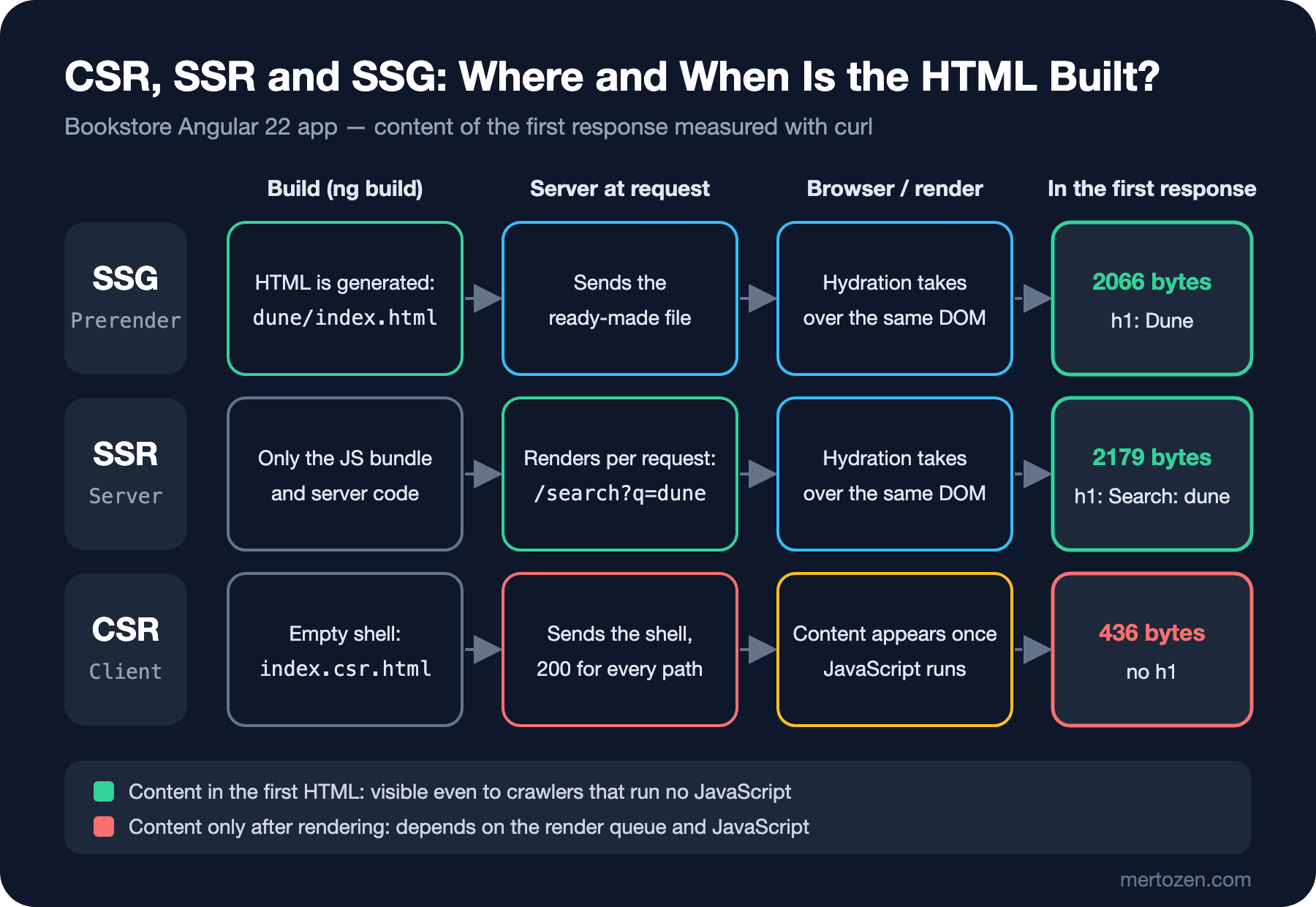
| Mode | When the HTML is created | What a crawler sees in the first response | Content it suits |
|---|---|---|---|
| SSG (prerender) | During the build, once | Full content | Pages that are the same for everyone and change rarely: book detail, blog post |
| SSR | On every request, on the server | Full content | Pages that vary per request and should be indexed: search, filtered lists |
| CSR | In the browser, when JavaScript runs | An empty shell | Personal screens that won't be indexed: account, cart, admin |
Hybrid rendering means choosing a mode per route within the same application; since Angular 19 it's possible with server routes, and it's modern Angular's default approach. With SSR and SSG, the browser takes over the HTML from the server with hydration instead of throwing it away and redrawing; the user sees the content before JavaScript loads, and interaction starts once JavaScript has loaded.
The Experiment: Same Page, Three Render Modes
In Bookstore's Angular application, the same BookDetail component sits on two routes: /books/:slug is prerendered, while /client/books/:slug is served with RenderMode.Client. The search page /search is rendered on the server on every request. As a client that doesn't run JavaScript, I looked at the first responses with curl:
/books/dune            bytes=2066   title=Dune_|_Bookstore h1=Dune
/search?q=dune         bytes=2179   title=Search_|_Bookstore h1=Search:_dune
/client/books/dune     bytes=436    title=BookstoreNg h1=
Here are all 436 bytes the CSR route sends:
<!doctype html>
<html lang="en" data-beasties-container="">
<head>
  <meta charset="utf-8">
  <title>BookstoreNg</title>
  <base href="/en/">
  <meta name="viewport" content="width=device-width, initial-scale=1">
  <link rel="icon" type="image/x-icon" href="favicon.ico">
<link rel="stylesheet" href="styles-5INURTSO.css"></head>
<body ngcm="">
  <app-root></app-root>
<script src="main-Y6BAQ67V.js" type="module"></script></body>
</html>
The title is the application default, no description, no canonical, no content; just an empty <app-root> and a script. On the prerendered page, the same component's output is inside the HTML, and Angular even writes down which path it came from:
<app-root ng-version="22.2.5" ngh="1" ng-server-context="ssg">
...
<app-book-detail ngh="0">
<h1>Dune</h1>
<p>Frank Herbert</p>
<p>A desert planet, a noble family and the spice that everyone wants.</p>
/books/dune ng-server-context="ssg"
/search?q=dune ng-server-context="ssr"
/client/books/dune (none)The ng-server-context attribute is the quickest way to check which mode a page is really served with in production. The ngh attributes and the ng-state script at the end of the page are the data hydration uses.
A local counterpart of the "rendered HTML" view in Google's URL Inspection tool is headless Chrome printing the DOM (Document Object Model) after rendering. I ran Chrome with a temporary profile folder:
$ "/Applications/Google Chrome.app/Contents/MacOS/Google Chrome" --headless=new --disable-gpu --no-first-run \
    --user-data-dir=./chrome-tmp --dump-dom http://localhost:20110/client/books/dune > csr.dom.html
$ grep -o '<title>[^<]*</title>\|<h1>[^<]*</h1>\|<link rel="canonical"[^>]*>' csr.dom.html
<title>Dune | Bookstore</title>
<link rel="canonical" href="https://bookstore.example/books/dune">
<h1>Dune</h1>
After rendering, the CSR page also has the right title, canonical and content. As long as Googlebot renders it, it will see the same. The difference is that the page depends on rendering to reach its content: waiting in the render queue, rendering failing for some reason (a timeout, a blocked resource, a JavaScript error), and every other client that doesn't run JavaScript.
What Lighthouse Measures and What It Doesn't
To answer the first opening question, I ran only Lighthouse's SEO category on three pages:
$ npx lighthouse http://localhost:20110/client/books/dune --only-categories=seo --output=json \
    --chrome-flags="--headless=new --user-data-dir=./chrome-tmp"
# summary from the JSON reports of the three pages:
/books/dune seo= 100 lighthouse 13.6.0 fails= []
/client/books/dune seo= 100 lighthouse 13.6.0 fails= []
/search?q=dune seo= 63 lighthouse 13.6.0 fails= [('is-crawlable', 0)]
The CSR page also got 100, because Lighthouse loads the page in a real Chrome and audits it after running the JavaScript. Title, meta description, canonical, links, status code: all correct in the rendered DOM. Lighthouse's SEO category answers the question "does the rendered page follow basic SEO rules?"; it doesn't answer "what does a crawler that runs no JavaScript see in the first response?". For the second, you need to look at the first HTML with curl. So the developer's sentence from the opening is half right: Google will most likely see it, but Lighthouse doesn't prove that.
The search page scoring 63 is instructive too. Lighthouse's is-crawlable audit gave two reasons: the <meta name="robots" content="noindex"> on the page and the first line of robots.txt. In the second post of this series I put Disallow: /search into Angular's public/robots.txt, and in the third post I gave the search page noindex. That's exactly the conflict from the third post: because robots.txt blocks crawling, Google can never see the noindex on the page. Lighthouse caught it in my own demo; to keep search results out of the index, you have to pick one of the two mechanisms.
Links, Routing and Other JavaScript Pitfalls
Even when rendering succeeds, some things done with JavaScript stay invisible to a crawler. Google only follows <a> elements with an href as links; a button or <div> with a (click) handler isn't a link for a crawler. Fragment routes (#/books/dune) can't be resolved reliably by Google; the History API (Application Programming Interface) should be used. We saw both of these on Angular in the first post of the series.
Content that waits for user interaction is a risk too: comments loaded when "Show more" is clicked, or a description fetched when a tab is clicked, may not make it into the rendered HTML because Googlebot doesn't click. Content you want indexed should be in the DOM when the page loads; it can be visually hidden (tabs, accordions), but its creation shouldn't depend on a click. Google flattens shadow DOM and light DOM during rendering; content inside web components can be indexed as long as it's visible in the rendered HTML.
The same logic applies to lazy loading: loading images and content when they enter the viewport is right for performance, but if the only trigger is a scroll event and Googlebot doesn't scroll the page, the content may never load. Google's lazy loading guide recommends loading="lazy" or IntersectionObserver. Angular's @defer blocks render the placeholder by default under SSR; before putting content that should be indexed behind @defer, check what the server sends.
Why Dynamic Rendering Isn't a Long-Term Solution
There used to be a recommended stopgap: the server looks at the user agent, sends bots prerendered HTML and users the CSR application. Google now explicitly calls this a workaround and doesn't recommend it; the wording in its documentation is that dynamic rendering was a workaround and not a long-term solution. The reasoning is practical: keeping two separate render paths (for bots and for users) in sync means extra complexity and resources, user agent detection is fragile, and when the two contents drift apart, a situation resembling cloaking can arise. The alternatives Google recommends are SSR, static rendering (prerendering) and hydration; Angular's hybrid rendering provides exactly these.
Crawlers That Don't Run JavaScript
Google renders, but Google isn't the only client crawling the web. Social networks' link preview bots, messaging apps' link unfurlers, some search engines' crawlers and AI (Artificial Intelligence) companies' crawlers usually read only the first HTML. An analysis published by Vercel and MERJ (an SEO and data consultancy) in December 2024 reported finding no evidence of JavaScript execution in more than 500 million GPTBot requests, and that the major AI crawlers examined, ClaudeBot included, didn't render JavaScript. That's one company's measurement; the crawler owners' documentation doesn't always state this behavior explicitly, and it may change over time. The types of AI bots and how to manage them are the topic of "Understanding and Managing AI Bots" in the GEO (Generative Engine Optimization) series.
For this post the takeaway is simple: content you want indexed, cited or correctly previewed when shared should be in the first HTML. The CSR page from the opening will most likely show up in Google, but what it shows a crawler that runs no JavaScript is an empty page titled BookstoreNg.
Production Notes
In production, automate two checks for every important template: does the first HTML fetched with curl contain the title, canonical and a piece of the main content; and does the DOM rendered by headless Chrome contain the same values? The difference between the two shows how much of the content depends on JavaScript. The "Test Live URL" and rendered HTML view in Search Console's URL Inspection tool is the only source showing Google's own rendering; local tests don't replace it, they complement it.
Monitor JavaScript errors that break rendering. A third-party script throwing an error can prevent all content from appearing in a CSR application; with SSR, the damage stays limited because the content is already in the HTML. That's SSR's resilience benefit beyond SEO.
mertozen.com is in a fortunate position here: the site is rendered on the server with ASP.NET Core MVC (Model-View-Controller), and a post's content, title, canonical and hreflang arrive in the first HTML; JavaScript is used for interactions such as the theme toggle and sliders, while one or two components such as the blog map fetch their data from a JSON (JavaScript Object Notation) endpoint and draw it in the browser, so only those components' content depends on rendering. CSS and JavaScript files are versioned with a hash parameter appended to the URL by asp-append-version; even though the file name doesn't change, the URL does, which removes the risk of WRS using a stale cached file just the same.
Common Pitfalls
Treating the Lighthouse SEO score as the answer to "what does the crawler see?". Lighthouse audits the rendered page, not the first HTML.
Setting the title, meta description and canonical only in the browser. With CSR, these tags aren't in the first HTML; Google sees them if it renders, other clients don't.
Making content depend on a click. Googlebot doesn't click buttons; content loaded with "More" may not be indexed.
Blocking JavaScript and CSS files with robots.txt. Rendering stays incomplete; with CSR, the content disappears entirely.
Choosing dynamic rendering as the solution in a new project. Google calls it a workaround; hybrid rendering is simpler and more resilient.
A Small Experiment
★☆☆ Download a page from your own site with curl -s and search the HTML for the page title, the main heading (h1) and the first paragraph. Whatever you can't find depends on JavaScript.
★★☆ Write a small script that compares the word count of visible text in the curl output with headless Chrome's --dump-dom output for the same page. Report the ratio as "percentage of content in the first HTML" and run it on Bookstore's three routes.
★★★ Add a Lighthouse custom audit or a simple Node.js check to Bookstore's CSR route: load the page in a Chrome with JavaScript disabled (--blink-settings=scriptEnabled=false), check that an h1 exists, and have this check turn red in CI (Continuous Integration).
The difference is clear: content to be indexed must be in the first HTML. In the next post we set this up route by route in Angular: choosing a RenderMode in app.routes.server.ts, prerendering with getPrerenderParams, the Title and Meta services, the REQUEST and RESPONSE_INIT tokens, hydration, and SSR's security setting allowedHosts.