

I/O Models and IPC: Blocking, Non-Blocking, epoll/kqueue/IOCP, Pipes and Signals
No thread waits during await: on Linux .NET registers sockets with epoll and a single .NET Sockets thread watches them all, while IOCP does the same job on Windows. We show with strace that 1000 idle connections hold 14 OS threads with async and 1014 with blocking, try Unix domain sockets and named pipes, and measure why a container started through a shell never receives SIGTERM and dies with 137 after 10 seconds.
Version note: The code in this post was built and run with .NET 10; tests use xUnit v3 4.0.3. Measurements were taken in mcr.microsoft.com/dotnet/sdk:10.0 containers based on Ubuntu 24.04, on a Linux 6.x kernel, with Docker 29. Socket and signal behavior comes from the dotnet/runtime source code and Windows details from Microsoft Learn; the Windows behavior was not run for this post.
Guess First
The stock service of Bookstore, the online bookstore used as the shared example across this site's series, keeps 1000 connections from warehouse terminals open; the terminals are silent most of the time and occasionally send a byte. The service waits on each connection with await socket.ReceiveAsync(...). How many OS threads does this process have: around 1000, around 100, fewer than 20?
Second question: the service is started in a container with a shell command such as sh -c "dotnet Bookstore.Api.dll; echo done", and the code has a handler that catches SIGTERM and closes open orders. When you run docker stop, does the handler run, and how many seconds does the container take to stop, with which exit code? In this post we look at how I/O waits and how processes talk to each other.
Blocking, Non-Blocking and Async I/O
When you want to read from a socket, the data may not have arrived yet. The OS has three answers to that. With blocking I/O, the recv call returns only when data arrives; the thread sleeps in the kernel, which is one of the voluntary context switches we saw in the fourth post. With non-blocking I/O, the socket is opened in that mode, and if there is no data recv returns at once with an EAGAIN error; when to try again is up to you. With async I/O you hand the work to the kernel and are notified when it is done.
The blocking model is simple, but every waiting connection means a thread; we measured the cost of a thousand threads in the third post. Non-blocking on its own does not help: trying thousands of sockets in turn and getting EAGAIN burns CPU for nothing. The missing piece is a mechanism that asks the kernel "which of these sockets are ready?"
Readiness and Completion: epoll, kqueue and IOCP
There are two answers to that question. In the readiness model, epoll on Linux and kqueue on macOS, you register sockets in a watch list and wait with a single call for "which ones are readable?"; the kernel tells you which are ready, and you do the reading. In the completion model, IOCP on Windows and io_uring on Linux, you hand the read itself to the kernel up front, together with its buffer; the kernel puts the data into the buffer and reports completion through a completion port.
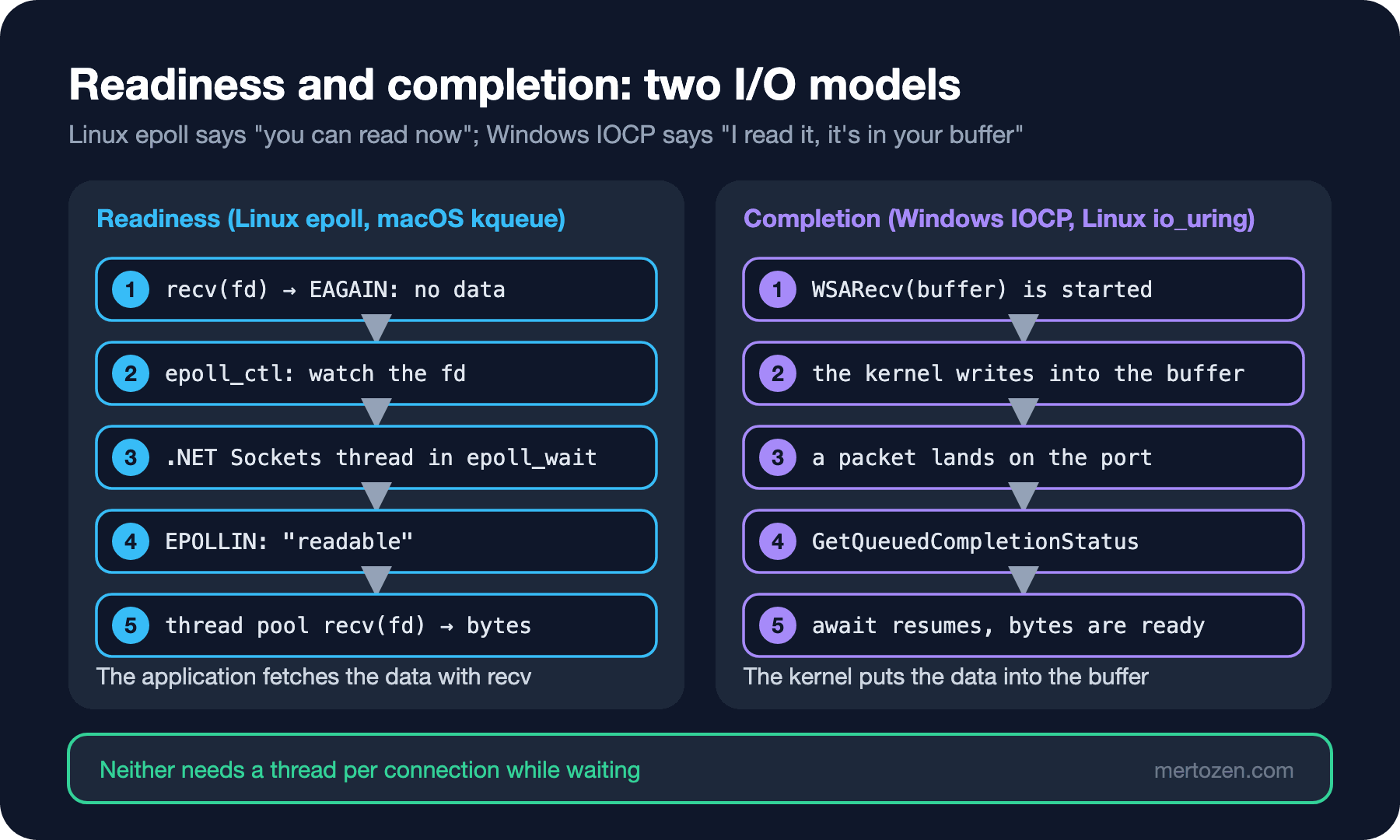
.NET builds its sockets on these mechanisms on both platforms. According to the dotnet/runtime source, on Linux SocketAsyncEngine opens an epoll instance, a thread named ".NET Sockets" receives events from epoll, and the reads and writes are handed to the thread pool. There is one engine for every 30 cores on x64 and every 8 cores on arm64, with at least one. On Windows, sockets and file handles opened for asynchronous I/O are bound to the thread pool's IOCP. We covered the async API itself in the first post of the C# Async Programming series; here we look at its OS side.
Where Is the Thread During await?
I added a command to the lab app that opens N connections over loopback. The server side waits for one byte on every connection, either the old way, with one thread per connection blocking in Receive, or with await:
byte[] buffer = new byte[1];
if (blocking)
{
    // The old way: one thread per connection, the thread blocks inside Receive
    Thread t = new(() => server.Receive(buffer)) { IsBackground = true };
    t.Start();
    threads.Add(t);
}
else
{
    // await: no thread waits, only a socket registered with epoll
    waits.Add(server.ReceiveAsync(buffer));
}
dotnet Bookstore.OsLab.dll connections 1000 async
dotnet Bookstore.OsLab.dll connections 1000 blocking
dotnet Bookstore.OsLab.dll connections 1000 async --names1000 idle connections (async ): os threads= 14, setup 764 ms
1000 idle connections (blocking): os threads= 1014, setup 1020 ms
1000 idle connections (async ): os threads= 14, setup 785 ms
.NET Debugger
.NET DebugPipe
.NET EventPipe
.NET Finalizer
.NET SigHandler
.NET Sockets
.NET SynchManag
.NET Tiered Com
.NET Timer
.NET TP Gate
.NET TP Worker x5
dotnetThe answer to the first question: 14. A thousand connections are waiting, but no thread is waiting. Besides the runtime threads we saw in the third post, the list has .NET Sockets; that single thread watches all 1000 sockets. In blocking mode there is one thread per connection: 1014. Let us follow the life of a single connection with strace, with the client side's lines removed:
strace -f -qq -e trace=connect,accept4,recvfrom,epoll_ctl,epoll_pwait dotnet Bookstore.OsLab.dll connections 1 async1285 accept4(47, {sa_family=AF_INET, sin_port=htons(50444), sin_addr=inet_addr("127.0.0.1")}, [64 => 16], SOCK_CLOEXEC) = 56
1285 recvfrom(56, 0xfffc82813b18, 1, 0, NULL, NULL) = -1 EAGAIN (Resource temporarily unavailable)
1285 epoll_ctl(46, EPOLL_CTL_ADD, 56, {events=EPOLLIN|EPOLLOUT|EPOLLET, data={u32=1, u64=1}}) = 0
1284 epoll_pwait(46, [{events=EPOLLIN|EPOLLOUT, data={u32=1, u64=1}}], 1024, -1, NULL, 8) = 1
1287 recvfrom(56, "\1", 1, 0, NULL, NULL) = 1The accepted connection became fd 56. The thread pool thread, 1285, tried to read first and got EAGAIN: no data. Only then did it add the socket to the epoll list with epoll_ctl, and the await released the thread and returned. When the client sent its byte, the .NET Sockets thread, 1284, got the EPOLLIN event for this socket from epoll, the work went to the thread pool, and another thread, 1287, read the byte. This is the OS counterpart of the sentence "no thread waits during await": the only thing waiting is an entry in epoll's list. This strace was taken on arm64; on x64 Linux the same wait shows up as epoll_wait and the buffer address starts with 7f. In a run with 100 connections, strace -c counted 1 epoll_create1, 200 epoll_ctl and 375 epoll_pwait calls.
Why Is File I/O Different?
epoll does not work with regular files: according to the epoll_ctl(2) man page, adding a regular file or a directory to the list is rejected with EPERM. Waiting for a disk read to become "ready" makes no sense; the read can wait on the disk either way. According to the dotnet/runtime source, on Linux FileStream.ReadAsync and RandomAccess.ReadAsync hand the work to the thread pool, which performs a synchronous pread; the awaiting code is freed, but a thread pool thread waits on the disk. On Windows, files opened with FileOptions.Asynchronous are bound to IOCP with real overlapped I/O. On Linux io_uring fills this gap; there is no io_uring use in the .NET 10 source. The practical result: on Linux thousands of concurrent file reads can swell the thread pool, while sockets have no such problem.
IPC: Pipes, Unix Domain Sockets and Named Pipes
In the second post we used an anonymous pipe to read a child process's stdout: a buffer in the kernel and two fds, one end writing and one reading. A more flexible tool for two independent processes on the same machine is the Unix domain socket: it is used like a TCP socket, but it does not go through the network stack and its address is a file path. Bookstore's stock service answers a reporting tool on the same machine this way:
// If the process crashes the socket file stays on disk: delete the old one before bind
File.Delete(path);
using (Socket listener = new(AddressFamily.Unix, SocketType.Stream, ProtocolType.Unspecified))
{
    listener.Bind(new UnixDomainSocketEndPoint(path));
    listener.Listen();
    lines.Add($"bound {path}, file exists: {File.Exists(path)}");
    ...
}
lines.Add($"after Dispose, file exists: {File.Exists(path)}");
dotnet Bookstore.OsLab.dll uds /tmp/bookstore-stock.sock
dotnet Bookstore.OsLab.dll named-pipe bookstore-reportsbound /tmp/bookstore-stock.sock, file exists: True
reply: stock 9780441172719 = 12
after Dispose, file exists: False
server received: report:daily
/tmp/CoreFxPipe_bookstore-reportsThe socket file was created by bind, and according to the dotnet/runtime source Socket.Dispose deletes the file it was bound to; but if the process dies with SIGKILL the file stays, and the next bind fails with "address in use." Kestrel's documentation on Microsoft Learn gives the same warning. Having Kestrel listen on a Unix domain socket with ListenUnixSocket and putting nginx in front of it is a lighter path than TCP for a reverse proxy on the same machine.
The second group of lines is interesting: NamedPipeServerStream uses the operating system's named pipes on Windows, while on Linux, according to the dotnet/runtime source, it opens a Unix domain socket with the CoreFxPipe_ prefix in the temp folder. One API, two different mechanisms on two operating systems. The shared memory from the sixth post is the fastest path but leaves synchronization to you; once processes spread across machines, the next step is a message queue, which we covered in the published Messaging and Event-Driven Architecture series.
Signals: SIGTERM, SIGINT and SIGKILL
A signal is a small, asynchronous notification the kernel sends to a process, addressed by its PID. Three of them matter directly to a service developer: SIGINT is Ctrl+C in a terminal; SIGTERM is a request to shut down, sent by docker stop and Kubernetes; SIGKILL cannot be caught and the kernel kills the process. In dotnet/runtime, signals first arrive at a native handler, are written to a pipe, and the .NET SigHandler thread we saw in the third post carries them to managed code. You can join this flow with PosixSignalRegistration:
TaskCompletionSource<PosixSignal> stop = new(TaskCreationOptions.RunContinuationsAsynchronously);
void OnSignal(PosixSignalContext context)
{
    // Cancel the default behavior of ending the process at once; we manage the shutdown
    context.Cancel = true;
    stop.TrySetResult(context.Signal);
}
using PosixSignalRegistration term = PosixSignalRegistration.Create(PosixSignal.SIGTERM, OnSignal);
using PosixSignalRegistration interrupt = PosixSignalRegistration.Create(PosixSignal.SIGINT, OnSignal);

Console.WriteLine($"pid={Environment.ProcessId} waiting for SIGTERM or SIGINT");
PosixSignal signal = await stop.Task;
Console.WriteLine($"[{sw.Elapsed.TotalSeconds,5:F1} s] {signal} received, finishing open orders");
await Task.Delay(cleanup);
Console.WriteLine($"[{sw.Elapsed.TotalSeconds,5:F1} s] shutdown complete");
In a real ASP.NET Core or Worker Service app you do not write this by hand: the Generic Host catches SIGTERM and stops hosted services through IHostApplicationLifetime.ApplicationStopping. We covered the details in the graceful shutdown post of the published Kubernetes series and in the IHostedService post of the Background Jobs series. According to the PosixSignalRegistration documentation on Microsoft Learn, SIGINT and SIGQUIT can be canceled on Windows too, while SIGTERM only on Unix; stopping a Windows Service comes through the service control manager instead, and that is in the Worker Service post of the Background Jobs series.
The PID 1 Problem in Containers
Now the second question. I started the serve command in a container in four different ways and stopped it after 6 seconds with docker stop -t 10. Each time I looked at the process list inside the container, the time to stop and the exit code:
docker run -d --name bookstore -v ${PWD}/out:/app -w /app mcr.microsoft.com/dotnet/sdk:10.0 dotnet Bookstore.OsLab.dll serve 1
docker run -d --name bookstore -v ${PWD}/out:/app -w /app mcr.microsoft.com/dotnet/sdk:10.0 sh -c "dotnet Bookstore.OsLab.dll serve 1; echo wrapper done"
docker run -d --name bookstore --init -v ${PWD}/out:/app -w /app mcr.microsoft.com/dotnet/sdk:10.0 sh -c "dotnet Bookstore.OsLab.dll serve 1; echo wrapper done"
docker run -d --name bookstore -v ${PWD}/out:/app -w /app mcr.microsoft.com/dotnet/sdk:10.0 sh -c "exec dotnet Bookstore.OsLab.dll serve 1"| Started as | PID 1 | docker stop | Exit code | Did the handler run? |
|---|---|---|---|---|
dotnet ... (exec form) | dotnet | 1.1 s | 0 | yes, "shutdown complete" |
sh -c "dotnet ...; echo ..." | sh | 10.1 s | 137 | no, SIGTERM never arrived |
same + --init | docker-init | 0.1 s | 143 | no, the process was killed |
sh -c "exec dotnet ..." | dotnet | 1.1 s | 0 | yes |
In exec form dotnet was PID 1; it received SIGTERM, did its one-second cleanup and exited with 0. In the shell wrapper PID 1 was sh, which neither handled the signal nor passed it to its child; Docker waited 10 seconds and sent SIGKILL: 137. The reason is in the kernel. According to the pid_namespaces(7) man page, only the signals for which the init process of a namespace, PID 1, has installed a handler reach it from outside; without a handler SIGTERM is silently dropped, and only SIGKILL and SIGSTOP are forced through. sh had no handler for SIGTERM, so the signal did nothing. With dotnet as PID 1 there is no problem, because the runtime installs its own handler for SIGTERM; when I tried a command with no handler of its own, proc-info, the container also stopped in 0.1 seconds with 143.
--init did not fix this scenario. Docker's init passed SIGTERM to its child, sh; since sh was no longer PID 1 it died with the default behavior, and init exited. According to the same man page, when init terminates the kernel kills every process in the namespace with SIGKILL: dotnet was gone before it could clean up. The real job of --init is reaping zombie processes and passing signals to a single child; put a shell in between and the signal still goes to the wrong process. The right fix is for the application to be PID 1 or the direct child of init: an exec-form ENTRYPOINT ["dotnet", "Bookstore.Api.dll"] in the Dockerfile, or exec on the last line if a shell script is a must. Writing Dockerfiles is the subject of the upcoming Docker series.
Production Notes
Think of shutdown time as a budget. Docker's default is 10 seconds and Kubernetes' terminationGracePeriodSeconds is 30 seconds; the .NET Generic Host's own ShutdownTimeout has to fit inside them. An application that exceeds the budget dies by SIGKILL with exit code 137; that is the same code as the OOMKilled case in the fifth post, so check the orchestrator's reason field to tell them apart.
Moving old thread-per-connection code to async brings memory and context switch savings, but if a blocking call remains in the same process, such as a synchronous HTTP client or .Result, the thread pool still clogs. The number of waiting connections should grow the length of the epoll list, not the thread count.
Common Pitfalls
Writing the ENTRYPOINT in shell form. Docker runs ENTRYPOINT dotnet Bookstore.Api.dll through /bin/sh -c; SIGTERM never reaches the application and every deployment ends with a 10-second SIGKILL. If you see no "shutdown" line in the log, look at PID 1 in the container first.
Trying to catch SIGKILL. No handler can be installed for SIGKILL and SIGSTOP; the kernel stops the process and neither finally blocks nor ProcessExit run. Everything that must persist should be written to disk or the database while the work happens, not just before shutdown.
Treating file I/O on Linux like sockets. On Linux await File.ReadAllBytesAsync(...) makes a thread pool thread wait on the disk; thousands of parallel file reads cause a thread increase you never see with sockets.
A Small Experiment
★☆☆ Run the connections command with 10, 100 and 5000 connections in both modes and compare the OS thread counts. With 5000 blocking connections, see what runs out first: memory or the fd limit?
★★☆ Run connections 1000 async --names with DOTNET_SYSTEM_NET_SOCKETS_THREAD_COUNT=4 and confirm that the number of .NET Sockets threads changes; count with strace how many separate epoll instances are created.
★★★ Write a small ASP.NET Core Minimal API for Bookstore and have Kestrel listen on /tmp/bookstore-api.sock with ListenUnixSocket. Send a request with curl --unix-socket; then kill the process with kill -9, try to start it again and watch what the leftover socket file does.
In this post we saw how I/O waits and how processes communicate. In the last post of the series we bring everything together: what a container is from the OS's point of view, namespaces, cgroup v2, and what the sentence "a container is just a process" really means.