

How File Systems Work: Inodes, File Descriptors, the Page Cache and fsync

Writing to a file first puts the data in the kernel's page cache; it reaches the disk only with fsync, Flush(true) in .NET, or the kernel's background writeback. We show inodes, hard links and file descriptors, and measure with strace that fsync makes 1000 order writes about 60 times slower, that .NET's FileShare.None lock is advisory on Linux, and how a temp file plus rename gives an atomic write.
Version note: The code in this post was built and run with .NET 10; tests use xUnit v3 4.0.3. Measurements were taken in mcr.microsoft.com/dotnet/sdk:10.0 containers based on Ubuntu 24.04, on a Linux 6.x kernel with overlay and ext4 file systems. .NET's file behavior comes from the dotnet/runtime source code and Windows details from Microsoft Learn; the Windows behavior was not run for this post.
Guess First
Bookstore, the online bookstore used as the shared example across this site's series, writes every order to a log file as one line, calls FileStream.Flush() and tells the customer "your order has been received." Two seconds later the server loses power. Is the order line on disk?
Two more questions: if you write the same 1000 orders with Flush(flushToDisk: true) after every line, how many times longer does it take: two, ten, fifty? And why does the MVC app you develop on Windows and run in a Linux container fail only in production when it says View("index")? In this post we look at what the file system does for an application.
Files, Directories and Inodes
The abstraction a file system gives you is simple: named files made of a sequence of bytes, and directories that group them. Underneath there are three separate structures. The file's contents live in disk blocks. Size, owner, permissions, timestamps and the list of blocks live in the inode. The file's name lives not in the inode but in the directory: a directory is a table that maps names to inode numbers. In a container I created a catalog file, a hard link to it and a symbolic link:
printf "9780441172719;Dune\n" > catalog.csv
ln catalog.csv catalog-hard.csv
ln -s catalog.csv catalog-soft.csv
ls -li
stat -c "%n inode=%i links=%h size=%s blocks=%b" catalog.csv
rm catalog.csv
cat catalog-hard.csv
cat catalog-soft.csv
347603 -rw-r--r-- 2 root root 19 Nov 14 03:58 catalog-hard.csv
347604 lrwxrwxrwx 1 root root 11 Nov 14 03:58 catalog-soft.csv -> catalog.csv
347603 -rw-r--r-- 2 root root 19 Nov 14 03:58 catalog.csv
catalog.csv inode=347603 links=2 size=19 blocks=8
9780441172719;Dune
cat: catalog-soft.csv: No such file or directoryThe first column is the inode number. A hard link is not a new file but a second name for the same inode, 347603; that is why the link count is 2. A symbolic link is a separate file with its own inode, 347604, that holds only the target's name. rm does not really say "delete"; it removes the name from the directory. According to Linux's unlink(2) man page, the inode and blocks are freed only when the last name is removed and no process still has the file open. That is why data could still be read through the hard link, while the symbolic link broke because it points at a name that no longer exists. .NET has File.CreateSymbolicLink and FileSystemInfo.LinkTarget for symbolic links; there is no API for hard links.
File Descriptors and "Too many open files"
When you open a file, the kernel gives you a file descriptor, a small number in the process's table of open files. Every later read and write uses this number. The structure in between has two layers: according to the open(2) man page, every open creates a new open file description in the kernel, and the offset and open flags are kept there; the fd points to that record, and the record points to the inode. On Windows a handle plays the same role.
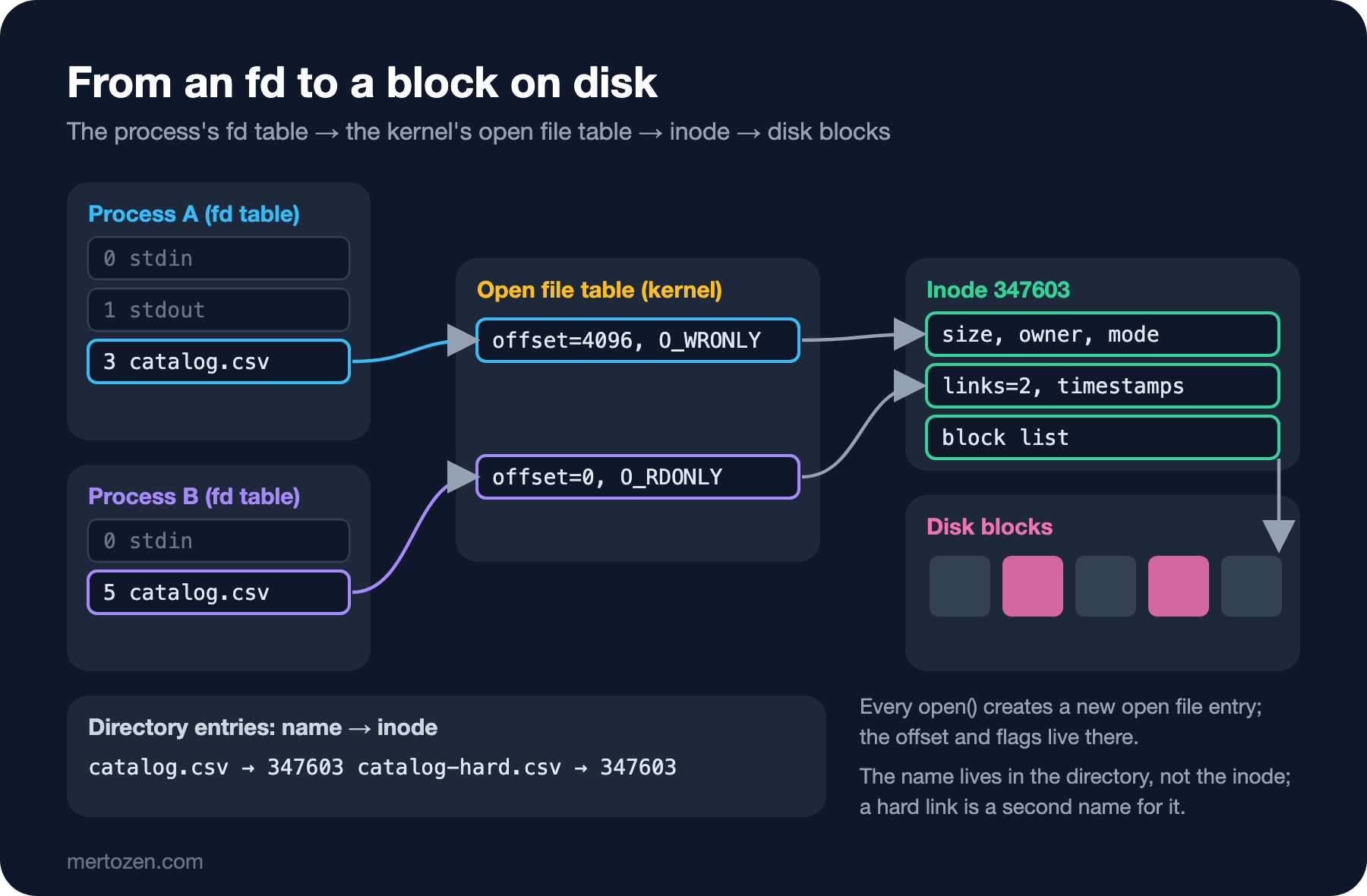
The number of fds is limited, and sockets are fds too; that is why the socket exhaustion we covered in the TCP post of the Networking series ends with the same error. Imagine a Bookstore job that produces invoices and forgets to close its files:
public static (int Opened, string Error) OpenUntilFailure(string directory)
{
    List<FileStream> open = [];
    try
    {
        for (int i = 0; ; i++)
        {
            open.Add(new FileStream(Path.Combine(directory, $"invoice-{i}.pdf"), FileMode.Create));
        }
    }
    catch (IOException ex)
    {
        return (open.Count, ex.Message);
    }
    finally
    {
        foreach (FileStream fs in open)
        {
            fs.Dispose();
        }
    }
}
ulimit -n 64
dotnet Bookstore.OsLab.dll fd-limit /tmp/invoicessoft limit: Max open files 64 64 files
open descriptors before: 45
opened 18 files, then: Too many open files : '/tmp/invoices/invoice-18.pdf'
open descriptors after: 45Before doing anything the process already held 45 descriptors: stdin, stdout and stderr, the assembly files the runtime opened, the diagnostics socket, and the directory handle used for counting. After 18 files the limit of 64 was full, and the kernel's EMFILE error arrived in .NET as an IOException. One more detail: ulimit -n 64 sets both the soft and the hard limit to 64. When I lowered only the soft limit, the limit never kicked in, because the PAL startup code in dotnet/runtime raises the soft limit to the hard limit at startup. In a container the hard limit is usually high; in that attempt the process hit the container's memory limit instead of the fd limit.
The Page Cache: Why Is write So Fast?
A write call does not write data to the disk. The kernel copies the bytes into pages in the page cache, marks the pages dirty, meaning changed but not yet written to disk, and returns right away. The kernel's flusher threads do the disk writes in the background. According to the kernel's vm sysctl documentation, dirty_expire_centisecs sets how old a dirty page must be to become eligible for writing, and dirty_writeback_centisecs how often those threads wake up; in the container the values were 3000 and 1500, that is 30 and 15 seconds. Reads work the same way: a file read once stays in the page cache, and the second read does not go to disk.
There is one more buffer between the application and the kernel: FileStream's own buffer, 4096 bytes by default. Write writes to that buffer first, and Flush() hands the buffer to the kernel with a system call. Flush(flushToDisk: true) goes one step further. According to the dotnet/runtime source it ends up in fsync on Linux and in FlushFileBuffers on Windows; according to the fsync(2) man page, fsync transfers the file's modified data and metadata to the device and waits until the device reports that it has written them.
The Cost of Flush, Flush(true) and fsync
The lab app has a command that writes 1000 order lines in two ways:
// One flush after every order: with toDisk=true it also calls fsync
public static FlushResult WriteOrders(string path, int count, bool toDisk)
{
    using FileStream fs = new(path, FileMode.Create, FileAccess.Write, FileShare.Read);
    Stopwatch sw = Stopwatch.StartNew();
    for (int i = 0; i < count; i++)
    {
        fs.Write(OrderLine(i));
        fs.Flush(flushToDisk: toDisk);
    }
    return new FlushResult(toDisk ? "Flush(true)" : "Flush()", count, sw.Elapsed.TotalMilliseconds);
}
dotnet Bookstore.OsLab.dll flush 1000Flush() 1000 orders in 7.3 ms ( 7.3 us per order)
Flush(true) 1000 orders in 442.1 ms ( 442.1 us per order)A second run gave 8.0 and 518.4 ms: writing with fsync is about 60 times slower. The ratio depends on the disk, and this measurement was taken on the virtual disk of a Linux VM; on a spinning disk the gap is far larger, on a RAID card with a battery-backed write cache it is smaller. strace shows the counts too:
strace -f -qq -c -e trace=write,pwrite64,fsync dotnet Bookstore.OsLab.dll flush 1000% time seconds usecs/call calls errors syscall
------ ----------- ----------- --------- --------- ----------------
72.49 0.020509 20 1000 fsync
27.32 0.007731 3 2000 pwrite64
0.19 0.000054 6 8 write
------ ----------- ----------- --------- --------- ----------------
100.00 0.028294 9 3008 total2000 pwrite64 calls for the two modes (.NET's FileStream tracks the offset itself on Linux and uses positional writes) and 1000 fsync calls for the second mode only. The time column of strace -c is CPU time spent in system calls; fsync's real cost is not CPU but waiting for the device to finish writing, and that wait shows up in wall-clock time. The answer to the first question is here as well: after Flush() the data was in the kernel, not on disk. Had the process crashed, the data would have survived, because the page cache belongs to the kernel; but on a power cut, writes from up to the last 30 seconds are lost.
Journaling, Crash Consistency and WAL
On a power cut the file system itself can be damaged: appending a block to a file is several separate writes, the data block, the inode, the free-block bitmap, and the power can go when half of them are done. Journaling file systems solve this by writing the change to a journal first; at startup a half-finished operation is completed from the journal or discarded. According to the kernel's ext4 documentation, in the default data=ordered mode only metadata goes to the journal, and file data is forced to disk before the metadata that belongs to it is committed. NTFS also keeps a log for its metadata. The journal protects the structure of the file system; it does not guarantee that your application's data is consistent.
That is why databases keep their own logs. WAL, write-ahead logging, writes every change first to a sequential log, forces the log to disk with fsync on every commit, and writes the data pages later, in batches and in random order. Writing a sequential log is cheaper than writing random pages, and after a crash recovery runs from the log. We covered SQL Server's transaction log in the transactions and transaction log post of the published SQL Server series. Ask the same question when you write your own file: what happens if this data is lost?
Platform Differences: Letter Case, Paths and Open Files
Bookstore's MVC app has Views/Home/Index.cshtml, but somewhere the code says View("index"). The default file systems on Windows and macOS are case-insensitive; ext4 and the overlay in the container are case-sensitive:
dotnet Bookstore.OsLab.dll case-checkFile.Exists("Views/Home/Index.cshtml") = True
File.Exists("Views/Home/index.cshtml") = FalseA page that works on the developer's machine fails with "view not found" in the Linux container. The second bug of the same family is the path separator: a hand-written backslash as in "Views\\Home" is not a separator on Linux but a character of the file name. That is why Path.Combine and Path.DirectorySeparatorChar exist.
The third difference is deleting an open file. On Linux, deleting means removing the name from the directory, and it does not affect the open file:
dotnet Bookstore.OsLab.dll open-delete /tmp/stock-export.csvFile.Exists after delete: False
still readable: Dune;Emma;The Hobbit
fd 37 -> /tmp/stock-export.csv (deleted)The file disappeared from the directory, but the fd still holds the inode; the disk space comes back when the fd is closed. That is often the cause of the complaint "the disk is full but I deleted the big file," and the (deleted) lines in /proc/<pid>/fd point to the culprit. On Windows the behavior is different: if the handle that opened the file did not allow deletion, the delete fails with a sharing violation. In .NET that permission is FileShare.Delete, and according to the dotnet/runtime source the default share mode of FileStream is FileShare.Read; so on Windows another process cannot delete an open log file by default.
Two Processes, One File: Locks and Atomic Writes
On Windows FileShare values are enforced by the kernel. On Linux, dotnet/runtime takes an exclusive lock with flock for FileShare.None. While one process held the file, a second .NET process and a shell tried to access it:
dotnet Bookstore.OsLab.dll lock /tmp/daily-report.pdf 6 &
sleep 3
dotnet Bookstore.OsLab.dll open /tmp/daily-report.pdf
echo "Dune" > /tmp/daily-report.pdf && echo "shell write ok: $(cat /tmp/daily-report.pdf)"
pid=438 holds /tmp/daily-report.pdf with FileShare.None for 6 s
IOException: The process cannot access the file '/tmp/daily-report.pdf' because it is being used by another process.
shell write ok: DuneThe .NET process got an error similar to the one on Windows, but the shell wrote to the file without trouble. According to the flock(2) man page this lock is advisory: it only applies between programs that agree to check it, and a program that does not call flock never sees it. On Linux you have to keep two different programs from writing to the same file by design, not with locks.
The best-known part of that design is the atomic write: instead of changing the file in place, write to a temporary file, force it to disk and put it in place with a single rename. According to the rename(2) man page, if the target exists it is replaced atomically; a reader sees either the old file or the new one, never a half-written file:
// Write to a temporary file first, force it to disk, then swap it in with a single rename
public static void AtomicSave(string path, string content)
{
    string temp = path + ".tmp";
    using (FileStream fs = new(temp, FileMode.Create, FileAccess.Write, FileShare.None))
    {
        fs.Write(Encoding.UTF8.GetBytes(content));
        fs.Flush(flushToDisk: true);
    }
    File.Move(temp, path, overwrite: true);
}
strace -f -qq -e trace=openat,pwrite64,fsync,rename,renameat,renameat2 dotnet Bookstore.OsLab.dll atomic-save /tmp/price-list.json "{\"Dune\":420.00}"840 openat(AT_FDCWD, "/tmp/price-list.json.tmp", O_WRONLY|O_CREAT|O_CLOEXEC, 0666) = 32
840 pwrite64(32, "{\"Dune\":420.00}", 15, 0) = 15
840 fsync(32) = 0
840 renameat(AT_FDCWD, "/tmp/price-list.json.tmp", AT_FDCWD, "/tmp/price-list.json") = 0The order in the strace output is exactly what we want: write, fsync, rename. strace ran on arm64 in this environment; on x64 the kernel has a separate rename system call, so glibc uses it and the last line shows up as rename("/tmp/price-list.json.tmp", "/tmp/price-list.json") = 0. According to dotnet/runtime, File.Move with overwrite: true calls rename directly on Linux; if the two paths are on different file systems it falls back to copy and delete, and atomicity is lost. On Windows File.Move goes to Win32's file move API and File.Replace to ReplaceFile. Full durability needs one more step: according to the fsync(2) man page, syncing the file does not guarantee that the new entry in the directory has reached the disk; for that the directory itself must be synced, and .NET offers no API for it.
Production Notes
Instead of an fsync on every write, batch the work: combining several orders in a buffer and forcing them down with a single fsync, group commit, is the method databases use too. Decide which data needs fsync: the page cache is enough for log and cache files, while money and order data should be in a database anyway.
Watch the fd count on Linux. If ls /proc/<pid>/fd | wc -l keeps growing over time, a file or socket is not being closed somewhere. When the disk fills up in a container, look for log files kept open as (deleted).
Common Pitfalls
Believing the data is on disk because you called Flush(). The data moved to the kernel, nothing more. Data that must survive a power cut needs Flush(true) or FileOptions.WriteThrough; according to dotnet/runtime the latter opens the file with O_SYNC on Linux.
Writing to the same file from two processes. According to the dotnet/runtime source, FileMode.Append does not use O_APPEND on Linux: it opens the file, moves to its end and then writes at its own offset. Two processes appending at the same time can overwrite each other's lines, and locks are advisory too. Let each process write to its own file, or route writes through a single process.
Changing a file in place. File.WriteAllText(path, ...) truncates the file first and then writes; a process that crashes in between leaves an empty or half-written file. For files read as a whole, such as configuration or a price list, use a temporary file and rename.
A Small Experiment
★☆☆ Run the flush command on your own machine both in a Docker container and directly on Windows with the .NET 10 SDK. Compare the cost of FlushFileBuffers behind Flush(true) on Windows with fsync on Linux.
★★☆ Write a copy of WriteOrders that calls Flush(true) once every 50 orders. Calculate the time for 1000 orders and the maximum number of orders that could be lost on a power cut.
★★★ Add a directory fsync to AtomicSave: write a small P/Invoke that opens the directory with open on Linux and calls fsync, and confirm with strace that the call is really made.
In this post we followed the path data takes to a file: the fd, the open file table, the inode and the page cache. In the next post we look at waiting for I/O: blocking and non-blocking I/O, epoll and IOCP, why no thread waits during await, pipes, Unix domain sockets and signals.