

Accessibility Test Automation: a11y Checks in CI with axe-core, Lighthouse, Playwright and ESLint, and the Limits of Automation
You protect accessibility in CI not with one tool but with layers: angular-eslint, axe in component tests, page and state scans in a real browser, Lighthouse as a regression alarm, and the manual testing that is still needed. In Bookstore we find a real violation that only appears in one state, set up a GitHub Actions gate that baselines existing debt and fails the build on new violations, and produce a Level A report for the Ministry's checklist.
Version note: The examples in this post were run with WCAG 2.2, Angular 22.2 (TypeScript 6.0), angular-eslint 22.6 with ESLint 10.15, Vitest 5.1, Node.js 24, Playwright 1.65 (Chromium 158), axe-core and @axe-core/playwright 4.14, Lighthouse 13.6 and actionlint 1.7.
Guess First
Since the start of the series, the four pages of Bookstore, the online bookstore used as the shared example across this site's series, have scored zero WCAG violations in scan.mjs and 100 in Lighthouse. If we run the same axe not only on the pages as they open, but also on the states after the user has done something (suggestion list open, error summary visible, remove dialog open), how many violations come up? Second question: roughly what share of accessibility issues do automated tools find, 30, 60 or 90 percent? This is the last post of the series; we turn the checks we have run by hand so far into a gate that runs on every pull request.
Layers
No single tool sees everything; each catches something different, at a different moment and at a different cost. The chain we set up for Bookstore:
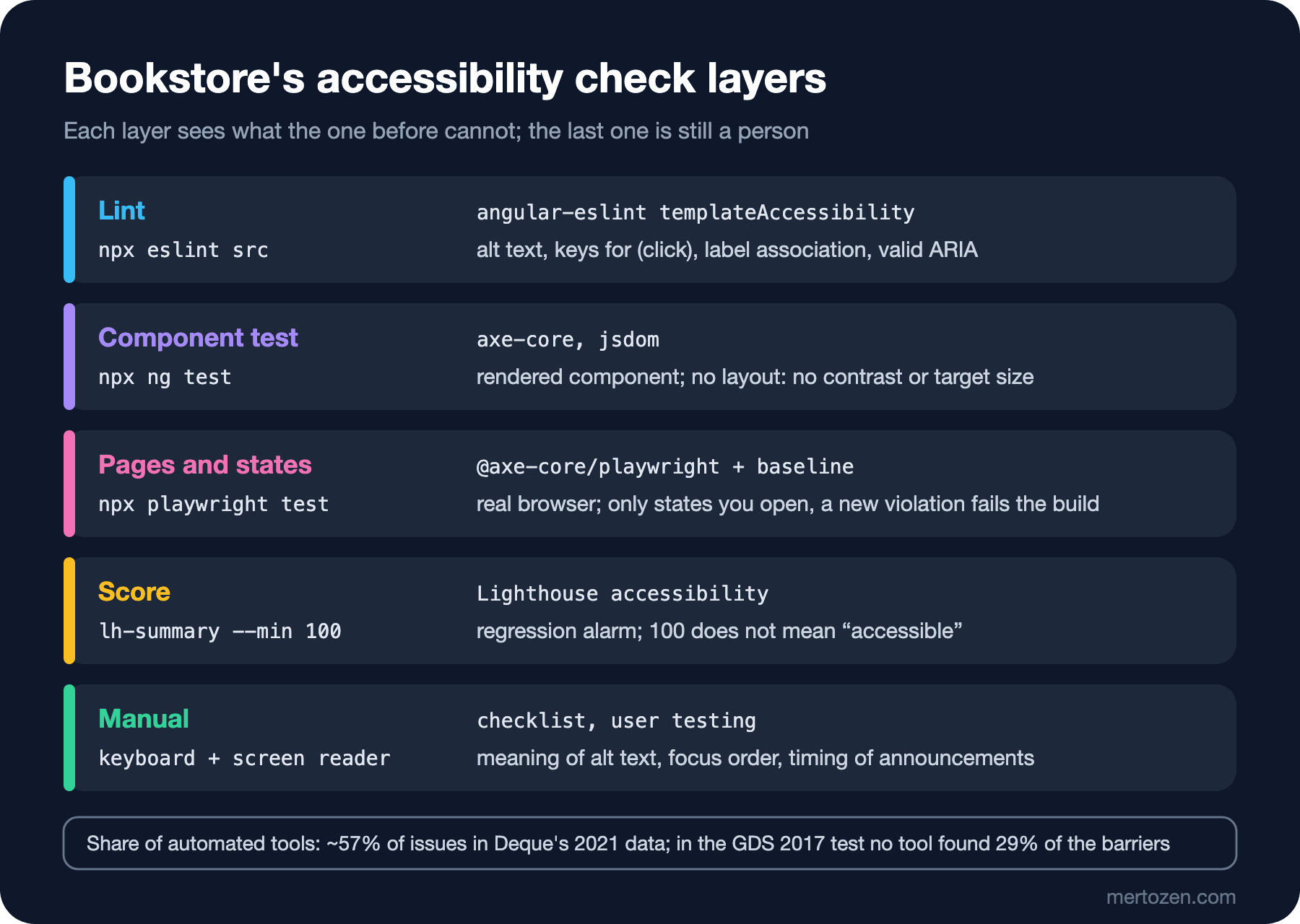
The top layers are cheap and fast: they run in the editor or in a CI step of a few seconds. Going down, they get closer to reality and more expensive; the manual test at the bottom can never be fully automated. Setting up Playwright and the basics of E2E testing are in the Integration and E2E Testing series, the component test infrastructure in the Frontend Testing series, the ESLint infrastructure in the Static Analysis series; here we only add the accessibility parts.
Lint: angular-eslint's Accessibility Rules
The templateAccessibility config of angular-eslint catches typical template mistakes while you write: an img without alt, a (click) without a keyboard counterpart, an interactive element that cannot receive focus, a form field without a label, an invalid ARIA attribute, a positive tabindex. What the rules catch and sample output are in the "Accessible Markup Basics" post of the HTML5 and Semantic HTML series; here we put the config into Bookstore and run it:
// @ts-check
const tseslint = require('typescript-eslint');
const angular = require('angular-eslint');

module.exports = tseslint.config(
  {
    files: ['**/*.ts'],
    extends: [...tseslint.configs.recommended, ...angular.configs.tsRecommended],
    processor: angular.processInlineTemplates,
  },
  {
    // Template rules, including the accessibility set (alt text, labels, focusable click handlers, valid ARIA)
    files: ['**/*.html'],
    extends: [...angular.configs.templateRecommended, ...angular.configs.templateAccessibility],
    rules: {
      '@angular-eslint/template/no-positive-tabindex': 'error',
    },
  },
);
npm install -D eslint@10.15.0 angular-eslint@22.6.0 typescript-eslint@8.72.2
npx eslint src
echo $?
0Bookstore came out clean; most of what we fixed over the series' seven posts was already the subject of these rules. One detail: the no-autofocus rule is on, but it reported no error for the autofocus inside the cart's remove dialog; in a test file where I put the same attribute on a button outside a dialog, it did. Setting the first focus inside a dialog is the recommended use of autofocus, and the rule tells the two apart.
axe in Component Tests
Lint looks at the text of the template; it does not look at the rendered DOM. The cheapest way to check a component's real output is to run axe-core in its component test. Angular 22's unit-test builder uses Vitest and jsdom; axe-core runs in jsdom, but since there is no layout, we turn off the rules that need measurements, like contrast and target size:
import { provideHttpClient } from '@angular/common/http';
import { HttpTestingController, provideHttpClientTesting } from '@angular/common/http/testing';
import { TestBed } from '@angular/core/testing';
import { provideRouter } from '@angular/router';
import axe from 'axe-core';
import { BookDetails } from '../core/api-models';
import { BookDetailPage } from './book-detail-page';

const dune: BookDetails = {
  isbn: '9780441172719', title: 'Dune', author: 'Frank Herbert', category: 'Science Fiction',
  price: 489, publishedYear: 1965, description: 'A desert planet.', available: 25,
};

describe('BookDetailPage accessibility', () => {
  it('has no axe violations once the book has loaded', async () => {
    TestBed.configureTestingModule({ providers: [provideRouter([]), provideHttpClient(), provideHttpClientTesting()] });
    const fixture = TestBed.createComponent(BookDetailPage);
    fixture.componentRef.setInput('isbn', dune.isbn);
    // Render once so httpResource sends its request; whenStable() would wait for the response
    fixture.detectChanges();
    TestBed.inject(HttpTestingController).expectOne(`/api/books/${dune.isbn}`).flush(dune);
    await fixture.whenStable();

    // jsdom has no layout: rules that need rendering (color-contrast, target-size) belong in the browser tests
    const results = await axe.run(fixture.nativeElement, {
      runOnly: ['wcag2a', 'wcag2aa', 'wcag21a', 'wcag21aa'],
      rules: { 'color-contrast': { enabled: false } },
    });
    expect(results.violations.map(v => `${v.id}: ${v.nodes.map(n => n.target.join(' ')).join(', ')}`)).toEqual([]);
    expect(results.passes.length).toBeGreaterThan(0);
  });
});
To see the test actually catch something, I deleted the "Quantity" label text on the book page:
 ❯ |bookstore-web| src/app/catalog/book-detail-page.a11y.spec.ts (1 test | 1 failed) 98ms
   ❯ BookDetailPage accessibility (1)
     × has no axe violations once the book has loaded 97ms
⎯⎯⎯⎯⎯⎯⎯ Failed Tests 1 ⎯⎯⎯⎯⎯⎯⎯
 FAIL  |bookstore-web| src/app/catalog/book-detail-page.a11y.spec.ts > BookDetailPage accessibility > has no axe violations once the book has loaded
AssertionError: expected [ 'label: input' ] to deeply equal []
- Expected
+ Received
- []
+ [
+   "label: input",
+ ]
 ❯ src/app/catalog/book-detail-page.a11y.spec.ts:29:104
     27|       rules: { 'color-contrast': { enabled: false } },
     28|     });
     29|     expect(results.violations.map(v => `${v.id}: ${v.nodes.map(n => n.…
       |                                                                                                        ^
     30|     expect(results.passes.length).toBeGreaterThan(0);
     31|   });
⎯⎯⎯⎯⎯⎯⎯⎯⎯⎯⎯⎯⎯⎯⎯⎯⎯⎯⎯⎯⎯⎯⎯⎯[1/1]⎯
 Test Files  1 failed | 1 passed (2)
      Tests  1 failed | 1 passed (2)
   Start at  05:05:10
   Duration  776ms (environment 57%, setup 14%, tests 12%, import 10%, transform 6%)
With the label back:
 Test Files  2 passed (2)
      Tests  2 passed (2)
   Start at  05:05:12
   Duration  781ms (environment 51%, setup 19%, tests 12%, import 11%, transform 7%, worker 1%)
The strength of this layer is its speed (the test takes under a second) and that it names the component with the problem directly. Its weakness is that it only sees the state of the component you set up in the test and is blind to layout, real CSS and page context (landmarks, heading order, the page title).
axe on Pages and States: Playwright
The real gate is in a real browser. We added a suite to Playwright Test with @axe-core/playwright. Besides the pages as they open, it scans the states that only exist after an interaction: the catalog with the suggestion list open, the book page with the Details tab selected, the cart with the error summary visible, the cart with the remove dialog open. Every violation becomes a line in the form "state | rule | CSS target" and is compared with the lines in a11y-baseline.json:
// axe on every page and on the states that only exist after an interaction (popup open, errors shown, dialog open).
// A violation that is not in a11y-baseline.json fails the test; known debt in the baseline does not.
// Update the baseline on purpose: A11Y_UPDATE_BASELINE=1 npx playwright test
import { AxeBuilder } from '@axe-core/playwright';
import { expect, test, type Page } from '@playwright/test';
import { mkdirSync, readFileSync, writeFileSync } from 'node:fs';

const tags = ['wcag2a', 'wcag2aa', 'wcag21a', 'wcag21aa', 'wcag22aa', 'best-practice'];
const baselineFile = new URL('../a11y-baseline.json', import.meta.url);
const baseline: string[] = JSON.parse(readFileSync(baselineFile, 'utf8'));
const found: string[] = [];
for (const state of states) {
test(`${state.name}: no new axe violations`, async ({ page }) => {
await state.open(page);
const results = await new AxeBuilder({ page }).withTags(tags).analyze();
// Raw results for the report (report.mjs)
mkdirSync('reports/axe', { recursive: true });
writeFileSync(`reports/axe/${state.name.replace(/\W+/g, '-')}.json`, JSON.stringify(results));
// One line per element: state | rule | CSS target. Stable enough to compare between runs.
const lines = results.violations.flatMap(v => v.nodes.map(n => `${state.name} | ${v.id} | ${n.target.join(' ')}`));
found.push(...lines);
const fresh = lines.filter(line => !baseline.includes(line));
if (!process.env.A11Y_UPDATE_BASELINE) {
expect(fresh, 'violations that are not in a11y-baseline.json').toEqual([]);
}
});
}
test.afterAll(() => {
if (process.env.A11Y_UPDATE_BASELINE) {
writeFileSync(baselineFile, JSON.stringify([...new Set(found)].sort(), null, 2) + '\n');
}
// Fixed debt: tell the team to remove the line from the baseline, so it cannot come back unnoticed
const fixed = baseline.filter(line => !found.includes(line));
if (fixed.length && !process.env.A11Y_UPDATE_BASELINE) {
console.log(`Fixed, remove from a11y-baseline.json:\n ${fixed.join('\n ')}`);
}
});import { defineConfig } from '@playwright/test';
// The a11y suite: axe on Bookstore's pages and states, against the mock API and the built app.
export default defineConfig({
testDir: 'tests',
// One worker: the tests share the baseline bookkeeping in afterAll
workers: 1,
reporter: process.env.CI ? [['list'], ['json', { outputFile: 'reports/axe-results.json' }]] : 'list',
use: { baseURL: process.env.BOOKSTORE_URL ?? 'http://127.0.0.1:52411' },
webServer: {
command: 'node mock-api/server.mjs',
cwd: '..',
url: 'http://127.0.0.1:52411/api/categories',
reuseExistingServer: !process.env.CI,
},
});The first run with an empty baseline:
Running 6 tests using 1 worker

  ✓  1 tests/a11y.spec.ts:47:3 › catalog: no new axe violations (402ms)
  ✓  2 tests/a11y.spec.ts:47:3 › catalog, suggestions open: no new axe violations (405ms)
  ✓  3 tests/a11y.spec.ts:47:3 › book, details tab: no new axe violations (320ms)
  ✘  4 tests/a11y.spec.ts:47:3 › cart, error summary: no new axe violations (421ms)
  ✓  5 tests/a11y.spec.ts:47:3 › cart, remove dialog: no new axe violations (377ms)
  ✓  6 tests/a11y.spec.ts:47:3 › statement: no new axe violations (246ms)


  1) tests/a11y.spec.ts:47:3 › cart, error summary: no new axe violations ──────────────────────────

    Error: violations that are not in a11y-baseline.json

    expect(received).toEqual(expected) // deep equality

    - Expected  - 1
    + Received  + 4

    - Array []
    + Array [
    +   "cart, error summary | target-size | a[href$=\"#customer-name\"]",
    +   "cart, error summary | target-size | a[href$=\"#customer-email\"]",
    + ]

      57 |     const fresh = lines.filter(line => !baseline.includes(line));
      58 |     if (!process.env.A11Y_UPDATE_BASELINE) {
    > 59 |       expect(fresh, 'violations that are not in a11y-baseline.json').toEqual([]);
         |                                                                      ^
      60 |     }
      61 |   });
      62 | }
        at /home/user/bookstore/a11y/tests/a11y.spec.ts:59:70

    Error Context: test-results/a11y-cart-error-summary-no-new-axe-violations/error-context.md

    Error Context: test-results/a11y-cart-error-summary-no-new-axe-violations/error-context.md

  1 failed
    tests/a11y.spec.ts:47:3 › cart, error summary: no new axe violations ───────────────────────────
  5 passed (2.7s)
The answer to the first guess question: one state has two violations. The links of the error summary we added in the series' dynamic content post fail 2.5.8 Target Size (Minimum): each link is on its own line, its height is under 24 CSS pixels, and because they sit one under the other, the spacing exception does not save them either. If these links were inside a sentence, they would fall under the "inline" exception. Neither scan.mjs nor Lighthouse could have found this, because both looked at the initial state, where the error summary never appears. Scanning states is the most important thing this layer adds.
Baselining Existing Debt
In a real project, when you first set up the gate you usually face dozens of violations, and you cannot fix them all the same day. There are two options: run the gate in warning mode until the violations are gone, or write the existing violations into a baseline and fail the build only on new ones. The first is easy, but warnings are soon ignored and the debt grows. The second freezes the debt: old problems stay visible in the list, and a new violation is stopped in the first pull request. For Bookstore we chose the second. Updating the baseline on purpose is a separate command:
A11Y_UPDATE_BASELINE=1 npx playwright test[
"cart, error summary | target-size | a[href$=\"#customer-email\"]",
"cart, error summary | target-size | a[href$=\"#customer-name\"]"
]
Running 6 tests using 1 worker

  ✓  1 tests/a11y.spec.ts:47:3 › catalog: no new axe violations (388ms)
  ✓  2 tests/a11y.spec.ts:47:3 › catalog, suggestions open: no new axe violations (403ms)
  ✓  3 tests/a11y.spec.ts:47:3 › book, details tab: no new axe violations (320ms)
  ✓  4 tests/a11y.spec.ts:47:3 › cart, error summary: no new axe violations (412ms)
  ✓  5 tests/a11y.spec.ts:47:3 › cart, remove dialog: no new axe violations (371ms)
  ✓  6 tests/a11y.spec.ts:47:3 › statement: no new axe violations (240ms)

  6 passed (2.4s)
Because the file lives in the repo, every line goes through code review; adding a line to the baseline is the same decision as adding a "known limitation" to the accessibility statement, and the two should be done together. Then we paid off the debt: we gave the links a height of 24 pixels.
/* Links on their own lines are not "inline" targets: give them 24px of height (WCAG 2.5.8) */
.error-summary a { display: inline-block; min-height: 24px; padding: 0.2rem 0; }
Running 6 tests using 1 worker

  ✓  1 tests/a11y.spec.ts:47:3 › catalog: no new axe violations (403ms)
  ✓  2 tests/a11y.spec.ts:47:3 › catalog, suggestions open: no new axe violations (414ms)
  ✓  3 tests/a11y.spec.ts:47:3 › book, details tab: no new axe violations (322ms)
  ✓  4 tests/a11y.spec.ts:47:3 › cart, error summary: no new axe violations (419ms)
  ✓  5 tests/a11y.spec.ts:47:3 › cart, remove dialog: no new axe violations (375ms)
Fixed, remove from a11y-baseline.json:
  cart, error summary | target-size | a[href$="#customer-email"]
  cart, error summary | target-size | a[href$="#customer-name"]
  ✓  6 tests/a11y.spec.ts:47:3 › statement: no new axe violations (244ms)

  6 passed (2.5s)
The tests pass and the suite names the fixed lines. That warning matters: if a fixed line stays in the baseline, the gate will count the same violation as "known debt" when it comes back later and let it through silently. We updated the baseline with the same command; the file is now an empty array.
That the fingerprint (the line that identifies a violation) relies on the CSS target is a weakness: when ids Angular generates or the order on the page change, the same violation can look "new". In Bookstore the targets axe chooses (like a[href$="#customer-name"]) are stable; if target selection is unstable in your project, keeping the line at rule and page level and comparing counts is more robust.
The Lighthouse Score and an a11y Gate in GitHub Actions
Lighthouse's accessibility category runs a subset of axe-core's rules and gives a weighted score; as we measured in the series' WCAG post, the category also lists ten manual checks that do not count towards the score. That is why we use the score not as proof but as a regression alarm. We added a threshold to the script that summarizes Lighthouse reports:
// Prints the accessibility score and the failed audits of Lighthouse JSON reports.
// Usage: node lh-summary.mjs [--min 100] reports/*.json
// With --min the exit code is 1 when a score is below it: a regression alarm, not proof of accessibility.
import { readFileSync } from 'node:fs';

const args = process.argv.slice(2);
const minAt = args.indexOf('--min');
const min = minAt >= 0 ? Number(args.splice(minAt, 2)[1]) : null;
let below = 0;
for (const file of args) {
  const lhr = JSON.parse(readFileSync(file, 'utf8'));
  const category = lhr.categories.accessibility;
  const failed = category.auditRefs
    .map(ref => lhr.audits[ref.id])
    .filter(a => a.score === 0)
    .map(a => a.id);
  const manual = category.auditRefs.filter(ref => lhr.audits[ref.id].scoreDisplayMode === 'manual').length;
  const score = Math.round(category.score * 100);
  console.log(`${file}: Lighthouse ${lhr.lighthouseVersion} accessibility ${score}`);
  console.log(`  failed: ${failed.join(', ') || 'none'}; manual checks listed: ${manual}`);
  if (min !== null && score < min) below++;
}
if (below) {
  console.log(`${below} report(s) below ${min}`);
  process.exit(1);
}
reports/lh-book.json: Lighthouse 13.6.0 accessibility 100
failed: none; manual checks listed: 10
reports/lh-catalog.json: Lighthouse 13.6.0 accessibility 100
failed: none; manual checks listed: 10
reports/lh-statement.json: Lighthouse 13.6.0 accessibility 100
failed: none; manual checks listed: 10We put it all together in a GitHub Actions workflow. The order goes from cheap to expensive: lint, component tests, the Playwright suite, Lighthouse, the report. Playwright starts the mock API through its own webServer setting; the Lighthouse step starts the same server by hand.
# Accessibility gate for every pull request: template lint, component tests with axe, axe on pages and states
# (fails on violations that are not in a11y/a11y-baseline.json), Lighthouse score as a regression alarm, Level A report.
name: a11y
on:
pull_request:
push:
branches: [main]
permissions:
contents: read
jobs:
a11y:
runs-on: ubuntu-latest
timeout-minutes: 20
steps:
- uses: actions/checkout@v7
- uses: actions/setup-node@v7
with:
node-version: 24
cache: npm
cache-dependency-path: |
web/bookstore-web/package-lock.json
a11y/package-lock.json
- name: Install and build the Angular client
working-directory: web/bookstore-web
run: |
npm ci
npx ng build
- name: Template lint (angular-eslint accessibility rules)
working-directory: web/bookstore-web
run: npx eslint src
- name: Component tests (axe in jsdom)
working-directory: web/bookstore-web
run: npx ng test --watch=false
- name: Install the a11y tools and Chromium
working-directory: a11y
run: |
npm ci
npx playwright install --with-deps chromium
# Playwright starts the mock API (serves dist too) through webServer in playwright.config.ts
- name: axe on pages and states
working-directory: a11y
env:
CI: "true"
run: npx playwright test
- name: Lighthouse accessibility score
working-directory: a11y
run: |
(cd .. && node mock-api/server.mjs &)
for i in $(seq 1 20); do curl -sf http://127.0.0.1:52411/api/categories > /dev/null && break; sleep 1; done
for page in "catalog /" "book /books/9780441172719" "statement /accessibility"; do
set -- $page
npx lighthouse "http://127.0.0.1:52411$2" --only-categories=accessibility --quiet \
--output=json --output-path="reports/lh-$1.json" --chrome-flags="--headless=new"
done
node lh-summary.mjs --min 100 reports/lh-*.json
- name: Level A report
if: ${{ !cancelled() }}
working-directory: a11y
run: |
node report.mjs
cat reports/a11y-report.md >> "$GITHUB_STEP_SUMMARY"
- uses: actions/upload-artifact@v7
if: ${{ !cancelled() }}
with:
name: a11y-reports
path: |
a11y/reports/
a11y/test-results/I checked the workflow with actionlint; it reported no errors (shellcheck is not installed on this machine, so the run blocks did not get the extra shell analysis):
actionlint .github/workflows/a11y.yml
echo $?
0Then I cloned the repo into a clean folder and ran the steps in order locally. In the Lighthouse step on macOS I added --use-mock-keychain and a temporary --user-data-dir to --chrome-flags so the browser would not touch the Keychain; an Ubuntu runner does not need them:
== npm ci && npx ng build
Application bundle generation complete. [1.298 seconds]
== npx eslint src
exit 0
== npx ng test --watch=false
Test Files 2 passed (2)
Tests 2 passed (2)
== npm ci
added 123 packages in 1s
== CI=true npx playwright test
✓ 6 tests/a11y.spec.ts:47:3 › statement: no new axe violations (237ms)
6 passed (2.6s)
== lighthouse x3 + lh-summary --min 100
reports/lh-book.json: Lighthouse 13.6.0 accessibility 100
  failed: none; manual checks listed: 10
reports/lh-catalog.json: Lighthouse 13.6.0 accessibility 100
  failed: none; manual checks listed: 10
reports/lh-statement.json: Lighthouse 13.6.0 accessibility 100
  failed: none; manual checks listed: 10
exit 0
== node report.mjs
6 page states, 31 Level A criteria: 0 failed, 1 need review, 8 with automated checks and no issues, 22 manual onlyThe workflow was not run on GitHub for this post; behavior on the GitHub side (Chrome on the runner, uploading artifacts, the step summary) was therefore not verified.
The Limits of Automation and a Report for the Checklist
The second guess question. According to a study Deque, the company behind axe-core, published in March 2021, an average of 57% of roughly 300,000 issues found in more than 2,000 audits on more than 13,000 pages were found by automated tests. That is a tool vendor's own data, and it measures by issue count: very frequent problems like contrast pull the share up. Another measurement comes from the UK Government Digital Service: in 2017 they tried ten free tools on a page with 143 deliberate accessibility barriers; no tool found 29% of the barriers, and the best tool stopped at 41%. Whichever number you take, the conclusion is the same: automation is necessary but not sufficient.
The Ministry's checklist (the Turkish Ministry of Family and Social Services' "Web Sites and Mobile Applications Accessibility Checklist"), as we described in the series' first post, is a Level A list based on WCAG 2.2; sites found accessible in the monitoring process may use the Accessibility Logo for two years. An official report format for the list could not be verified for this post; so we produce our report in the unit the list is based on, the 31 Level A success criteria of WCAG 2.2. The script gathers, criterion by criterion, the raw axe results the Playwright suite saves for each state:
// Turns the raw axe results of the test run (reports/axe/*.json) into a report per WCAG 2.2 Level A criterion,
// the level of the Ministry's checklist. "automated: no issues" is not "conforms": axe only checks part of each criterion.
// Usage: node report.mjs   (after npx playwright test; writes reports/a11y-report.md)
import { readdirSync, readFileSync, writeFileSync } from 'node:fs';

// The 31 Level A success criteria of WCAG 2.2 (4.1.1 Parsing is obsolete and not listed)
const levelA = ['1.1.1', '1.2.1', '1.2.2', '1.2.3', '1.3.1', '1.3.2', '1.3.3', '1.4.1', '1.4.2', '2.1.1', '2.1.2', '2.1.4',
  '2.2.1', '2.2.2', '2.3.1', '2.4.1', '2.4.2', '2.4.3', '2.4.4', '2.5.1', '2.5.2', '2.5.3', '2.5.4', '3.1.1', '3.2.1',
  '3.2.2', '3.2.6', '3.3.1', '3.3.2', '3.3.7', '4.1.2'];

// axe tags criteria as "wcag111", "wcag1412": turn them back into "1.1.1", "1.4.12"
const criteria = tags => tags.filter(t => /^wcag\d{3,4}$/.test(t)).map(t => `${t[4]}.${t[5]}.${t.slice(6)}`);

const byCriterion = new Map(levelA.map(sc => [sc, { failed: new Set(), passed: new Set(), review: new Set() }]));
const files = readdirSync('reports/axe').filter(f => f.endsWith('.json'));
for (const file of files) {
  const results = JSON.parse(readFileSync(`reports/axe/${file}`, 'utf8'));
  for (const [list, key] of [[results.violations, 'failed'], [results.passes, 'passed'], [results.incomplete, 'review']]) {
    for (const rule of list) {
      for (const sc of criteria(rule.tags)) {
        byCriterion.get(sc)?.[key].add(rule.id);
      }
    }
  }
}

const rows = [...byCriterion].map(([sc, r]) => {
  const status = r.failed.size ? `FAILED (${[...r.failed].join(', ')})`
    : r.review.size ? `needs review (${[...r.review].join(', ')})`
    : r.passed.size ? `automated: no issues (${[...r.passed].join(', ')})`
    : 'manual only';
  return `| ${sc} | ${status} |`;
});
const count = word => rows.filter(row => row.includes(word)).length;
const summary = `${files.length} page states, ${levelA.length} Level A criteria: ${count('FAILED')} failed, ` +
  `${count('needs review')} need review, ${count('automated: no issues')} with automated checks and no issues, ` +
  `${count('manual only')} manual only`;
writeFileSync('reports/a11y-report.md', [
  '# Bookstore accessibility report (WCAG 2.2 Level A)', '', summary, '',
  '| Criterion | Automated result |', '| --- | --- |', ...rows, '',
  'Every criterion still needs the manual checklist and a screen reader pass.', '',
].join('\n'));
console.log(summary);
console.log(rows.filter(row => !row.includes('manual only')).join('\n'));
6 page states, 31 Level A criteria: 0 failed, 1 need review, 8 with automated checks and no issues, 22 manual only
| 1.3.1 | automated: no issues (aria-hidden-body, aria-required-children, aria-required-parent, list, listitem, td-headers-attr, th-has-data-cells) |
| 1.4.1 | automated: no issues (link-in-text-block) |
| 2.4.1 | automated: no issues (bypass) |
| 2.4.2 | automated: no issues (document-title) |
| 2.4.4 | automated: no issues (link-name) |
| 2.5.3 | automated: no issues (label-content-name-mismatch) |
| 3.1.1 | automated: no issues (html-has-lang, html-lang-valid) |
| 3.3.2 | automated: no issues (form-field-multiple-labels) |
| 4.1.2 | needs review (aria-valid-attr-value) |Reading this table honestly matters. For 22 of the 31 criteria, axe has no rule at all; these are entirely manual. For eight, axe's rules found no problems, but that does not mean the criterion is met: for 2.4.4 axe checks whether a link has a name, not whether the name describes its purpose. The "needs review" on 4.1.2 is axe being unable to verify the combobox's aria-controls target while the suggestion list is open; in the DOM output of the series' Angular post we saw that the id is on the listbox, so this is a line a person has looked at and noted. In the workflow the report goes into the step summary and is kept as an artifact; when preparing for the Ministry's list, every line needs the result and date of the manual check next to it.
The list of things automation cannot catch and that we checked by hand in Bookstore, by post in the series:
- The meaning of alt text and of link and button names (axe checks that a name exists, not that it is right).
- The logic of the focus order, and where focus goes on a route change and when a dialog closes (the series' keyboard post).
- The timing, order and needless repetition of announcements (the dynamic content post); timing bugs like a live region added later are invisible to a static scan.
- Whether a task can be completed from start to finish with a screen reader (the test script in the screen reader post).
- Whether error messages say what to do, time limits, moving content and the layout at 320 pixels wide (the audit in the WCAG post).
In Production
Open the gate with a baseline first, then plan the debt. Every line in the baseline should be a line in the accessibility statement; when the two drift apart, either the statement is wrong or the gate is loose.
Grow the list of states with the product. When a new dialog, dropdown or error state is added, adding a line to the Playwright suite that opens that state should be part of the pull request. A state that is not scanned is a state the gate cannot see.
If you ever need to lower the Lighthouse threshold below 100, write down why. Since the score is weighted, even a single critical violation can drop it by a few points; lowering the threshold means accepting that violation.
Update axe-core deliberately. A new version can bring new rules or stricter checks and turn the gate red overnight. Pin the version, update it in a separate pull request, and either fix the violations that come up or write them into the baseline with a reason.
Put periodic manual testing on the calendar. CI checks every change, but the main-flow test with a screen reader and the manual lines of the checklist only happen when a person makes time for them; tying them to the release cycle (for example before every major release) helps.
Common Pitfalls
First, counting Lighthouse 100 as proof of accessibility. Bookstore had 100 at the start of the series too.
Second, scanning only the initial state of pages. The only real violation in this post was in a state that appears only after submitting the form empty.
Third, never shrinking the baseline. If fixed lines do not leave the list, the gate will not see the same problem when it comes back.
Fourth, trusting the axe result in jsdom and skipping the scan in the browser. Contrast, target size and real CSS are only measured in a browser.
Fifth, taking the automated report as the answer to the checklist. An "automated: no issues" line is a line a person has to look at.
A Small Experiment
★☆☆ Add the empty cart ("Your cart is empty") and the order confirmation to the list of states in a11y.spec.ts. Does a new violation come up? Does the summary line of report.mjs change?
★★☆ Change the fingerprint to the form "state | rule | count" and write the baseline comparison accordingly. When you fix a violation and add a new one of the same kind elsewhere on the same page, what do the two methods say?
★★★ Extend report.mjs to cover the AA criteria of WCAG 2.2 too, and add manual results next to each criterion from a JSON file with "manual: done / date / who" fields. Could the report feed the "How we checked" section of the accessibility statement page?
The series ends here. Over eight posts we took Bookstore from the structure of WCAG 2.2 and the obligations in Türkiye and the EU to the most commonly failed criteria, keyboard and focus management, ARIA and accessible names, dynamic content, screen reader testing, Angular's ready-made accessible components and, finally, this automation gate. Accessibility is not a job that is done once; every new feature comes with the same questions. The decisions about color palettes and form design are covered in detail in the UI/UX Design Principles series, and Playwright itself in the Integration and E2E Testing series.