

What Is Accessibility and Why Is It Mandatory? WCAG 2.2, POUR, A/AA/AAA and Obligations in Türkiye and the EU
Accessibility means a product can be used by everyone, including people with disabilities, and today it is a legal obligation through Circular 2025/10 in Türkiye and the European Accessibility Act in the EU; in practice both point to WCAG 2.2 AA. The post explains WCAG's structure of POUR, guidelines, success criteria and levels, what changed in 2.2 and what the Circular and the EAA mean for developers; we set up the series' Bookstore lab and run the first axe scan.
Version note: This post follows the current WCAG 2.2 text dated 12 December 2024 and the state of the law in November 2026; the lab was run with Angular 22.2 (TypeScript 6.0), Node.js 24, Playwright 1.65 (Chromium 158) and axe-core 4.14. The legal sections are not legal advice.
Guess First
Bookstore, the online bookstore used as the shared example across this site's series, comes with a three-page Angular client: catalog, book details and cart. The code is clean and most of the HTML is semantic: header, nav, main, real buttons, a real table for the cart. We are going to scan these three pages with the automated accessibility testing tool axe-core against the WCAG 2.2 AA rules.
How many violations will it find: zero, five, twenty? The second question matters more: how usable does that number make Bookstore for someone who uses a screen reader or only a keyboard? We will answer once the lab is set up. First, let's be clear about who accessibility is for and what "mandatory" means for a developer in Türkiye and the EU today.
Who Is Accessibility For?
Accessibility (a11y for short: there are 11 letters between the first "a" and the last "y") means a product can be used by everyone, including people with disabilities. According to World Health Organization figures from March 2023, about 1.3 billion people, one in six people worldwide, live with a significant disability. They use the web through assistive technology, and whether those tools work depends largely on our code:
- Vision: blindness, low vision, color blindness. Screen readers that speak the content or send it to a braille display, screen magnifiers, browser zoom, high-contrast themes.
- Hearing: captions and transcripts for video and audio; notifications that are not sound-only.
- Motor: tremor, paralysis, one-handed use. Keyboard only, switch devices that scan with a single button, voice control (Windows Voice Access, macOS Voice Control), eye tracking.
- Cognitive and learning: attention, memory, dyslexia. Plain language, consistent navigation, no time pressure, forms that prevent errors and make them easy to fix.
Disability is not only permanent. Microsoft's Inclusive Design guidance describes three layers: permanent (someone with one arm), temporary (someone with a broken wrist) and situational (someone holding a baby). All three have to use the phone with one hand. A user looking at a phone in the sun suffers from low contrast, everyone who ages from small click targets; code you write for accessibility helps all of them.
Throughout the series we will test Bookstore with four user scenarios: a screen reader user searching for a book with NVDA, the free and open-source screen reader for Windows; someone who cannot use a mouse and does everything with Tab and Enter; a low-vision user reading the page at 200% zoom; and someone navigating by voice, saying "Click Add to cart". Each expects something different from the code: correct names, a sensible focus order, a layout that survives enlargement and buttons whose name matches the visible text.
Setting Up the Lab: a Bookstore Copy, a Mock API and the First Scan
The series' code is a small lab with three folders. web/bookstore-web is an unmodified copy of the reference Bookstore's Angular 22 client; this is where we will make the fixes. mock-api/server.mjs is a small dependency-free Node.js server that answers the same routes as Bookstore.Api with the same JSON shapes, in memory; it carries the 20 classics and the stock values from the seed unchanged (Don Quixote is sold out, War and Peace has 3 copies) and serves the built Angular app from the same address. For accessibility testing all we need from the backend is the right JSON, so there is no need for SQL Server. a11y/ holds the test tools: Playwright, @axe-core/playwright and Lighthouse, which we will use later.
The lab has its own Git repo, every post is one commit; in the Bookstore repo this series is the series/accessibility-a11y branch and each post the accessibility-a11y/NN tag. So that it does not clash with Bookstore.Api on 5080, the server listens on 127.0.0.1:52411 by default. On Windows with PowerShell:
cd web/bookstore-web
npm ci
npx ng build
cd ../..
node mock-api/server.mjs
Bookstore mock API on http://127.0.0.1:52411In a second terminal we install the test tools. Installing Playwright and its locators are covered in the "Getting Started with Playwright" post of the Integration and E2E Testing series; here we only download the browser:
cd a11y
npm ci
npx playwright install chromium
node scan.mjs
The shared part of the scripts lives in lib.mjs: the pages to test and, for each page, the element to wait for so we know it is ready. The cart page has no table while it is empty, so a book is added from the catalog first:
// Shared helpers for the lab scripts: base URL and Bookstore's pages, ready to test.
export const base = process.env.BOOKSTORE_URL ?? 'http://127.0.0.1:52411';

export const pages = {
  catalog: { path: '/', ready: '.book-card' },
  book: { path: '/books/9780441172719', ready: 'h1' },
  cart: { path: '/cart', ready: 'table', async setup(page) {
    // The cart must not be empty: add the first book of the catalog (1984)
    await page.goto(base + '/');
    await page.locator('.book-card').first().getByRole('button', { name: /Add to cart/ }).click();
    await page.getByTestId('cart-link').filter({ hasText: '(1)' }).waitFor();
  } },
};

export async function open(page, name) {
  const p = pages[name];
  await p.setup?.(page);
  await page.goto(base + p.path);
  await page.locator(p.ready).first().waitFor();
  return p;
}
The scan script runs axe twice on every page: once with only the A and AA rules of WCAG 2.0, 2.1 and 2.2, once with the default settings. What shows up in the second run but not in the first are axe's "best practice" rules, checks Deque recommends that are not tied to a WCAG criterion. From each violation's tags we also extract the success criterion number:
// Scans Bookstore's pages with axe-core and prints the violations per page.
// Usage: node scan.mjs   (BOOKSTORE_URL defaults to http://127.0.0.1:52411)
import { chromium } from 'playwright';
import { AxeBuilder } from '@axe-core/playwright';
import { open, pages } from './lib.mjs';

const wcagTags = ['wcag2a', 'wcag2aa', 'wcag21a', 'wcag21aa', 'wcag22aa'];
const browser = await chromium.launch();
// AxeBuilder needs a browser context; a page from browser.newPage() throws
const page = await (await browser.newContext()).newPage();
let total = 0;
for (const name of Object.keys(pages)) {
  const { path } = await open(page, name);
  const wcag = await new AxeBuilder({ page }).withTags(wcagTags).analyze();
  const all = await new AxeBuilder({ page }).analyze();
  const bestPractice = all.violations.filter(v => !v.tags.some(t => wcagTags.includes(t)));
  console.log(`--- ${name} (${path})`);
  for (const v of wcag.violations) {
    const sc = v.tags.filter(t => /^wcag\d{3,4}$/.test(t)).map(t => `${t[4]}.${t[5]}.${t.slice(6)}`).join(',');
    console.log(`  WCAG ${v.id.padEnd(20)} ${v.impact.padEnd(9)} SC ${sc.padEnd(7)} nodes=${v.nodes.length}`);
  }
  for (const v of bestPractice) {
    console.log(`  BP   ${v.id.padEnd(20)} ${v.impact.padEnd(9)} ${''.padEnd(10)} nodes=${v.nodes.length}`);
  }
  console.log(`  passed rules=${wcag.passes.length}`);
  total += wcag.violations.length;
}
console.log(`axe-core ${(await new AxeBuilder({ page }).analyze()).testEngine.version}, WCAG violations: ${total}`);
await browser.close();
--- catalog (/)
BP page-has-heading-one moderate nodes=1
passed rules=21
--- book (/books/9780441172719)
passed rules=13
--- cart (/cart)
WCAG label critical SC 4.1.2 nodes=1
BP empty-table-header minor nodes=1
passed rules=15
axe-core 4.14.0, WCAG violations: 1What the Scan Says and What It Doesn't
The answer to the guess: a single WCAG violation across three pages. The quantity input in the cart has no label; axe marked it critical and tied it to 4.1.2 (Name, Role, Value). Next to it are two best practice findings: the catalog page has no h1 at all, and the last column header of the cart table is empty. The book details page came out clean.
So what does a screen reader get from these pages? tree.mjs prints the accessibility tree of one part of a page with Playwright's ariaSnapshot(); that tree of roles and names is what the browser builds from the page's elements and hands to assistive technology. The cart row and the order form:
// Prints the accessibility tree (Playwright aria snapshot) of one part of a page.
// Usage: node tree.mjs <catalog|book|cart> [css selector]
import { chromium } from 'playwright';
import { open } from './lib.mjs';

const [name = 'catalog', selector = 'body'] = process.argv.slice(2);
const browser = await chromium.launch();
const page = await (await browser.newContext()).newPage();
await open(page, name);
console.log(await page.locator(selector).first().ariaSnapshot());
await browser.close();
node tree.mjs cart "tbody tr"
node tree.mjs cart form.checkout- row "1984 ₺279.00 ₺279.00 Remove":
- cell "1984":
- link "1984":
- /url: /books/9780451524935
- cell "₺279.00"
- cell:
- spinbutton: "1"
- cell "₺279.00"
- cell "Remove":
- button "Remove"
- textbox "Full name"
- textbox "E-mail"
- button "Place order"In the tree the quantity field is only spinbutton: "1": there is a role and a value, but no name. A screen reader says "spin button, 1" and never says what it is the quantity of. The two textboxes in the order form carry the names "Full name" and "E-mail", and axe passed them. Those names come from placeholder: the visual hint disappears as soon as the user starts typing, and why a placeholder is not a label was covered in the "HTML Forms 1" post of the HTML5 and Semantic HTML series. In terms of criteria this belongs to 3.3.2 (Labels or Instructions) and a human has to decide.
The scan does not look at much more: does a screen reader announce the "Added." message that appears when you press "Add to cart", where does focus go when you open a book's details, where is a keyboard user left after deleting a row from the cart, can you tell which of the twenty "Add to cart" buttons in the catalog belongs to which book? None of these can be measured with a static scan; they are the subject of the next posts. "One violation" does not say Bookstore is accessible, it says the problems an automated tool can catch are few.
How WCAG Is Structured: POUR, Guidelines and Success Criteria
WCAG is the standard produced by the W3C's WAI, the part of W3C that runs its accessibility work. It has four layers:
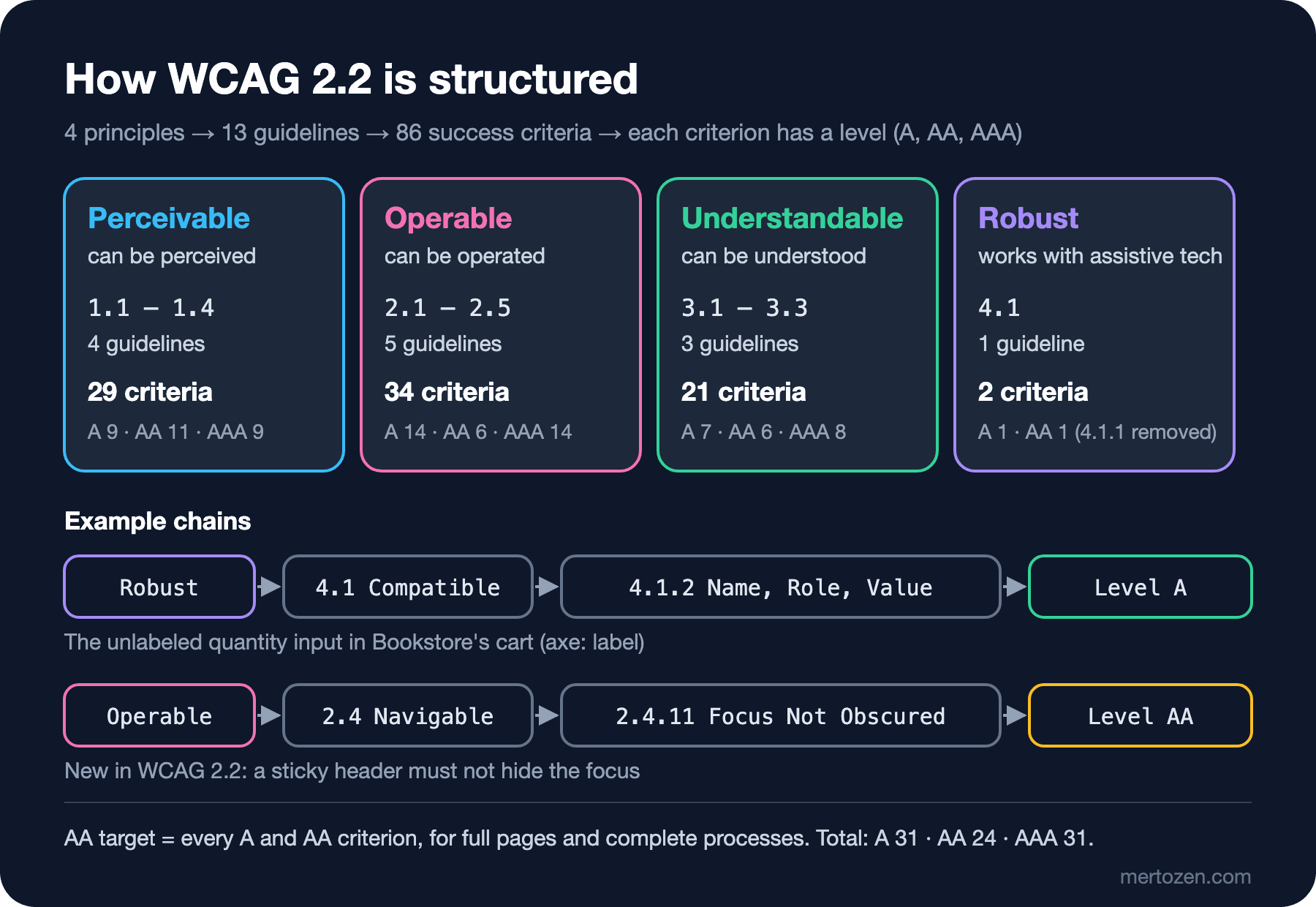
At the top are four principles, abbreviated POUR. Perceivable: content must be presented in a way users can perceive; text alternatives for images, captions for video, enough contrast. Operable: the interface must be usable; everything can be done with the keyboard, users get enough time, they can find their way around. Understandable: content and behavior must be understandable; the page's language is set, navigation is consistent, forms explain errors. Robust: content must work reliably with different tools, assistive technology included; every element must have a correct name, role and state.
Under the principles are 13 guidelines, such as 1.1 Text Alternatives, 2.1 Keyboard Accessible and 3.3 Input Assistance. Guidelines describe the goal but cannot be tested. What can be tested are the success criteria under them: "does this page meet 1.1.1?" has a yes or no answer. WCAG 2.2 has 86 success criteria and each has a level: A, the criteria that remove the most basic barriers; AA, the level that regulations usually target; and AAA, the strictest level.
Only these criteria and the conformance rules are normative. The "Understanding WCAG 2.2" pages explain each criterion's intent, the "Techniques" pages known solutions and common failures; they are informative, and not applying a technique is not a violation by itself. Because the criterion text is short and written in legal language, read the Understanding page first when you have to decide.
Conformance is more than meeting criteria one by one. An AA-conformant page meets every A and AA criterion. Conformance applies to full pages; you cannot exclude part of a page. When a process spans several pages, for example the cart, address and payment steps, every page in the process must conform; a conformant cart page means nothing if the payment step is inaccessible. A non-conforming part, such as an autoplaying video or a widget that traps the keyboard, must not make the rest of the page unusable. W3C does not recommend requiring AAA as a general policy for an entire site, because for some types of content it is not possible to meet every AAA criterion. In practice the target is WCAG 2.2 AA.
From WCAG 2.0 to 2.2, and WCAG 3
WCAG 2.0 was published in December 2008 and in 2012 became the international standard ISO/IEC 40500:2012. WCAG 2.1 (June 2018) added 17 criteria for mobile use, low vision and cognitive disabilities, such as reflow, text spacing and non-text contrast. WCAG 2.2 was published in October 2023, updated with corrections on 12 December 2024, and brought nine new criteria:
| Criterion | Level | What it means for Bookstore |
|---|---|---|
| 2.4.11 Focus Not Obscured (Minimum) | AA | A sticky header or cookie banner must not completely hide the focused element |
| 2.4.12 Focus Not Obscured (Enhanced) | AAA | No part of the focused element may be hidden |
| 2.4.13 Focus Appearance | AAA | Minimum area and contrast of the focus indicator |
| 2.5.7 Dragging Movements | AA | Every drag-and-drop action has a single-pointer alternative |
| 2.5.8 Target Size (Minimum) | AA | Click targets of at least 24x24 CSS pixels, or enough spacing |
| 3.2.6 Consistent Help | A | The help and contact link sits in the same place on every page |
| 3.3.7 Redundant Entry | A | Checkout does not make you type the same address twice |
| 3.3.8 Accessible Authentication (Minimum) | AA | Sign-in does not rely on a cognitive test; pasting the password is not blocked |
| 3.3.9 Accessible Authentication (Enhanced) | AAA | Not even the object or personal content recognition exception |
One criterion was also removed: 4.1.1 Parsing. Error-free markup was required because assistive technologies used to parse HTML themselves; today the browser builds the accessibility tree, and real problems such as duplicate ids are caught by 1.3.1 and 4.1.2. In WCAG 2.2, 4.1.1 is marked "obsolete and removed"; if you have to report against WCAG 2.0 or 2.1 you may still need to test it. The versions are backward compatible: content that meets WCAG 2.2 also meets 2.1 and 2.0. On 21 October 2025 WCAG 2.2 was approved as ISO/IEC 40500:2025 and is freely available from ISO; this matters for countries that want to adopt the standard into their law.
WCAG 3, on the other hand, is still a Working Draft; the latest draft is dated 10 September 2026. Its structure is different, with outcomes and scoring instead of criteria, but W3C states plainly that the draft still has several years of work ahead and that WCAG 3 does not deprecate WCAG 2. The yardstick for the code you write today is WCAG 2.2.
Türkiye: Presidential Circular No. 2025/10
Presidential Circular No. 2025/10, "Accessibility of Websites and Mobile Applications", was published in the Official Gazette on 21 June 2025, issue 32933. Its legal basis is Law No. 5378 on Persons with Disabilities. The parts that concern developers are these:
Scope and deadlines fall into two groups. For public institutions, universities, municipalities and their companies, state economic enterprises, professional bodies with public-institution status, banks, private hospitals, private schools, certain passenger transport companies, A-group travel agencies and electronic communications operators with more than 200,000 subscribers, the deadline is 1 year. For e-commerce service providers under Law No. 6563 on the Regulation of Electronic Commerce, it is 2 years. The text of the Circular does not state separately when the periods start; counted from the publication date, they end in June 2026 for the first group and June 2027 for e-commerce.
Two documents are named as the yardstick: the "Accessibility of Websites and Mobile Applications Checklist - Level A" published by the Ministry of Family and Social Services, and WCAG 2.2. According to the Ministry, the checklist is based on WCAG 2.2 and consists of 31 items and 122 questions; WCAG 2.2 also has 31 Level A success criteria. Organizations set up an internal Review Commission that assesses their sites technically and reports to the Monitoring Commission at the Ministry. Sites and apps found accessible after monitoring may use the Ministry's "Accessibility Logo" for 2 years. The Ministry's announcement also says that information about those who do not meet the requirements in time will be shared with the public.
What it means for a developer: the checklist is a floor. Because the Circular also names WCAG 2.2 separately, setting the target at the list's Level A alone is risky; the most frequent problems, such as contrast (1.4.3) and focus visibility (2.4.7), are at Level AA.
The EU: the European Accessibility Act and EN 301 549
The European Accessibility Act, Directive 2019/882 on accessibility requirements for products and services, has applied since 28 June 2025. The services it covers include e-commerce services offered to consumers, banking, e-books and the digital parts of passenger transport. Member states apply the Directive through their own laws, and enforcement is national too. Microenterprises providing services, those with fewer than 10 employees and an annual turnover or balance sheet total of no more than 2 million euros, are exempt for services. Service contracts concluded before 28 June 2025 may continue unchanged for at most five years, that is until 2030.
The Directive does not write individual technical rules; it sets functional requirements. The way to show you meet them is the harmonized standard EN 301 549, the accessibility standard for information and communication technology published jointly by the European standardization organizations, and its web section is built directly on WCAG. The version currently cited in the Official Journal of the European Union is 3.2.1, which references WCAG 2.1 AA. Version 4.1.1, published on 2 September 2026, moved the reference to WCAG 2.2 AA; the Commission is expected to cite the new version on 16 December 2026. If Bookstore sells to consumers in the EU in EUR, this regulation may concern it too; the exact scope is a lawyer's call, but technically both roads lead to the same place: WCAG 2.2 AA.
In Production
Write the target down. "Make it accessible" is not measurable; "all of Bookstore's public pages and the checkout process meet WCAG 2.2 AA" is. That sentence covers the Circular's reference to WCAG 2.2, the Ministry list's Level A and the AA reference of EN 301 549 version 4.1.1 at the same time.
Do not use the automated scan as your only evidence. The scan in this post found one violation; the manual audit in the next post will find many more. An automated tool does not replace manual checks, it is a quick filter that comes before them.
Put accessibility into your definition of done. Before it is merged, every new screen is used once end to end with the keyboard and passes an axe scan; fixing it after components have spread is much more expensive.
Keep evidence. Record which page you tested when, with which tool and checklist, plus the findings and fixes; you will need them for a Review Commission's assessment and for the accessibility statement page in the next post.
Common Pitfalls
First, reading axe's zero-violation report as "accessible". The report only says something about the rules the tool can check.
Second, believing that an accessibility overlay widget added to the page, a ready-made script offering font-size and contrast buttons, makes the site conformant. The unlabeled input, the button you cannot reach with the keyboard or the wrong focus order are still in the code; an overlay does not fix them.
Third, taking the Ministry checklist's Level A as the final goal. If the e-commerce site also sells to the EU, AA is expected through EN 301 549; the most frequent problems, such as contrast, are at AA too.
Fourth, reducing accessibility to screen reader support. Keyboard, zoom, contrast, voice control and cognitive load matter just as much; most users do not use a screen reader.
A Small Experiment
★☆☆ Print the catalog page's .toolbar with tree.mjs. Where do the names of the search box and the category picker come from: a visible label, aria-label or the placeholder?
★★☆ Change the tag list in scan.mjs to only ['wcag2a', 'wcag21a'] and run it; you get a scan close to the Level A of the Ministry list. Then add wcag22aa back and confirm that axe's target-size rule only runs when that tag is requested and not in the default scan (hint: look for the rule's id in the result's passes and inapplicable lists).
★★★ Pick three pages from your own project and adapt scan.mjs to them. Group the findings by POUR principle, then use each page for five minutes with the keyboard only and write the problems the automated scan missed in a separate list. Compare the length of the two lists.
In the next post we read WCAG 2.2 not criterion by criterion but through the problems most often failed in the real world: low contrast, missing alt text, unlabeled inputs, empty links and buttons. We will produce Bookstore's manual audit table and make the first fixes, measure WCAG 2.2's new criteria and draft an accessibility statement page.