

Vite: The Native ESM Dev Server, HMR, Dependency Pre-bundling and Production Builds with Rolldown

In development Vite does not bundle source code: it transforms each file on request, serves it as native ESM and pre-bundles dependencies once; in production Vite 8 uses Rolldown, Oxc and Lightning CSS. Connecting the Bookstore widget to ASP.NET Core, we look at the /api proxy, when HMR reloads the page, a Razor tag helper that reads manifest.json, how VITE_ variables end up in the bundle, and settings that silently stop working when migrating from Vite 7.
Version note: The examples in this post were run with Vite 8.3 (Rolldown 1.2, Oxc, Lightning CSS 1.33), TypeScript 7.0, Node.js 24 and .NET 10 (ASP.NET Core 10); browser behavior was observed with Playwright 1.65's Chromium. Timings come from the author's own machine.
Guess First
We placed the book search widget into Bookstore.Web, the server-rendered site of Bookstore, the online bookstore used as the shared example across this site's series. The Razor page runs at http://localhost:5080, while the widget's TypeScript modules come from Vite's dev server (http://localhost:5173). We opened the page and typed "eliot" into the search box; the list narrowed to Middlemarch and Silas Marner. With the page open, we make two changes:
/* 1) styles.css: the bottom border of the list rows */
border-bottom: 2px solid #f59e0b;

// 2) finder.ts: the search box placeholder text
input.placeholder = "Search by title, author";
What happens in the browser after each change? Does the page reload, and does "eliot" stay in the search box? Do you give the same answer for both changes?
This is the fourth post in the Build Tools series. In the first post we used Vite only as a build tool; after the webpack and esbuild posts we now look at Vite itself: the native ESM dev server, dependency pre-bundling, HMR, developing together with ASP.NET Core, and the production build that moved to Rolldown in Vite 8.
The Dev Server: No Bundle, Native ESM
Vite's dev server does not bundle source code. When the browser requests a module, Vite transforms that file on the spot (TypeScript to JavaScript with Oxc, CSS into a JS module) and returns it as native ESM. These are the requests Chromium makes when the Razor page opens:
http://localhost:5080/
http://localhost:5173/@vite/client
http://localhost:5173/src/main.ts
http://localhost:5173/src/styles.css
http://localhost:5173/src/api.ts
http://localhost:5173/src/books.ts
http://localhost:5173/src/finder.ts
http://localhost:5173/node_modules/vite/dist/client/env.mjs
http://localhost:5173/node_modules/.vite/deps/lodash-es.js
http://localhost:5173/src/format.ts
http://localhost:5173/src/search.ts
http://localhost:5080/api/books
The HTML and the API come from ASP.NET Core, the modules from Vite. Every source file is a separate request; change finder.ts and only that file is transformed again. That is why Vite's startup time is almost independent of project size: on this machine the dev server was ready in 55–125 ms and had not touched a single source file by then. The work happens when the page is requested and only for the requested files. The production build takes a completely different route:
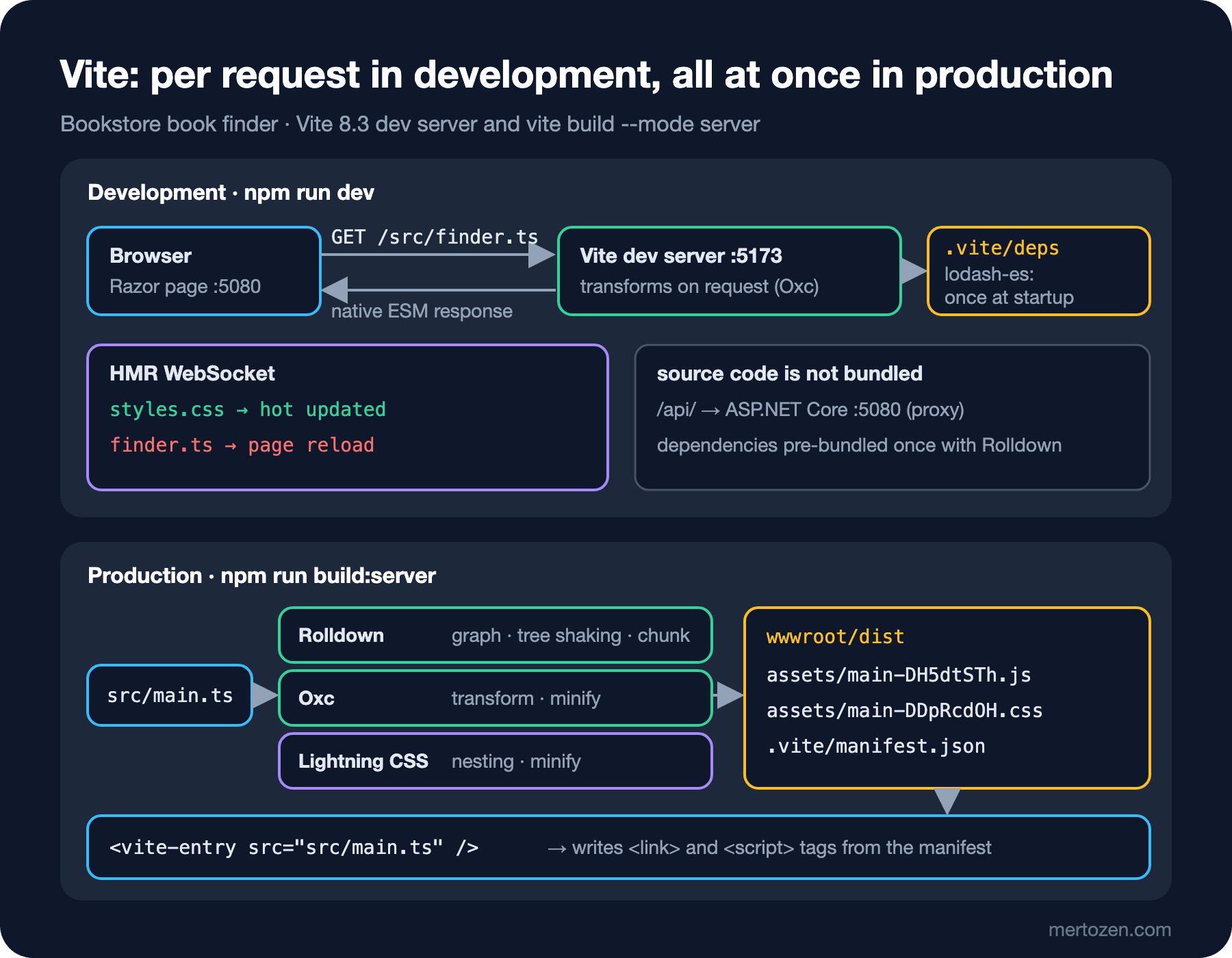
Dependency Pre-bundling
There is one exception in the list: lodash-es arrives as a single node_modules/.vite/deps/lodash-es.js instead of 640 files. In the first post of the series we saw the same import produce 642 requests on a bundler-free page. Vite solves this with dependency pre-bundling: at startup it scans the source code, finds the packages in use and bundles each of them once into a single file, with Rolldown in Vite 8. After deleting the .vite cache and starting with --debug deps, the process looks like this (paths shortened):
npx vite --debug depsvite:deps scanning for dependencies...
vite:deps Crawling dependencies using entries:
.../widget/api.html
.../widget/index.html
.../widget/federation/host.html
.../widget/nobuild/index.html
vite:deps Scan completed in 6.32ms:
lodash-es -> .../widget/node_modules/lodash-es/lodash.js
vite:deps Dependencies bundled in 32.82ms
vite:deps dependencies optimizedPre-bundling has two goals. The first is request count: a package of hundreds of small files becomes a single file. The second is compatibility: packages written in CommonJS do not run directly in the browser; pre-bundling converts them to ESM. The result is written to node_modules/.vite/deps/_metadata.json:
{
  "hash": "94cf188b",
  "configHash": "c9948d63",
  "lockfileHash": "7c0d8d5e",
  "browserHash": "7cf20e02",
  "optimized": {
    "lodash-es": {
      "src": "../../lodash-es/lodash.js",
      "file": "lodash-es.js",
      "fileHash": "9324b7f4",
      "needsInterop": false
    }
  },
  "chunks": {}
}
The lockfileHash and configHash fields decide when the cache counts as stale: when package-lock.json or vite.config.ts changes, pre-bundling is redone on the next startup; if not, the log says Hash is consistent. Skipping. browserHash is the ?v=7cf20e02 parameter in the URL sent to the browser; because the URL changes when the pre-bundle changes, the browser does not use the old file from its cache. When you edit a package file by hand (say, while debugging inside node_modules), Vite does not notice; you re-bundle with npx vite --force and see the line Forced re-optimization of dependencies in the log.
Note the scan's entry list: Vite scans every HTML file in the root folder, including the federation test page from the webpack post and the bundler-free page from the first post. In a large project that means unnecessary scanning; you can limit the files to scan with optimizeDeps.entries.
HMR: When an In-Place Update, When a Reload?
The answer to the guess differs for the two changes. We kept the page open with Playwright, made the changes and counted the page's load events:
console: debug [vite] hot updated: /src/styles.css
css change -> loads: 1 input: eliot border: 2px
console: debug [vite] connecting...
console: debug [vite] connected.
ts change -> loads: 2 input: "" placeholder: Search by title, author
The corresponding lines in Vite's terminal:
3:52:02 PM [vite] (client) hmr update /src/styles.css
3:52:05 PM [vite] (client) page reload src/finder.ts
On the CSS change the page did not reload; the new rule was applied (border: 2px) and "eliot" stayed in the box. On the finder.ts change the page loaded from scratch and the text we typed was lost. The reason is that HMR works with boundaries. When a module changes, Vite walks up the import chain looking for a module that "accepts" the update. CSS modules accept their own updates: the content of the old style tag is replaced, and that is it. Nobody accepts finder.ts; the chain reaches main.ts and from there the page itself, and Vite does the only safe thing: reload the page.
A module can accept its own update with import.meta.hot.accept(); but then cleaning up the event listeners and DOM the old module set up is your job too. The Vite plugins for React (Fast Refresh), Vue and Svelte set up these boundaries automatically for every component; only the changed component is redrawn, with its state preserved. Our widget is plain TypeScript without a framework, so every change other than CSS means a full reload. That is not a bad thing; the reload only re-requests the single file Vite transformed and still takes milliseconds. We see component and style HMR in Angular's own dev server in the series' Angular CLI post.
Developing with Bookstore.Web: the Proxy and Dev Server Scripts
We develop the widget in two ways: either on its own on Vite's own page, or inside ASP.NET Core's Razor page. For both, we added this server section to the Vite config:
server: {
    port: 5173,
    strictPort: true,
    // Bookstore.Web (ASP.NET Core) runs at 5080: /api goes there, its pages load our modules
    proxy: { "/api/": "http://localhost:5080" },
    cors: { origin: "http://localhost:5080" },
},
proxy forwards /api/ requests made from Vite's own page to ASP.NET Core. The widget now fetches books from the API if the host element's data-source attribute has an address, and uses the sample list from the previous posts otherwise:
import "./styles.css";
import { fetchBooks } from "./api";
import { sampleBooks, type Book } from "./books";
import { mountBookFinder } from "./finder";

async function start(host: HTMLElement): Promise<void> {
    const source = host.dataset.source;
    const books: readonly Book[] = source ? await fetchBooks(source) : sampleBooks;
    mountBookFinder(host, books);
}

const host = document.querySelector<HTMLElement>("#book-finder");
if (host) {
    void start(host);
}
That way index.html keeps working with sample data as in the previous posts, and the webpack and esbuild builds keep compiling unchanged. The new api.html page uses the API with <div id="book-finder" data-source="/api/books">. The API is a one-line minimal API endpoint inside Bookstore.Web: app.MapGet("/api/books", (BookCatalog catalog) => catalog.GetAll());.
In the first attempt the proxy key was "/api", and http://localhost:5173/api.html returned 404. Vite's proxy key is a prefix match; the /api.html request also starts with the /api prefix, so it was forwarded to ASP.NET Core and not found there. With the key changed to "/api/" the page opened with the 7-book list from the API, and a search for "austen" returned three books.
The second way is for the Razor page to load its scripts directly from Vite. All it takes is writing the two script tags from Vite's backend integration documentation into the page in the Development environment: first the HMR client (/@vite/client), then the entry. We gave this job to a tag helper; the dev server address lives only in appsettings.Development.json:
{
  "Vite": {
    "DevServerUrl": "http://localhost:5173"
  }
}
dotnet run --project server/Bookstore.Web --launch-profile vite-dev
npm run devThe head Razor produces:
<script type="module" src="http://localhost:5173/@vite/client"></script>
<script type="module" src="http://localhost:5173/src/main.ts"></script>
Since the page comes from 5080 and the modules from 5173, this is a module load from a different origin; the browser performs a CORS check. Vite's default CORS setting only allows localhost origins; writing cors.origin explicitly guarantees it also works when the backend is opened under a different host name. The HMR we saw in the guessing question works in this setup: the CSS change is applied in place on the ASP.NET Core page.
Production: from manifest.json to the Razor Layout
There is no dev server in production; Razor has to know the hashed file names. Vite provides build.manifest for that. We added a section to the config that only applies in server mode:
...(mode === "server" && {
    base: "/dist/",
    input: "src/main.ts",
    build: {
        manifest: true,
        outDir: "../server/Bookstore.Web/wwwroot/dist",
        emptyOutDir: true,
        modulePreload: { polyfill: false },
    },
}),
input makes main.ts the entry directly instead of index.html; Vite 8's documentation recommends writing this with the top-level input option rather than build.rolldownOptions.input. base: "/dist/" makes the URLs generated inside the output (a url() in CSS or a dynamically imported chunk, for example) resolve under /dist/ instead of the site root. We turned modulePreload.polyfill off because without an HTML entry Vite cannot add the polyfill to the page; in that case the documentation recommends writing import "vite/modulepreload-polyfill" at the top of the entry, but webpack and esbuild do not know that import. The widget has no dynamic imports, so it does not need the polyfill either.
npm run build:server../server/Bookstore.Web/wwwroot/dist/.vite/manifest.json 0.18 kB │ gzip: 0.14 kB
../server/Bookstore.Web/wwwroot/dist/assets/main-DDpRcdOH.css 0.30 kB │ gzip: 0.19 kB
../server/Bookstore.Web/wwwroot/dist/assets/main-DH5dtSTh.js 3.59 kB │ gzip: 1.74 kB
✓ built in 64ms{
"src/main.ts": {
"file": "assets/main-DH5dtSTh.js",
"name": "main",
"src": "src/main.ts",
"isEntry": true,
"css": [
"assets/main-DDpRcdOH.css"
]
}
}The manifest's key is the entry's source path; file is the output file and css the entry's CSS files. If there were shared chunks they would be listed in imports, and dynamic imports in dynamicImports. On the ASP.NET Core side we wrote a service that reads the manifest once:
using System.Text.Json;
using Microsoft.Extensions.Options;

namespace Bookstore.Web.Vite;

public sealed record ViteChunk(string File, string? Src, bool IsEntry, IReadOnlyList<string>? Css, IReadOnlyList<string>? Imports);

public sealed class ViteManifest(IWebHostEnvironment environment, IOptions<ViteOptions> options)
{
    private readonly Lazy<IReadOnlyDictionary<string, ViteChunk>> chunks = new(() =>
    {
        string path = Path.Combine(environment.WebRootPath, options.Value.OutputPath, ".vite", "manifest.json");
        using FileStream stream = File.OpenRead(path);
        return JsonSerializer.Deserialize<Dictionary<string, ViteChunk>>(stream, JsonSerializerOptions.Web)
            ?? throw new InvalidOperationException($"Empty Vite manifest: {path}");
    });

    public ViteChunk GetEntry(string src) =>
        chunks.Value.TryGetValue(src, out ViteChunk? chunk) && chunk.IsEntry
            ? chunk
            : throw new InvalidOperationException($"'{src}' is not an entry in the Vite manifest. Did you run 'npm run build:server'?");

    // Chunks the entry imports statically, dependencies first (same walk as the Vite docs)
    public IReadOnlyList<ViteChunk> GetImportedChunks(ViteChunk entry)
    {
        List<ViteChunk> result = [];
        HashSet<string> seen = [];
        Visit(entry);
        return result;

        void Visit(ViteChunk chunk)
        {
            foreach (string key in chunk.Imports ?? [])
            {
                if (seen.Add(key))
                {
                    ViteChunk imported = chunks.Value[key];
                    Visit(imported);
                    result.Add(imported);
                }
            }
        }
    }
}
The tag helper that writes the tags follows the order the Vite documentation recommends: first the CSS of the entry and of the chunks it imports, then the entry's script, and last a modulepreload for each imported chunk:
using System.Text.Encodings.Web;
using Microsoft.AspNetCore.Razor.TagHelpers;
using Microsoft.Extensions.Options;

namespace Bookstore.Web.Vite;

// <vite-entry src="src/main.ts" />: dev server scripts in Development, hashed files from the manifest otherwise
[HtmlTargetElement("vite-entry", TagStructure = TagStructure.WithoutEndTag)]
public sealed class ViteEntryTagHelper(ViteManifest manifest, IOptions<ViteOptions> options, HtmlEncoder encoder) : TagHelper
{
    public required string Src { get; set; }

    public override void Process(TagHelperContext context, TagHelperOutput output)
    {
        output.TagName = null;
        string? devServer = options.Value.DevServerUrl?.TrimEnd('/');

        if (!string.IsNullOrEmpty(devServer))
        {
            output.Content.AppendHtml(Script($"{devServer}/@vite/client"));
            output.Content.AppendHtml(Script($"{devServer}/{Src}"));
            return;
        }

        ViteChunk entry = manifest.GetEntry(Src);
        IReadOnlyList<ViteChunk> imported = manifest.GetImportedChunks(entry);
        string basePath = $"/{options.Value.OutputPath}/";

        foreach (string css in imported.SelectMany(chunk => chunk.Css ?? []).Concat(entry.Css ?? []).Distinct())
        {
            output.Content.AppendHtml($"<link rel=\"stylesheet\" href=\"{encoder.Encode(basePath + css)}\">\n");
        }
        output.Content.AppendHtml(Script(basePath + entry.File));
        foreach (ViteChunk chunk in imported)
        {
            output.Content.AppendHtml($"<link rel=\"modulepreload\" href=\"{encoder.Encode(basePath + chunk.File)}\">\n");
        }
    }

    private string Script(string src) => $"<script type=\"module\" src=\"{encoder.Encode(src)}\"></script>\n";
}
Using it in the layout takes one line: <vite-entry src="src/main.ts" />. When we started the application with the vite-manifest profile (Production environment, no dev server address), Razor produced this head:
dotnet run --project server/Bookstore.Web --launch-profile vite-manifest<title>Find a book · Bookstore</title>
<link rel="stylesheet" href="/dist/assets/main-DDpRcdOH.css">
<script type="module" src="/dist/assets/main-DH5dtSTh.js"></script>In Chromium the page opened with 4 requests (HTML, CSS, JS and /api/books), and a search for "austen" listed the three Jane Austen books from the API. For the hashed files we added an OnPrepareResponse to UseStaticFiles in Program.cs; every response under /dist/assets comes back with Cache-Control: public, max-age=31536000, immutable. We covered ASP.NET Core's own build-time fingerprinting (MapStaticAssets) in the ASP.NET Core MVC series post "Static Assets and UI Plumbing"; here Vite produces the hash, so that mechanism is not needed.
import.meta.env and the VITE_ Prefix
Vite embeds values known at build time into the code through import.meta.env. To see the behavior, we put a .env file in the widget root and added a temporary line to main.ts:
VITE_STORE_NAME=Bookstore
CATALOG_ADMIN_KEY=local-dev-value
console.log(import.meta.env.VITE_STORE_NAME, import.meta.env.CATALOG_ADMIN_KEY, import.meta.env.MODE);npx vite build
# console.log(`Bookstore`,void 0,`production`)
npx vite build --mode staging
# console.log(`Bookstore`,void 0,`staging`)Three things stand out. The variable starting with VITE_ was embedded in the bundle as plain text. CATALOG_ADMIN_KEY, without the VITE_ prefix, was not embedded; import.meta.env.CATALOG_ADMIN_KEY became void 0, that is undefined, at build time. MODE carries the --mode value; Vite also loads mode-specific files such as .env.staging based on it. The prefix rule is a safety measure, so that a variable meant for the server side does not leak into client code by accident. But do not forget the reverse: every VITE_-prefixed value can be read by anyone who downloads the JavaScript file. An API key, a token or a password can never be a VITE_ variable. In a scenario with a backend like Bookstore.Web, reading settings that vary by environment (such as the API address) from the HTML the server produces is more flexible than baking them into the build; that is why the widget takes its API address from the data-source attribute. The same build output can then be used unchanged in test and production.
Vite 8's Production Build and Migrating from Vite 7
Vite 8's (12 March 2026) biggest change is under the production build. Up to Vite 7, esbuild ran on the dev side (pre-bundling and TypeScript transforms) and Rollup in production; two different tools meant two different behaviors. In Vite 8 both were replaced by the Rust-based Rolldown. Oxc handles TypeScript transforms and JavaScript minification, Lightning CSS handles CSS minification; Lightning CSS is no longer optional but a regular dependency. Rolldown 1.0 reached a stable release on 7 May 2026 and its public API is now bound by semantic versioning. The numbers in the Vite team's announcement come from companies' own projects: Linear's production build went from 46 seconds to 6, Ramp's got 57% shorter and Beehiiv's 64%. Those numbers belong to those projects; we do our own measurements in the last post of the series.
The default of build.target stayed 'baseline-widely-available', but the versions behind it went up: Chrome and Edge from 107 to 111, Firefox from 104 to 114, Safari from 16.0 to 16.4. In the first post of the series we saw why this target flattens CSS nesting.
The official recommendation for migrating a Vite 7 project has two steps: first switch to the rolldown-vite package, which tries Rolldown on top of Vite 7, and fix the problems there, then upgrade to Vite 8. The Node.js requirement did not change: 20.19+ or 22.12+. Vite 8 converts some of the old esbuild and build.rollupOptions settings to their Oxc and Rolldown equivalents by itself; most projects need no config changes. But the word "most" matters. In Vite 7 the common way to remove console calls from production was esbuild: { drop: ["console"] }. We tried the same config on Vite 8:
esbuild: { drop: ["console"] },
# vite build: no error, no warning; 2 console.log calls remain in the output

build: { rolldownOptions: { output: { minify: { compress: { dropConsole: true } } } } },
# vite build: no console.log in the output
The old setting produced neither an error nor a warning; it was simply ignored. The migration guide says esbuild.drop has moved to the options under build.rolldownOptions.output.minify.compress. That is why you should compare the build output with the old version's output after migrating. The guide also says build.rollupOptions was renamed to build.rolldownOptions, the object form of manualChunks was removed, and CommonJS default imports now follow a single rule.
In Production
Get the deploy order right: first npm ci and npm run build:server, then dotnet publish. wwwroot/dist must be populated before publishing; otherwise the published application starts with an empty folder and a missing manifest. Because ViteManifest reads the file once and keeps it in memory, the application has to be restarted after every build that changes the manifest; a normal deploy does that anyway.
If the manifest is missing, fail early and clearly. GetEntry throws an exception asking whether npm run build:server was run when it cannot find the entry in the manifest. Silently producing an empty head means the page opens in production without styles and with a widget that does not work.
Separate the cache headers. The hashed files under /dist/assets get a year and immutable; the Razor page is generated on every request and contains the new hashes. If you use a CDN, make sure it does not cache the HTML for a long time.
Do not expose the dev server to the internet. Opening server.host, setting server.cors to true or loosening server.allowedHosts can expose source files on your local disk to others on the network. The Vite dev server is a development tool; production must always serve the build output.
Common Pitfalls
First, mistaking the VITE_ prefix for secrecy. The prefix is the way to expose a variable to the client, not to hide it. Every value starting with VITE_ sits in the bundle as plain text.
Second, writing the proxy key too broadly. "/api" also catches /api.html and /apiary. Write the key as "/api/" or use a regular expression starting with ^.
Third, expecting HMR to preserve state on every change. In code without a framework only CSS is updated in place; a JavaScript change reloads the page because there is no HMR boundary. That is not a bug but Vite's safe choice.
Fourth, not testing the difference between dev and production. The dev server works with native ESM and pre-bundled dependencies, the production build with Rolldown's tree shaking and chunks. A package's CommonJS compatibility or side effects may cause trouble on one side and not the other. Opening the production build in a browser with at least one smoke test in CI catches this difference.
Fifth, trusting old esbuild settings when moving to Vite 8. As we saw above, some of them are ignored without an error; check the output after migrating.
A Small Experiment
★☆☆ Start Vite with npm run dev and Bookstore.Web with dotnet run --project server/Bookstore.Web --launch-profile vite-dev. Type something into the search box on http://localhost:5080, then change a color in styles.css and the currency format in format.ts; note in which case the text you typed stays.
★★☆ Set up an HMR boundary that remounts the widget by adding an import.meta.hot.accept() call to main.ts: when a new mountBookFinder arrives, clear the host element and call it again. Verify that a finder.ts change no longer reloads the page; then check whether this code breaks the webpack and esbuild builds.
★★★ Add a second module to the widget that is loaded with a dynamic import (for example, a panel showing a book's details). After npm run build:server, look at how dynamicImports and the new chunk appear in the manifest; verify in Chromium that the tags produced by the tag helper are still correct.
In the next post we move to the Angular counterpart of the pieces we saw in these four posts: the Angular CLI's application builder, how it combines esbuild and Vite, the move to Rolldown and migrating from the webpack-based builder.