

Why Build Tools Exist: Module Graphs, Transpiling, Bundling, Minification and the Dev Server's Job
A build tool does what the browser cannot do on its own: it resolves imports into a module graph, transpiles TypeScript, drops unused code, bundles and minifies files and gives them content-hashed names. Using Bookstore's book search widget, we look at the 642 requests of bundler-free ESM, the 3-request output from Vite 8, Baseline build targets and the difference between the dev server and a production build, all with real output.
Version note: The examples in this post were run with Vite 8.3 (Rolldown 1.2, Oxc, Lightning CSS 1.33), TypeScript 7.0, lodash-es 4.18 and Node.js 24; browser measurements were taken with Playwright 1.65's Chromium. Timings come from the author's own machine; look at the ratios, not the absolute values.
Guess First
We want to add a small "find a book" widget to the ASP.NET Core pages of Bookstore, the online bookstore used as the shared example across this site's series: a search box and a book list that filters as you type. So that the search runs when the user stops typing rather than on every key, we use lodash-es's debounce function. The first attempt was written without any build tool, using only the browser's own module system:
<!doctype html>
<html lang="en">
<head>
    <meta charset="utf-8">
    <title>Book finder without a build step</title>
    <script type="importmap">
        {
            "imports": {
                "lodash-es": "/node_modules/lodash-es/lodash.js"
            }
        }
    </script>
    <script type="module" src="./main.js"></script>
</head>
<body>
    <input type="search" id="query" aria-label="Search books">
</body>
</html>
import { debounce } from "lodash-es";
const input = document.querySelector("#query");
const search = debounce(() => console.log(`searching for "${input.value}"`), 200);
input.addEventListener("input", search);
console.log("book finder ready");The page works: the console prints book finder ready, and typing "dune" logs the search line 200 ms later. The question: how many HTTP requests does the browser make while opening this page? Two (the HTML and main.js), three (plus lodash), or many more? Pick a number and keep it in mind.
This is the first post of the Build Tools series. In the rest of the series we open up webpack, esbuild, Vite and the Angular CLI's build system one by one; here we follow the work they all share, the path source code takes to the browser, step by step.
From the Script Tag to ESM: A Short History
In the early days, JavaScript was a sequence of script tags added to the page. Every file wrote to the global scope; if jquery.js did not come before the cart.js that used it, the page broke. The ordering lived in the HTML, and the dependencies were written down nowhere.
The first remedy was the IIFE: each file wrapped itself in its own function and exposed a single global object. Global collisions went down, but the ordering problem stayed. CommonJS (require and module.exports), which arrived with Node.js in 2009, moved dependencies into the code, but because it is synchronous it could not be used directly in the browser. On the browser side, AMD and RequireJS were tried. Browserify and then webpack bridged the two worlds by combining CommonJS code into a single file for the browser; they are the ancestors of today's bundlers.
ES2015 brought the language's own module system: ESM, written with import and export. Thanks to static import statements, what a file depends on can be read before the code runs. That property is the basis of most of the analysis today's build tools do, tree shaking included. Browsers shipped script type="module" between 2017 and 2018; import maps reached every major browser in March 2023 with Safari 16.4 and have been Baseline widely available since September 2025. So the page in the guessing question runs in every current browser today without any build tool. We covered how modules behave in the browser and the import map syntax in the JavaScript Intermediate series post "JavaScript Modules in the Browser: import, export, Dynamic import() and Import Maps"; here we look at the cost.
Where Is Bundler-Free ESM Enough Today?
The answer to the guess: 642 requests. We opened the page in Playwright's Chromium and counted every request: 1 HTML file, 1 main.js and 640 files from lodash-es, roughly 615 KB of uncompressed JavaScript. The reason is that the line import { debounce } from "lodash-es" requests lodash's barrel file, lodash.js, which re-exports every function. Once the browser reads that file it has to request every import inside it; it cannot know which export will be used, because that only becomes clear by looking at the whole graph.
If we point the import map at the package folder and import only the file we need, the picture changes:
<script type="importmap">
    {
        "imports": {
            "lodash-es/": "/node_modules/lodash-es/"
        }
    }
</script>
import debounce from "lodash-es/debounce.js";This time it is 16 requests and 15 KB: debounce.js and the 13 small files it imports transitively. The bundled version of the same widget carries 4.6 KB in total over 3 requests (HTML, one CSS, one JS). Even on localhost with no network latency, on this machine the load event of the 642-request page arrived about 12 times later than the 16-request one. On a real network every request also adds a round trip and header cost; HTTP/2 multiplexing narrows the gap but does not close it, because the browser only learns a module's imports after downloading and parsing that module. Deep import chains therefore turn into a serial download waterfall.
If the import map is forgotten or missing, the page breaks with one line, because the browser cannot resolve a bare package name like lodash-es on its own:
TypeError: Failed to resolve module specifier "lodash-es". Relative references must start with either "/", "./", or "../".Bundler-free ESM is enough when the code is plain JavaScript, the dependencies are few and shallow, and the page is small and internal (an admin screen, a prototype). It stops being enough the moment you write TypeScript, because the browser cannot run code with type annotations. It also stops being enough when you use a package with a barrel file; the 642 requests are the result.
The Steps of a Build: From Resolve to Content Hash
The real widget is written in TypeScript and consists of four small modules. Searching and price formatting live in separate files, and finder.ts puts them together:
import { debounce } from "lodash-es";
import type { Book } from "./books";
import { formatPrice } from "./format";
import { searchBooks } from "./search";

export function mountBookFinder(host: HTMLElement, books: readonly Book[]): void {
    const input = document.createElement("input");
    input.type = "search";
    input.className = "finder-input";
    input.placeholder = "Search by title or author";
    input.setAttribute("aria-label", "Search books");

    const list = document.createElement("ul");
    list.className = "finder-results";

    const render = (items: Book[]): void => {
        list.replaceChildren(...items.map(book => {
            const item = document.createElement("li");
            item.textContent = `${book.title} · ${book.author} · ${formatPrice(book.price)}`;
            return item;
        }));
    };

    input.addEventListener("input", debounce(() => render(searchBooks(books, input.value)), 200));
    host.replaceChildren(input, list);
    render([...books]);
}
const priceFormat = new Intl.NumberFormat("tr-TR", { style: "currency", currency: "TRY" });
export function formatPrice(value: number): string {
return priceFormat.format(value);
}
export function formatIsbn(isbn: string): string {
return `${isbn.slice(0, 3)}-${isbn.slice(3, 4)}-${isbn.slice(4, 7)}-${isbn.slice(7, 12)}-${isbn.slice(12)}`;
}main.ts imports the CSS and mounts the widget on the #book-finder element; books.ts holds a sample book list (Dune, Emma, The Hobbit, Middlemarch, Pride and Prejudice). We build this code with Vite 8. Vite is only the vehicle here; the steps are the same in webpack, esbuild and the Angular CLI. To look inside the bundler we wrote a small plugin that prints the module graph and the modules that ended up in each chunk just before the build finishes. The plugin only runs in graph mode and does not affect the normal build:
import { defineConfig, normalizePath, type Plugin } from "vite";

// Runs with "npx vite build --mode graph": prints the module graph and what ended up in each chunk
function moduleGraphReport(): Plugin {
    return {
        name: "module-graph-report",
        apply: "build",
        generateBundle(_options, bundle) {
            const root = normalizePath(process.cwd()) + "/";
            const short = (id: string) => id.replace(root, "");
            const graph = [...this.getModuleIds()];
            const fromLodash = graph.filter(id => id.includes("/lodash-es/")).length;
            console.log(`\nmodule graph: ${graph.length} modules (${fromLodash} from lodash-es)`);
            for (const id of graph.filter(id => id.includes("/src/"))) {
                const imports = this.getModuleInfo(id)?.importedIds ?? [];
                console.log(`  ${short(id)} -> ${imports.map(short).join(", ") || "(none)"}`);
            }
            for (const output of Object.values(bundle)) {
                if (output.type !== "chunk") {
                    continue;
                }
                const rendered = Object.entries(output.modules).filter(([, m]) => m.renderedLength > 0);
                const lodash = rendered.filter(([id]) => id.includes("/lodash-es/")).length;
                console.log(`chunk ${output.fileName}: ${rendered.length} modules rendered (${lodash} from lodash-es)`);
            }
        },
    };
}

export default defineConfig(({ mode }) => ({
    plugins: mode === "graph" ? [moduleGraphReport()] : [],
}));
npx vite build --mode graphvite v8.3.8 building client environment for graph...
transforming...
✓ 649 modules transformed.
rendering chunks...
module graph: 648 modules (640 from lodash-es)
src/styles.css -> (none)
src/books.ts -> (none)
src/search.ts -> (none)
src/finder.ts -> node_modules/lodash-es/lodash.js, src/format.ts, src/search.ts
src/format.ts -> (none)
src/main.ts -> src/styles.css, src/books.ts, src/finder.ts
chunk assets/index-B8efG9ka.js: 20 modules rendered (14 from lodash-es)
computing gzip size...
dist/index.html 0.39 kB │ gzip: 0.26 kB
dist/assets/index-DDpRcdOH.css 0.30 kB │ gzip: 0.19 kB
dist/assets/index-B8efG9ka.js 4.04 kB │ gzip: 1.90 kB
✓ built in 38msThis output shows the steps of a build one by one:
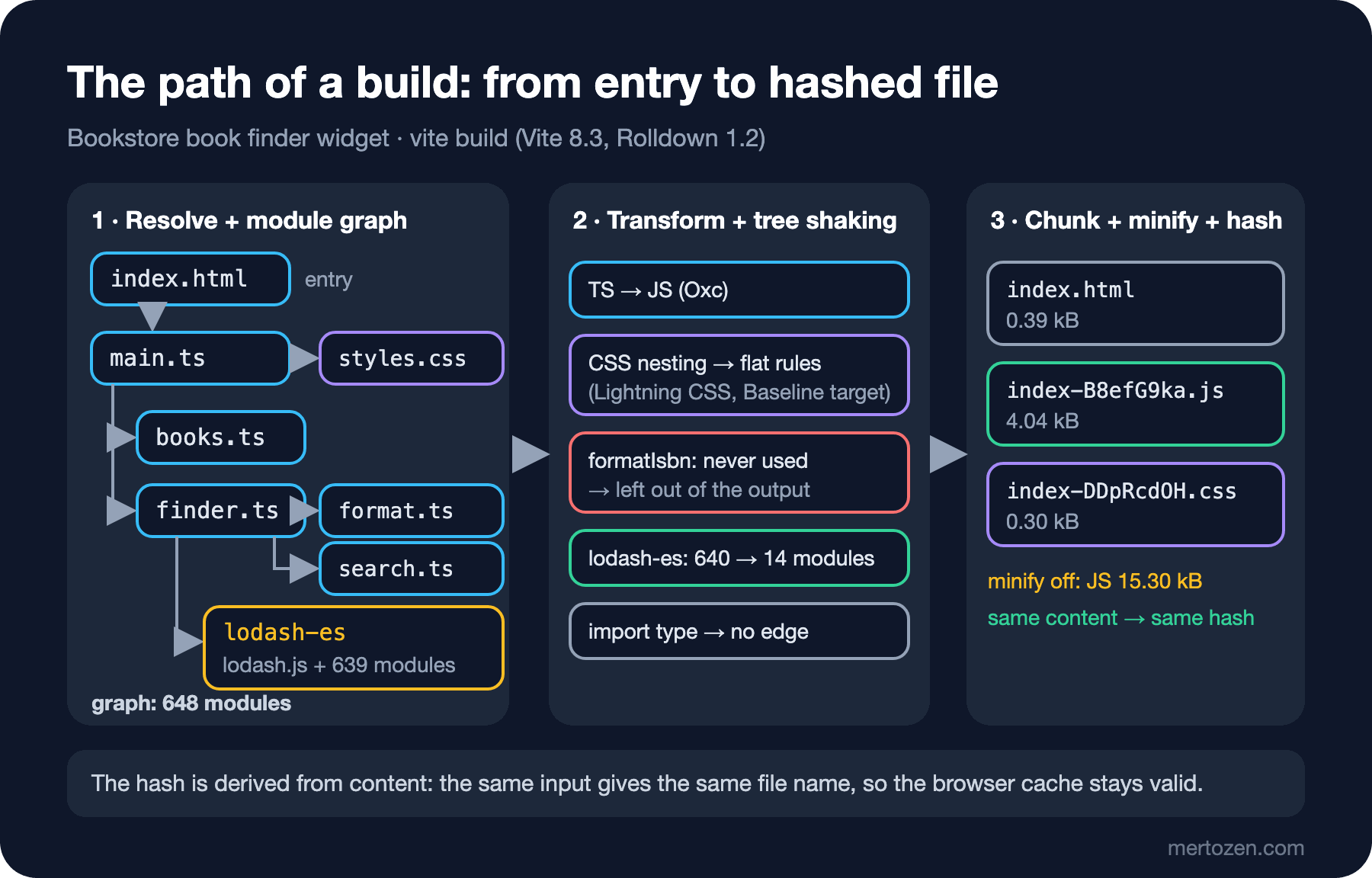
Resolve: the bundler starts from the entry (here index.html) and works out which file each import points to. The bare name "lodash-es" was resolved to lodash.js through node_modules/lodash-es/package.json, and the extensionless path "./format" to src/format.ts. What the browser does with an import map, the bundler does at build time with Node.js's resolution rules.
Module graph: every resolved file enters the graph as a node, and imports become edges. The graph has 648 modules, 640 of them from lodash-es. Note that search.ts imports the Book type and still has no edge in the graph. import type is removed entirely during the transform, so the bundler never sees that dependency.
Transform: each file is turned into JavaScript the browser understands. In Vite 8, TypeScript is handled by Oxc, the Rust-based family of parser, transformer and minifier, and CSS by Lightning CSS. If there were Sass, JSX or Vue files, their transforms would run in this step too.
Tree shaking and chunking: the whole graph does not go into the output. The bundler checks which exports are actually used; of the 640 lodash modules only 14, debounce and the helpers it needs, made it into the chunk. Since there is no code splitting, everything ended up in a single chunk.
Minify and content hash: the chunk is minified and a hash derived from its content is added to the file name: index-B8efG9ka.js. In the asset step, CSS and images are named the same way, and index.html is rewritten with the new names.
Seeing Tree Shaking, Minification and Content Hashes in the Output
A build with minification turned off shows the result of tree shaking and scope hoisting in readable form:
npx vite build --minify false// node_modules/lodash-es/now.js
...
// node_modules/lodash-es/debounce.js
...
// src/format.ts
var priceFormat = new Intl.NumberFormat("tr-TR", {
style: "currency",
currency: "TRY"
});
function formatPrice(value) {
return priceFormat.format(value);
}
// src/search.tsTwo things stand out. First, formatIsbn is gone; it was exported, but nobody imported it, so it was left out. Second, the modules were not wrapped in separate functions; they all sit one after another in a single scope, separated by comment lines. This is called scope hoisting, and ESM's static structure makes it possible. In CommonJS, require is a function called at run time, so a bundler cannot decide with the same certainty; we return to this in the series' tree shaking post.
The size difference shows minification's share: with minification off the JS is 15.30 kB (4.90 kB gzipped), with it on 4.04 kB (1.90 kB gzipped). A minifier does more than strip whitespace; it shortens local variable names, writes !0 instead of true and removes branches that can never run.
To see how content hashes behave, we ran the same build repeatedly while making changes:
| Change | CSS file | JS file |
|---|---|---|
| none (two builds) | index-DDpRcdOH.css | index-B8efG9ka.js |
a color in styles.css | index-DqKZ1iiT.css | index-CvX385Gp.js |
| reverted | index-DDpRcdOH.css | index-B8efG9ka.js |
placeholder text in finder.ts | index-DDpRcdOH.css | index-UvNSaxts.js |
The same input gives the same name every time; the build is deterministic. That lets the server send these files with a one-year Cache-Control: immutable; when the content changes the name changes too, so the browser does not use the old file. The interesting row is the second one: we changed only the CSS, yet the JS hash changed as well. Vite's CSS plugin adds the names of the CSS files a JS chunk imports to that chunk's hash. There is no such link in the other direction: when the JS changed, the CSS name stayed the same.
Transpiler, Bundler, Minifier, Dev Server: Who Does What?
What we call a "build tool" is really several separate roles put together. Knowing which tool plays which role tells you where to look when something goes wrong:
| Role | What it does | Typical tools in 2026 |
|---|---|---|
| Type checker | Verifies types, does not need to emit files | tsc (TypeScript 7, the Go-based compiler) |
| Transpiler | Turns TS and JSX into JavaScript, lowers new syntax to the target | Oxc, esbuild, SWC, Babel |
| Bundler | Resolve, module graph, tree shaking, chunks | Rolldown, Rollup, webpack, Rspack, esbuild |
| Minifier | Whitespace, name shortening, dead code removal | Oxc minifier, esbuild, Terser |
| CSS processor | Lowering nesting, prefixes, CSS minification | Lightning CSS, PostCSS |
| Dev server | Transforms and serves files as they are requested, HMR | Vite, webpack-dev-server, Angular CLI |
The most commonly confused split is between the type checker and the transpiler. Vite, esbuild and webpack's new built-in TypeScript support only strip types; they do not check them. We accidentally wrote one price in books.ts as a string and ran both tools:
npx vite build
# ...
# ✓ built in 28ms

npx tsc --noEmit
# src/books.ts(9,70): error TS2322: Type 'string' is not assignable to type 'number'.
The build finished successfully and emitted the broken code; only tsc caught the error. That is why the typecheck script in package.json (tsc --noEmit) should run in CI as a step separate from the build. TypeScript 7's Go-based compiler made that step much faster than before; the details are in the TypeScript Advanced series post "TypeScript 7 and Beyond: The Go-Based Compiler and the New Defaults".
Most of today's tools take on several of these roles at once. esbuild is a transpiler, bundler and minifier; Vite 8 is a dev server and, in production builds, runs Rolldown (bundler), Oxc (transpiler and minifier) and Lightning CSS together. The Angular CLI uses esbuild and Vite inside its own builder. We open these tools up one by one in the next posts of the series.
Build Targets and Baseline
The transpiler's second job is to lower the syntax you wrote to a form the oldest browser you want to support understands. That goal is called the build target. Vite 8's default build.target is 'baseline-widely-available': the lowest browser versions that support the features that were Baseline widely available as of 1 January 2026, namely chrome111, edge111, firefox114, safari16.4 and ios16.4. Baseline, the web-features project's label for how long a feature has been supported in every major browser, uses a 30-month rule for "widely available".
We built the same widget with three different targets. On the JavaScript side the difference showed up in a single line coming from lodash:
npx vite build --target esnext
# ...}catch{}var i=s.call(e)...

npx vite build --target es2015
# ...}catch(e){}var i=s.call(e)...
A parameterless catch arrived with ES2019; for an ES2015 target the transpiler added an unused parameter. On the CSS side the difference is more visible. The rules we nested in the source were flattened with the default target:
#book-finder{max-width:32rem;font-family:system-ui,sans-serif}#book-finder .finder-input{...}#book-finder .finder-results li{...}With esnext the nesting stayed as written (#book-finder{...;& .finder-input{...}}), and with ES2015 Lightning CSS added fallback fonts such as -apple-system, Segoe UI and Roboto for older browsers behind system-ui, growing the file from 0.30 kB to 0.39 kB. There is a small detail here: CSS nesting became widely available in June 2026, but because Vite's default is pinned to 2026-01-01, it is still flattened. A target is a date and a list of versions; you have to follow the release notes to see when it moves along with your tool version.
Dev Builds and Production Builds
Everything we have looked at so far was a production build. During development the goal is different: seeing the result the moment you save a file. We opened the same widget on Vite's dev server and counted the requests:
npx vite/
/src/main.ts
/src/styles.css
/src/books.ts
/src/finder.ts
/src/format.ts
/src/search.ts
/node_modules/.vite/deps/lodash-es.js?v=b6e28c33
/@vite/client
/node_modules/vite/dist/client/env.mjsThe dev server does not bundle; each source file is a separate request, transformed on demand and served as native ESM. That is why startup time stays nearly constant as the project grows. But lodash-es does not arrive as 640 files: at startup Vite bundled the dependencies once and put them in a single file named node_modules/.vite/deps/lodash-es.js. This is the dev-side fix for the 642-request problem from the first section; it is called dependency pre-bundling, and we look at it in detail in the series' Vite post. This page carried about 1.8 MB over 10 requests. Of that, 1.5 MB is the pre-bundled file containing all of lodash with its source map embedded in the file, and about 220 KB is the client Vite adds to the page for HMR. Nothing is minified and nothing is tree-shaken. The right choice for development, not for production.
In short: a dev build is optimized for fast feedback, readable code, source maps and HMR. A production build is optimized for few requests, small files, tree shaking, minification and hashed names that can be cached for a long time. Because the two take different paths, "works in dev, breaks in production" bugs come from here too.
In Production
Measure the build output in CI. The size table Vite prints on every build (4.04 kB │ gzip: 1.90 kB) is the cheapest alarm system you have. If that number suddenly doubles in a pull request, someone has added a large dependency. We cover finding what bloats a bundle in the series' bundle analysis post, and measuring how a smaller bundle affects page speed in the upcoming Web Performance series.
The cache strategy with hashed files has two parts: hashed files under assets/ are cached for a long time and marked immutable, while the index.html that references them is not cached or only briefly. If the HTML goes stale, users request old hashes after a new deploy; if you deleted the old files from the server they get a 404. Keeping the previous release's assets around for a while after a deploy is a good habit.
Keep the build reproducible. Two builds from the same commit should give the same hashes; if they do not, either the lock file (package-lock.json) was not committed or the build embeds a date or an environment variable. Use npm ci instead of npm install in CI. Type checking belongs in the same pipeline as a separate but mandatory step; the bundler does not see type errors.
Common Pitfalls
First, thinking of the bundler as just "the tool that concatenates files". Concatenating files is the smallest part of the job today. The real gains come from graph analysis: tree shaking, scope hoisting and splitting chunks sensibly.
Second, not seeing the cost of barrel imports. import { debounce } from "lodash-es" is no problem in a bundle, because the bundler sees the whole graph and drops what is unused. But the same line means 640 requests with bundler-free ESM, and hundreds of requests on a dev server without pre-bundling. The index.ts barrels in your own code have the same effect.
Third, leaving the build target at its default and then being surprised, either by "why doesn't this work in old Safari" or, the other way round, by "why is the output so big". Choose the target deliberately from the list of browsers you support; a very old target bloats the bundle with unnecessary polyfills and transforms.
Fourth, committing the dist/ folder or fixing it by hand. The output is regenerated on every build; changes belong in the source or the config.
A Small Experiment
★☆☆ Serve nobuild/index.html with npx http-server . -p 8080 -c-1, open the Network tab in your browser's DevTools and see the request count for yourself. Then change the import map to the "lodash-es/" form, import lodash-es/debounce.js in main.js and compare the numbers.
★★☆ Use formatIsbn from format.ts in finder.ts; show each book's ISBN in the list too. Compare what changes in the npx vite build --mode graph output, and the JS file's size and hash, with the previous build.
★★★ Add build: { cssTarget: "chrome120" } to vite.config.ts and check whether the nesting survives in the CSS output. Then set build.target from the list of browsers your own project supports and justify the choice in one line of a README.
In the next post we move on to the oldest and still most widespread implementer of these steps: webpack. We build the same widget with webpack 5.112 and look at the order of the loader chain, plugin hooks, and the native CSS and HTML support webpack has recently moved into its core.