

System.IO.Pipelines: Copy-Free Parsing with PipeReader, PipeWriter and ReadOnlySequence
System.IO.Pipelines takes over the work of lines split across buffers, buffer growth and copying, and lets you parse data without turning it into strings; the key to using it correctly is the AdvanceTo(consumed, examined) rule. We parse Bookstore's NDJSON order stream with PipeReader, hand it to a Channel, and show backpressure and the difference from StreamReader with real BenchmarkDotNet numbers.
Version note: The code in this post was built and run with .NET 10 and BenchmarkDotNet 0.15.8.
Guess First
The order service of Bookstore, the online bookstore used as the shared example across this site's series, receives an order stream from the warehouse system in NDJSON format. A developer parsed it like this:
byte[] buffer = new byte[4096];
int n;
while ((n = await stream.ReadAsync(buffer)) > 0)
{
    foreach (string piece in Encoding.UTF8.GetString(buffer, 0, n).Split('\n', StringSplitOptions.RemoveEmptyEntries))
    {
        var order = JsonSerializer.Deserialize<Order>(piece);
    }
}
It checks the return value of Read, it reuses the buffer even if it does not pool it, and none of the mistakes from the first post are there. How many orders does this code read correctly from a stream of 20,000? Why might nobody have noticed in testing?
Second question: if you convert the code that does the same job with StreamReader.ReadLineAsync to System.IO.Pipelines, how much shorter does the total time get, JSON parsing included? Half, a tenth, or barely any change?
This post covers System.IO.Pipelines around those two questions. The code is in the series' repo, in the Bookstore.IO.Pipelines console app and the Bookstore.IO.Benchmarks project:
dotnet run --project src/Bookstore.IO.Pipelines -- naive
dotnet run -c Release --project benchmarks/Bookstore.IO.Benchmarks -- --filter "*NdjsonBenchmarks*"
The Classic Mistakes of Parsing a Protocol with Stream
Let's run the code above:
Naive: 18,344 parsed, 3,312 JsonException, expected 20,0001,656 orders were lost. The reason is that a line gets split across two ReadAsync calls. The end of a 4 KB buffer rarely lands on a line ending; the first half of the line stays in one buffer, the second half in the next, and each piece on its own is invalid JSON. Tests usually send a few small orders, they all fit in the first buffer, and the bug stays hidden.
The classic fix is to keep the leftover bytes until the next read, grow the buffer when a line is bigger than it, copy as it grows, use a pool to reduce the copies, and shift the consumed part to the start of the buffer. The same bookkeeping code is rewritten in every protocol parser, and most bugs come from it. StreamReader.ReadLine does this for us, but the price is turning every line into a string: UTF-8 bytes are converted to UTF-16 characters, copied, and allocated once per line.
System.IO.Pipelines puts this buffer management, which the ASP.NET Core team extracted while building Kestrel, in one place. In modern .NET it is part of the shared framework; you do not need to add a NuGet package.
Pipe, PipeReader and PipeWriter
A Pipe has two ends: the PipeWriter that writes data and the PipeReader that reads it. The writer does not allocate memory itself; it asks the pipe for it:
Memory<byte> memory = pipe.Writer.GetMemory(size); // at least size bytes
data.AsSpan(offset, size).CopyTo(memory.Span);
pipe.Writer.Advance(size);                          // I wrote this much
FlushResult flush = await pipe.Writer.FlushAsync(); // make it visible to the reader
GetMemory may give you a buffer larger than you asked for, and two calls do not have to return the same buffer. Writing to the old buffer after Advance is not allowed; you need a new GetMemory. FlushAsync then makes the written data available to the reader.
If you already have a Stream (a file, a network connection, an HTTP body), you do not need to build a pipe; PipeReader.Create(stream) gives you a reader that reads the stream into its own pooled buffers. The defaults look like this:
var reader = PipeReader.Create(new MemoryStream(data), new StreamPipeReaderOptions(bufferSize: 4096));
long count = await NdjsonOrders.ReadWithPipeReaderAsync(reader, _ => ValueTask.CompletedTask);

var defaults = PipeOptions.Default;
Console.WriteLine($"PipeOptions.Default: pause {defaults.PauseWriterThreshold:N0}, resume {defaults.ResumeWriterThreshold:N0}, " +
                  $"minimum segment {defaults.MinimumSegmentSize:N0}");
PipeReader: 20,000 orders parsed
PipeOptions.Default: pause 65,536, resume 32,768, minimum segment 4,096The same 20,000 orders, with the same 4 KB buffers, were read completely. Let's see how.
ReadAsync, SequenceReader and the AdvanceTo Rule
PipeReader.ReadAsync returns a ReadResult. Its Buffer is a ReadOnlySequence<byte>: not a single array, but a linked list of several segments from the pool. Bytes left unprocessed by the previous read and newly arrived bytes sit side by side in this sequence; nothing is copied. Here is our whole NDJSON reader:
public static async Task<long> ReadWithPipeReaderAsync(PipeReader reader, Func<Order, ValueTask> onOrder,
    CancellationToken ct = default)
{
    long count = 0;
    try
    {
        while (true)
        {
            ReadResult result = await reader.ReadAsync(ct);
            ReadOnlySequence<byte> buffer = result.Buffer;

            try
            {
                while (TryReadLine(ref buffer, out ReadOnlySequence<byte> line))
                {
                    if (line.IsEmpty) continue;
                    await onOrder(ParseOrder(line));
                    count++;
                }

                if (buffer.Length > MaxLineLength)
                {
                    throw new InvalidDataException($"Line longer than {MaxLineLength} bytes.");
                }

                if (result.IsCompleted)
                {
                    if (!buffer.IsEmpty)
                    {
                        // The last line has no trailing '\n'.
                        await onOrder(ParseOrder(buffer));
                        count++;
                        buffer = buffer.Slice(buffer.End);
                    }
                    break;
                }
            }
            finally
            {
                // consumed: everything before the first unparsed byte; examined: everything we looked at.
                reader.AdvanceTo(buffer.Start, buffer.End);
            }
        }
    }
    finally
    {
        await reader.CompleteAsync();
    }
    return count;
}

private static bool TryReadLine(ref ReadOnlySequence<byte> buffer, out ReadOnlySequence<byte> line)
{
    var sequenceReader = new SequenceReader<byte>(buffer);
    if (sequenceReader.TryReadTo(out line, (byte)'\n'))
    {
        buffer = buffer.Slice(sequenceReader.Position);
        return true;
    }
    line = default;
    return false;
}

private static Order ParseOrder(ReadOnlySequence<byte> line)
{
    if (line.IsSingleSegment)
    {
        return JsonSerializer.Deserialize<Order>(line.FirstSpan)!;
    }
    // The line spans two buffer segments: Utf8JsonReader reads it without copying.
    var jsonReader = new Utf8JsonReader(line);
    return JsonSerializer.Deserialize<Order>(ref jsonReader)!;
}
SequenceReader<byte> handles the segment boundaries of the sequence for you: whichever segment TryReadTo finds the \n in, it still hands the line back as a ReadOnlySequence<byte>. If the line is in a single segment, we parse the JSON straight from the span; if it spans two segments, the sequence constructor of Utf8JsonReader takes over. In neither case is the line turned into a string. SequenceReader and Utf8JsonReader are ref structs, so they cannot live in a method that contains await; that is why both sit in separate synchronous helper methods. The ref struct rules are in the Span post of the Advanced C# series.
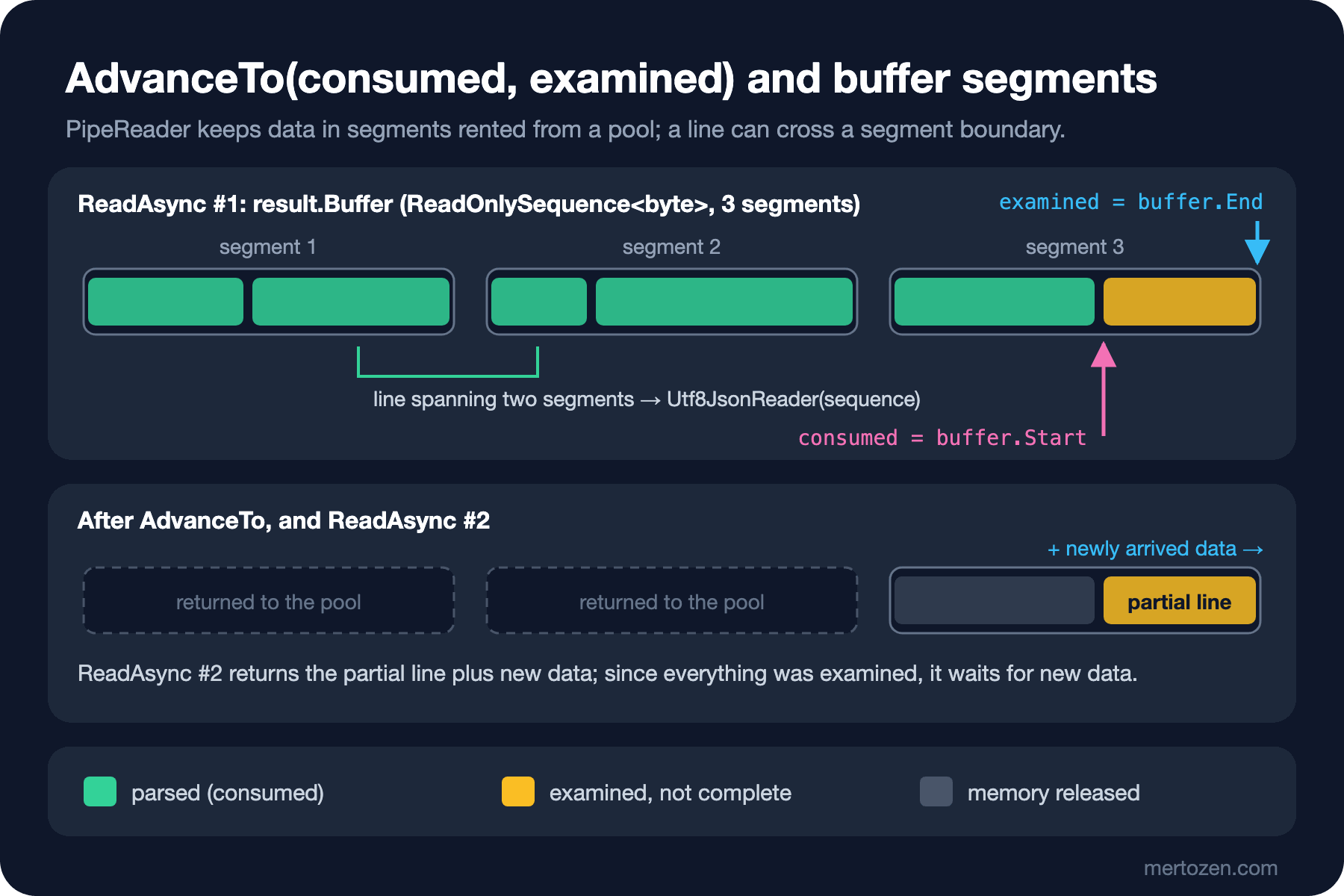
The most important line of the post is reader.AdvanceTo(buffer.Start, buffer.End). The first argument is consumed: you are done with the bytes before this point, and the pipe can return that memory to the pool. The second argument is examined: you looked at everything up to here and found nothing usable. Because TryReadLine moves buffer past the line after every successful line, when the loop ends buffer.Start points to the start of the partial line and buffer.End to the end of the data. The next ReadAsync returns the partial line together with newly arrived data. And because we marked everything up to the end as examined, it does not return until new data arrives; there is no busy loop looking at the same partial line over and over.
Getting these two arguments wrong is the most common Pipelines mistake, and the consequences are harsh. If you pass examined equal to consumed while no new line was found, ReadAsync returns immediately with the same data and you end up in a loop that burns the CPU. If you never move consumed forward, the pipe keeps holding the data and memory grows. Using the old ReadOnlySequence after AdvanceTo means reading memory that has gone back to the pool. The MaxLineLength check is there on purpose too: without it, a stream that never sends a line ending (a broken or malicious client) grows the pipe until OutOfMemoryException.
The last detail is result.IsCompleted. It becomes true when the writer has finished, but the buffer may still hold unprocessed data. Leaving the loop as soon as you see IsCompleted loses the last line; process the buffer first, then exit.
Backpressure: PauseWriterThreshold and ResumeWriterThreshold
If the writer is faster than the reader, data piles up in the pipe. The pipe limits this with two thresholds: when unread data exceeds PauseWriterThreshold, FlushAsync returns an incomplete ValueTask and the writer waits; once the reader consumes enough that the data drops below ResumeWriterThreshold, the writer continues. Two separate thresholds stop the writer from pausing and resuming every few bytes. We connected a fast producer and a slow consumer that waits 1 ms every 500 orders to the same pipe:
var pipe = new Pipe(new PipeOptions(pauseWriterThreshold: 64 * 1024, resumeWriterThreshold: 32 * 1024));

// A fast producer: 8 KB at a time, as fast as the pipe allows.
for (int offset = 0; offset < data.Length; offset += 8192)
{
    int size = Math.Min(8192, data.Length - offset);
    data.AsSpan(offset, size).CopyTo(pipe.Writer.GetSpan(size));
    pipe.Writer.Advance(size);
    Interlocked.Add(ref written, size);

    ValueTask<FlushResult> flush = pipe.Writer.FlushAsync();
    if (!flush.IsCompleted) pauses++;
    maxBuffered = Math.Max(maxBuffered, Interlocked.Read(ref written) - Interlocked.Read(ref consumed));
    await flush;
}
await pipe.Writer.CompleteAsync();
20,000 orders, 6,808,653 bytes
Writer paused 104 times, max buffered 65,963 bytes6.8 MB of data flowed through, but at most about 66 KB sat in the pipe at once; the writer was held back 104 times. Memory use was set by the thresholds, not by the producer's speed. To count consumed bytes, we wrapped the reader in a small PipeReader decorator that watches AdvanceTo; the code is in the repo.
The same model is inside ASP.NET Core. Kestrel also exposes the HTTP request body as a PipeReader through HttpRequest.BodyReader, and the response as a PipeWriter through HttpResponse.BodyWriter. You can call ReadWithPipeReaderAsync above unchanged with context.Request.BodyReader in a minimal API endpoint; if the client writes fast while your processing is slow, backpressure propagates all the way to the TCP connection. The details of file upload and download are in the File Upload and Download post of the ASP.NET Core Web API series.
From Pipe to Channel: Handing Orders to Workers
Parsing has to be done by a single reader; PipeReader is not thread-safe. The work done with the orders (reducing stock, summing revenue, writing to the database) can run in parallel, though. We connected the two with a bounded Channel<Order>: the parser writes with WriteAsync, three consumers read with ReadAllAsync.
var channel = Channel.CreateBounded<Order>(new BoundedChannelOptions(1_000)
{
    SingleWriter = true,
    FullMode = BoundedChannelFullMode.Wait
});

await using var file = new FileStream(path, FileMode.Open, FileAccess.Read, FileShare.Read, 0, FileOptions.Asynchronous);
long count = await NdjsonOrders.ReadWithPipeReaderAsync(PipeReader.Create(file),
    order => channel.Writer.WriteAsync(order));
channel.Writer.Complete();
await Task.WhenAll(consumers);
100,000 orders in 554 ms
Pending 17,803,934.30 TRY
Paid 17,872,047.00 TRY
Shipped 17,790,512.50 TRY
Delivered 17,814,535.30 TRY
Cancelled 17,744,557.60 TRYTwo backpressure chains run back to back here. If the consumers slow down, the channel fills at 1,000 orders and WriteAsync waits. While the parser waits, AdvanceTo is not called, the pipe fills, and the file read behind PipeReader.Create stops too. Memory use stays bounded end to end. That is also why we opened the FileStream with bufferSize: 0: PipeReader already manages its own buffers, there is no need for another 4 KB copy in between. The difference between bounded and unbounded channels and the FullMode options are in the Channels post of the C# Async series.
Measuring: StreamReader vs PipeReader
To answer the second question, we read a 10,000-order NDJSON from memory with BenchmarkDotNet. There are four scenarios: full parsing (JSON to Order) with both approaches, and splitting into lines only with both approaches.
[MemoryDiagnoser]
public class NdjsonBenchmarks
{
    [Benchmark(Baseline = true)]
    public Task<long> StreamReader() =>
        NdjsonOrders.ReadWithStreamReaderAsync(new MemoryStream(_data), Sum);

    [Benchmark]
    public Task<long> PipeReader() =>
        NdjsonOrders.ReadWithPipeReaderAsync(System.IO.Pipelines.PipeReader.Create(new MemoryStream(_data)), Sum);

    // StreamReaderLinesOnly and PipeReaderLinesOnly: no JSON, just counting lines.
}
| Method | Orders | Mean | Error | StdDev | Ratio | Gen0 | Gen1 | Allocated | Alloc Ratio |
|---------------------- |------- |-----------:|---------:|---------:|------:|----------:|--------:|-----------:|------------:|
| StreamReader | 10000 | 9,117.7 us | 29.64 us | 26.28 us | 1.00 | 2609.3750 | 15.6250 | 21875416 B | 1.000 |
| PipeReader | 10000 | 8,630.2 us | 48.50 us | 37.87 us | 0.95 | 1687.5000 | - | 14138080 B | 0.646 |
| StreamReaderLinesOnly | 10000 | 841.0 us | 7.57 us | 6.71 us | 0.09 | 926.7578 | 14.6484 | 7759448 B | 0.355 |
| PipeReaderLinesOnly | 10000 | 280.6 us | 2.50 us | 2.22 us | 0.03 | - | - | 560 B | 0.000 |The table gives an honest answer. For splitting into lines alone, the difference is huge: StreamReader allocates 7.7 MB and spends 841 µs, while PipeReader finishes in 281 µs with 560 bytes. But once building objects from JSON is involved, the total time drops by only 5 percent. The main cost is no longer finding the line; it is creating an Order, a List<OrderItem> and string properties from every line. The 35 percent drop in allocations is the line strings that are gone; the remaining 14 MB are the objects themselves.
So measure where the bottleneck is before moving to Pipelines. If you can process the parsed data without turning it into objects (read one field and sum it, filter, forward it somewhere as bytes), the gain is large. If you build an object graph from every line anyway, the gain is limited. The absolute numbers come from a developer machine; on your hardware they will differ, while the ratios stay similar. Setting up BenchmarkDotNet and reading its results is covered in the performance post of the Advanced C# series.
.NET 10: JsonSerializer Reads Straight from PipeReader
Before .NET 10, JsonSerializer supported PipeWriter on the write side, but on the read side you had to turn the PipeReader into a stream with AsStream() first. With .NET 10, DeserializeAsync and DeserializeAsyncEnumerable take a PipeReader directly. Combined with the topLevelValues: true parameter, you may not need your own parser for NDJSON at all:
var reader = PipeReader.Create(new MemoryStream(data));
await foreach (var order in JsonSerializer.DeserializeAsyncEnumerable<Order>(reader, topLevelValues: true))
{
    count++;
    total += order!.Total;
}
DeserializeAsyncEnumerable(PipeReader): 20,000 orders, 17,919,106.90 TRYtopLevelValues: true reads the stream not as a single JSON array but as JSON values one after another; the line endings in between count as whitespace. What our hand-written reader brings is control: a line length limit, the ability to skip a broken line and continue, error reports with line numbers. If you do not need those, the built-in API means less code. We will cover using DeserializeAsyncEnumerable with streams, and reading large JSON with constant memory, in detail in the System.Text.Json posts of this series. The lock contention improvement in .NET 11's Pipe is in the series' .NET 11 post.
In Production
When not to use it: small files, imports with a few thousand lines, a job that runs once a night. In those cases File.ReadLinesAsync or StreamReader is enough, easy to read and hard to get wrong. Pipelines belongs in high-volume network protocols, continuously flowing data and hot paths where allocation is a measured problem.
Always set a message size limit. Without MaxLineLength, a single client that never sends a line ending can fill the service's memory. When the limit is exceeded, close the connection or skip the line and count an error; never let it grow silently.
Always complete the reader and the writer. If CompleteAsync is not called, the pipe's segments do not go back to the pool. When exiting with an exception, report the error to the other side with CompleteAsync(exception), so that the writer can see FlushResult.IsCompleted and stop.
When measuring, look at the GC numbers. The Gen0 column in the table shows how many Gen0 collections happen per 1,000 operations; for PipeReaderLinesOnly it is zero. In a service under load, fewer GCs mean lower and steadier latency.
Common Pitfalls
Calling AdvanceTo with the wrong arguments. When you could not parse anything, pass buffer.End as examined; otherwise ReadAsync returns immediately with the same data and the loop burns the CPU. Call exactly one AdvanceTo after every ReadAsync; a finally block is the safest place for it.
Leaving without processing the buffer once you see IsCompleted. The writer may have completed together with the last data. Process the remaining lines first, then exit.
Using the ReadOnlySequence after AdvanceTo. If you hand a line to another task, copy it first or (as we did) turn it into an object; writing the sequence itself to a channel means sharing memory that has gone back to the pool.
Reading the same PipeReader from several tasks. The reader and the writer are not thread-safe. Let a single reader parse, and spread the work with a channel.
Switching without measuring. As the table shows, the gain in a parse that builds objects can be small. Write a benchmark with your own data before you make the code more complex.
A Small Experiment
★☆☆ In the split command, lower the bufferSize of StreamPipeReaderOptions to 512. Does the result change? Add a counter to ParseOrder that counts how often a line takes the Utf8JsonReader path, and compare 512 with 4096.
★★☆ Change ReadWithPipeReaderAsync so that, instead of stopping at a line with broken JSON, it records the error with the line number and continues. To test it, put a half line such as {"OrderNumber": in the middle of the stream.
★★★ Write a third method that, instead of full parsing, reads only Status and the UnitPrice/Quantity values inside Items with Utf8JsonReader and computes revenue without building objects, and add it to the benchmark. Which row do its time and allocation come close to?
So far we have always used JSON with default settings. The next post goes into the settings of System.Text.Json: JsonSerializerOptions.Web, naming policies, deserialization with required and constructors, .NET 10's Strict settings, why a duplicate property is a security risk, and polymorphism through the PaymentMethod hierarchy.