

Large Files and Memory-Mapped Files: Processing Gigabytes with Constant Memory
Processing a large file with constant memory is not enough, allocation has to go to zero too: on a 5 GB order log, File.ReadLines took 14.5 seconds with 54 MB of memory but 35 GB of allocation, while a rented buffer and a byte parser finished the same job in 2.5 seconds. We split the file into line-aligned offset ranges processed in parallel through a Channel and show with real measurements when memory-mapped files help and how they affect the working set.
Version note: The code in this post was built and run with .NET 10 and dotnet-counters 10.0.
Guess First
The order service of Bookstore, the online bookstore used as the shared example across this site's series, writes every order event to a log, one line each. By the end of the year the file is 5 GB, 101 million lines. Accounting wants daily revenue, and the first code written is this:
foreach (string line in File.ReadLines(path))
{
    string[] parts = line.Split(',');
    if (parts[2] is "Pending" or "Cancelled") continue;
    var day = DateOnly.ParseExact(parts[0].AsSpan(0, 10), "yyyy-MM-dd", CultureInfo.InvariantCulture);
    totals[day] = totals.GetValueOrDefault(day) + decimal.Parse(parts[3], CultureInfo.InvariantCulture);
}
Because File.ReadLines reads the file line by line, the process's memory stays constant. So how many bytes in total are allocated by the time this loop finishes: less than 5 GB, or more?
Second question: we do the same job by opening the file as a memory-mapped file. How many MB does the process's working set grow to?
Third: splitting the file into pieces and reading it with 4 workers takes 0.58 seconds. How many seconds does it take with 8 workers?
This post brings everything from the series' earlier posts together around one question: what do we do when a file does not fit in memory, or when it fits but we should not load it? The examples are in the Bookstore.IO.LargeFiles console app; the measurements use a Release build:
dotnet run -c Release --project src/Bookstore.IO.LargeFiles -- generate 5
dotnet run -c Release --project src/Bookstore.IO.LargeFiles -- revenue streamreader
101,214,575 lines, 5,000,000,009 bytes in 3.5 s
2026-01-01T00:00:00Z,BS-000000001,Cancelled,1427.79
2026-01-01T00:00:00Z,BS-000000002,Delivered,805.58
2026-01-01T00:00:00Z,BS-000000003,Paid,183.38The Constant-Memory Principle and the Cost of Allocation
The first rule of processing large files is that memory should be proportional to the largest piece being processed, not to the file size. File.ReadAllText and File.ReadAllLines break this rule; File.ReadLines does not. The result of the code above:
streamreader   14.45 s  allocated  35,461.7 MB  peak working set      54 MB  gen0  4445  gen2   0
  293 days, total 85,019,891,247.66 TRY, 2026-01-01: 290,294,127.20 TRY
The answer to the first question: 35 GB, seven times the file. The working set stayed at 54 MB, so the "constant memory" goal held; but every line produced a line string, four field strings and an array. Because .NET strings are UTF-16, a 49-byte line takes twice as much space in memory. All of these die in gen0, which is why there were 4,445 gen0 collections and no gen2 at all. Cheap, but not free: most of the 14 seconds goes into producing and collecting these objects.
To see this picture from outside a running process, you use dotnet-counters. We ran the same command while collecting counters; a sample from the middle of the run:
dotnet-counters collect --format csv -o counters.csv --refresh-interval 2 --counters System.Runtime -- dotnet bin/Release/net10.0/Bookstore.IO.LargeFiles.dll revenue streamreaderdotnet.gc.heap.total_allocated (By / 2 sec),Rate,5315120000
dotnet.gc.collections ({collection} / 2 sec)[gc.heap.generation=gen0],Rate,636
dotnet.gc.collections ({collection} / 2 sec)[gc.heap.generation=gen2],Rate,0
dotnet.gc.pause.time (s / 2 sec),Rate,0.036371000000000014
dotnet.process.memory.working_set (By),Metric,637173765.3 GB of allocation and 636 gen0 collections in two seconds, but a 64 MB working set. These lines explain why a job that looks like it "has no memory problem" eats CPU. Detailed use of dotnet-counters and the other diagnostic tools is in the Profiling and Diagnostics in .NET series.
The LOH and rented buffers
To get rid of the strings we will read the data as bytes in large chunks. But a large buffer has a trap too: objects of 85,000 bytes and above go to the LOH. The difference between allocating a new 1 MB array for each chunk and renting one from ArrayPool:
new byte[1 MB]  5,000 x:   75 ms, allocated 5,000 MB, gen2 collections 1666
ArrayPool.Rent  5,000 x:    3 ms, allocated     1 MB, gen2 collections 0
Every 1 MB array landed on the LOH, and 5,000 repetitions caused 1,666 gen2 collections. A gen2 collection scans the whole heap; in a real application with a large heap, each one is a noticeable pause. ArrayPool<byte>.Shared handed out the same buffer again and again. This is the large-file counterpart of what we did for CopyToAsync in the series' post on the Stream model.
One Thread, a Fixed Buffer, No Strings
The second approach reads the file in 1 MB chunks, parses the complete lines in each chunk as bytes, and moves the partial line at the end of the chunk to the start of the buffer to be completed by the next read:
byte[] buffer = ArrayPool<byte>.Shared.Rent(bufferSize);
try
{
    using var file = new FileStream(path, FileMode.Open, FileAccess.Read, FileShare.Read, bufferSize: 0, FileOptions.SequentialScan);
    int carry = 0, read;
    while ((read = file.Read(buffer, carry, buffer.Length - carry)) > 0)
    {
        int length = carry + read;
        int consumed = LineParser.AccumulateLines(buffer.AsSpan(0, length), cents);
        // Move the partial line to the start of the buffer.
        carry = length - consumed;
        buffer.AsSpan(consumed, carry).CopyTo(buffer);
    }
}
finally
{
    ArrayPool<byte>.Shared.Return(buffer);
}
bufferSize: 0 turns off FileStream's own internal buffer; since we already read large chunks, a second copy is unnecessary. FileOptions.SequentialScan tells the operating system the file will be read from start to end. The line parser creates no strings; it finds the fields from the positions of the commas, converts the date and the amount straight from bytes to numbers and keeps the daily totals in cents in a long[]:
public static void Accumulate(ReadOnlySpan<byte> line, long[] centsPerDay)
{
    int c1 = line.IndexOf((byte)',');
    int c2 = c1 + 1 + line[(c1 + 1)..].IndexOf((byte)',');
    int c3 = c2 + 1 + line[(c2 + 1)..].IndexOf((byte)',');
    ReadOnlySpan<byte> status = line[(c2 + 1)..c3];
    if (status.SequenceEqual("Pending"u8) || status.SequenceEqual("Cancelled"u8)) return;

    int year = Digits(line[..4]), month = Digits(line.Slice(5, 2)), day = Digits(line.Slice(8, 2));
    int dayIndex = new DateOnly(year, month, day).DayNumber - FirstDayNumber;
    centsPerDay[dayIndex] += ParseCents(line[(c3 + 1)..]);
}
chunked 2.47 s allocated 1.0 MB peak working set 43 MB gen0 0 gen2 0
293 days, total 85,019,891,247.66 TRY, 2026-01-01: 290,294,127.20 TRYThe same result, 5.8 times faster, 1 MB of allocation instead of 35 GB, and zero GCs. Using long cents is a deliberate choice: adding decimals is more expensive than adding longs, and for money with two decimals it is lossless. The parser has a price too: you have to know the format exactly. Does the amount always have two decimals, does the line always start with a UTC date in yyyy-MM-dd? Verify these assumptions on your own file, and add checks that reject a broken line rather than silently adding it up wrong. The rules of Span<T> and ref struct are in the Span post of the Advanced C# series.
Parallel Processing: Offset Ranges and a Channel
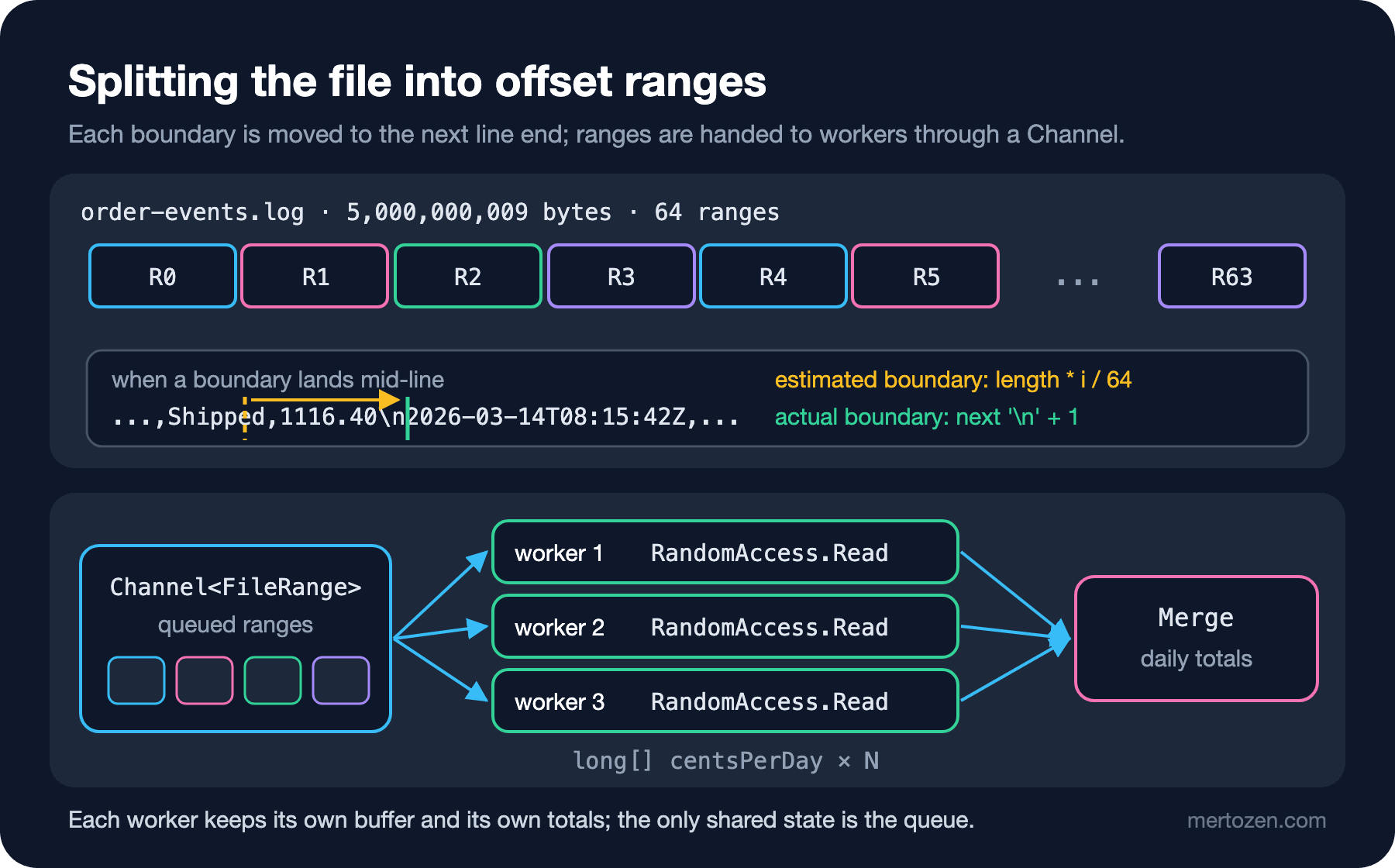
One thread parses 2 GB per second. To go faster we can split the file into pieces and spread them over several cores. The problem: an offset such as length * i / 64 almost always lands in the middle of a line. The fix is to find the first \n after each estimated boundary and move the boundary to just after it:
public static IReadOnlyList<FileRange> Split(SafeFileHandle handle, int count)
{
    long length = RandomAccess.GetLength(handle);
    var boundaries = new List<long> { 0 };
    Span<byte> probe = stackalloc byte[256];
    for (int i = 1; i < count; i++)
    {
        long guess = length * i / count;
        int read = RandomAccess.Read(handle, probe, guess);
        int newline = probe[..read].IndexOf((byte)'\n');
        long boundary = guess + newline + 1;
        if (boundary > boundaries[^1]) boundaries.Add(boundary);
    }
    boundaries.Add(length);
    return [.. boundaries.Zip(boundaries.Skip(1), (start, end) => new FileRange(start, end))];
}
A 256-byte probe is enough as long as it is longer than the longest line; for a file whose line length is unknown you need to grow the probe or keep reading in a loop. We keep more ranges (64) than workers and put them in a Channel; each worker takes the next range from the queue when it finishes one. That way, even if one range is processed slowly, the other workers do not sit idle. Each worker uses RandomAccess.Read, which we saw in the series' FileStream post: because it is offset-based, the workers can share the same handle, and nobody changes Position:
long[][] partials = await Task.WhenAll(Enumerable.Range(0, workers).Select(_ => Task.Run(async () =>
{
    var cents = new long[LineParser.Days];
    byte[] buffer = ArrayPool<byte>.Shared.Rent(1 << 20);
    try
    {
        await foreach (FileRange range in queue.Reader.ReadAllAsync())
        {
            long offset = range.Start;
            int carry = 0;
            while (offset < range.End)
            {
                int toRead = (int)Math.Min(buffer.Length - carry, range.End - offset);
                int read = RandomAccess.Read(handle, buffer.AsSpan(carry, toRead), offset);
                offset += read;
                int length = carry + read;
                int consumed = LineParser.AccumulateLines(buffer.AsSpan(0, length), cents);
                carry = length - consumed;
                buffer.AsSpan(consumed, carry).CopyTo(buffer);
            }
        }
    }
    finally
    {
        ArrayPool<byte>.Shared.Return(buffer);
    }
    return cents;
})));
The only thing shared between the workers is the queue. Each worker keeps its own buffer and its own long[]; the results are combined at the very end. No locks, no Interlocked. The details of Channels are in the Channels post of the C# Async series.
MemoryMappedFile: Mapping the File into Memory
A memory-mapped file places the file's contents into the process's virtual address space: the file's three billionth byte is three billion past a pointer. Reading is not done through a system call; the first time you touch a page, the operating system brings it in from the file through a page fault. The data is not copied into a buffer; you see the pages in the page cache directly. There are two kinds: persisted maps tied to a file on disk (CreateFromFile) and non-persisted maps without a file, used for memory shared between processes (CreateNew). There are two kinds of views for reading: CreateViewStream for sequential access and CreateViewAccessor for random access. The fastest way is to take the accessor's pointer and build a span over it:
using var map = MemoryMappedFile.CreateFromFile(path, FileMode.Open, mapName: null, capacity: 0, MemoryMappedFileAccess.Read);
using MemoryMappedViewAccessor view = map.CreateViewAccessor(0, 0, MemoryMappedFileAccess.Read);
byte* basePointer = null;
view.SafeMemoryMappedViewHandle.AcquirePointer(ref basePointer);
try
{
    byte* start = basePointer + view.PointerOffset;
    var partials = new long[ranges.Count][];
    Parallel.For(0, ranges.Count, new ParallelOptions { MaxDegreeOfParallelism = workers }, i =>
    {
        FileRange range = ranges[i];
        var cents = new long[LineParser.Days];
        var span = new ReadOnlySpan<byte>(start + range.Start, checked((int)(range.End - range.Start)));
        LineParser.AccumulateLines(span, cents);
        partials[i] = cents;
    });
    return Merge(partials);
}
finally
{
    view.SafeMemoryMappedViewHandle.ReleasePointer();
}
The code is unsafe, which is why AllowUnsafeBlocks is on in the project. Because a span's length is an int, a single span can cover at most 2 GB; splitting the 5 GB file into ranges solves that limit as well. Do not forget to add PointerOffset: the view is aligned to a page boundary, so it can start a little before the offset you asked for. Always pair AcquirePointer with ReleasePointer.
Measurement: Four Approaches
We ran the four approaches on a developer machine, in separate processes, on the same 5 GB file. All of them gave the same result (293 days, 85,019,891,247.66 TRY):
streamreader   14.45 s  allocated  35,461.7 MB  peak working set      54 MB  gen0  4445  gen2   0
chunked         2.47 s  allocated       1.0 MB  peak working set      43 MB  gen0     0  gen2   0
parallel x1     2.31 s  allocated       1.1 MB  peak working set      46 MB  gen0     0  gen2   0
parallel x2     0.95 s  allocated       2.1 MB  peak working set      47 MB  gen0     0  gen2   0
parallel x4     0.58 s  allocated       4.1 MB  peak working set      50 MB  gen0     1  gen2   1
parallel x8     0.58 s  allocated       8.1 MB  peak working set      54 MB  gen0     1  gen2   1
mmap x1         2.16 s  allocated       0.2 MB  peak working set   4,811 MB  gen0     0  gen2   0
mmap x2         0.94 s  allocated       0.2 MB  peak working set   4,727 MB  gen0     0  gen2   0
mmap x4         0.48 s  allocated       0.2 MB  peak working set   4,785 MB  gen0     0  gen2   0
mmap x8         0.37 s  allocated       0.2 MB  peak working set   4,701 MB  gen0     0  gen2   0
A warning first: these numbers were taken while the file was in the operating system's page cache. We read the file once before the measurements; reading 5 GB in 0.58 seconds means 8.6 GB per second, and that speed comes from RAM, not from the disk. If the file is not in the cache, the speed of the disk dominates the first read. A practical way to tell whether the bottleneck is the disk or the CPU: run the same mode twice in a row. The difference between the first and second run is the disk's share; if the second run is already slow on one thread, the work is on the CPU and parallelism helps. On a server whose disk reads 500 MB per second while one thread can parse 2 GB per second, 8 workers gain nothing.
The answer to the third question is in the table: 8 workers took as long as 4. Past this point the bottleneck is not parsing but most likely RandomAccess.Read copying the data from the page cache into our buffer on every read. The memory-mapped version has no such copy and got down to 0.37 seconds with 8 workers. On a single thread, though, the difference is small: mmap x1 2.16, chunked 2.47 seconds.
The answer to the second question is in the last column: the working set of the memory-mapped versions is 4.7 GB. Every page touched counts toward the process's working set. Because they come from the file, the operating system can drop them when memory gets tight, so this is not "a 4.7 GB leak". But it matters for the memory limit and the monitoring alerts of a job running in a container: if the same job shows 43 MB with chunked and 4.7 GB with mmap and nobody knows why, an alert fires.
Random access: where mmap really shines
In a single sequential pass, the difference a memory-mapped file makes is limited. Its real gain is in work that goes back to different places in the same file again and again: finding a record through an index, a binary search, scanning the same data several times. We read 64 bytes from random places in the file a million times:
randomaccess 1,000,000 random reads in 465 ms (465 ns/read), checksum 59100920
mmap         1,000,000 random reads in 187 ms (187 ns/read), checksum 59100920
RandomAccess.Read makes a system call on every read; with mmap, once a page is in memory, a read is an ordinary memory access. In this measurement the difference is 2.5 times, and if the file were not in the cache, both would go to the disk and the gap would narrow.
Sharing between processes, and limits
Giving a map a name (CreateNew("bookstore-orders", ...), OpenExisting) so that two processes see the same memory only works on Windows; on Linux and macOS a named map is rejected with PlatformNotSupportedException: Named maps are not supported. On those platforms, two processes opening the same file on disk with CreateFromFile each share the same pages. In a 32-bit process the address space is small (Microsoft's documentation gives 2 GB as the space available for mapping), so you cannot open a 5 GB file with a single view; you have to create views piece by piece. On 64-bit this limit does not matter in practice.
In Production
Measure first, then parallelize. A single-threaded byte parser is enough in most cases: 5 GB in 2.5 seconds. Parallelism only helps if the CPU is the bottleneck and the disk can deliver that speed; on a server where the disk is the bottleneck it only adds complexity.
Keep intermediate totals private to each worker. Writing to a shared Dictionary under a lock spends all the gain of parallelism on the lock. Let each worker produce its own result and combine them at the end.
Validate the format. Fast parsers assume the format. Comparing the line count, total bytes or a checksum with a summary line at the end of the file catches a broken or truncated file before it produces a wrong report.
Make sure a memory-mapped file will not change. If another process truncates the file while you are reading it, touching a page of the map that is no longer in the file can kill the process with a signal on Linux. Map only files that are finished and will not change; not the last part of a log that is still being written.
Read the working set correctly. The working set of a service that uses mmap includes file pages. Show the GC heap and the working set separately on the monitoring dashboard.
Common Pitfalls
Opening a large file with File.ReadAllLines or ReadAllText. A 5 GB file grows past 10 GB as UTF-16 strings; the process either gets an OutOfMemoryException or pushes the machine into swap.
Ignoring allocation because "memory is constant". File.ReadLines kept the working set constant but allocated 35 GB. The work the GC does is CPU time.
Allocating a large buffer every time. Every array over 85,000 bytes lands on the LOH; a new byte[1 MB] inside a loop triggers gen2 collections. Use ArrayPool and return the buffer in finally.
Forgetting the line boundary when splitting. A line cut in the middle is parsed incorrectly by both workers, or not counted at all. Align the boundary to the next line end and test it by comparing the total line count with the single-threaded result.
Assuming mmap is always fast. In a single sequential pass the difference was small; the real gain is in random and repeated access. Measure with your own workload.
A Small Experiment
★☆☆ Run the chunked mode with 64 KB, 1 MB and 16 MB buffers. Where does the time level off? Does renting a 16 MB buffer from ArrayPool<byte>.Shared still come from the pool?
★★☆ Add validation to LineParser: check that the amount has exactly two decimals and that the date is valid, and count the bad lines. Add three bad lines to the log by hand and verify that the parallel and chunked modes report the same error count. How much does the validation add to the time?
★★★ In addition to daily revenue, produce a top 10 by customer (this log has no customer; you can use the last digit of the order number as the customer). What did you have to change when combining the per-worker results? Compare the time with a version that uses a single shared ConcurrentDictionary.
That completes the series' .NET 10 block: streams, files, Pipelines, JSON, XML, CSV, archives and large files. In the next post we look back: what changed in I/O and serialization from .NET 6 to .NET 10, with a short before-and-after example for each item.