

The Stream Model in .NET: Short Reads, Decorator Chains and leaveOpen
Stream.Read returns the bytes available right now, not the count you asked for, so fixed-size data needs ReadExactly. We write and read Bookstore's order export through a FileStream, GZipStream and CryptoStream chain and show dispose order, leaveOpen, copying with ArrayPool and writing your own Stream, all with real output.
Version note: The code in this post was built and run with .NET 10.
Guess First
An export file starts with a fixed 16-byte header: a 4-byte magic value, a 2-byte version, an 8-byte record count and 2 bytes of flags. You read the file from the network and write this:
var header = new byte[16];
stream.Read(header, 0, header.Length);
long count = BinaryPrimitives.ReadInt64LittleEndian(header.AsSpan(6));
Everything passes in tests. In production the record count is occasionally nonsense. Why?
Second question: the code that compresses the order export with GZipStream exits early because of a bug, without disposing the stream. The next day you open the same file with .NET's GZipStream. Do you get an exception?
Third: you built a GZipStream on top of a MemoryStream, the using block has ended, and now you want to set ms.Position = 0 and read the result. What happens?
All three answers live in the contract of the Stream class. This series walks through files, streams and serialization in .NET in order, and the first stop is the abstraction everything else is built on.
Every example in this post is a command in the Bookstore.IO.Streams console app in the series' code repository. The .NET 10 SDK is all you need to run it; the command names are capabilities, short-read, export, truncated, leave-open, counting and memory:
dotnet run --project src/Bookstore.IO.Streams -- capabilities
dotnet run --project src/Bookstore.IO.Streams -- short-read
The Stream Contract: the Can* Properties, Position and Length
We covered the basics such as File.ReadAllText, Path.Combine and Encoding in the File and Console post of the C# Fundamentals series. Here we go one level down. A Stream is an abstraction over a sequence of bytes, but not every stream can do everything. Three properties tell you what it can do: CanRead, CanWrite, CanSeek. Our examples come from Bookstore, the online bookstore used as the shared example across this site's series. First, the streams we have at hand:
Stream[] streams =
[
    new MemoryStream(),
    file,
    new BufferedStream(file),
    new GZipStream(new MemoryStream(), CompressionLevel.Fastest),
    client.GetStream() // the NetworkStream from a TcpClient
];

foreach (var s in streams)
{
    string length;
    try { length = s.Length.ToString(); }
    catch (NotSupportedException) { length = "NotSupportedException"; }
    Console.WriteLine($"{s.GetType().Name,-16} {s.CanRead,-8} {s.CanWrite,-9} {s.CanSeek,-8} {length}");
}
Stream CanRead CanWrite CanSeek Length
MemoryStream True True True 0
FileStream True True True 0
BufferedStream True True True 0
GZipStream False True False NotSupportedException
NetworkStream True True False NotSupportedExceptionA GZipStream opened for compression is write-only: you cannot read it, seek in it, and it has no length. NetworkStream works in both directions but still cannot seek. The rule in short: when CanSeek is false, Length, Position, Seek and SetLength throw NotSupportedException. Any code that starts with "get the stream's length and allocate an array that big" breaks the day it reads from the network or from compressed data.
So when a method takes a Stream parameter, it should check its needs up front. For an operation that needs seeking, check if (!stream.CanSeek) and either throw a meaningful exception or copy the data to a temporary file and work with that.
Read Can Return Fewer Bytes: ReadExactly and ReadAtLeast
Here is the answer to the first question. Read(buffer, 0, 16) does not mean "read 16 bytes"; it means "read at most 16 bytes and tell me how many you read". The contract only guarantees this: if the stream has not ended it returns at least 1 byte, and when it has ended it returns 0. Let's show it with a real TCP connection. The sender writes the 16-byte header in two pieces, waiting 50 ms in between:
byte[] header = CreateHeader(120_000);
for (int round = 0; round < 2; round++)
{
    await ns.WriteAsync(header.AsMemory(0, 7));
    await Task.Delay(50);
    await ns.WriteAsync(header.AsMemory(7));
}
await ns.WriteAsync(header.AsMemory(0, 10)); // truncated third header
The reader first tries the classic Read, then ReadExactly and ReadAtLeast, which arrived in .NET 7:
int n = stream.Read(buffer, 0, buffer.Length);
Console.WriteLine($"Read returned {n} of {buffer.Length} bytes");
stream.ReadExactly(buffer, n, buffer.Length - n); // complete the first header

stream.ReadExactly(buffer);
long count = BinaryPrimitives.ReadInt64LittleEndian(buffer.AsSpan(6));
Console.WriteLine($"ReadExactly: magic={Encoding.ASCII.GetString(buffer, 0, 4)}, records={count}");

await sender; // the sender has closed the connection

int got = stream.ReadAtLeast(buffer, buffer.Length, throwOnEndOfStream: false);
Console.WriteLine($"ReadAtLeast(throwOnEndOfStream: false) returned {got}");

try
{
    stream.ReadExactly(buffer);
}
catch (EndOfStreamException ex)
{
    Console.WriteLine($"{ex.GetType().Name}: {ex.Message}");
}
Read returned 7 of 16 bytes
ReadExactly: magic=BKEX, records=120000
ReadAtLeast(throwOnEndOfStream: false) returned 10
EndOfStreamException: Unable to read beyond the end of the stream.Read returned the 7 bytes that had arrived at that moment. The rest of the header stayed as zeros in the buffer, so the record count would have been read wrong; in a test the data arrives in one piece, so you would never have seen it. ReadExactly keeps reading until the requested count is filled and throws EndOfStreamException if the stream ends early. ReadAtLeast says "at least this many"; with throwOnEndOfStream: false it returns whatever it could read instead of throwing when the stream ends. For the truncated last header it returned 10 bytes.
This is not only about networks. Since .NET 6, GZipStream, DeflateStream and CryptoStream no longer wait until the requested buffer is full either; they return as many bytes as they can produce at that moment. Microsoft announced this as a breaking change. Code ported from .NET Framework that ignores the return value of Read can break on compressed files for exactly this reason. If you read a fixed-size structure, use ReadExactly, or ReadExactlyAsync in async code; when the length is not known, loop on the return value.
The good news is that the compiler now catches this. Compile the code from the start of the post against a NetworkStream with the .NET 10 SDK and the CA2022 analyzer warns by default:
warning CA2022: Avoid inexact read with 'System.Net.Sockets.NetworkStream.Read(byte[], int, int)'Do not suppress this warning; with TreatWarningsAsErrors on, it stops the build, which is exactly what we want.
The Decorator Chain: FileStream, GZipStream and CryptoStream
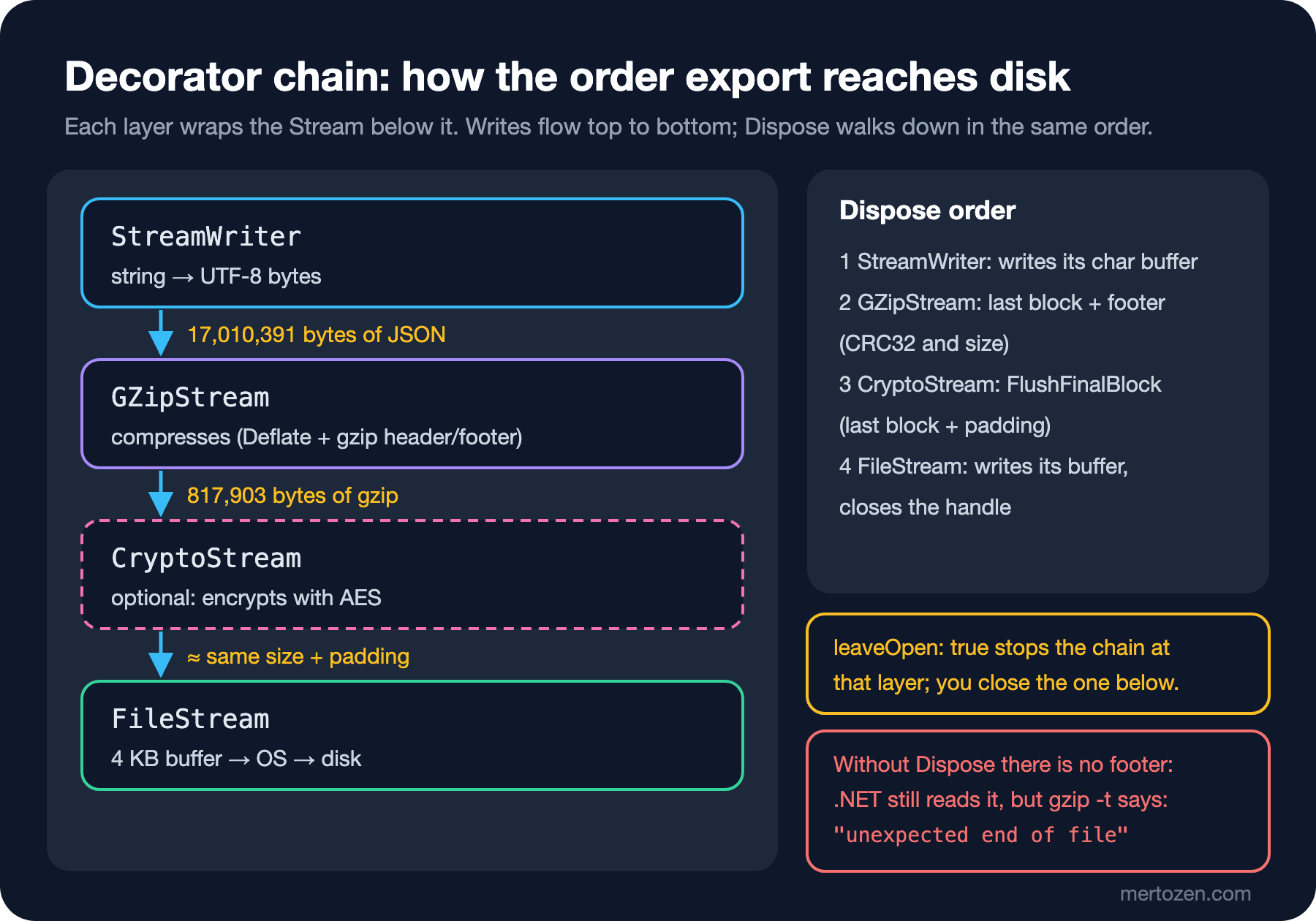
GZipStream does not write anywhere by itself; it wraps another stream it receives in its constructor. CryptoStream, BufferedStream and StreamWriter work the same way. This is the best-known .NET example of the structure we described in the Decorator Pattern post of the Design Patterns series: each layer adds a behavior to the stream below and still looks like a Stream from the outside. Bookstore's monthly order export is written through this chain, one JSON line per order:
public static async Task WriteAsync(string path, IEnumerable<Order> orders, CancellationToken ct = default)
{
    await using var file = new FileStream(path, FileMode.Create, FileAccess.Write, FileShare.None,
        bufferSize: 4096, useAsync: true);
    await using var gzip = new GZipStream(file, CompressionLevel.Optimal);
    await using var writer = new StreamWriter(gzip, new UTF8Encoding(encoderShouldEmitUTF8Identifier: false));

    foreach (var order in orders)
    {
        await writer.WriteLineAsync(JsonSerializer.Serialize(order).AsMemory(), ct);
    }
}

public static async IAsyncEnumerable<Order> ReadAsync(string path,
    [EnumeratorCancellation] CancellationToken ct = default)
{
    await using var file = new FileStream(path, FileMode.Open, FileAccess.Read, FileShare.Read,
        bufferSize: 4096, useAsync: true);
    await using var gzip = new GZipStream(file, CompressionMode.Decompress);
    using var reader = new StreamReader(gzip, Encoding.UTF8);

    while (await reader.ReadLineAsync(ct) is { } line)
    {
        yield return JsonSerializer.Deserialize<Order>(line)!;
    }
}
The read side is the same chain in reverse. Writing 100,000 orders and reading them back:
Written: 1,633,057 bytes in 319 ms
Read back: 100,000 orders, total 89,025,586.70 TRY in 395 ms
Expected:  100,000 orders, total 89,025,586.70 TRY
The sample data is very repetitive, so the compression ratio is high; real data compresses less. The important part is that no layer of the chain ever holds the whole file in memory. The details of IAsyncEnumerable and await foreach on the async read side are in the C# Async series.
Once you add encryption to the chain, order matters. Compression works by finding repeated bytes and shortening them; well-encrypted data looks random and has no repetition. We wrote the same orders in both orders and counted the bytes that came out:
// writer -> gzip -> crypto -> target
var crypto = new CryptoStream(target, aes.CreateEncryptor(), CryptoStreamMode.Write);
top = new GZipStream(crypto, CompressionLevel.Optimal);

// writer -> crypto -> gzip -> target
var gzip = new GZipStream(target, CompressionLevel.Optimal, leaveOpen: true);
top = new CryptoStream(gzip, aes.CreateEncryptor(), CryptoStreamMode.Write);
gzip -> AES: 1,633,072 bytes
AES -> gzip: 34,002,279 bytesCompress then encrypt, and the file is 1.6 MB; the other way round it is 34 MB, larger than the raw JSON. The rule is simple: compress first, then encrypt. Key management and the choice of cipher mode are not the topic of this post; the AES example is here only to show the order of the chain.
Dispose Order and leaveOpen
By default every layer in the chain disposes the stream below it when it is disposed. When StreamWriter closes, it first writes its own char buffer, then closes the GZipStream. GZipStream writes the last compressed block and the gzip footer (CRC32 and the original size), then closes the FileStream. Let's see what happens when a step of that sequence is skipped. We compressed 2,000 orders into a MemoryStream and looked at the byte count at each stage:
var ms = new MemoryStream();
var gzip = new GZipStream(ms, CompressionLevel.Optimal);
gzip.Write(payload);
byte[] notFlushed = ms.ToArray();
gzip.Flush();
byte[] flushedOnly = ms.ToArray();
gzip.Dispose();
Without Flush/Dispose: 30,671 bytes in MemoryStream
After Flush: 33,088 bytes
After Dispose: 33,098 bytes
not flushed: 624,660 of 675,471 bytes, no exception
flushed, not disposed: 675,471 of 675,471 bytes, no exception
disposed: 675,471 of 675,471 bytes, no exceptionThe last block of the stream that was never disposed was never written: only 624,660 of the 675,471 bytes come back. The bad part is that in our test .NET 10's GZipStream did not notice; it returned the incomplete data without throwing. When we wrote the same bytes to files and tested them with gzip -t, both broken files were caught:
gzip: not-flushed.gz: unexpected end of file
gzip: flushed.gz: unexpected end of file
Flush writes all the data but not the footer; .NET reads such a file, while gzip on Linux, Python's gzip module or whatever tool accounting uses rejects it. "It opens in my own test" does not prove the file is intact. Guarantee the dispose order at the end of an export and, if you can, store the record count or a checksum separately.
Sometimes you do not want the underlying stream to close. The most common case is MemoryStream: you finish compressing and want to read the result.
var ms = new MemoryStream();
using (var gzip = new GZipStream(ms, CompressionLevel.Fastest))
{
    gzip.Write(data);
}
ms.Position = 0; // ObjectDisposedException

var ms2 = new MemoryStream();
using (var gzip = new GZipStream(ms2, CompressionLevel.Fastest, leaveOpen: true))
{
    gzip.Write(data);
}
ms2.Position = 0; // fine
leaveOpen: false -> ObjectDisposedException: Cannot access a closed Stream.
leaveOpen: true -> 41 bytes, Position reset to 0leaveOpen: true cuts the chain at that layer: GZipStream writes its footer but leaves ms2 alone, and closing it is now your job. Every wrapper has this parameter: StreamWriter, StreamReader, CryptoStream, BinaryWriter and so on. One small detail: MemoryStream.ToArray() still works after disposal, but Position, Read and Write do not.
CopyToAsync, Buffer Size and ArrayPool
The shortest way to move one stream into another is CopyToAsync. The default buffer size is 81,920 bytes; for seekable streams .NET caps it at the number of remaining bytes, so a 2 KB file does not get an 80 KB buffer. The reason for 81,920 is that arrays above 85,000 bytes land on the Large Object Heap, and a comment in the runtime source says so too.
If you need to do something during the copy, such as counting lines, computing a hash or reporting progress, you write the loop yourself. Then rent the buffer from ArrayPool<byte>.Shared instead of allocating it with new every time:
public static async Task<long> CopyWithPooledBufferAsync(Stream source, Stream destination,
    int bufferSize = 81_920, CancellationToken ct = default)
{
    byte[] buffer = ArrayPool<byte>.Shared.Rent(bufferSize);
    long total = 0;
    try
    {
        int n;
        while ((n = await source.ReadAsync(buffer.AsMemory(0, bufferSize), ct)) > 0)
        {
            await destination.WriteAsync(buffer.AsMemory(0, n), ct);
            total += n;
        }
    }
    finally
    {
        ArrayPool<byte>.Shared.Return(buffer);
    }
    return total;
}
ArrayPool.Rent(81920) returned 131,072 bytes
Copied 817,903 bytes with a pooled bufferRent can return a larger array than requested; we asked for 81,920 and got 131,072. That is why the loop uses bufferSize rather than buffer.Length, and always writes exactly n bytes. Putting Return in finally is also required; if you don't give the array back on an exception, the pool cannot do its job. The rules of Memory<byte> and Span<byte> are covered in the Span post of the Advanced C# series.
Writing Your Own Stream: CountingStream
How did we measure the compression ratios above? By adding a small decorator to the chain that counts the bytes passing through it:
public sealed class CountingStream(Stream inner, bool leaveOpen = false) : Stream
{
    public long BytesRead { get; private set; }
    public long BytesWritten { get; private set; }

    public override bool CanRead => inner.CanRead;
    public override bool CanWrite => inner.CanWrite;
    public override bool CanSeek => false;

    public override long Length => throw new NotSupportedException();
    public override long Position
    {
        get => throw new NotSupportedException();
        set => throw new NotSupportedException();
    }

    public override int Read(byte[] buffer, int offset, int count) => Read(buffer.AsSpan(offset, count));

    public override int Read(Span<byte> buffer)
    {
        int n = inner.Read(buffer);
        BytesRead += n;
        return n;
    }

    public override Task<int> ReadAsync(byte[] buffer, int offset, int count, CancellationToken ct) =>
        ReadAsync(buffer.AsMemory(offset, count), ct).AsTask();

    public override async ValueTask<int> ReadAsync(Memory<byte> buffer, CancellationToken ct = default)
    {
        int n = await inner.ReadAsync(buffer, ct).ConfigureAwait(false);
        BytesRead += n;
        return n;
    }

    // Write, Write(ReadOnlySpan), WriteAsync(byte[]) and WriteAsync(ReadOnlyMemory) do the same:
    // write to inner and increase BytesWritten.

    public override void Flush() => inner.Flush();
    public override Task FlushAsync(CancellationToken ct) => inner.FlushAsync(ct);

    public override long Seek(long offset, SeekOrigin origin) => throw new NotSupportedException();
    public override void SetLength(long value) => throw new NotSupportedException();

    private bool _disposed;

    protected override void Dispose(bool disposing)
    {
        if (disposing && !_disposed)
        {
            _disposed = true;
            if (!leaveOpen)
            {
                inner.Dispose();
            }
        }
        base.Dispose(disposing);
    }

    public override async ValueTask DisposeAsync()
    {
        if (!_disposed)
        {
            _disposed = true;
            if (!leaveOpen)
            {
                await inner.DisposeAsync().ConfigureAwait(false);
            }
        }
        await base.DisposeAsync().ConfigureAwait(false);
    }
}
When you derive from Stream, the compiler requires these abstract members: the three Can* properties, Length, Position, Flush, Read(byte[], int, int), Write(byte[], int, int), Seek and SetLength. If you write only those, the stream works, but slowly. The base class's Read(Span<byte>) rents an array from ArrayPool, calls your array-based Read and copies the result. ReadAsync(Memory<byte>) falls back to the array-based overload, which runs your synchronous Read on the thread pool. So a call that looks async actually blocks a thread. Always override the span and memory overloads together with the async ones, and route the array overloads to them.
The Can* properties also need to be honest. CountingStream says plainly that it cannot seek, and methods like CopyToAsync behave according to that. Placed in the chain, the measurement came out like this:
var file = new FileStream(path, FileMode.Create, FileAccess.Write, FileShare.None, 4096, useAsync: true);
var compressed = new CountingStream(file);
var gzip = new GZipStream(compressed, CompressionLevel.Optimal);
var raw = new CountingStream(gzip);
JSON bytes into gzip: 17,010,391
gzip bytes into file: 817,903
File length on disk: 817,903In Production
The most expensive stream mistake is writing everything into a MemoryStream to make the job easier. We wrote 200,000 orders first into a MemoryStream, then straight to a file, and measured with GC.GetTotalAllocatedBytes:
MemoryStream: Length 68,001,648, Capacity 134,217,728, allocated 487,690,760 bytes
FileStream:   allocated 223,744,736 bytes
For 68 MB of data, MemoryStream holds a 128 MB array; because capacity doubles every time it fills, arrays of 64, 32 and 16 MB were also allocated and thrown away along the way. The 264 MB difference between the two lines is that growth. The 224 MB on the file side comes from the JSON string built for each order; we will cut that down in the System.Text.Json posts of this series by serializing straight to the stream. And since MemoryStream is built on a byte[], it has an upper limit of about 2 GB. You cannot collect a 5 GB export in memory; connect the chain directly to the file or the response.
When measuring, watch two things: the process's working set and how often the GC runs. We will cover processing large files with constant memory, and how to monitor it, in detail in the large files post of this series.
Think about the failure case too. If the export is interrupted halfway by an exception, the await using blocks still run and the gzip footer is written; you are left with a file that looks valid but is missing records. That is why an export should be written under a temporary name first and moved to its real name only once it finishes successfully. We will see this atomic write technique in the next post.
Common Pitfalls
Ignoring the return value of Read. In tests the data always arrives in one piece, so the bug stays hidden; it shows up in production once network latency or compressed data is involved. Use ReadExactly for fixed lengths and a loop on the return value for everything else.
Using the bytes before the compression stream is disposed. Calling ms.ToArray() inside the using block is the most common form. Make sure the GZipStream is closed before you take the result; leaveOpen: true exists for exactly this.
Owning a layer of the chain twice. Opening both the StreamWriter and the FileStream below it with separate using statements is usually harmless, because the second dispose does nothing. But if you close them in the wrong order (the FileStream first), the StreamWriter tries to write its buffer to a closed stream and you get an exception.
Using Length or Position on a stream that cannot seek. The stream of an uploaded file, GZipStream and NetworkStream do not support them. Check CanSeek first.
Writing only the abstract members in your own stream. It works, but every async call blocks a thread and every span call makes an extra copy.
A Small Experiment
★☆☆ Change the sender in the ShortReadAsync example so it writes the header in 16 separate pieces, waiting 10 ms after each byte. How many bytes does Read return, and does the ReadExactly result change?
★★☆ Add a feature to CountingStream that computes SHA-256 over the bytes passing through (you can use IncrementalHash). Compute the hash while writing the export, compute it again while reading, and compare; delete the last 100 bytes of the file and see the difference.
★★★ Put this post's 16-byte BKEX header at the start of the export: to write the record count, first write the uncompressed header with zeros, and once the export finishes, seek to byte 6 of the FileStream and write the real count. Why is this impossible without GZipStream's leaveOpen parameter?
In this post we always opened FileStream with the same parameters. The next post looks at what those parameters do: FileStreamOptions, the difference between real async I/O on Windows and Linux, offset-based reads with RandomAccess, and atomic replacement for writing files that never end up half-written.