

Window Functions 1: OVER, PARTITION BY, ROW_NUMBER, RANK and Top-N per Group

A window function computes like GROUP BY but does not collapse rows; it writes the result next to each row. We show OVER and PARTITION BY, how ROW_NUMBER, RANK, DENSE_RANK and NTILE differ on ties, why they cannot appear in WHERE, top-N per group with a CTE, the tie decision, and safe duplicate removal with ROW_NUMBER on Bookstore data with real output.
Version note: The SQL (Structured Query Language) examples in this post were run on SQL Server 2025 (17.0, CU10 (Cumulative Update 10)) against the series' Bookstore database.
Guess First
We sort the nine books in the Programming category by price and number them with three different functions. Three books sell for 1150.00, two for 950.00 and two for 890.00 TL (Turkish lira). Which numbers does Clean Code get?
SELECT title, list_price,
       ROW_NUMBER() OVER (ORDER BY list_price DESC) AS row_num,
       RANK()       OVER (ORDER BY list_price DESC) AS rnk,
       DENSE_RANK() OVER (ORDER BY list_price DESC) AS dense_rnk
FROM dbo.books
WHERE category_id = 11
ORDER BY list_price DESC, row_num;
The answer:
title                                             list_price row_num rnk dense_rnk
------------------------------------------------- ---------- ------- --- ---------
Design Patterns                                      1450.00       1   1         1
Structure and Interpretation of Computer Programs    1250.00       2   2         2
Code Complete                                        1150.00       3   3         3
The Pragmatic Programmer                             1150.00       4   3         3
Refactoring                                          1150.00       5   3         3
The C Programming Language                            950.00       6   6         4
Domain-Driven Design                                  950.00       7   6         4
The Mythical Man-Month                                890.00       8   8         5
Clean Code                                            890.00       9   8         5
Same ordering, three different numbers: ROW_NUMBER 9, RANK 8, DENSE_RANK 5. All three functions answer the same question, "where does this row stand in the ordering?", but they treat ties differently. Notice also that the order between the ROW_NUMBER values of equally priced books (Code Complete 3, The Pragmatic Programmer 4) rests on nothing; on the next run they may swap places. This post is the first half of window functions: OVER, PARTITION BY, the ranking functions and their most common use, top-N per group.
The Difference from GROUP BY: Rows Do Not Disappear
In post 10 of this series we saw that GROUP BY collapses rows into groups: four Dystopian books become one row and you lose the titles. A window function does the same calculation but writes the result next to every row. The OVER clause tells the function which set of rows (the window) to look at:
SELECT b.category_id, b.title, b.list_price,
       COUNT(*)          OVER (PARTITION BY b.category_id) AS books_in_category,
       AVG(b.list_price) OVER (PARTITION BY b.category_id) AS category_avg
FROM dbo.books AS b
WHERE b.category_id IN (4, 12)
ORDER BY b.category_id, b.list_price DESC;
category_id title list_price books_in_category category_avg
----------- ------------------------------- ---------- ----------------- ------------
4 The Handmaid's Tale 580.50 4 490.800000
4 Nineteen Eighty-Four 530.90 4 490.800000
4 Fahrenheit 451 530.90 4 490.800000
4 Brave New World 320.90 4 490.800000
12 The Art of Computer Programming 1450.00 2 1300.000000
12 The Algorithm Design Manual 1150.00 2 1300.000000Every book row carries its own price, its category's book count and its category's average. PARTITION BY category_id splits the window by category; COUNT and AVG look only at the rows of their own category for each row. Doing this with GROUP BY would mean computing the aggregate separately and joining it back.
The most common use is a row's share of the total. The share of each Science Fiction book in the category's revenue:
WITH book_revenue AS (
    SELECT b.category_id, b.title, SUM(oi.quantity * oi.unit_price) AS revenue
    FROM dbo.books AS b
    JOIN dbo.order_items AS oi ON oi.book_id = b.book_id
    JOIN dbo.orders AS o       ON o.order_id = oi.order_id
    WHERE o.status <> 'Cancelled' AND b.category_id = 3
    GROUP BY b.category_id, b.title
)
SELECT title, revenue,
       SUM(revenue) OVER ()                                                     AS category_total,
       CAST(100.0 * revenue / SUM(revenue) OVER () AS DECIMAL(5,2))             AS pct_of_category
FROM book_revenue
ORDER BY revenue DESC;
title revenue category_total pct_of_category
------------------------- -------- -------------- ---------------
Dune Messiah 12413.70 64066.20 19.38
Dune 12222.65 64066.20 19.08
Foundation 10243.95 64066.20 15.99
I, Robot 6903.00 64066.20 10.77
The Left Hand of Darkness 5874.00 64066.20 9.17
Neuromancer 5621.85 64066.20 8.78
The Time Machine 5617.65 64066.20 8.77
The War of the Worlds 3063.40 64066.20 4.78
Hyperion 2106.00 64066.20 3.29SUM(revenue) OVER () with an empty OVER treats the whole result as one window, so it writes the grand total on every row. No separate query or subquery was needed to compute the share. Window functions entered the standard with SQL:2003; SQL Server added the ranking functions in 2005 and ORDER BY plus frame support for aggregates in 2012, and support arrived in MySQL 8.0 and SQLite 3.25.
PARTITION BY and ORDER BY
The two parts inside OVER do different jobs. PARTITION BY splits rows into independent groups; the window function starts over in every partition. ORDER BY sets the order within a partition and is mandatory for the ranking functions. Let us number two categories in the same query:
SELECT category_id, title, list_price,
       ROW_NUMBER() OVER (PARTITION BY category_id ORDER BY list_price DESC, book_id) AS row_num,
       RANK()       OVER (PARTITION BY category_id ORDER BY list_price DESC)          AS rnk,
       DENSE_RANK() OVER (PARTITION BY category_id ORDER BY list_price DESC)          AS dense_rnk
FROM dbo.books
WHERE category_id IN (4, 12)
ORDER BY category_id, row_num;
category_id title list_price row_num rnk dense_rnk
----------- ------------------------------- ---------- ------- --- ---------
4 The Handmaid's Tale 580.50 1 1 1
4 Nineteen Eighty-Four 530.90 2 2 2
4 Fahrenheit 451 530.90 3 2 2
4 Brave New World 320.90 4 4 3
12 The Art of Computer Programming 1450.00 1 1 1
12 The Algorithm Design Manual 1150.00 2 2 2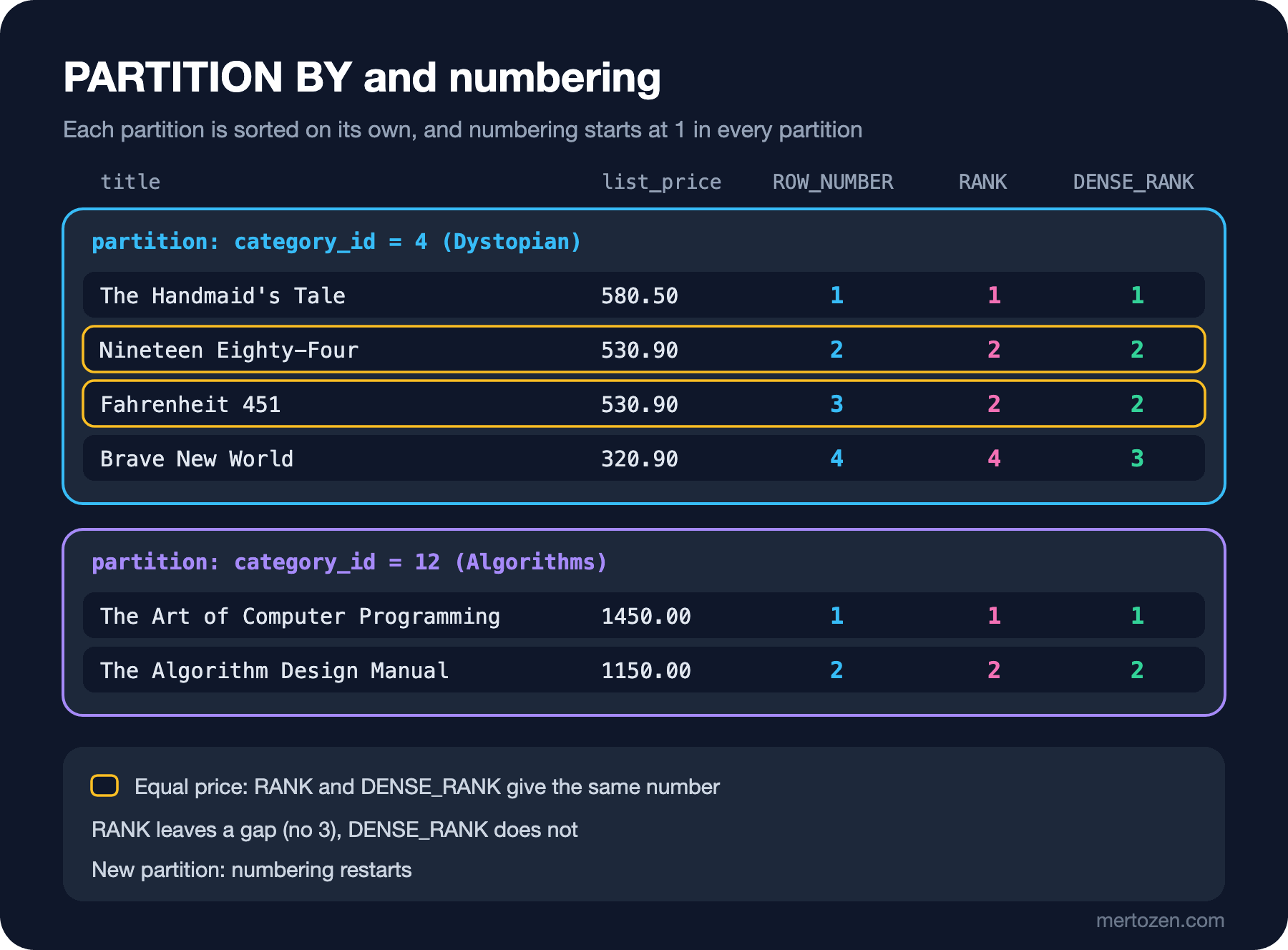
In Dystopian the numbers go from 1 to 4, and when we move to Algorithms they start again from 1. I added book_id as a second key to ROW_NUMBER's ORDER BY; that way Nineteen Eighty-Four and Fahrenheit 451, which have the same price, get the same number on every run. RANK and DENSE_RANK do not need it, because they give ties the same number anyway.
The ORDER BY inside OVER is independent of the ORDER BY at the end of the query. The first is the order for the window function's calculation; the second is the order in which the result reaches you. If you want the result sorted the way the window is, you must write the outer ORDER BY as well.
ROW_NUMBER, RANK, DENSE_RANK and NTILE
The rules behind the opening result:
| Function | On ties | Next number | Clean Code |
|---|---|---|---|
ROW_NUMBER | A different number for every row, order among ties undefined | The next integer | 9 |
RANK | The same number for ties | Skips by the number of ties (1, 2, 3, 3, 3, 6) | 8 |
DENSE_RANK | The same number for ties | Does not skip (1, 2, 3, 3, 3, 4) | 5 |
NTILE(n) | Ties may fall into different buckets | Splits rows into n buckets as evenly as possible | - |
Which one you choose depends on the business rule. "One number per row for paging" is ROW_NUMBER. "If two runners tie for second, the next one is fourth, not third" is RANK. "All books at the three highest price levels" is DENSE_RANK.
NTILE distributes rows, in order, into buckets of equal size. Splitting customers into four quartiles by spend is the classic first step of a segmentation report:
WITH spend AS (
    SELECT o.customer_id, SUM(oi.quantity * oi.unit_price) AS total
    FROM dbo.orders AS o
    JOIN dbo.order_items AS oi ON oi.order_id = o.order_id
    WHERE o.status <> 'Cancelled'
    GROUP BY o.customer_id
)
SELECT quartile, COUNT(*) AS customers, MIN(total) AS min_spend, MAX(total) AS max_spend
FROM (SELECT customer_id, total, NTILE(4) OVER (ORDER BY total DESC) AS quartile FROM spend) AS q
GROUP BY quartile
ORDER BY quartile;
quartile customers min_spend max_spend
-------- --------- --------- ---------
1 9 11769.61 38259.40
2 9 6319.11 10595.13
3 9 4494.40 6306.61
4 9 1179.00 4084.4036 customers were spread 9 to a bucket. Had the row count not divided evenly, the first buckets would have received one extra row each. Remember that NTILE looks at row counts, not values: two customers at the boundary may fall into different buckets even if they spent exactly the same.
You Cannot Use a Window Function in WHERE
You want the three most expensive books in each category, and the first thing that comes to mind is this:
SELECT title, list_price,
       ROW_NUMBER() OVER (PARTITION BY category_id ORDER BY list_price DESC) AS rn
FROM dbo.books
WHERE ROW_NUMBER() OVER (PARTITION BY category_id ORDER BY list_price DESC) <= 3;
Msg 4108, Level 15, State 1, Server b8be943222fa, Line 4
Windowed functions can only appear in the SELECT or ORDER BY clauses.The reason is, again, the logical query processing order. Window functions are computed in the SELECT phase, after WHERE, GROUP BY and HAVING are done. When WHERE runs, the numbers do not exist yet. For the same reason you can run window functions over the result of an aggregate, because the groups are formed before SELECT:
SELECT b.category_id,
       SUM(oi.quantity) AS copies,
       RANK() OVER (ORDER BY SUM(oi.quantity) DESC) AS sales_rank
FROM dbo.books AS b
JOIN dbo.order_items AS oi ON oi.book_id = b.book_id
JOIN dbo.orders AS o       ON o.order_id = oi.order_id
WHERE o.status <> 'Cancelled' AND b.category_id IS NOT NULL
GROUP BY b.category_id
ORDER BY sales_rank;
category_id copies sales_rank
----------- ------ ----------
2 283 1
3 125 2
5 112 3
6 68 4
4 65 5
11 64 6
9 37 7
13 13 8
12 7 9RANK() OVER (ORDER BY SUM(oi.quantity) DESC) shows that grouping happens first and numbering second. The way to filter on a window function's result is to compute it inside a CTE (Common Table Expression) or a derived table and filter in the outer query; we do that in the next section.
Some databases (such as Snowflake, BigQuery and DuckDB) offer a non-standard QUALIFY clause for this. SQL Server 2025 does not have it:
SELECT title, list_price
FROM dbo.books
QUALIFY ROW_NUMBER() OVER (PARTITION BY category_id ORDER BY list_price DESC) = 1;
Msg 102, Level 15, State 1, Server b8be943222fa, Line 3
Incorrect syntax near 'ROW_NUMBER'.Top-N per Group
"The three best-selling books in each category" is the most frequently written window function query. The recipe is always the same: compute the sales first, then number within the partition, then filter on the number:
WITH sales AS (
    SELECT b.category_id, b.book_id, b.title, SUM(oi.quantity) AS copies
    FROM dbo.books AS b
    JOIN dbo.order_items AS oi ON oi.book_id = b.book_id
    JOIN dbo.orders AS o       ON o.order_id = oi.order_id
    WHERE o.status <> 'Cancelled'
    GROUP BY b.category_id, b.book_id, b.title
),
ranked AS (
    SELECT category_id, title, copies,
           ROW_NUMBER() OVER (PARTITION BY category_id ORDER BY copies DESC, book_id) AS rn
    FROM sales
)
SELECT category_id, rn, title, copies
FROM ranked
WHERE rn <= 3 AND category_id IN (2, 3, 11)
ORDER BY category_id, rn;
category_id rn title copies
----------- -- -------------------------- ------
2 1 Animal Farm 28
2 2 Pride and Prejudice 26
2 3 The Picture of Dorian Gray 22
3 1 Dune 32
3 2 Dune Messiah 24
3 3 Foundation 16
11 1 The Pragmatic Programmer 16
11 2 Clean Code 15
11 3 Design Patterns 12Two CTEs keep the steps apart: sales computes copies sold per book, ranked numbers within each category, the final SELECT takes the top three. I limited the report to three categories to keep it short.
Now the question of ties. In the Fantasy category two books share third place with 20 copies each:
WITH sales AS (
    SELECT b.category_id, b.book_id, b.title, SUM(oi.quantity) AS copies
    FROM dbo.books AS b
    JOIN dbo.order_items AS oi ON oi.book_id = b.book_id
    JOIN dbo.orders AS o       ON o.order_id = oi.order_id
    WHERE o.status <> 'Cancelled'
    GROUP BY b.category_id, b.book_id, b.title
),
ranked AS (
    SELECT category_id, title, copies,
           ROW_NUMBER() OVER (PARTITION BY category_id ORDER BY copies DESC, book_id) AS rn,
           RANK()       OVER (PARTITION BY category_id ORDER BY copies DESC)          AS rnk,
           DENSE_RANK() OVER (PARTITION BY category_id ORDER BY copies DESC)          AS drnk
    FROM sales
)
SELECT category_id, title, copies, rn, rnk, drnk
FROM ranked
WHERE category_id = 5
ORDER BY rn;
category_id title copies rn rnk drnk
----------- -------------------------- ------ -- --- ----
5 The Hobbit 28 1 1 1
5 The Fellowship of the Ring 23 2 2 2
5 Good Omens 20 3 3 3
5 American Gods 20 4 3 3
5 A Wizard of Earthsea 16 5 5 4
5 The Colour of Magic 5 6 6 5A filter of rn <= 3 leaves American Gods out, and which one stays out is decided by the second key in ORDER BY (book_id). rnk <= 3 takes both and returns four rows. drnk <= 3 also takes both; but if the tie were higher up, DENSE_RANK could return more than four rows by saying "the top three sales levels". Ask the product team which one they mean by "top three"; most of the time the answer is RANK, and nobody had thought about it in advance.
The most common special case of the same recipe is "latest record per group": each customer's last order.
WITH numbered AS (
    SELECT o.customer_id, o.order_id, o.ordered_at, o.status,
           ROW_NUMBER() OVER (PARTITION BY o.customer_id ORDER BY o.ordered_at DESC, o.order_id DESC) AS rn
    FROM dbo.orders AS o
)
SELECT customer_id, order_id, ordered_at, status
FROM numbered
WHERE rn = 1 AND customer_id <= 5
ORDER BY customer_id;
customer_id order_id ordered_at status
----------- -------- ------------------- ---------
1 369 2026-06-10 21:27:57 Shipped
2 366 2026-06-06 09:39:30 Delivered
3 377 2026-06-20 16:58:05 Shipped
4 326 2026-03-16 10:31:45 Delivered
5 359 2026-05-15 12:00:31 DeliveredWith ORDER BY o.ordered_at DESC, o.order_id DESC the result is deterministic even if two orders were placed in the same second. You could also write this with the correlated subquery from post 11 of this series (WHERE ordered_at = (SELECT MAX(...))); but that approach returns two rows for two orders with the same timestamp, whereas ROW_NUMBER always returns one.
Deleting Duplicates with ROW_NUMBER
After a CSV (Comma-Separated Values) import, the customer_import table holds several records for the same e-mail address. One is written in a different case, two are identical. We want to keep the newest record per e-mail address and delete the rest. First I prepare the table in my own database:
DROP TABLE IF EXISTS dbo.customer_import;
CREATE TABLE dbo.customer_import (
    import_id   INT IDENTITY(1,1) PRIMARY KEY,
    email       VARCHAR(254) NOT NULL,
    first_name  NVARCHAR(100) NOT NULL,
    imported_at DATETIME2(0) NOT NULL
);
INSERT INTO dbo.customer_import (email, first_name, imported_at) VALUES
    ('ada.lovelace@example.com', N'Ada',   '2026-06-01 09:00'),
    ('Ada.Lovelace@example.com', N'Ada',   '2026-06-03 10:30'),
    ('grace.hopper@example.com', N'Grace', '2026-06-02 08:15'),
    ('linus@example.com',        N'Linus', '2026-06-01 12:00'),
    ('linus@example.com',        N'Linus', '2026-06-01 12:00'),
    ('linus@example.com',        N'Linus', '2026-06-05 18:45');
Before deleting, always look at what will be deleted:
SELECT import_id, email, imported_at,
       ROW_NUMBER() OVER (PARTITION BY LOWER(email) ORDER BY imported_at DESC, import_id DESC) AS rn
FROM dbo.customer_import
ORDER BY LOWER(email), rn;
import_id email imported_at rn
--------- ------------------------ ------------------- --
2 Ada.Lovelace@example.com 2026-06-03 10:30:00 1
1 ada.lovelace@example.com 2026-06-01 09:00:00 2
3 grace.hopper@example.com 2026-06-02 08:15:00 1
6 linus@example.com 2026-06-05 18:45:00 1
5 linus@example.com 2026-06-01 12:00:00 2
4 linus@example.com 2026-06-01 12:00:00 3PARTITION BY LOWER(email) groups while ignoring case; rn = 1 is the newest record in each group. If the preview looks right, you can delete through the same CTE:
WITH numbered AS (
    SELECT import_id,
           ROW_NUMBER() OVER (PARTITION BY LOWER(email) ORDER BY imported_at DESC, import_id DESC) AS rn
    FROM dbo.customer_import
)
DELETE FROM numbered
WHERE rn > 1;
SELECT @@ROWCOUNT AS deleted;
SELECT import_id, email, imported_at FROM dbo.customer_import ORDER BY import_id;
deleted
-------
3
import_id email imported_at
--------- ------------------------ -------------------
2 Ada.Lovelace@example.com 2026-06-03 10:30:00
3 grace.hopper@example.com 2026-06-02 08:15:00
6 linus@example.com 2026-06-05 18:45:00SQL Server lets you DELETE through a CTE based on a single table, and the delete is applied to the underlying table. import_id DESC in the ORDER BY decides which of the two identical Linus records survives; without it, the remaining row could change from run to run. In production, do this inside a transaction, verifying the count with a SELECT first; we look at that in detail in post 15.
Production Notes
The cost of the ranking functions is mostly a sort. The plan of a simple ROW_NUMBER query with SET SHOWPLAN_TEXT ON:
SET SHOWPLAN_TEXT ON;
GO
SELECT title, ROW_NUMBER() OVER (PARTITION BY category_id ORDER BY list_price DESC) AS rn
FROM dbo.books;
GO
SET SHOWPLAN_TEXT OFF;
|--Sequence Project(DEFINE:([Expr1002]=row_number))
|--Segment
|--Sort(ORDER BY:([sqlt_13].[dbo].[books].[category_id] ASC, [sqlt_13].[dbo].[books].[list_price] DESC))
|--Clustered Index Scan(OBJECT:([sqlt_13].[dbo].[books].[PK_books]))Read it bottom up: the table is scanned, sorted by category_id and list_price, the Segment operator marks partition boundaries, and Sequence Project produces the numbers. For 77 rows the sort is trivial; at millions of rows it needs both CPU (Central Processing Unit) and memory, and spills to tempdb when memory runs short. An index that starts with the partition and ordering columns and covers the selected columns ((category_id, list_price DESC) INCLUDE (title)) can remove the sort. Index design and plan details belong to the SQL Server Derinlemesine (SQL Server in Depth) series.
ORDER BY is mandatory for the ranking functions. Forget it and:
SELECT title, ROW_NUMBER() OVER (PARTITION BY category_id) AS rn
FROM dbo.books;
Msg 4112, Level 15, State 1, Server b8be943222fa, Line 1
The function 'ROW_NUMBER' must have an OVER clause with ORDER BY.To silence this error you will find the ORDER BY (SELECT NULL) suggestion on the internet. It means "I do not care about order"; the numbers you get depend on the physical read order and lead to disaster in jobs like paging or deleting duplicates. Even if you really do not care about order, at least write the primary key.
Non-deterministic numbering is a bug tests do not show. On small data the plan runs serially and ties always come in the same order; when the data grows and the plan goes parallel, the order changes. The rule: ROW_NUMBER's ORDER BY must always end with a unique key.
Common Pitfalls
Trying to use a window function in WHERE or HAVING. Compute it inside a CTE or derived table first and filter outside.
Not ending ROW_NUMBER's ORDER BY with a unique key. Numbers for ties change from run to run.
Not discussing the difference between ROW_NUMBER, RANK and DENSE_RANK with the business when they ask for "the top three".
Thinking OVER (ORDER BY ...) sorts the result. The result's order needs the outer ORDER BY.
Not previewing before deleting duplicates. Run the same CTE with SELECT first, check the count, then turn it into DELETE.
Thinking NTILE splits by value range. It splits by row count; equal values can fall into different buckets.
A Small Experiment
★☆☆ Number each customer's orders by date and return each customer's first order (rn = 1). Then change the same query to return each customer's second order.
★★☆ Find the top two customers by total spend in each country. Which function did you use to show both when there is a tie? Also add each customer's share of their country's revenue.
★★★ In the reviews table, find the highest-rated review for each book; if several reviews share that rating, pick the newest. Then compare in a single query whether "the book with the most reviews" and "the book with the highest average rating" are the same in each category (watch out for the integer division trap from post 10 when averaging).
In this post we split the window into partitions and numbered within them. In the next post we move the window row by row: running totals with SUM() OVER (ORDER BY ...), the sneaky difference between ROWS and RANGE frames, looking at the previous row with LAG/LEAD, and the gaps and islands problem.