

SQL Lab: Running SQL Server 2025 in Docker, the VS Code MSSQL Extension and the Bookstore Sample Database
We run SQL Server 2025 in Docker with the mcr.microsoft.com/mssql/server:2025-latest image, keeping the password in an environment variable and the data on a volume; connect with sqlcmd, the VS Code mssql extension and SSMS 22; and load the 10-table Bookstore database used throughout the series. Edition choice, Rosetta emulation on Apple Silicon and why TrustServerCertificate is for labs only are covered too.
Version note: The SQL (Structured Query Language) queries in this post were run on SQL Server 2025 (17.0, Cumulative Update 10) with macOS 27.0.1 and Docker Desktop 4.64.0; the sqlcmd inside the container is version 18.7.
Guess First: Which CPU Does the Container on Apple Silicon See?
Every query in this series runs on SQL Server 2025 inside Docker on a Mac with an M-series chip. The Mac's processor runs on ARM64 (Arm's 64-bit processor architecture). Now we connect to the container and ask the server who it is. Which architecture do you think appears at the end of the version line?
SELECT @@VERSION AS version;version
--------------------------------------------------------------------------
Microsoft SQL Server 2025 (RTM-CU10) (KB5125471) - 17.0.5035.5 (X64)
Oct 15 2026 19:55:26
Copyright (C) 2025 Microsoft Corporation
Enterprise Developer Edition (64-bit) on Linux (Ubuntu 24.04.5 LTS) <X64>
(1 rows affected)X64. The server believes it is on an Ubuntu machine with an Intel or AMD (Advanced Micro Devices) processor. The processor information inside the container tells the rest of the story:
docker exec bookstore-sql cat /proc/cpuinfo | grep -m1 'model name'model name : VirtualApple @ 2.50GHz"VirtualApple" is Apple's Rosetta translation layer. SQL Server's Linux image is published only for x86-64; the only reason it runs on Apple Silicon is that Docker translates every x86 instruction to ARM64 through Rosetta. In this post we build this lab step by step: which edition, which Docker command, where to keep the password, which tool to connect with, and how to load the Bookstore database we will use for the whole series. Emulation has a side effect too; we will talk about it in the "In Production" section.
Which Edition? Express, Standard Developer and Enterprise Developer
The edition list changed with SQL Server 2025. There used to be a single Developer edition; now there are two. The ones that matter for a lab:
| Edition | License | Key limits |
|---|---|---|
| Express | Free, allowed in production | 50 GB per database, at most 1 socket or 4 cores, 1,410 MB for the buffer pool |
| Standard Developer | Free, development and test only | Feature set of Standard edition |
| Enterprise Developer | Free, development and test only | All Enterprise edition features |
| Evaluation | 180-day trial | All Enterprise edition features |
Express's database limit went from 10 GB to 50 GB in 2025, and the features that used to ship separately as "Express with Advanced Services" are now part of Express. Still, there is no reason to pick Express for a lab. If production runs Standard, choose Standard Developer; if it runs Enterprise, choose Enterprise Developer. That way you do not find out at the last minute that a feature you used while developing is missing from your production edition. In a container the edition is selected by the MSSQL_PID environment variable; the valid values for 2025 include Express, StandardDeveloper and EnterpriseDeveloper. Microsoft's quickstart example uses the value Developer, and in this lab that value maps to Enterprise Developer:
SELECT SERVERPROPERTY('Edition') AS edition,
       SERVERPROPERTY('ProductVersion') AS product_version,
       SERVERPROPERTY('ProductUpdateLevel') AS update_level,
       SERVERPROPERTY('Collation') AS server_collation;
edition product_version update_level server_collation
------------------------------------- --------------- ------------ ----------------------------
Enterprise Developer Edition (64-bit) 17.0.5035.5 CU10 SQL_Latin1_General_CP1_CI_AS
(1 rows affected)CU10 (Cumulative Update 10) in the ProductUpdateLevel column shows the latest cumulative update installed on the server. SQL Server's servicing model is no longer service packs but cumulative updates released at regular intervals. The 2025-latest tag always pulls the newest cumulative update.
Running SQL Server 2025 in Docker
Set the password first. Microsoft's default password policy requires at least 8 characters and at least three of the four groups uppercase, lowercase, digits and symbols; if you violate it, the container abandons setup and stops, and the reason shows up only in docker logs. Do not type the password on the command line, it lands in your shell history. Read it silently and keep it in an environment variable:
# read the password without echoing it
read -rs MSSQL_SA_PASSWORD
export MSSQL_SA_PASSWORD

docker run -d --name bookstore-sql --hostname bookstore-sql \
    --platform linux/amd64 \
    -e "ACCEPT_EULA=Y" -e MSSQL_SA_PASSWORD -e "MSSQL_PID=Developer" \
    -p 1433:1433 \
    -v bookstore-sql-data:/var/opt/mssql \
    mcr.microsoft.com/mssql/server:2025-latest
Watch three details. -e MSSQL_SA_PASSWORD has no value; in this form Docker takes the value from the variable of the same name in your shell, so the password appears neither in the command nor in history. --platform linux/amd64 tells Docker explicitly which image variant you want on Apple Silicon; it is the only variant anyway, but spelling it out spares you the warning. -v bookstore-sql-data:/var/opt/mssql puts the database files on a named volume. Without a volume, all your databases are gone the moment you remove the container. The lab container I took this post's output from runs the same image with the same MSSQL_PID=Developer setting, but under another name and without a volume; for a throwaway test environment that is a deliberate choice, not one for your own lab.
Once the container is up, the log tells you when it is ready:
docker logs bookstore-sql 2>&1 | grep -m1 'ready for client'2026-11-07 17:57:05.21 spid43s SQL Server is now ready for client connections. This is an informational message; no user action is required.Another line at the top of the log stands out: "SQL Server 2025 will run as non-root by default." The 2025 image starts the process as the mssql user instead of root. If you bind-mount a host folder (such as -v ~/sqldata:/var/opt/mssql), that folder must give this user write access; a named volume avoids the problem.
Connecting: sqlcmd, VS Code and SSMS
For the first connection you do not need to install anything. The image ships the mssql-tools18 package, built on ODBC (Open Database Connectivity) Driver 18:
export SQLCMDPASSWORD="$MSSQL_SA_PASSWORD"
docker exec -it -e SQLCMDPASSWORD bookstore-sql /opt/mssql-tools18/bin/sqlcmd \
    -S localhost -U sa -C -W -Q "SELECT SUSER_SNAME() AS login_name, DB_NAME() AS db"
login_name db
---------- --
sa masterWhen -P is not given, sqlcmd reads the password from the SQLCMDPASSWORD environment variable, so the password does not show up in the process list either. -C means trusting the server certificate unconditionally. With Driver 18, connections are encrypted by default, and since the container's certificate is self-signed, the connection fails certificate validation without this flag. The .NET equivalent is TrustServerCertificate=True in the connection string. Both are acceptable only for a lab on your own machine.
For daily work there are two graphical tools. In Visual Studio Code, Microsoft's "SQL Server (mssql)" extension runs on macOS, Linux and Windows: in the connection dialog you enter localhost,1433 as the server, SQL Login as authentication, sa as the user and tick "Trust server certificate". The query results grid, execution plan viewer, table designer and schema designer are all inside the extension, and it can now create a local SQL Server container directly. If you are on Windows, SSMS (SQL Server Management Studio) 22 has been generally available since November 11, 2025 and is the most complete management tool. There is also the new sqlcmd, rewritten in Go; installed through Homebrew or winget, it can even start a container with sqlcmd create mssql. According to Microsoft's documentation, however, that command does not support MSSQL_PID and always installs Developer edition.
The Bookstore Sample Database
All examples in the series run against the same database: an online shop that sells books. The schema and seed data live in a single script, SCHEMA.sql. The script is idempotent: it drops and recreates the ten Bookstore tables in the database you run it in and inserts exactly the same rows every time. When you break an example, just run the script again.
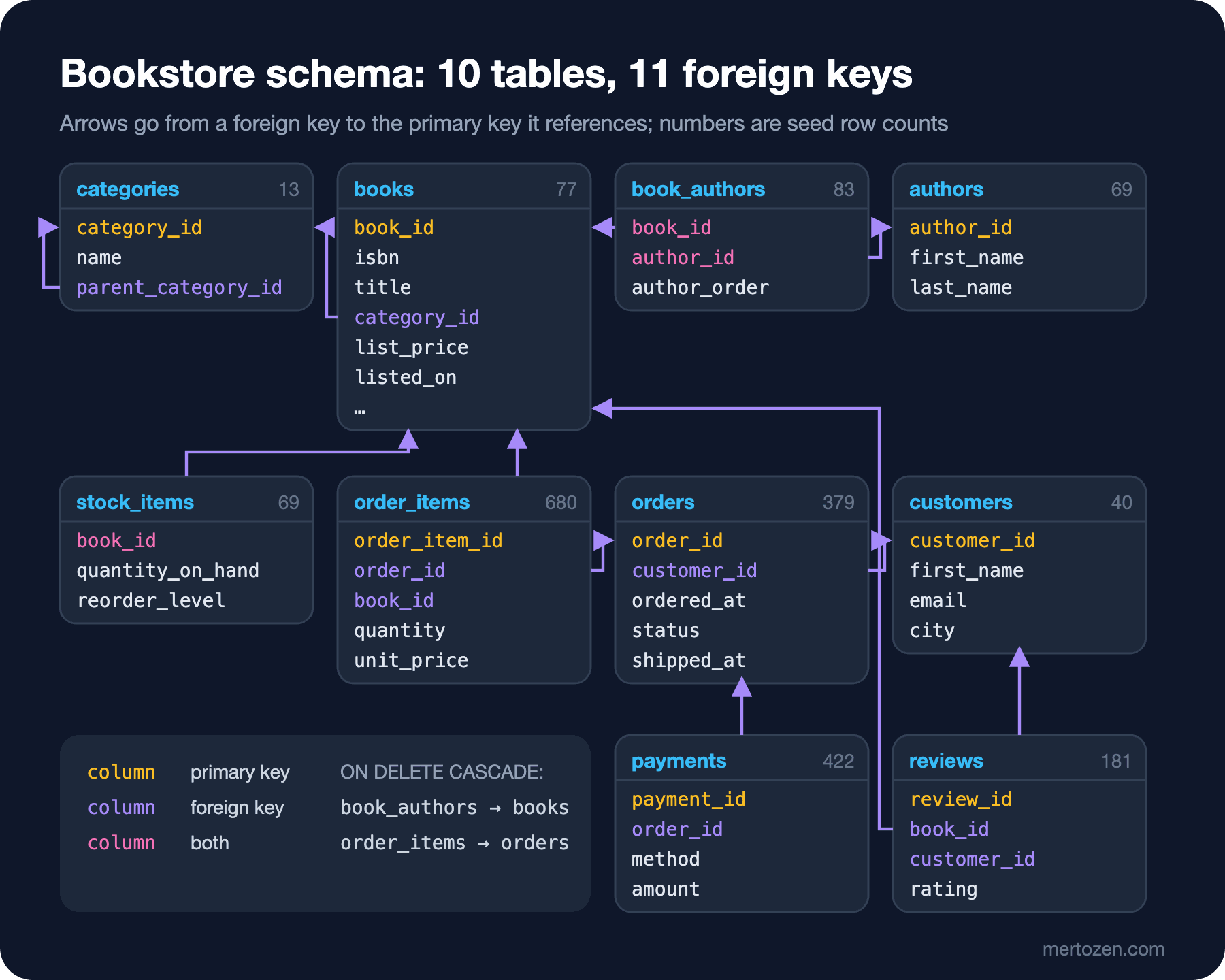
I open a separate database for every post (sqlt_02 in this one); you can just as well use a single bookstore database:
docker exec -i -e SQLCMDPASSWORD bookstore-sql /opt/mssql-tools18/bin/sqlcmd \
    -S localhost -U sa -C -Q "CREATE DATABASE sqlt_02;"

docker exec -i -e SQLCMDPASSWORD bookstore-sql /opt/mssql-tools18/bin/sqlcmd \
    -S localhost -U sa -C -d sqlt_02 -f 65001 -I < SCHEMA.sql
If there is no error, the second command prints nothing; the script starts with SET NOCOUNT ON and does everything inside one transaction. -f 65001 declares the file as Unicode Transformation Format 8-bit (UTF-8). The catalog's four Turkish books (Kürk Mantolu Madonna, İnce Memed, Tutunamayanlar, Saatleri Ayarlama Enstitüsü) contain Turkish characters. In my test, sqlcmd on Linux read them correctly even without -f, but since the command line code page on Windows can differ, make this flag a habit. -I turns on QUOTED_IDENTIFIER; in sqlcmd it is off by default, while some features such as filtered indexes and computed columns require it to be on.
Once loading finishes, let's check how many rows each table has:
SELECT t.name AS table_name, SUM(p.rows) AS row_count
FROM sys.tables AS t
JOIN sys.partitions AS p
    ON p.object_id = t.object_id AND p.index_id IN (0, 1)
GROUP BY t.name
ORDER BY t.name;
table_name row_count
------------ ---------
authors 69
book_authors 83
books 77
categories 13
customers 40
order_items 680
orders 379
payments 422
reviews 181
stock_items 69
(10 rows affected)The numbers are small but deliberate. 77 books are enough to paginate with pages of 20; 379 orders spread from January 2025 to June 2026 and give enough months and days for monthly reports, running totals and window function examples. Instructive traps are built into the data too: 71 books have no subtitle, 2 books have no category, 4 customers never ordered, 2 authors have no books in the catalog, and some orders were placed close to midnight in UTC (Coordinated Universal Time). Each of these is the topic of a later post.
You can also read the relationships between tables from the system views:
SELECT fk.name AS foreign_key,
       OBJECT_NAME(fk.parent_object_id) AS child_table,
       COL_NAME(fkc.parent_object_id, fkc.parent_column_id) AS child_column,
       OBJECT_NAME(fk.referenced_object_id) AS parent_table,
       fk.delete_referential_action_desc AS on_delete
FROM sys.foreign_keys AS fk
JOIN sys.foreign_key_columns AS fkc
    ON fkc.constraint_object_id = fk.object_id
ORDER BY child_table, foreign_key;
foreign_key child_table child_column parent_table on_delete
----------------------- ------------ ------------------ ------------ ---------
FK_book_authors_authors book_authors author_id authors NO_ACTION
FK_book_authors_books book_authors book_id books CASCADE
FK_books_categories books category_id categories NO_ACTION
FK_categories_parent categories parent_category_id categories NO_ACTION
FK_order_items_books order_items book_id books NO_ACTION
FK_order_items_orders order_items order_id orders CASCADE
FK_orders_customers orders customer_id customers NO_ACTION
FK_payments_orders payments order_id orders NO_ACTION
FK_reviews_books reviews book_id books NO_ACTION
FK_reviews_customers reviews customer_id customers NO_ACTION
FK_stock_items_books stock_items book_id books NO_ACTION
(11 rows affected)Three structures matter most. categories references itself: parent_category_id builds a tree such as Fiction → Science Fiction → Dystopian, which we will walk with a self join (post 9) and a recursive CTE (post 12). book_authors is a many-to-many bridge: Good Omens has two authors, Design Patterns four. And two foreign keys are CASCADE: when an order is deleted, its items go with it. We will discuss the reasoning behind these choices in the constraints post (post 4).
The First Query
To see the lab working end to end, let's list the Turkish books by price:
SELECT TOP (5) b.title, c.name AS category, b.list_price
FROM dbo.books AS b
JOIN dbo.categories AS c
    ON c.category_id = b.category_id
WHERE b.language_code = 'tr'
ORDER BY b.list_price DESC;
title category list_price
--------------------------- -------- ----------
Tutunamayanlar Classics 620.90
İnce Memed Classics 480.90
Saatleri Ayarlama Enstitüsü Classics 400.50
Kürk Mantolu Madonna Classics 350.00
(4 rows affected)We asked for TOP (5) and got 4 rows, because the catalog has 4 Turkish books. TOP is an upper bound, not a promise. The Turkish characters arrived intact as well; that proves we loaded the script with the right encoding. As a last check, let's see which range the order data covers:
SELECT MIN(ordered_at) AS first_order, MAX(ordered_at) AS last_order, COUNT(*) AS order_count
FROM dbo.orders;
first_order last_order order_count
------------------- ------------------- -----------
2025-01-02 09:19:25 2026-06-29 21:05:58 379
(1 rows affected)The data's "today" is June 30, 2026 and all times are UTC. You will need to remember this in date queries: an order placed at 21:05 UTC falls on 00:05 the next day in Istanbul time.
In Production
Emulation makes performance measurements meaningless. How many milliseconds a query takes on SQL Server under Rosetta says nothing about how long it would take on a real x86 server. That is why throughout the series we will use machine-independent measures instead of time: logical reads, row counts and plan operators. If you need to measure time, use a real x86-64 machine or the cloud; the Azure SQL Database free offer gives each database 100,000 vCore seconds of compute and 32 GB of storage per month.
Apple Silicon support is not official. Microsoft's documentation states clearly that the container images are supported only on Linux hosts with Intel and AMD x86-64 processors and that emulation layers such as Rosetta 2 are not tested. In practice that has had a cost: in October 2025, users who moved to macOS 26 Tahoe reported that SQL Server 2025 RC (release candidate) containers would not start; an error related to AVX (Advanced Vector Extensions) instructions was tracked as an issue in Microsoft's mssql-docker GitHub repository. This post's environment is macOS 27.0.1 with Docker Desktop 4.64.0, and the container runs without problems. Still, if the container will not start after a macOS or Docker update, check docker logs first and then that GitHub repository.
Passwords and connection strings do not go into the repository. Even in a lab, if you use a .env file, add it to .gitignore; on the .NET side, read the connection string from user-secrets or an environment variable. Finally, do not forget the edition license: the Developer editions are free but may not run in production. "We moved the lab container to production" is a license violation.
Common Pitfalls
- Writing the password in plain text in the
docker runcommand and leaving it in shell history or a README. The-e MSSQL_SA_PASSWORDform takes the value from the environment. - Giving a password that breaks the policy and not understanding why the container stopped. The reason is in
docker logs. - Removing the container without a volume and losing every database.
- Carrying
TrustServerCertificate=Trueor-Cfrom the lab into a production connection string. In production the server must have a real certificate and it must be validated. - Reading times measured under emulation as "SQL Server is this fast".
- Loading the seed script without
-f 65001, with the wrong encoding, and seeing the Turkish book titles with garbled characters.
A Small Experiment
★☆☆ Build the lab, load SCHEMA.sql and run the row count query. Your numbers must match the ones here exactly; if they do not, you may have interrupted the script.
★★☆ Run SCHEMA.sql a second time in the same database and verify that the row counts do not change. Then add a row to dbo.books by hand, run the script again and see what happened to that row. What exactly does it mean for the script to be idempotent?
★★★ Start the container without a volume, create a database, remove the container and start it again with the same command. Where is your database? Repeat the experiment with a named volume and find in the docker volume inspect output where the data lives on the host.
The lab is ready and Bookstore is loaded. In the next post we take a close look at the CREATE TABLE statements that built these tables: why DECIMAL(10,2) was chosen for list_price, why email is VARCHAR but title is NVARCHAR, and what the collation does to the Turkish letter "i" when you uppercase "İnce Memed".