

SQL JOINs 1: INNER JOIN, LEFT/RIGHT/FULL OUTER JOIN and the ON vs WHERE Difference

Joins match rows; they are not Venn diagrams: INNER JOIN keeps matched pairs, and LEFT/RIGHT/FULL OUTER JOIN also keep the preserved side's unmatched rows with NULLs. Filtering the right table of a LEFT JOIN in WHERE silently turns it into an INNER JOIN, which we see as Inner Join in the plan. We look at books without reviews, customers without orders, stock reconciliation with FULL OUTER JOIN and how one-to-many joins multiply rows, with real output.
Version note: The SQL (Structured Query Language) queries in this post were run on SQL Server 2025 (17.0, Cumulative Update 10); the dialect comparisons were run on PostgreSQL 18.6 and MySQL 8.4.
Guess First: Does the Filter Go in ON or in WHERE?
We want to list the books in the Programming category with their 4- and 5-star reviews. Books that never got a high rating should stay in the list with NULL next to them, so we use LEFT JOIN. The only difference between the two versions is where the rating filter sits:
SELECT b.book_id, b.title, r.rating
FROM dbo.books AS b
LEFT JOIN dbo.reviews AS r
    ON r.book_id = b.book_id
WHERE b.category_id = 11
  AND r.rating >= 4
ORDER BY b.book_id, r.rating DESC;
SELECT b.book_id, b.title, r.rating
FROM dbo.books AS b
LEFT JOIN dbo.reviews AS r
ON r.book_id = b.book_id
AND r.rating >= 4
WHERE b.category_id = 11
ORDER BY b.book_id, r.rating DESC;Programming has 9 books. How many rows does each return? The first returns 13 rows, the second 16. The three extra rows of the second query are these:
book_id  title                                              rating
-------  -------------------------------------------------  ------
...
62       The Mythical Man-Month                             NULL
63       Domain-Driven Design                               NULL
64       Structure and Interpretation of Computer Programs  NULL

(16 rows affected)
In the first query these three books silently disappeared; although we wrote LEFT JOIN, the query behaved like an INNER JOIN. In this post we cover what joins actually do, namely matching rows, then INNER, LEFT, RIGHT and FULL OUTER JOIN, and the reason behind this trap.
What a Join Is: Matching Rows
A join pairs the rows of two tables according to a condition. Logically, all row pairs of the two tables are considered first (the Cartesian product), then the pairs for which the ON condition is TRUE are kept. Outer joins add one step: rows of the preserved side that matched no pair are added back to the result, with the other side's columns filled with NULL. Let's see it with three books and three categories:
SELECT b.book_id, b.title, c.category_id, c.name
FROM (SELECT * FROM dbo.books WHERE book_id IN (26, 39, 73)) AS b
FULL OUTER JOIN (SELECT * FROM dbo.categories WHERE category_id IN (3, 5, 7)) AS c
    ON c.category_id = b.category_id
ORDER BY COALESCE(b.book_id, 999);
book_id title category_id name
------- ----------- ----------- ---------------
26 Dune 3 Science Fiction
39 The Hobbit 5 Fantasy
73 Meditations NULL NULL
NULL NULL 7 Poetry
(4 rows affected)Dune matched Science Fiction, The Hobbit matched Fantasy. Meditations has no category, Poetry has no books. The four join types differ in which of these four rows they keep:
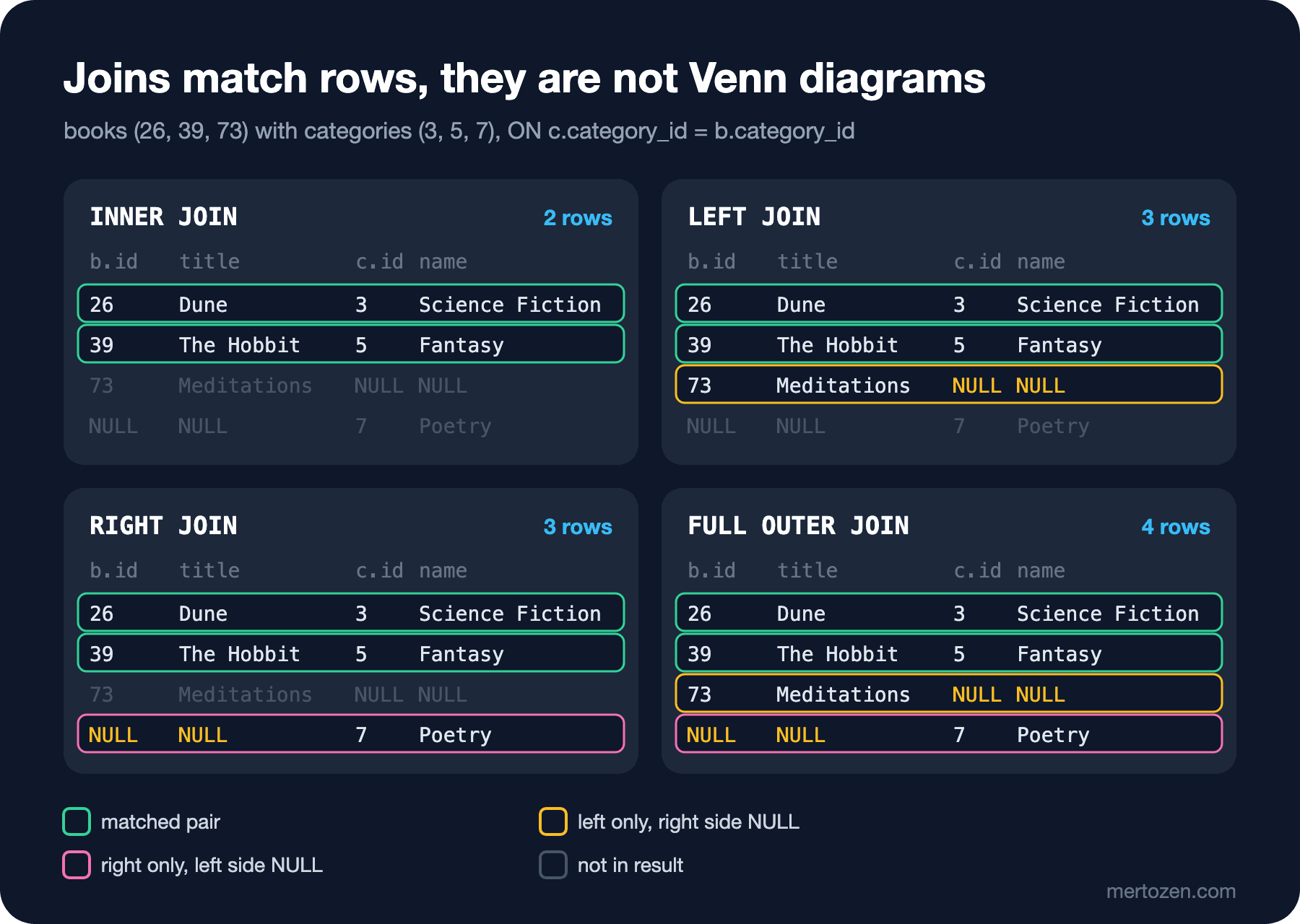
Joins are usually explained with two circles and a shaded overlap. That picture is misleading on one point: a Venn diagram treats the elements of both sets as the same kind of thing, and the intersection means "an element present in both sets". But books and categories have no common element; a join produces something new, combined rows. The Venn picture also does not show that a row can match more than one row: if a category has 29 books, that category appears 29 times in the result. A row matching grid shows both that and the side outer joins fill with NULL correctly.
INNER JOIN
INNER JOIN keeps only matched pairs. Joining books with their categories drops two books:
SELECT COUNT(*) AS books_total,
       (SELECT COUNT(*) FROM dbo.books AS b JOIN dbo.categories AS c ON c.category_id = b.category_id) AS inner_rows,
       (SELECT COUNT(*) FROM dbo.books AS b LEFT JOIN dbo.categories AS c ON c.category_id = b.category_id) AS left_rows
FROM dbo.books;
books_total inner_rows left_rows
----------- ---------- ---------
77 75 77
(1 rows affected)JOIN on its own means INNER JOIN. The two books whose category is NULL match no category, so they are missing from the INNER JOIN. A developer who writes the "all books" screen with an INNER JOIN may spend a long time searching for why those two books are not in the list. Several joins are written as a chain; each one combines the result of the previous step with one more table:
SELECT TOP (6) o.order_id, c.first_name, b.title, oi.quantity, oi.unit_price
FROM dbo.orders AS o
JOIN dbo.customers AS c ON c.customer_id = o.customer_id
JOIN dbo.order_items AS oi ON oi.order_id = o.order_id
JOIN dbo.books AS b ON b.book_id = oi.book_id
WHERE o.order_id IN (370, 372)
ORDER BY o.order_id, b.title;
order_id first_name title quantity unit_price
-------- ---------- --------------------------- -------- ----------
370 Annie And Then There Were None 1 430.00
370 Annie Crime and Punishment 1 200.00
370 Annie One Thousand and One Nights 1 370.50
372 Mary American Gods 1 300.50
372 Mary And Then There Were None 1 430.00
372 Mary Cosmos 2 200.50
(6 rows affected)Two orders, six rows. There are as many rows as order items, and the customer name repeats on every item. That is the natural result of a join: when you join a one-to-many relationship, the grain of the result drops to the "many" side. Across all orders, 379 orders become 680 rows once joined with their items. When you write COUNT(*) or SUM after a join, you need to know at which grain you are counting; if you do not, you will join two one-to-many relationships at once and inflate the totals. This trap is called fan-out, and the next post has a section devoted to it.
LEFT JOIN and Unmatched Rows
LEFT JOIN (in full LEFT OUTER JOIN) preserves every row of the left table. When there is no match, the right side's columns come back as NULL, which gives the classic answer to "the ones without any ..." questions. Books that never received a review:
SELECT b.book_id, b.title
FROM dbo.books AS b
LEFT JOIN dbo.reviews AS r
    ON r.book_id = b.book_id
WHERE r.review_id IS NULL
ORDER BY b.book_id;
19 books come back, among them A Tale of Two Cities, The Mythical Man-Month and all four Turkish books. The WHERE r.review_id IS NULL check is deliberately on the right table's primary key: since a primary key cannot be NULL, a NULL there can only mean "no match". Had you written r.body IS NULL, you would also have counted books that do have a review but no text. Customers who never placed an order, with the same technique:
SELECT c.customer_id, c.first_name, c.last_name, c.created_at
FROM dbo.customers AS c
LEFT JOIN dbo.orders AS o
    ON o.customer_id = c.customer_id
WHERE o.order_id IS NULL
ORDER BY c.customer_id;
customer_id first_name last_name created_at
----------- ---------- --------- -------------------
37 Mert Kaya 2026-06-22 11:40:00
38 Zeynep Demir 2026-06-29 07:58:00
39 Can Sahin 2026-06-26 15:46:00
40 Deniz Celik 2026-06-28 19:01:00
(4 rows affected)All four registered within the last ten days. For a marketing team, this is the "new customers who have not placed a first order yet" list. This structure is called an anti join and can also be written with NOT EXISTS; we will compare the two forms, and why NOT IN is dangerous here, in posts 9 and 11.
RIGHT JOIN
RIGHT JOIN does the same for the right table. Categories without any books:
SELECT c.name AS category, b.title
FROM dbo.books AS b
RIGHT JOIN dbo.categories AS c
    ON c.category_id = b.category_id
WHERE b.book_id IS NULL
ORDER BY c.name;
category title
----------- -----
Computing NULL
Fiction NULL
Non-Fiction NULL
Poetry NULL
(4 rows affected)Poetry really is empty; Fiction, Non-Fiction and Computing are parent categories that have no books of their own, only subcategories. Swapping the tables and writing FROM dbo.categories AS c LEFT JOIN dbo.books AS b gives exactly the same result. In practice most teams use only LEFT JOIN: the query reads as "write the preserved table first, attach the others to it", and when several outer joins are chained, mixing LEFT and RIGHT makes it hard to follow which side is preserved.
Reconciliation with FULL OUTER JOIN
FULL OUTER JOIN preserves both sides and is the natural tool for comparing two lists, that is, for reconciliation. Bookstore's warehouse team wants to compare two lists: books on sale and books with at least one copy in the warehouse.
WITH on_sale AS (
    SELECT book_id, title FROM dbo.books WHERE is_active = 1
),
in_stock AS (
    SELECT book_id, quantity_on_hand FROM dbo.stock_items WHERE quantity_on_hand > 0
)
SELECT COALESCE(s.book_id, k.book_id) AS book_id,
       s.title,
       k.quantity_on_hand,
       CASE
           WHEN s.book_id IS NULL THEN 'in stock, not on sale'
           WHEN k.book_id IS NULL THEN 'on sale, no stock'
           ELSE 'ok'
       END AS reconciliation
FROM on_sale AS s
FULL OUTER JOIN in_stock AS k
    ON k.book_id = s.book_id
WHERE s.book_id IS NULL OR k.book_id IS NULL
ORDER BY reconciliation, book_id;
book_id title quantity_on_hand reconciliation
------- ------------------------------------------------- ---------------- ---------------------
44 NULL 41 in stock, not on sale
61 NULL 29 in stock, not on sale
18 To the Lighthouse NULL on sale, no stock
20 Dracula NULL on sale, no stock
...
77 Saatleri Ayarlama Enstitüsü NULL on sale, no stock
(20 rows affected)I shortened the output; there are 20 rows in total. The two named queries starting with WITH are CTEs (Common Table Expressions); for now read them as "intermediate results named at the top of the query", and we will go into detail in post 12. The result shows two kinds of problems. Two books that are not on sale (The Colour of Magic and Code Complete) have 41 and 29 copies sitting in the warehouse; they should either go back on sale or be returned. 18 books are on sale but have no stock: either no stock record was ever opened or the quantity is zero. COALESCE(s.book_id, k.book_id) merges the keys of the two sides, because only one of them can be filled in each row.
FULL OUTER JOIN is standard and works the same in PostgreSQL. MySQL 8.4 does not support it: the same statement fails with ERROR 1064 (42000), a syntax error. In MySQL you get the same result by combining the results of a LEFT JOIN and a RIGHT JOIN with UNION; set operators come in post 11.
ON or WHERE?
Back to the opening question. Looking at the logical order, the answer is clear: ON is applied at the join step, WHERE after the join is complete. After LEFT JOIN has added back the unmatched left rows with the right side filled with NULL, WHERE r.rating >= 4 runs; NULL >= 4 is UNKNOWN, and that is exactly why the added-back rows are dropped. WHERE undoes the one thing that sets LEFT JOIN apart, preserving the unmatched rows. The optimizer knows this and builds the plan accordingly:
SET SHOWPLAN_TEXT ON;
GO
SELECT b.book_id, r.rating
FROM dbo.books AS b
LEFT JOIN dbo.reviews AS r ON r.book_id = b.book_id
WHERE r.rating >= 4;
GO
SET SHOWPLAN_TEXT OFF;
|--Merge Join(Inner Join, MERGE:([b].[book_id])=([r].[book_id]), RESIDUAL:([sqlt_08].[dbo].[books].[book_id] as [b].[book_id]=[sqlt_08].[dbo].[reviews].[book_id] as [r].[book_id]))The query says LEFT JOIN; the plan says Inner Join. The rule: a filter on the non-preserved side of an outer join goes in ON; if it goes in WHERE, the join turns inner. The only case that belongs in WHERE is the IS NULL check on the non-preserved side, that is, the anti join. Let's see the effect on reports with an example: the number of cancelled orders per customer.
SELECT TOP (6) c.customer_id, c.first_name, COUNT(o.order_id) AS cancelled_orders
FROM dbo.customers AS c
LEFT JOIN dbo.orders AS o
    ON o.customer_id = c.customer_id
   AND o.status = 'Cancelled'
GROUP BY c.customer_id, c.first_name
ORDER BY c.customer_id;
customer_id first_name cancelled_orders
----------- ---------- ----------------
1 Ada 2
2 Alan 0
3 Grace 0
4 Linus 1
5 Margaret 0
6 Donald 0
(6 rows affected)With the filter in ON, every customer stays in the list and those without cancellations show 0. Move the same filter to WHERE and the list continues Ada, Linus, Edsger, Radia, Tim, Katherine: customers with zero cancellations disappeared completely. The total row counts of the two queries say the same: 48 versus 24 rows after the join. Which one is right depends on the question asked; but for a report that starts with "all customers", only the ON version is correct. With INNER JOIN, whether the filter is in ON or WHERE does not change the result; choose for readability there, the join condition in ON and the filter in WHERE.
Old Join Syntax and NULL Keys
In old code you may see joins written as comma-separated tables in FROM and an equality condition in WHERE. This SQL-89 form is still valid and gives the same result: FROM dbo.books AS b, dbo.categories AS c WHERE c.category_id = b.category_id returns 75 rows. The problem is how easy it is to forget the join condition:
SELECT COUNT(*) AS forgot_where_rows
FROM dbo.books AS b, dbo.categories AS c;
forgot_where_rows
-----------------
1001
(1 rows affected)77 × 13 = 1001: every book matched every category. With JOIN ... ON, forgetting the ON gives a syntax error; with the comma form you silently get a Cartesian product. Use the explicit join syntax introduced with SQL-92. The old outer join operators (*= and =*) have not been supported in SQL Server since compatibility level 90; trying them gives Incorrect syntax near '*'. One last rule: since the join condition is an equality, NULL keys never match. A NULL on one side and a NULL on the other do not meet in a join, because NULL = NULL is UNKNOWN. If you join on nullable columns, think separately about where the NULL rows go.
In Production
Keep the types of joined columns identical. The implicit conversion we saw in the previous post makes the index unusable in a join condition too; INT with BIGINT and VARCHAR with NVARCHAR joins are among the most common problems in the plan cache. Indexing foreign key columns is not automatic in SQL Server: the primary key gets an index, the foreign key column that references it does not. For frequently joined columns such as orders.customer_id this is an index design decision and the topic of the "SQL Server Derinlemesine" (SQL Server in Depth) series. On the ORM (Object-Relational Mapping) side, Entity Framework Core (EF Core) turns navigations into joins; a required relationship produces an INNER JOIN, an optional one a LEFT JOIN. In the EF Core series post "EF Core'da İlişkili Veri Yükleme: Include, Explicit ve Lazy Loading, Split Query" (loading related data) we saw how loading several collections with Include produces the row multiplication from this post.
Common Pitfalls
- Filtering the right table of a
LEFT JOINinWHERE; the join silently turns into anINNER JOIN. - Doing the
IS NULLcheck of an anti join on a nullable column of the right table; use the primary key or the join column. - Writing an "all X" list with
INNER JOINand losing rows with a nullable foreign key. - Thinking of joins as Venn diagrams and forgetting that a one-to-many relationship multiplies rows.
- Forgetting the join condition in the old comma syntax and getting a Cartesian product.
- Mixing
LEFTandRIGHTjoins in the same query and losing track of which side is preserved. - Expecting
FULL OUTER JOINin MySQL.
A Small Experiment
★☆☆ Find orders without any payment record using LEFT JOIN and count them by status. Explain why the result is consistent with the business rules: in which statuses is a missing payment normal?
★★☆ List every category's name and the number of books on sale in it; categories without books should show 0. Put the is_active = 1 filter first in ON, then in WHERE, and compare the row counts.
★★★ Write a reconciliation query that compares "books on sale" with "books ordered at least once in the last 90 days (the data's today is 2026-06-30)" using FULL OUTER JOIN. Show the books "on sale but not sold for 90 days" together with their stock quantities.
In this post the join condition was always an equality and we always combined two different tables. In the next post we break both assumptions: joining a table to itself, joining on inequality, semi joins with EXISTS and anti joins with NOT EXISTS, CROSS APPLY and standard LATERAL for every customer's last three orders, and how joining two one-to-many relationships at once doubles the totals.