

SELECT, WHERE and ORDER BY: Logical Query Processing Order, TOP and OFFSET/FETCH

SQL evaluates a query as FROM, WHERE, GROUP BY, HAVING, SELECT, DISTINCT, ORDER BY, TOP, which is why a SELECT alias is invisible in WHERE but visible in ORDER BY. We show the cost of SELECT * and DISTINCT, why order is not guaranteed without ORDER BY, TOP WITH TIES, how even adding an index changes a page when OFFSET/FETCH pagination lacks a tie-breaker, and keyset pagination.
Version note: The SQL (Structured Query Language) queries in this post were run on SQL Server 2025 (17.0, Cumulative Update 10); the PostgreSQL comparisons were run on PostgreSQL 18.6.
Guess First: Can You Use an Alias in WHERE?
We add a column that computes the price with 10 percent tax, give it a name, and ask for the books whose taxed price is over 1000 TRY (Turkish lira). In C# you can use a variable on the lines after you declare it; is that the case in SQL?
SELECT title, list_price, list_price * 1.10 AS price_with_tax
FROM dbo.books
WHERE price_with_tax > 1000
ORDER BY price_with_tax DESC;
Msg 207, Level 16, State 1, Server b8be943222fa, Line 1
Invalid column name 'price_with_tax'.The error comes from the alias in WHERE. More interestingly, the ORDER BY that uses the same alias does not fail: write the expression in WHERE out as list_price * 1.10 > 1000 and the query runs, with ORDER BY price_with_tax DESC sorting without complaint:
SELECT title, list_price, list_price * 1.10 AS price_with_tax
FROM dbo.books
WHERE list_price * 1.10 > 1000
ORDER BY price_with_tax DESC;
title list_price price_with_tax
------------------------------------------------- ---------- --------------
Design Patterns 1450.00 1595.0000
The Art of Computer Programming 1450.00 1595.0000
Structure and Interpretation of Computer Programs 1250.00 1375.0000
The Algorithm Design Manual 1150.00 1265.0000
Code Complete 1150.00 1265.0000
The Pragmatic Programmer 1150.00 1265.0000
Refactoring 1150.00 1265.0000
Domain-Driven Design 950.00 1045.0000
The C Programming Language 950.00 1045.0000
(9 rows affected)The alias is defined in SELECT, invisible in WHERE, visible in ORDER BY. That is not an inconsistency but the natural consequence of SQL's logical query processing order. In this post we cover that order, SELECT, WHERE, DISTINCT and ORDER BY, and then write the series' first real application query: "newest 20 books, page 3".
Logical Query Processing Order
You start writing a SELECT statement with the word SELECT, but SQL Server does not evaluate it in that order. Microsoft's SELECT documentation gives the logical processing order as: FROM, ON, JOIN, WHERE, GROUP BY, WITH CUBE/WITH ROLLUP, HAVING, SELECT, DISTINCT, ORDER BY, TOP. The standard OFFSET/FETCH also comes last, as part of ORDER BY.
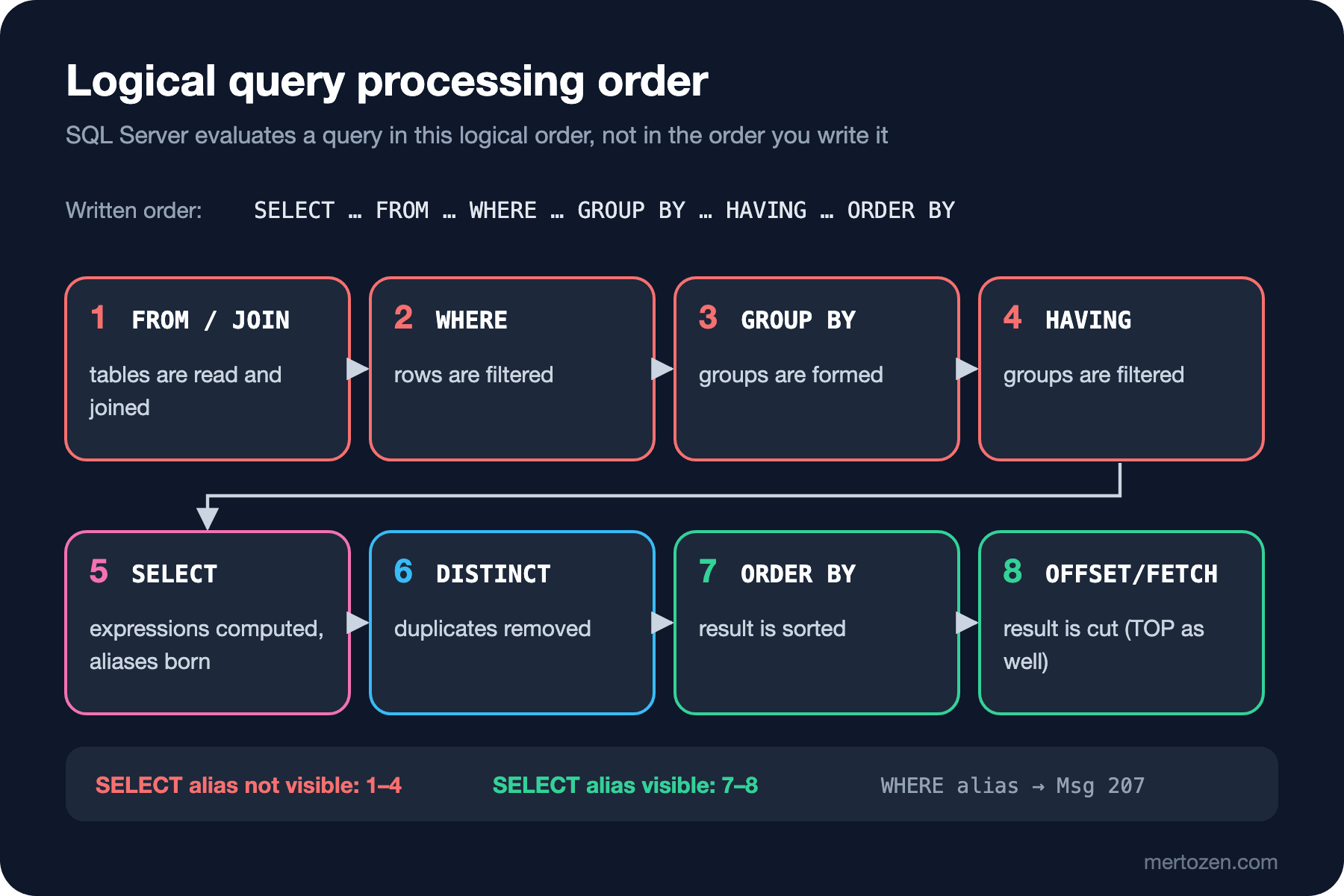
Each step works on the result produced by the previous one and only sees the names defined so far. SELECT is step 5; aliases are born there. WHERE runs at step 2, so there is no such thing as price_with_tax yet. ORDER BY is step 7 and sees the alias. The same rule applies to HAVING:
SELECT category_id, COUNT(*) AS book_count
FROM dbo.books
GROUP BY category_id
HAVING book_count >= 5;
Msg 207, Level 16, State 1, Server b8be943222fa, Line 4
Invalid column name 'book_count'.The correct form is HAVING COUNT(*) >= 5. This rule is not a T-SQL quirk; PostgreSQL also answers SELECT 1 * 2 AS x WHERE x > 1 with column "x" does not exist. The order is a logical model: it defines the result, not which work the engine physically does first. The optimizer may apply a filter before a join or take the sort ready-made from an index; but the result must always be as if it were evaluated in this order. In post 13 we will use the same order to explain why window functions cannot be used in WHERE.
SELECT: Column Lists, SELECT * and DISTINCT
SELECT * is handy for quick exploration and a risk in application code:
SELECT TOP (1) * FROM dbo.books;book_id isbn title subtitle category_id language_code published_year page_count list_price listed_on is_active
------- ------------- ------------------- -------- ----------- ------------- -------------- ---------- ---------- ---------- ---------
1 9798900000015 Pride and Prejudice NULL 2 en 1813 356 230.90 2024-06-01 1
(1 rows affected)Eleven columns came back. If the list screen uses three of them, the other eight cross the network for nothing. More importantly, when a column is added to the table tomorrow or the column order changes, the result of SELECT * changes too; code that reads columns by position silently reads the wrong data. There is an index angle as well: when you ask only for the columns you need, the optimizer can read them from a narrow index that covers them. So spell out the column list in application queries. If you use Entity Framework Core (EF Core), projection does the same job; we saw it in the EF Core series post "EF Core'da Performans Temelleri: N+1, Projection, AsNoTracking ve Compiled Query" (performance basics).
DISTINCT removes duplicate rows from the result. Which countries are our customers from?
SELECT DISTINCT country_code
FROM dbo.customers
ORDER BY country_code;
country_code
------------
DE
GB
NL
TR
(4 rows affected)DISTINCT is not free: to find duplicates the server either sorts the result or builds a hash table, and both need memory and CPU (Central Processing Unit). A query written as "the join multiplied the rows, I added DISTINCT and fixed it" usually papers over a wrong join; we will see the real cause as fan-out in post 9. DISTINCT's place in the logical order creates one more rule: ORDER BY can only sort by expressions in the SELECT list, because once duplicates are removed it is undefined which row a column outside the list would come from:
SELECT DISTINCT country_code
FROM dbo.customers
ORDER BY created_at;
Msg 145, Level 15, State 1, Server b8be943222fa, Line 1
ORDER BY items must appear in the select list if SELECT DISTINCT is specified.Filtering with WHERE
WHERE evaluates a condition for every row and passes only the rows whose result is true to the next step. Books in the Programming category that are on sale and cheaper than 1000 TRY:
SELECT book_id, title, list_price
FROM dbo.books
WHERE category_id = 11
  AND is_active = 1
  AND list_price < 1000
ORDER BY list_price, book_id;
book_id title list_price
------- -------------------------- ----------
58 Clean Code 890.00
62 The Mythical Man-Month 890.00
56 The C Programming Language 950.00
63 Domain-Driven Design 950.00
(4 rows affected)AND is evaluated before OR; write parentheses explicitly whenever you mix the two. WHERE a = 1 OR b = 2 AND c = 3 actually means a = 1 OR (b = 2 AND c = 3), and that is not what someone saying "a or b, but c is required" means. I stressed "whose result is true" because there is a third possibility: comparisons with NULL return "unknown" and WHERE drops those too. Three-valued logic is the topic of the next post.
ORDER BY, TOP and WITH TIES
Perhaps the most important rule of SQL: unless you write ORDER BY, the order of the result is not guaranteed. A TOP without ORDER BY runs, but the question "which three rows" has no answer:
SELECT TOP (3) book_id, title
FROM dbo.books;
book_id title
------- -------------------
1 Pride and Prejudice
2 Emma
3 Middlemarch
(3 rows affected)Today they came in book_id order because the server scanned the table in clustered index order. That is an implementation detail, not a contract; a parallel plan, a new index or a different data distribution can bring three other rows. Even when you sort with ORDER BY, the order among equal values is still undefined. Let's ask for the four most expensive books:
SELECT TOP (4) title, list_price
FROM dbo.books
ORDER BY list_price DESC;
title list_price
------------------------------------------------- ----------
Design Patterns 1450.00
The Art of Computer Programming 1450.00
Structure and Interpretation of Computer Programs 1250.00
The Pragmatic Programmer 1150.00
(4 rows affected)The Pragmatic Programmer is in fourth place, but there are four books at 1150 TRY and nothing decides which one is picked. If you mean "everyone with the same price as the fourth", use WITH TIES:
SELECT TOP (4) WITH TIES title, list_price
FROM dbo.books
ORDER BY list_price DESC;
title list_price
------------------------------------------------- ----------
Design Patterns 1450.00
The Art of Computer Programming 1450.00
Structure and Interpretation of Computer Programs 1250.00
The Algorithm Design Manual 1150.00
Code Complete 1150.00
Refactoring 1150.00
The Pragmatic Programmer 1150.00
(7 rows affected)We asked for four and got seven. Putting the two queries side by side shows one more thing: The Pragmatic Programmer was first among the 1150 books in the first query and is last here. The order among ties can change from plan to plan. The standard form of WITH TIES is FETCH FIRST 4 ROWS WITH TIES; SQL Server 2025 answers that form with Incorrect syntax near the keyword 'WITH', while PostgreSQL has supported it since version 13 and returns the same seven books.
Pagination with OFFSET/FETCH and a Tie-Breaker
Now Bookstore's home page: newest books, 20 per page, page 3. OFFSET/FETCH has been in the standard since SQL:2008 and in SQL Server since 2012:
SELECT book_id, title, listed_on
FROM dbo.books
ORDER BY listed_on DESC
OFFSET 40 ROWS FETCH NEXT 20 ROWS ONLY;
book_id title listed_on
------- --------------------------- ----------
37 Fahrenheit 451 2024-09-19
36 Brave New World 2024-09-16
35 Nineteen Eighty-Four 2024-09-09
34 Hyperion 2024-08-21
33 Neuromancer 2024-07-12
32 The War of the Worlds 2024-07-06
31 The Time Machine 2024-06-27
30 The Left Hand of Darkness 2024-06-01
29 I, Robot 2024-06-01
28 Foundation 2024-06-01
27 Dune Messiah 2024-06-01
26 Dune 2024-06-01
25 One Thousand and One Nights 2024-06-01
24 Beowulf 2024-06-01
23 Animal Farm 2024-06-01
22 Les Miserables 2024-06-01
21 The Picture of Dorian Gray 2024-06-01
20 Dracula 2024-06-01
19 Frankenstein 2024-06-01
18 To the Lighthouse 2024-06-01
(20 rows affected)Looks right. But the first 30 books of the catalog were added in bulk on the same day, 2024-06-01, and the page cuts through the middle of those 30 books. ORDER BY listed_on DESC does not decide which 13 of them land on this page. To prove it, let's add just an index, change no data, and run the same query again:
CREATE INDEX IX_books_listed_on_desc ON dbo.books (listed_on DESC) INCLUDE (title);book_id title listed_on
------- ---------------------- ----------
37 Fahrenheit 451 2024-09-19
36 Brave New World 2024-09-16
35 Nineteen Eighty-Four 2024-09-09
34 Hyperion 2024-08-21
33 Neuromancer 2024-07-12
32 The War of the Worlds 2024-07-06
31 The Time Machine 2024-06-27
1 Pride and Prejudice 2024-06-01
2 Emma 2024-06-01
3 Middlemarch 2024-06-01
4 Jane Eyre 2024-06-01
5 Wuthering Heights 2024-06-01
6 Great Expectations 2024-06-01
7 A Tale of Two Cities 2024-06-01
8 Moby-Dick 2024-06-01
9 Anna Karenina 2024-06-01
10 War and Peace 2024-06-01
11 Crime and Punishment 2024-06-01
12 The Brothers Karamazov 2024-06-01
13 Madame Bovary 2024-06-01
(20 rows affected)Same query, same data, a different 13 books. The optimizer now takes the order ready-made from the index, and the index keeps equal dates in ascending book_id order. In production this means the books a user sees on page 3 change when a DBA (Database Administrator) adds an index overnight; worse, across pages some books show up twice and some never. The fix is to end the sort with a unique column, that is, to add a tie-breaker:
DECLARE @page INT = 3, @page_size INT = 20;
SELECT book_id, title, listed_on
FROM dbo.books
ORDER BY listed_on DESC, book_id DESC
OFFSET (@page - 1) * @page_size ROWS FETCH NEXT @page_size ROWS ONLY;
This query returns the same 20 rows with or without the index: seven books from 37 down to 31 and the thirteen books dated 2024-06-01 from book_id 30 down to 18. The order is now fully defined; the pair (listed_on, book_id) is unique for every row. A separate query gives the total number of pages:
SELECT COUNT(*) AS total_books, CEILING(COUNT(*) / 20.0) AS page_count
FROM dbo.books;
total_books page_count
----------- ----------
77 4
(1 rows affected)T-SQL only accepts OFFSET together with ORDER BY; without ORDER BY you get Incorrect syntax near '40'. That is a good restriction: paginating an unordered result makes no sense. In PostgreSQL and MySQL the same job is done with LIMIT 20 OFFSET 40, and both allow LIMIT without ORDER BY; the tie-breaker rule applies there just the same.
An Introduction to Keyset Pagination
OFFSET has a structural problem: to show page 1000, the server must read and discard the first 19,980 rows. The larger the page number, the more expensive the query. And if a new book is added while the user moves between pages, everything shifts by one row and a book shows up on two pages. Keyset pagination (the seek method) asks "where did I stop" instead of "which page". The last row of page 3 was (2024-06-01, 18); page 4 is whatever comes after that pair:
DECLARE @last_listed_on DATE = '2024-06-01', @last_book_id INT = 18;
SELECT TOP (20) book_id, title, listed_on
FROM dbo.books
WHERE listed_on < @last_listed_on
   OR (listed_on = @last_listed_on AND book_id < @last_book_id)
ORDER BY listed_on DESC, book_id DESC;
book_id title listed_on
------- ---------------------- ----------
17 Mrs Dalloway 2024-06-01
16 Ulysses 2024-06-01
15 The Great Gatsby 2024-06-01
14 Don Quixote 2024-06-01
13 Madame Bovary 2024-06-01
12 The Brothers Karamazov 2024-06-01
11 Crime and Punishment 2024-06-01
10 War and Peace 2024-06-01
9 Anna Karenina 2024-06-01
8 Moby-Dick 2024-06-01
7 A Tale of Two Cities 2024-06-01
6 Great Expectations 2024-06-01
5 Wuthering Heights 2024-06-01
4 Jane Eyre 2024-06-01
3 Middlemarch 2024-06-01
2 Emma 2024-06-01
1 Pride and Prejudice 2024-06-01
(17 rows affected)The last page, the remaining 17 books. With an index on (listed_on, book_id) the server jumps straight to that point and the cost stays the same whatever the page number. The price is losing random access such as "go to page 17". The standard lets you write the condition much more briefly with a row value comparison: WHERE (listed_on, book_id) < (DATE '2024-06-01', 18). PostgreSQL 18.6 supports it and returns 17 and 16 in the right order on a small test table; SQL Server rejects it with An expression of non-boolean type specified in a context where a condition is expected, so the longer form with OR is required in T-SQL. The API (Application Programming Interface) side of this topic is in the ASP.NET Core Web API series post "ASP.NET Core Web API'de Pagination, Filtering ve Sorting: Büyük Listeleri Güvenle Döndürmek" (pagination, filtering and sorting), and the deep comparison in the Solution Pattern series post "Pagination Stratejileri Derinlemesine: Offset, Keyset ve Opaque Cursor Token" (pagination strategies).
In Production
Sorting is expensive. If no index satisfies the query's ORDER BY, the server loads all candidate rows into memory and sorts them, spilling to tempdb when memory runs out. For pagination queries, an index containing the ORDER BY columns and the tie-breaker in the same order makes both the sort and the keyset jump cheap; index design is covered in the "SQL Server Derinlemesine" (SQL Server in Depth) series. If you build dynamic SQL to add a user-selected sort column, never put the column name straight into the string; pick it from a list of allowed columns. Use parameters for values; this is covered in the OWASP (Open Worldwide Application Security Project) series post "OWASP A05: Injection (1) — SQL Injection ve Command Injection". Finally, cap the page size; a client sending page_size=100000 pulls the whole catalog in one request.
Common Pitfalls
- Trying to use an alias in
WHERE,GROUP BYorHAVING. The alias is born inSELECT; the steps before it cannot see it. - Expecting an order without
ORDER BY; usingTOPwithoutORDER BY. - Paginating on a non-unique column. Without a tie-breaker, even adding an index changes the content of pages.
- Sorting by position as in
ORDER BY 2; when a column is added to theSELECTlist, the sort silently changes. SELECT *in application code: unnecessary data, fragile column order, unusable indexes.- Hiding rows multiplied by a wrong join with
DISTINCT. - Forgetting the cost of
OFFSETon deep pages; consider keyset pagination for large, frequently changing lists.
A Small Experiment
★☆☆ List the 5 most expensive books with title and price; among equal prices, sort alphabetically by title. Then run it again with TOP (5) WITH TIES and explain why the row count changed.
★★☆ To write a "customers with the most orders" list in pages of 10, build a query that counts orders per customer from orders and fetch page 2. Which tie-breaker did you choose, and why?
★★★ Rewrite the keyset pagination query so that it works backwards (previous page). Hint: reverse the comparison direction and the ORDER BY, then sort the result again before showing it to the user.
In this post we stressed several times that WHERE only lets "true" through. In the next post we look at the third possibility, NULL, and three-valued logic: why = NULL is never true, the type difference between COALESCE and ISNULL, LIKE and IN, and how BETWEEN misses the end of the day in date ranges.