

CTEs, Views and Recursive Queries: Readable SQL with WITH and Hierarchical Data

A CTE lets you write a query top to bottom in named steps, but SQL Server does not materialize it; every reference runs again. We show chained CTEs, views, the SELECT * trap, SCHEMABINDING and WITH CHECK OPTION, a recursive CTE walking the category tree, cycle protection and MAXRECURSION on Bookstore data with real output and logical reads.
Version note: The SQL (Structured Query Language) examples in this post were run on SQL Server 2025 (17.0, CU10 (Cumulative Update 10)) against the series' Bookstore database; PostgreSQL comparisons were tried on PostgreSQL 18.6.
Guess First
The query below defines a CTE (Common Table Expression) that picks a random book, then CROSS JOINs the CTE with itself. The CTE returns a single row; both references look at the same "table". Do the two columns in the result show the same book?
WITH pick AS (
    SELECT TOP (1) book_id, title
    FROM dbo.books
    ORDER BY NEWID()
)
SELECT a.title AS first_read, b.title AS second_read
FROM pick AS a
CROSS JOIN pick AS b;
Most people say "yes": the CTE is computed once, then read twice. When I ran it, the output was:
first_read         second_read
------------------ ------------------------
Great Expectations The Pragmatic Programmer
Two different books. Run it again and you will most likely see two different books again. In SQL Server a CTE is not an intermediate table but a named expression pasted into the query; each reference is evaluated separately, and NEWID() picks a different book every time. This post covers what a CTE is and what it is not, views as the lasting form of the same idea, and recursive queries, the CTE's real superpower.
Writing a Query Top to Bottom with WITH
In the previous post we saw derived tables. They are useful, but as they nest the query reads inside out. A CTE lets you write the same logic top to bottom, giving each step a name, and it entered the standard with SQL:1999. Customers who spent more than twice their country's average on delivered orders:
WITH customer_spend AS (
    SELECT o.customer_id, SUM(oi.quantity * oi.unit_price) AS spend
    FROM dbo.orders AS o
    JOIN dbo.order_items AS oi ON oi.order_id = o.order_id
    WHERE o.status = 'Delivered'
    GROUP BY o.customer_id
),
country_avg AS (
    SELECT c.country_code, AVG(cs.spend) AS avg_spend
    FROM customer_spend AS cs
    JOIN dbo.customers AS c ON c.customer_id = cs.customer_id
    GROUP BY c.country_code
)
SELECT c.customer_id, c.first_name, c.last_name, c.country_code, cs.spend, ca.avg_spend
FROM customer_spend AS cs
JOIN dbo.customers AS c   ON c.customer_id = cs.customer_id
JOIN country_avg AS ca    ON ca.country_code = c.country_code
WHERE cs.spend > ca.avg_spend * 2
ORDER BY cs.spend DESC;
customer_id first_name last_name country_code spend avg_spend
----------- ---------- ---------- ------------ -------- ------------
3 Grace Hopper TR 36417.00 8537.969615
32 Ivan Sutherland TR 27110.19 8537.969615
30 Jean Bartik TR 26879.12 8537.969615
2 Alan Turing DE 25281.68 12558.385714
22 Joan Clarke TR 17150.36 8537.969615The first CTE computes spend per customer, the second uses the first to compute the country average, and the final SELECT combines the two. Every step has a name and every step can be tested on its own: to see the middle CTE's result, change the final SELECT to SELECT * FROM country_avg. Multiple CTEs are separated by commas, WITH is written only once, and a later CTE can reference earlier ones, not the other way round.
There is a syntax detail in T-SQL (Transact-SQL): because the word WITH has other meanings too, you get an error if the previous statement did not end with a semicolon. That is why some code bases write ;WITH; the right fix is to end every statement with a semicolon.
A CTE Is Not Materialized
The reason for the opening surprise: SQL Server expands the CTE into the query before optimization, like a view. Reference the CTE twice and the query that produces it runs twice. We can measure that with SET STATISTICS IO ON. The number of customers spending above the overall average, with two references to the CTE:
SET STATISTICS IO ON;
WITH customer_spend AS (
    SELECT o.customer_id, SUM(oi.quantity * oi.unit_price) AS spend
    FROM dbo.orders AS o
    JOIN dbo.order_items AS oi ON oi.order_id = o.order_id
    WHERE o.status = 'Delivered'
    GROUP BY o.customer_id
)
SELECT COUNT(*) AS above_overall_avg
FROM customer_spend
WHERE spend > (SELECT AVG(spend) FROM customer_spend);
SET STATISTICS IO OFF;
above_overall_avg
-----------------
11
Table 'Worktable'. Scan count 0, logical reads 0, physical reads 0, page server reads 0, read-ahead reads 0, page server read-ahead reads 0, lob logical reads 0, lob physical reads 0, lob page server reads 0, lob read-ahead reads 0, lob page server read-ahead reads 0.
Table 'Workfile'. Scan count 0, logical reads 0, physical reads 0, page server reads 0, read-ahead reads 0, page server read-ahead reads 0, lob logical reads 0, lob physical reads 0, lob page server reads 0, lob read-ahead reads 0, lob page server read-ahead reads 0.
Table 'order_items'. Scan count 2, logical reads 10, physical reads 0, page server reads 0, read-ahead reads 0, page server read-ahead reads 0, lob logical reads 0, lob physical reads 0, lob page server reads 0, lob read-ahead reads 0, lob page server read-ahead reads 0.
Table 'orders'. Scan count 2, logical reads 8, physical reads 0, page server reads 0, read-ahead reads 0, page server read-ahead reads 0, lob logical reads 0, lob physical reads 0, lob page server reads 0, lob read-ahead reads 0, lob page server read-ahead reads 0.orders and order_items were each scanned twice (Scan count 2). If we write the same intermediate result into a temporary table once and read it twice:
SET STATISTICS IO ON;
SELECT o.customer_id, SUM(oi.quantity * oi.unit_price) AS spend
INTO #customer_spend
FROM dbo.orders AS o
JOIN dbo.order_items AS oi ON oi.order_id = o.order_id
WHERE o.status = 'Delivered'
GROUP BY o.customer_id;
SELECT COUNT(*) AS above_overall_avg
FROM #customer_spend
WHERE spend > (SELECT AVG(spend) FROM #customer_spend);
SET STATISTICS IO OFF;
DROP TABLE #customer_spend;
Table 'Worktable'. Scan count 0, logical reads 0, physical reads 0, page server reads 0, read-ahead reads 0, page server read-ahead reads 0, lob logical reads 0, lob physical reads 0, lob page server reads 0, lob read-ahead reads 0, lob page server read-ahead reads 0.
Table 'Workfile'. Scan count 0, logical reads 0, physical reads 0, page server reads 0, read-ahead reads 0, page server read-ahead reads 0, lob logical reads 0, lob physical reads 0, lob page server reads 0, lob read-ahead reads 0, lob page server read-ahead reads 0.
Table 'order_items'. Scan count 1, logical reads 5, physical reads 0, page server reads 0, read-ahead reads 0, page server read-ahead reads 0, lob logical reads 0, lob physical reads 0, lob page server reads 0, lob read-ahead reads 0, lob page server read-ahead reads 0.
Table 'orders'. Scan count 1, logical reads 4, physical reads 0, page server reads 0, read-ahead reads 0, page server read-ahead reads 0, lob logical reads 0, lob physical reads 0, lob page server reads 0, lob read-ahead reads 0, lob page server read-ahead reads 0.
above_overall_avg
-----------------
11
Table '#customer_spend_____________________________________________________________________________________________________00000000000B'. Scan count 2, logical reads 2, physical reads 0, page server reads 0, read-ahead reads 0, page server read-ahead reads 0, lob logical reads 0, lob physical reads 0, lob page server reads 0, lob read-ahead reads 0, lob page server read-ahead reads 0.This time the source tables were scanned once each; reading the intermediate result twice cost a total of 2 logical reads on the temporary table. At Bookstore's size the difference does not matter; but if the CTE contains an aggregate that walks millions of rows and you use its result in three places, you pay three times. The rule: a CTE is a readability tool, not a cache. If you really want to compute an intermediate result once, use a temporary table.
PostgreSQL behaves differently here. Before PostgreSQL 12 every CTE was materialized; since 12, side-effect-free CTEs referenced once are inlined into the query and those referenced several times are materialized. You can also make the decision yourself with WITH x AS MATERIALIZED (...) and NOT MATERIALIZED. SQL Server has no such hint.
View: A Lasting Query
A CTE lives for a single statement. If you are going to use the same query in many places, you store it as a view. A view is a SELECT stored in the database under a name; it holds no data, and every time it is used it is expanded and merged into the query:
CREATE OR ALTER VIEW dbo.v_book_sales
AS
SELECT b.book_id,
       b.title,
       COUNT(DISTINCT oi.order_id)       AS orders,
       SUM(oi.quantity)                  AS copies,
       SUM(oi.quantity * oi.unit_price)  AS revenue
FROM dbo.books AS b
JOIN dbo.order_items AS oi ON oi.book_id = b.book_id
JOIN dbo.orders AS o       ON o.order_id = oi.order_id
WHERE o.status <> 'Cancelled'
GROUP BY b.book_id, b.title;
SELECT TOP (5) title, orders, copies, revenue
FROM dbo.v_book_sales
ORDER BY revenue DESC, book_id;title orders copies revenue
-------------------------- ------ ------ --------
The Pragmatic Programmer 13 16 17365.00
Design Patterns 9 12 16530.00
Nineteen Eighty-Four 26 30 15449.19
The Fellowship of the Ring 17 23 13680.00
Clean Code 13 15 12460.00A view has two benefits. The first is abstraction: the definition "sales per book from non-cancelled orders" lives in one place; if the rule changes (say, returned orders must be excluded too) you change one place. The second is a permission boundary: you can GRANT SELECT ON dbo.v_book_sales to a reporting user without granting anything on the orders table. When the view and the tables have the same owner, SQL Server's ownership chaining skips the permission check on the underlying tables.
You cannot write ORDER BY inside a view (it is only allowed together with TOP, and even then it does not guarantee the outer query's order). Ordering is the job of the query that uses the view.
The SELECT * Trap in Views and SCHEMABINDING
When a view is created, its column list is written into metadata. A view defined with SELECT * does not update itself when the table changes. I show this with a small promotions table in my own database:
DROP VIEW IF EXISTS dbo.v_promotions;
DROP TABLE IF EXISTS dbo.promotions;
CREATE TABLE dbo.promotions (
    promotion_id INT          NOT NULL PRIMARY KEY,
    code         VARCHAR(20)  NOT NULL,
    discount_pct DECIMAL(4,1) NOT NULL,
    ends_on      DATE         NOT NULL
);
INSERT INTO dbo.promotions VALUES (1, 'BACK2SCHOOL', 10.0, '2025-09-30'), (2, 'NEWYEAR', 15.0, '2026-01-31');
GO
CREATE VIEW dbo.v_promotions AS SELECT * FROM dbo.promotions;
GO
SELECT * FROM dbo.v_promotions;
promotion_id code discount_pct ends_on
------------ ----------- ------------ ----------
1 BACK2SCHOOL 10.0 2025-09-30
2 NEWYEAR 15.0 2026-01-31Now I drop the discount_pct column from the middle of the table, add a new channel column at the end, and send the same query to the view:
ALTER TABLE dbo.promotions DROP COLUMN discount_pct;
ALTER TABLE dbo.promotions ADD channel VARCHAR(10) NOT NULL CONSTRAINT DF_promotions_channel DEFAULT ('web');
SELECT * FROM dbo.v_promotions;
promotion_id code discount_pct ends_on
------------ ----------- ------------ -------
1 BACK2SCHOOL 2025-09-30 web
2 NEWYEAR 2026-01-31 webNo error. But under the discount_pct heading there are end dates, and under ends_on there are channel names. The view keeps the old column names and lines the table's new columns up under them in order. An application reading this result blows up trying to read discount_pct as a decimal; worse, if the types happen to be compatible, it silently uses the wrong data. sp_refreshview refreshes the metadata:
EXEC sp_refreshview 'dbo.v_promotions';
SELECT * FROM dbo.v_promotions;
promotion_id code ends_on channel
------------ ----------- ---------- -------
1 BACK2SCHOOL 2025-09-30 web
2 NEWYEAR 2026-01-31 webThe lasting fix is to list the columns explicitly in the view and use WITH SCHEMABINDING where it matters. A schema-bound view blocks changes to the columns it depends on:
DROP VIEW dbo.v_promotions;
GO
CREATE VIEW dbo.v_promotions
WITH SCHEMABINDING
AS
SELECT promotion_id, code, ends_on
FROM dbo.promotions;
GO
ALTER TABLE dbo.promotions DROP COLUMN ends_on;
Msg 5074, Level 16, State 1, Server b8be943222fa, Line 1
The object 'v_promotions' is dependent on column 'ends_on'.
Msg 4922, Level 16, State 9, Server b8be943222fa, Line 1
ALTER TABLE DROP COLUMN ends_on failed because one or more objects access this column.SCHEMABINDING has two rules: objects are written with two-part names (dbo.promotions) and SELECT * is not allowed. In return, a table change that would break the view fails already at deployment time. Advanced features such as indexed views also require a schema-bound view; they belong to the SQL Server Derinlemesine (SQL Server in Depth) series.
Updatable Views and WITH CHECK OPTION
Through a view that is based on a single table and contains no aggregate or DISTINCT, you can run INSERT, UPDATE and DELETE; the change goes to the underlying table. A view showing customers in Turkey:
CREATE OR ALTER VIEW dbo.v_tr_customers
AS
SELECT customer_id, first_name, last_name, city, country_code
FROM dbo.customers
WHERE country_code = 'TR'
WITH CHECK OPTION;
GO
UPDATE dbo.v_tr_customers SET city = N'Konya' WHERE customer_id = 37;
SELECT @@ROWCOUNT AS updated;
updated
-------
1If I change a customer's country through this view, the row leaves the view: the update happens, but afterwards I can no longer see that row through the view. WITH CHECK OPTION prevents that; any change that breaks the view's WHERE condition is rejected:
UPDATE dbo.v_tr_customers SET country_code = 'DE' WHERE customer_id = 37;Msg 550, Level 16, State 1, Server b8be943222fa, Line 1
The attempted insert or update failed because the target view either specifies WITH CHECK OPTION or spans a view that specifies WITH CHECK OPTION and one or more rows resulting from the operation did not qualify under the CHECK OPTION constraint.
The statement has been terminated.A view containing an aggregate cannot be updated, because it is not clear which row a column like revenue should be written to:
UPDATE dbo.v_book_sales SET revenue = 0 WHERE book_id = 1;Msg 4406, Level 16, State 1, Server b8be943222fa, Line 1
Update or insert of view or function 'dbo.v_book_sales' failed because it contains a derived or constant field.The standard defines which views are updatable with detailed rules, and dialects implement different subsets of them. In practice I rarely use updatable views; writes go through tables, views are for reading and permissions.
Recursive CTE: The Category Tree
A CTE can do one thing a derived table cannot: reference itself. Bookstore's categories table is a self-referencing tree: each category's parent_category_id points to another category. To produce every path (breadcrumb) without knowing the depth of the tree:
WITH category_tree AS (
    SELECT category_id, name, parent_category_id,
           0 AS depth,
           CAST(name AS NVARCHAR(400)) AS path
    FROM dbo.categories
    WHERE parent_category_id IS NULL
    UNION ALL
    SELECT c.category_id, c.name, c.parent_category_id,
           t.depth + 1,
           CAST(t.path + N' > ' + c.name AS NVARCHAR(400))
    FROM dbo.categories AS c
    JOIN category_tree AS t ON c.parent_category_id = t.category_id
)
SELECT category_id, depth, path
FROM category_tree
ORDER BY path;
category_id depth path
----------- ----- -------------------------------------
13 0 Children
1 0 Fiction
2 1 Fiction > Classics
5 1 Fiction > Fantasy
6 1 Fiction > Mystery
7 1 Fiction > Poetry
3 1 Fiction > Science Fiction
4 2 Fiction > Science Fiction > Dystopian
8 0 Non-Fiction
10 1 Non-Fiction > Computing
12 2 Non-Fiction > Computing > Algorithms
11 2 Non-Fiction > Computing > Programming
9 1 Non-Fiction > ScienceA recursive CTE has two parts joined with UNION ALL. The anchor member produces the starting rows: the root categories. The recursive member joins to the CTE itself and finds the children of the rows produced in the previous step. SQL Server runs this as iterations: in each iteration the recursive member sees only the rows of the previous iteration, and it stops as soon as no new rows are produced.
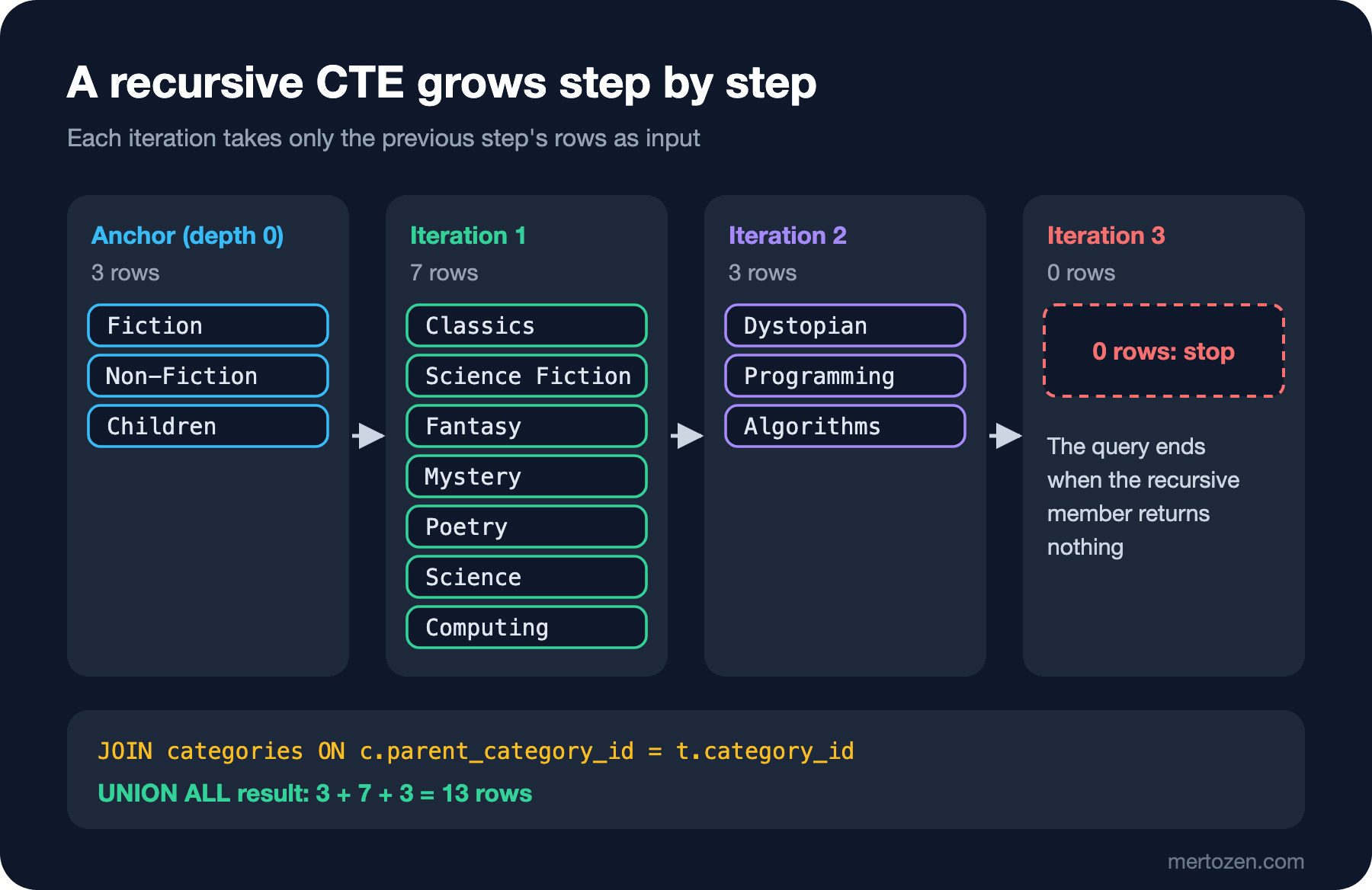
In our tree the anchor produced 3 rows, the first iteration 7, the second 3, the third iteration came back empty and the query ended: 13 rows in total. The standard requires WITH RECURSIVE for these queries; PostgreSQL and MySQL enforce the keyword (without RECURSIVE, PostgreSQL 18 gave me "There is a WITH item named "n", but it cannot be referenced from this part of the query"). SQL Server, on the contrary, does not recognise the word RECURSIVE:
WITH RECURSIVE n AS (
    SELECT 1 AS i
    UNION ALL
    SELECT i + 1 FROM n WHERE i < 3
)
SELECT i FROM n;
Msg 102, Level 15, State 1, Server b8be943222fa, Line 1
Incorrect syntax near 'n'.There are two more subtle points. The column types of the anchor and the recursive member must match exactly. If you write path without a CAST:
WITH category_tree AS (
    SELECT category_id, name AS path
    FROM dbo.categories
    WHERE parent_category_id IS NULL
    UNION ALL
    SELECT c.category_id, t.path + N' > ' + c.name
    FROM dbo.categories AS c
    JOIN category_tree AS t ON c.parent_category_id = t.category_id
)
SELECT * FROM category_tree;
Msg 240, Level 16, State 1, Server b8be943222fa, Line 1
Types don't match between the anchor and the recursive part in column "path" of recursive query "category_tree".name in the anchor is NVARCHAR(100), the concatenation in the recursive member is a longer NVARCHAR; SQL Server does not accept that. The second point is the restrictions on the recursive member: in SQL Server you cannot use GROUP BY, aggregates, TOP, DISTINCT or outer joins inside it. You aggregate outside the recursive CTE, over its result. The number of books in all categories under Non-Fiction:
WITH subtree AS (
    SELECT category_id FROM dbo.categories WHERE category_id = 8
    UNION ALL
    SELECT c.category_id
    FROM dbo.categories AS c
    JOIN subtree AS s ON c.parent_category_id = s.category_id
)
SELECT COUNT(*) AS books_under_non_fiction
FROM dbo.books
WHERE category_id IN (SELECT category_id FROM subtree);
books_under_non_fiction
-----------------------
16Cycles and MAXRECURSION
In real data a tree does not always stay a tree. If a bad update made Dystopian the parent of Fiction (Dystopian is already Fiction's grandchild), a cycle appears. I try this on a copy of categories in my own database:
DROP TABLE IF EXISTS dbo.category_copy;
SELECT category_id, name, parent_category_id INTO dbo.category_copy FROM dbo.categories;
UPDATE dbo.category_copy SET parent_category_id = 4 WHERE category_id = 1;
WITH tree AS (
SELECT category_id, name, 0 AS depth
FROM dbo.category_copy
WHERE category_id = 1
UNION ALL
SELECT c.category_id, c.name, t.depth + 1
FROM dbo.category_copy AS c
JOIN tree AS t ON c.parent_category_id = t.category_id
)
SELECT COUNT(*) AS rows_produced FROM tree;Msg 530, Level 16, State 1, Server b8be943222fa, Line 1
The statement terminated. The maximum recursion 100 has been exhausted before statement completion.SQL Server's default recursion limit is 100 iterations. Without it the query would loop forever; thanks to the limit it fails and stops. But the error does not say "there is a cycle in the data", it only says the limit was hit. To detect the cycle and stop gracefully, I carry the visited nodes in a path:
WITH tree AS (
    SELECT category_id, name, 0 AS depth,
           CAST(CONCAT('/', category_id, '/') AS VARCHAR(400)) AS visited,
           0 AS is_cycle
    FROM dbo.category_copy
    WHERE category_id = 1
    UNION ALL
    SELECT c.category_id, c.name, t.depth + 1,
           CAST(CONCAT(t.visited, c.category_id, '/') AS VARCHAR(400)),
           CASE WHEN t.visited LIKE CONCAT('%/', c.category_id, '/%') THEN 1 ELSE 0 END
    FROM dbo.category_copy AS c
    JOIN tree AS t ON c.parent_category_id = t.category_id
    WHERE t.is_cycle = 0
)
SELECT category_id, name, depth, visited, is_cycle
FROM tree
ORDER BY depth, category_id;
category_id name depth visited is_cycle
----------- --------------- ----- --------- --------
1 Fiction 0 /1/ 0
2 Classics 1 /1/2/ 0
3 Science Fiction 1 /1/3/ 0
5 Fantasy 1 /1/5/ 0
6 Mystery 1 /1/6/ 0
7 Poetry 1 /1/7/ 0
4 Dystopian 2 /1/3/4/ 0
1 Fiction 3 /1/3/4/1/ 1When Fiction is seen a second time, is_cycle becomes 1 and the recursive member does not continue from that row. The standard does this in one line with the CYCLE clause (and there is SEARCH DEPTH FIRST / BREADTH FIRST for ordering); SQL:2023 simplified the clause's mark values to booleans. PostgreSQL has supported both since 14; on the same cyclic copy, writing CYCLE category_id SET is_cycle USING visited made PostgreSQL 18 return the same eight rows and mark only the second Fiction row with is_cycle true. SQL Server has no such clause; checking by hand with a path is the only way.
Another common use of a recursive CTE is generating a series of numbers or dates. Producing the days of December 2025 and seeing days without orders as 0:
WITH days AS (
    SELECT CAST('2025-12-01' AS date) AS d
    UNION ALL
    SELECT DATEADD(day, 1, d) FROM days WHERE d < '2025-12-31'
)
SELECT d, COUNT(o.order_id) AS orders
FROM days
LEFT JOIN dbo.orders AS o
       ON o.ordered_at >= d AND o.ordered_at < DATEADD(day, 1, d)
WHERE d BETWEEN '2025-12-20' AND '2025-12-26'
GROUP BY d
ORDER BY d;
d orders
---------- ------
2025-12-20 0
2025-12-21 2
2025-12-22 4
2025-12-23 1
2025-12-24 2
2025-12-25 1
2025-12-26 1The anchor produces 1 December, and 30 iterations produce the remaining days. Try generating the days of a year and you hit the limit:
WITH n AS (
    SELECT 1 AS i
    UNION ALL
    SELECT i + 1 FROM n WHERE i < 365
)
SELECT COUNT(*) AS days_in_year FROM n;
Msg 530, Level 16, State 1, Server b8be943222fa, Line 1
The statement terminated. The maximum recursion 100 has been exhausted before statement completion.OPTION (MAXRECURSION n) changes the limit; it can be at most 32767, and 0 removes the limit entirely:
WITH n AS (
    SELECT 1 AS i
    UNION ALL
    SELECT i + 1 FROM n WHERE i < 365
)
SELECT COUNT(*) AS days_in_year FROM n
OPTION (MAXRECURSION 400);
days_in_year
------------
365Never write MAXRECURSION 0 without a cycle check. For generating series, SQL Server 2022 added GENERATE_SERIES, which is faster; we will see it in post 17.
Production Notes
Do not mistake a CTE for a performance tool. It improves readability, but for SQL Server's optimizer it is no different from a derived table. If you reference a CTE twice, look at the logical reads; if there is an expensive repeated computation, move it into a temporary table.
Stacking views is tempting: a v_category_sales that uses v_book_sales, a v_dashboard that uses that one. Each layer makes sense on its own, but the optimizer eventually expands them all into one giant query, and even joins you do not use can stay in the plan. View chains deeper than three layers are one of the most frequent "why is this query slow" causes I see in production.
A recursive CTE runs as many iterations as the tree is deep and executes a join in each one. Without an index on parent_category_id, every iteration scans the table from scratch. For small, shallow structures like the category tree that is fine; for large hierarchies such as org charts or comment threads, index the parent_id column and limit the depth.
Always write cycle protection for recursive CTEs in production. Even if the data is a tree today, one day a bad UPDATE turns it into a graph, and that day the error message is "maximum recursion 100 has been exhausted"; nobody reads that as "there is a cycle in the data".
Common Pitfalls
Thinking a CTE is computed once and stored. In SQL Server every reference is re-evaluated; nondeterministic functions (NEWID(), SYSDATETIME()) can return different results for each reference.
Defining a view with SELECT *. When the table changes, the view returns new data under old column names; list the columns explicitly and add SCHEMABINDING where needed.
Putting ORDER BY inside a view and expecting the order to be kept.
Not matching the types of the anchor and the recursive member in a recursive CTE. Bring both sides to the same type with CAST.
Silencing the error with MAXRECURSION 0. If there is a cycle, the query never ends; add a cycle check first.
Leaving the statement before WITH without a semicolon.
A Small Experiment
★☆☆ Rewrite the previous post's "customers who placed no orders in 2026" derived-table query as a CTE and add the customer's name to the final SELECT.
★★☆ Write a view named dbo.v_category_sales that returns, for each category, the number of books and the revenue from non-cancelled orders. List the columns explicitly and add WITH SCHEMABINDING. Then try dropping a column the view uses from books and read the error.
★★★ Using a recursive CTE, compute for each category the total number of books in the category itself and all of its subcategories (for Fiction, the sum of books in Classics, Science Fiction, Dystopian, Fantasy, Mystery and Poetry). Hint: a CTE that starts from every category and walks down should produce (root_id, category_id) pairs; aggregate outside the CTE.
With recursive CTEs and conditional aggregation we can write many reports, but questions like "the top three best-selling books in each category" or "running total" are still hard. In the next post we start on the natural answer to those questions, window functions: OVER, PARTITION BY, ROW_NUMBER and RANK.