

What Changed from Node.js 22 to 26: require(esm), Type Stripping, the Permission Model, Temporal and the New Release Schedule
From Node.js 22 to 26 came require(esm), type stripping, the Permission Model, a global URLPattern and Web Storage; 26 turned Temporal on by default, removed the _stream_* modules and writeHeader, and raised NODE_MODULE_VERSION to 147. With real output: Date and Temporal disagreeing on a delivery date, deprecations caught in CI with --throw-deprecation, an addon built on Node 24 that fails to load on 26, and the yearly Alpha → Current → LTS schedule that starts with Node 27.
Version note: The examples in this post were run with Node.js 26.13.1 (LTS); comparisons use Node.js 24.22.3, and type checking used TypeScript 7.0.2 and @types/node 26.6.6.
Guess First
In Bookstore, the online bookstore used as the shared example across this site's series, the order page shows the delivery date as three days after the order. Ada places her order at 01:30 on 15 November, Istanbul time; the server stores that moment in UTC. We run the same file with Node 24 and Node 26:
// Ada's order page promises delivery three days after the order date, in Istanbul time
const placedAt = "2026-11-14T22:30:00Z";

// Date only knows UTC and the machine's own time zone
const viaDate = new Date(placedAt);
viaDate.setUTCDate(viaDate.getUTCDate() + 3);
console.log("Date:    ", viaDate.toISOString().slice(0, 10));

// Temporal: the time zone is part of the calculation
const viaTemporal = Temporal.Instant.from(placedAt).toZonedDateTimeISO("Europe/Istanbul").toPlainDate().add({ days: 3 });
console.log("Temporal:", viaTemporal.toString());
How many lines does Node 24 print? On Node 26, do the two lines show the same date?
fnm exec --using=24.22.3 node labs/17/guess.ts
node labs/17/guess.ts
Date: 2026-11-17
file:///home/user/bookstore-api/labs/17/guess.ts:10
const viaTemporal = Temporal.Instant.from(placedAt).toZonedDateTimeISO("Europe/Istanbul").toPlainDate().add({ days: 3 });
^
ReferenceError: Temporal is not defined
at file:///home/user/bookstore-api/labs/17/guess.ts:10:21
...
Node.js v24.22.3
Date: 2026-11-17
Temporal: 2026-11-18Node 24 has no Temporal; the process crashes after the first line. On Node 26 the two lines differ: Date counted from 14 November in UTC, Temporal from the order's date in Istanbul, 15 November. The right date to show Ada is 18 November. (I ran the two versions from separate installations; the fnm exec in the first line is the command that does the same with the fnm we set up in post 02.) In this last post of the series we collect what changed from Node 22 to 26: which version brought the features we used in the series, what 26 adds and removes, what to check in an upgrade, and the new release schedule that starts with Node 27.
From 22 to 26, Release by Release
Instead of listing everything that changed in four major versions, I collected what mattered in this series and what you will run into during an upgrade. Dates and items are from the release notes on nodejs.org; every major version also upgrades V8:
| Version | Released | Highlights |
|---|---|---|
| 22.0.0 | 24 April 2024 | V8 12.4, --watch stable, node --run, fs.glob, global WebSocket client |
| 22.12.0 | 3 December 2024 | require(esm) unflagged (backported to the LTS line) |
| 23.0.0 | 16 October 2024 | require(esm) on by default, node --run stable, 32-bit Windows support dropped |
| 24.0.0 | 6 May 2025 | V8 13.6, npm 11, global URLPattern, --permission, the test runner awaits subtests itself, url.parse() runtime deprecation |
| 25.0.0 | 15 October 2025 | V8 14.1, Web Storage on by default, --allow-net, Corepack no longer distributed |
| 26.0.0 | 5 May 2026 | V8 14.6, Temporal on by default, undici 8, writeHeader and _stream_* removed, module.register() runtime deprecation |
We already used most of these in the series, so I won't explain them again. --watch, node --run and --env-file were in post 02; require(esm) becoming unflagged in 22.12 and stable in 25.4 was in 03; type stripping becoming the default in 22.18 and 23.6, stable in 24.12 and 25.2, and the removal of --experimental-transform-types in 26 were in 05; fs.glob and the Permission Model were in 08; the removal of writeHeader was in 10. One note on the Permission Model: the documentation says it became stable in 23.5 and 22.13, while the 24.0 release notes highlight that the flag changed from --experimental-permission to --permission. --allow-net, which came in 25, is still at "Active development" (1.1) in the documentation; the "Use --allow-net" error in post 08 comes from that flag.
Two more items are easy to miss. Since 24, AsyncLocalStorage uses a new implementation called AsyncContextFrame by default; the request context from post 07 works with its API unchanged, but if you use an APM agent that relies on AsyncLocalStorage, check the agent's version when you move to 24. Also since 24, the test runner waits for subtests that were not awaited; the tests in post 16 rely on that behaviour.
URLPattern and Web Storage
Since 24, URLPattern is a global. It is the browser's URL matching standard; you give path parameters and regex constraints in one pattern:
// URLPattern is a global since Node 24: route matching without a framework
const bookRoute = new URLPattern({ pathname: "/api/books/:isbn(97[89]\\d{10})" });

console.log(bookRoute.test("http://127.0.0.1:3000/api/books/9780441172719"));
console.log(bookRoute.test("http://127.0.0.1:3000/api/books/dune"));
console.log(bookRoute.exec("http://127.0.0.1:3000/api/books/9780441172719?format=json")?.pathname.groups);
true
false
{ isbn: '9780441172719' }We could have shortened the hand-written routing table from post 10 with this. It is not the same as Express's own path syntax (path-to-regexp 8, post 11); don't mix the two when you use Express. URLPattern belongs in small services without a framework, edge functions and code shared with the browser.
In 25 the browser's localStorage API was turned on by default, and 26 settled its behaviour: without a file, localStorage is undefined.
node -e "console.log(typeof localStorage)"
node --localstorage-file=labs/17/out/ls.json -e "localStorage.setItem('cart', '3'); console.log(localStorage.getItem('cart'))"
undefined
(node:78767) ExperimentalWarning: localStorage is not available because --localstorage-file was not provided.
(Use `node --trace-warnings ...` to show where the warning was created)
3On the server this API has a trap: localStorage is one store per process, not per user. If you write Ada's cart there, Alan sees the same cart. It is useful for tools and tests that share code with the browser, not for request data.
Node 26: Temporal On by Default
The most visible addition in 26 is Temporal. It is the new date and time API designed to fix the problems of Date (months starting at 0, a mutable object, only UTC and the machine's time zone); much like the split between DateTimeOffset, DateOnly and TimeSpan in .NET, each concept has its own type:
// Temporal types for the order timeline: an exact instant, a calendar date, a duration
const placed = Temporal.Instant.from("2026-11-14T22:30:00Z");
const istanbul = placed.toZonedDateTimeISO("Europe/Istanbul");
console.log(istanbul.toString());

// Months start at 1, not 0 as in Date
const due = Temporal.PlainDate.from({ year: 2026, month: 11, day: 18 });
console.log(due.dayOfWeek, due.toLocaleString("en-GB", { weekday: "long" }));

// Days left until delivery, counted in calendar days
const today = Temporal.PlainDate.from("2026-11-15");
console.log(today.until(due).toString(), today.until(due).days);

// Berlin switches to summer time on 2027-03-28: one day is not always 24 hours
const berlin = Temporal.ZonedDateTime.from("2027-03-27T12:00[Europe/Berlin]");
console.log(berlin.add({ days: 1 }).toString());
console.log(berlin.add({ hours: 24 }).toString());

// Temporal values are immutable and serialize to ISO strings in JSON
console.log(JSON.stringify({ dueDate: due, placedAt: placed }));

// Interop with code that still uses Date
const legacy = new Date("2026-11-14T22:30:00Z");
console.log(legacy.toTemporalInstant().equals(placed));
2026-11-15T01:30:00+03:00[Europe/Istanbul]
3 Wednesday
P3D 3
2027-03-28T12:00:00+02:00[Europe/Berlin]
2027-03-28T13:00:00+02:00[Europe/Berlin]
{"dueDate":"2026-11-18","placedAt":"2026-11-14T22:30:00Z"}
trueInstant is an exact point on the timeline (the UTC value in the database), ZonedDateTime is that moment in a time zone, PlainDate is a calendar date without a time (the delivery day), and Duration is a length of time such as P3D. The Berlin example shows that "one day later" and "24 hours later" give different results across a daylight saving change; with Date you would have to work that out yourself. Turkey has not used daylight saving time since 2016, but for the customers Bookstore sells to in EUR the difference is real.
On the API side, watch two things. In JSON, Temporal values turn into standard date strings such as "2026-11-18", but JSON.parse does not turn them back into Temporal; a request body needs an explicit conversion in zod such as z.string().transform((s) => Temporal.PlainDate.from(s)). Second, packages like mssql (post 13) and pino (post 14) still expect or produce Date; use Temporal inside the domain and convert at the edges with toTemporalInstant() and Temporal.Instant.fromEpochMilliseconds().
V8 14.6: getOrInsert and Iterator.concat
V8 14.6 brings two small additions that shorten everyday code. Let's group order lines by customer:
// V8 14.6 (Node 26): Map.prototype.getOrInsert / getOrInsertComputed and Iterator.concat
interface Line {
    customerId: string;
    isbn: string;
    quantity: number;
}

const lines: Line[] = [
    { customerId: "ada", isbn: "9780441172719", quantity: 3 },
    { customerId: "alan", isbn: "9780547928227", quantity: 1 },
    { customerId: "ada", isbn: "9780547928227", quantity: 1 },
];

// Before: get, check for undefined, set
const before = new Map<string, Line[]>();
for (const line of lines) {
    let list = before.get(line.customerId);
    if (!list) {
        list = [];
        before.set(line.customerId, list);
    }
    list.push(line);
}

// After: one call; the factory runs only when the key is missing
const byCustomer = new Map<string, Line[]>();
for (const line of lines) {
    byCustomer.getOrInsertComputed(line.customerId, () => []).push(line);
}
console.log([...byCustomer].map(([id, l]) => `${id}: ${l.length}`).join(", "));

// getOrInsert takes a ready value: fine for a number, but an array literal would be built on every call
const quantities = new Map<string, number>();
for (const line of lines) {
    quantities.set(line.isbn, quantities.getOrInsert(line.isbn, 0) + line.quantity);
}
console.log(Object.fromEntries(quantities));

// TypeScript 7.0 does not know Iterator.concat yet: declare it until lib catches up
declare global {
    interface IteratorConstructor {
        concat<T>(...iterables: Iterable<T>[]): IteratorObject<T, undefined, unknown>;
    }
}

// Iterator.concat walks several sources lazily, without building a new array
const tryBooks = ["Dune", "The Hobbit"];
const eurBooks = new Set(["Emma", "Middlemarch"]);
const all = Iterator.concat(tryBooks.values(), eurBooks.values());
console.log(all.take(3).toArray());
ada: 2, alan: 1
{ '9780441172719': 3, '9780547928227': 2 }
[ 'Dune', 'The Hobbit', 'Emma' ]getOrInsertComputed resembles the ConcurrentDictionary.GetOrAdd(key, factory) overload in C#: when the key is missing it runs the factory and stores the result, otherwise it returns what is there. The value you pass to getOrInsert, on the other hand, is evaluated on every call; pass [] and an empty array is created and thrown away even when the key exists. On Node 24 the same file stops at the first new call with TypeError: byCustomer.getOrInsertComputed is not a function.
The more interesting part is the declare global block in the middle of the file. Node 26 runs Iterator.concat, but TypeScript 7.0.2's lib files have no type for it; without the block tsc reports:
labs/17/collections.ts(42,22): error TS2339: Property 'concat' does not exist on type 'IteratorConstructor'.The runtime and TypeScript don't have to support new features at the same time; the types for Temporal and getOrInsert are in TypeScript 7.0, the one for Iterator.concat is not. After an upgrade, try every new API you want to use with both node and tsc.
What Node 26 Removed and Deprecated
Adding features breaks nobody; removed APIs are what cause trouble in an upgrade. One of the removals in 26 is the old public paths into Node's internal stream modules, such as _stream_readable and _stream_writable. You don't write these in your own code, but an old dependency may still use them:
// An old dependency that still reaches into Node's internal stream modules
const Readable = require("_stream_readable");
console.log(typeof Readable, Readable === require("node:stream").Readable);
# Node 24.22.3
function true
# Node 26.13.1
node:internal/modules/cjs/loader:1607
throw err;
^
Error: Cannot find module '_stream_readable'
Require stack:
- /home/user/bookstore-api/labs/17/legacy-stream.cjs
at Module._resolveFilename (node:internal/modules/cjs/loader:1603:15)
...
code: 'MODULE_NOT_FOUND',
...On 24 it runs without a warning; it was deprecated in 25, and on 26 the process exits with code 1 and MODULE_NOT_FOUND. To see an error like this in CI rather than in production, you need to follow the deprecation warnings in the previous version. module.register(), which 26 turned into a runtime deprecation, is a good example:
import { register } from "node:module";

// Async customization hooks via module.register(): runtime-deprecated in Node 26
register("data:text/javascript,export async function resolve(s, c, next) { return next(s, c); }", import.meta.url);
console.log("hooks registered");
hooks registered
(node:78731) [DEP0205] DeprecationWarning: `module.register()` is deprecated. Use `module.registerHooks()` instead.
(Use `node --trace-deprecation ...` to show where the warning was created)The code keeps running; only one line lands on stderr, and nobody notices it in the logs. The recommended replacement, module.registerHooks(), is synchronous, runs the hooks on the thread where modules are loaded, and is at "Release candidate" (1.2) in the documentation. Even if you don't use this API directly, a tool that sets up a loader for TypeScript or coverage may use it behind the scenes.
The way to turn the warning into an error is --throw-deprecation. Let's try it with an old helper that uses url.parse(), a runtime deprecation since 24:
import { parse } from "node:url";

// Legacy redirect helper from an old Bookstore admin script
const target = parse("https://shop.example.com/books/9780441172719?ref=mail");
console.log(target.pathname);

// WHATWG URL: the replacement that throws no deprecation warning
console.log(new URL("https://shop.example.com/books/9780441172719?ref=mail").pathname);
node --throw-deprecation labs/17/legacy-url.ts
echo "exit $?"/books/9780441172719
/books/9780441172719
node:internal/process/warning:176
throw warning;
^
DeprecationWarning: `url.parse()` behavior is not standardized and prone to errors that have security implications. Use the WHATWG URL API instead. CVEs are not issued for `url.parse()` vulnerabilities.
at urlParse (node:url:137:13)
at file:///home/user/bookstore-api/labs/17/legacy-url.ts:4:16
... {
code: 'DEP0169'
}
Node.js v26.13.1
exit 1The process exited with code 1 after both lines were printed: in Node's source, --throw-deprecation does not throw the warning immediately but through process.nextTick, so the synchronous code running at that moment completes. Because the exit code is 1, the CI job turns red. Codes like DEP0169 in the message are the keys of the deprecation list in the documentation, and the CVE sentence states plainly why url.parse() should be abandoned. Running the test command in CI as NODE_OPTIONS=--throw-deprecation npm test passes the same setting to every child process; the module.register() example exited with code 1 that way too.
Native Addons and NODE_MODULE_VERSION 147
When a package contains a .node file written in C++ and compiled against V8's C++ API, that file is tied to one ABI version. Node reports that version in process.versions.modules:
// What an upgrade changes under the hood: engine, libuv, HTTP client and native addon ABI
const { node, v8, uv, undici, modules, napi } = process.versions;
console.log({ node, v8, uv, undici, modules, napi, lts: process.release.lts });
{
node: '24.22.3',
v8: '13.6.233.17-node.63',
uv: '1.52.1',
undici: '7.30.2',
modules: '137',
napi: '10',
lts: 'Krypton'
}
{
node: '26.13.1',
v8: '14.6.202.34-node.40',
uv: '1.52.1',
undici: '8.12.4',
modules: '147',
napi: '10',
lts: 'Lithium'
}modules went from 137 to 147 (127 on Node 22), while napi stayed at 10. To see what that difference means, I put a one-function C++ addon in labs/17/addon and built it with Node 24:
cd labs/17/addon
fnm exec --using=24.22.3 npm rebuild
node -p "require('./build/Release/hello.node').hello()"
Error: The module '/home/user/bookstore-api/labs/17/addon/build/Release/hello.node'
was compiled against a different Node.js version using
NODE_MODULE_VERSION 137. This version of Node.js requires
NODE_MODULE_VERSION 147. Please try re-compiling or re-installing
the module (for instance, using `npm rebuild` or `npm install`).
...Running npm rebuild under Node 26 rebuilt the addon and it printed hello. In a real project this means not carrying node_modules over from the old version and running npm ci with the new one. Packages that ship prebuilt binaries (bcrypt, SQLite drivers and the like) fall back to building from source if they have not published a binary for the new ABI; on Windows that needs the Visual Studio C++ build tools and Python that node-gyp asks for (I did not try this step on Windows). An addon written with Node-API (node_api.h) has no such problem: the documentation says Node-API's ABI is stable across versions, which is why napi stayed at 10. The Bookstore API has no native addons; the mssql driver from post 13 (tedious) is pure JavaScript.
The New Release Schedule: Node 27 and Beyond
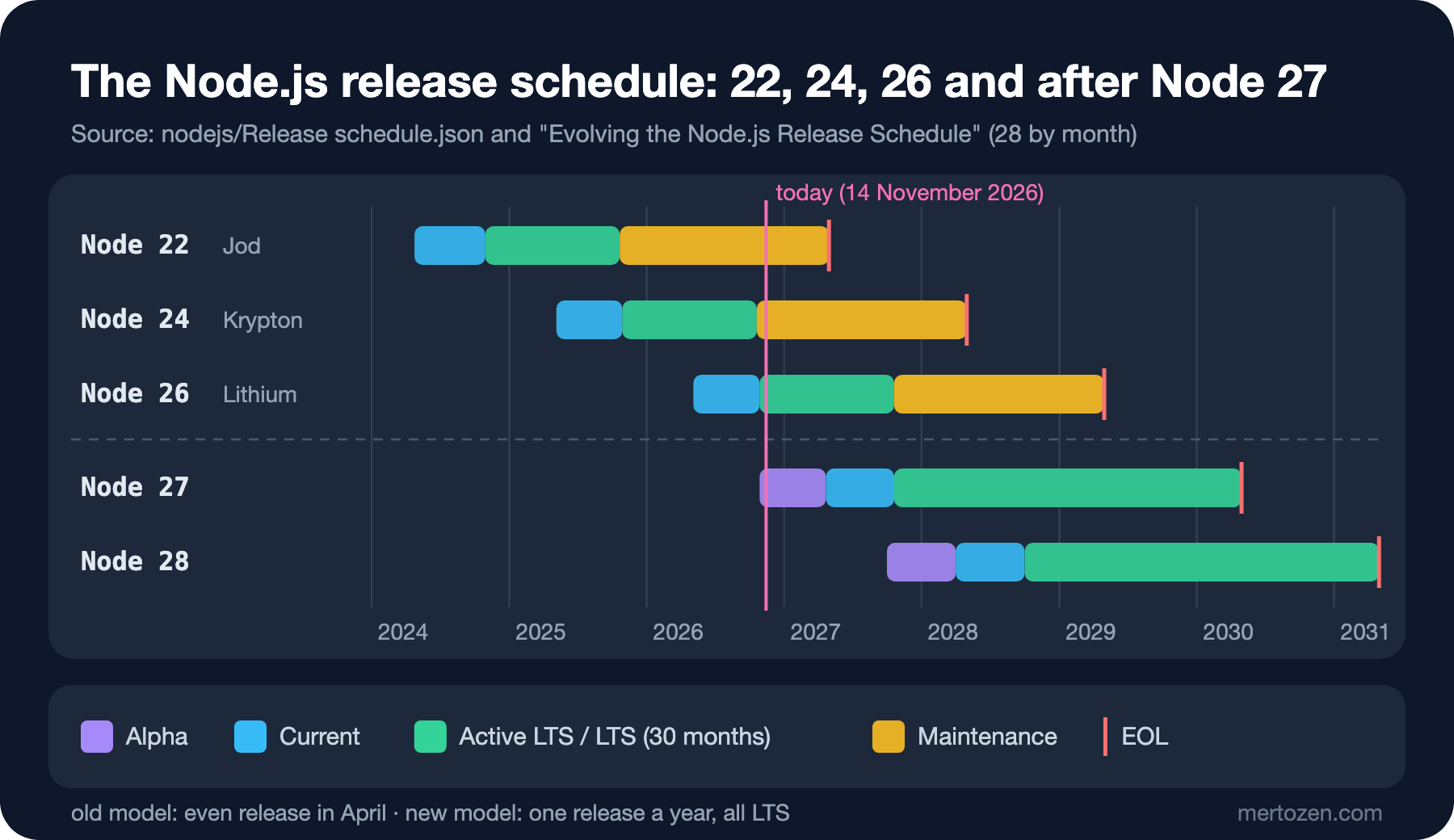
The schedule change we touched on in post 01 makes Node 26 the last release of the old model. The dates come from schedule.json in the nodejs/Release repository: 22 (Jod) reaches end of life on 30 April 2027, 24 (Krypton) on 30 April 2028, 26 (Lithium) on 30 April 2029. 24 moved to maintenance on 20 October 2026 and now gets only security and critical fixes. 26 is Active LTS until 20 October 2027.
Node 27 is the first release of the new model. Its Alpha channel opened on 28 October 2026; 27.0.0 is planned to ship as Current on 22 April 2027, enter LTS on 20 October 2027 and reach end of life on 30 April 2030. After that the rhythm is the same: an Alpha every October, a Current every April, an LTS every October, 36 months of support in total. The announcement gives only months for 28 (Alpha October 2027, Current April 2028, LTS October 2028, end of life April 2031) and says the schedule may change and that schedule.json is the authoritative record. So there is no longer an odd/even split, every release will be LTS, and the number follows the year.
In practice: the "LTS only" rule for production does not change, but now there is an LTS every year, and upgrading every year hurts less than jumping from one LTS to the next one two years later. If you write a library, adding Alpha to your CI matrix lets you see breaking changes before your users do; the announcement recommends exactly that. Alpha releases are signed and tagged, but not meant for production.
In Production
Say you are moving the Bookstore API from 24 to 26. The checklist:
.nvmrc,enginesinpackage.jsonand the Node version in CI point to the same major (posts 02 and 04).- The
@types/nodemajor matches the runtime:@types/node26 for 26. Old types don't know the new APIs; newer ones allow APIs the old runtime lacks. - Clean
node_modulesand runnpm ciwith the new version; native addons get rebuilt for NODE_MODULE_VERSION 147 or fetch a prebuilt binary. - One release ahead, run the tests with
NODE_OPTIONS=--throw-deprecation; every deprecation code that shows up is a candidate for removal in the next major. - Search for the removals:
_stream_*,writeHeader,--experimental-transform-types,module.register(). Usenpm explainto find which dependency brings them in (post 04). - Change the base image tag of the container image too; the app must not be tested on 26 and deployed on 24 (details in the Docker series).
Keep upgrades separate from security releases. Moving from 26.13.0 to 26.13.1 is a security fix within the same major; do it right away. Do a major upgrade as planned work, on its own branch and with its tests.
Common Pitfalls
Ignoring deprecation warnings. _stream_readable was deprecated in 25 and is gone in 26. The release where the warning appears is the time you are given to fix it.
Assuming everything in the runtime is also in TypeScript. Iterator.concat runs on Node 26; TypeScript 7.0.2 has no type for it.
Passing Temporal across library boundaries. The database driver and the logger expect Date; convert at the edge and don't mix two date types inside the domain.
Taking localStorage on the server for a per-user store. There is one per process.
Staying on Node 22. It reaches end of life in April 2027; plan the move to 24 or 26 now.
A Small Experiment
★☆☆ Change the order moment in labs/17/guess.ts to "2026-11-14T20:30:00Z". Do Date and Temporal still disagree? Why?
★★☆ Start the Bookstore API with NODE_OPTIONS=--throw-deprecation and run the tests from post 16 with that setting. Does any deprecation code show up? If so, find the dependency it comes from with --trace-deprecation.
★★★ Add an estimatedDeliveryDate field to OrderDto: three business days (Saturday and Sunday don't count) after the order's date in Istanbul, using Temporal. Write tests for an order placed on a Sunday and for a time zone with a daylight saving change.
The series ends here. Starting from the runtime model and moving through the module system, npm, build-free TypeScript, the event loop, streams, Express 5, SQL Server, production readiness, security and testing, we built the Node.js side of Bookstore next to its ASP.NET Core counterparts. The natural next step is to put this API in a container image and measure it: the Docker series and the Observability series pick up right from here.