

What Is Node.js? V8, libuv and the Event-Driven Server Model Through an ASP.NET Core Developer's Eyes
Node.js is a runtime that runs JavaScript on the server with the V8 engine and the libuv event loop: your code runs on one thread, waiting on I/O holds no thread, but one long synchronous computation makes every request wait. With real measurements: 500 concurrent waits in 227 ms, a 1.4-second report holding a trivial request for 1,340 ms, the 4-thread libuv pool, a comparison with Kestrel and the ThreadPool, a Node-or-.NET table and the yearly release schedule that starts with Node 27.
Version note: The examples in this post were run with Node.js 26.13.1 (LTS, codename "Lithium").
Guess First
In this series we build the API of Bookstore, the online bookstore used as the shared example across this site's series, on Node.js. There is no project yet in this first post; first let's see how Node works. The small server below has three endpoints: one returns the book list straight away, one waits 100 ms to simulate a database, and the third computes a fake price report over 20 million rows.
// A tiny stand-in for the Bookstore API: a fast endpoint, an I/O-bound one and a CPU-bound one
import { createServer } from "node:http";
import { setTimeout as delay } from "node:timers/promises";

const books = [
    { isbn: "9780441172719", title: "Dune", price: 349.9 },
    { isbn: "9780547928227", title: "The Hobbit", price: 289.5 },
    { isbn: "9780141439600", title: "Middlemarch", price: 310.0 },
];

function json(res, status, body) {
    res.writeHead(status, { "content-type": "application/json" });
    res.end(JSON.stringify(body));
}

const server = createServer(async (req, res) => {
    if (req.url === "/api/books") {
        return json(res, 200, books);
    }
    if (req.url === "/api/books/from-db") {
        // Simulates a database query: 100 ms of waiting on I/O, the thread stays free
        await delay(100);
        return json(res, 200, books);
    }
    if (req.url === "/api/reports/price-summary") {
        // CPU-bound work: a fake price report over 20 million rows
        const started = performance.now();
        let total = 0;
        for (let i = 0; i < 20_000_000; i++) {
            total += Math.sqrt(i) * 1.18;
            total = Number(total.toFixed(2));
        }
        return json(res, 200, { total, ms: Math.round(performance.now() - started) });
    }
    json(res, 404, { error: "not found" });
});

server.listen(3000, () => console.log("listening on http://localhost:3000"));
A second file sends requests to the server and times them. It first fires 500 concurrent "database" requests, then starts the report request and, 50 ms later, calls /api/books three times:
// Sends requests to server.js and measures how long they take
const base = "http://localhost:3000";

async function timed(path) {
    const started = performance.now();
    const res = await fetch(base + path);
    await res.json();
    return (performance.now() - started).toFixed(1);
}

// 1) 500 concurrent "database" requests
let started = performance.now();
await Promise.all(Array.from({ length: 500 }, () => timed("/api/books/from-db")));
console.log(`500 concurrent /api/books/from-db: ${Math.round(performance.now() - started)} ms total`);

// 2) /api/books while the report request is running
const report = timed("/api/reports/price-summary").then((ms) => console.log(`price-summary: ${ms} ms`));
await new Promise((r) => setTimeout(r, 50));
const fast = await Promise.all([timed("/api/books"), timed("/api/books"), timed("/api/books")]);
console.log(`/api/books while the report runs: ${fast.join(" ms, ")} ms`);
await report;
console.log(`/api/books after the report: ${await timed("/api/books")} ms`);
Two questions. Node runs your JavaScript on a single thread. How long do 500 requests that each wait 100 ms take in total: 500 × 100 ms = 50 seconds? And while the report is being computed, how many milliseconds do the /api/books requests take, requests that do no work at all and just return a fixed list?
node labs/01/server.js
node labs/01/probe.js
500 concurrent /api/books/from-db: 227 ms total
price-summary: 1389.2 ms
/api/books while the report runs: 1339.9 ms, 1339.8 ms, 1339.8 ms
/api/books after the report: 0.4 msThe 500 waits took 227 ms in total; the single thread did not wait for them one after another. But during the 1.4 seconds the report was running, even the simplest request waited 1,340 ms, and once the report finished the same request dropped to 0.4 ms. These two results sum up Node's execution model: it handles waiting very well, and it does not share computation. The rest of this post explains why, how it differs from ASP.NET Core's Kestrel and ThreadPool model, and when you should pick Node.
Runtime and Language: What Exactly Is Node.js?
JavaScript is a language; its rules live in the ECMAScript standard, written by TC39. The language on its own cannot read a file, open a socket or see the process's environment variables. Whatever runs the language provides that. In the browser that environment gives you the DOM, fetch and the browser's event loop. Node.js is a runtime that runs the same language on the server: a JavaScript engine, an event loop, APIs that reach the operating system, and the C++ code that ties them together.
Seen from .NET, the split is familiar: C# is a language, and the CLR that runs it plus the base class library next to it are separate pieces. Node separates language and runtime as well, with one difference: the Node version also decides which language features you can use, because the engine that runs the language ships inside Node. Let's see which pieces come with which version:
// Prints the parts of the Node.js runtime and their versions
import { builtinModules } from "node:module";

const { node, v8, uv, openssl, napi, modules } = process.versions;
console.log({ node, v8, uv, openssl, napi, modules });
console.log("lts:", process.release.lts ?? "(not an LTS release)");
console.log("built-in modules:", builtinModules.filter((m) => !m.startsWith("_")).length);
console.log(builtinModules.filter((m) => ["fs", "http", "crypto", "worker_threads"].includes(m)));
{
node: '26.13.1',
v8: '14.6.202.34-node.40',
uv: '1.52.1',
openssl: '3.5.9',
napi: '10',
modules: '147'
}
lts: Lithium
built-in modules: 59
[ 'crypto', 'fs', 'http', 'worker_threads' ]modules: '147' is the ABI version native addons are compiled against; this number is why native packages have to be rebuilt when you jump to a new major Node version. We use these versions throughout the series.
The Parts of Node: V8, libuv and the Core Modules
V8 is the JavaScript engine Google wrote for Chrome. It first turns code into bytecode and interprets it, then compiles frequently run functions to machine code while the program runs, so it is a JIT compiler. Memory management and the garbage collector are V8's job as well. Node 26 ships V8 14.6; the Temporal API being on by default and additions such as Map.prototype.getOrInsert() come from that engine update.
libuv is a layer written for Node that later became an independent C library. It has two jobs. The first is the event loop: it watches timers, sockets and file operations and queues the callbacks of whatever is ready. The second is a small thread pool for work that has no async counterpart in the operating system. For network I/O libuv uses each platform's own mechanism: epoll on Linux, kqueue on macOS, IOCP on Windows, the same family of mechanisms .NET uses for its sockets.
The core modules are the APIs you call from JavaScript: node:fs, node:http, node:crypto, node:worker_threads and 59 in total. The node: prefix is optional, but I recommend it; it cannot be confused with an npm package of the same name, and it tells the reader "this is Node's own module". Some of them are written in JavaScript, some in C++ and bound to V8. npm, undici (the HTTP client behind fetch) and OpenSSL ship with Node too.
One Thread, Thousands of Connections: Side by Side with Kestrel
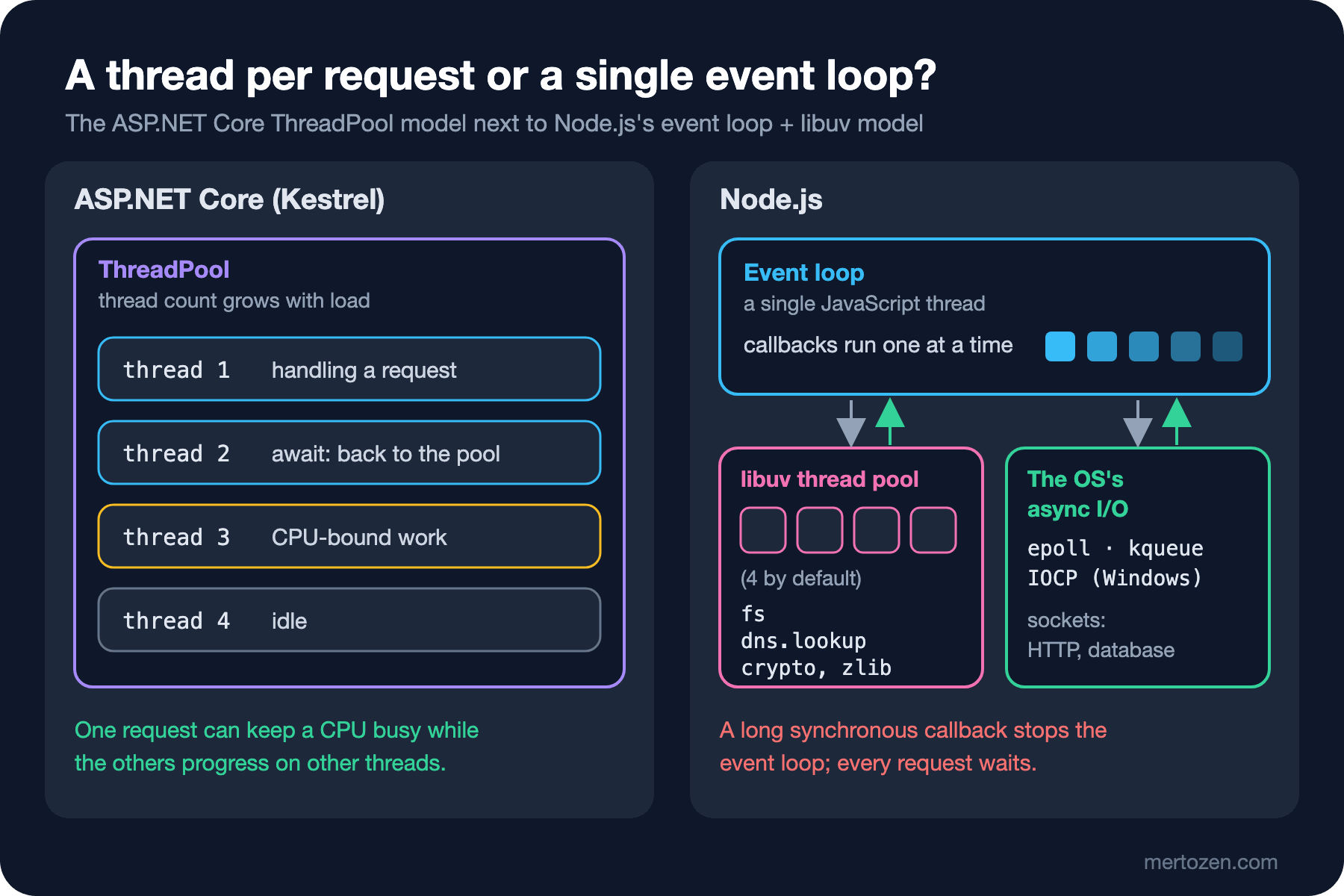
In ASP.NET Core, Kestrel accepts connections and runs each request's code on a thread it takes from the ThreadPool. When the code reaches an await, for example while waiting for a SQL query, the thread goes back to the pool; when the query completes, the rest of the code continues on any free thread. The difference is where the code runs: in .NET the code of several requests can run in parallel on as many threads as there are cores. If one keeps a CPU busy for a second, the others make progress on other threads, and the ThreadPool adds threads if it needs to.
In Node your JavaScript code runs on a single thread. When a request arrives the handler runs, hands any I/O to libuv and returns. When the database answers, the matching callback is queued and the same thread runs it. That is why the 500 requests in Guess First took 227 ms: each of the 500 handlers ran for a few microseconds, set up a timer and returned. 100 ms later the timers fired and the callbacks wrote the responses one by one. Most of the remaining time went into opening 500 TCP connections and writing the responses.
This model looks like a limitation, but it has two concrete advantages. First, you need no locks to touch shared state; while one callback runs, no other JavaScript can interleave with it. Second, a waiting request costs very little: a few objects and a callback rather than a thread stack. The C# Async Programming series covered the relationship between I/O and scale from the .NET side; here we look at a runtime that solves the same problem a different way.
The libuv Thread Pool: The Story of Four Threads
"Node is single-threaded" is half true. JavaScript code runs on one thread, but there are other threads inside a Node process. One group is libuv's thread pool. Network I/O uses the operating system's async mechanism, but some work, such as the file system, has no portable async counterpart. libuv does that work synchronously on threads in the pool and notifies the event loop when it is done. Let's see it with eight async pbkdf2 calls:
// 8 async pbkdf2 calls: all of them run on the libuv thread pool
import { pbkdf2 } from "node:crypto";

const started = performance.now();
for (let i = 1; i <= 8; i++) {
    pbkdf2("correct horse", "bookstore-salt", 3_000_000, 32, "sha256", () => {
        console.log(`hash ${i} done at ${Math.round(performance.now() - started)} ms`);
    });
}
console.log(`all 8 calls started in ${Math.round(performance.now() - started)} ms`);
node labs/01/threadpool.js
UV_THREADPOOL_SIZE=8 node labs/01/threadpool.jsall 8 calls started in 0 ms
hash 3 done at 310 ms
hash 1 done at 333 ms
hash 4 done at 358 ms
hash 2 done at 436 ms
hash 5 done at 591 ms
hash 7 done at 656 ms
hash 6 done at 661 ms
hash 8 done at 764 ms
---
all 8 calls started in 0 ms
hash 2 done at 503 ms
hash 3 done at 504 ms
hash 1 done at 516 ms
hash 4 done at 524 ms
hash 6 done at 538 ms
hash 7 done at 592 ms
hash 5 done at 602 ms
hash 8 done at 614 msAll eight calls started at 0 ms, so the main thread was not blocked. But with the default setting the results came in two waves: the first four between 310 and 436 ms, the next four between 591 and 764 ms. The pool has four threads; the fifth job waited in line until one of the first four finished. With UV_THREADPOOL_SIZE=8 all eight ran together and finished between 503 and 614 ms.
According to the Node documentation these APIs use the pool: every fs API except the file watchers and the explicitly synchronous ones, async crypto APIs such as crypto.pbkdf2(), crypto.scrypt() and crypto.randomBytes(), dns.lookup(), and every zlib API that is not explicitly synchronous. The documentation's warning matters too: because the pool has a fixed size, if one of these takes long, seemingly unrelated work slows down as well. The size is read when the process starts; changing process.env.UV_THREADPOOL_SIZE from your code is not guaranteed to work, so pass it as an environment variable. On Windows, in PowerShell, you would type $env:UV_THREADPOOL_SIZE=8 and run the same command (I did not try this line on Windows).
Why Does CPU-Bound Work Stop Everything?
Back to Guess First. The price report is synchronous code that does 20 million calculations in a for loop. While it runs, the JavaScript thread is busy. The /api/books requests reached the operating system's socket buffer and libuv noticed them, but the thread that would run their callbacks did not become free until the report finished. The requests waited 1,340 ms and were then answered within microseconds.
In ASP.NET Core the same report would keep one ThreadPool thread busy for 1.4 seconds, but other requests would keep running on other threads. In Node a single slow handler slows down the whole process. Hence the simple rule in Node: do not block the event loop. If there is CPU-heavy work, either split it into slices and give the event loop a turn in between, move it to a separate thread with worker_threads, or put it on a queue and process it in a separate process. We will see all of these in post 06 by adding the same price report to the Bookstore API and measuring it.
Let's also clear up a misconception: making a function async does not move it to another thread. In C# you can send CPU work to the ThreadPool with Task.Run; the async keyword in JavaScript has no such effect. An async function runs on the caller's thread, right away, until its first await.
Node or .NET? A Decision Table
The goal of this series is not to leave .NET; it is to know what Node is good at and use it in the right place. Thinking about Bookstore specifically, the table looks like this:
| Scenario | Node.js | ASP.NET Core |
|---|---|---|
| BFF for the Angular client | Strong: same language, passes JSON through as is, most of the work is waiting on other APIs | Possible, but the team switches between two languages |
| Angular SSR | Its natural home: Angular SSR runs on Node | Not a fit |
| Build script, CLI, code generator | Strong: the npm ecosystem, same runtime as the frontend tools | Possible, as a dotnet tool |
| Thin, I/O-heavy API, proxy, webhook receiver | Strong: many connections with little memory | Strong |
| CPU-heavy work such as price reports, PDFs, image processing | Weak: needs worker threads or a separate service | Strong: spreads work across threads |
| Large domain model such as orders, stock, institutional approvals | Doable, but the type system and tooling help less | Strong: EF Core, strong types, mature tooling |
In this series we rewrite Bookstore's main API on Node, because the best way to learn a runtime is to solve a familiar problem with it. In real life Bookstore's ordering and payment core would stay on .NET, and Node would earn its place in the BFF, SSR and tooling.
The Release Model: Current, LTS and the Yearly Schedule That Starts with Node 27
Node's release model changed this year, so a little detail is in order. Under the old scheme there were two major releases a year: an even-numbered one in April and an odd-numbered one in October. Each major spent six months as Current. Odd-numbered lines went out of support after those six months, even-numbered ones moved to LTS. Node 26 is the last line released under that scheme: 26.0.0 came out on May 5, 2026, it became LTS with 26.13.0 on October 28, 2026 and got the codename "Lithium". The 26.13.1 I used for this post is a security release from November 10. According to the release schedule Node 26 moves to maintenance in October 2027 and reaches end of life in April 2029.
Node 27 starts the new scheme: one major release a year. Each release first spends six months in the Alpha channel (October to March); breaking changes are allowed there, and it is not meant for production but for library authors to test early in CI. It then ships as Current in April, moves to LTS in October and gets 30 months of support. The odd/even distinction goes away; every release becomes LTS. Version numbers follow the calendar too: 27.0.0 in 2027, 28.0.0 in 2028. Today the table on nodejs.org shows 27 as Alpha, 26 (Lithium), 24 (Krypton) and 22 (Jod) as LTS, and 20 and older as end of life. No release is in Current status, because 26 has moved to LTS and 27 is still in Alpha.
The production rule has not changed, and nodejs.org states it plainly: in production use only Active LTS or Maintenance LTS releases. This series is built on Node 26 LTS. If you write a library, running the Alpha as an extra line in CI makes sense.
One paragraph on Deno and Bun: both are alternative JavaScript runtimes. Deno was started by Ryan Dahl, Node's original author; it runs TypeScript directly, comes with a permission system on by default and is compatible with npm packages. Bun uses Safari's engine JavaScriptCore instead of V8 and bundles a package manager, test runner and bundler into a single binary. Both imitate most of Node's APIs. This series stays with Node, because its LTS policy, hosting support and ecosystem are the most mature.
In Production
Measure the event loop. In Node the most common cause of latency is not a slow database but a piece of code that keeps the event loop busy. In post 06 we set up perf_hooks.monitorEventLoopDelay to collect event loop delay as a metric; if that metric is not on a dashboard, you will struggle to notice something like the 1,340 ms wait above in production.
Tune the thread pool deliberately. If the application does a lot of file work, verifies passwords with bcrypt or pbkdf2, or compresses with zlib, four threads may not be enough. Raising UV_THREADPOOL_SIZE shortens the queue in that case, but values beyond the number of CPU cores do not make the work faster; they only move where the waiting happens. It has no effect at all on CPU work in your own JavaScript, which still runs on the main thread.
Stay on LTS and follow the security releases. 26.13.1 is marked as a security release on nodejs.org.
One process uses one core. On a multi-core machine a single Node process leaves most cores idle. You scale either with several processes (the cluster module, several container replicas) or with worker threads; we discuss this together with production readiness in post 14.
Common Pitfalls
"Node is single-threaded, so it only uses one core" and "Node is single-threaded, so it cannot handle thousands of connections" are both wrong. Your code runs on one thread; waiting on I/O does not hold a thread, and the libuv pool and V8's garbage collector threads run on their own.
Assuming an async function runs in parallel. async does not move code to another thread, and wrapping CPU work in a Promise does not save the event loop either. We measure this in post 06.
Trying to fix a CPU problem with UV_THREADPOOL_SIZE. The pool only runs work handed to libuv. Your own loop never goes to the pool.
Putting an odd-numbered or Alpha release into production. Moving to Current for a new feature can be tempting, but the support window is short and the risk of breaking changes is high.
A Small Experiment
★☆☆ Before running labs/01/threadpool.js with UV_THREADPOOL_SIZE=2, predict how many waves the results will arrive in, then run it and compare.
★★☆ Add an endpoint called /api/books/hash to server.js that computes a 3,000,000-iteration hash with async crypto.pbkdf2. Run the probe again against this endpoint: does /api/books wait while the hash is computed? What changes when you use pbkdf2Sync?
★★★ Write the same three endpoints as an ASP.NET Core minimal API and run the same probe against it. What happens to the /api/books times while the report runs? How do the two runtimes behave when you send the report request 20 times at once?
We have seen how Node works; next comes a proper setup on your machine. In the next post we install Node with a version manager and start the Bookstore API project: .nvmrc, package.json, node --watch, --env-file and the first GET /health endpoint.