

Node.js Streams: Readable, Writable, Transform, pipeline() and Backpressure
Node.js streams process data piece by piece; waiting for drain when write() returns false, which is respecting backpressure, keeps memory constant, and pipeline() wires that into every stage together with error handling. With real measurements: a producer that ignores false growing the heap to 182 MB, pipe() leaving the source file open, a 505 MB Bookstore order export streamed with 147 MB RSS, and the same job taking 993 MB in memory.
Version note: The examples in this post were run with Node.js 26.13.1 (LTS) and TypeScript 7.0.2.
Guess First
In Bookstore, the online bookstore used as the shared example across this site's series, we write order lines to a destination. The destination is slow: it spends 1 ms per chunk, just like a slow client or a busy disk. The loop writes 200,000 lines back to back:
import { Writable } from "node:stream";

// A slow destination: it needs 1 ms per chunk (a slow client, a busy disk)
const slow = new Writable({
    write(chunk, encoding, callback) {
        setTimeout(callback, 1);
    },
});

let firstFalse = 0;
for (let i = 1; i <= 200_000; i++) {
    const ok = slow.write(`ORD-${100000 + i},9780441172719,2,349.90\n`);
    if (!ok && firstFalse === 0) {
        firstFalse = i;
    }
}
console.log(`highWaterMark: ${slow.writableHighWaterMark} bytes`);
console.log(`write() first returned false at line ${firstFalse}`);
console.log(`loop finished, buffered in memory: ${(slow.writableLength / 1024 / 1024).toFixed(1)} MB`);
// Stop the demo here; draining 200,000 chunks would take minutes
slow.destroy();
What happens when the destination's buffer is full? Does write() wait, throw, or drop lines?
node labs/09/guess.tshighWaterMark: 65536 bytes
write() first returned false at line 1928
loop finished, buffered in memory: 6.5 MBNone of those. At line 1928 the buffer went past 64 KiB and write() returned false, but it did not refuse the write: the loop carried on and all 200,000 lines were buffered in memory. false is not a "stop" command, it is a request: "my buffer is full, wait for the drain event". A producer that ignores the request fills memory in proportion to how slow the destination is. In C#, await stream.WriteAsync(...) already makes you wait until the destination is ready; in Node, write() is not awaited and waiting is your responsibility.
This flow control mechanism is called backpressure, and it is the reason streams exist. In this post we look at the four stream types, backpressure, pipeline(), consuming with for await and the bridge to Web Streams. At the end we add an endpoint to Bookstore that produces a 500 MB order export with constant memory.
The Four Stream Types and highWaterMark
In Node, streams are four classes that derive from EventEmitter:
- Readable: a data source.
fs.createReadStream,reqon an HTTP server, an incoming response on the client side. - Writable: a data destination.
fs.createWriteStream,reson an HTTP server,process.stdout. - Duplex: a stream you both read and write, with the two directions independent of each other. A TCP socket.
- Transform: a Duplex that transforms what is written and makes it readable.
zlib.createGzip(), encryption, converting to CSV.
Every stream has an internal buffer and a threshold called highWaterMark. For byte streams the default is 64 KiB; Node 22 raised it from 16 KiB. In objectMode a stream carries JavaScript objects instead of bytes, and the threshold counts objects: 16 by default. The threshold is a signal, not a limit: on a Writable, write() returns false once the buffer goes past it; on a Readable, reading from the source pauses once the buffer reaches it.
The closest .NET counterparts are System.IO.Stream and the newer System.IO.Pipelines. Pipelines has the same idea with PauseWriterThreshold and ResumeWriterThreshold; the difference is that in C# the waiting is built into the language through await FlushAsync().
Respecting Backpressure
Let's run the loop from Guess First in two ways, this time with 1,000,000 lines and a destination that handles each chunk in one event loop turn:
import { Writable } from "node:stream";
import { once } from "node:events";

// A destination that is slower than the producer: one event loop turn per chunk
function slowDestination(): Writable {
    return new Writable({
        write(chunk, encoding, callback) {
            setImmediate(callback);
        },
    });
}

async function produce(respectBackpressure: boolean): Promise<void> {
    const out = slowDestination();
    let peak = 0;
    let peakHeap = 0;
    const started = performance.now();
    for (let i = 1; i <= 1_000_000; i++) {
        const ok = out.write(`ORD-${100000 + i},9780441172719,2,349.90\n`);
        peak = Math.max(peak, out.writableLength);
        if (i % 10_000 === 0) {
            peakHeap = Math.max(peakHeap, process.memoryUsage().heapUsed);
        }
        if (!ok && respectBackpressure) {
            // Wait until the destination has drained its buffer
            await once(out, "drain");
        }
    }
    out.end();
    await once(out, "finish");
    const label = respectBackpressure ? "await drain" : "ignore false";
    console.log(`${label.padEnd(13)} peak buffer ${(peak / 1024 / 1024).toFixed(2).padStart(6)} MB, peak heap ${(peakHeap / 1024 / 1024).toFixed(0).padStart(3)} MB, ${Math.round(performance.now() - started)} ms`);
}

await produce(process.argv[2] !== "ignore");
node labs/09/backpressure.ts ignore
node labs/09/backpressure.tsignore false peak buffer 32.52 MB, peak heap 182 MB, 15398 ms
await drain peak buffer 0.06 MB, peak heap 21 MB, 14667 msThe total time is almost the same, because the destination is the bottleneck. The difference is memory: the version that ignores false held 32.5 MB of data in its buffer and the heap grew to 182 MB; because a separate buffer entry is kept for each small string, the heap is more than five times the data. In the version that waits for drain, the buffer never went much above 64 KiB. On an HTTP server, the "destination" can be a slow mobile client; an endpoint that ignores backpressure can run the process out of memory with ten slow clients downloading at the same time.
The good news: you rarely write the write()/drain loop by hand. When you connect streams to each other, Node manages backpressure. The real question is how you connect them.
Why pipe() Is Not Enough: pipeline() from stream/promises
The old way to connect streams is source.pipe(destination). It handles backpressure correctly, but not errors. Let's build a chain whose middle stage fails on the third chunk, in both ways:
import { createReadStream } from "node:fs";
import { Transform, Writable } from "node:stream";
import { pipeline } from "node:stream/promises";

// A transform that fails on its third chunk (bad data in the middle of a file)
function failingTransform(): Transform {
    let chunks = 0;
    return new Transform({
        transform(chunk, encoding, callback) {
            chunks++;
            callback(chunks === 3 ? new Error("bad row in chunk 3") : null, chunk);
        },
    });
}

const input = import.meta.filename;
// Discards everything it receives
const sink = () => new Writable({ write: (chunk, encoding, callback) => callback() });

if (process.argv[2] === "pipe") {
    const source = createReadStream(input, { highWaterMark: 256 });
    const transform = failingTransform();
    transform.on("error", (err) => console.log(`pipe: transform error: ${err.message}`));
    source.pipe(transform).pipe(sink());
    setTimeout(() => console.log(`pipe: source destroyed? ${source.destroyed}, file closed? ${source.closed}`), 100);
} else {
    const source = createReadStream(input, { highWaterMark: 256 });
    try {
        await pipeline(source, failingTransform(), sink());
    } catch (err) {
        console.log(`pipeline: rejected with: ${(err as Error).message}`);
    }
    console.log(`pipeline: source destroyed? ${source.destroyed}, file closed? ${source.closed}`);
}
pipe: transform error: bad row in chunk 3
pipe: source destroyed? false, file closed? false
pipeline: rejected with: bad row in chunk 3
pipeline: source destroyed? true, file closed? trueWith pipe() the error stayed in the stream that failed: the source file is still open and nobody closes it. On a server that opens a file per request, that is a file descriptor leak that builds up slowly. Had we not listened to the transform's error, the process would have crashed (07). pipeline() wires both backpressure and error handling through every stage of the chain: if one stage fails or closes, it destroys all of them and a single promise rejects. The rule: in new code, use pipeline() from node:stream/promises, not pipe().
Readable.from, for await and Web Streams
The most readable way to consume a Readable is for await: Readables are async iterable and the loop does not ask for the next chunk until its body has finished, so backpressure works by itself. In the other direction, Readable.from() turns an array, a generator or an async generator into a Readable; with generators, data is produced only when it is requested. Generators and async iterators themselves are covered in the Advanced JavaScript series.
There is one more standard that comes from the browser: Web Streams (ReadableStream, WritableStream, TransformStream). Node's global fetch gives you the response body as a web ReadableStream. The bridge between the two worlds is Readable.fromWeb() and Readable.toWeb(). The client below reads 1 million rows line by line from the export endpoint we are about to write; since node:readline expects a Node stream, we pass the body through the bridge:
import { Readable } from "node:stream";
import type { ReadableStream as NodeReadableStream } from "node:stream/web";
import { createInterface } from "node:readline";

const base = process.env.API_URL ?? "http://127.0.0.1:3000";

// 1) Read the export line by line: fetch gives a web ReadableStream, readline wants a Node stream
const response = await fetch(`${base}/api/orders/export?rows=1000000`, { headers: { "accept-encoding": "gzip" } });
console.log(`content-encoding: ${response.headers.get("content-encoding")}`);
// fetch's body is typed with the DOM lib; Node's stream/web type is the same object at runtime
const body = response.body as NodeReadableStream<Uint8Array>;
const lines = createInterface({ input: Readable.fromWeb(body), crlfDelay: Infinity });

let count = 0;
let deliveredRevenue = 0;
for await (const line of lines) {
    if (count++ === 0) {
        continue; // header row
    }
    const fields = line.split(",");
    if (fields[8] === "Delivered") {
        deliveredRevenue += Number(fields[5]) * Number(fields[6]);
    }
}
console.log(`rows: ${count - 1}, delivered revenue: ${deliveredRevenue.toFixed(2)} TRY, heap ${(process.memoryUsage().heapUsed / 1024 / 1024).toFixed(0)} MB`);

// 2) Give up half way: the server should stop generating rows
const controller = new AbortController();
const big = await fetch(`${base}/api/orders/export?rows=5300000`, { signal: controller.signal });
let received = 0;
try {
    for await (const chunk of big.body!) {
        received += chunk.byteLength;
        if (received > 50 * 1024 * 1024) {
            controller.abort();
        }
    }
} catch (err) {
    console.log(`client stopped after ${(received / 1024 / 1024).toFixed(0)} MB: ${(err as Error).name}`);
}
The cast is a TypeScript detail: fetch's type comes from the DOM library, Readable.fromWeb's parameter from @types/node, and TypeScript 7 considers them incompatible. At runtime it is the same object. fetch decompresses the gzipped response itself, so readline receives plain text. We will see the output in the Bookstore section.
Bookstore: A 500 MB Order Export
The accounting team wants every order line of the year as CSV: 5.3 million rows, about 505 MB. We move to the database in 13; for now there is a generator that produces the rows deterministically. What matters is that rows are produced one at a time and only when requested:
const HEADER = "orderId,createdAtUtc,customerId,isbn,title,quantity,unitPrice,currency,status\n";
const START = Date.UTC(2026, 0, 1);

// Synthetic order lines until the SQL Server post; generated lazily, one row at a time
export function* generateOrderRows(count: number): Generator<OrderExportRow> {
    const books = listBooks();
    for (let i = 0; i < count; i++) {
        const book = books[i % books.length];
        yield {
            orderId: `ORD-${100001 + i}`,
            createdAtUtc: new Date(START + i * 7_000).toISOString(),
            customerId: `customer-${String(i % 50_000).padStart(5, "0")}`,
            isbn: book.isbn,
            title: book.title,
            quantity: (i % 3) + 1,
            unitPrice: book.price,
            currency: book.currency,
            status: ORDER_STATUSES[i % ORDER_STATUSES.length],
        };
    }
}

// RFC 4180 quoting: wrap in quotes when the value contains a comma, quote or line break
function csvField(value: string | number): string {
    const text = String(value);
    return /[",\r\n]/.test(text) ? `"${text.replaceAll('"', '""')}"` : text;
}

export function toCsvLine(row: OrderExportRow): string {
    return [row.orderId, row.createdAtUtc, row.customerId, row.isbn, row.title, row.quantity, row.unitPrice.toFixed(2), row.currency, row.status]
        .map(csvField)
        .join(",") + "\n";
}

// Object mode in, text out; batches lines so each chunk is a few KB instead of one tiny string per row
export function csvTransform(batchSize = 200): Transform {
    let batch: string[] = [HEADER];
    return new Transform({
        writableObjectMode: true,
        transform(row: OrderExportRow, encoding, callback) {
            batch.push(toCsvLine(row));
            if (batch.length >= batchSize) {
                const chunk = batch.join("");
                batch = [];
                callback(null, chunk);
            } else {
                callback();
            }
        },
        flush(callback) {
            callback(null, batch.join(""));
        },
    });
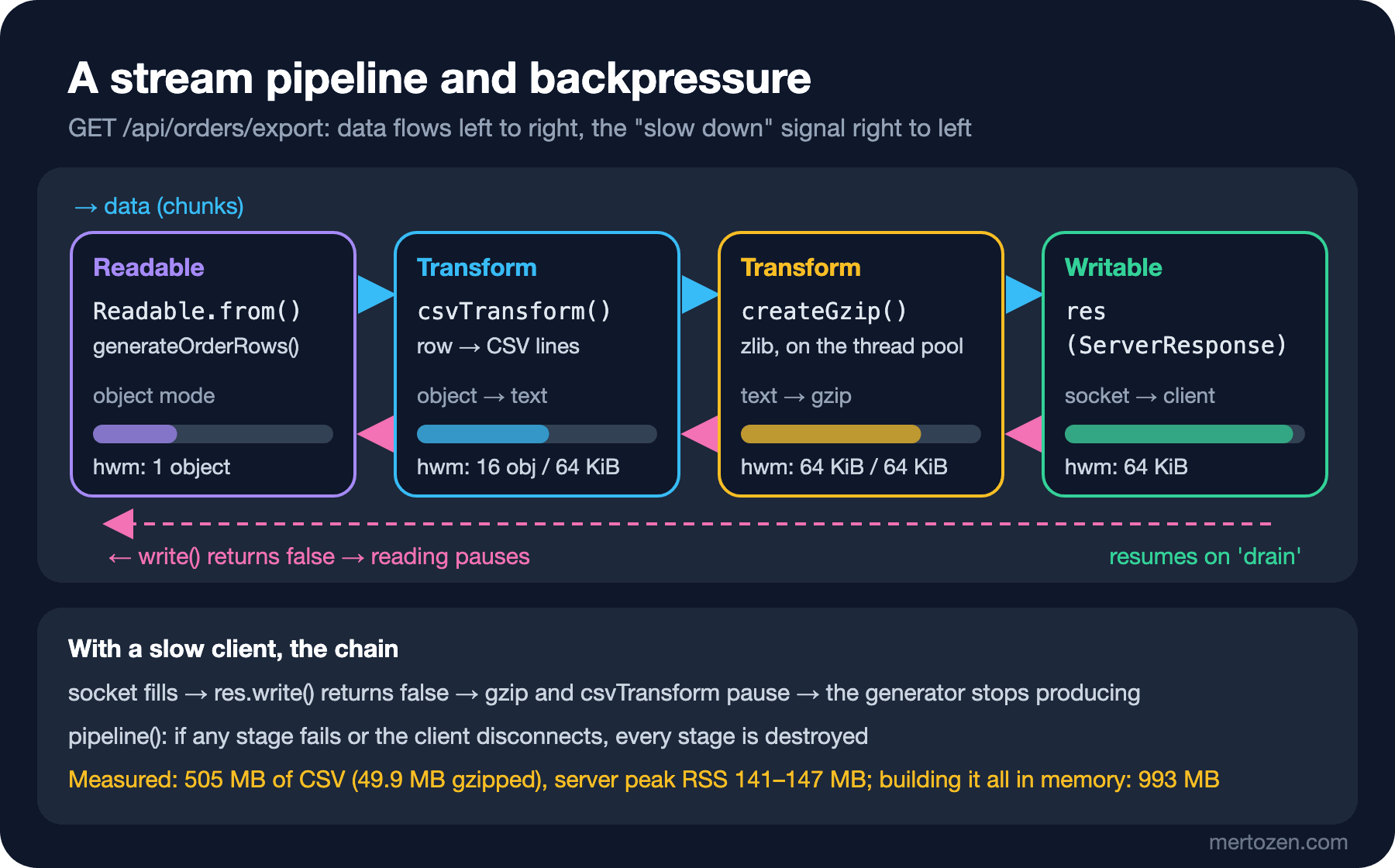
}csvTransform's input is object mode (writableObjectMode) and its output is text. We join rows in groups of 200 because of the per-chunk cost we saw in the backpressure experiment. flush sends the last partial group when the source ends. The route builds the stages according to the client's Accept-Encoding and connects them all to the response with pipeline():
// GET /api/orders/export?rows=N: CSV, gzip-compressed when the client accepts it
export async function handleOrderExport(req: IncomingMessage, res: ServerResponse, url: URL): Promise<void> {
    const rows = Number(url.searchParams.get("rows") ?? 100_000);
    const gzip = /\bgzip\b/.test(req.headers["accept-encoding"] ?? "");
    const started = performance.now();

    res.writeHead(200, {
        "content-type": "text/csv; charset=utf-8",
        "content-disposition": 'attachment; filename="orders.csv"',
        ...(gzip ? { "content-encoding": "gzip" } : {}),
    });

    const stages = gzip ? [csvTransform(), createGzip()] : [csvTransform()];
    try {
        // pipeline wires backpressure through every stage and destroys all of them on error
        await pipeline(orderRowStream(rows), ...stages, res);
        log("info", "order export finished", { rows, gzip, durationMs: Math.round(performance.now() - started) });
    } catch (err) {
        // A client that disconnects mid-download ends up here as ERR_STREAM_PREMATURE_CLOSE
        log("warn", "order export aborted", { error: (err as NodeJS.ErrnoException).code ?? (err as Error).message, durationMs: Math.round(performance.now() - started) });
    }
}
orderRowStream(rows) returns Readable.from(generateOrderRows(rows)). You can picture the chain like this:
Let's measure. I started the server, downloaded the export first plain and then gzipped, and sampled the server process's RSS every 50 ms in the meantime:
curl -s "http://127.0.0.1:3000/api/orders/export?rows=3"
curl -s -o orders.csv -w "plain: %{size_download} bytes, ttfb %{time_starttransfer}s, total %{time_total}s\n" "http://127.0.0.1:3000/api/orders/export?rows=5300000"
curl -s -H "Accept-Encoding: gzip" -o orders.csv.gz -w "gzip: %{size_download} bytes, ttfb %{time_starttransfer}s, total %{time_total}s\n" "http://127.0.0.1:3000/api/orders/export?rows=5300000"
orderId,createdAtUtc,customerId,isbn,title,quantity,unitPrice,currency,status
ORD-100001,2026-01-01T00:00:00.000Z,customer-00000,9780441172719,Dune,1,349.90,TRY,Pending
ORD-100002,2026-01-01T00:00:07.000Z,customer-00001,9780547928227,The Hobbit,2,289.50,TRY,Paid
ORD-100003,2026-01-01T00:00:14.000Z,customer-00002,9780141439600,Middlemarch,3,310.00,TRY,Shipped
plain: 504985079 bytes, ttfb 0.003997s, total 5.175213s
gzip: 49924987 bytes, ttfb 0.003204s, total 5.947556sThe idle process used 85 MB of RSS; during the 505 MB export the peak was 141 MB plain and 147 MB with gzip. The first byte arrived after 4 ms. For comparison I wrote a script that produces the same CSV the "simple" way, joining every row into one string and compressing it with gzipSync:
// The "simple" way: build the whole CSV in memory, then compress it in one go
const rows = Number(process.argv[2] ?? 5_300_000);
const started = performance.now();
let peakRss = 0;
const lines: string[] = [];
for (const row of generateOrderRows(rows)) {
    lines.push(toCsvLine(row));
    if (lines.length % 100_000 === 0) {
        peakRss = Math.max(peakRss, process.memoryUsage().rss);
    }
}
try {
    const csv = lines.join("");
    const gzipped = gzipSync(csv);
    peakRss = Math.max(peakRss, process.memoryUsage().rss);
    console.log(`${rows} rows: csv ${(csv.length / 1e6).toFixed(0)} MB, gzip ${(gzipped.length / 1e6).toFixed(1)} MB, peak rss ${(peakRss / 1024 / 1024).toFixed(0)} MB, ${Math.round(performance.now() - started)} ms before the first byte`);
} catch (err) {
    console.log(`${rows} rows: ${(err as Error).name}: ${(err as Error).message} after ${Math.round(performance.now() - started)} ms, peak rss ${(peakRss / 1024 / 1024).toFixed(0)} MB`);
}
node labs/09/naive-export.ts 5300000
node labs/09/naive-export.ts 60000005300000 rows: csv 505 MB, gzip 49.9 MB, peak rss 993 MB, 6924 ms before the first byte
6000000 rows: RangeError: Invalid string length after 5861 ms, peak rss 485 MBThe simple way reached 993 MB, and the client could only have received the first byte after 6.9 seconds; meanwhile gzipSync blocked the event loop as well. At 6 million rows there is no result at all: in V8 a string's length is limited to about 512 MB (buffer.constants.MAX_STRING_LENGTH is 536,870,888 characters on this machine) and join threw a RangeError. The streaming version has no limit on the number of rows; its memory does not depend on the row count.
The output of the client run and the server's log:
content-encoding: gzip
rows: 1000000, delivered revenue: 119440060.40 TRY, heap 14 MB
client stopped after 50 MB: AbortError
{"time":"2026-11-14T18:50:36.334Z","level":"info","requestId":"e819714c-6e0c-4f19-89fe-79c3b72b3cb2","msg":"order export finished","rows":1000000,"gzip":true,"durationMs":1145}
{"time":"2026-11-14T18:50:37.015Z","level":"warn","requestId":"12f3eb03-3527-4851-a7a5-99b632f5dd89","msg":"order export aborted","error":"ERR_STREAM_PREMATURE_CLOSE","durationMs":680}The client processed 1 million rows with a 14 MB heap. On the second request the client gave up at 50 MB; the server saw this as ERR_STREAM_PREMATURE_CLOSE and the export stopped after 680 ms. The full export took 5.2 seconds, so the generator really did stop producing rows. Without pipeline(), the generator could have kept running for nothing despite the closed socket. This is the stream side of the "client went away" cancellation we postponed in 07; what HttpContext.RequestAborted does in ASP.NET Core, pipeline does here.
In Production
Stream large responses and limit large request bodies. In 06 we saw an 85 MB JSON.parse stop the event loop for 149 ms; responses such as exports, reports and file downloads should be produced as streams. When reading incoming bodies as streams, count the total size and cut the request off when it goes over the limit; we write that in 10.
Decide where compression happens. Async zlib runs on the thread pool and occupies one of the 4 threads during an export. If there is a reverse proxy (Nginx, YARP) or a CDN in front, compressing there may be cheaper; don't compress in both places.
Account for the layers in between on long downloads. Node's HTTP server does not limit the duration of the response itself: requestTimeout (300 seconds by default) only covers receiving the request from the client. I tested it: with requestTimeout lowered to 1 second, a response that took 3 seconds completed without problems. We look at the settings in 10. The load balancer or reverse proxy in front of you has timeouts of its own, though. For really large exports, the most robust option is to do the work in the background, put the file in object storage and give the client a download link.
If an error happens after the stream has started, the status code can no longer change: 200 and the headers are already gone. The client gets a partial file; the server signals it by cutting the connection. Putting a row count or checksum at the end of the export makes it easier for the client to notice a partial file.
Common Pitfalls
Reading a large file with readFile. The CSV import in 08 was for small files; read a file of hundreds of MB line by line with createReadStream and readline.
pipe() without error handlers. An error leaves the source open, and an error nobody listens to crashes the process. Use pipeline().
Consuming a stream twice. A Readable is read once; a second for await or a second pipeline gets nothing. If the same data must go to two destinations, create the source twice or tee it deliberately.
Ignoring the return value of write(). In every loop you write by hand, wait for drain when you get false.
Writing very small pieces per chunk. Writing every row as its own chunk works but is slow; batch rows when you write.
A Small Experiment
★☆☆ Run csvTransform with a batchSize of 1 and of 2,000 and measure the time of a 1 million row export. Where does the difference come from?
★★☆ Add a status query parameter to the export (for example ?status=Delivered) and write the filter as a separate object mode Transform that runs before csvTransform. Does memory usage change?
★★★ Rewrite the catalog import from 08 with createReadStream, readline and for await, and try it with a 1 million row CSV. Make sure it still handles the BOM and Turkish characters correctly.
So far we have managed with the if chain in src/server.ts. In the next post we take a close look at node:http itself: reading the request body with a size limit, headers, keep-alive and timeout settings, a hand-rolled routing table and POST /api/orders. At the end we will list why we need a framework.