

Getting Started with Express 5: Routing, the Middleware Chain and What Changed from Express 4
Express 5 forwards errors from async handlers to the error middleware by itself, moves path syntax to path-to-regexp 8 and leaves req.body undefined when the body was not parsed. With real output: Express 4 crashing on the same error, old paths that now fail at startup, the three-parameter error handler trap, moving the Bookstore API to Express, a listen that silently swallows EADDRINUSE, and NODE_ENV=production not changing speed for a JSON API.
Version note: The examples in this post were run with Node.js 26.13.1 (LTS), Express 5.3.0 and TypeScript 7.0.2; the comparison uses Express 4.22.3.
Guess First
In this post we move the API of Bookstore, the online bookstore used as the shared example across this site's series, to Express. Before moving, a small experiment: in the app below, the route is registered before the JSON parser. We run the same code once with Express 5 and once with Express 4 and send a JSON body:
import express from "express";

const app = express();

// The route is registered first, the JSON parser after it
app.post("/api/orders", async (req, res) => {
    const { customerId } = req.body;
    res.status(201).json({ customerId });
});
app.use(express.json());

app.listen(3101, "127.0.0.1", () => console.log("express 5 on 3101"));
curl -sS -w "\nstatus %{http_code}\n" -X POST http://127.0.0.1:3101/api/orders -H "content-type: application/json" -d '{"customerId":"ada"}'What does the client see with each version? Does the server stay up?
== Express 5
<!DOCTYPE html>
<html lang="en">
...
<pre>TypeError: Cannot destructure property 'customerId' of 'req.body' as it is undefined.<br> at file:///home/user/bookstore-api/labs/11/guess.ts:7:13<br> ...</pre>
...
status 500
next request: 500
== Express 4
curl: (52) Empty reply from server
status 000
curl: (7) Failed to connect to 127.0.0.1 port 3102 after 0 ms: Couldn't connect to serverIn both, req.body is undefined, because the parser is registered after the route and the request never reaches it. The difference is what happens to the error. Express 5 caught the async handler's rejected promise and passed it to the error middleware; the client got a 500 and the server stayed up. But the response is an HTML page containing the stack trace and file paths. Express 4 does not look at the promise; the rejection stayed unhandled and the process exited, just like the bare server in 10. In this post we look at Express 5's routing, the middleware chain, what changed from Express 4 and what decides whether that stack trace shows up in the HTML.
app, Router and Route Parameters
In Express the application is created with express(). Routes are added with method names (app.get, app.post); related routes are grouped in a Router and mounted on a path: app.use("/api/books", booksRouter). Paths inside the router are written relative to that mount path, similar to MapGroup in ASP.NET Core. Path parameters come from req.params, the query string from req.query.
Express 5 matches paths with path-to-regexp 8, used by router 2, and the syntax differs from Express 4:
import express from "express";

const app = express();

// Express 5 / path-to-regexp 8: wildcards need a name, optional parts use braces
app.get("/covers/*file", (req, res) => res.json({ route: "/covers/*file", params: req.params }));
app.get("/api/books/:isbn{.:format}", (req, res) => res.json({ route: "/api/books/:isbn{.:format}", params: req.params }));
app.get("/api/authors{/:id}", (req, res) => res.json({ route: "/api/authors{/:id}", params: req.params }));

// Express 4 syntax that no longer parses
for (const old of ["/covers/*", "/api/books/:isbn?", "/api/books/:isbn(\\d+)"]) {
    try {
        app.get(old, (req, res) => res.end());
        console.log(`${old.padEnd(24)} accepted`);
    } catch (err) {
        console.log(`${old.padEnd(24)} ${(err as Error).message.split(";")[0]}`);
    }
}

const server = app.listen(0, "127.0.0.1", async () => {
    const { port } = server.address() as { port: number };
    for (const path of ["/covers/2026/9780441172719.jpg", "/api/books/9780441172719.json", "/api/books/9780441172719", "/api/authors", "/api/authors/42"]) {
        const body = await (await fetch(`http://127.0.0.1:${port}${path}`)).json();
        console.log(`${path.padEnd(32)} -> ${JSON.stringify(body.params)}`);
    }
    server.close();
});
/covers/* Missing parameter name at index 9: /covers/*
/api/books/:isbn? Unexpected ? at index 16: /api/books/:isbn?
/api/books/:isbn(\d+) Unexpected ( at index 16: /api/books/:isbn(\d+)
/covers/2026/9780441172719.jpg -> {"file":["2026","9780441172719.jpg"]}
/api/books/9780441172719.json -> {"isbn":"9780441172719","format":"json"}
/api/books/9780441172719 -> {"isbn":"9780441172719"}
/api/authors -> {}
/api/authors/42 -> {"id":"42"}All three old forms throw when the route is added; the application never starts, which is good, because the problem shows up on the first run. Instead of an unnamed * you write *file, instead of ? you write {...}, and RegEx inside a parameter is no longer supported. There is no counterpart to route constraints such as {isbn:regex(...)} in ASP.NET Core; validation happens in the handler or in a schema (12). A wildcard parameter is now an array, one element per path segment. An optional parameter that does not match is left out of req.params altogether.
The Middleware Chain and next()
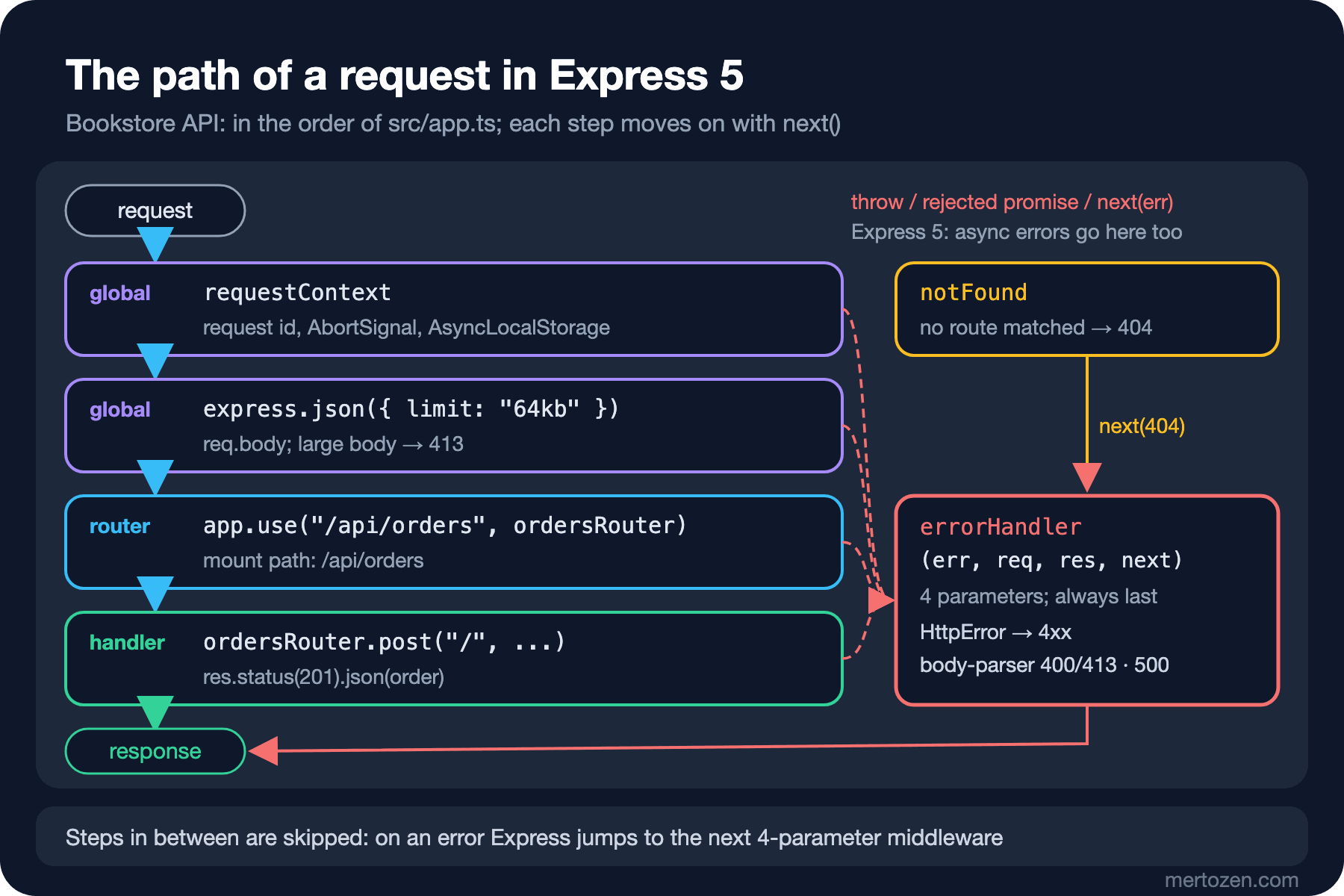
In Express everything is middleware: a function with the signature (req, res, next). It either writes the response or moves on with next(); if it does neither, the request hangs. The order is the registration order. Error middleware has four parameters: (err, req, res, next). Express tells the two apart by the function's parameter count, and that has a trap:
import express, { type NextFunction, type Request, type Response } from "express";

const app = express();

app.use((req, res, next) => {
    console.log("1. global middleware");
    next();
});

const books = express.Router();
books.use((req, res, next) => {
    console.log("2. router middleware");
    next();
});
books.get("/:isbn", async (req, res) => {
    console.log("3. handler, about to throw");
    throw new Error(`stock service down for ${req.params.isbn}`);
});
app.use("/api/books", books);

// Looks like an error handler, but has three parameters: Express treats it as normal middleware
app.use((err: any, req: any, res: any) => {
    console.log("never called");
    res.status(500).json({ error: "from the 3-parameter handler" });
});

// Four parameters: this one receives the error
app.use((err: Error, req: Request, res: Response, next: NextFunction) => {
    console.log(`4. error middleware: ${err.message}`);
    res.status(503).json({ error: err.message });
});

const server = app.listen(0, "127.0.0.1", async () => {
    const { port } = server.address() as { port: number };
    const res = await fetch(`http://127.0.0.1:${port}/api/books/9780441172719`);
    console.log(`client got ${res.status} ${await res.text()}`);
    server.close();
});
1. global middleware
2. router middleware
3. handler, about to throw
4. error middleware: stock service down for 9780441172719
client got 503 {"error":"stock service down for 9780441172719"}The three-parameter function was never called. When an error occurs, Express skips the normal middleware in between and jumps to the next four-parameter middleware. If a tool such as ESLint suggests removing the unused next, your error handler silently turns into normal middleware. The model is very close to the pipeline described in the ASP.NET Core Web API series post on the middleware pipeline; the difference is that in Express, middleware does not run again on the way back. In ASP.NET Core, code after await next() runs on the response path; in Express the counterpart is events such as res.on("finish").
express.json() and req.body
express.json() is the counterpart of the readJsonBody we wrote by hand in 10. It reads requests whose Content-Type is JSON, limits the size (100 KB by default; we pass 64 KB) and puts the result in req.body. Two behaviours are worth knowing. First, in Express 5 req.body is undefined when the body was not parsed; in Express 4 it was an empty object when a parser was registered but no body arrived. Second, for a request whose Content-Type is not JSON the parser does nothing and raises no error. To keep the 415 response from 10, the handler checks req.is("application/json"). The parser's own errors are error objects with a status field: broken JSON is 400, a large body is 413. Express 5's parsers can also decompress Brotli-compressed bodies.
Moving the Bookstore API to Express
We added Express to the API (npm install express@^5.3.0, and -D @types/express for the types); with it, the production dependency tree grew to 66 packages. The code that builds the application moves out of listen into src/app.ts; in 16 the tests will use the app without opening a port:
import express from "express";
import { requestContext } from "#middleware/requestContext";
import { notFound, errorHandler } from "#middleware/errorHandler";
import { health } from "#routes/health";
import { booksRouter } from "#routes/books";
import { ordersRouter } from "#routes/orders";
import { reportsRouter } from "#routes/reports";
import { diagnosticsRouter } from "#routes/diagnostics";
import { coversRoot } from "#storage/coverStorage";

// Builds the Express app without listening, so tests can use it without a port (post 16)
export function createApp(): express.Express {
    const app = express();

    // Global middleware runs for every request, in this order
    app.use(requestContext);
    app.use(express.json({ limit: "64kb" }));

    // Book covers saved in post 08; ETag and Last-Modified come for free, dotfiles are ignored
    app.use("/covers", express.static(coversRoot, { maxAge: "1d", index: false }));

    app.get("/health", health);
    app.use("/api/books", booksRouter);
    app.use("/api/orders", ordersRouter);
    app.use("/api/reports", reportsRouter);
    app.use("/diagnostics", diagnosticsRouter);

    // Nothing matched: 404; then the error handler, always last
    app.use(notFound);
    app.use(errorHandler);
    return app;
}
Every piece from 10 found its place. The request id, the abort signal and the AsyncLocalStorage context became the first middleware; we pass next to runWithRequestContext, so the rest of the chain runs inside the context. The central try/catch became the error middleware:
// Four parameters: that is how Express recognises an error handler
export const errorHandler: ErrorRequestHandler = (err, req, res, next) => {
    if (currentRequestContext()?.signal.aborted) {
        log("warn", "client went away", { method: req.method, path: req.path });
        return;
    }
    if (res.headersSent) {
        // Too late for a status code; Express's default handler closes the connection
        log("error", "error after the response started", { error: (err as Error).message });
        return next(err);
    }
    // HttpError from our code, or errors from body-parser that carry a 4xx status (400, 413, 415)
    const status: number = err instanceof HttpError ? err.status : Number.isInteger(err?.status) && err.status >= 400 && err.status < 500 ? err.status : 500;
    if (status === 500) {
        log("error", "unhandled error", { error: (err as Error).stack });
    }
    if (status === 413) {
        // The rest of the body is still on its way: close instead of reading it all
        res.setHeader("connection", "close");
    }
    res.status(status).json({ error: status === 500 ? "internal server error" : (err as Error).message });
};
Routes moved into routers. Handlers can now throw or reject; Express brings both to this middleware. A piece of the orders router:
// POST /api/orders
ordersRouter.post("/", (req, res) => {
    if (!req.is("application/json")) {
        throw new HttpError(415, "content-type must be application/json");
    }
    const { customerId, lines } = parsePlaceOrder(req.body);
    try {
        const order = orderService.placeOrder(customerId, lines);
        res.status(201).location(`/api/orders/${order.id}`).json(order);
    } catch (err) {
        if (err instanceof UnknownBookError) {
            throw new HttpError(422, err.message);
        }
        throw err;
    }
});
I repeated the curl tests from 10 unchanged:
HTTP/1.1 201 Created
X-Powered-By: Express
x-request-id: cd2b7bb8-dbe3-4e2d-a848-8a82ca018472
Location: /api/orders/ORD-1001
Content-Type: application/json; charset=utf-8
Content-Length: 163
ETag: W/"a3-8ARWLN5dbSusbI45k93fz7OK9js"
Date: Sat, 14 Nov 2026 19:03:18 GMT
Connection: keep-alive
Keep-Alive: timeout=5

{"id":"ORD-1001","customerId":"ada","status":"Pending","items":[{"isbn":"9780441172719","quantity":2,"unitPrice":349.9}],"createdAtUtc":"2026-11-14T19:03:18.072Z"}
{"error":"customerId must be a non-empty string; lines[0].isbn must be a string; lines[0].quantity must be an integer between 1 and 20"} 400
{"error":"unknown ISBN 9780000000000"} 422
{"error":"Expected double-quoted property name in JSON at position 20 (line 1 column 21)"} 400
{"error":"content-type must be application/json"} 415
{"error":"request entity too large"} 413
{"error":"no route for DELETE /api/orders/ORD-1001"} 404
{"error":"Failed to decode param '%E0%A4'"} 400
{"error":"no route for GET /nope"} 404
The behaviour is largely the same, but there are differences. Express adds X-Powered-By: Express to every response and a weak ETag to JSON responses; we turn the first off in 15. For broken JSON, V8's parse message now goes to the client. The 405 our router gave is gone: Express returns 404 even when the path matches and only the method does not. Express turns the broken path escape into a 400 by itself. Covers are now served with express.static; Cache-Control: public, max-age=86400, ETag and Last-Modified headers come ready-made, and paths containing ../ get a 404.
What Changed from Express 4
Express 5.0 came out in September 2024, 5.3.0 in October 2026. Apart from what we saw in Guess First and in the path syntax, the main changes are:
- Removed:
app.del,req.param(),res.sendfile(useres.sendFile), theres.json(obj, status)andres.send(status)signatures (useres.status(...).json(...)andres.sendStatus),res.redirect("back"); singular methods such asacceptsEncodingremain only under their plural names. - Changed:
req.queryis now a read-only getter and the default query parser is "simple" (?a[b]=1no longer becomes a nested object),express.urlencoded'sextendeddefaults tofalse,res.status()accepts only integers from 100 to 999,express.staticignores files and folders starting with a dot by default, and Node 18 or later is required.
One change is particularly sneaky: app.listen no longer throws errors such as EADDRINUSE, it passes them to the callback as an argument. A callback written with Express 4 habits does not look at its argument:
import express from "express";

// The Express 4 habit: the callback ignores its argument
const app = express();
app.listen(3000, "127.0.0.1", () => console.log("listening on 3000"));
// Express 5 passes listen errors (EADDRINUSE...) to this callback instead of throwing them
const server = app.listen(port, host, (err?: Error) => {
if (err) {
console.error(`cannot listen on ${host}:${port}: ${err.message}`);
process.exit(1);
}
console.log(`Bookstore API listening on http://${host}:${port} (${app.get("env")})`);
});
// app.listen returns the node:http server, so the timeouts from post 10 still apply here
server.headersTimeout = 10_000;
server.requestTimeout = 30_000;
server.keepAliveTimeout = 5_000;I ran both while port 3000 was taken:
node labs/11/listen-unchecked.ts; echo "exit=$?"
node src/server.ts; echo "exit=$?"
listening on 3000
exit=0
cannot listen on 127.0.0.1:3000: listen EADDRINUSE: address already in use 127.0.0.1:3000
exit=1The first printed "listening" and exited with code 0: with no listening socket, nothing was left waiting on the event loop. A supervisor may take that for a successful exit. I fell for this myself while load testing for this post: an old server was holding the port, the new one had quietly exited, and the measurements were going to the old server.
Express's support page currently lists the end of support as "ongoing" for both 4.x and 5.x; 4.22.3 was released in September 2026. So Express 4 is not on an EOL schedule, but new features go into 5. The Express team has a codemod for migrating: npx codemod@latest @expressjs/v5-migration-recipe (I did not use it in this post; our code was written for 5 directly).
What Does NODE_ENV=production Change in Express?
In 02 we said we would measure here whether NODE_ENV has a measurable effect in Express. First, what Express reads from it:
import express from "express";

// What does NODE_ENV change inside an Express app?
const app = express();
console.log({ env: app.get("env"), viewCache: app.enabled("view cache"), etag: app.get("etag"), xPoweredBy: app.enabled("x-powered-by") });
{
env: 'development',
viewCache: false,
etag: 'weak',
xPoweredBy: true
}
{ env: 'production', viewCache: true, etag: 'weak', xPoweredBy: true }The only setting that changes is view cache: in apps that render templates, templates are not recompiled on every request. Our JSON API has no templates. The second effect is the default error page. Running the app from Guess First with NODE_ENV=production gave this response:
<!DOCTYPE html>
<html lang="en">
<head>
<meta charset="utf-8">
<title>Error</title>
</head>
<body>
<pre>Internal Server Error</pre>
</body>
</html>

status 500
The stack trace is gone. Bookstore's own error handler gives no details anyway, but in an app without an error handler, or one that fails before reaching it, forgetting NODE_ENV leaks file paths and dependency names. Finally, performance: labs/11/load.ts calls GET /api/books with 50 concurrent loops for 10 seconds. I ran the API in both modes three times each, alternating:
development run 1 [(development)]: 45419 req/s, p50 1.0 ms, p99 3.4 ms, errors 0
production run 1 [(production)]: 49316 req/s, p50 1.0 ms, p99 2.0 ms, errors 0
development run 2 [(development)]: 45509 req/s, p50 1.0 ms, p99 3.3 ms, errors 0
production run 2 [(production)]: 44400 req/s, p50 1.0 ms, p99 3.1 ms, errors 0
development run 3 [(development)]: 49150 req/s, p50 1.0 ms, p99 1.9 ms, errors 0
production run 3 [(production)]: 46455 req/s, p50 1.0 ms, p99 2.7 ms, errors 0
Both modes are in the 44–49 thousand requests per second range; the differences are no larger than the noise from run to run. Since the client generating the load runs on the same machine, these numbers are not an absolute capacity, only a comparison of the two modes. The conclusion: for a JSON API, NODE_ENV=production does not make Express faster. The often-repeated advice that "it gets several times faster in production" comes from the template cache. Still, set NODE_ENV=production in production: for the error page, and because your own code and your dependencies may look at this value. Tying configuration to NODE_ENV is a separate topic; in 14 we build typed configuration from environment variables.
Express, Fastify, NestJS or Hono?
This series uses Express: it is the most widespread, it has the largest middleware ecosystem, and the concepts you learn carry over to the others. The alternatives answer different needs (versions from the npm registry, 2026-11-14; I did not run these frameworks for this post):
| Framework | Approach | When |
|---|---|---|
| Express 5.3 | Minimal and middleware-based; you build the structure | Small and medium APIs, BFFs, reusing existing middleware |
| Fastify 5.12 | Validation and serialization with JSON Schema, a plugin system | High request volume, APIs whose schema is defined up front |
| NestJS 12.5 | Angular-like modules, DI and decorators; Express or Fastify underneath | Large teams and large domains; people looking for ASP.NET Core's structure |
| Hono 4.13 | A small router on top of the web-standard Request/Response | Edge runtimes, the same code on Bun and Deno |
Because NestJS uses decorators, it does not work with the build-free TypeScript approach from 05; it needs a build step. For someone coming from ASP.NET Core, NestJS feels the most familiar and Express the least surprising.
In Production
Check the error in the listen callback. In Express 5, a server that doesn't looks as if it exited successfully when the port is taken.
Put the error handler last and always write it with four parameters. Look at the status field of errors from the body parser and other middleware; don't turn everything into a 500.
Filter error messages. V8's message for broken JSON and the stack trace for a 500 should not reach the client; in 12 we tidy this up with the Problem Details format.
Watch the dependency tree. Express brought a 66-package production tree; npm audit and the checks from 04 now really earn their keep.
Common Pitfalls
Writing error middleware with three parameters. Express treats it as normal middleware and errors never reach it.
Adding middleware after the route. If express.json() is registered after the route, req.body is undefined; that is the bug in Guess First.
Carrying over Express 4 path syntax. *, ? and RegEx inside parameters fail at startup in Express 5.
Not setting NODE_ENV in production. The default error page shows the stack trace and file paths.
Still writing try/catch and next(err) for async errors. Express 5 does not need them; in a project still on Express 4, though, those lines are vital.
A Small Experiment
★☆☆ Add a /covers/{*file} route to labs/11/paths.ts and try the path /covers/. How does it differ from *file?
★★☆ Add middleware to the API that returns 405 with an Allow header when the path matches but the method does not. What information do you need, and how do you get it from Express?
★★★ Run labs/11/load.ts against GET /api/orders/ORD-1001 and the export endpoint (rows=1000). Does NODE_ENV still make no difference? How much do requests per second change when you turn off the log line in requestContext?
The Express skeleton is ready. In the next post we turn it into a real API: routes → handler → service → repository layers, request schemas and type inference with zod, error responses in the RFC 9457 Problem Details format, and keeping prices as whole numbers of kuruş, the minor unit of the lira.