

Why Messaging? From Synchronous Call Chains to Asynchronous Communication
A synchronous HTTP chain requires every dependency to be up at the same moment; dropping work on a queue breaks that temporal coupling and shields checkout from an email provider outage. Chained availability, an in-process queue with Channel<T>, the broker's role as buffer and load leveler, Web-Queue-Worker, and the price of asynchrony, with real output.
Version note: The code in this post was built and run with C# 14 and .NET 10.
Guess First
Bookstore's checkout does four things in a row today: it reserves stock in Inventory, takes the money through the payment provider, writes the order to the database, and sends the confirmation email. Stock, payment, and email are separate services called over HTTP (Hypertext Transfer Protocol). Here is the code, together with the fake clients we'll use in the experiment:
namespace Bookstore.Ordering;

public sealed class ServiceUnavailableException(string service) : Exception($"{service} unavailable");

// Fake HTTP clients standing in for the external services
public sealed class InventoryClient
{
    public Task ReserveAsync(Guid orderId) => Task.CompletedTask;
}

public sealed class PaymentClient
{
    public int Captured { get; private set; }
    public Task CaptureAsync(Guid orderId, decimal amount) { Captured++; return Task.CompletedTask; }
}

public sealed class EmailClient
{
    public bool IsDown { get; set; }
    public int Sent { get; private set; }

    public Task SendConfirmationAsync(Guid orderId)
    {
        if (IsDown) throw new ServiceUnavailableException("Email provider");
        Sent++;
        return Task.CompletedTask;
    }
}

public sealed class OrderStore
{
    public List<Guid> Saved { get; } = [];
    public Task SaveAsync(Guid orderId) { Saved.Add(orderId); return Task.CompletedTask; }
}
namespace Bookstore.Ordering;
public sealed class SyncCheckoutService(
InventoryClient inventory, PaymentClient payment, OrderStore store, EmailClient email)
{
public async Task<int> PlaceOrderAsync(Guid orderId, decimal total)
{
try
{
await inventory.ReserveAsync(orderId); // HTTP
await payment.CaptureAsync(orderId, total); // HTTP
await store.SaveAsync(orderId); // database
await email.SendConfirmationAsync(orderId); // HTTP
return 201;
}
catch (ServiceUnavailableException)
{
return 500;
}
}
}In the middle of the back-to-school campaign, the email provider stops answering for the duration of three orders. How many of ten orders return 201? For the ones that don't, has the customer's card been charged, and is the order in the database? What happens if the customer says "I got an error" and presses the button again?
The Hidden Contract of a Synchronous Chain: Temporal Coupling
Let's run the experiment. The provider is down for orders 4, 5, and 6:
// Synchronous chain: the email provider is down during orders 4-6
{
    InventoryClient inventory = new();
    PaymentClient payment = new();
    OrderStore store = new();
    EmailClient email = new();
    SyncCheckoutService checkout = new(inventory, payment, store, email);

    int ok = 0;
    for (int i = 1; i <= 10; i++)
    {
        email.IsDown = i is >= 4 and <= 6;
        int status = await checkout.PlaceOrderAsync(Guid.CreateVersion7(), 30m);
        if (status == 201) ok++;
    }
    Console.WriteLine($"[sync]   201 responses: {ok}/10, orders saved: {store.Saved.Count}, " +
                      $"payments captured: {payment.Captured}, emails sent: {email.Sent}");
}
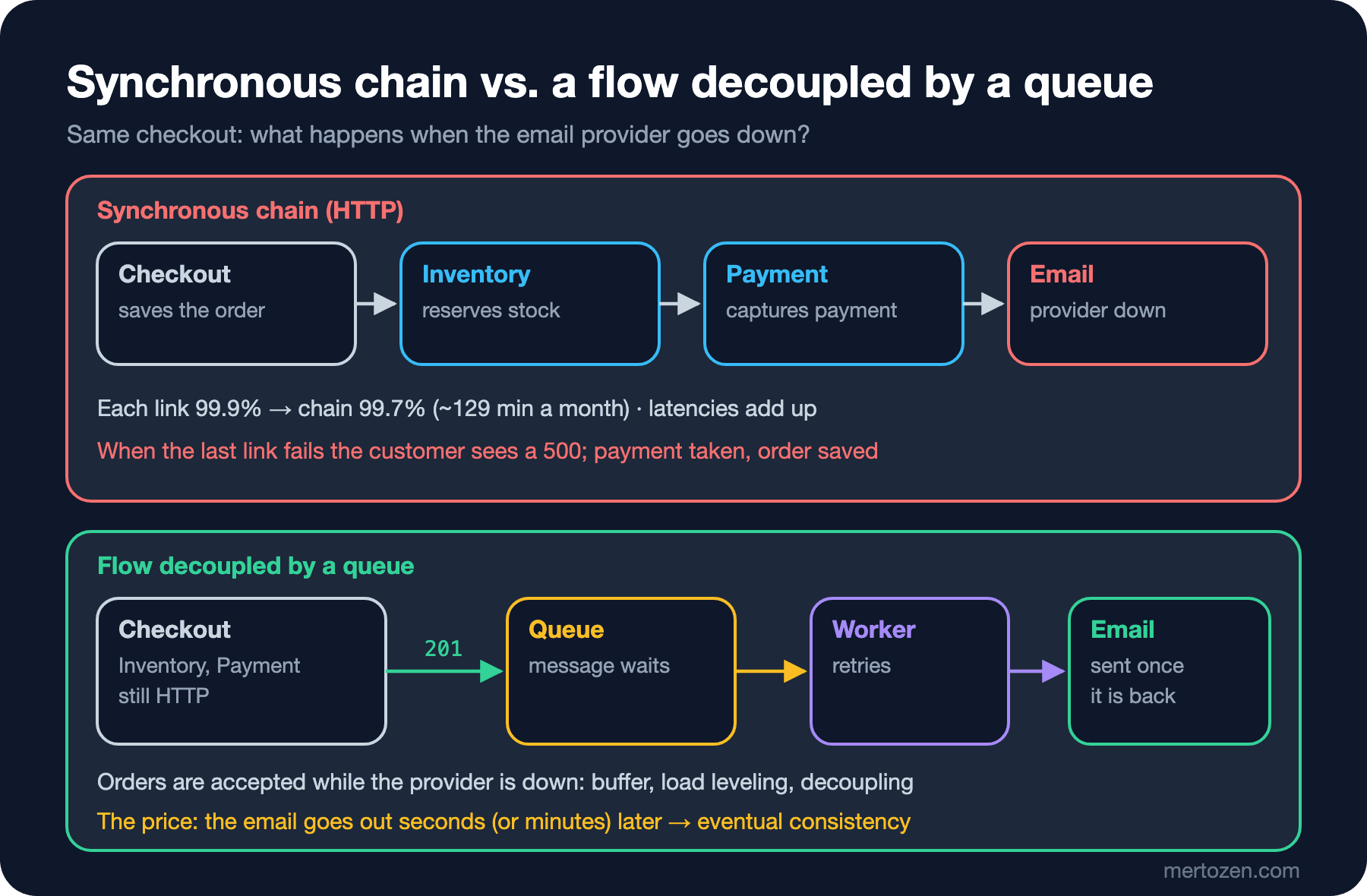
[sync] 201 responses: 7/10, orders saved: 10, payments captured: 10, emails sent: 7Seven of the ten orders got a 201, but all ten were saved and all ten were charged. Three customers saw a 500 on screen. The order actually exists and the money was taken; the only thing missing was an email. If one of those three presses the button again, a second order and a second charge appear. The Solution Patterns series post "Idempotency Keys: Not Creating the Same Order Twice on Double Clicks and Retries" dealt with exactly that second click; here the problem starts earlier: a failed email should never have meant a failed order.
This code has an unwritten contract: for checkout to work, the stock service, the payment provider, and the email provider must all be up and answering at the same moment. That is called temporal coupling: two parts tied together through time. They may hide behind an interface in the code and be deployed by different teams; if one is missing at call time, the other doesn't work either. Gregor Hohpe and Bobby Woolf's 2003 book Enterprise Integration Patterns (EIP: a catalog of 65 patterns for message-based integration) lists exactly this as the first benefit of messaging: the sender and the receiver don't need to be running at the same time.
The cost of the chain is easy to see in numbers. Say each link has 99.9% availability, roughly 43 minutes of downtime a month. If the links fail independently, the availability of the chain is the product:
using System.Threading.Channels;
using Bookstore.Ordering;

// Availability of the chain: each link is 99.9%
double[] links = [0.999, 0.999, 0.999];
double chain = links.Aggregate(1.0, (product, a) => product * a);
const double minutesPerMonth = 30 * 24 * 60;
Console.WriteLine($"One service:  {links[0]:P2} -> {(1 - links[0]) * minutesPerMonth:F0} min down per month");
Console.WriteLine($"Chain of {links.Length}:   {chain:P2} -> {(1 - chain) * minutesPerMonth:F0} min down per month");
double[] five = [0.999, 0.999, 0.999, 0.999, 0.999];
double chain5 = five.Aggregate(1.0, (product, a) => product * a);
Console.WriteLine($"Chain of 5:   {chain5:P2} -> {(1 - chain5) * minutesPerMonth:F0} min down per month");
Console.WriteLine();
One service: 99.90% -> 43 min down per month
Chain of 3: 99.70% -> 129 min down per month
Chain of 5: 99.50% -> 216 min down per monthThree dependencies triple the downtime; since checkout itself is also a link, the real picture is a bit worse. In the Introduction to Architecture series post "Quality Attribute Scenarios" we set a monthly 99.9% target for checkout. With this chain, that target is mathematically out of reach. Latency accumulates the same way: the delays of each call add up, and the slowest link's bad day becomes the whole request's bad day. A 5-second hiccup at the payment provider becomes a 5-second wait for the customer at the cart.
Drop It on a Queue, Return Right Away
Let's stop making email something checkout waits for. Checkout just leaves a message saying "send a confirmation email for this order" and returns; a worker sends the email in the background. The shortest way to do that inside a process is System.Threading.Channels:
using System.Threading.Channels;

namespace Bookstore.Ordering;

public sealed record OrderConfirmationRequested(Guid OrderId);

public sealed class QueuedCheckoutService(
    InventoryClient inventory, PaymentClient payment, OrderStore store,
    ChannelWriter<OrderConfirmationRequested> queue)
{
    public async Task<int> PlaceOrderAsync(Guid orderId, decimal total)
    {
        await inventory.ReserveAsync(orderId);
        await payment.CaptureAsync(orderId, total);
        await store.SaveAsync(orderId);
        // We don't wait for the email: drop it on the queue and return
        await queue.WriteAsync(new OrderConfirmationRequested(orderId));
        return 201;
    }
}

public sealed class ConfirmationWorker(ChannelReader<OrderConfirmationRequested> queue, EmailClient email)
{
    public int Retries { get; private set; }

    public async Task RunAsync()
    {
        await foreach (OrderConfirmationRequested message in queue.ReadAllAsync())
        {
            while (true)
            {
                try
                {
                    await email.SendConfirmationAsync(message.OrderId);
                    break;
                }
                catch (ServiceUnavailableException)
                {
                    Retries++;
                    await Task.Delay(TimeSpan.FromMilliseconds(50)); // simple wait and retry
                }
            }
        }
    }
}
Same experiment, this time with the provider down from the start and coming back only after all the orders have been accepted:
// Through a queue: a background worker does the email work
{
    InventoryClient inventory = new();
    PaymentClient payment = new();
    OrderStore store = new();
    EmailClient email = new();
    Channel<OrderConfirmationRequested> queue = Channel.CreateUnbounded<OrderConfirmationRequested>();
    QueuedCheckoutService checkout = new(inventory, payment, store, queue.Writer);
    ConfirmationWorker worker = new(queue.Reader, email);

    email.IsDown = true;                       // provider is down from the start
    Task running = worker.RunAsync();
    int ok = 0;
    for (int i = 1; i <= 10; i++)
    {
        if (await checkout.PlaceOrderAsync(Guid.CreateVersion7(), 30m) == 201) ok++;
    }
    Console.WriteLine($"[queued] 201 responses: {ok}/10, emails sent so far: {email.Sent}");

    await Task.Delay(TimeSpan.FromMilliseconds(300));
    email.IsDown = false;                      // provider is back
    queue.Writer.Complete();
    await running;
    Console.WriteLine($"[queued] after recovery: emails sent: {email.Sent}, worker retried: {worker.Retries > 0}");
}
Console.WriteLine();
[queued] 201 responses: 10/10, emails sent so far: 0
[queued] after recovery: emails sent: 10, worker retried: TrueAll ten orders got a 201; at that moment not a single email had gone out. When the provider came back, the worker retried and sent the ten waiting messages. From the customer's point of view the difference is large: the order screen no longer depends on the health of the email provider. The price is visible in the same output: "emails sent so far: 0". The order exists but has no confirmation yet. The system is inconsistent for a while and then becomes consistent. That's called eventual consistency, and much of the rest of this series is about managing that price.
Notice that stock and payment are still synchronous. That's deliberate: the customer wants to know whether the payment went through without leaving the page. Bookstore's quality attributes already have an answer for this too: if the payment provider doesn't answer within 5 seconds, the order becomes PaymentPending and the user doesn't get an error. So payment is half synchronous: a short wait first, and if that fails, carry on asynchronously. A fully asynchronous order flow, where stock reservation and payment are also wired together with events, is the subject of the saga posts later in the series.
What Is a Message Broker For?
The Channel<T> above is a queue, but not a message broker. A broker is a separate server that keeps messages in its own process and on its own disk: RabbitMQ, Azure Service Bus, Apache Kafka, and so on. The producer hands the message to the broker, the consumer takes it from there; neither even knows the other's address. That intermediary gives you three concrete benefits.
Buffer. While the consumer is down or slow, messages wait in the broker. The producer's pace stops depending on the consumer's pace. The email scenario above was a small version of this.
Load leveling. Microsoft's Queue-Based Load Leveling pattern in the Azure Architecture Center sums it up like this: a queue turns irregular incoming load into a smooth stream the service can process at its own pace. At Bookstore's campaign peak, 120 orders arrive per minute. Assume the email side can handle 50 messages a minute:
// Load leveling: 120 orders a minute during the campaign, the email side handles 50 a minute
int backlog = 0, peak = 0, peakMinute = 0;
for (int minute = 1; minute <= 40; minute++)
{
    int arrived = minute <= 10 ? 120 : 10;     // a 10-minute peak, then a quiet hour
    backlog = Math.Max(0, backlog + arrived - 50);
    if (backlog > peak) (peak, peakMinute) = (backlog, minute);
    if (minute is 1 or 5 or 10 or 15 or 20 or 25 or 30)
        Console.WriteLine($"minute {minute,2}: arrived {arrived,3}, queue depth {backlog,3}");
    if (minute > 10 && backlog == 0)
    {
        Console.WriteLine($"queue drained at minute {minute} (peak {peak} at minute {peakMinute})");
        break;
    }
}
minute 1: arrived 120, queue depth 70
minute 5: arrived 120, queue depth 350
minute 10: arrived 120, queue depth 700
minute 15: arrived 10, queue depth 500
minute 20: arrived 10, queue depth 300
minute 25: arrived 10, queue depth 100
queue drained at minute 28 (peak 700 at minute 10)During the ten-minute peak the queue grows to 700 messages and drains in minute 28 of the quiet hour. The last email goes out about 18 minutes after its order. Is that acceptable? For email, most likely yes. For a payment confirmation, no. Load leveling speeds nothing up; it only moves the waiting off the caller and into the queue. The same Microsoft page warns about this: if the average arrival rate is higher than the processing rate, the queue keeps growing; you need to watch the queue depth and add consumers when needed.
Decoupling. Checkout doesn't know who sends the email, with how many instances, or in which language. Tomorrow a second consumer listening to the same message (say a Notification feature that sends the customer an SMS (Short Message Service)) can be added without touching checkout. This comes back in the third post of the series under publish/subscribe.
Web-Queue-Worker: The Architecture Style Version of This Idea
The Azure Architecture Center gives this arrangement a name: Web-Queue-Worker. A web front end takes the request and answers quickly; long-running or resource-hungry work goes through a queue to a worker in the background. In the Introduction to Architecture series post "A Map of Architecture Styles" we saw Bookstore's decision to put email on a queue as a small, in-process version of this style; the code in this post is that decision itself. The boundary the style suggests is the same: the web side does the work the user has to wait for and hands everything else to the worker.
The style doesn't require moving to microservices. Web and worker can be two hosts of the same monolith, or even two parts of the same process. What matters is that the two sides talk through messages and one side's slowness doesn't leak into the other.
Channel<T> or a Broker?
In the Introduction to Architecture series post "Trade-off Thinking", Bookstore made a decision: the order confirmation email would be sent through an in-process queue, accepting that messages in the queue could be lost on a deploy or a crash. The Channel<T> in this post is the code for that decision. When is it not enough?
| Synchronous HTTP chain | In-process Channel<T> | Message broker | |
|---|---|---|---|
| If a dependency fails | The request fails | The message waits in memory | The message waits in the broker (on disk) |
| If the application restarts | The in-flight request is lost | Everything in the queue is lost | Messages survive |
| Where the consumer runs | In the other service | In the same process | In any process, multiple instances |
| Scaling | Grow the other service | Limited to one machine | Add consumer instances |
| Operational load | None | None | Broker cluster, monitoring, upgrades |
Channel<T> fits work that can tolerate loss, stays inside the same process, and just needs to be pushed to the background. For backpressure, bounded channels, and pipelines, see the C# Async series post "Producer/Consumer with C# Channels: Backpressure, Bounded Channels and Pipelines". If messages must not be lost, if another process will do the work, or if several instances will share the messages, it's the broker's turn. We said the Introduction to Architecture decision was a two-way door: checkout only sees a ChannelWriter<T>, and swapping it tomorrow for an implementation that writes to a broker touches a single class. The genuinely hard part of durability (making the database commit and the message publish reliable together) is in the outbox post of this series.
The Price: Asynchrony Isn't Free
Hohpe and Woolf list the challenges of messaging alongside its benefits: the programming model gets more complex, message order isn't guaranteed, and some scenarios are synchronous by nature. At Bookstore's scale, those look like this:
- Eventual consistency: the order page has to show intermediate states such as "confirmation email on its way"; the support team needs an answer to "the order is there but no email arrived".
- Debugging: a failure no longer shows up in a single stack trace. Checkout succeeds, the worker fails three minutes later; without an id linking the two, you get lost in the logs. We'll put a correlation id in the message envelope in the next post.
- Operational load: the broker is a server too. It has to be upgraded, monitored, kept from filling its disk, and its dead-letter queue has to be emptied. For Bookstore's single part-time ops person, that's not a cost to take lightly.
- Duplicates: brokers usually deliver a message "at least once". The worker may send the same email twice. Posts 04 and 06 of the series are about this.
When Is HTTP Enough?
Turning every call into a message means buying a different complexity while escaping temporal coupling. A synchronous call is the right choice in these cases:
The caller needs the answer immediately. "Is it in stock?" on a book page is a query; sending the answer as a message makes no sense. The user is waiting at the screen.
The operation is short and the dependency is reliable. Setting up a broker for a 20-millisecond call to a service in the same data center, run by the same team, is unnecessary.
A consistent result affects the user's decision. Payment sits on this line; Bookstore's solution is the hybrid we saw above: a short synchronous attempt, continuing asynchronously on timeout.
The question to keep in mind is: "Does the caller of this work have to wait for its result?" If the answer is no and the work can be retried when it fails, it's a good candidate for a queue.
Common Pitfalls
Waiting synchronously over a queue
Building request/reply with messages and waiting for the reply inside the same HTTP request brings temporal coupling back, and adds the broker's latency and timeout handling on top. If you need to wait for the answer, either use HTTP or don't wait: accept the request (202 Accepted) and report the result later.
"Pushing to the background" with Task.Run
Sending the email with _ = Task.Run(...) looks asynchronous but isn't a queue: no retry, the exception is lost, and the work is cut off when the process shuts down. The C# Async series post "C# async void and Fire-and-Forget: Lost Exceptions" covers this pitfall in detail.
Not monitoring queue depth
As the load leveling example showed, a queue can silently pile up a problem. If the consumer has stopped because of a bug, users notice hours later, from emails that never arrive. Queue depth and the age of the oldest message are two metrics to watch from day one.
Treating the broker as a box that solves everything
A broker carries messages; it doesn't solve business rules, consistency, or ordering on its own. The "payment taken but a 500 returned" problem in the synchronous chain can turn into "the message was published but the database commit failed" when the same code is written with a broker. The later posts in this series exist precisely to close those gaps.
A Small Experiment
★☆☆ In the load leveling simulation, raise the email side's capacity from 50 to 100 a minute. How large does the queue get, and in which minute does it drain? What changes at a capacity of 130?
★★☆ Use Channel.CreateBounded<OrderConfirmationRequested>(5) instead of Channel.CreateUnbounded and try placing ten orders while the provider is down. Why does checkout slow down? If you choose BoundedChannelFullMode.DropOldest, whose email is lost?
★★★ Change SyncCheckoutService so it never waits for the email, but still think through the "a 500 returned but the money was taken" problem for the payment step: if the payment provider doesn't answer within 5 seconds, the order should move to PaymentPending. Who finds out later whether an order in that state was actually paid, and how?
In the next post we'll look at the thing we drop on the queue: is OrderConfirmationRequested a command or an event? Why does the difference matter, and what belongs in a message's envelope?