

Heaps and Priority Queues: Binary Heap, Heapify, Heap Sort and Top-K in C#

A heap is an array-backed tree that always keeps the smallest element on top; insert and remove-min are O(log n) and bottom-up build-heap is O(n). We write a BinaryHeap and heap sort in C#, show with real output that .NET's 4-ary PriorityQueue is not FIFO for equal priorities, and finish with top-K, k-way merge and running median examples plus a BenchmarkDotNet measurement.
Version note: The code in this post was built with .NET 10 and C# 14 and verified with xUnit v3 4.0.2 tests; measurements were taken with BenchmarkDotNet 0.15.8.
Guess First
The shipping service processes orders by priority. Eight orders arrive in the morning, all with the same priority (1), in order from A1 to A8. We put them into .NET's PriorityQueue and take them out one by one:
PriorityQueue<string, int> orders = new();
string[] ids = ["A1", "A2", "A3", "A4", "A5", "A6", "A7", "A8"];
foreach (string id in ids) orders.Enqueue(id, 1);
List<string> plain = [];
while (orders.TryDequeue(out string? id, out _)) plain.Add(id);
Console.WriteLine($"same priority:      {string.Join(" ", plain)}");
It is called a "queue", so arrival order is preserved, right? Do you get A1 A2 A3 ... A8, or some other order? I give the answer halfway through the post, after we see how a heap works.
What a Heap Is: A Tree with a Single Rule
A binary heap is a binary tree in which every node is less than or equal to its two children (a min-heap) and every level is filled from left to right. The rule gives a single guarantee: the smallest element is at the root. There is no order between siblings, or between the left and right subtrees. The balanced tree from the previous post keeps the full order; a heap keeps only "the one on top", and that looseness makes it both simpler and faster.
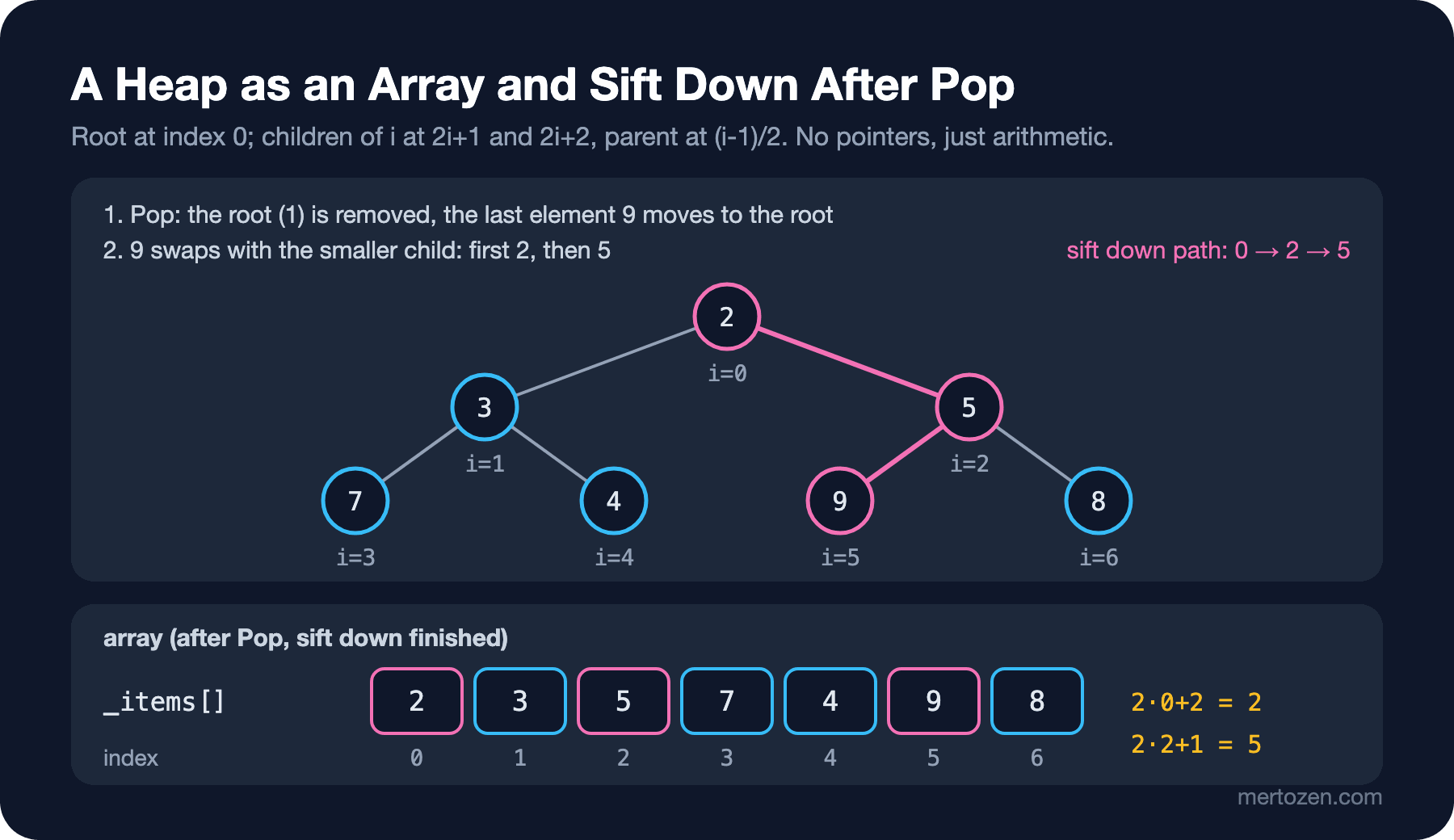
Thanks to the "every level filled left to right" condition (a complete tree) we can store a heap in a plain array instead of with pointers. The root sits at index 0; the children of the node at index i are at 2i + 1 and 2i + 2, and its parent is at (i - 1) / 2. No node objects, no child references, just arithmetic:
That makes a heap very memory-efficient: an array of n slots for n elements. Since the elements are contiguous, the CPU (Central Processing Unit) cache is happy too; in the 3rd post of the series we saw why a linked list loses, and a heap sits on the opposite side.
Sift Up and Sift Down
A heap has two basic moves. On insert, the new element goes to the end of the array and moves up as long as it is smaller than its parent (sift up). To remove the smallest, we take the root, move the last element to the root, and it goes down by swapping with the smaller child as long as it is larger than its children (sift down). Both take at most as many steps as the tree height: O(log n).
public sealed class BinaryHeap<T>
{
    private T[] _items;
    private readonly IComparer<T> _comparer;

    public BinaryHeap(IComparer<T>? comparer = null)
    {
        _items = new T[4];
        _comparer = comparer ?? Comparer<T>.Default;
    }

    public int Count { get; private set; }

    public T Peek() => Count > 0 ? _items[0] : throw new InvalidOperationException("Heap is empty.");

    public void Push(T item)
    {
        if (Count == _items.Length)
        {
            Array.Resize(ref _items, _items.Length * 2);
        }

        _items[Count] = item;
        SiftUp(Count);
        Count++;
    }

    public T Pop()
    {
        T top = Peek();
        Count--;
        _items[0] = _items[Count];
        _items[Count] = default!; // so the GC can collect the object for reference types
        if (Count > 0)
        {
            SiftDown(0);
        }

        return top;
    }

    private void SiftUp(int index)
    {
        T item = _items[index];
        while (index > 0)
        {
            int parent = (index - 1) / 2;
            if (_comparer.Compare(item, _items[parent]) >= 0)
            {
                break;
            }

            _items[index] = _items[parent]; // move the parent down, no swap
            index = parent;
        }

        _items[index] = item;
    }

    private void SiftDown(int index)
    {
        T item = _items[index];
        while (true)
        {
            int child = 2 * index + 1;
            if (child >= Count)
            {
                break;
            }

            if (child + 1 < Count && _comparer.Compare(_items[child + 1], _items[child]) < 0)
            {
                child++; // the smaller child
            }

            if (_comparer.Compare(_items[child], item) >= 0)
            {
                break;
            }

            _items[index] = _items[child];
            index = child;
        }

        _items[index] = item;
    }
}
Two small details affect performance. First, instead of swapping at every step we hold the moving element in a variable and shift the "hole"; one assignment per level instead of three. Second, in Pop we reset the freed slot to default; as we saw with the dynamic array in the 2nd post of the series, otherwise reference-type elements cannot be collected by the GC (Garbage Collector). A max-heap does not need a separate class, a reversed comparer is enough: Comparer<int>.Create((a, b) => b.CompareTo(a)).
Why Build-Heap Is O(n)
If you already have an array, pushing the elements one by one looks like n log n work. There is something better: treat the array as a heap as it is, and sift down every node from the last inner node back to the root (bottom-up build-heap, Floyd's method):
public BinaryHeap(IEnumerable<T> items, IComparer<T>? comparer = null)
{
    _items = [.. items];
    _comparer = comparer ?? Comparer<T>.Default;
    Count = _items.Length;
    for (int i = (Count - 2) / 2; i >= 0; i--)
    {
        SiftDown(i);
    }

    if (_items.Length == 0)
    {
        _items = new T[4];
    }
}
The intuition: half of the nodes are leaves and do no work. A quarter go down at most one level, an eighth at most two. The expensive nodes that walk long paths are a minority; the total work stays around n/4·1 + n/8·2 + n/16·3 + ... ≤ n. Building with Push is the opposite: half of the elements are added at the bottom level, and they are the ones that may walk the longest path. I saw this by counting; I built a heap of a million elements with a comparer that counts comparisons:
private sealed class CountingComparer : IComparer<int>
{
    public long Comparisons;
    public int Compare(int x, int y)
    {
        Comparisons++;
        return x.CompareTo(y);
    }
}
n=1,000,000: Push one by one = 2,280,005 comparisons, bottom-up build = 1,880,456 comparisons
descending input: Push = 17,951,445, build = 1,999,974On random data the difference is small, because the sift up of a random element stops after a few steps on average. But on descending data (the worst case for a min-heap, every new element climbs to the root) building with Push makes 18 million comparisons while build-heap stays at 2 million. Bottom-up construction costs O(n) regardless of the input. You can do the detailed analysis with the summation technique from the "Deriving Time Complexity from Code" post of the Big-O and Complexity series.
Heap Sort
Build-heap plus the repeated "put the largest at the end" step gives a sorting algorithm. We build a max-heap, swap the root (the largest) to the end of the array, shrink the heap by one and sift the root down:
public static void Sort<T>(Span<T> items, IComparer<T>? comparer = null)
{
    comparer ??= Comparer<T>.Default;
    int n = items.Length;
    for (int i = n / 2 - 1; i >= 0; i--)
    {
        SiftDown(items, i, n, comparer);
    }

    for (int end = n - 1; end > 0; end--)
    {
        (items[0], items[end]) = (items[end], items[0]);
        SiftDown(items, 0, end, comparer);
    }
}
Heap sort has two nice properties: O(n log n) even in the worst case, and O(1) extra memory; it sorts in place. It also has two weaknesses: it is not stable (we saw why stability matters in the 8th post of the series), and it jumps between distant regions of the array, so it is not cache friendly. That is why .NET's Array.Sort uses heap sort not as its main algorithm but as introsort's safety valve: when quicksort's recursion depth exceeds 2·log n, it switches to heap sort. Details are in the 9th post of the series.
.NET PriorityQueue: A 4-ary Heap and the FIFO Trap
Now the answer to the opening question:
same priority: A1 A8 A7 A6 A5 A4 A3 A2Arrival order was not preserved. This is not a bug; the Microsoft Learn documentation describes PriorityQueue<TElement, TPriority> as an array-backed quaternary (4-ary) min-heap and states explicitly that it does not guarantee FIFO (First-In-First-Out) semantics for elements of equal priority. In a 4-ary heap every node has four children; the tree is flatter, so sift up walks fewer levels while sift down compares four children at each level. On ties, which element moves up depends on the heap's internal shape, not on arrival order.
If order matters (orders with the same priority must be processed in arrival order), add a sequence number to the priority. Tuples compare by the first field first, and by the second when equal:
PriorityQueue<string, (int Priority, long Sequence)> fifo = new();
long sequence = 0;
foreach (string id in ids) fifo.Enqueue(id, (1, sequence++));
List<string> stable = [];
while (fifo.TryDequeue(out string? id, out _)) stable.Add(id);
Console.WriteLine($"(priority, seq):    {string.Join(" ", stable)}");
(priority, seq): A1 A2 A3 A4 A5 A6 A7 A8The second important gap is decrease-key: you cannot change the priority of an element already in the queue. There is Remove(element, out removed, out priority, comparer), added in .NET 9, but as the documentation says it scans the whole heap linearly, so it is O(n). The practical solution is lazy deletion: add the element again with the new priority, and when the old entry comes out, recognize it as stale and skip it. That is exactly how we will write Dijkstra in the 17th post of the series. We covered the rest of the API (Application Programming Interface) in the "C# Queue, Stack, LinkedList and PriorityQueue" post of the C# Collections series.
Uses: Top-K, K-Way Merge and Running Median
The 10 best-selling books. We computed per-book totals from two million sales records and we have tens of thousands of distinct ISBNs (International Standard Book Numbers). Sorting all of them is O(n log n) work and needs an n-element buffer. But we only want the top K. If we keep a min-heap limited to size K, the element on top is "the weakest of the best K so far"; if a newcomer beats it, they swap:
public static List<(TItem Item, int Score)> TopK<TItem>(IEnumerable<(TItem Item, int Score)> source, int k)
{
    PriorityQueue<TItem, int> heap = new(k);
    foreach ((TItem item, int score) in source)
    {
        if (heap.Count < k)
        {
            heap.Enqueue(item, score);
        }
        else if (heap.TryPeek(out _, out int smallest) && score > smallest)
        {
            heap.DequeueEnqueue(item, score); // drop the weakest, add the new one: a single sift down
        }
    }

    List<(TItem, int)> result = new(heap.Count);
    while (heap.TryDequeue(out TItem? item, out int score))
    {
        result.Add((item, score));
    }

    result.Reverse();
    return result;
}
978-000000011 568
978-000000019 555
978-000000017 553
978-000000004 535
978-000000065 534The cost is O(n log k) and the memory O(k). With K = 5, log k is practically a constant; this algorithm also works on a stream, without ever collecting the data in memory. DequeueEnqueue does "remove, then add" with a single sift down.
Merging K sorted lists. Every warehouse sends its own order list sorted by date, and we want to merge them into a single sorted stream. The heap holds the next element of each list; we take the smallest and add the next one from the same list:
public static IEnumerable<T> MergeSorted<T>(IReadOnlyList<IEnumerable<T>> sources, IComparer<T>? comparer = null)
{
    comparer ??= Comparer<T>.Default;
    List<IEnumerator<T>> enumerators = [.. sources.Select(s => s.GetEnumerator())];
    try
    {
        PriorityQueue<int, T> heap = new(comparer); // element: which list it came from
        for (int i = 0; i < enumerators.Count; i++)
        {
            if (enumerators[i].MoveNext())
            {
                heap.Enqueue(i, enumerators[i].Current);
            }
        }

        while (heap.TryDequeue(out int index, out T? value))
        {
            yield return value;
            if (enumerators[index].MoveNext())
            {
                heap.Enqueue(index, enumerators[index].Current);
            }
        }
    }
    finally
    {
        foreach (IEnumerator<T> e in enumerators) e.Dispose();
    }
}
O(n log k) for n elements in total and k lists. This is also the merge step of the external merge sort mentioned in the 8th post of the series: sorted chunks written to disk are merged in one pass with a heap.
Running median. We want to keep the median of shipping delivery times up to date with every new record. Keeping a sorted list means an O(n) shift on every insert. With two heaps it is O(log n): the lower half sits in a max-heap, the upper half in a min-heap; the two are balanced so their sizes differ by at most one, and the median is read from the tops:
public sealed class RunningMedian
{
    private readonly PriorityQueue<int, int> _lower = new(Comparer<int>.Create((a, b) => b.CompareTo(a)));
    private readonly PriorityQueue<int, int> _upper = new();

    public void Add(int value)
    {
        if (_lower.Count == 0 || value <= _lower.Peek())
        {
            _lower.Enqueue(value, value);
        }
        else
        {
            _upper.Enqueue(value, value);
        }

        if (_lower.Count > _upper.Count + 1)
        {
            int moved = _lower.Dequeue();
            _upper.Enqueue(moved, moved);
        }
        else if (_upper.Count > _lower.Count)
        {
            int moved = _upper.Dequeue();
            _lower.Enqueue(moved, moved);
        }
    }

    public double Median => _lower.Count == 0
        ? throw new InvalidOperationException("No values.")
        : _lower.Count > _upper.Count ? _lower.Peek() : (_lower.Peek() + (double)_upper.Peek()) / 2;
}
26->26 30->28 22->26 90->28 24->26 28->27 25->26A shipment delayed by 90 hours would skew the average, but it barely moves the median. In the test we compare the result with the middle of a sorted list at every step; all the heap tests:
Test run summary: Passed!
  total: 10
  failed: 0
  succeeded: 10
  skipped: 0
  duration: 330ms
Measurement: Our Heap, PriorityQueue and Array.Sort
I added 100,000 random ints and then removed all of them; I also compared heap sort with Array.Sort (both sorts copy the array first):
[Benchmark(Baseline = true)]
public long PriorityQueue_EnqueueDequeue()
{
    PriorityQueue<int, int> queue = new();
    foreach (int v in _data) queue.Enqueue(v, v);
    long sum = 0;
    while (queue.TryDequeue(out int v, out _)) sum += v;
    return sum;
}

[Benchmark]
public long BinaryHeap_PushPop()
{
    BinaryHeap<int> heap = new();
    foreach (int v in _data) heap.Push(v);
    long sum = 0;
    while (heap.TryPop(out int v)) sum += v;
    return sum;
}

[Benchmark]
public int[] HeapSort_Copy()
{
    int[] copy = [.. _data];
    HeapSort.Sort<int>(copy);
    return copy;
}

[Benchmark]
public int[] ArraySort_Copy()
{
    int[] copy = [.. _data];
    Array.Sort(copy);
    return copy;
}
The measurements were taken on an Apple M5 (10 cores), macOS 27.0.1, .NET 10.0.13 and BenchmarkDotNet 0.15.8. I ran the benchmarks one at a time, but other work was running on the machine; look at the ratios, not the absolute numbers. The Ratio column is computed against a single baseline, so read the first two rows against each other and the last two rows against each other.
| Method                       | N      | Mean     | Ratio | Allocated  |
|----------------------------- |------- |---------:|------:|-----------:|
| PriorityQueue_EnqueueDequeue | 100000 | 8.211 ms |  1.00 | 2048.69 KB |
| BinaryHeap_PushPop           | 100000 | 6.767 ms |  0.83 | 1024.54 KB |
| HeapSort_Copy                | 100000 | 8.064 ms |  0.98 |  390.72 KB |
| ArraySort_Copy               | 100000 | 3.953 ms |  0.48 |  390.73 KB |
Our binary heap is about 17% faster than PriorityQueue in this scenario and uses half the memory. The Allocated column shows one reason for the difference: PriorityQueue stores an (element, priority) pair in every slot, we store only the value. In this special case, where element and priority are the same thing, it carries twice the data and grows twice as large (2 MB vs 1 MB). I left the d-ary experiment at the end of the post to separate how much of the difference comes from this and how much from the 4-ary layout. When element and priority differ (an order and its date) this advantage disappears; PriorityQueue is also a tested, ready-made structure with optimized operations like EnqueueDequeue. For sorting the table is clear: heap sort takes twice as long as Array.Sort despite the same O(n log n). Introsort's quicksort works in contiguous regions while heap sort jumps from index i to 2i + 1 and keeps missing the cache.
Production Notes
PriorityQueue is not thread-safe. If several workers write to the same queue, either use a lock or split priorities into separate channels and work with Channels; see the "C# Synchronization" and "Producer/Consumer with C# Channels" posts of the C# Async series.
Unbounded growth. If a job scheduler's queue fills faster than the consumer drains it, the heap grows silently and every operation slows down by log n. Track the queue length as a metric and set an upper bound; whether to reject new work, drop the lowest priority or slow down the producer once the bound is hit is a business decision and should not stay hidden in the code.
A priority must not change while it is in the queue. If you use a property of a mutable object as the priority (say an order's DueDate) and that value changes while the item is queued, the heap rule breaks and the output order is wrong. Copy the priority at enqueue time (use a value type), or apply lazy deletion when it changes.
Sorting the whole list for Top-K. OrderByDescending(x => x.Sales).Take(10) is readable, but it buffers the entire source. For a few thousand records it does not matter; on a stream of millions of rows or in a container with a memory limit, prefer the size-K heap. If the data is in a database, the best option is to leave sorting to it with ORDER BY ... LIMIT.
Common Pitfalls
Expecting FIFO on equal priorities. The opening output showed it; if order matters between jobs with the same priority, add the sequence number to the priority and pin it down with a test.
The wrong heap for Top-K. Finding the largest K needs a min-heap (the weakest candidate sits on top), the smallest K needs a max-heap. Pick the opposite and every new element is still compared with the top, but the wrong element is dropped and the result breaks silently.
Off-by-one index formulas. In a 0-based array the children are 2i + 1 and 2i + 2 and the parent is (i - 1) / 2. Carrying the 1-based textbook formulas (2i, 2i + 1, i / 2) into a 0-based array makes the root its own first child. A "does the output come out ascending" test on random data catches this immediately.
Assuming a heap is sorted. Iterating UnorderedItems or your own array with foreach does not give a sorted result; if you want sorted output, you must dequeue the elements one by one.
A Small Experiment
★☆☆ Use BinaryHeap<T> as a max-heap to find the three most expensive orders in an order list. Then do the same with PriorityQueue and a reversed comparer.
★★☆ Make BinaryHeap<T> d-ary: children between d·i + 1 and d·i + d, parent at (i - 1) / d. Rerun the benchmark for d = 2, 4 and 8. When Push and Pop are measured separately, which one gets faster as d grows and which one gets slower?
★★★ Merge 20 files from shipping warehouses, each sorted by date (100,000 lines each), into a single file with MergeSorted; watch the memory with GC.GetGCMemoryInfo() and compare with a version that reads all the lines and sorts them with OrderBy.
With the heap we learned the "smallest always on top" rule. In the next post we move to a different question: when a user types "dun" into the search box, how do we find books starting with that prefix, like "Dune" and "Dune Messiah", within milliseconds? The answer is a tree that stores keys character by character: the trie.