

Recursion in C#: Base Case, Call Stack, StackOverflowException and Converting to Iteration
In .NET a StackOverflowException cannot be caught and kills the whole process; on an 8 MB main thread an empty method called itself about 130,650 times and the catch block never ran. We cover the anatomy of recursion, call stack frames, converting recursive code to iteration with an explicit Stack<T>, and depth defences such as JSON MaxDepth (64) and EnsureSufficientExecutionStack, with xUnit tests and real output.
Version note: The code in this post was built with .NET 10 and C# 14 and verified with xUnit v3 4.0.2 tests.
Guess First
Bookstore's admin panel has a recursive method that computes the depth of the category menu. One day a broken category file imported from outside produces a 1,000,000-level chain where each category is the child of the previous one. The code calling the method is wrapped in try { ... } catch (Exception ex) { logger.LogError(ex, ...); }.
What happens: is the exception caught and logged, does the request return 500, or something else? Second question: on the main thread of a .NET 10 application on macOS, how many times can a method that does nothing call itself: 1,000, 100,000, 10 million?
The Anatomy of Recursion
A recursive function reduces a problem to a smaller copy of itself. It needs two things to work: at least one base case (where it answers without calling itself) and getting closer to the base case on every call. If either is missing, the function never stops.
namespace Algorithms.Recursion;

public static class Basics
{
    public static long Factorial(int n)
    {
        ArgumentOutOfRangeException.ThrowIfNegative(n);
        if (n <= 1) return 1;            // base case
        return n * Factorial(n - 1);     // progress: n gets smaller on every call
    }

    // divide and conquer: split in half, solve both halves, combine
    public static long Sum(ReadOnlySpan<int> values)
    {
        if (values.Length == 0) return 0;
        if (values.Length == 1) return values[0];
        int mid = values.Length / 2;
        return Sum(values[..mid]) + Sum(values[mid..]);
    }
}
Factorial calls itself n times and the calls wait on each other like a chain; the depth is n. Sum splits the array in two and sums each half separately: the number of calls is still around n, but the depth is only log₂(n), 20 levels for a 1-million-element array. This second shape is the skeleton of divide and conquer, that is, of merge sort, quick sort and binary search; it comes back in the series' sorting posts. Deriving the complexity of a recursive algorithm with a recurrence is covered in the Big-O and Complexity series post "Deriving Time Complexity from Code".
The Call Stack: Every Call Is a Frame
When a method is called, the runtime puts a frame on the thread's stack: the return address, parameters, local variables and saved registers. When the method returns, the frame is removed. A recursive chain of calls means as many frames piling up as there are calls; none of them can be removed until the deepest call reaches the base case and returns.
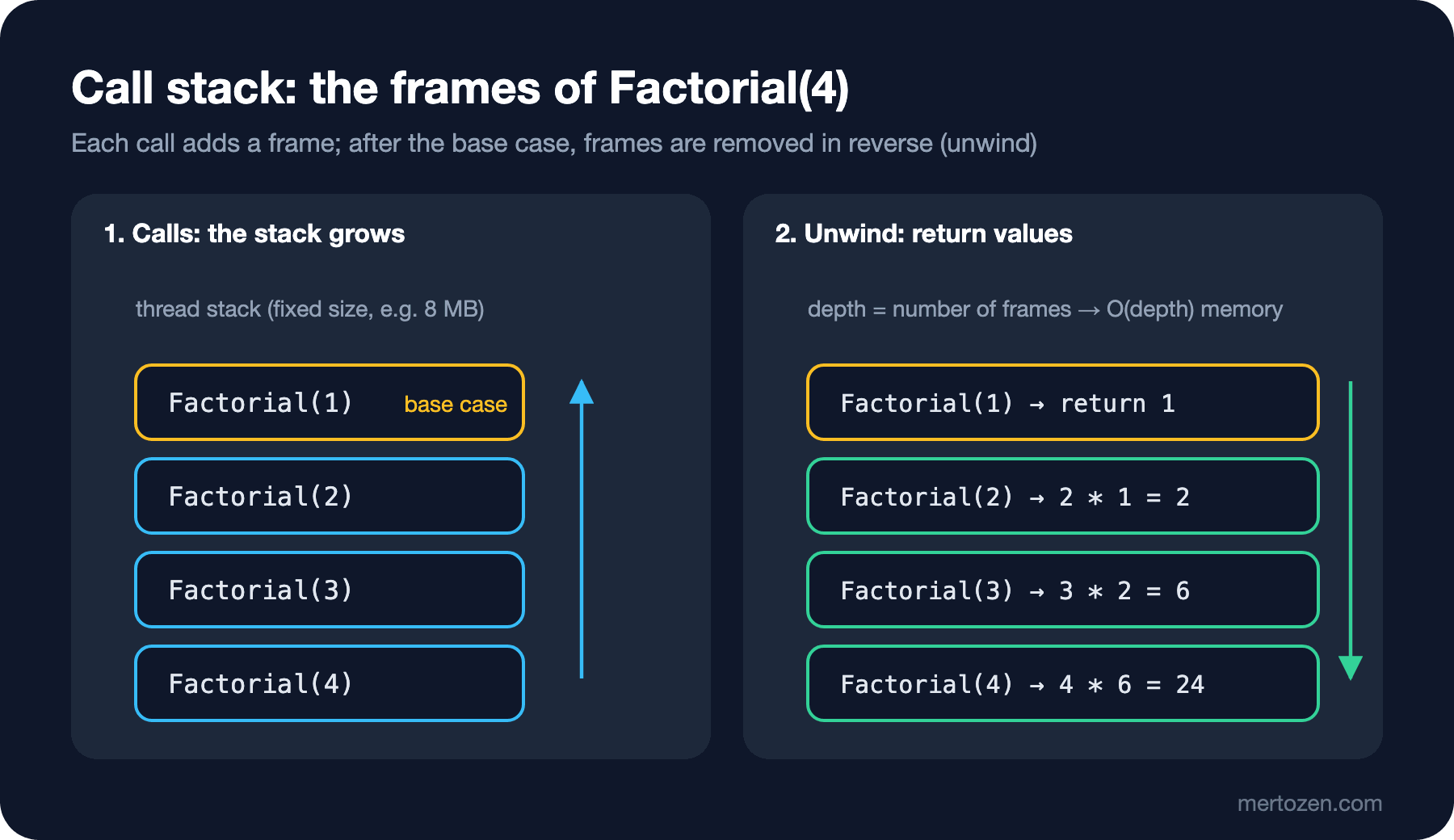
That is why recursion costs O(depth) memory: O(n) for Factorial(n), O(log n) for Sum. This side of space complexity is in the Big-O and Complexity series post "Space Complexity: Auxiliary Memory, Recursion Stack and Allocations". The debugger's Call Stack window was covered in the C# Fundamentals series post "Debugging in C#: Breakpoints, the Call Stack, Debug.Assert and Compiler Warnings". Stopping at a breakpoint in a recursive method and looking at that window is the quickest way to watch frames pile up.
A thread's stack has a fixed size and is tiny compared with the heap. On macOS the main thread's stack is the shell's ulimit -s value; on this machine 8,176 KB. When you create a new Thread you can set the size with maxStackSize. The size of ThreadPool threads, where ASP.NET Core requests and Task.Run run, cannot be changed from code.
The .NET Reality: StackOverflowException Cannot Be Caught
Let's answer the opening question with an experiment. This code prints the depth every 50,000 calls and wraps the whole chain in catch (Exception):
public static void Overflow()
{
    try
    {
        Dive();
    }
    catch (Exception ex) // never runs: a stack overflow cannot be caught
    {
        Console.WriteLine($"caught {ex.GetType().Name}");
    }
}

private static void Dive()
{
    _depth++;
    if (_depth % 50_000 == 0) Console.WriteLine($"depth {_depth:N0}");
    Dive();
}
$ dotnet Algorithms.Demos.dll overflow; echo "exit=$?"
depth 50,000
depth 100,000
Stack overflow.
Repeated 130648 times:
--------------------------------
at Algorithms.Demos.RecursionDemo.Dive()
--------------------------------
at Algorithms.Demos.RecursionDemo.Overflow()
at Program.<Main>$(System.String[])
exit=134The catch block never ran. The runtime printed "Stack overflow.", dumped the stack trace and terminated the process; the exit code is 134, that is, SIGABRT (the abort signal). Microsoft's documentation says so explicitly: a StackOverflowException cannot be caught with a try/catch block, and the process is terminated by default. In a web application this means the whole process dies, not just that request: every other request being processed at that moment goes with it. The try/catch from the opening saves nothing, and nothing is written to the log either.
The answer to the second question is in the output too: on the 8 MB main thread, a method with no local variables could call itself about 130,650 times, around 64 bytes per frame. A real method with locals, parameters or a foreach enumerator has a bigger frame and a correspondingly lower limit.
People coming from functional languages think of tail call optimization: if the recursive call is the method's last action, the frame can be reused and the stack does not grow. In C# you cannot rely on it. The C# compiler does not emit the tail. prefix in IL (Intermediate Language); the JIT (Just-In-Time) compiler can turn some calls into tail calls on its own in optimized code, but that is not a guarantee, and it never happens in a Debug build. Do not leave a recursion whose depth depends on data alone because "it is a tail call anyway".
From Recursive to Iterative: Keeping Your Own Stack
All recursion does is store "where you left off" on the call stack. Store the same information yourself in a Stack<T> on the heap, and the depth limit stops being the thread stack's 8 MB and becomes the whole memory of the process. Let's compute the total size of the folder holding Bookstore's cover images in two ways:
namespace Algorithms.Recursion;

public static class FolderSize
{
    public static long Recursive(string path)
    {
        long total = 0;
        foreach (string entry in Directory.EnumerateFileSystemEntries(path))
        {
            if (Directory.Exists(entry))
                total += Recursive(entry); // the call stack remembers where we were in this folder
            else
                total += new FileInfo(entry).Length;
        }
        return total;
    }

    public static long Iterative(string path)
    {
        long total = 0;
        Stack<string> pending = new(); // our own stack, on the heap, instead of call stack frames
        pending.Push(path);
        while (pending.TryPop(out string? folder))
        {
            foreach (string entry in Directory.EnumerateFileSystemEntries(folder))
            {
                if (Directory.Exists(entry))
                    pending.Push(entry);
                else
                    total += new FileInfo(entry).Length;
            }
        }
        return total;
    }
}
The recipe for the conversion is always the same: instead of the recursive call, push "process this later" onto the stack, and pop at the top of the loop. For order-insensitive work like a total, that is all. When order matters there is one more detail. Two versions that flatten the admin panel's category menu into an indented list:
public sealed record MenuCategory(string Name, List<MenuCategory> Children)
{
    public MenuCategory(string name, params MenuCategory[] children) : this(name, new List<MenuCategory>(children)) { }
}

public static class CategoryMenu
{
    public static List<string> FlattenRecursive(MenuCategory root)
    {
        List<string> lines = [];
        Visit(root, 0);
        return lines;

        void Visit(MenuCategory category, int depth)
        {
            lines.Add(new string(' ', depth * 2) + category.Name); // base case: no children, loop runs zero times
            foreach (MenuCategory child in category.Children)
                Visit(child, depth + 1);
        }
    }

    public static List<string> FlattenIterative(MenuCategory root)
    {
        List<string> lines = [];
        Stack<(MenuCategory Category, int Depth)> pending = new();
        pending.Push((root, 0));
        while (pending.TryPop(out (MenuCategory Category, int Depth) item))
        {
            lines.Add(new string(' ', item.Depth * 2) + item.Category.Name);
            // push in reverse so the first child is popped first: same order as the recursive version
            for (int i = item.Category.Children.Count - 1; i >= 0; i--)
                pending.Push((item.Category.Children[i], item.Depth + 1));
        }
        return lines;
    }
}
In the recursive version the depth is a parameter; in the iterative version it travels inside each stack element. Every piece of information in the frame becomes a field of the tuple on the stack. Pushing the children in reverse compensates for the stack being LIFO (Last In, First Out). The tests check that both versions give the same result and that the iterative version walks the 1,000,000-level chain without trouble:
[Fact]
public void Flatten_RecursiveAndIterative_SameOrder()
{
    MenuCategory menu = new("Books",
        new MenuCategory("Fiction", new MenuCategory("Science Fiction"), new MenuCategory("Classics")),
        new MenuCategory("Non-Fiction", new MenuCategory("Software", new MenuCategory(".NET"))));

    List<string> recursive = CategoryMenu.FlattenRecursive(menu);

    Assert.Equal(recursive, CategoryMenu.FlattenIterative(menu));
    Assert.Equal("      .NET", recursive[^1]);
    Assert.Equal(4, CategoryMenu.DepthRecursive(menu));
}

[Fact]
public void DepthIterative_MillionLevels_DoesNotOverflow()
{
    MenuCategory chain = CategoryMenu.Chain(1_000_000);

    Assert.Equal(1_000_000, CategoryMenu.DepthIterative(chain));
}
A demo that runs the same chain through the recursive DepthRecursive on threads with different stack sizes shows that the limit depends entirely on the stack size:
$ dotnet Algorithms.Demos.dll deep-menu 100000 1
iterative depth: 100,000
Stack overflow.
Repeated 11041 times:

$ dotnet Algorithms.Demos.dll deep-menu 100000 64
iterative depth: 100,000
recursive depth on a 64 MB thread: 100,000

$ dotnet Algorithms.Demos.dll deep-menu 1000000 64
iterative depth: 1,000,000
Stack overflow.
Repeated 699169 times:
On the 1 MB thread the recursive version died at 11,041 levels; with the foreach enumerator and Math.Max, this method's frame is about 95 bytes. The 64 MB thread passed 100,000 levels but died at 1,000,000 too. The iterative version worked in all three. Growing the stack only pushes the limit further; for depth that comes from data, the real fix is going iterative.
User-Controlled Depth
If the depth of a recursion depends on data the user sends, it is a security issue: an attacker can kill the process by sending a very deep input, a DoS (Denial of Service). That is why recursive parsers put a limit on depth. In System.Text.Json the default value of JsonSerializerOptions.MaxDepth is 0, which means 64 levels; going past it throws a catchable JsonException:
public static void JsonDepth(int depth)
{
    string json = new string('[', depth) + new string(']', depth);
    try
    {
        JsonSerializer.Deserialize<JsonElement>(json);
        Console.WriteLine($"depth {depth}: ok");
    }
    catch (JsonException ex)
    {
        Console.WriteLine($"depth {depth}: {ex.GetType().Name}: {ex.Message}");
    }
}
depth 64: ok
depth 65: JsonException: The maximum configured depth of 64 has been exceeded. Cannot read next JSON array. Path: $ | LineNumber: 0 | BytePositionInLine: 64.You can build the same defence in your own recursive code in two ways. The first is an explicit depth parameter: inside Visit(child, depth + 1), throw a meaningful error when depth > MaxDepth. For a category menu even 20 levels is too many; an import that sees a 21st level should be rejected. The second is the runtime's own check: RuntimeHelpers.EnsureSufficientExecutionStack() throws a catchable InsufficientExecutionStackException when the remaining stack space drops below a safe limit:
// recursive, but fails with a catchable exception instead of killing the process
public static int DepthGuarded(MenuCategory category)
{
    System.Runtime.CompilerServices.RuntimeHelpers.EnsureSufficientExecutionStack();
    int deepest = 0;
    foreach (MenuCategory child in category.Children)
        deepest = Math.Max(deepest, DepthGuarded(child));
    return deepest + 1;
}
$ dotnet Algorithms.Demos.dll guarded 1000000
caught InsufficientExecutionStackException: Insufficient stack to continue executing the program safely. This can happen from having too many functions on the call stack or function on the stack using too much stack space.
process is still aliveThis time the process is alive. The check has a small cost on every call and you do not decide where the limit is; for user data an explicit MaxDepth, and for your own internal algorithms the iterative version, are better defaults.
In Production
Question every recursion whose depth depends on the shape of the data. In a balanced tree the depth stays around log n and recursion is safe. But the same code reaches depth n on a degenerate tree built from sorted data or on a broken ParentId chain; the series' tree post shows a real example. Think in terms of your worst production data, not your test data.
Do not look for a stack overflow in your logs. Because the process terminates, nothing is written to the application's own log. You find the trace in the exit code reported by the container or service manager (134, SIGABRT) and in the "Stack overflow." line printed to stderr. A pod's restart count quietly going up in Kubernetes is the typical symptom.
Growing the thread stack is a temporary patch. new Thread(..., maxStackSize) pushes the limit, but the problem comes back as the data grows, and code running on the ThreadPool does not have this option at all. The lasting fix is going iterative or limiting the depth.
Do not think of recursion as bad. Most algorithms on trees and graphs are far more readable when written recursively; where you know the depth is bounded by log n (balanced trees, divide and conquer), the recursive version is the right choice.
Common Pitfalls
A missing or unreachable base case. Write Factorial(-1) with an n == 0 base case and it never stops; that is why we reject negative input right at the start.
Trying to catch StackOverflowException. The catch block never runs; protection can only happen before the overflow: a depth limit, EnsureSufficientExecutionStack or the iterative version.
Breaking the order when going iterative. Push the children in their natural order and the stack pops them in reverse; the menu comes out upside down. Comparing the output of both versions in a test catches this immediately.
Mutable state shared across the recursion. A recursive method writing to an outside list is natural, but a call that changes that list and forgets to undo the change (especially in backtracking) breaks the branches that follow. The upcoming backtracking post shows the "choose, explore, unchoose" template for this.
A Small Experiment
★☆☆ Add a maxDepth parameter to FlattenRecursive; when exceeded, throw an InvalidOperationException that includes the category's name and path. Test it with a 21-level chain.
★★☆ Extend FolderSize.Iterative to also report each folder's own total size (Dictionary<string, long>). A folder's total is only known once all its subfolders are done; how do you do that with an explicit stack? Hint: put each folder on the stack twice.
★★★ The depth of a recursive merge sort is log n. Would sorting a 100-million-element array with recursive merge sort on a 1 MB thread cause a stack overflow? Calculate first, then confirm with a small experiment.
With recursion and the call stack, the block on linear structures ends. The next post moves on to hashing: we write our own HashMap with the same internal structure as .NET's Dictionary, with buckets and entries arrays, and look at collisions, the load factor and how a bad GetHashCode turns everything into O(n).