

Arrays and Dynamic Arrays in C#: Contiguous Memory, Indexing and Writing Your Own List

A dynamic array is an array that moves to a new array twice its size when it fills up; 1,000,000 Adds copy only 1,048,572 elements in total, so the cost per element is constant. We write our own DynamicArray<T> with xUnit tests, explain why a removed slot must be cleared for the GC, and show with BenchmarkDotNet that walking a 4,000×4,000 grid column by column is 3 times slower than row by row.
Version note: The code in this post was built with .NET 10 and C# 14 and verified with xUnit v3 4.0.2 tests; measurements were taken with BenchmarkDotNet 0.15.8.
Guess First
Bookstore's warehouse screen keeps stock per shelf and per day in a 4,000 × 4,000 int[,] grid. You can compute the total stock in two ways: walk the rows first, then the columns, or walk the columns first, then the rows. Both do exactly 16 million additions. How big is the difference: a few percent, twice, more?
Second question: you add 1,000,000 elements one by one to an empty List<int>. When its capacity fills up, List<T> copies the elements into a bigger array. Over those 1,000,000 Add calls, how many elements are copied in total: around 1 million, 20 million, half a trillion?
How an Array Sits in Memory
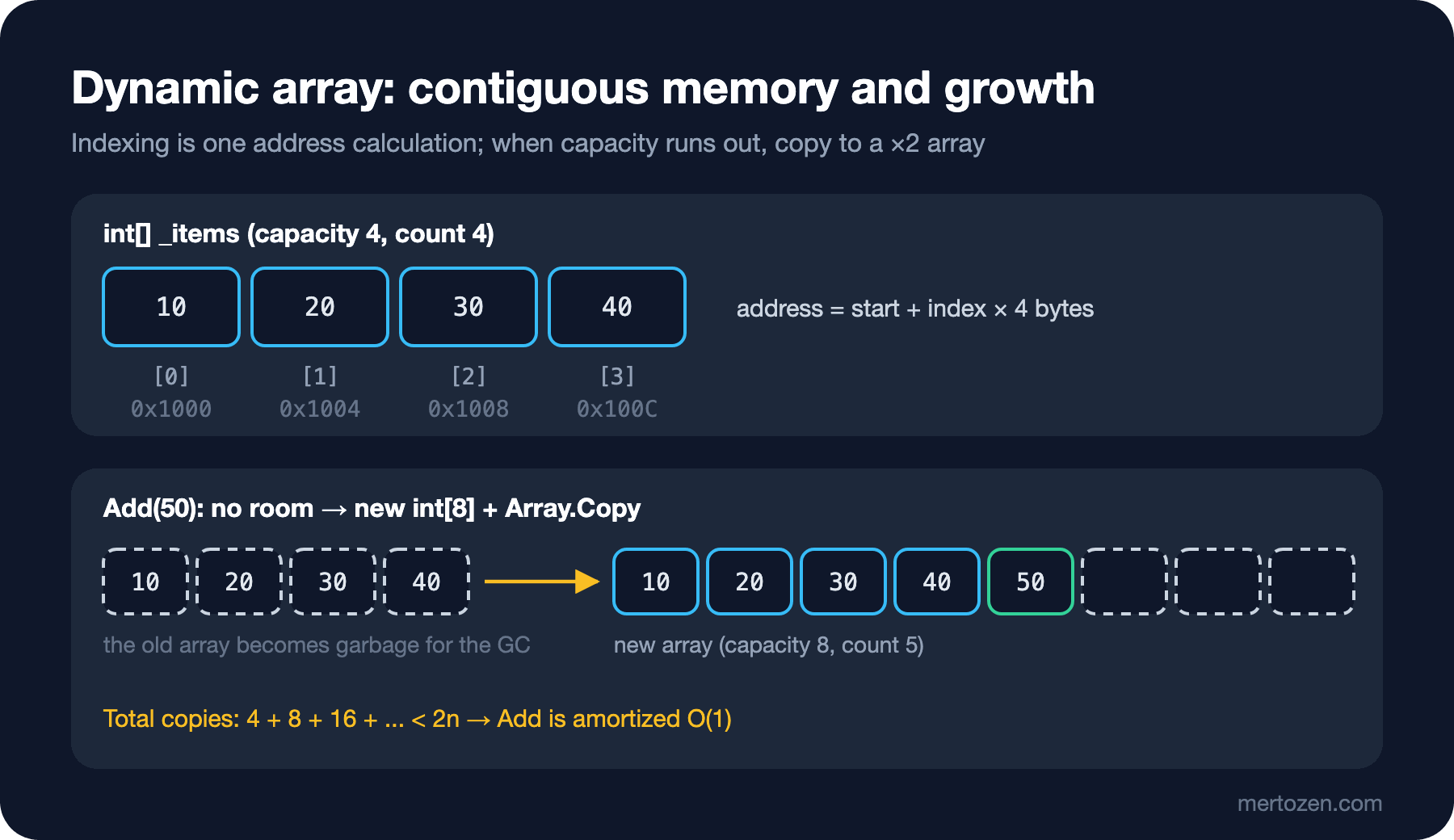
An array keeps elements of the same type next to each other in memory, as a single block. Being "contiguous" is the source of all of the array's strengths: the address of prices[i] is found by adding i × element size to the array's start address. Element 10 and element 10 million are reached with the same single calculation; indexing is O(1).
What the element is changes the memory picture. In an int[] each slot is 4 bytes and holds the value itself. In a Book[] or object[] each slot is an 8-byte reference in a 64-bit process, and the book itself lives elsewhere on the heap. Walking the array means reading the references in order; following each reference to its object means jumping to a random place in memory. The difference between value types and reference types is covered in the C# Fundamentals series post "Value Types and Reference Types in C#", and arrays themselves in "Arrays in C#: Single and Multidimensional, Jagged, Index and Range".
On every access the runtime checks that the index is within 0 ≤ i < Length; this is the bounds check. An out-of-range access throws IndexOutOfRangeException instead of corrupting memory. When the JIT (Just-In-Time) compiler sees that a loop's bound is array.Length, it can remove that check from the loop. We will see the effect in the measurement section.
The Cost of Inserting and Removing in the Middle
An array has a fixed size. "Inserting an element in the middle" really means shifting every element to its right one slot further and writing into the gap; removing means pulling the ones on the right one slot back. Inserting at the front of a 100,000-element price list is 100,000 copies. Appending needs no shifting: you write to the next free slot, and that is it.
That is why costs are asymmetric in every array-based structure: appending and removing from the end are cheap, inserting and removing at the front or in the middle are expensive. Indexing is cheap; searching by value (when unsorted) is a full scan. The API (Application Programming Interface) of List<T> is covered in the C# Collections series post "A Guide to C# List<T>"; here we build the same mechanism ourselves.
Our Own DynamicArray<T>
A dynamic array wraps a fixed-size array and moves to a bigger one when it fills up, presenting a "list that grows without limit" to the outside. Our version mimics the core behaviour of List<T>:
using System.Collections;

namespace Algorithms.Linear;

public sealed class DynamicArray<T> : IEnumerable<T>
{
    private const int DefaultCapacity = 4;
    private T[] _items = [];
    private int _count;
    private int _version;

    public int Count => _count;
    public int Capacity => _items.Length;

    public T this[int index]
    {
        get
        {
            // (uint) cast: negative index becomes huge, one comparison covers both ends
            if ((uint)index >= (uint)_count) throw new ArgumentOutOfRangeException(nameof(index));
            return _items[index];
        }
        set
        {
            if ((uint)index >= (uint)_count) throw new ArgumentOutOfRangeException(nameof(index));
            _items[index] = value;
            _version++;
        }
    }

    public void Add(T item)
    {
        if (_count == _items.Length) Grow();
        _items[_count++] = item;
        _version++;
    }

    public void Insert(int index, T item)
    {
        if ((uint)index > (uint)_count) throw new ArgumentOutOfRangeException(nameof(index));
        if (_count == _items.Length) Grow();
        // shift [index, count) one slot to the right: O(n - index)
        Array.Copy(_items, index, _items, index + 1, _count - index);
        _items[index] = item;
        _count++;
        _version++;
    }

    public void RemoveAt(int index)
    {
        if ((uint)index >= (uint)_count) throw new ArgumentOutOfRangeException(nameof(index));
        _count--;
        // shift (index, count] one slot to the left
        Array.Copy(_items, index + 1, _items, index, _count - index);
        // the last slot still holds a reference; clear it so the GC can collect the object
        _items[_count] = default!;
        _version++;
    }

    private void Grow()
    {
        int newCapacity = _items.Length == 0 ? DefaultCapacity : _items.Length * 2;
        T[] bigger = new T[newCapacity];
        Array.Copy(_items, bigger, _count);
        _items = bigger;
    }

    public IEnumerator<T> GetEnumerator()
    {
        int version = _version;
        for (int i = 0; i < _count; i++)
        {
            if (version != _version)
                throw new InvalidOperationException("Collection was modified during enumeration.");
            yield return _items[i];
        }
    }

    IEnumerator IEnumerable.GetEnumerator() => GetEnumerator();

    // test hook: lets a test look at the raw slot after RemoveAt
    internal T RawSlot(int index) => _items[index];
}
A few details are the design itself. Count and Capacity are separate: the array's length says how much space is reserved, _count how much of it is used. The indexer checks against _count, not _items.Length; otherwise the default values in the unused part of the capacity could be read. The (uint)index >= (uint)_count trick is also used in the BCL (Base Class Library) source: a negative int converted to uint is larger than 2³¹, so both index < 0 and index >= count are caught with a single comparison.
The _version counter lets the enumerator notice when the collection changes during a foreach. List<T> does the same, and that is where the "Collection was modified" exception comes from. How implementing IEnumerable<T> with yield return works is in the C# Collections series post "C# Collection Interfaces: IEnumerable, ICollection, IList and yield return".
Why Grow by ×2?
Let's pin the behaviour down with tests. The first adds 17 elements and records which values the capacity goes through:
[Fact]
public void Add_BeyondCapacity_DoublesCapacity()
{
    DynamicArray<int> array = new();
    List<int> capacities = [];

    for (int i = 0; i < 17; i++)
    {
        array.Add(i);
        if (capacities.Count == 0 || capacities[^1] != array.Capacity)
            capacities.Add(array.Capacity);
    }

    Assert.Equal([4, 8, 16, 32], capacities);
    Assert.Equal(17, array.Count);
}

[Fact]
public void Add_Add_Add_CopiesTotalLessThanTwiceCount()
{
    // count element copies done by doubling growth for n adds
    int n = 1_000_000, capacity = 0, copies = 0;
    for (int count = 0; count < n; count++)
    {
        if (count == capacity)
        {
            copies += count;
            capacity = capacity == 0 ? 4 : capacity * 2;
        }
    }

    Assert.Equal(1_048_572, copies);
    Assert.True(copies < 2 * n);
}
$ dotnet test --project tests/Algorithms.Tests -- --filter-class Algorithms.Tests.DynamicArrayTests
Running tests from tests/Algorithms.Tests/bin/Debug/net10.0/Algorithms.Tests.dll (net10.0|arm64)
tests/Algorithms.Tests/bin/Debug/net10.0/Algorithms.Tests.dll (net10.0|arm64) passed (576ms)
Test run summary: Passed!
total: 8
failed: 0
succeeded: 8
skipped: 0
duration: 698msHere is the answer to the second question: over 1,000,000 Add calls, 1,048,572 elements are copied in total, less than twice n. Each resize copies everything added so far, but resizes become rarer and rarer: 4, 8, 16, ... 524,288. The sum of these numbers cannot exceed twice the size at the last resize. The average cost per element is constant; this is called amortized O(1). Why geometric growth such as ×2 is required, why a constant "+10" growth leads to O(n²) copies in total, and the proof with the accounting method are in the Big-O and Complexity series post "Amortized Analysis: Why List<T>.Add Counts as O(1)".
Our code makes the same decision as the BCL. In dotnet/runtime's List.cs, DefaultCapacity is 4 and the growth formula is _items.Length == 0 ? DefaultCapacity : 2 * _items.Length, capped at Array.MaxLength.
The Removed Slot and the GC
This line in RemoveAt is easy to forget:
[Fact]
public void RemoveAt_LastSlot_IsClearedForGc()
{
    DynamicArray<Book> array = new();
    array.Add(new Book("9780000000001", "Dune", 10m));
    array.Add(new Book("9780000000002", "Emma", 12m));

    array.RemoveAt(0);

    Assert.Equal("Emma", array[0].Title);
    Assert.Null(array.RawSlot(1));
}
After the shift, the last used slot still holds a reference to an element that is logically no longer in the list: both index 0 and index 1 point to Emma. If you do not reset the slot to default, even after you later remove Emma from the list, the array keeps that object alive and the GC (Garbage Collector) cannot collect it. With a small book record it does not matter; if the slot holds a 50 MB report buffer or an HTTP (Hypertext Transfer Protocol) context, it is a silent memory leak. List<T> does this when RuntimeHelpers.IsReferenceOrContainsReferences<T>() is true and skips it for types such as int that contain no references, since there is nothing to release.
Row-Major Traversal of a 2D Array and the Cache
Back to the first question. In .NET, int[,] is stored row-major: all columns of row 0 first, then all columns of row 1, all in one block. A jagged array (int[][]) is an array that holds each row as a separate array; the rows are separate blocks on the heap. The benchmark that measures four variants:
[MemoryDiagnoser]
public class TraversalBenchmarks
{
    private int[,] _grid = null!;
    private int[][] _jagged = null!;

    [Params(1_000, 4_000)]
    public int N;

    [GlobalSetup]
    public void Setup()
    {
        _grid = new int[N, N];
        _jagged = new int[N][];
        for (int r = 0; r < N; r++)
        {
            _jagged[r] = new int[N];
            for (int c = 0; c < N; c++) _grid[r, c] = _jagged[r][c] = r ^ c;
        }
    }

    [Benchmark(Baseline = true)]
    public long RowMajor2D()
    {
        long sum = 0;
        for (int r = 0; r < N; r++)
            for (int c = 0; c < N; c++)
                sum += _grid[r, c];
        return sum;
    }

    [Benchmark]
    public long ColumnMajor2D()
    {
        long sum = 0;
        for (int c = 0; c < N; c++)
            for (int r = 0; r < N; r++)
                sum += _grid[r, c];
        return sum;
    }

    [Benchmark]
    public long RowMajorJagged()
    {
        long sum = 0;
        foreach (int[] row in _jagged)
            foreach (int value in row)
                sum += value;
        return sum;
    }

    [Benchmark]
    public long ColumnMajorJagged()
    {
        long sum = 0;
        for (int c = 0; c < N; c++)
            for (int r = 0; r < N; r++)
                sum += _jagged[r][c];
        return sum;
    }
}
BenchmarkDotNet v0.15.8, macOS 27.0.1 (26A434) [Darwin 27.0.0]
Apple M5, 1 CPU, 10 logical and 10 physical cores
.NET SDK 10.0.402
[Host] : .NET 10.0.13 (10.0.13, 10.0.1326.50504), Arm64 RyuJIT armv8.0-a
| Method | N | Mean | Ratio | Allocated |
|------------------ |----- |------------:|------:|----------:|
| RowMajor2D | 1000 | 524.5 us | 1.00 | - |
| ColumnMajor2D | 1000 | 602.4 us | 1.15 | - |
| RowMajorJagged | 1000 | 270.4 us | 0.52 | - |
| ColumnMajorJagged | 1000 | 589.2 us | 1.12 | - |
| | | | | |
| RowMajor2D | 4000 | 8,255.8 us | 1.00 | - |
| ColumnMajor2D | 4000 | 25,449.4 us | 3.08 | - |
| RowMajorJagged | 4000 | 4,308.8 us | 0.52 | - |
| ColumnMajorJagged | 4000 | 29,398.9 us | 3.56 | - |The same number of additions, more than three times apart on the 4,000 grid. The processor does not read ints one at a time; it reads cache lines of 64 or 128 bytes and, when it notices sequential access, fetches the next lines in advance (prefetch). Walking row by row uses all 16 or 32 ints in a cache line. Walking column by column jumps 4,000 × 4 = 16,000 bytes ahead at every step; only one int of each fetched line is used, and by the next pass over the same column the line has been evicted. On the 1,000 grid (4 MB) the difference stays at 15 percent because most of the data still fits in the cache; on the 4,000 grid (64 MB) it does not, and the gap opens up.
The second surprise: walking a jagged array row by row with foreach is almost twice as fast as walking the int[,]. In a multidimensional array every _grid[r, c] access involves an address calculation that accounts for the lower and upper bounds of two dimensions, plus a bounds check. In a foreach over a one-dimensional int[] the JIT knows the loop bound is the array's length and can remove the bounds check. The measurement ran while other work was running on the machine; the ratios are consistent, the absolute values will differ on your machine. This cache effect that Big-O does not show is the subject of the Big-O and Complexity series post "What Big-O Doesn't Tell You".
In Production
If you know how many elements are coming, set the capacity up front. If you know you will read 50,000 rows from the database, new List<Order>(50_000) or EnsureCapacity removes fourteen resizes and 65,532 unnecessary copies. More importantly, the intermediate arrays do not end up as garbage for the GC.
Large arrays live a separate life. Objects larger than 85,000 bytes go to the Large Object Heap (LOH), where they are collected less often and at a higher cost. An int[] with more than roughly 21,200 elements, or a Book[] holding more than roughly 10,600 references, crosses that limit. Large lists that grow and shrink allocate a new, bigger block on the LOH with every growth. That is why ArrayPool<T> exists for frequently used large buffers.
The growth moment is a latency spike. The Add that moves a 1-million-element list into a 2-million-slot array is thousands of times more expensive than the others. The average is cheap, but on a low-latency path (a handler where every call must stay under 1 ms) that single call shows up. Reserving the capacity in advance is the fix here too.
The order in which you walk multidimensional data should match its order in memory. In reporting code, walk grids row by row; if you need column totals, accumulate them in a separate array while walking each row.
Common Pitfalls
Removing inside a forward for loop. This loop, written to remove books with zero stock, skips an element:
[Fact]
public void ForwardLoopRemove_SkipsNeighbours()
{
    List<int> stock = [0, 0, 5, 0, 3];

    // buggy: after RemoveAt(i) the next item slides into i and is skipped
    for (int i = 0; i < stock.Count; i++)
        if (stock[i] == 0) stock.RemoveAt(i);

    Assert.Equal([0, 5, 3], stock);

    List<int> fixedStock = [0, 0, 5, 0, 3];
    for (int i = fixedStock.Count - 1; i >= 0; i--)
        if (fixedStock[i] == 0) fixedStock.RemoveAt(i);

    Assert.Equal([5, 3], fixedStock);
}
When the zero at index 0 is removed, the second zero slides into index 0 while the loop moves on to index 1. Walking backwards works because the shifted elements move into the part that has already been processed. Even better is stock.RemoveAll(x => x == 0): it moves each element at most once, so it is O(n), while RemoveAt one by one inside a loop is O(n²) in the worst case.
Leaving a reference in a removed slot. When you write your own array-based structure, forgetting to reset the freed slot to default in RemoveAt, Pop or Dequeue keeps the GC from collecting the object.
Modifying while enumerating. Calling Add or Remove on the same list inside a foreach ends with InvalidOperationException; that is a safeguard, not a bug. If you need to modify, enumerate a copy or build a new list.
Confusing capacity with count. new List<int>(100) is not a list with 100 elements but an empty list with room for 100; list[0] throws.
A Small Experiment
★☆☆ Add RemoveAll(Predicate<T> match) to DynamicArray<T>: a single pass with read and write indexes, copying each element at most once. Compare it with RemoveAt in a loop using a benchmark that removes 1,000 elements from the middle.
★★☆ Change Grow to grow by ×1.5 instead of ×2. How many copies does the test report for 1,000,000 Add calls? How does the unused space (capacity − count) change in the worst case?
★★★ Design a structure that also makes Insert(0, x) and RemoveAt(0) O(1): leave free space at the front of the array as well and keep a _start index. How does this idea relate to the circular buffer in one of the next posts?
The array's strength is being contiguous; its weakness is the cost of inserting in the middle. The next post looks at the structure that does the opposite: the linked list, which keeps elements scattered in memory, makes insertion O(1) and pays for it with a cache miss at every step.