

Writing Your Own Action: JavaScript/TypeScript Actions, Docker Container Actions, Workflow Commands and Annotations
To write your own action, set runs.using: node24 in action.yml, bundle the TypeScript into a single file with Rollup, commit dist/, and bring findings to the pull request as ::error file=…,line=… annotations. An action that checks EF Core migrations for Bookstore: TypeScript with @actions/core 3, Vitest tests, running it without GitHub via INPUT_*, a Docker container version, problem matchers, versioning and the Marketplace.
Version note: The examples in this post were run with Node.js 24.22, TypeScript 6.0, @actions/core 3.0.1, @actions/exec 3.0.0, @actions/github 9.1.1, Rollup 4.68, Vitest 5.1, actionlint 1.7.12, Docker 29.2 and .NET 10 (SDK 10.0.404). The actions were run locally by preparing the environment variables and files the runner provides by hand; the GitHub documentation and npm versions were checked on November 15, 2026.
Guess First
Emre is adding an EF Core migration to the API of Bookstore, the online bookstore used as the shared example across this site's series; it adds an Isbn column to the Books table. He copied the migration files by hand from another branch, so BookstoreContextModelSnapshot.cs was not updated. The build passes and the tests pass; the problem will show up on the next dotnet ef migrations add, when the model diff is computed against the wrong snapshot. You decide to write a small action that catches this in the pull request.
Two questions. First: in action.yml you marked the migrations-path input as required: true. If a workflow calls the action without that input, what does the runner do? Second: if you compile the TypeScript and commit only the resulting .js files, does the action run?
Three Kinds of Action and action.yml
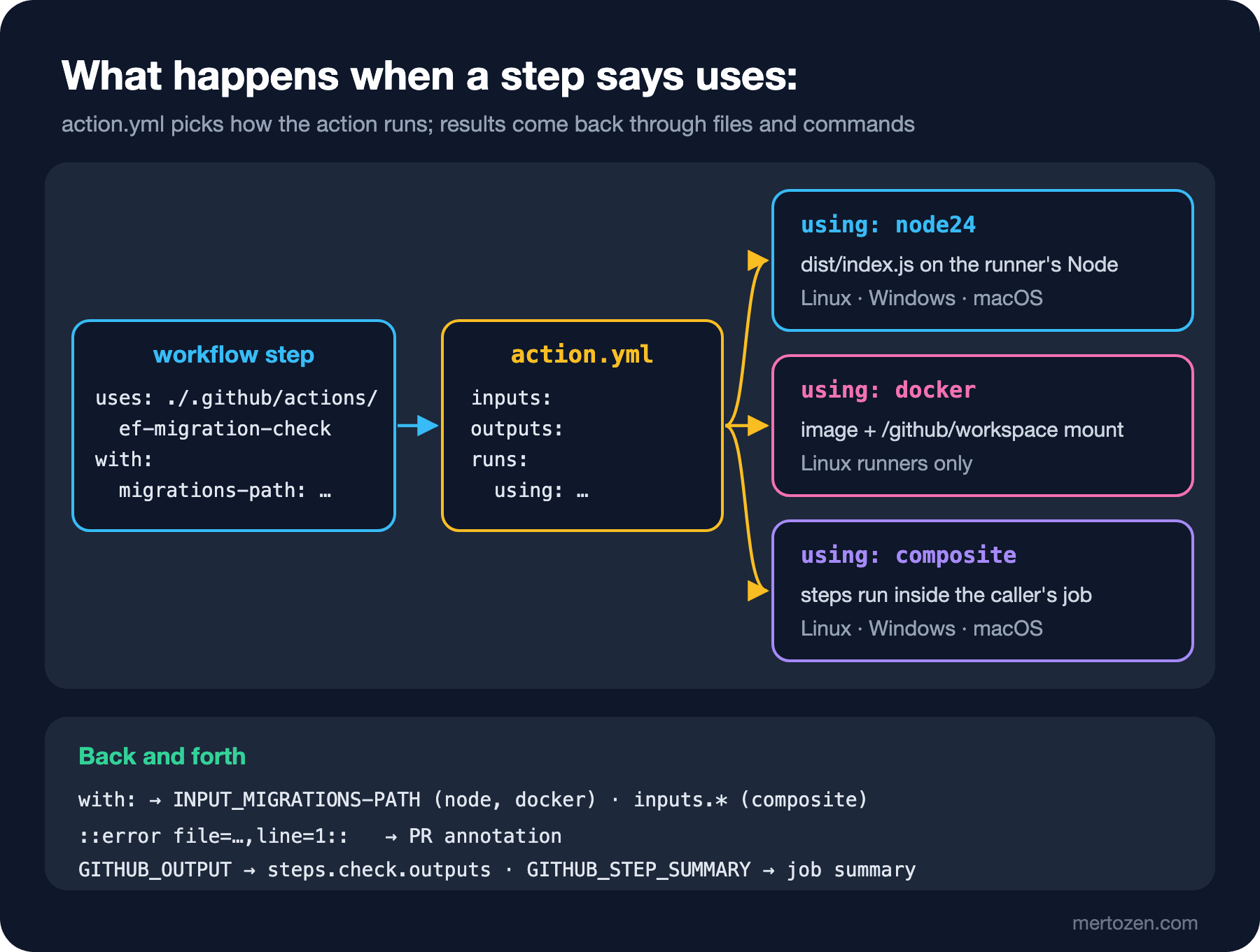
In post 12 we wrote a composite action: a YAML file that packages other steps. GitHub knows two more kinds: JavaScript actions and Docker container actions. All three are described by the same file, action.yml; runs.using decides which kind it is.
| Topic | JavaScript | Docker container | Composite |
|---|---|---|---|
| How it runs | The runner's Node runs the main file | An image is built or pulled and a container starts | Steps run inside the calling job |
| Runner OS | Linux, Windows, macOS | Linux only | Linux, Windows, macOS |
| Inputs | INPUT_* environment variables | INPUT_* and args | The inputs context |
| Dependencies | Bundled into dist/ | Inside the image | Called actions and tools on the runner |
| Start-up time | Short | Long, until the image is ready | Short |
The metadata of Bookstore's action:
name: ef-migration-check
description: Flags EF Core migrations added without an updated model snapshot.
inputs:
  migrations-path:
    description: Folder that holds the migrations, relative to the repository root.
    required: true
  base-ref:
    description: Commit to compare against. Defaults to the pull request base SHA.
    required: false
    default: ''
  fail-on-error:
    description: Fail the step when an error annotation is written.
    required: false
    default: 'true'
outputs:
  migrations:
    description: Number of migrations added in this change.
  problems:
    description: Number of annotations written.
runs:
  using: node24
main: dist/index.jsname, description and runs are required. The metadata syntax page still lists node20 and node24 for JavaScript actions, but according to the September 23, 2026 changelog Node 20 is gone from the runners and JavaScript actions run on Node 24; write node24 in a new action. The runner turns every input into an environment variable with the INPUT_ prefix: the name is upper-cased, spaces become underscores and hyphens stay as they are. So migrations-path becomes INPUT_MIGRATIONS-PATH, a detail that will come up twice later. In JavaScript and Docker actions an output only has a description and the code writes the value; in a composite action value is required.
A JavaScript Action in TypeScript
GitHub's actions/typescript-action template uses TypeScript, Rollup and Jest. I took the same Rollup layout and chose Vitest for tests. The action lives in the Bookstore repository under .github/actions/ef-migration-check/; the documentation suggests the .github folder for actions that stay in the same repository as the application code. The checking logic is a function without side effects:
export function findProblems(changes: FileChange[], migrationsPath: string) {
  const root = migrationsPath.replace(/\/+$/, '') + '/';
  const inFolder = changes.filter((c) => c.path.startsWith(root) && c.path.endsWith('.cs'));
  const isSnapshot = (p: string) => p.endsWith('ModelSnapshot.cs');
  const isDesigner = (p: string) => p.endsWith('.Designer.cs');

  const migrations = inFolder
    .filter((c) => c.status === 'A' && !isSnapshot(c.path) && !isDesigner(c.path))
    .map((c) => c.path);
  const snapshot = inFolder.find((c) => isSnapshot(c.path));
  const findings: Finding[] = [];

  if (migrations.length > 0 && !snapshot) {
    for (const file of migrations) {
      findings.push({
        level: 'error',
        file,
        title: 'Model snapshot not updated',
        message: `${baseName(file)} was added but no *ModelSnapshot.cs changed. Recreate it with dotnet ef migrations add.`,
      });
    }
  }
  for (const file of migrations) {
    const designer = file.replace(/\.cs$/, '.Designer.cs');
    if (!inFolder.some((c) => c.path === designer)) {
      findings.push({
        level: 'warning',
        file,
        title: 'Designer file missing',
        message: `${baseName(designer)} is not part of this change.`,
      });
    }
  }
  if (snapshot && migrations.length === 0) {
    findings.push({
      level: 'warning',
      file: snapshot.path,
      title: 'Snapshot changed without a migration',
      message: 'The model snapshot changed but no migration was added.',
    });
  }
  return { migrations, findings };
}
parseNameStatus turns the git diff --name-status output into { status, path } pairs, line by line. The part that touches GitHub and the runner is a thin main.ts:
import * as core from '@actions/core';
import * as exec from '@actions/exec';
import { context } from '@actions/github';
import { findProblems, parseNameStatus } from './check.js';

// A ref must look like a SHA or a branch name; anything else could be read as a git option.
const SAFE_REF = /^[A-Za-z0-9][A-Za-z0-9._\/-]*$/;

export async function run(): Promise<void> {
  try {
    const migrationsPath = core.getInput('migrations-path', { required: true });
    const failOnError = core.getBooleanInput('fail-on-error');
    const baseRef = core.getInput('base-ref') || context.payload.pull_request?.base?.sha;

    if (!baseRef) {
      core.setFailed('No base-ref input and no pull_request payload to read it from.');
      return;
    }
    if (!SAFE_REF.test(baseRef)) {
      core.setFailed(`Refusing to use base-ref "${baseRef}".`);
      return;
    }

    const diff = await exec.getExecOutput(
      'git',
      ['diff', '--name-status', '--no-renames', `${baseRef}...HEAD`],
      { silent: true, ignoreReturnCode: true },
    );
    if (diff.exitCode !== 0) {
      core.setFailed(`git diff failed: ${diff.stderr.trim()}`);
      return;
    }
    const changes = parseNameStatus(diff.stdout);

    core.startGroup(`Changed files (${changes.length})`);
    for (const change of changes) {
      core.info(`${change.status} ${change.path}`);
    }
    core.endGroup();

    const { migrations, findings } = findProblems(changes, migrationsPath);
    for (const f of findings) {
      const props = { title: f.title, file: f.file, startLine: 1 };
      if (f.level === 'error') {
        core.error(f.message, props);
      } else {
        core.warning(f.message, props);
      }
    }

    core.setOutput('migrations', migrations.length);
    core.setOutput('problems', findings.length);

    await core.summary
      .addHeading('EF Core migration check', 3)
      .addTable([
        [
          { data: 'Level', header: true },
          { data: 'File', header: true },
          { data: 'Problem', header: true },
        ],
        ...findings.map((f) => [f.level, f.file, f.title]),
      ])
      .write();

    const errors = findings.filter((f) => f.level === 'error').length;
    if (errors > 0 && failOnError) {
      core.setFailed(`${errors} migration problem(s) found.`);
    }
  } catch (error) {
    core.setFailed(error instanceof Error ? error.message : String(error));
  }
}
Three toolkit packages do the work here. @actions/core reads inputs, writes outputs, groups the log, emits annotations and marks the step as failed. @actions/exec runs a process with an argument list, without going through a shell. From @actions/github I only use context: it reads the event JSON the runner provides through GITHUB_EVENT_PATH and finds the base commit of the pull request. The same package's getOctokit can call the GitHub API, but git diff is enough for this check and needs no token.
The SAFE_REF check is a habit. Passing arguments as an array prevents shell injection, but git still reads a value starting with --output=... as an option. The rule from post 13 holds inside an action too: validate any value that comes from outside before you use it.
Tests, Bundling and the dist/ Folder
{
  "name": "ef-migration-check",
  "version": "1.0.0",
  "private": true,
  "type": "module",
  "engines": {
    "node": ">=24"
  },
  "scripts": {
    "test": "vitest run",
    "typecheck": "tsc --noEmit",
    "bundle": "rollup --config rollup.config.mjs"
  },
  "dependencies": {
    "@actions/core": "^3.0.1",
    "@actions/exec": "^3.0.0",
    "@actions/github": "^9.1.1"
  },
  "devDependencies": {
    "@rollup/plugin-commonjs": "^29.0.3",
    "@rollup/plugin-node-resolve": "^16.0.3",
    "@rollup/plugin-typescript": "^12.3.1",
    "@types/node": "^24.10.0",
    "rollup": "^4.68.3",
    "tslib": "^2.8.1",
    "typescript": "^6.0.3",
    "vitest": "^5.1.0"
  }
}
Since 3.0.0, released in January 2026, @actions/core ships as ESM only, and its package.json exports only an import entry. The require line from older examples no longer works:
$ node -e "require('@actions/core')"
Error [ERR_PACKAGE_PATH_NOT_EXPORTED]: No "exports" main defined in /work/app/.github/actions/ef-migration-check/node_modules/@actions/core/package.json
  code: 'ERR_PACKAGE_PATH_NOT_EXPORTED'
That is why there is "type": "module" and why the TypeScript imports use the ./check.js extension. I kept TypeScript on 6.0; the template still uses 5.9. The tests fake the core, exec and github packages with vi.mock; for example, the option injection test:
  it('rejects a base-ref that git would read as an option', async () => {
    inputs['base-ref'] = '--output=/tmp/pwned';
    await run();
    expect(exec.getExecOutput).not.toHaveBeenCalled();
    expect(core.setFailed).toHaveBeenCalledWith('Refusing to use base-ref "--output=/tmp/pwned".');
  });
$ npm test -- --reporter=verbose
✓ __tests__/matcher.test.ts > csc problem matcher > matches a real dotnet build warning 1ms
✓ __tests__/matcher.test.ts > csc problem matcher > ignores MSBuild summary lines 0ms
✓ __tests__/check.test.ts > findProblems > accepts a migration with designer and snapshot 1ms
✓ __tests__/check.test.ts > findProblems > reports an error when the snapshot did not change 1ms
✓ __tests__/check.test.ts > findProblems > warns when the designer file is missing 0ms
✓ __tests__/check.test.ts > findProblems > warns when only the snapshot changed 0ms
✓ __tests__/check.test.ts > findProblems > ignores files outside the migrations folder 0ms
✓ __tests__/main.test.ts > run > writes an error annotation and fails the step 1ms
✓ __tests__/main.test.ts > run > rejects a base-ref that git would read as an option 0ms
Test Files 3 passed (3)
Tests 9 passed (9)We will get to the matcher tests shortly. The answer to the second question is here: the runner never calls npm install for a JavaScript action. It starts whatever main points to with Node. Compiling the TypeScript and running it from a folder without node_modules gives:
$ npx tsc --outDir ../nobundle/lib
$ cd ../nobundle
$ env 'INPUT_MIGRATIONS-PATH=api' node lib/index.js
Error [ERR_MODULE_NOT_FOUND]: Cannot find package '@actions/core' imported from /work/app/.github/actions/nobundle/lib/main.js
  code: 'ERR_MODULE_NOT_FOUND'
The documentation says not to commit node_modules, but to bundle the dependencies into a single file and commit dist/. The Rollup config is the same as the template's:
import commonjs from '@rollup/plugin-commonjs';
import { nodeResolve } from '@rollup/plugin-node-resolve';
import typescript from '@rollup/plugin-typescript';

export default {
  input: 'src/index.ts',
  output: { file: 'dist/index.js', format: 'es', sourcemap: true },
  plugins: [typescript(), nodeResolve({ preferBuiltins: true }), commonjs()],
};
$ npm run bundle
> ef-migration-check@1.0.0 bundle
> rollup --config rollup.config.mjs
src/index.ts → dist/index.js...
(!) "this" has been rewritten to "undefined"
(!) Circular dependency
node_modules/@actions/core/lib/core.js -> node_modules/@actions/core/lib/oidc-utils.js -> node_modules/@actions/core/lib/core.js
created dist/index.js in 1s
$ ls -lh dist
-rw-r--r-- 1 user staff 1.2M Nov 15 14:40 index.js
-rw-r--r-- 1 user staff 2.0M Nov 15 14:40 index.js.mapThe warnings come from @actions/core's own code and do not break the bundle. Most of the 1.2 MB is the HTTP client that core brings along: removing the @actions/github import brought the file down to 1.04 MB. The bundle is deterministic; building it a second time did not change a single line in Git. The template's check-dist.yml workflow relies on that: it rebuilds dist/ in CI, compares it with the committed one and stops the pull request if they differ. If src/ changes and dist/ stays old, the runner runs the old code and nobody notices.
Running Without GitHub and Wiring It Into a Workflow
What the runner does for a JavaScript action is essentially this: hand over the inputs as INPUT_*, the event and the command files through GITHUB_* variables, and run node dist/index.js. I did the same on the feature/book-isbn branch:
mkdir -p ../runner
BASE=$(git rev-parse main)
echo "{\"pull_request\":{\"base\":{\"sha\":\"$BASE\"}}}" > ../runner/event.json
: > ../runner/output
: > ../runner/summary.md

env 'INPUT_MIGRATIONS-PATH=api/src/Bookstore.Api/Migrations' \
    'INPUT_BASE-REF=' \
    'INPUT_FAIL-ON-ERROR=true' \
    GITHUB_EVENT_PATH=../runner/event.json \
    GITHUB_OUTPUT=../runner/output \
    GITHUB_STEP_SUMMARY=../runner/summary.md \
    node .github/actions/ef-migration-check/dist/index.js
echo "exit code: $?"

::group::Changed files (2)
A api/src/Bookstore.Api/Migrations/20261115090000_AddBookIsbn.Designer.cs
A api/src/Bookstore.Api/Migrations/20261115090000_AddBookIsbn.cs
::endgroup::
::error title=Model snapshot not updated,file=api/src/Bookstore.Api/Migrations/20261115090000_AddBookIsbn.cs,line=1::20261115090000_AddBookIsbn.cs was added but no *ModelSnapshot.cs changed. Recreate it with dotnet ef migrations add.
::error::1 migration problem(s) found.
exit code: 1
You cannot define INPUT_MIGRATIONS-PATH with export, because bash does not accept a hyphen in a variable name; the env command does. The ::group:: and ::error lines in the output are workflow commands that the runner reads from the log and acts on. Let's look at the output and summary files:
$ cat ../runner/output
migrations<<ghadelimiter_4a2f110e-a3ee-4014-b87f-9c8aec62654d
1
ghadelimiter_4a2f110e-a3ee-4014-b87f-9c8aec62654d
problems<<ghadelimiter_2b76b155-40d4-4a52-8486-c8afe4a897d4
1
ghadelimiter_2b76b155-40d4-4a52-8486-c8afe4a897d4
$ cat ../runner/summary.md
<h3>EF Core migration check</h3>
<table><tr><th>Level</th><th>File</th><th>Problem</th></tr><tr><td>error</td><td>api/src/Bookstore.Api/Migrations/20261115090000_AddBookIsbn.cs</td><td>Model snapshot not updated</td></tr></table>
core.setOutput uses the delimiter format we wrote by hand in post 03. core.summary produces HTML rather than Markdown; the job summary renders both. Now the first question:
$ env GITHUB_OUTPUT=../runner/output node .github/actions/ef-migration-check/dist/index.js
::error::Input required and not supplied: migrations-path
$ env 'INPUT_MIGRATIONS-PATH=api/src/Bookstore.Api/Migrations' GITHUB_OUTPUT=../runner/output node .github/actions/ef-migration-check/dist/index.js
::error::Input does not meet YAML 1.2 "Core Schema" specification: fail-on-error%0ASupport boolean input list: `true | True | TRUE | false | False | FALSE`
$ INPUT_FAIL-ON-ERROR=true node .github/actions/ef-migration-check/dist/index.js
bash: INPUT_FAIL-ON-ERROR=true: command not found
In the first call, the error does not come from the runner but from the required option of core.getInput. The documentation states it plainly: required: true does not produce an error for a missing input by itself. The second call shows another detail: the runner fills in the default values from action.yml; locally you have to provide them. getBooleanInput accepts only the YAML 1.2 spellings of true and false, not an empty value. The template also suggests the @github/local-action tool for this job; it reads the inputs from a .env file and runs src/main.ts directly.
After the commit that updates the snapshot, the same command returned exit code: 0 and problems dropped to zero in the output. Let's wire the action into a workflow:
name: migration-check

on:
  pull_request:
    branches: [main]

permissions:
  contents: read

jobs:
  migrations:
    runs-on: ubuntu-24.04
    timeout-minutes: 5
    steps:
      - uses: actions/checkout@v7
        with:
          fetch-depth: 0
          persist-credentials: false
      - name: Check EF Core migrations
        id: check
        uses: ./.github/actions/ef-migration-check
        with:
          migrations-path: api/src/Bookstore.Api/Migrations
      - name: Report
        if: always()
        env:
          MIGRATIONS: ${{ steps.check.outputs.migrations }}
          PROBLEMS: ${{ steps.check.outputs.problems }}
        run: echo "migrations=$MIGRATIONS problems=$PROBLEMS"

  build-in-container:
    runs-on: ubuntu-24.04
    container: mcr.microsoft.com/dotnet/sdk:10.0
    timeout-minutes: 10
    steps:
      - uses: actions/checkout@v7
        with:
          persist-credentials: false
      - name: Register csc problem matcher
        run: echo "::add-matcher::.github/matchers/csc.json"
      - name: Build
        run: dotnet build api/Bookstore.slnx -c Release -tl:off
      - name: Remove csc problem matcher
        if: always()
        run: echo "::remove-matcher owner=csc::"
actionlint stayed silent on the first run. Because it reads the local action's action.yml, misspelling the input as migration-path produced two errors at once; this is the tool that catches the first question before the workflow is even pushed:
$ actionlint
$ actionlint
.github/workflows/migration-check.yml:21:15: missing input "migrations-path" which is required by action "ef-migration-check" defined at "./.github/actions/ef-migration-check". all required inputs are "migrations-path" [action]
.github/workflows/migration-check.yml:23:11: input "migration-path" is not defined in action "ef-migration-check" defined at "./.github/actions/ef-migration-check". available inputs are "base-ref", "fail-on-error", "migrations-path" [action]
fetch-depth: 0 is needed because actions/checkout fetches only the last commit by default, and the merge base for base...HEAD cannot be found. I tried the same situation with a clone of depth one:
git clone -q --depth 1 --branch feature/book-isbn "file://$PWD" ../shallow
cd ../shallow
env 'INPUT_MIGRATIONS-PATH=api/src/Bookstore.Api/Migrations' \
    'INPUT_FAIL-ON-ERROR=true' \
    GITHUB_EVENT_PATH=../runner/event.json \
    GITHUB_OUTPUT=../runner/output \
    GITHUB_STEP_SUMMARY=../runner/summary.md \
    node .github/actions/ef-migration-check/dist/index.js

::error::git diff failed: fatal: Invalid symmetric difference expression ef9aecfa723ed968098a239e1e40285b9bcb022b...HEAD
Workflow Commands, Annotations and Problem Matchers
Even without the toolkit you can speak the runner's language; each command is a line written to stdout:
::group::{title}and::endgroup::: a collapsible section in the log.::notice,::warning,::error: an annotation. The parameters aretitle,file,line,endLine,colandendColumn; withoutfileit defaults to.github, withoutlineto 1.::debug::: visible only when debug logging is on (post 15).::add-mask::: hides a value in the log (post 08).::stop-commands::token: stops processing commands until the same token is written again; use it with a random token before printing untrusted output to the log.
file has to be a path relative to the repository root; then the annotation shows up on the right line in the pull request's "Files changed" tab and in the run summary. According to the toolkit's problem matcher document, each step shows at most 10 annotations per type and each job at most 50 in total; a tool that prints hundreds of warnings can hide the real error. Line breaks and the % sign in a message must be escaped: @actions/core does this for you, and the %0A in the getBooleanInput error above is a line break. When you print with echo from a shell, the job is yours. The workflow commands page does not document these escaping rules; the toolkit's source code defines them.
The second way to produce annotations is a problem matcher: the runner itself turns log lines that match a regex into annotations. When actions/setup-dotnet runs, its source code registers csc.json automatically; that is why .NET compiler warnings show up in the pull request with no extra setup. If you build without setup-dotnet, for example in the mcr.microsoft.com/dotnet/sdk:10.0 container as in the workflow, you register the matcher yourself. A copy of the file from setup-dotnet:
{
  "problemMatcher": [
    {
      "owner": "csc",
      "pattern": [
        {
          "regexp": "^\\s*(?:\\d+>\\s*)?([^\\s].*)\\((\\d+)(?:,(\\d+))?(?:,\\d+)*\\):\\s+(error|warning)\\s+([a-zA-Z]+(?<!MSB)\\d*):\\s*(.*?)\\s+\\[(.*?)\\]$",
          "file": 1,
          "line": 2,
          "column": 3,
          "severity": 4,
          "code": 5,
          "message": 6,
          "fromPath": 7
        }
      ]
    }
  ]
}
To test that the regex matches a real warning, I produced a null warning in a small project:
$ dotnet build Bookstore.Warn -tl:off
/work/Bookstore.Warn/Program.cs(2,19): warning CS8602: Dereference of a possibly null reference. [/work/Bookstore.Warn/Bookstore.Warn.csproj]
    1 Warning(s)
    0 Error(s)
matcher.test.ts reads this line from a file and checks the file, line, column, code and message groups; they are the first two lines of the test output above. -tl:off matters: the .NET terminal logger writes in a different format, and using the classic output in CI keeps the regex reliable. The fromPath group resolves relative paths from the project file in square brackets.
A Docker Container Action
I also wrote the same check as a Docker container action. The code is sh, the tools are in the image:
name: ef-migration-check-docker
description: Same check as ef-migration-check, packaged as a Docker container action.
inputs:
  migrations-path:
    description: Folder that holds the migrations, relative to the repository root.
    required: true
  base-ref:
    description: Commit to compare against. Defaults to the pull request base SHA.
    required: false
    default: ''
outputs:
  migrations:
    description: Number of migrations added in this change.
runs:
  using: docker
  image: Dockerfile
  args:
    - ${{ inputs.migrations-path }}
    - ${{ inputs.base-ref }}
FROM alpine:3.24
RUN apk add --no-cache git jq
COPY entrypoint.sh /entrypoint.sh
ENTRYPOINT ["/entrypoint.sh"]#!/bin/sh
set -eu
migrations_path="${1%/}"
base_ref="${2:-}"
if [ -z "$base_ref" ]; then
base_ref=$(jq -r '.pull_request.base.sha // empty' "$GITHUB_EVENT_PATH")
fi
case "$base_ref" in
""|-*) echo "::error::Missing or unsafe base-ref"; exit 1 ;;
esac
# The workspace belongs to the runner user; the container runs as root.
git config --global --add safe.directory "$GITHUB_WORKSPACE"
changes=$(git diff --name-status --no-renames "$base_ref...HEAD" -- "$migrations_path")
echo "::group::Changed files"
echo "$changes"
echo "::endgroup::"
added=$(echo "$changes" | awk -F'\t' '$1 == "A" && $2 ~ /\.cs$/ && $2 !~ /(\.Designer|ModelSnapshot)\.cs$/ { print $2 }')
count=$(echo "$added" | grep -c . || true)
echo "migrations=$count" >> "$GITHUB_OUTPUT"
if [ "$count" -gt 0 ] && ! echo "$changes" | grep -q 'ModelSnapshot\.cs$'; then
for file in $added; do
echo "::error title=Model snapshot not updated,file=$file,line=1::$(basename "$file") was added but no *ModelSnapshot.cs changed."
done
exit 1
fiThe rules on the Dockerfile support page decide a lot here. The container must run as root; with a USER instruction you cannot access the workspace. Do not use WORKDIR; the runner mounts the workspace at /github/workspace and makes it the working directory. Write ENTRYPOINT in exec form and make the script executable; if you commit from Windows, use git update-index --chmod=+x entrypoint.sh. I passed the inputs through args, because sh cannot read a hyphenated variable such as INPUT_MIGRATIONS-PATH. On the runner the workspace belongs to the runner user while the container runs as root; since git 2.35.2, git reports "dubious ownership" in a repository owned by someone else, and the safe.directory line is there for that.
$ docker build -t ghaseries-migration-check:dev .github/actions/ef-migration-check-docker
Successfully tagged ghaseries-migration-check:dev
$ docker image ls ghaseries-migration-check:dev --format "{{.Repository}}:{{.Tag}} {{.Size}}"
ghaseries-migration-check:dev 35.3MB
I imitated how the runner starts the container, with the same mounts:
: > ../runner/output
docker run --rm --name ghaseries-migration-check-run \
  --workdir /github/workspace \
  -e GITHUB_WORKSPACE=/github/workspace \
  -e GITHUB_EVENT_PATH=/github/workflow/event.json \
  -e GITHUB_OUTPUT=/github/file_commands/output \
  -v "$PWD":/github/workspace \
  -v "$PWD/../runner":/github/workflow \
  -v "$PWD/../runner":/github/file_commands \
  ghaseries-migration-check:dev api/src/Bookstore.Api/Migrations ""
echo "exit code: $?"
cat ../runner/output

::group::Changed files
A	api/src/Bookstore.Api/Migrations/20261115090000_AddBookIsbn.Designer.cs
A	api/src/Bookstore.Api/Migrations/20261115090000_AddBookIsbn.cs
::endgroup::
::error title=Model snapshot not updated,file=api/src/Bookstore.Api/Migrations/20261115090000_AddBookIsbn.cs,line=1::20261115090000_AddBookIsbn.cs was added but no *ModelSnapshot.cs changed.
exit code: 1
migrations=1
The result matches the JavaScript version. The differences: GitHub builds this action from the Dockerfile in every job, which, as the documentation also notes, adds time compared with a JavaScript action. Pointing to a prebuilt image with image: docker://... shortens that. It cannot be used on Windows or macOS runners at all. Escaping messages, writing outputs and testing are entirely up to you. The real reason for a Docker action is pinning a toolchain that does not come with Node: a specific git, Python, or a CLI.
Versioning and the Marketplace
If the action is going to be used by other repositories, it moves to its own repository. The release flow is the one we described in post 12: first a full semver tag, then moving the major tag that users follow to the same commit.
git tag -a v1.0.0 -m "v1.0.0"
git tag -f v1
git push origin v1.0.0
git push --force origin v1
Renaming or removing an input is a breaking change and needs v2; we covered what version numbers mean in the SemVer post of the Versioning and Release Management series, and release notes in that series' "Changelog and Release Notes" post. With immutable releases turned on, release tags are locked, so you keep v1 as a plain Git tag. Consumers pin to a commit SHA instead of a tag, as in post 13:
steps:
  - uses: your-org/ef-migration-check@<commit-sha> # v1.0.0
    with:
      migrations-path: api/src/Bookstore.Api/Migrations
To list an action in the Marketplace, the repository must be public, have a single action.yml at its root and contain only the files the action needs. name must be unique; it cannot clash with an existing action, user, organization or category. The account owner must have accepted the Marketplace Developer Agreement. Publishing happens on the Releases page: draft a release, tick "Publish this Action to the GitHub Marketplace", pick a category, and confirm with two-factor authentication. icon and color under branding define the badge shown in the listing. This section is based on the official documentation.
In Production
Verify dist/ in CI. Without a job like check-dist, the gap between the source and the code that actually runs grows silently; the TypeScript you review is not the bundle the runner executes.
Keep annotations few and precise. There is a limit of 50 per job, and every warning in a pull request asks for someone's attention. Use setFailed when the problem really should block the merge, and warning when information is enough.
Update dependencies with Dependabot's npm ecosystem, but rebuild dist/ after every update. Major versions such as the ESM move in @actions/core 3.0 may require code changes.
In a Docker action, pin the base image to a fixed version and keep the image small; every job prepares that image again.
Common Pitfalls
Adding dist/ to .gitignore, or committing only the tsc output. The runner never calls npm install; the result is ERR_MODULE_NOT_FOUND.
Embedding an input in a shell command. Writing run: git diff ${{ inputs.base-ref }} in a composite action is the same script injection as in post 13; pass the input through env:, or use an argument array in a JavaScript action and validate the value.
Treating required: true as validation. getInput(..., { required: true }) and actionlint do the checking, not the runner.
Looking at history with the default fetch-depth: 1. Every action that takes a diff needs a deep checkout.
Calling a Docker action from a Windows or macOS job, or putting USER and WORKDIR in the Dockerfile.
Using an absolute path in an annotation. If file is not relative to the repository root, the annotation is not attached to the file.
A Small Experiment
★☆☆ Add a quiet input to ef-migration-check that writes the Designer file missing warning only to the job summary instead of as an annotation; write its unit test and rebuild dist/.
★★☆ Can the Docker version have unit tests too? Write a test that runs entrypoint.sh in a temporary git repository and check that both versions produce the same annotations for the same change.
★★★ Write your own problem matcher for the output of dotnet format --verify-no-changes, test its regex against real output, and keep the matcher active only for the duration of the format step.
With this post the GitHub Actions series is complete. We started with workflows, triggers and expressions; built CI pipelines for .NET and Angular, deployed, reduced duplication, locked down the supply chain, learned to read old workflows and, finally, wrote our own action. If you want to see the same pipeline thinking in another tool, continue with the Jenkins series; for moving containers into a cluster, the Kubernetes series; and for blue-green and canary, the Deployment Strategies series.