

Kendi Action'ını Yazmak: JavaScript/TypeScript Action, Docker Container Action, Workflow Command'ları ve Annotation'lar
Kendi action'ını yazarken action.yml'da runs.using: node24 seç, TypeScript kodunu Rollup ile tek dosyaya bundle'layıp dist/'i commit'le ve bulguları ::error file=…,line=… annotation'larıyla PR'a taşı. Bookstore için EF Core migration kontrolü yapan bir action: @actions/core 3 ile TypeScript, Vitest testleri, GitHub olmadan INPUT_* ile çalıştırma, Docker container sürümü, problem matcher, sürümleme ve Marketplace.
Sürüm notu: Bu yazıdaki örnekler Node.js 24.22, TypeScript 6.0, @actions/core 3.0.1, @actions/exec 3.0.0, @actions/github 9.1.1, Rollup 4.68, Vitest 5.1, actionlint 1.7.12, Docker 29.2 ve .NET 10 (SDK 10.0.404) ile denenmiştir. Action'lar, runner'ın verdiği environment variable'lar ve dosyalar elle hazırlanarak yerelde koşuldu; GitHub dokümantasyonu ve npm sürümleri 15 Kasım 2026'da kontrol edilmiştir.
Önce Tahmin Et
Emre, sitedeki serilerin ortak örnek uygulaması Bookstore'un (bir online kitapçı) API'sine Books tablosuna Isbn kolonu ekleyen bir Entity Framework Core (EF Core; .NET'in veritabanı erişim library'si) migration'ı ekliyor. Migration dosyalarını başka bir branch'ten elle kopyaladığı için BookstoreContextModelSnapshot.cs güncellenmemiş. Build geçiyor, testler geçiyor; sorun bir sonraki dotnet ef migrations add'de, model farkı yanlış hesaplandığında ortaya çıkacak. Bunu pull request (PR) aşamasında yakalayan küçük bir action yazmaya karar veriyorsun.
İki soru. Birincisi: action.yml'da migrations-path input'unu required: true diye işaretledin. Bir workflow bu input'u vermeden action'ı çağırırsa runner ne yapar? İkincisi: TypeScript'i derleyip yalnız çıkan .js dosyalarını commit'lersen action çalışır mı?
Üç Action Türü ve action.yml
12. yazıda composite action yazdık: başka step'leri paketleyen bir YAML (workflow dosyalarının yazıldığı veri biçimi) dosyası. GitHub iki tür daha tanıyor: JavaScript action ve Docker container action. Üçünü de aynı dosya tanımlar, action.yml; farkı runs.using belirler.
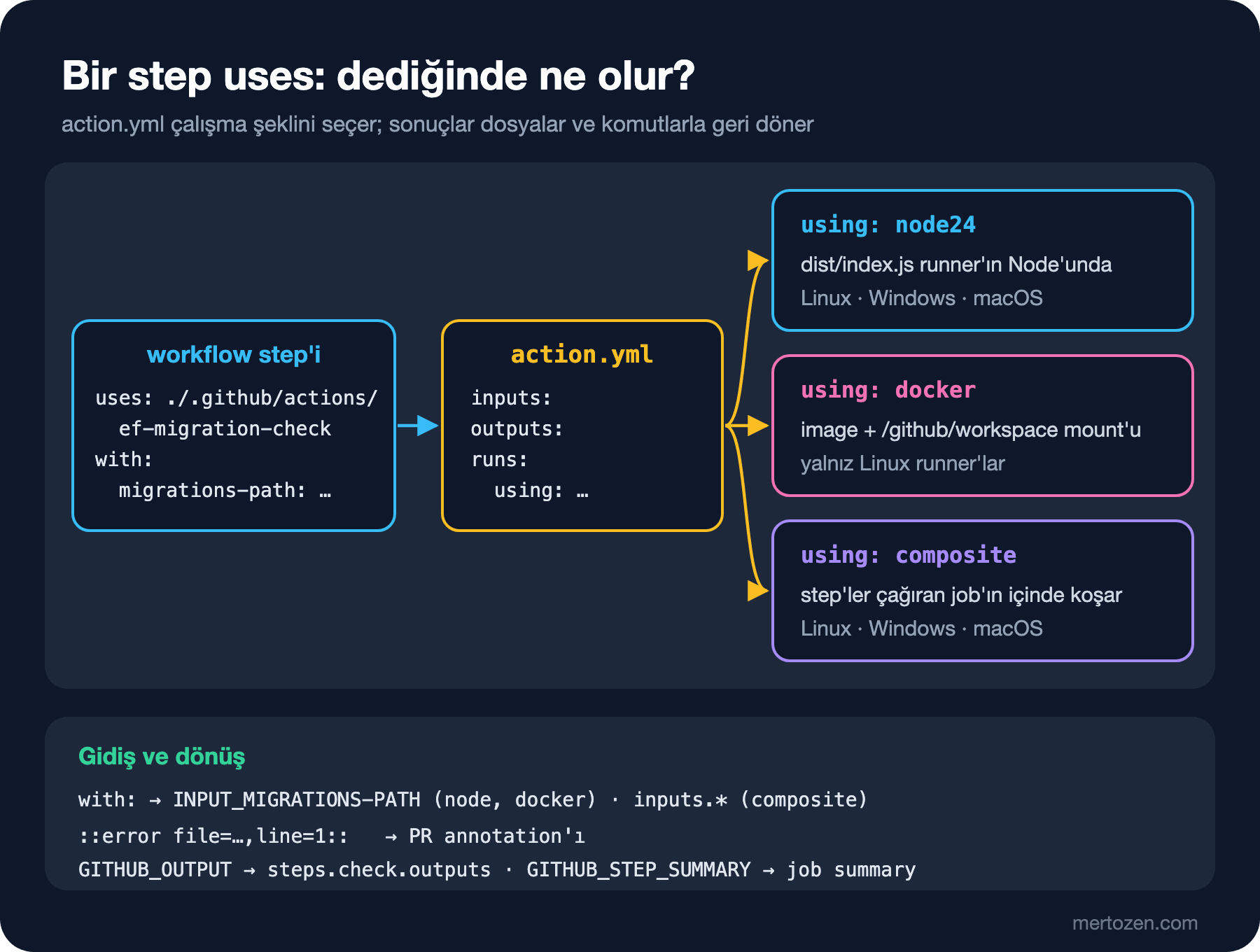
| Konu | JavaScript | Docker container | Composite |
|---|---|---|---|
| Çalışma şekli | Runner'daki Node, main dosyasını çalıştırır | Image build edilir ya da çekilir, container başlar | Step'ler çağıran job'ın içinde koşar |
| Runner OS | Linux, Windows, macOS | Yalnız Linux | Linux, Windows, macOS |
| Input'lar | INPUT_* environment variable'ları | INPUT_* ve args | inputs context'i |
| Bağımlılıklar | Bundle'lanmış dist/ içinde | Image içinde | Çağrılan action'lar ve runner'daki araçlar |
| Başlama süresi | Kısa | Image hazırlanana kadar uzun | Kısa |
Bookstore'un action'ının metadata'sı:
name: ef-migration-check
description: Flags EF Core migrations added without an updated model snapshot.
inputs:
  migrations-path:
    description: Folder that holds the migrations, relative to the repository root.
    required: true
  base-ref:
    description: Commit to compare against. Defaults to the pull request base SHA.
    required: false
    default: ''
  fail-on-error:
    description: Fail the step when an error annotation is written.
    required: false
    default: 'true'
outputs:
  migrations:
    description: Number of migrations added in this change.
  problems:
    description: Number of annotations written.
runs:
  using: node24
main: dist/index.jsname, description ve runs zorunlu. Metadata syntax sayfası JavaScript için hâlâ node20 ve node24 değerlerini listeliyor, ama 23 Eylül 2026 changelog'una göre runner'larda Node 20 artık yok ve JavaScript action'lar Node 24 ile çalışıyor; yeni bir action'da node24 yaz. Her input runner tarafından INPUT_ önekli bir environment variable'a çevrilir: ad büyük harfe çevrilir, boşluklar alt çizgi olur, tire olduğu gibi kalır. migrations-path bu yüzden INPUT_MIGRATIONS-PATH olur; bu ayrıntı ileride iki kez karşımıza çıkacak. JavaScript ve Docker action'larında output'un yalnız description'ı var, değeri kod yazıyor; composite action'da ise value zorunlu.
TypeScript ile Bir JavaScript Action
GitHub'ın actions/typescript-action template'i TypeScript, Rollup ve Jest kullanıyor. Aynı Rollup düzenini aldım, test için Vitest'i seçtim. Action, Bookstore repository'sinde .github/actions/ef-migration-check/ altında duruyor; dokümantasyon, uygulama koduyla aynı repository'de kalacak action'lar için .github altını öneriyor. Kontrol mantığı yan etkisi olmayan bir fonksiyonda:
export function findProblems(changes: FileChange[], migrationsPath: string) {
  const root = migrationsPath.replace(/\/+$/, '') + '/';
  const inFolder = changes.filter((c) => c.path.startsWith(root) && c.path.endsWith('.cs'));
  const isSnapshot = (p: string) => p.endsWith('ModelSnapshot.cs');
  const isDesigner = (p: string) => p.endsWith('.Designer.cs');

  const migrations = inFolder
    .filter((c) => c.status === 'A' && !isSnapshot(c.path) && !isDesigner(c.path))
    .map((c) => c.path);
  const snapshot = inFolder.find((c) => isSnapshot(c.path));
  const findings: Finding[] = [];

  if (migrations.length > 0 && !snapshot) {
    for (const file of migrations) {
      findings.push({
        level: 'error',
        file,
        title: 'Model snapshot not updated',
        message: `${baseName(file)} was added but no *ModelSnapshot.cs changed. Recreate it with dotnet ef migrations add.`,
      });
    }
  }
  for (const file of migrations) {
    const designer = file.replace(/\.cs$/, '.Designer.cs');
    if (!inFolder.some((c) => c.path === designer)) {
      findings.push({
        level: 'warning',
        file,
        title: 'Designer file missing',
        message: `${baseName(designer)} is not part of this change.`,
      });
    }
  }
  if (snapshot && migrations.length === 0) {
    findings.push({
      level: 'warning',
      file: snapshot.path,
      title: 'Snapshot changed without a migration',
      message: 'The model snapshot changed but no migration was added.',
    });
  }
  return { migrations, findings };
}parseNameStatus, git diff --name-status çıktısını satır satır { status, path } çiftlerine çeviriyor. GitHub'a ve runner'a dokunan kısım ince bir main.ts:
import * as core from '@actions/core';
import * as exec from '@actions/exec';
import { context } from '@actions/github';
import { findProblems, parseNameStatus } from './check.js';

// Ref bir SHA ya da branch adına benzemeli; başka bir şeyi git bir option olarak okuyabilir.
const SAFE_REF = /^[A-Za-z0-9][A-Za-z0-9._\/-]*$/;

export async function run(): Promise<void> {
  try {
    const migrationsPath = core.getInput('migrations-path', { required: true });
    const failOnError = core.getBooleanInput('fail-on-error');
    const baseRef = core.getInput('base-ref') || context.payload.pull_request?.base?.sha;

    if (!baseRef) {
      core.setFailed('No base-ref input and no pull_request payload to read it from.');
      return;
    }
    if (!SAFE_REF.test(baseRef)) {
      core.setFailed(`Refusing to use base-ref "${baseRef}".`);
      return;
    }

    const diff = await exec.getExecOutput(
      'git',
      ['diff', '--name-status', '--no-renames', `${baseRef}...HEAD`],
      { silent: true, ignoreReturnCode: true },
    );
    if (diff.exitCode !== 0) {
      core.setFailed(`git diff failed: ${diff.stderr.trim()}`);
      return;
    }
    const changes = parseNameStatus(diff.stdout);

    core.startGroup(`Changed files (${changes.length})`);
    for (const change of changes) {
      core.info(`${change.status} ${change.path}`);
    }
    core.endGroup();

    const { migrations, findings } = findProblems(changes, migrationsPath);
    for (const f of findings) {
      const props = { title: f.title, file: f.file, startLine: 1 };
      if (f.level === 'error') {
        core.error(f.message, props);
      } else {
        core.warning(f.message, props);
      }
    }

    core.setOutput('migrations', migrations.length);
    core.setOutput('problems', findings.length);

    await core.summary
      .addHeading('EF Core migration check', 3)
      .addTable([
        [
          { data: 'Level', header: true },
          { data: 'File', header: true },
          { data: 'Problem', header: true },
        ],
        ...findings.map((f) => [f.level, f.file, f.title]),
      ])
      .write();

    const errors = findings.filter((f) => f.level === 'error').length;
    if (errors > 0 && failOnError) {
      core.setFailed(`${errors} migration problem(s) found.`);
    }
  } catch (error) {
    core.setFailed(error instanceof Error ? error.message : String(error));
  }
}
Toolkit'in üç paketi burada iş görüyor. @actions/core input okur, output yazar, log'u gruplar, annotation basar ve step'i başarısız sayar. @actions/exec bir process'i shell'e uğramadan argüman listesiyle çalıştırır. @actions/github'dan yalnız context'i kullanıyorum: runner'ın GITHUB_EVENT_PATH ile verdiği event JSON'unu okuyup PR'ın base commit'ini buluyor. Aynı paketteki getOctokit ile GitHub API'sine de gidilebilir, ama bu kontrol için git diff yetiyor ve token gerektirmiyor.
SAFE_REF kontrolü bir alışkanlık. Argümanları dizi olarak vermek shell injection'ı engeller, ama git --output=... diye başlayan bir değeri yine option olarak okur. 13. yazıdaki kural action'ın içinde de geçerli: dışarıdan gelen değeri kullanmadan önce doğrula.
Test, Bundle ve dist/ Klasörü
{
  "name": "ef-migration-check",
  "version": "1.0.0",
  "private": true,
  "type": "module",
  "engines": {
    "node": ">=24"
  },
  "scripts": {
    "test": "vitest run",
    "typecheck": "tsc --noEmit",
    "bundle": "rollup --config rollup.config.mjs"
  },
  "dependencies": {
    "@actions/core": "^3.0.1",
    "@actions/exec": "^3.0.0",
    "@actions/github": "^9.1.1"
  },
  "devDependencies": {
    "@rollup/plugin-commonjs": "^29.0.3",
    "@rollup/plugin-node-resolve": "^16.0.3",
    "@rollup/plugin-typescript": "^12.3.1",
    "@types/node": "^24.10.0",
    "rollup": "^4.68.3",
    "tslib": "^2.8.1",
    "typescript": "^6.0.3",
    "vitest": "^5.1.0"
  }
}
@actions/core Ocak 2026'da çıkan 3.0.0'dan beri yalnız ESM (ECMAScript Modules; JavaScript'in standart module sistemi) olarak geliyor ve package.json'ında yalnız import export'u var. Eski örneklerdeki require satırı artık çalışmıyor:
$ node -e "require('@actions/core')"
Error [ERR_PACKAGE_PATH_NOT_EXPORTED]: No "exports" main defined in /work/app/.github/actions/ef-migration-check/node_modules/@actions/core/package.json
  code: 'ERR_PACKAGE_PATH_NOT_EXPORTED'
Bu yüzden "type": "module" var ve TypeScript'te import'lar ./check.js uzantısıyla yazılıyor. TypeScript'i 6.0'da tuttum; template hâlâ 5.9 kullanıyor. Testlerde vi.mock ile core, exec ve github paketlerini taklit ediyorum; örneğin option injection testi:
  it('rejects a base-ref that git would read as an option', async () => {
    inputs['base-ref'] = '--output=/tmp/pwned';
    await run();
    expect(exec.getExecOutput).not.toHaveBeenCalled();
    expect(core.setFailed).toHaveBeenCalledWith('Refusing to use base-ref "--output=/tmp/pwned".');
  });
$ npm test -- --reporter=verbose
✓ __tests__/matcher.test.ts > csc problem matcher > matches a real dotnet build warning 1ms
✓ __tests__/matcher.test.ts > csc problem matcher > ignores MSBuild summary lines 0ms
✓ __tests__/check.test.ts > findProblems > accepts a migration with designer and snapshot 1ms
✓ __tests__/check.test.ts > findProblems > reports an error when the snapshot did not change 1ms
✓ __tests__/check.test.ts > findProblems > warns when the designer file is missing 0ms
✓ __tests__/check.test.ts > findProblems > warns when only the snapshot changed 0ms
✓ __tests__/check.test.ts > findProblems > ignores files outside the migrations folder 0ms
✓ __tests__/main.test.ts > run > writes an error annotation and fails the step 1ms
✓ __tests__/main.test.ts > run > rejects a base-ref that git would read as an option 0ms
Test Files 3 passed (3)
Tests 9 passed (9)Matcher testlerine birazdan geleceğiz. Tahminin ikinci sorusunun cevabı burada: runner bir JavaScript action için npm install çalıştırmaz. main neyse onu Node ile başlatır. TypeScript'i derleyip node_modules'u olmayan bir klasörden çalıştırınca:
$ npx tsc --outDir ../nobundle/lib
$ cd ../nobundle
$ env 'INPUT_MIGRATIONS-PATH=api' node lib/index.js
Error [ERR_MODULE_NOT_FOUND]: Cannot find package '@actions/core' imported from /work/app/.github/actions/nobundle/lib/main.js
  code: 'ERR_MODULE_NOT_FOUND'
Dokümantasyon node_modules'u commit'lememeni, bağımlılıkları tek dosyaya bundle'layıp dist/'i commit'lemeni söylüyor. Rollup config'i template'teki gibi:
import commonjs from '@rollup/plugin-commonjs';
import { nodeResolve } from '@rollup/plugin-node-resolve';
import typescript from '@rollup/plugin-typescript';

export default {
  input: 'src/index.ts',
  output: { file: 'dist/index.js', format: 'es', sourcemap: true },
  plugins: [typescript(), nodeResolve({ preferBuiltins: true }), commonjs()],
};
$ npm run bundle
> ef-migration-check@1.0.0 bundle
> rollup --config rollup.config.mjs
src/index.ts → dist/index.js...
(!) "this" has been rewritten to "undefined"
(!) Circular dependency
node_modules/@actions/core/lib/core.js -> node_modules/@actions/core/lib/oidc-utils.js -> node_modules/@actions/core/lib/core.js
created dist/index.js in 1s
$ ls -lh dist
-rw-r--r-- 1 user staff 1.2M Nov 15 14:40 index.js
-rw-r--r-- 1 user staff 2.0M Nov 15 14:40 index.js.mapUyarılar @actions/core'un kendi kodundan geliyor ve bundle'ı bozmuyor. 1,2 MB'ın çoğu core'un getirdiği HTTP client'ı: @actions/github import'unu çıkarınca dosya 1,04 MB oldu. Bundle deterministik; ikinci kez build edince Git'te tek satır değişmedi. Template'teki check-dist.yml workflow'u da bundan yararlanıyor: dist/'i CI'da yeniden üretip commit'lenmiş olanla karşılaştırıyor, fark varsa PR'ı durduruyor. src/ değişip dist/ eski kalırsa runner eski kodu çalıştırır ve bunu kimse fark etmez.
GitHub Olmadan Çalıştırmak ve Workflow'a Bağlamak
Runner'ın bir JavaScript action için yaptığı iş temelde şu: input'ları INPUT_* olarak, event'i ve komut dosyalarını GITHUB_* değişkenleriyle verip node dist/index.js'i çalıştırmak. Aynısını feature/book-isbn branch'inde yaptım:
mkdir -p ../runner
BASE=$(git rev-parse main)
echo "{\"pull_request\":{\"base\":{\"sha\":\"$BASE\"}}}" > ../runner/event.json
: > ../runner/output
: > ../runner/summary.md

env 'INPUT_MIGRATIONS-PATH=api/src/Bookstore.Api/Migrations' \
    'INPUT_BASE-REF=' \
    'INPUT_FAIL-ON-ERROR=true' \
    GITHUB_EVENT_PATH=../runner/event.json \
    GITHUB_OUTPUT=../runner/output \
    GITHUB_STEP_SUMMARY=../runner/summary.md \
    node .github/actions/ef-migration-check/dist/index.js
echo "exit code: $?"

::group::Changed files (2)
A api/src/Bookstore.Api/Migrations/20261115090000_AddBookIsbn.Designer.cs
A api/src/Bookstore.Api/Migrations/20261115090000_AddBookIsbn.cs
::endgroup::
::error title=Model snapshot not updated,file=api/src/Bookstore.Api/Migrations/20261115090000_AddBookIsbn.cs,line=1::20261115090000_AddBookIsbn.cs was added but no *ModelSnapshot.cs changed. Recreate it with dotnet ef migrations add.
::error::1 migration problem(s) found.
exit code: 1
INPUT_MIGRATIONS-PATH değişkenini export ile tanımlayamazsın, bash adında tire kabul etmiyor; env komutu kabul ediyor. Çıktıdaki ::group:: ve ::error satırları runner'ın log'dan okuyup işlediği workflow command'ları. Output ve summary dosyalarına bakalım:
$ cat ../runner/output
migrations<<ghadelimiter_4a2f110e-a3ee-4014-b87f-9c8aec62654d
1
ghadelimiter_4a2f110e-a3ee-4014-b87f-9c8aec62654d
problems<<ghadelimiter_2b76b155-40d4-4a52-8486-c8afe4a897d4
1
ghadelimiter_2b76b155-40d4-4a52-8486-c8afe4a897d4
$ cat ../runner/summary.md
<h3>EF Core migration check</h3>
<table><tr><th>Level</th><th>File</th><th>Problem</th></tr><tr><td>error</td><td>api/src/Bookstore.Api/Migrations/20261115090000_AddBookIsbn.cs</td><td>Model snapshot not updated</td></tr></table>core.setOutput, 03. yazıda elle yazdığımız delimiter'lı biçimi kullanıyor. core.summary ise Markdown değil HTML üretiyor; job summary ikisini de gösteriyor. Şimdi tahminin ilk sorusu:
$ env GITHUB_OUTPUT=../runner/output node .github/actions/ef-migration-check/dist/index.js
::error::Input required and not supplied: migrations-path
$ env 'INPUT_MIGRATIONS-PATH=api/src/Bookstore.Api/Migrations' GITHUB_OUTPUT=../runner/output node .github/actions/ef-migration-check/dist/index.js
::error::Input does not meet YAML 1.2 "Core Schema" specification: fail-on-error%0ASupport boolean input list: `true | True | TRUE | false | False | FALSE`
$ INPUT_FAIL-ON-ERROR=true node .github/actions/ef-migration-check/dist/index.js
bash: INPUT_FAIL-ON-ERROR=true: command not found
İlk çağrıda hata veren runner değil, core.getInput'un required seçeneği. Dokümantasyon da açıkça yazıyor: required: true eksik input için kendiliğinden hata üretmez. İkinci çağrı başka bir ayrıntıyı gösteriyor: runner action.yml'daki default'ları kendisi doldurur; yerelde onları sen vermelisin. getBooleanInput yalnız YAML 1.2'nin true/false yazımlarını kabul ediyor, boş değeri değil. Template, bu işi kolaylaştıran @github/local-action aracını da öneriyor; bir .env dosyasından input'ları okuyup src/main.ts'i doğrudan çalıştırıyor.
Snapshot'ı güncelleyen commit'ten sonra aynı komut exit code: 0 verdi ve output'ta problems sıfıra düştü. Action'ı workflow'a bağlayalım:
name: migration-check

on:
  pull_request:
    branches: [main]

permissions:
  contents: read

jobs:
  migrations:
    runs-on: ubuntu-24.04
    timeout-minutes: 5
    steps:
      - uses: actions/checkout@v7
        with:
          fetch-depth: 0
          persist-credentials: false
      - name: Check EF Core migrations
        id: check
        uses: ./.github/actions/ef-migration-check
        with:
          migrations-path: api/src/Bookstore.Api/Migrations
      - name: Report
        if: always()
        env:
          MIGRATIONS: ${{ steps.check.outputs.migrations }}
          PROBLEMS: ${{ steps.check.outputs.problems }}
        run: echo "migrations=$MIGRATIONS problems=$PROBLEMS"

  build-in-container:
    runs-on: ubuntu-24.04
    container: mcr.microsoft.com/dotnet/sdk:10.0
    timeout-minutes: 10
    steps:
      - uses: actions/checkout@v7
        with:
          persist-credentials: false
      - name: Register csc problem matcher
        run: echo "::add-matcher::.github/matchers/csc.json"
      - name: Build
        run: dotnet build api/Bookstore.slnx -c Release -tl:off
      - name: Remove csc problem matcher
        if: always()
        run: echo "::remove-matcher owner=csc::"
actionlint ilk çalıştırmada sessiz kaldı. Yerel action'ın action.yml'ını okuduğu için input adını migration-path diye yanlış yazınca iki hatayı birden verdi; tahminin ilk sorusunu, workflow daha push'lanmadan yakalayan araç bu:
$ actionlint
$ actionlint
.github/workflows/migration-check.yml:21:15: missing input "migrations-path" which is required by action "ef-migration-check" defined at "./.github/actions/ef-migration-check". all required inputs are "migrations-path" [action]
.github/workflows/migration-check.yml:23:11: input "migration-path" is not defined in action "ef-migration-check" defined at "./.github/actions/ef-migration-check". available inputs are "base-ref", "fail-on-error", "migrations-path" [action]
fetch-depth: 0 gerekli, çünkü actions/checkout varsayılan olarak yalnız son commit'i çekiyor ve base...HEAD için ortak ata commit'i bulunamıyor. Aynı durumu derinliği bir olan bir clone ile denedim:
git clone -q --depth 1 --branch feature/book-isbn "file://$PWD" ../shallow
cd ../shallow
env 'INPUT_MIGRATIONS-PATH=api/src/Bookstore.Api/Migrations' \
    'INPUT_FAIL-ON-ERROR=true' \
    GITHUB_EVENT_PATH=../runner/event.json \
    GITHUB_OUTPUT=../runner/output \
    GITHUB_STEP_SUMMARY=../runner/summary.md \
    node .github/actions/ef-migration-check/dist/index.js

::error::git diff failed: fatal: Invalid symmetric difference expression ef9aecfa723ed968098a239e1e40285b9bcb022b...HEAD
Workflow Command'ları, Annotation'lar ve Problem Matcher
Toolkit kullanmasan da runner'la aynı dille konuşabilirsin; her biri stdout'a yazılan bir satır:
::group::{title}ve::endgroup::: log'da katlanabilir bölüm.::notice,::warning,::error: annotation. Parametrelertitle,file,line,endLine,col,endColumn;fileverilmezse.github,lineverilmezse 1 kabul edilir.::debug::: yalnız debug logging açıkken görünür (15. yazı).::add-mask::: değeri log'da gizler (08. yazı).::stop-commands::token: aynı token tekrar yazılana kadar komut işlemeyi durdurur; güvenilmeyen bir çıktıyı log'a basmadan önce rastgele bir token'la kullanılır.
file repository köküne göre göreli bir yol olmalı; o zaman annotation, PR'ın "Files changed" sekmesinde ilgili satırda ve run özetinde görünür. Toolkit'in problem matcher belgesine göre her step'te tür başına en fazla 10 annotation, job başına toplam 50 annotation gösteriliyor; yüzlerce uyarı basan bir araç asıl hatayı gizleyebilir. Mesajdaki satır sonları ve % işareti kaçışlanmalı: @actions/core bunu kendisi yapıyor, yukarıdaki getBooleanInput hatasındaki %0A bir satır sonu. Shell'den doğrudan echo ile basarken bu iş sana kalıyor. Workflow commands sayfası bu kaçış kurallarını yazmıyor; toolkit'in kaynak kodu belirliyor.
Annotation üretmenin ikinci yolu problem matcher: runner, regex'i tutan log satırlarını kendisi annotation'a çeviriyor. actions/setup-dotnet çalıştığında kaynak kodundaki csc.json'u kendiliğinden kaydediyor; .NET derleyici uyarıları bu yüzden ek ayar gerekmeden PR'da görünüyor. Build'i setup-dotnet olmadan, workflow'daki gibi mcr.microsoft.com/dotnet/sdk:10.0 container'ında yapıyorsan matcher'ı kendin kaydedersin. setup-dotnet'teki dosyanın kopyası:
{
  "problemMatcher": [
    {
      "owner": "csc",
      "pattern": [
        {
          "regexp": "^\\s*(?:\\d+>\\s*)?([^\\s].*)\\((\\d+)(?:,(\\d+))?(?:,\\d+)*\\):\\s+(error|warning)\\s+([a-zA-Z]+(?<!MSB)\\d*):\\s*(.*?)\\s+\\[(.*?)\\]$",
          "file": 1,
          "line": 2,
          "column": 3,
          "severity": 4,
          "code": 5,
          "message": 6,
          "fromPath": 7
        }
      ]
    }
  ]
}
Regex'in gerçek bir uyarıyı tuttuğunu test etmek için küçük bir projede null uyarısı ürettim:
$ dotnet build Bookstore.Warn -tl:off
/work/Bookstore.Warn/Program.cs(2,19): warning CS8602: Dereference of a possibly null reference. [/work/Bookstore.Warn/Bookstore.Warn.csproj]
    1 Warning(s)
    0 Error(s)
matcher.test.ts bu satırı dosyadan okuyup file, line, column, code ve message gruplarını kontrol ediyor; yukarıdaki test çıktısındaki ilk iki satır bunlar. -tl:off önemli: .NET'in terminal logger'ı farklı biçimde yazıyor ve CI'da klasik çıktıyı kullanmak regex'i güvenli tutuyor. fromPath grubu, köşeli parantez içindeki proje dosyasından göreli yolu çözmek için.
Docker Container Action
Aynı kontrolü bir de Docker container action olarak yazdım. Kod sh, araçlar image'da:
name: ef-migration-check-docker
description: Same check as ef-migration-check, packaged as a Docker container action.
inputs:
  migrations-path:
    description: Folder that holds the migrations, relative to the repository root.
    required: true
  base-ref:
    description: Commit to compare against. Defaults to the pull request base SHA.
    required: false
    default: ''
outputs:
  migrations:
    description: Number of migrations added in this change.
runs:
  using: docker
  image: Dockerfile
  args:
    - ${{ inputs.migrations-path }}
    - ${{ inputs.base-ref }}
FROM alpine:3.24
RUN apk add --no-cache git jq
COPY entrypoint.sh /entrypoint.sh
ENTRYPOINT ["/entrypoint.sh"]#!/bin/sh
set -eu
migrations_path="${1%/}"
base_ref="${2:-}"
if [ -z "$base_ref" ]; then
base_ref=$(jq -r '.pull_request.base.sha // empty' "$GITHUB_EVENT_PATH")
fi
case "$base_ref" in
""|-*) echo "::error::Missing or unsafe base-ref"; exit 1 ;;
esac
# Workspace runner kullanıcısına ait, container ise root olarak çalışıyor.
git config --global --add safe.directory "$GITHUB_WORKSPACE"
changes=$(git diff --name-status --no-renames "$base_ref...HEAD" -- "$migrations_path")
echo "::group::Changed files"
echo "$changes"
echo "::endgroup::"
added=$(echo "$changes" | awk -F'\t' '$1 == "A" && $2 ~ /\.cs$/ && $2 !~ /(\.Designer|ModelSnapshot)\.cs$/ { print $2 }')
count=$(echo "$added" | grep -c . || true)
echo "migrations=$count" >> "$GITHUB_OUTPUT"
if [ "$count" -gt 0 ] && ! echo "$changes" | grep -q 'ModelSnapshot\.cs$'; then
for file in $added; do
echo "::error title=Model snapshot not updated,file=$file,line=1::$(basename "$file") was added but no *ModelSnapshot.cs changed."
done
exit 1
fiDockerfile support sayfasındaki kurallar burada belirleyici. Container root olarak çalışmalı, USER koyarsan workspace'e erişemezsin. WORKDIR kullanma; runner workspace'i /github/workspace'e mount edip çalışma klasörü yapıyor. ENTRYPOINT'i exec biçiminde yaz ve script'in çalıştırma izni olsun; Windows'ta commit'liyorsan git update-index --chmod=+x entrypoint.sh ile. Input'ları args ile geçirdim, çünkü sh INPUT_MIGRATIONS-PATH gibi tireli bir değişkeni okuyamıyor. Runner'da workspace runner kullanıcısına ait, container root; git 2.35.2'den beri sahibi farklı bir repository'de "dubious ownership" hatası veriyor, safe.directory satırı bunun için.
$ docker build -t ghaseries-migration-check:dev .github/actions/ef-migration-check-docker
Successfully tagged ghaseries-migration-check:dev
$ docker image ls ghaseries-migration-check:dev --format "{{.Repository}}:{{.Tag}} {{.Size}}"
ghaseries-migration-check:dev 35.3MB
Runner'ın container'ı nasıl başlattığını aynı mount'larla taklit ettim:
: > ../runner/output
docker run --rm --name ghaseries-migration-check-run \
  --workdir /github/workspace \
  -e GITHUB_WORKSPACE=/github/workspace \
  -e GITHUB_EVENT_PATH=/github/workflow/event.json \
  -e GITHUB_OUTPUT=/github/file_commands/output \
  -v "$PWD":/github/workspace \
  -v "$PWD/../runner":/github/workflow \
  -v "$PWD/../runner":/github/file_commands \
  ghaseries-migration-check:dev api/src/Bookstore.Api/Migrations ""
echo "exit code: $?"
cat ../runner/output

::group::Changed files
A	api/src/Bookstore.Api/Migrations/20261115090000_AddBookIsbn.Designer.cs
A	api/src/Bookstore.Api/Migrations/20261115090000_AddBookIsbn.cs
::endgroup::
::error title=Model snapshot not updated,file=api/src/Bookstore.Api/Migrations/20261115090000_AddBookIsbn.cs,line=1::20261115090000_AddBookIsbn.cs was added but no *ModelSnapshot.cs changed.
exit code: 1
migrations=1
Sonuç JavaScript sürümüyle aynı. Farklar: GitHub bu action'ı her job'da Dockerfile'dan build eder; bu, dokümantasyonun da belirttiği gibi JavaScript action'a göre ek süre demek. Önceden build edilmiş bir image'ı image: docker://... ile göstermek bu süreyi kısaltır. Windows ve macOS runner'larda hiç çalışmaz. Mesajı kaçışlamak, output yazmak ve test etmek tamamen sana kalır. Docker action'ın asıl gerekçesi, Node ile gelmeyen bir araç zincirini (belirli bir git, Python, bir CLI) sabitlemek.
Sürümleme ve Marketplace
Action başka repository'lerde kullanılacaksa kendi repository'sine taşınır. Release akışı 12. yazıda anlattığımız düzen: önce tam bir semver tag'i, sonra kullanıcıların takip ettiği major tag'i o commit'e taşımak.
git tag -a v1.0.0 -m "v1.0.0"
git tag -f v1
git push origin v1.0.0
git push --force origin v1
Input'u yeniden adlandırmak ya da kaldırmak breaking change'tir ve v2 ister; sürüm numaralarının anlamını Versioning ve Release Management serisinin SemVer yazısında, release notlarını aynı serinin "Changelog ve Release Notes" yazısında anlattık. Immutable release açıksa release tag'leri kilitlenir, bu yüzden v1'i düz bir Git tag'i olarak tutarsın. Kullanan taraf ise 13. yazıdaki gibi tag yerine commit SHA'sına (commit'in 40 karakterlik hash'i) pin'ler:
steps:
  - uses: your-org/ef-migration-check@<commit-sha> # v1.0.0
    with:
      migrations-path: api/src/Bookstore.Api/Migrations
Marketplace'te listelemek için repository public olmalı, kökünde tek bir action.yml bulunmalı ve repository yalnız action'ın ihtiyaç duyduğu dosyaları içermeli. name benzersiz olmalı; mevcut bir action, kullanıcı, organization ya da kategori adıyla çakışamaz. Hesap sahibi Marketplace Developer Agreement'ı kabul etmiş olmalı. Yayın, Releases sayfasında taslak release açıp "Publish this Action to the GitHub Marketplace" kutusunu işaretleyerek, kategori seçerek ve iki faktörlü doğrulamayla yapılır. branding altındaki icon ve color listede görünen rozeti belirler. Bu bölümde resmî belgelerden yararlanılmıştır.
Üretimde Dikkat
dist/'i CI'da doğrula. check-dist benzeri bir job olmadan kaynak kod ile çalışan kod arasındaki fark sessizce büyür; review'da bakılan TypeScript, runner'ın çalıştırdığı bundle değildir.
Annotation'ı az ve kesin tut. Job başına 50 sınırı var ve PR'da her uyarı birinin dikkatini istiyor. Hata gerçekten merge'i durdurmalıysa setFailed, bilgi vermek yetiyorsa warning.
Bağımlılıkları Dependabot'un npm ecosystem'iyle güncelle, ama her güncellemeden sonra dist/'i yeniden üret. @actions/core 3.0'daki ESM geçişi gibi major sürümler kodu değiştirmeni isteyebilir.
Docker action'da base image'ı sabit bir sürüme pin'le ve image'ı küçük tut; her job o image'ı yeniden hazırlıyor.
Sık Düşülen Tuzaklar
dist/'i .gitignore'a eklemek ya da yalnız tsc çıktısını commit'lemek. Runner npm install çalıştırmaz; sonuç ERR_MODULE_NOT_FOUND.
Input'u shell komutuna gömmek. Composite action'da run: git diff ${{ inputs.base-ref }} yazmak, 13. yazıdaki script injection'ın aynısı; input'u env: ile geçir ya da JavaScript action'da argüman dizisi kullan ve değeri doğrula.
required: true'yu doğrulama sanmak. Kontrolü getInput(..., { required: true }) ve actionlint yapıyor, runner değil.
Varsayılan fetch-depth: 1 ile geçmişe bakmaya çalışmak. Diff alan her action derin bir checkout ister.
Docker action'ı Windows ya da macOS job'ında çağırmak, ya da Dockerfile'a USER ve WORKDIR koymak.
Annotation'da mutlak yol vermek. file repository köküne göre değilse annotation dosyaya bağlanmaz.
Küçük Bir Deneme
★☆☆ ef-migration-check'e Designer file missing uyarısını annotation yerine yalnız job summary'ye yazan bir quiet input'u ekle; birim testini yaz ve dist/'i yeniden üret.
★★☆ Docker sürümüne de birim testi yazılabilir mi? entrypoint.sh'ı geçici bir git repository'sinde çalıştıran bir test yaz ve iki sürümün aynı değişiklik için aynı annotation'ları ürettiğini karşılaştır.
★★★ dotnet format --verify-no-changes çıktısı için kendi problem matcher'ını yaz, regex'ini gerçek bir çıktıyla test et ve matcher'ı yalnız format step'inin süresince açık tut.
Bu yazıyla GitHub Actions serisi tamamlanıyor. Workflow, trigger ve expression'larla başladık; .NET ve Angular için CI pipeline'ları kurduk, deploy ettik, tekrarı azalttık, tedarik zincirini kilitledik, eski workflow'ları okumayı öğrendik ve son olarak kendi action'ımızı yazdık. Aynı pipeline düşüncesini başka bir araçta görmek istersen Jenkins serisine, container'ları cluster'a taşımak için Kubernetes serisine, blue-green ve canary için Deployment Stratejileri serisine geçebilirsin.