

Exposing Localhost and Mock Servers: Dev Tunnels, Cloudflare Tunnel, ngrok, Prism and WireMock.Net
Receiving the payment provider's webhook on Bookstore.Api at localhost needs a tunnel, but what protects the API is the signature, not the tunnel. We try a webhook endpoint with an HMAC signature and a timestamp tolerance locally with real output, compare Dev Tunnels, Cloudflare's quick tunnel and ngrok by their access settings, and build a Prism mock from OpenAPI that returns 401 and 422 plus a WireMock.Net carrier mock with scenarios and delays.
Version note: The code in this post was built and run with .NET 10; the mocks were run with Prism 5.16 (@stoplight/prism-cli) and WireMock.Net 2.31.
Guess First
In Bookstore, the online bookstore used as the shared example across this site's series, the payment provider sends a signed webhook to Bookstore.Api when a payment completes. When providers are not sure a delivery arrived, they send the same webhook again. What does the API return for these three requests?
- Two copies of the same
evt-0001event, one right after the other. - A request with a valid signature whose amount was changed to
1.00on the way. - An untouched request signed 15 minutes ago, for example an old webhook sent again with "Replay" from a tunnel tool's UI.
The answers are in the output in the webhook section. The third one is the one that surprises people most when they work through a tunnel.
When We Expose Localhost to the Internet
In the previous post we watched traffic going out of Bookstore.Api. In this one the direction is reversed. In three situations something outside needs to reach the API on your machine: receiving a payment or shipping provider's webhook during development, trying bookstore-web on a phone, and showing unfinished work to a customer or to Selin. Instead of opening a port on the router, you use a tunnel service.
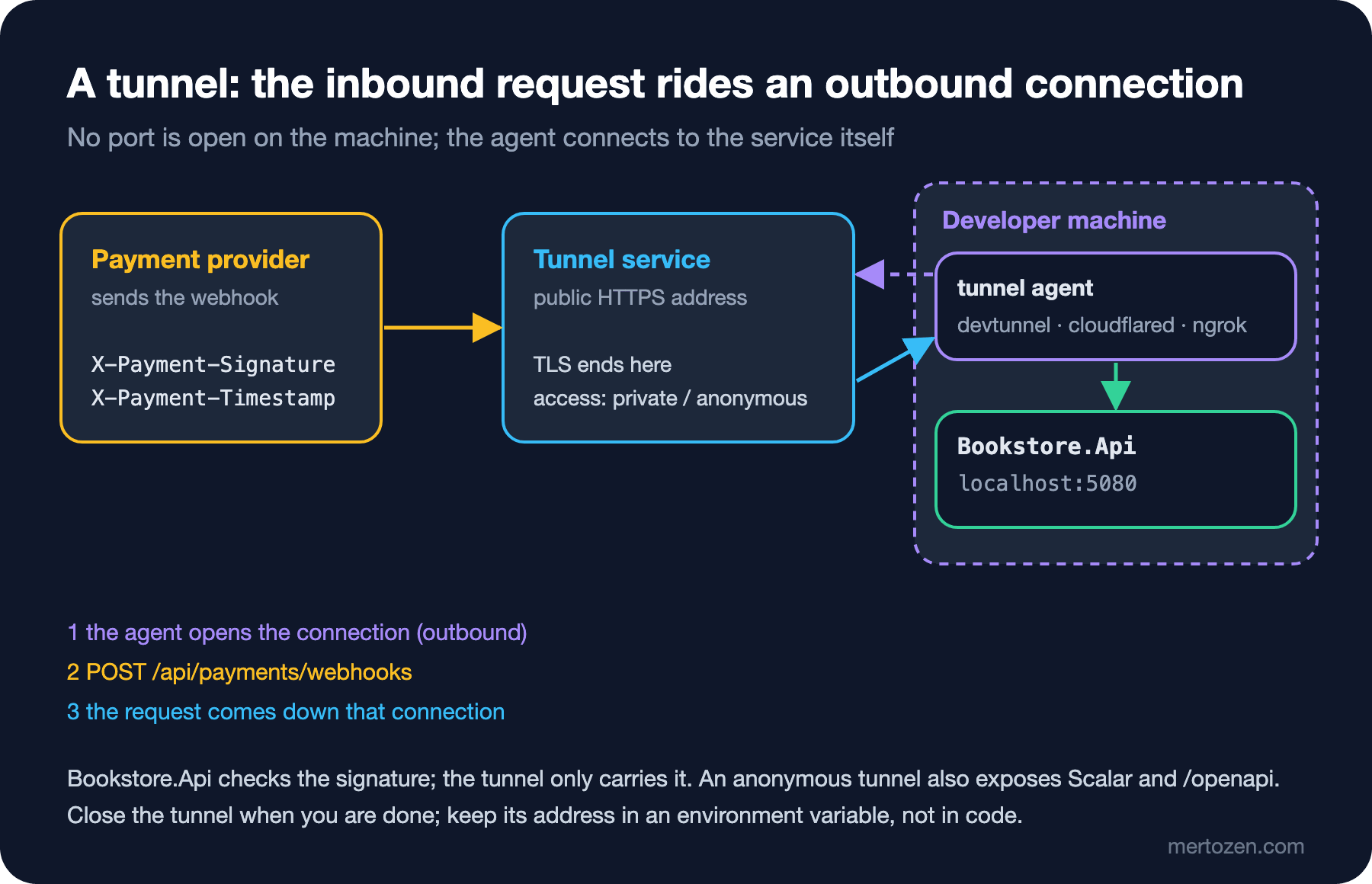
The three tools share one model. An agent on your machine opens an outbound connection to the tunnel service; the service gives you a public HTTPS address and forwards requests for that address down the connection to the agent, which passes them to the port on localhost. No port on the machine is open to the outside, yet anyone who knows the address can reach the API. That is why I first set up the thing that protects the API itself: the webhook signature.
The Webhook Endpoint and Signature Verification
I added a Payments module to Bookstore.Api. POST /api/payments/webhooks does not ask for a user token; the signature proves who is calling. The provider puts the Unix time in the X-Payment-Timestamp header and a hex HMAC-SHA256 computed with the shared secret, prefixed with v1=, in X-Payment-Signature. The signed data is "{timestamp}.{raw body}":
private static string? Verify(IHeaderDictionary headers, byte[] body, PaymentsOptions options, DateTimeOffset now)
{
    if (!long.TryParse(headers[TimestampHeader], NumberStyles.None, CultureInfo.InvariantCulture, out long unixSeconds))
    {
        return "missing timestamp";
    }
    // Blocks replays of old requests (default tolerance: 5 minutes).
    TimeSpan age = now - DateTimeOffset.FromUnixTimeSeconds(unixSeconds);
    if (age.Duration() > options.SignatureTolerance)
    {
        return $"timestamp outside tolerance ({age.TotalSeconds:F0}s)";
    }

    string? header = headers[SignatureHeader];
    if (header is null || !header.StartsWith("v1=", StringComparison.Ordinal))
    {
        return "missing signature";
    }

    byte[] expected = Sign(options.WebhookSecret, unixSeconds, body);
    byte[] actual;
    try
    {
        actual = Convert.FromHexString(header.AsSpan(3));
    }
    catch (FormatException)
    {
        return "malformed signature";
    }
    return CryptographicOperations.FixedTimeEquals(expected, actual) ? null : "signature mismatch";
}
The signature is computed over the incoming bytes, not over a deserialized object; even a whitespace difference breaks it. The comparison uses FixedTimeEquals, so timing cannot be used to guess the signature. The eventId of a valid event is kept in IMemoryCache for 24 hours, and a second copy gets a 200 without being processed. Marking the order Paid in the same step, durable idempotency and returning a fast 2xx are covered in the External Service Integration and Resilience series post "Receiving Webhooks: Signature Verification, Replay Protection, Fast 2xx and Idempotent Processing". The goal here is to try the endpoint locally before any tunnel.
To play the provider I wrote scripts/send-payment-webhook.cs, a single-file .NET 10 app that dotnet run runs without a project file. --tamper changes the amount after signing, and --age moves the timestamp back. The Development secret is in plain sight in appsettings.Development.json and deliberately looks like no real format:
$ export PAYMENT_WEBHOOK_SECRET=test-webhook-secret-not-real
$ dotnet run scripts/send-payment-webhook.cs -- $B/api/payments/webhooks 1 --event evt-0001
evt-0001 -> 200 OK
$ dotnet run scripts/send-payment-webhook.cs -- $B/api/payments/webhooks 1 --event evt-0001
evt-0001 -> 200 OK
$ dotnet run scripts/send-payment-webhook.cs -- $B/api/payments/webhooks 1 --event evt-0002 --tamper
evt-0002 -> 401 Unauthorized
$ dotnet run scripts/send-payment-webhook.cs -- $B/api/payments/webhooks 1 --event evt-0003 --age 900
evt-0003 -> 401 Unauthorized

# Bookstore.Api
info: Bookstore.Payments.PaymentEvent[0]
      Payment event evt-0001 payment.succeeded for order 1: 659.80 TRY
info: Bookstore.Payments.PaymentEvent[0]
      Payment event evt-0001 already processed
warn: Bookstore.Payments.PaymentEvent[0]
      Rejected payment webhook: signature mismatch
warn: Bookstore.Payments.PaymentEvent[0]
      Rejected payment webhook: timestamp outside tolerance (901s)
The answer to the guess: the repeated copy gets a 200 but is processed once, the changed amount gets a 401, and the 15-minute-old request gets a 401 even though its signature is correct. That is why a tunnel tool's "Replay" button stops working after a few minutes; to try an old request again you ask the provider's dashboard for a new delivery. The rest of webhook security is in the API Security (OWASP API Top 10) series post "API7 and API10: APIs That Talk to the Outside World".
Dev Tunnels
This section is based on the official documentation.
Microsoft dev tunnels is still in public preview, and the CLI's command names may change. Opening a tunnel requires signing in with a Microsoft, Microsoft Entra ID or GitHub account; anonymous hosting is not supported. Installing on Windows and hosting a temporary tunnel:
winget install Microsoft.devtunnel
devtunnel user login
# default: only the account that opened the tunnel can connect
devtunnel host -p 5080
# for clients that cannot sign in, such as webhooks
devtunnel host -p 5080 --allow-anonymous
A temporary tunnel is deleted when the process exits. If you do not want to change the webhook address in the provider's dashboard every time, devtunnel create makes a persistent tunnel, and ports and access rules are added with separate commands. Expiration times range from 1 hour to 30 days. An API client can get into a tunnel without anonymous access by sending a token from devtunnel token in the X-Tunnel-Authorization: tunnel <token> header; if your payment provider lets you add a custom header, you do not need anonymous access. The documentation's warning is plain: with anonymous access, anyone who guesses the tunnel ID can connect to your local server.
In Visual Studio (2022 17.6 and later, according to the docs) the same feature is in the debug menu: Dev Tunnels → Create A Tunnel, with Temporary or Persistent as the type and Private, Organization or Public as the access. While a tunnel is active, Visual Studio gives the app the VS_TUNNEL_URL environment variable. A browser gets a warning page on the first visit; requests other than GET, or without text/html in the Accept header, which means webhooks, skip that page.
Cloudflare Tunnel and ngrok
This section is based on the official documentation.
Cloudflare's quick tunnel needs no account and no domain:
cloudflared tunnel --url http://localhost:5080Each run gives you a random trycloudflare.com address, and the address dies when cloudflared stops. According to the docs, quick tunnels are for testing and development only: at most 200 requests in flight (the rest get a 429), no Server-Sent Events, no uptime guarantee. A fixed address and authentication with Cloudflare Access need a named Cloudflare Tunnel tied to an account.
ngrok needs an account and an authtoken. On the free plan every account gets a fixed dev domain ending in ngrok-free.app or ngrok-free.dev, and ngrok http uses it, so the webhook address stays the same when the agent restarts. The free plan shows a warning page to browsers that ask for HTML; API clients are not affected. Authentication is now done with a traffic policy file rather than command-line flags; --oauth and --basic-auth are deprecated:
ngrok config add-authtoken <token>
ngrok http 5080
ngrok http 5080 --traffic-policy-file policy.yml
# policy.yml: the Google OAuth example from the ngrok docs
on_http_request:
- actions:
- type: oauth
config:
provider: googleOAuth fits a demo on a phone or for a customer; a server sending webhooks cannot go through an OAuth flow. The ngrok agent's inspection UI at http://localhost:4040 shows requests with their bodies and can send them again with "Replay"; as we saw above, if the signature carries a timestamp, that replay gets a 401 after a few minutes.
| Topic | Dev Tunnels | Cloudflare quick tunnel | ngrok (free) |
|---|---|---|---|
| Account | Microsoft, Entra ID or GitHub | Not needed | Needed (authtoken) |
| Address | New each time for a temporary tunnel, fixed for a persistent one | Random each time | The account's fixed dev domain |
| Default access | Only the account that opened it | Anyone with the address | Anyone with the address |
| Narrowing access | Tenant, GitHub org, tunnel token | --allowed-mail on a quick tunnel, Cloudflare Access on a named tunnel | Traffic policy (OAuth and more) |
| Note | Public preview | 200 requests in flight, no SSE | 20,000 HTTP requests a month |
For webhooks in Bookstore I prefer a persistent Dev Tunnels tunnel: it is closed by default, it comes with Visual Studio, and the address is entered in the provider's dashboard once. For a five-minute try without an account, a quick tunnel is enough.
Prism: A Mock from the OpenAPI Document
In the fourth post, the Postman CLI's local mock returned 201 to a request without a token and produced negative prices. Prism reads the same OpenAPI document and runs a stricter mock. Say Ayşe on the frontend wants to build the checkout page before the shipping cost endpoint is ready:
$ curl -s -o openapi.json $B/openapi/v1.json
$ npx --yes @stoplight/prism-cli@5.16.0 mock openapi.json -h 127.0.0.1 -p 52690
[2:14:14 PM] › [CLI] ℹ  info      POST       http://127.0.0.1:52690/api/shipping/quotes
[2:14:14 PM] › [CLI] ℹ  info      POST       http://127.0.0.1:52690/api/payments/webhooks
[2:14:14 PM] › [CLI] ℹ  info      POST       http://127.0.0.1:52690/api/auth/login
...
[2:14:14 PM] › [CLI] ▶  start     Prism is listening on http://127.0.0.1:52690
$ curl -s -w ' %{http_code}\n' $P/api/shipping/quotes --json '{"city":"Ankara","books":2}'
{"type":"https://stoplight.io/prism/errors#UNAUTHORIZED","title":"Invalid security scheme used","status":401, ...} 401
$ curl -s -w ' %{http_code}\n' $P/api/shipping/quotes -H "Authorization: Bearer test" --json '{"books":200}'
{"type":"https://stoplight.io/prism/errors#UNPROCESSABLE_ENTITY","title":"Invalid request","status":422, ... "validation":[{"location":["body"],"severity":"Error","code":"required","message":"Request body must have required property 'city'"},{"location":["body","books"],"severity":"Error","code":"maximum","message":"Request body property books must be <= 99"}]} 422
$ curl -s -w ' %{http_code}\n' $P/api/shipping/quotes -H "Authorization: Bearer test" --json '{"city":"Ankara","books":2}'
{"quoteId":"string","city":"string","books":-2147483648,"price":-1.7976931348623157e+308,"currency":"string","estimatedDays":-2147483648} 200
$ curl -s -w ' %{http_code}\n' $P/api/shipping/quotes -H "Authorization: Bearer test" -H "Prefer: dynamic=true" --json '{"city":"Ankara","books":2}'
{"adipisicing8":"quis magna cupidatat aliqua labore","books":"187","cillum7cf":41635620.867682666,"city":"sunt non magna","currency":"fugiat","estimatedDays":"0", ... ,"price":"42485421229.934061","quoteId":"dolor pariatur nisi eiusmod", ...} 200$P is Prism's address. The good part: Prism reads the security definition and returns 401 for a request without a token, and 422 for a body that does not match the schema, so the error paths in Angular can be tried against the mock. The bad part is the responses. In static mode every field gets the extreme value of its type. With Prefer: dynamic=true the values come from Faker, with two surprises: random extra fields appear because the schema does not forbid additional properties, and books and price come back as strings. The cause is ASP.NET Core 10's document: with the web defaults, numbers can also be read from strings, so the schema says "type": ["integer", "string"] and Prism picks one of the two. Angular code that calls price.toFixed(2) breaks against this mock. Prefer: code=404 answers "Requested status code 404 is not defined in the document.": Prism can only produce responses the document defines.
The fix is to put a realistic example into the document. A schema transformer adds one to ShippingQuoteView:
// An example response in /openapi/v1.json: mock servers such as Prism return it instead of "string" and int.MinValue.
public static class ShippingOpenApi
{
    public static OpenApiOptions AddShippingExamples(this OpenApiOptions options) =>
        options.AddSchemaTransformer((schema, context, _) =>
        {
            if (context.JsonTypeInfo.Type == typeof(ShippingQuoteView))
            {
                schema.Examples =
                [
                    new JsonObject
                    {
                        ["quoteId"] = "q-0001",
                        ["city"] = "Ankara",
                        ["books"] = 2,
                        ["price"] = 49.90m,
                        ["currency"] = "TRY",
                        ["estimatedDays"] = 2
                    }
                ];
            }
            return Task.CompletedTask;
        });
}
On my first try I used schema.Example; it is obsolete in Microsoft.OpenApi 2.x, so the build stopped with CS0618 in a project with TreatWarningsAsErrors. With the Examples list, after fetching the document again and restarting Prism:
$ curl -s -w '  %{http_code}\n' $P/api/shipping/quotes -H "Authorization: Bearer test" --json '{"city":"Ankara","books":2}'
{"quoteId":"q-0001","city":"Ankara","books":2,"price":49.9,"currency":"TRY","estimatedDays":2}  200
Pointing the Angular dev server at Prism only takes a separate proxy file, like proxy.mitm.conf.json in the previous post, with the target set to 52690. Prism is stateless: it is not the right tool for requests that depend on each other, such as creating an order and then reading it.
WireMock.Net: Scenarios and Delays
Prism mimics the contract; WireMock.Net mimics the behaviour of an external service. Bookstore needs the carrier's bad days: in one city the first request gets a 503 and the second succeeds; in another the response is 3 seconds late. The mappings are JSON files under mocks/wiremock/__admin/mappings/. The first file of the two-step scenario for Kars:
{
  "Guid": "6d1f0c52-7d0a-4a43-9a9e-0c2a3f6c1004",
  "Title": "Carrier outage for Kars: first call fails",
  "Priority": 1,
  "Scenario": "carrier-outage",
  "SetStateTo": "recovered",
  "Request": {
    "Path": { "Matchers": [ { "Name": "ExactMatcher", "Pattern": "/v1/quotes" } ] },
    "Methods": [ "POST" ],
    "Body": { "Matcher": { "Name": "JsonPartialMatcher", "Pattern": { "destinationCity": "Kars" } } }
  },
  "Response": {
    "StatusCode": 503,
    "Headers": { "Content-Type": "application/json" },
    "BodyAsJson": { "error": "temporarily_unavailable" }
  }
}
The second file ties the same request to a 200 with "WhenStateIs": "recovered". The Van mapping adds "Delay": 3000 to the response, other requests with the right API key get a normal quote, and a request without the key gets a 401. I added WireMock.Net to the repo's tool manifest as a local tool and ran it from the mappings folder:
$ dotnet tool install dotnet-wiremock --version 2.31.0
$ cd mocks/wiremock
$ dotnet tool run dotnet-wiremock --Urls http://127.0.0.1:52691 --ReadStaticMappings true --WireMockLogger WireMockConsoleLogger
11/15/2026 11:12:03 AM [Info] : Version [2.31.0.0]
11/15/2026 11:12:03 AM [Info] : Reading Static MappingFile : '.../__admin/mappings/carrier-outage-kars-1.json'.
...
11/15/2026 11:12:03 AM [Info] : Server listening at http://localhost:52691
Do not leave out --Urls: according to the docs the default is http://*:9091/, which means every interface, and the admin interface is on by default. Someone on the same network could change your mappings. In appsettings.Development.json the carrier address is now WireMock (http://127.0.0.1:52691); fake_carrier.py from the previous post stays for HTTPS and proxy experiments. I started the API and asked for three cities:
$ for c in Ankara Kars Van; do curl -s -w '  %{http_code} %{time_total}s\n' $B/api/shipping/quotes \
    -H "Authorization: Bearer $TOKEN" --json "{\"city\":\"$c\",\"books\":2}"; done
{"quoteId":"wm-0001","city":"Ankara","books":2,"price":49.9,"currency":"TRY","estimatedDays":2}  200 0.056216s
{"quoteId":"wm-kars","city":"Kars","books":2,"price":79.9,"currency":"TRY","estimatedDays":3}  200 0.142304s
{"type":"https://tools.ietf.org/html/rfc9110#section-15.6.4","title":"Service Unavailable","status":503, ...}  503 6.522767s
$ curl -s http://127.0.0.1:52691/__admin/requests | jq -c '.[] | {city: (.Request.BodyAsJson.destinationCity), status: .Response.StatusCode, mapping: .MappingTitle}'
{"city":"Ankara","status":200,"mapping":"Carrier quote: normal answer"}
{"city":"Kars","status":503,"mapping":"Carrier outage for Kars: first call fails"}
{"city":"Kars","status":200,"mapping":"Carrier outage for Kars: recovered"}
{"city":"Van","status":200,"mapping":"Carrier quote: Van answers after 3 seconds"}
{"city":"Van","status":200,"mapping":"Carrier quote: Van answers after 3 seconds"}
{"city":"Van","status":200,"mapping":"Carrier quote: Van answers after 3 seconds"}
For Kars, the retry hides the 503 from the user. For Van, we get the picture we saw with the mitmproxy addon in the previous post, this time without a proxy: three attempts, all three 200 at the carrier, a 503 for the user. The admin API's request journal shows which mapping each request hit; it is the quickest way to understand why a mapping did not match. Once the scenario reaches "recovered" it stays there; to try again:
$ curl -s -X POST http://127.0.0.1:52691/__admin/scenarios/reset
{"Status":"Scenarios reset"}
I use the same mapping files in tests. tests/Bookstore.Shipping.Tests starts WireMock inside the test on a random port, reads the mappings folder, and builds CarrierClient with the real resilience settings from AddShippingModule:
[Fact]
public async Task Retries_after_a_503_and_returns_the_second_answer()
{
    CarrierClient client = services.GetRequiredService<CarrierClient>();

    CarrierQuote quote = await client.GetQuoteAsync(new QuoteRequest("Kars", 1, 900), TestContext.Current.CancellationToken);

    Assert.Equal("wm-kars", quote.QuoteId);
    Assert.Equal([503, 200], carrier.LogEntries.Select(e => Convert.ToInt32(e.ResponseMessage!.StatusCode)));
}
$ dotnet test --project tests/Bookstore.Shipping.Tests
Test run summary: Passed!
total: 3
failed: 0
succeeded: 3
skipped: 0
duration: 5s 665msIn the tests I lowered the attempt timeout to 0.5 seconds; the Van test still confirms that all three attempts time out. Using WireMock.Net inside tests, fault injection and FakeTimeProvider are covered in the Integration and E2E Testing series post "Faking External Dependencies at the Boundary: WireMock.Net, Fake SMTP, FakeTimeProvider and Failure Scenarios".
Prism, WireMock.Net or a Postman Mock
| Topic | Prism | WireMock.Net | Postman mock |
|---|---|---|---|
| Source | The OpenAPI document | Hand-written mappings (JSON or C#) | Examples in a collection, or OpenAPI |
| Where it runs | Locally, on Node.js | Locally, as a .NET tool or inside a test | Postman's cloud; locally with the CLI |
| Request validation | Schema (422) and security (401) | An unmatched request gets a 404 | The local mock accepted a request without a token |
| State and delay | None, every request stands alone | Scenario, Delay | Choosing the response with a header |
| Best job | Building the frontend against the contract | Mimicking an external service's errors and delays | Sharing within a team that uses Postman |
In Bookstore both live side by side: Prism for our own API's endpoints that are not written yet, WireMock.Net for external services we do not control.
In Production
Tunnels and mocks are development tools. In production the payment provider sends the webhook straight to the API's public address; no tunnel service sits in between. Tunnel traffic goes through a third party's infrastructure and TLS ends there, so a tunnel carrying the provider's real payment data and tokens is plain text on that company's servers. Send only sandbox or test-mode provider data through a tunnel.
Keep a separate webhook secret per environment. Development's readable fake secret must not move to the sandbox, nor the sandbox's to production. In Bookstore PaymentsOptions is validated at startup; in production the app does not start if the secret is empty.
Mocks need maintenance like code. The mapping files and the OpenAPI examples are in the repo and go through review. When the real provider changes its responses, the mappings go stale without a sound; compare them regularly with the provider's current documentation and with real responses from its sandbox.
Common Pitfalls
Leaving the tunnel open. A temporary tunnel goes away when the process exits, but a persistent tunnel and an anonymous access rule stay until you remove them or they expire. Open access rules for a short time and delete the tunnel when you are done.
Everything being reachable through an anonymous tunnel. A tunnel opens the whole port, not just the webhook endpoint. While Bookstore.Api runs in Development, Scalar, /openapi/v1.json and login with the demo users are reachable at that address too, and the demo passwords are written openly in this series' posts. When you try webhooks, it is safer to run the API with a separate launch profile that has only the endpoints you need, or to open the tunnel with authentication.
Hard-coding the tunnel address. If an address like https://...devtunnels.ms goes into appsettings.json or Angular's environment file, it points to the wrong place on everyone else's machine. Use an environment variable, like Visual Studio's VS_TUNNEL_URL.
Running a mock on every interface. WireMock.Net's default address and its open admin interface let anyone on the same network change your mappings. --Urls http://127.0.0.1:... is a must.
Trusting Prism's random responses. Numbers arriving as strings in dynamic mode make frontend code written against the mock fail on the mock rather than on the real API. Add examples to the document and keep static mode as the default.
A Small Experiment
★☆☆ Send --age 290 and --age 310 with send-payment-webhook.cs; look at what happens at the edge of the tolerance and at the seconds in the log.
★★☆ Add a third scenario to WireMock: for "Erzurum" the first two requests get a 503 and the third a 200. Guess whether the API returns 200 or 503 in that case, then check with the request journal.
★★★ Start Prism with the --errors option and try the Angular checkout page with a bad body. Then set NumberHandling to JsonNumberHandling.Strict in ConfigureHttpJsonOptions, fetch the document again and see how the "type" values in the schema change.
That brings us to the end of the API Tools series. We ran the same Bookstore flow with curl, with .http files in two dialects, with Postman and with Bruno; we saw with mitmproxy what the API sends out; and with tunnels and mocks we handled, locally, services that call in and services that do not exist yet. Testing the API's behaviour in the codebase is the topic of the Integration and E2E Testing series, and measuring the same flow under load belongs to the Performance and Load Testing series.