

Capturing HTTP Traffic: Seeing, Modifying and Replaying Browser, HttpClient and Angular Dev Server Requests with mitmproxy and Fiddler
To see Bookstore.Api's HTTPS call to the carrier API, we run mitmproxy on 127.0.0.1, point HttpClient at it with HTTPS_PROXY and give the CA to that client only, never to the OS. A Python addon delays the response by 3 seconds so we watch timeouts and retries in real output (the user gets a 503 while the carrier creates three quotes), then we cover filters, saving and replay, the Angular dev server, Chromium's loopback exception and Fiddler's capture modes.
Version note: The code in this post was built and run with .NET 10; traffic was captured with mitmproxy 12.3, the resilience settings use Microsoft.Extensions.Http.Resilience 10.11, and the dev server example was run with Angular 22.
Guess First
In Bookstore, the online bookstore used as the shared example across this site's series, the checkout page shows the shipping cost, and to get it Bookstore.Api sends a POST /v1/quotes request to the carrier's API. The HttpClient resilience settings are: each attempt may take at most 2 seconds, then at most 2 retries. One morning the carrier's API starts answering every request in 3 seconds. The answers are successful, just late.
When a user clicks "Calculate shipping" once, how many price quotes are created on the carrier's side, and what does the user see? Zero, one or three? Make your guess; we will see the answer with real output in the section where we simulate the slow carrier in the proxy.
Traffic DevTools Cannot See
We looked at requests leaving the browser in the Browser DevTools series post "The Network Panel: Waterfall, Timing, Throttling, HAR and Request Overrides". The request that asks for the shipping cost does not leave the browser, though: the browser calls Bookstore.Api, and Bookstore.Api calls the carrier on the server side. Calls to the payment provider and the e-mail service are the same. To see them you need an HTTP proxy in the middle: the client hands the request to the proxy, the proxy forwards it to the target and records both.
For this post I added a small Shipping module to Bookstore.Api. The CarrierClient typed client asks the carrier's API for a price; its address, API key and standard resilience handler are set up in ShippingModule:
services.AddHttpClient<CarrierClient>(http =>
    {
        http.BaseAddress = options.BaseAddress
            ?? throw new InvalidOperationException("Shipping:BaseAddress is missing.");
        http.DefaultRequestHeaders.Authorization = new AuthenticationHeaderValue("Bearer", options.ApiKey);
    })
    .ConfigurePrimaryHttpMessageHandler(() => CreatePrimaryHandler(options, environment))
    .AddStandardResilienceHandler(resilience =>
    {
        // 2 s per attempt, at most 2 retries
        resilience.AttemptTimeout.Timeout = options.AttemptTimeout;
        resilience.Retry.MaxRetryAttempts = options.MaxRetryAttempts;
        resilience.Retry.Delay = TimeSpan.FromMilliseconds(200);
        resilience.TotalRequestTimeout.Timeout = options.AttemptTimeout * (options.MaxRetryAttempts + 2);
        resilience.CircuitBreaker.SamplingDuration = options.AttemptTimeout * 10;
    });
The pipeline itself is covered in the External Service Integration and Resilience series post "The Standard Pipeline with Microsoft.Extensions.Http.Resilience: Defaults, Settings and Pitfalls". Since we cannot connect to a real carrier, I wrote a small fake carrier API, tools/fake-carrier/fake_carrier.py. It listens on 127.0.0.1, HTTP on 52682 and HTTPS on 52683, and creates its own self-signed certificate on first start.
Sending HttpClient through a proxy needs no code change. The handler's UseProxy is on by default, and every handler without a proxy of its own uses HttpClient.DefaultProxy. According to Microsoft Learn, DefaultProxy first looks at the HTTP_PROXY, HTTPS_PROXY, ALL_PROXY and NO_PROXY environment variables. Without them it reads the user's proxy settings on Windows and the system's on macOS, and uses no proxy on Linux. An environment variable is enough to give the proxy to the API process alone; in PowerShell that is $env:HTTPS_PROXY = "http://127.0.0.1:52681".
Running mitmproxy for This Job Only
mitmproxy is an open source, MIT licensed proxy written in Python. It has three front ends: the interactive mitmproxy in the terminal, mitmweb in the browser, and mitmdump, which streams like a log. The output in this post comes from mitmdump. I installed it with pip into its own Python venv; the official site also has a Windows installer:
$ pip install mitmproxy
$ mitmdump --version
Mitmproxy: 12.3.1
Python:    3.12.14
I start the proxy from the repo root like this:
$ mitmdump --listen-host 127.0.0.1 -p 52681 --set confdir=.mitmproxy \
    --set ssl_verify_upstream_trusted_ca=tools/fake-carrier/.certs/carrier-cert.pem \
    --flow-detail 3
Each option is there for a reason. The default listen_host is empty, which means mitmproxy listens on every network interface, and someone on the same network could send traffic through your proxy. The default port 8080 is busy on many machines, so I picked 52681. confdir puts the CA that mitmproxy creates on first start into the repo's git-ignored .mitmproxy/ folder instead of the default ~/.mitmproxy. Six files appear there; mitmproxy-ca.pem also holds the private key and is never shared. The last option makes the proxy trust the fake carrier's certificate when it connects to it, a much narrower permission than turning verification off with ssl_insecure.
Seeing HTTPS: Give the CA to the Client, Not the System
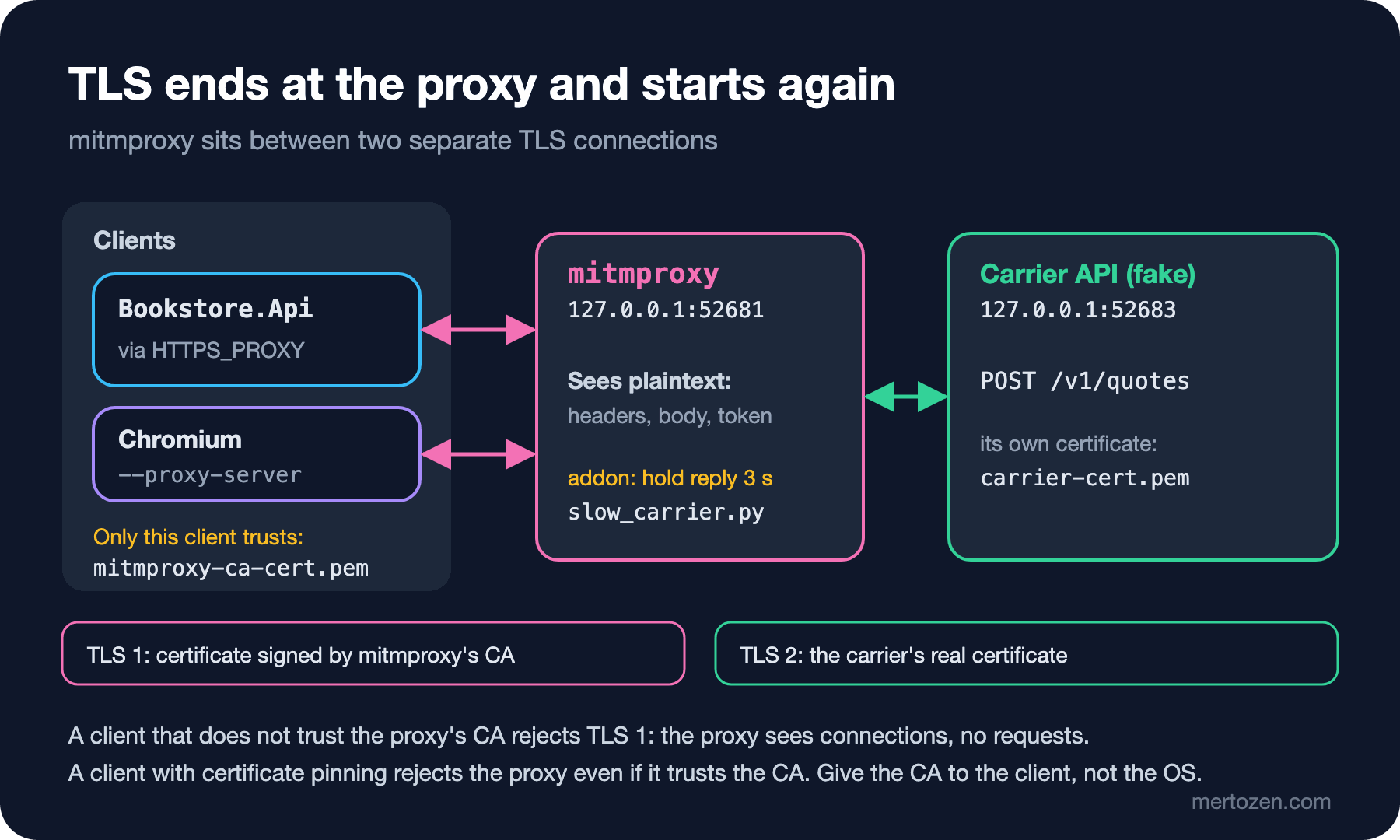
A proxy can see inside an HTTPS request only if it terminates TLS itself. HttpClient sends CONNECT 127.0.0.1:52683 to the proxy. mitmproxy presents a certificate for the carrier, signed by its own CA, to the client, and opens a separate TLS connection to the carrier. How the chain is validated is covered in the SSL/TLS Certificates and HTTPS series post "What's Inside a TLS Certificate? X.509, SAN, Chain of Trust and File Formats". If the client does not trust mitmproxy's CA, the first connection fails. This is what happens when the API is started with HTTPS_PROXY only:
$ curl -s -w '\n%{http_code} %{time_total}s\n' $B/api/shipping/quotes \
    -H "Authorization: Bearer $TOKEN" --json '{"city":"Ankara","books":3}'
{"type":"https://tools.ietf.org/html/rfc9110#section-15.6.4","title":"Service Unavailable","status":503,"detail":"The carrier did not return a quote. Try again later.", ...}
503 0.333116s

# mitmdump
[14:06:40.631][127.0.0.1:54561] client connect
[14:06:40.632][127.0.0.1:54561] server connect 127.0.0.1:52683
[14:06:40.642][127.0.0.1:54561] client disconnect
[14:06:40.863][127.0.0.1:54563] client connect
...
[14:06:40.960][127.0.0.1:54565] client disconnect

# Bookstore.Api
System.Net.Http.HttpRequestException: The SSL connection could not be established, see inner exception.
 ---> System.Security.Authentication.AuthenticationException: The remote certificate was rejected by the provided RemoteCertificateValidationCallback.
The proxy sees three connections and not a single request: one attempt and two retries, all rejected during TLS. The mitmproxy documentation describes installing the CA into the operating system or the browser (the mitm.it page, Keychain, the Windows certificate store). Do not do that. Adding a root the system trusts opens the HTTPS traffic of every application on the machine to anyone who gets the CA file, and it is easy to forget to remove it afterwards. In Bookstore I give the CA only to the carrier client, and only in Development:
// In AddShippingModule: checked when the app starts
if (options.ExtraRootCertificates.Count > 0 && !environment.IsDevelopment())
{
    throw new InvalidOperationException("Shipping:ExtraRootCertificates is only allowed in Development.");
}

private static SocketsHttpHandler CreatePrimaryHandler(ShippingOptions options, IHostEnvironment environment)
{
    // UseProxy is on by default: HTTPS_PROXY, HTTP_PROXY and NO_PROXY apply here too.
    SocketsHttpHandler handler = new() { PooledConnectionLifetime = TimeSpan.FromMinutes(5) };
    if (options.ExtraRootCertificates.Count == 0)
    {
        return handler;
    }

    X509Certificate2Collection roots = [];
    foreach (string path in options.ExtraRootCertificates)
    {
        roots.ImportFromPemFile(Path.GetFullPath(path, environment.ContentRootPath));
    }
    handler.SslOptions.RemoteCertificateValidationCallback =
        (_, certificate, _, errors) => IsTrusted(certificate, errors, roots);
    return handler;
}

private static bool IsTrusted(X509Certificate? certificate, SslPolicyErrors errors, X509Certificate2Collection roots)
{
    if (errors == SslPolicyErrors.None)
    {
        return true;
    }
    // A wrong host name or a missing certificate is never accepted; only the chain is re-checked.
    if (certificate is null || errors != SslPolicyErrors.RemoteCertificateChainErrors)
    {
        return false;
    }

    using X509Chain chain = new();
    chain.ChainPolicy.TrustMode = X509ChainTrustMode.CustomRootTrust;
    chain.ChainPolicy.CustomTrustStore.AddRange(roots);
    chain.ChainPolicy.RevocationMode = X509RevocationMode.NoCheck;
    using X509Certificate2 leaf = X509CertificateLoader.LoadCertificate(certificate.GetRawCertData());
    return chain.Build(leaf);
}
The callback never accepts a name mismatch; only on a chain error does it rebuild the chain with the given roots (CustomRootTrust). If the list has files outside Development, the app fails at startup. The first entry is the fake carrier's certificate from appsettings.Development.json; I add mitmproxy's CA as the second entry with an environment variable:
$ export HTTPS_PROXY=http://127.0.0.1:52681
$ export Shipping__ExtraRootCertificates__1=../../.mitmproxy/mitmproxy-ca-cert.pem
$ dotnet run --project src/Bookstore.Api -- --urls http://127.0.0.1:52680
The path is relative to the API project folder. I ran the API on 52680 instead of 5080; $B is that address and $TOKEN is Ada's login token:
$ curl -s $B/api/shipping/quotes -H "Authorization: Bearer $TOKEN" --json '{"city":"Ankara","books":3}'
{"quoteId":"q-0003","city":"Ankara","books":3,"price":49.9,"currency":"TRY","estimatedDays":2}

# mitmdump
127.0.0.1:54598: POST https://127.0.0.1:52683/v1/quotes HTTP/1.1
    Host: 127.0.0.1:52683
    Authorization: Bearer fake-carrier-key-for-tests
    Transfer-Encoding: chunked
    traceparent: 00-caf1f662dbca40992fc170110e78843a-65af1a08c8a2213b-00
    Content-Type: application/json; charset=utf-8

    {
        "destinationCity": "Ankara",
        "parcels": 1,
        "weightGrams": 1350
    }

 << HTTP/1.0 200 OK 75b
    Server: BaseHTTP/0.6 Python/3.12.14
    Content-Type: application/json
    Content-Length: 75

    {
        "quoteId": "q-0003",
        "price": 49.9,
        "currency": "TRY",
        "estimatedDays": 2
    }
Now everything is plain text: the carrier's API key, the weight in the body, the price in the response. The body goes out chunked because PostAsJsonAsync writes the JSON without measuring it first; the first version of the fake carrier could not read that, and the proxy made it obvious. HttpClient adds the W3C trace context header traceparent itself. That ID is useful when you discuss a problem with the carrier.
This approach has two limits. A client that does certificate pinning, usually a mobile app that hard-codes the certificate or public key it expects, rejects the proxy's certificate even if it trusts the CA; the mitmproxy documentation suggests passing such traffic through undecrypted with ignore_hosts. HSTS removes the option to click through a certificate warning in the browser: if the browser does not trust the CA, an HSTS site offers no "continue anyway". The details are in the SSL/TLS series post "Enforcing HTTPS: HTTP→HTTPS Redirects, Rolling Out HSTS Gradually, Preload and Mixed Content".
A Slow Carrier: Delaying the Response with an Addon
What makes mitmproxy really useful is addons: Python classes that run on events such as request and response. The addon that simulates the morning the carrier slowed down is tools/mitm/slow_carrier.py:
"""mitmproxy addon: holds the carrier's quote responses to simulate a slow carrier.

    mitmdump -s tools/mitm/slow_carrier.py --set carrier_delay_ms=3000 --set carrier_slow_count=1
"""
import asyncio
import logging

from mitmproxy import ctx, http


class SlowCarrier:
    def __init__(self) -> None:
        self.slowed = 0

    def load(self, loader) -> None:
        loader.add_option("carrier_delay_ms", int, 0, "Milliseconds to hold each /v1/quotes response.")
        loader.add_option("carrier_slow_count", int, 0, "How many responses to hold (0 = all).")

    async def response(self, flow: http.HTTPFlow) -> None:
        if ctx.options.carrier_delay_ms <= 0 or not flow.request.path.startswith("/v1/quotes"):
            return
        if ctx.options.carrier_slow_count and self.slowed >= ctx.options.carrier_slow_count:
            return
        self.slowed += 1
        logging.info("slow_carrier: holding response #%d for %d ms", self.slowed, ctx.options.carrier_delay_ms)
        # async wait: other connections through the proxy keep moving
        await asyncio.sleep(ctx.options.carrier_delay_ms / 1000)


addons = [SlowCarrier()]
On my first try I declared the delay in seconds as a float. mitmproxy 12.3 printed "Failed to parse option carrier_delay: unsupported option type: <class 'float'>" at startup and exited; float is not among the option types. That is why the addon takes milliseconds as an int. Holding every response for 3 seconds:
$ mitmdump --listen-host 127.0.0.1 -p 52681 --set confdir=.mitmproxy \
    --set ssl_verify_upstream_trusted_ca=tools/fake-carrier/.certs/carrier-cert.pem \
    -s tools/mitm/slow_carrier.py --set carrier_delay_ms=3000
[14:07:32.792][127.0.0.1:54619] client connect
[14:07:32.794][127.0.0.1:54619] server connect 127.0.0.1:52683
[14:07:32.814] slow_carrier: holding response #1 for 3000 ms
[14:07:34.794][127.0.0.1:54619] client disconnect
[14:07:35.043][127.0.0.1:54622] client connect
[14:07:35.053] slow_carrier: holding response #2 for 3000 ms
127.0.0.1:54619: POST https://127.0.0.1:52683/v1/quotes HTTP/1.1
     << HTTP/1.0 200 OK 75b
[14:07:37.046][127.0.0.1:54622] client disconnect
[14:07:37.344][127.0.0.1:54624] client connect
[14:07:37.360] slow_carrier: holding response #3 for 3000 ms
127.0.0.1:54622: POST https://127.0.0.1:52683/v1/quotes HTTP/1.1
     << HTTP/1.0 200 OK 75b
[14:07:39.346][127.0.0.1:54624] client disconnect
127.0.0.1:54624: POST https://127.0.0.1:52683/v1/quotes HTTP/1.1
     << HTTP/1.0 200 OK 75b

$ curl -s -w '\n%{http_code} %{time_total}s\n' $B/api/shipping/quotes -H "Authorization: Bearer $TOKEN" --json '{"city":"Ankara","books":3}'
{"type":"https://tools.ietf.org/html/rfc9110#section-15.6.4","title":"Service Unavailable","status":503, ...}
503 6.561202s

# Bookstore.Api
fail: Polly[0]
      Resilience event occurred. EventName: 'OnTimeout', Source: 'CarrierClient-standard//Standard-AttemptTimeout', Operation Key: '', Result: ''
warn: Polly[3]
      Execution attempt. Source: 'CarrierClient-standard//Standard-Retry', Operation Key: '', Result: 'The operation didn't complete within the allowed timeout of '00:00:02'.', Handled: 'True', Attempt: '0', Execution Time: 2012.434ms
...
fail: Polly[3]
      Execution attempt. Source: 'CarrierClient-standard//Standard-Retry', Operation Key: '', Result: 'The operation didn't complete within the allowed timeout of '00:00:02'.', Handled: 'True', Attempt: '2', Execution Time: 2005.1285ms
warn: Bookstore.Shipping.CarrierClient[0]
      Carrier quote failed: TimeoutRejectedException
The answer to the guess: the user waits 6.5 seconds and gets a 503, while three price quotes are created at the carrier. The API log shows only three timeouts. The proxy log shows the other half of the story: on each connection the "client disconnect" comes first (HttpClient gave up at 2 seconds), and the carrier's "200 OK" a second later. The carrier did its work, but nobody was waiting for the answer. Asking for a price is harmless, but the same pipeline would also call a POST that creates a shipment or a payment three times: the standard handler's retry repeats POST by default. DisableForUnsafeHttpMethods() turns that off. The way to repeat calls with side effects safely is an Idempotency-Key, as in the External Service Integration and Resilience series post "Idempotent Outbound Calls: Sending an Idempotency-Key, Unknown Outcomes and Reconciliation".
When only the first response is delayed (--set carrier_slow_count=1), the retry pays off:
$ curl -s -w '\n%{http_code} %{time_total}s\n' $B/api/shipping/quotes -H "Authorization: Bearer $TOKEN" --json '{"city":"Ankara","books":3}'
{"quoteId":"q-0008","city":"Ankara","books":3,"price":49.9,"currency":"TRY","estimatedDays":2}
200 2.222351s

# Bookstore.Api
warn: Polly[3]
      Execution attempt. Source: 'CarrierClient-standard//Standard-Retry', Operation Key: '', Result: 'The operation didn't complete within the allowed timeout of '00:00:02'.', Handled: 'True', Attempt: '0', Execution Time: 2005.6902ms
      Received HTTP response headers after 20.5252ms - 200
info: Polly[3]
      Execution attempt. Source: 'CarrierClient-standard//Standard-Retry', Operation Key: '', Result: '200', Handled: 'False', Attempt: '1', Execution Time: 20.915ms
The user gets the price in 2.2 seconds. The carrier still has two quotes: q-0007 was created by the first attempt and lost, and q-0008 went back to the user.
Filters, Saving and Replay
In a real application's traffic the carrier request gets lost among dozens of others. If you put a filter expression at the end of the mitmdump command, it only processes matching flows: ~u matches the URL, ~m the method, ~h a header, and they combine with &, | and !. -w writes the flows to a file:
$ mitmdump --listen-host 127.0.0.1 -p 52681 --set confdir=.mitmproxy \
    --set ssl_verify_upstream_trusted_ca=tools/fake-carrier/.certs/carrier-cert.pem \
    -s tools/mitm/slow_carrier.py --set carrier_delay_ms=3000 --set carrier_slow_count=1 \
    -w carrier.mitm "~u /v1/quotes"
[14:07:52.068] Only processing flows that match "~u /v1/quotes"
You can send the saved requests again with client replay, -C; -n skips starting the proxy, replays and exits:
$ mitmdump -n -C carrier.mitm --set confdir=.mitmproxy \
    --set ssl_verify_upstream_trusted_ca=tools/fake-carrier/.certs/carrier-cert.pem --flow-detail 2
[14:08:09.458] [replay] server connect 127.0.0.1:52683
[replay]: POST https://127.0.0.1:52683/v1/quotes HTTP/1.1
    Host: 127.0.0.1:52683
    Authorization: Bearer fake-carrier-key-for-tests
    Transfer-Encoding: chunked
    traceparent: 00-bc6f6b9c8f6fe1212346e7019a2e7565-587c8259387abb92-00
    Content-Type: application/json; charset=utf-8
 << HTTP/1.0 200 OK 75b
...
$ grep -a -o "Bearer fake-carrier-key-for-tests" carrier.mitm | sort | uniq -c
   2 Bearer fake-carrier-key-for-tests
Replay is handy for sending the same request again after a fix, or for showing the carrier "this request got this response". The last command is a reminder of what the file carries: the API key, twice, in plain text. In a real environment that line would hold a real key.
If you prefer a UI, mitmweb runs with the same options and lists the flows in the browser. In 12.x the web UI creates a token at startup, and a request without the token gets a 403:
$ mitmweb --listen-host 127.0.0.1 -p 52681 --web-host 127.0.0.1 --web-port 52685 --no-web-open-browser --set confdir=.mitmproxy
[14:08:28.392] HTTP(S) proxy listening at 127.0.0.1:52681.
[14:08:28.394] Web server listening at http://127.0.0.1:52685/?token=<token>
$ curl -s -o /dev/null -w '%{http_code}\n' http://127.0.0.1:52685/
403
The Angular Dev Server and the Browser
While bookstore-web is being developed, ng serve forwards /api requests to Bookstore.Api through proxy.conf.json. The browser sees what it sends to the dev server, but not what the dev server sends to the backend. To see that leg I put mitmproxy in reverse proxy mode in front of the API and pointed the dev server at it. I used a separate file so the team's proxy.conf.json stays unchanged:
// web/bookstore-web/proxy.mitm.conf.json
{
  "/api": {
    "target": "http://127.0.0.1:52686",
    "secure": false
  }
}
$ mitmdump --listen-host 127.0.0.1 --mode reverse:http://127.0.0.1:52680@52686 --set confdir=.mitmproxy --flow-detail 1
[14:08:44.322] reverse proxy to http://127.0.0.1:52680 listening at 127.0.0.1:52686.
$ npx ng serve --host 127.0.0.1 --port 52687 --proxy-config proxy.mitm.conf.json
➜ Local: http://127.0.0.1:52687/
$ curl -s -o /dev/null -w '%{http_code}\n' http://127.0.0.1:52687/api/auth/login \
--json '{"email":"ada@example.com","password":"Bookstore-Demo-1"}'
200
# mitmdump
127.0.0.1:54682: POST http://127.0.0.1:52680/api/auth/login
<< 200 OK 390bTo put the browser itself behind the proxy, starting Chromium with --proxy-server=http://127.0.0.1:52681 and a throwaway profile folder is enough; there is no need to touch the system proxy settings. Chromium, however, does not send localhost and 127.0.0.1 requests to the proxy by default. I opened the API's /openapi/v1.json twice with the Chromium that Playwright downloads. The first time the page loaded but the proxy saw nothing. The second time I added --proxy-bypass-list=<-loopback>, which removes the loopback exception:
# mitmdump, second run
127.0.0.1:54706: GET http://127.0.0.1:52680/openapi/v1.json
              << 200 OK 22.9k
.NET behaved differently: the API with HTTPS_PROXY did send its request to the carrier on 127.0.0.1 through the proxy. When you open an HTTPS page in this throwaway browser, --ignore-certificate-errors (ignoreHTTPSErrors in Playwright) ignores certificate errors for that browser only.
Fiddler: The System Proxy and Rules
This section is based on the official documentation.
On Windows, many teams think of Fiddler first, and there are two products. Fiddler Classic runs only on Windows; according to Telerik's page it is free for non-commercial use only, in maintenance mode and no longer actively developed. Fiddler Everywhere is a subscription product for Windows, macOS and Linux that you sign in to with an account. The pricing page lists no free plan; as of 15 November 2026 the cheapest plan is Lite, at 7 dollars per user per month billed annually.
The documentation describes Fiddler Everywhere's capture modes one by one. System capturing makes Fiddler the operating system's proxy; it is the broadest and most intrusive mode. Because .NET's DefaultProxy reads the user's proxy settings on Windows, HttpClient traffic ends up there too. Explicit capturing leaves the system settings alone and captures only the applications you point at Fiddler's proxy (127.0.0.1:8866 by default); giving Bookstore.Api HTTPS_PROXY=http://127.0.0.1:8866 is the same setup as above. Terminal capturing opens a terminal with the proxy set, and independent browser capturing opens a separate Chromium. Decrypting HTTPS requires trusting Fiddler's root certificate; the app suggests installing it into the system, and the risks above apply in full.
The Fiddler counterpart of a mitmproxy addon is the Rules tab. Rules replaced Fiddler Classic's AutoResponder: for requests that match a URL you can return a hand-written response (Manual Response) or delay the request by a number of milliseconds with the Delay Request action. Fiddler's .NET documentation says localhost requests may bypass the proxy and offers workarounds such as localhost. with a trailing dot.
| Need | mitmproxy | Fiddler Everywhere | Browser DevTools |
|---|---|---|---|
| Outbound calls from the backend | Through the proxy | Through the proxy (system or explicit) | Cannot see them |
| HTTPS content | Give the CA to the client | Trust the root certificate | The browser already decrypts it |
| Changing or delaying a response | Python addon | Rules | Local overrides, throttling |
| Interface | Terminal and web | Desktop app | Inside the browser |
| License | Open source (MIT) | Paid subscription | Comes with the browser |
For the Bookstore team I pick mitmproxy: it can be scripted, the addons live in the repo, and it attaches to a single process without touching system settings. For someone on Windows who likes working in a UI and has a license, Fiddler Everywhere's explicit capturing does the same job.
In Production
These tools are for the development machine. Putting a proxy in the middle in production means writing every user's tokens and personal data into a file. The right way to see outbound calls in production is HttpClient's own logs and traces: the System.Net.Http.HttpClient.CarrierClient log categories and the Polly events above. If you need to log content, choose the fields and mask sensitive values.
Always tie a trust extension such as ExtraRootCertificates to the environment. In Bookstore the app refuses to start if the list is not empty outside Development. An app that does not start is better than a configuration mistake that quietly reaches production with relaxed TLS validation. For the same reason, DangerousAcceptAnyServerCertificateValidator or a callback that always returns true should never be in the code. HttpClient certificate validation is covered in the SSL/TLS series post "Certificates in .NET and Kestrel: dev-certs, Loading PEM/PFX, SNI, Reload on Renewal and HttpClient Validation".
Manage the lifetime of the CA files. .mitmproxy/ is git-ignored; delete the folder when you are done. mitmproxy creates a new CA for every new confdir, so it is enough not to leave a client that trusts the old one.
Common Pitfalls
Closing the proxy but leaving the environment variable set. When mitmdump exited at startup because of the addon error, the API was still running with HTTPS_PROXY:
info: System.Net.Http.HttpClient.CarrierClient.ClientHandler[100]
      Sending HTTP request POST https://127.0.0.1:52683/v1/quotes
info: System.Net.Http.HttpClient.CarrierClient.ClientHandler[104]
      HTTP request failed after 8.819ms
      System.Net.Http.HttpRequestException: Connection refused (127.0.0.1:52681)
The request is for the carrier, but the error message shows the proxy's address, and at first sight it looks like the carrier is down. With a tool that changes the system proxy, the same error shows up in every application. After closing such a tool, check that the system setting is back.
Sharing captured traffic. A .mitm file, like a HAR file, carries headers and bodies as they were. When you share a bug, share only the relevant flow with tokens and personal data removed; do not put the file in the repo, an issue or a chat channel. In Bookstore *.mitm is git-ignored.
Installing the CA into the system and forgetting it. This is the most common and the most expensive mistake; give the CA only to the client that needs it.
Leaving out --listen-host. The default is every interface; in a café or on the office network your proxy stays open to others.
Judging retries by their count alone. It is easy to see "Attempt: 2" in the log and move on. Seeing in the proxy that all three carrier responses were 200 shows that the problem is the timeout setting, not the carrier: if the carrier answers in 3 seconds, a 2-second attempt wastes every request.
A Small Experiment
★☆☆ Start the fake carrier, mitmdump and the API, and capture the carrier request with --flow-detail 3. Then remove Shipping__ExtraRootCertificates__1, restart the API and see what changes in the proxy log.
★★☆ Add an option to slow_carrier.py that sets the response status code to 503 for a given city (flow.response.status_code). Count from the log whether the standard handler retries the 503 and how many attempts it makes.
★★★ Turn off retries for POST in the carrier client (DisableForUnsafeHttpMethods()), run the slow carrier scenario again and compare the number of quotes created at the carrier. Then add an Idempotency-Key header to the request and catch the second request with the same key in the addon.
In this post we watched outbound traffic. In the last post of the series the direction turns around: we bring the payment provider's webhook to Bookstore.Api on localhost through a tunnel, and we stand in for services that are not ready yet with Prism and WireMock.Net.