

Deploying with GitHub Actions 1: Azure App Service with OIDC and Secretless Cloud Access

With OIDC, every job gets a signed, short-lived token from GitHub, and Azure verifies it against a federated credential and grants access without a client secret. id-token: write, sub claim formats, the July 2026 subject change with IDs, custom property claims, deploying to a staging slot, smoke testing and swapping; AWS and Google Cloud equivalents.
Version note: The examples in this post were run with act 0.2.97, actionlint 1.7.12, Docker 29.2, .NET 10, azure/login@v3 (v3.1.0) and azure/webapps-deploy@v3 (v3.0.8). The Azure side and the token exchange were not run on GitHub or Azure; claim formats and dates were checked against the GitHub and Microsoft documentation as of November 2026.
Guess First
You created an app registration for Bookstore in Azure and added a single federated credential to it; its subject is repo:octo-org/bookstore:ref:refs/heads/main. Your deploy workflow is triggered from main and the job has environment: production. Does the azure/login step succeed?
Second question: you created the same repository from scratch in August 2026 and again wrote the subject by name, as repo:octo-org/bookstore:environment:production. What happens this time?
The Problem with Secret-Based Login
In the previous post the deploy job relied on an environment secret called DEPLOY_TOKEN. Connecting to Azure the classic way looks the same: you create a service principal, generate a client secret for it and put that secret into GitHub. It works, but it has three problems. The secret has an expiry date, and that date is usually remembered when it breaks a deploy on a Friday evening. If the secret leaks once (printed to a log, an old fork, a malicious action), whoever holds it can use it from outside GitHub, from any machine, until it expires. Third, the secret carries no information about "which workflow, which branch, which environment"; anyone who has it has the same power.
OIDC (OpenID Connect) turns this model around. There is no credential stored in the repository. While running, each job asks GitHub for a signed, short-lived identity token; the cloud side looks at the information inside that token and, if it fits the trust relationship you defined in advance, issues its own short-lived access token. Nothing long-lived is left to leak; a leaked token dies within minutes and is only valid on behalf of the repository and environment you defined. The tool-agnostic side, why short-lived credentials are safer, is in the pipeline security post of the CI/CD Fundamentals series, which covers CI (Continuous Integration) and CD (Continuous Delivery); here we focus on the mechanics and on Azure.
The OIDC Flow: Secretless Login in Four Steps
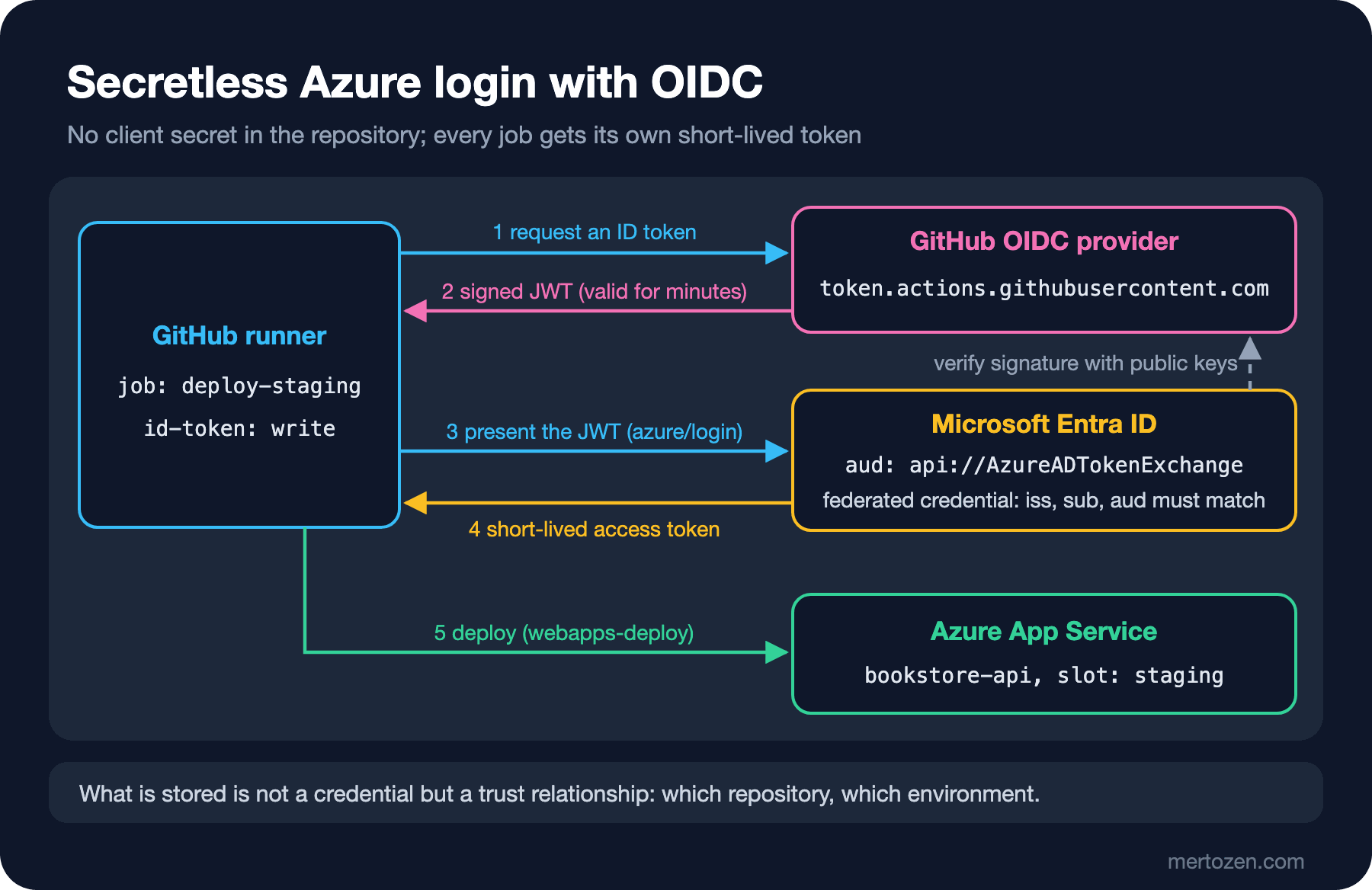
When a job starts with permissions: id-token: write, the runner gets two environment variables: ACTIONS_ID_TOKEN_REQUEST_URL and ACTIONS_ID_TOKEN_REQUEST_TOKEN. A step (or an action such as azure/login) calls that address and gets a JWT (JSON Web Token) for the audience it asks for. The token is signed by GitHub's OIDC provider; the issuer value is https://token.actions.githubusercontent.com. The cloud side (Microsoft Entra ID on Azure) verifies the signature with the public keys the provider publishes, then compares the iss, aud and sub claims with the federated credential you defined. If they match, the job receives an access token that lives only for the duration of that job.
An important detail: granting id-token: write does not add a privilege to the job; it only grants the right to request an identity document. What can be done with that document is decided on the cloud side. So write the permissions: block at the job level, only on deploy jobs. Remember: as soon as you write one permission, the ones you don't write become none; if you use actions/checkout, add contents: read as well.
What Is Inside the Token: Claims and the Subject
To see the token I wrote a small probe workflow. It does not print the token itself, only selected claims from the payload:
name: oidc-probe

on: workflow_dispatch

permissions:
  id-token: write

jobs:
  probe:
    runs-on: ubuntu-latest
    steps:
      - name: Request an ID token and print selected claims
        run: |
          if [ -z "${ACTIONS_ID_TOKEN_REQUEST_URL:-}" ]; then
            echo "No OIDC endpoint: missing id-token permission or not running on GitHub"
            exit 1
          fi
          token=$(curl -sSf -H "Authorization: bearer $ACTIONS_ID_TOKEN_REQUEST_TOKEN" \
            "$ACTIONS_ID_TOKEN_REQUEST_URL&audience=api://AzureADTokenExchange" | jq -r .value)
          payload=$(echo "$token" | cut -d. -f2 | tr '_-' '/+')
          while [ $(( ${#payload} % 4 )) -ne 0 ]; do payload="$payload="; done
          echo "$payload" | base64 -d | jq '{sub, aud, environment, ref, repository_id, exp}'
Running it with act gives the expected result:
[oidc-probe/probe] ⭐ Run Main Request an ID token and print selected claims
[oidc-probe/probe]   | No OIDC endpoint: missing id-token permission or not running on GitHub
[oidc-probe/probe]   ❌  Failure - Main Request an ID token and print selected claims [135.677ms]
[oidc-probe/probe] 🏁  Job failed
act has no OIDC provider, so these two variables are never defined. You see the same message on GitHub when you forget to grant id-token: write. I tested the base64url decoding part of the script separately in the runner image with an unsigned token I crafted by hand; since a JWT payload is base64url-encoded without padding, the tr and the = padding are required.
We know what a real GitHub token contains from the example in the documentation: sub, aud, iss, ref, sha, repository, repository_id, repository_owner_id, environment, job_workflow_ref, runner_environment and more. The trust decision is almost always made on sub, and its format changes with the job's context:
- If the job uses an environment:
repo:octo-org/bookstore:environment:production - No environment and a branch push:
repo:octo-org/bookstore:ref:refs/heads/main - No environment and a tag push:
repo:octo-org/bookstore:ref:refs/tags/v1.4.0 - A pull request event:
repo:octo-org/bookstore:pull_request
The answer to the first question is in the first line. As soon as the job uses environment: production, sub is no longer ref:refs/heads/main but environment:production. The federated credential written for the branch does not match, and azure/login fails with AADSTS700213: No matching federated identity record found for presented assertion subject, which its README also describes. Write the credential for the environment in jobs that use environments; it is also safer, because the environment's protection rules now become a precondition for cloud access too.
The answer to the second question lies in the most important OIDC change of 2026. For repositories created, renamed or transferred after July 15, 2026, the default sub appends immutable numeric IDs to the names: repo:octo-org@5544123/bookstore@821093847:environment:production. The reason is "subject recycling": if an organization name is released and taken by someone else, a trust policy written by name might trust the new owner's repository too. The repository you created in August uses the new format, so the subject you wrote by name does not match and you get AADSTS700213 again. Older repositories keep the old format until they opt in; to switch without downtime, first add a second credential with the new subject, opt in from the OIDC settings, verify the workflow, then delete the old one.
Another change, GA (General Availability) since April 2026, is that repository custom properties can be added to the token as claims with the repo_property_ prefix. If an organization admin enables, say, a tier property in the OIDC settings, every repository with tier=production gets a repo_property_tier claim in its token. Writing the trust policy against this claim instead of a list of repository names means you can grant access when a new service is added without touching the cloud side. On Azure you can use it not with a classic federated credential but with the expression of a flexible federated credential, which we touch on below.
The Azure Side: App Registration and Federated Credential
I do not have an Azure account for this, so the commands in this section were written against the schema on Microsoft Learn and were not executed. Two environments, two identities for Bookstore:
# Staging identity: can only deploy to the staging slot
az ad app create --display-name bookstore-deploy-staging
az ad sp create --id "$STAGING_APP_ID"
az ad app federated-credential create --id "$STAGING_APP_OBJECT_ID" --parameters staging.json
az role assignment create --assignee "$STAGING_APP_ID" --role "Website Contributor" \
  --scope "/subscriptions/$SUBSCRIPTION_ID/resourceGroups/rg-bookstore/providers/Microsoft.Web/sites/bookstore-api/slots/staging"
{
"name": "bookstore-environment-staging",
"issuer": "https://token.actions.githubusercontent.com",
"subject": "repo:octo-org/bookstore:environment:staging",
"audiences": ["api://AzureADTokenExchange"]
}For production you do the same in a separate app registration, with the environment:production subject and a role assignment at site level. Because the two identities are separate, even a compromised staging job cannot touch the production slot. On the GitHub side you put a secret with the same name, AZURE_CLIENT_ID, into both environments; the values differ. The "same name, different value per environment" idea from post 09 becomes a security boundary here. The client ID, tenant ID and subscription ID are not secrets, but the azure/login README recommends passing them only through secrets and never filling them from external values such as a PR (pull request) title or a workflow_dispatch input; v3 masks the client ID in logs by default.
In a classic federated credential the subject matches exactly and case-sensitively; there are no wildcards. If your organization name has uppercase letters (Octo-Org), write the subject as it appears in the token. An application can have at most 20 federated credentials; for many branches or repositories, Entra's flexible federated identity credential, in preview, allows pattern matching with claimsMatchingExpression. For GitHub, that expression must check repository_id and/or repository_owner_id in addition to sub.
The Workflow: Deploy to the Staging Slot, Smoke Test and Swap
App Service deployment slots (on Standard tiers and above) are blue-green deployment out of the box: the staging slot is a second app running on the same App Service plan as production. You deploy the new version there, test it, then swap the two slots. The logic of blue-green and the rollback strategy are in the blue-green post of the upcoming Deployment Strategies series; here is the workflow side:
name: deploy-azure

on:
  push:
    tags: ['v*']
  workflow_dispatch:

permissions:
  contents: read

env:
  AZURE_WEBAPP_NAME: bookstore-api
  AZURE_RESOURCE_GROUP: rg-bookstore

jobs:
  build:
    runs-on: ubuntu-latest
    steps:
      - uses: actions/checkout@v7
      - uses: actions/setup-dotnet@v6
        with:
          global-json-file: global.json
      - run: dotnet publish api/src/Bookstore.Api -c Release -o out/api
      - uses: actions/upload-artifact@v7
        with:
          name: api-publish
          path: out/api

  deploy-staging:
    needs: build
    runs-on: ubuntu-latest
    permissions:
      id-token: write
      contents: read
    environment:
      name: staging
      url: ${{ steps.deploy.outputs.webapp-url }}
    concurrency:
      group: deploy-staging
      cancel-in-progress: false
    steps:
      - uses: actions/download-artifact@v8
        with:
          name: api-publish
          path: out/api
      - uses: azure/login@v3
        with:
          client-id: ${{ secrets.AZURE_CLIENT_ID }}
          tenant-id: ${{ secrets.AZURE_TENANT_ID }}
          subscription-id: ${{ secrets.AZURE_SUBSCRIPTION_ID }}
      - id: deploy
        uses: azure/webapps-deploy@v3
        with:
          app-name: ${{ env.AZURE_WEBAPP_NAME }}
          slot-name: staging
          package: out/api
      - name: Smoke test staging slot
        env:
          SLOT_URL: ${{ steps.deploy.outputs.webapp-url }}
        run: |
          for attempt in 1 2 3 4 5; do
            if curl --fail --silent --show-error "$SLOT_URL/health"; then
              exit 0
            fi
            echo "Attempt $attempt failed, retrying in 10s"
            sleep 10
          done
          exit 1

  deploy-production:
    needs: deploy-staging
    runs-on: ubuntu-latest
    permissions:
      id-token: write
    environment:
      name: production
      url: https://bookstore-api.azurewebsites.net
    concurrency:
      group: deploy-production
      cancel-in-progress: false
    steps:
      - uses: azure/login@v3
        with:
          client-id: ${{ secrets.AZURE_CLIENT_ID }}
          tenant-id: ${{ secrets.AZURE_TENANT_ID }}
          subscription-id: ${{ secrets.AZURE_SUBSCRIPTION_ID }}
      - name: Swap staging into production
        run: |
          az webapp deployment slot swap \
            --resource-group "$AZURE_RESOURCE_GROUP" \
            --name "$AZURE_WEBAPP_NAME" \
            --slot staging \
            --target-slot production
A few decisions here. Staging's environment URL (Uniform Resource Locator) is not hard-coded; it comes from the webapp-url output of webapps-deploy, so the slot's real address lands in the deployment record. The smoke test takes that URL through env: rather than embedding it as an expression in run:; even though the value comes from a trusted source, this habit is the foundation of the script injection topic in post 13. The smoke test tries five times, ten seconds apart, because a freshly deployed slot starts cold on the first request. The production job does not rebuild or copy files; it only swaps. What reaches production are the same bytes that were tested in staging.
actionlint passed all three workflows (deploy-azure, oidc-probe and deploy from post 09) cleanly. With act, the build and artifact steps passed, while azure/login failed before it even got to OIDC:
[deploy-azure/deploy-staging] ⭐ Run Main azure/login@v3
[deploy-azure/deploy-staging]   | Running Azure CLI Login.
[deploy-azure/deploy-staging]   ❗  ::error::Login failed with Error: Unable to locate executable file: az. Please verify either the file path exists or the file can be found within a directory specified by the PATH environment variable. Also check the file mode to verify the file is executable.. Double check if the 'auth-type' is correct. Refer to https://github.com/Azure/login#readme for more information.
[deploy-azure/deploy-staging]   ❌  Failure - Main azure/login@v3 [507.08325ms]
[deploy-azure/deploy-staging] 🏁  Job failed
azure/login does nothing on its own; it calls the Azure CLI (Command Line Interface). GitHub's ubuntu-latest image ships with az installed; the catthehacker/ubuntu:act-24.04 image act uses does not. Even if we installed it, the next obstacle would be OIDC: act has no token endpoint. In short, the part of this workflow that talks to Azure cannot be verified locally; what you can test locally is the build, the artifact flow and the YAML (YAML Ain't Markup Language) file itself. So make the first real run on a test subscription, with workflow_dispatch.
AWS and Google Cloud Equivalents
The flow is the same on AWS (Amazon Web Services) and Google Cloud; what changes is where the trust policy is written and the name of the action:
| Topic | Azure | AWS | Google Cloud |
|---|---|---|---|
| Action | azure/login@v3 | aws-actions/configure-aws-credentials@v6 | google-github-actions/auth@v3 |
| Workflow inputs | client-id, tenant-id, subscription-id | role-to-assume, aws-region | workload_identity_provider |
| Trust definition | Federated credential on an app registration or managed identity | IAM (Identity and Access Management) OIDC identity provider and role trust policy | Workload Identity Pool and provider |
| Default audience | api://AzureADTokenExchange | sts.amazonaws.com | The provider's full resource name |
| Subject restriction | Exact subject or flexible expression | token.actions.githubusercontent.com:sub condition (StringEquals / StringLike) | attribute-condition (CEL, Common Expression Language expression) |
The trust policy example in AWS's README is already written with the new subject format that includes IDs. On AWS it is possible, and dangerous, to write a broad pattern like repo:octo-org/* with StringLike; on the Google Cloud side the README asks you to restrict the provider at least with assertion.repository_owner. The rule is the same everywhere: narrow the condition by repository, environment and, where possible, IDs.
In Production
Bind the credential to the environment, not the branch. An environment:production subject makes the environment's required reviewers and tag policy a precondition for Azure access as well. A branch subject opens the production door to every workflow that can push to main.
Grant the role at the narrowest scope. Contributor at subscription level takes back everything OIDC gave you. The staging identity on the slot, the production identity on a single site.
Check slot settings before swapping. App settings and connection strings not marked as a "Deployment slot setting" move to production with the swap; carrying a connection string pointing at the staging database into production is a classic accident.
Plan the rollback. The nice thing about a swap is that if something goes wrong you can swap back with the same command: the old version is now waiting in the staging slot. Make that a one-click separate workflow_dispatch, not a manual step.
Know your repository's subject format. Every repository created or renamed after July 15, 2026 uses the format with IDs. Renaming a repository changes the format as well; do not rename without updating the Azure side first.
Common Pitfalls
Writing id-token: write at the workflow level. That lets test jobs request tokens too. Grant it only to the job that goes to the cloud.
Adding an environment and forgetting to update the credential. Adding environment: to a job changes sub; the login that worked yesterday fails today with AADSTS700213.
A broad subject that accepts "any branch". repo:octo-org/bookstore:* on AWS, or an expression matching ref:refs/heads/* on Azure, lets anyone who can push to a feature branch deploy to production.
Filling in the owner/repository ID fields in the portal for an old repository. The azure/login README warns about this specifically: the portal generates a subject with IDs, while the token of a repository that has not opted in uses names; there is no match. The reverse happens too: a name-based subject for a new repository.
Case differences. Entra compares the subject case-sensitively; Octo-Org and octo-org are different. The error message (AADSTS7002138) says so explicitly, but nobody reads it the first time.
Printing the token to the log for debugging. Print only selected claims, as in the probe; the full JWT is a bearer credential for as long as it is valid.
A Small Experiment
★☆☆ Run oidc-probe twice in your own public test repository: once without an environment, once with environment: staging. Compare the sub values and note which subject format your repository uses.
★★☆ Add a step to the deploy-production job that checks /health on the production URL after the swap and runs az webapp deployment slot swap in reverse if it fails. See in act which steps run with if: failure() (the Azure steps will fail, but the condition flow is visible).
★★★ Write an IAM role trust policy for AWS: it should allow only the production environment of the octo-org/bookstore repository, use the subject format with IDs and restrict aud to sts.amazonaws.com. Explain in one sentence what opens up when you write the same policy with StringLike and *.
Deploying to PaaS (Platform as a Service) is the cleanest way to hand the credential over to the cloud. But not everything runs on App Service; many teams still deploy containers to their own Linux server. In the next post we push Bookstore's image to GHCR (GitHub Container Registry) and deploy it to our own server over SSH (Secure Shell), pinning known_hosts.