

Passwordless Deploys to Azure with Azure Pipelines: Workload Identity Federation, App Service Slots and EF Core Migration Bundles
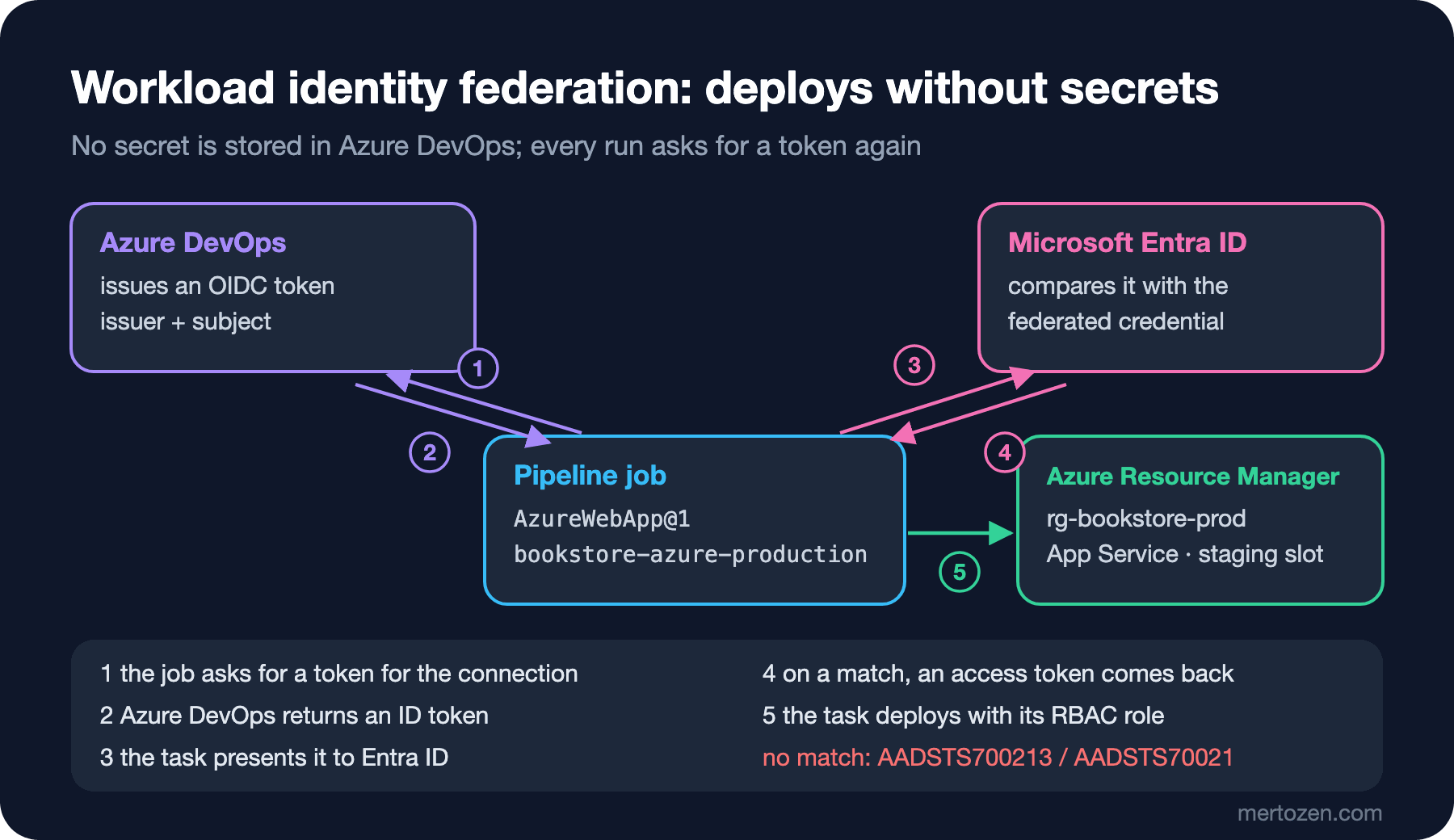
With workload identity federation, an Azure service connection works without storing any secret: Azure DevOps issues an OIDC token, and Entra ID matches it to a federated credential and returns an access token. We deploy Bookstore to an App Service staging slot through connections limited to a resource group, run a smoke test and a swap, apply the migration bundle with a connection string from Key Vault, and cover the 2027 retirement of the Azure DevOps issuer.
Version note: The EF Core migration bundle in this post was built locally with .NET 10 (SDK 10.0.404) and dotnet-ef 10.0.15 and run in a Linux container, and the smoke test script was run locally; the pipeline and template files were parsed and checked with yq 4.54. How service connections, workload identity federation and the Azure tasks behave is based on the official documentation on Microsoft Learn (November 2026 versions).
Guess First
The team behind Bookstore, the online bookstore used as the shared example across this site's series, uses an Azure service connection it set up two years ago: no secret, it works with workload identity federation. One morning the Azure DevOps project is renamed from Bookstore to Bookstore-Platform. The code, the pipeline and the connection itself stay the same. Does the nightly deployment still succeed?
It depends on when the connection was created. Older connections use the Azure DevOps issuer, and the subject of the federated credential in Microsoft Entra ID has the form sc://<organization>/<project>/<connection name>: the project name is part of the subject. When the name changes, the subject of the token the pipeline presents changes too, Entra ID finds no match with the registered credential, and the task fails with "AADSTS70021: No matching federated identity record found"; the troubleshooting page lists a renamed organization or project among the causes of this error. Connections created since March 2025 (Sprint 253) use the Microsoft Entra issuer instead; their subject contains no names, only the organization and connection IDs. For those connections a rename changes nothing.
Service Connections and Workload Identity Federation
A pipeline reaches Azure through an Azure Resource Manager service connection. The documentation gives two recommended ways to authenticate: an app registration or a user-assigned managed identity, both with workload identity federation. Options such as an app registration with a secret, a publish profile and an agent-assigned managed identity remain, according to the documentation, for backward compatibility and edge cases; they aren't recommended for a new connection.
The idea of federation is simple: no secret is stored in Azure DevOps. When a task needs Azure, Azure DevOps issues an OIDC token for that service connection. Entra ID compares the token's issuer and subject with the federated credential defined on the identity in advance; if they match, it returns an access token, and the task goes to Azure Resource Manager with it.
The difference between the two issuers is given in the same table in the Sprint 253 release notes and on the troubleshooting page. For Bookstore's production connection the values look like this (sample IDs):
Azure DevOps issuer
  Issuer:  https://vstoken.dev.azure.com/00000000-0000-0000-0000-000000000000
  Subject: sc://bookstore-org/Bookstore/bookstore-azure-production

Microsoft Entra issuer
  Issuer:  https://login.microsoftonline.com/11111111-1111-1111-1111-111111111111/v2.0
  Subject: <entra prefix>/sc/00000000-0000-0000-0000-000000000000/22222222-2222-2222-2222-222222222222
The timeline is fixed as well. The Azure DevOps issuer is deprecated as of July 1, 2026 and retires on July 1, 2027; in the roadmap's credential theft initiative table this item sits under 2027 Q2. What stays out of scope is written down too: non-public clouds such as Azure Government and connections that use multitenant app registrations keep using the Azure DevOps issuer; retirement for multitenant applications is an undated "Future" item on the roadmap.
To convert a connection you already have, the documented path is this: affected connections are flagged in the Service connections list under Project settings, and Update moves them to the Entra issuer. To turn an older connection with a secret into a federated one there is Convert, but only if Azure DevOps created the connection automatically and a single project uses it. A conversion can be reverted within seven days. If your permissions don't reach the Entra side, Azure DevOps gives you the issuer and subject values and the owner of the identity adds the credential by hand.
Bookstore's Service Connections
We created a separate connection for each environment: bookstore-azure-dev, bookstore-azure-staging and bookstore-azure-production. All of them were set up with "App registration (automatic)" and "Workload identity federation", choosing a single resource group as the scope instead of the whole subscription; the production one sees only rg-bookstore-prod. That is the documentation's security advice too: don't grant broad Contributor rights at subscription level, limit the connection to a resource group that holds only the resources it needs. We didn't tick "Grant access permission to all pipelines"; the documentation doesn't recommend it and says to authorize each pipeline separately.
We added the branch control and required template checks from the sixth post's production environment to the bookstore-azure-production connection as well. Even if someone writes a pipeline that never uses the environment and deploys straight through the same connection, these checks still apply. Inside the template the connection name is produced as bookstore-azure-${{ parameters.environment }}; as the documentation warns, a service connection can't be read from a variable, it must be known while the file is processed.
Migration Bundles: Build Once, Run at Deploy Time
Where migrations belong in a deployment and the rules for a backward-compatible schema were covered in the migrations post of the Deployment Strategies series. Here we look at the pipeline side: the bundle is built once in the Build stage, travels inside the release artifact, and the same file runs in every environment. Our first attempt failed locally:
$ dotnet ef migrations bundle --project src/Bookstore.Api/Bookstore.Api.csproj --configuration Release --self-contained --target-runtime linux-x64 --output out/migrations/efbundle
Build started...
Build succeeded.
An error occurred while accessing the Microsoft.Extensions.Hosting services. Continuing without the application service provider. Error: Connection string 'BookstoreDb' is missing. Set it with user-secrets or the ConnectionStrings__BookstoreDb environment variable (see README.md).
Unable to create a 'DbContext' of type 'BookstoreContext'. The exception 'Unable to resolve service for type 'Microsoft.EntityFrameworkCore.DbContextOptions`1[Bookstore.Data.BookstoreContext]' while attempting to activate 'Bookstore.Data.BookstoreContext'.' was thrown while attempting to create an instance. For the different patterns supported at design time, see https://go.microsoft.com/fwlink/?linkid=851728
To build the bundle, the EF tools create the DbContext through the application's own host, and Program.cs deliberately throws when there is no connection string. The bundle doesn't connect to a database while it is built, so a dummy value is enough:
$ ConnectionStrings__BookstoreDb="Server=bundle-build-only;Database=BookstoreDb" dotnet ef migrations bundle --project src/Bookstore.Api/Bookstore.Api.csproj --configuration Release --self-contained --target-runtime linux-x64 --output out/migrations/efbundle
Build started...
Build succeeded.
Building bundle...
Done. Migrations Bundle: …/out/migrations/efbundle
Don't forget to copy appsettings.json alongside your bundle if you need it to apply migrations.
$ du -h out/migrations/efbundle
172M	out/migrations/efbundle
A self-contained bundle carries the .NET runtime inside, hence 172 MB; the agent doesn't need .NET installed. The real lesson came from running it. We ran the bundle twice in a Linux container, against an address nothing listens on:
$ ./efbundle --connection "Server=127.0.0.1,1;Database=BookstoreDb;User Id=bookstore_migrator;Password=example-password-change-me;TrustServerCertificate=True;Connect Timeout=5"
An error occurred while accessing the Microsoft.Extensions.Hosting services. Continuing without the application service provider. Error: Connection string 'BookstoreDb' is missing. …
Unable to create a 'DbContext' of type 'Bookstore.Data.BookstoreContext'. …
$ ConnectionStrings__BookstoreDb="Server=127.0.0.1,1;…" ./efbundle
Microsoft.Data.SqlClient.SqlException (0x80131904): A network-related or instance-specific error occurred while establishing a connection to SQL Server. …
Even with --connection, the bundle builds the application's host and hits the same check. When the connection string comes as the ConnectionStrings__BookstoreDb environment variable, the bundle moves on to connecting; the error there is only because the address is deliberately empty. That's a good outcome for us: the secret never appears on a command line, which also follows the documentation's advice not to pass secrets as command-line parameters. The CI step carries the same lesson:
      # One self-contained executable that applies the migrations; it runs in the deploy stage, not here.
      - script: |
          dotnet tool restore
          dotnet ef migrations bundle --project ${{ parameters.apiProject }} --configuration ${{ parameters.buildConfiguration }} \
            --self-contained --target-runtime linux-x64 --output $(Build.ArtifactStagingDirectory)/migrations/efbundle
        displayName: Build EF Core migration bundle
        env:
          # Program.cs needs a connection string to build the DbContext; the bundle does not connect while it is built.
          ConnectionStrings__BookstoreDb: Server=bundle-build-only;Database=BookstoreDb
The bundle is uploaded as a separate migrations artifact, the Package job places it under release/migrations/, and the verification script now checks that efbundle is there as well.
Getting the Connection String from Key Vault
This is the path we promised in the second post: linking a variable group directly to Azure Key Vault. In the Library we created the bookstore-production-secrets group with "Link secrets from an Azure key vault as variables" turned on, selected a service connection and the kv-bookstore-prod vault, and added only the BookstoreDbMigrations secret. According to the documentation, only secret names are mapped to the group; the values are read from the vault, at their latest version, on every run. If a new secret is added to the vault, the group doesn't update itself; you add it by hand. For a vault that uses RBAC, the "Key Vault Secrets User" role on the connection's identity is enough; the documentation also notes that RBAC vaults behind a private endpoint aren't supported for this link.
The alternative is the AzureKeyVault@2 task: given a vault name and a filter, it turns secrets into variables for that job. The difference is where the permission lives. A variable group is a protected resource; it has its own pipeline permissions and checks, and it reaches the vault through the connection chosen when the group was created. We linked the group with a separate connection that can only read this vault (bookstore-keyvault-production). With the task, the permission to read the vault has to sit on the identity of the connection given to the task; if we used the deploy connection, that identity would become one that can both deploy and read secrets. Either way, a secret doesn't reach a script as an environment variable on its own; in the deploy step we map it explicitly with env. Key Vault itself was covered in the Configuration and Secret Management series.
Staging Slot, Smoke Test and Swap
The deploy hook of the deploy template now contains these steps (v1.4.0); useSlot is on only for production:
                # Migrations run before the new code goes live, so they must stay backward compatible.
                - script: |
                    chmod +x $(Pipeline.Workspace)/release/migrations/efbundle
                    $(Pipeline.Workspace)/release/migrations/efbundle
                  displayName: Apply EF Core migrations
                  env:
                    ConnectionStrings__BookstoreDb: $(BookstoreDbMigrations)

                - task: AzureWebApp@1
                  name: deployApi
                  displayName: Deploy API
                  inputs:
                    azureSubscription: bookstore-azure-${{ parameters.environment }}
                    appType: webAppLinux
                    appName: $(apiAppName)
                    ${{ if eq(parameters.useSlot, true) }}:
                      deployToSlotOrASE: true
                      resourceGroupName: $(resourceGroup)
                      slotName: staging
                    package: $(Pipeline.Workspace)/release/api
                    runtimeStack: DOTNETCORE|10.0

                - script: bash scripts/smoke-test.sh $(deployApi.AppServiceApplicationUrl)
                  displayName: Smoke test

                - ${{ if eq(parameters.useSlot, true) }}:
                    - task: AzureAppServiceManage@0
                      displayName: Swap staging slot into production
                      inputs:
                        azureSubscription: bookstore-azure-${{ parameters.environment }}
                        Action: Swap Slots
                        WebAppName: $(apiAppName)
                        ResourceGroupName: $(resourceGroup)
                        SourceSlot: staging
                        SwapWithProduction: true
The package input of AzureWebApp@1 accepts a folder produced by MSBuild as well as a zip file, so we pass the api folder from the release as is. DOTNETCORE|10.0 is in the runtimeStack list. The task's only output is AppServiceApplicationUrl; the documentation describes it as the URL of the selected App Service, and the smoke test takes its address from there. The app name and resource group come from the bookstore-production variable group; they can be variables, the restriction applies only to the connection name.
The smoke test is a small script: it tries a few times until /api/categories returns 200 and a non-empty JSON list. Locally we ran it against a small stub server that returns the same answer and against a port nothing listens on:
$ bash scripts/smoke-test.sh http://127.0.0.1:52107
Smoke test passed on attempt 1: http://127.0.0.1:52107/api/categories returned 4 categories
$ SMOKE_ATTEMPTS=3 SMOKE_DELAY_SECONDS=2 bash scripts/smoke-test.sh http://127.0.0.1:52108
Attempt 1/3: http://127.0.0.1:52108/api/categories returned HTTP 000
Attempt 2/3: http://127.0.0.1:52108/api/categories returned HTTP 000
Attempt 3/3: http://127.0.0.1:52108/api/categories returned HTTP 000
##vso[task.logissue type=error]Smoke test failed: http://127.0.0.1:52108/api/categories did not return categories after 3 attempts
If the smoke test fails, the job stops and the swap never runs; the production slot keeps serving the old version. The swap itself, slot-specific settings and rolling back were covered in the Blue-Green Deployment post of the Deployment Strategies series. AzureAppServiceManage@0 also supports swap with preview (Start Swap With Preview, Complete Swap).
Publishing the Angular Output
Angular's build output is static files. The first thing that comes to mind is the AzureStaticWebApp@0 task, but the inputs in its documentation ask for a deployment token (azure_static_web_apps_api_token), not an Azure service connection; that means storing a secret in the pipeline again. For Bookstore we chose the static website feature of a Storage account and upload through AzureCLI@2 with the same federated connection:
                - task: AzureCLI@2
                  displayName: Upload Angular app to the static website
                  inputs:
                    azureSubscription: bookstore-azure-${{ parameters.environment }}
                    scriptType: bash
                    scriptLocation: inlineScript
                    inlineScript: >-
                      az storage blob upload-batch --auth-mode login --overwrite true
                      --account-name $(webStorageAccount) --destination '$web'
                      --source $(Pipeline.Workspace)/release/web
--auth-mode login makes the Azure CLI use the signed-in identity instead of a storage account key; for that, the connection's identity needs a data role such as "Storage Blob Data Contributor" on that account. Putting a CDN in front and its cache settings are topics for the Cloud Fundamentals series.
In Production
Unused connections can be switched off. According to the documentation, Azure Pipelines may automatically disable Azure Resource Manager connections that weren't used for 100 days, and pipelines that refer to them break until the connection is enabled again. If you have a disaster recovery pipeline that runs a few times a year, keep this in mind.
Account for the window between migration and swap. After the bundle moves the production database to the new schema, the old code runs against that schema until the swap completes. That's why migrations must be backward compatible; things like dropping a column wait for the next release.
Grant roles at the narrowest level. The production connection's identity has no job other than deploying to App Service, swapping slots and writing to Storage. Even Contributor at resource group level may be wider than needed; narrower roles and assignments at resource level cut down the questions in an access review.
Common Pitfalls
Leaving the connection open with "Grant access permission to all pipelines". Every pipeline in the project, including one written in a pull request, gets access to production. Authorize pipelines one by one and add checks to the connection.
Granting the RBAC role at subscription level. If no resource group is chosen while the connection is set up, the identity's permissions cover the whole subscription. One wrong step can affect every environment.
Passing the connection string with --connection. The secret ends up on a command line, and in a project that builds its host, like ours, it doesn't even work. Use an environment variable.
Forgetting the old issuer. Federated connections set up before 2025 are waiting to be converted too; after July 1, 2027 no token can be obtained with the Azure DevOps issuer. Check the warning in the Service connections list today.
A Small Experiment
★☆☆ Add a second check to smoke-test.sh: /api/books?pageSize=1 must return 200 as well. Try it by placing a new file on the stub server.
★★☆ Work out from the documentation the steps to set up Bookstore's connection with a user-assigned managed identity, and write down how it differs from the app registration path in terms of permissions.
★★★ Design an on: failure hook that rolls the staging slot back to the previous version when the smoke test fails. Discuss which artifact the hook would need and whether the migration should be rolled back.
The pipeline now deploys to Azure without passwords. But all of this runs on Microsoft's hosted agents, and we haven't touched the organization's security settings yet. In the next post we look at agent options (Microsoft-hosted, self-hosted, Managed DevOps Pools) and at security settings from the job authorization scope to settableVariables.