

File Upload Security in Depth: Magic Byte Checks, Re-encoding Images, Malware Scanning, Zip Bombs and Direct-to-Blob Uploads with SAS
Both the name and the Content-Type of an uploaded file are text written by the client; safety comes from validating the content and keeping the file in quarantine until it is approved. On Bookstore we build, end to end, magic byte checks with an allowlist, re-encoding that defuses polyglots, zip bomb and Zip Slip limits for EPUBs, scanning with ClamAV and Defender for Storage, short-lived single-blob SAS uploads and signed download links.
Version note: The code in this post was built and run with .NET 10 (ASP.NET Core 10.0.15 runtime), using Azure.Storage.Blobs 12.30.1, SkiaSharp 4.156.1, xUnit v3 4.0.3, Azurite 3.37.0 and ClamAV 1.5.4. The "Upload files in ASP.NET Core" page on Microsoft Learn (updated 3 October 2026) and the OWASP File Upload Cheat Sheet were checked on 15 November 2026.
Guess First
In Bookstore, the online bookstore used as the shared example across this site's series, publishers upload book covers and sample chapters themselves. From a publisher account comes a file named dune-cover.jpg, sent with Content-Type: image/jpeg. Its first bytes are FF D8 FF, so it really is a JPEG; but after the end of the image data someone appended a piece of HTML containing <script>. Which of the extension check, the Content-Type check and the magic byte check stops this file?
None of them; by all three measures the file is a valid JPEG. In this post we validate the content of uploaded files, re-encode images, handle archives and scan for malware; we also keep each file in quarantine until it is approved and hand it to users through a short-lived signed link. The basics (IFormFile, not trusting the file name, random names, storing outside the web root) are in the file upload post of the ASP.NET Core Web API series, and body size limits are in this series' Kestrel post; we do not repeat them here.
Content, Not Extension or Content-Type: Magic Bytes
Both the file name and the Content-Type header are text written by the client. We read the format from the first bytes of the file, the magic bytes, and keep a separate allowlist for each upload purpose:
public static class FileSignatures
{
    // Decides by the first bytes, not by the file name or the Content-Type the client sent
    public static FileFormat? Detect(ReadOnlySpan<byte> head) => head switch
    {
        [0xFF, 0xD8, 0xFF, ..] => FileFormat.Jpeg,
        [0x89, (byte)'P', (byte)'N', (byte)'G', 0x0D, 0x0A, 0x1A, 0x0A, ..] => FileFormat.Png,
        [(byte)'R', (byte)'I', (byte)'F', (byte)'F', _, _, _, _, (byte)'W', (byte)'E', (byte)'B', (byte)'P', ..] => FileFormat.WebP,
        [(byte)'%', (byte)'P', (byte)'D', (byte)'F', (byte)'-', ..] => FileFormat.Pdf,
        [(byte)'P', (byte)'K', 0x03, 0x04, ..] when IsEpub(head) => FileFormat.Epub,
        _ => null,
    };

    // EPUB (OCF): the first zip entry is an uncompressed "mimetype" file with no extra field
    private static bool IsEpub(ReadOnlySpan<byte> head) =>
        head.Length >= 58
        && head[8] == 0 && head[9] == 0
        && head[28] == 0 && head[29] == 0
        && head[30..38].SequenceEqual("mimetype"u8)
        && head[38..58].SequenceEqual("application/epub+zip"u8);

    public static bool IsAllowed(UploadPurpose purpose, FileFormat format) => (purpose, format) switch
    {
        (UploadPurpose.Cover, FileFormat.Jpeg or FileFormat.Png or FileFormat.WebP) => true,
        (UploadPurpose.SampleChapter, FileFormat.Pdf or FileFormat.Epub) => true,
        _ => false,
    };
}
A sample chapter can be a PDF or an EPUB, which is a zip package that follows specific rules. Every zip starts with PK\x03\x04, so we tell EPUB apart using the rule in the W3C EPUB 3.3 specification: the first file must be a mimetype file, stored uncompressed, with no extra field, containing only application/epub+zip. For PDF we require the %PDF- signature at byte zero; readers accept it a little further in, but we have no use for bytes in front of it. I ran the test with dotnet run --project tests/Bookstore.Api.Tests -- -showLiveOutput (test-name prefixes trimmed):
dune-cover.jpg    Cover         detected=Jpeg     accepted=True
dune-cover.jpg    Cover         detected=unknown  accepted=False
dune-cover.jpg    Cover         detected=Jpeg     accepted=True
dune-sample.pdf   SampleChapter detected=Pdf      accepted=True
dune-sample.epub  SampleChapter detected=Epub     accepted=True
dune-sample.pdf   SampleChapter detected=Jpeg     accepted=False
The second line is an SVG named .jpg. An SVG can contain <script>, which runs when the browser opens the file directly; an SVG served from our origin means stored XSS, the attacker's script running in other users' browsers with the site's privileges. For the same reason we never accept HTML: anything not on the allowlist is "unknown". The third line is the file from the opening: the signature check sees a JPEG and lets it through. Magic bytes answer "which format is this file", not "is this file harmless".
Re-encoding Images
The file from the opening is a polyglot: the same bytes are valid in two different formats. The image decoder never looks at the trailing HTML, but a context that interprets the file as HTML runs it. Metadata such as EXIF and a format's comment fields can carry payloads the same way. OWASP's advice here is clear: decode the image and re-encode it into an allowed format. What we keep is the pixels; the rest of the file is not copied:
public byte[] Reencode(byte[] original)
{
    using SKData data = SKData.CreateCopy(original);
    using SKCodec codec = SKCodec.Create(data) ?? throw new InvalidUploadException("The image could not be read.");

    // Header only: the pixel limit is checked before a single pixel is decoded
    long pixels = (long)codec.Info.Width * codec.Info.Height;
    if (pixels > options.Value.MaxCoverPixels)
    {
        throw new InvalidUploadException($"{codec.Info.Width}x{codec.Info.Height} is {pixels:N0} pixels, the limit is {options.Value.MaxCoverPixels:N0}.");
    }

    // Decode to raw pixels and write a brand-new file: nothing else from the original survives
    using SKBitmap bitmap = SKBitmap.Decode(codec) ?? throw new InvalidUploadException("The image could not be decoded.");
    using SKImage image = SKImage.FromBitmap(bitmap);
    using SKData webp = image.Encode(SKEncodedImageFormat.Webp, 85);
    return webp.ToArray();
}
input : 374 bytes, Jpeg, contains <script: True
output: 566 bytes, WebP, contains <script: FalseThe pixel limit guards against decompression bombs, small files that expand into huge amounts of memory when decoded; even 40 million pixels take about 160 MB once decoded. We chose SkiaSharp (MIT license) as the library. We checked SixLabors ImageSharp's license on 15 November 2026: the Six Labors Split License grants Apache 2.0 only to open source projects, transitive dependencies, companies with under 1 million dollars of annual revenue and non-profits; everyone else needs a commercial license. The details of resizing, EXIF orientation and metadata cleanup are in the image processing post of the Email, PDF, Excel and Files in .NET series. For PDF and Office documents the counterpart of re-encoding is CDR, Content Disarm and Reconstruct, which parses a document and rebuilds it from its safe parts only; that is mostly done by commercial products, so we store the PDF as is and serve it only as a download.
Archives: EPUB, Zip Bombs and Zip Slip
Since an EPUB is a zip, the two classic zip problems are its problems too: a zip bomb, a small archive that fills the disk or memory when expanded, and Zip Slip, where ../ in an entry name writes the file outside the target folder. The mechanics of safe extraction are in the compression and archives post of the I/O in .NET series. We never extract the EPUB to disk; we only walk it and measure:
foreach (ZipArchiveEntry entry in archive.Entries)
{
    string name = entry.FullName;
    if (name.StartsWith('/') || name.Contains('\\') || name.Contains(':') || name.Split('/').Contains(".."))
    {
        return $"Entry '{UploadFileName.Printable(name)}' has an unsafe path.";
    }

    if (NestedArchives.Contains(Path.GetExtension(name)))
    {
        return $"Entry '{UploadFileName.Printable(name)}' is a nested archive.";
    }

    if (entry.CompressedLength > 0 && entry.Length / entry.CompressedLength > o.MaxCompressionRatio)
    {
        return $"Entry '{UploadFileName.Printable(name)}' has compression ratio {entry.Length / entry.CompressedLength:N0}:1.";
    }

    // The sizes in the header can lie, so count the bytes that really come out
    await using Stream content = await entry.OpenAsync(ct);
    int read;
    while ((read = await content.ReadAsync(buffer, ct)) > 0)
    {
        expanded += read;
        if (expanded > o.MaxExpandedBytes)
        {
            return $"Expanded size exceeds {o.MaxExpandedBytes:N0} bytes.";
        }
    }
}
Before the loop we cap the entry count at 2,000. The test builds the archives in memory; the bomb is a single entry of 100 MB of zeros:
valid                  288 bytes  OK
bomb               102,163 bytes  Entry 'OEBPS/ch1.xhtml' has compression ratio 1,028:1.
bomb, ratio off    102,163 bytes  Expanded size exceeds 52,428,800 bytes.
traversal              306 bytes  Entry '../../wwwroot/index.html' has an unsafe path.
nested                 320 bytes  Entry 'OEBPS/extra.zip' is a nested archive.
A 100 KB file expands to 100 MB. The ratio check catches it first; even with the ratio check turned off, the loop that counts real bytes stops at 50 MB, because the ratio is computed from numbers the archive declares about itself. We never accept an archive inside an archive; nested zips are the easiest way both to multiply the limits and to make scanning harder. We check paths even though we do not extract, because some other code that opens this EPUB one day (a web reader, a converter) will not have the same trust. EPUB 3 content can also contain JavaScript; if you write a reader that shows EPUBs in the browser, serve it from a separate origin as well.
Malware Scanning: ClamAV
Format and structure checks do not catch known malware; for that you need a signature-based scanner. Locally I used ClamAV's official image. The signature database for the tag ships with the image and freshclam updates it inside the container; the documentation states plainly that clamd's TCP socket has no authentication, so the port is bound to 127.0.0.1 only:
docker run -d --name aspsecseries-clamav -p 127.0.0.1:52110:3310 clamav/clamav:1.5.4-debianThe app talks to clamd with the INSTREAM command; the file is sent in chunks without being written to disk. The protocol is small, so we did not add a package:
// INSTREAM: 4-byte big-endian length + data per chunk, a zero length ends the stream
await stream.WriteAsync("zINSTREAM\0"u8.ToArray(), timeout.Token);
byte[] buffer = new byte[64 * 1024];
byte[] length = new byte[4];
int read;
while ((read = await content.ReadAsync(buffer, timeout.Token)) > 0)
{
    BinaryPrimitives.WriteUInt32BigEndian(length, (uint)read);
    await stream.WriteAsync(length, timeout.Token);
    await stream.WriteAsync(buffer.AsMemory(0, read), timeout.Token);
}

BinaryPrimitives.WriteUInt32BigEndian(length, 0);
await stream.WriteAsync(length, timeout.Token);

using StreamReader reader = new(stream, Encoding.ASCII);
string reply = (await reader.ReadToEndAsync(timeout.Token)).TrimEnd('\0');
return reply switch
{
    "stream: OK" => new ScanResult(true, null),
    _ when reply.StartsWith("stream: ") && reply.EndsWith(" FOUND") => new ScanResult(false, reply["stream: ".Length..^" FOUND".Length]),
    _ => throw new ScannerUnavailableException($"Unexpected clamd reply: {reply}"),
};
As "malware" the tests use only the EICAR test file: a 68-character text that antivirus vendors agreed to detect and that does nothing. If it sat contiguously in a source file, the antivirus on the reader's machine would quarantine the test file, so we join it at run time:
// Built at run time so that this source file itself does not trigger the reader's antivirus
public static byte[] Eicar() => Encoding.ASCII.GetBytes(@"X5O!P%@AP[4\PZX54(P^)7CC)7}$" + "EICAR-STANDARD-ANTIVIRUS-TEST-FILE!$H+H*");
In the end-to-end test each file is uploaded to quarantine with a SAS and processed:
dune-cover.jpg (polyglot)  Approved
dune-cover.jpg (svg)       Rejected  Unknown file format.
dune-sample.epub           Approved
dune-sample.epub (eicar)   Infected  Eicar-Test-Signature
dune-sample.pdf (25 MB)    Rejected  26,214,477 bytes, the limit is 20,971,520.
Note the fourth line: we put EICAR inside a valid EPUB, named OEBPS/fonts/serif.ttf. The signature check and the archive limits let the file through; ClamAV looked inside the archive and caught it. The polyglot cover was approved, because the approved file is now a re-encoded WebP. ClamAV's official documentation asks for at least 3 GiB of memory for clamd, 4 GiB preferred. Do not put the scanner in the same container as the API; run it as a separate service.
On Azure: Defender for Storage Malware Scanning
This section is based on the official documentation. The malware scanning feature of Microsoft Defender for Storage (documentation updated 22 September 2026) scans blobs uploaded to a storage account with the Microsoft Defender Antivirus engine: on-upload mode runs on every upload or change, on-demand mode whenever you ask. It scans files up to 50 GB per blob, archives included. By default the result is written to blob index tags (No threats found, Malicious, Error, Not scanned); you can also get Defender for Cloud alerts, Event Grid events and Log Analytics records. The documentation says index tags can be modified and therefore should not be the only security control; build your flow on the Event Grid event. There is also an option to soft delete malicious blobs automatically. Limits: client-side encrypted blobs and append and page blobs are not scanned; scan time varies by file and very large or complex archives can time out. In our flow Defender replaces ClamAV: when the Event Grid event arrives, the processor reads the result and either moves the file to the approved container or rejects it.
Quarantine and a Status Field: The Whole Flow
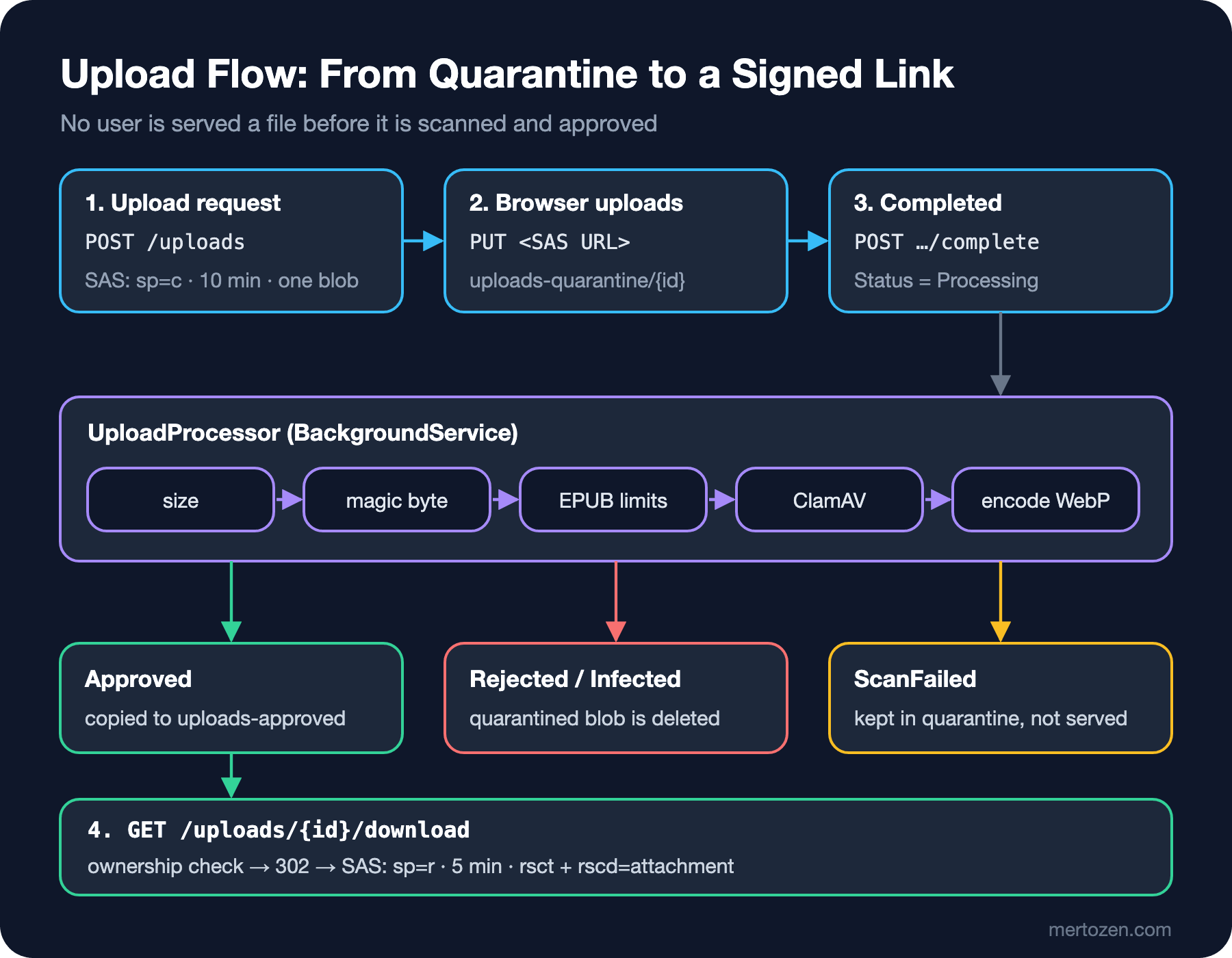
Every file a publisher uploads first lands in the uploads-quarantine container; no read path in the app serves files from it. The checks run in a BackgroundService, in order of rising cost: blob size first, then magic bytes and the allowlist, archive limits for EPUBs, then ClamAV, and finally re-encoding for covers. A file that passes is written to uploads-approved under a random name and the quarantined copy is deleted. The status (Processing, Approved, Rejected, Infected, ScanFailed) lives on the upload record; in this post an in-memory store, in reality a table. The most critical part is what happens on errors:
try
{
    await ProcessAsync(record, stoppingToken);
}
catch (InvalidUploadException ex)
{
    (record.Status, record.Reason) = (UploadStatus.Rejected, ex.Message);
    await Quarantine.GetBlobClient(record.QuarantineBlob).DeleteIfExistsAsync(cancellationToken: stoppingToken);
}
catch (Exception ex) when (ex is ScannerUnavailableException or SocketException or IOException or OperationCanceledException
                           && !stoppingToken.IsCancellationRequested)
{
    // Fail closed: the file stays in quarantine and is never served
    (record.Status, record.Reason) = (UploadStatus.ScanFailed, ex.GetType().Name);
}
If the scanner does not answer, the file is not considered clean. We tested this with a TcpListener we opened in the test ourselves, which accepts the connection and never answers, and a 2-second timeout:
info: Bookstore.Api.Uploads.UploadProcessor[0]
      Upload 28207b52-96b8-4304-a8cf-5a25e4b9aa9b (dune.pdf) finished as ScanFailed: OperationCanceledException
status ScanFailed (OperationCanceledException), download -> 409
The file name in the log line is not the name the client sent but its form after UploadFileName.ForDisplay: path dropped, control characters removed, cut to 100 characters. A file arriving as ..\..\appsettings.json\r\n[INF] Admin login ok is logged as appsettings.json[INF] Admin login ok; with the line breaks removed it cannot forge a log line.
Direct-to-Blob Uploads: Narrowing the SAS
Letting the browser upload a 20 MB PDF straight to Blob Storage instead of passing it through the API relieves both Kestrel and bandwidth. The mechanics of generating a SAS and the CORS settings are in the file storage post of the Email, PDF, Excel and Files in .NET series, and user delegation SAS is in the Cloud Storage post of the Cloud Fundamentals series. What matters here is what the SAS allows:
// One blob, create only, a few minutes, in the quarantine container
public Uri ForUpload(UploadRecord record)
{
    UploadOptions o = options.Value;
    BlobClient blob = blobs.GetBlobContainerClient(o.QuarantineContainer).GetBlobClient(record.QuarantineBlob);
    BlobSasBuilder sas = new(BlobSasPermissions.Create, time.GetUtcNow().Add(o.UploadSasLifetime))
    {
        BlobContainerName = blob.BlobContainerName,
        BlobName = blob.Name,
        Resource = "b",
        Protocol = o.SasProtocol,
    };
    return blob.GenerateSasUri(sas);
}
Locally I ran Azurite with an account whose key I generated myself. The service version the SDK sends (2026-10-06) is newer than what Azurite 3.37.0 knows, so --skipApiVersionCheck is needed; the tests read the connection details from environment variables:
docker run -d --name aspsecseries-azurite -p 127.0.0.1:52109:10000 -e AZURITE_ACCOUNTS="bookstoredev:<base64-key>" mcr.microsoft.com/azure-storage/azurite:3.37.0 azurite-blob --blobHost 0.0.0.0 --skipApiVersionCheck

$env:Storage__ConnectionString = "DefaultEndpointsProtocol=http;AccountName=bookstoredev;AccountKey=<base64-key>;BlobEndpoint=http://127.0.0.1:52109/bookstoredev;"
$env:ClamAv__Port = "52110"
dotnet run --project tests/Bookstore.Api.Tests -- -showLiveOutput
upload url: http://127.0.0.1:52109/bookstoredev/uploads-quarantine/d19f142616c448408fdadabc4c0d067e?sv=2026-10-06&spr=https,http&se=2026-11-15T11%3A33%3A11Z&sr=b&sp=c&sig=<signature>
PUT own blob -> 201
PUT own blob again -> 403 AuthorizationPermissionMismatch
PUT another blob name -> 403 AuthorizationFailure
GET with upload SAS -> 403 AuthorizationPermissionMismatchsr=b ties the SAS to a single blob: writing to another name with the same signature is refused. sp=c, the Create permission, is defined in the documentation as writing a new blob; Azurite refused the second PUT, the overwrite of the uploaded file, with 403. There is no read permission, so even if the SAS link leaks it cannot be used to distribute the file. In production spr=https should stay; in the test we relaxed it through a setting because Azurite listens on plain HTTP.
There is one thing a SAS cannot do, though: limit size or content. For the 25 MB file above we declared 1,024 bytes in the upload request, and Blob Storage accepted it without question. Kestrel limits do not apply on this path, which is why the processor's first job is to look at the blob's real size. Rate limit the endpoint that issues SAS URLs, and put a lifecycle policy on the quarantine container that deletes blobs after a day; otherwise unfinished uploads pile up in storage. Resource consumption risks like these are in the resource consumption post of the API Security series.
Downloads: Authorization and Safe Headers
Approved files are not public either. The download endpoint checks ownership first, then redirects to a five-minute, read-only SAS. Another publisher's file gets a 404 just like a missing one, so the existence of IDs does not leak either:
uploads.MapGet("/{id:guid}/download", (Guid id, ClaimsPrincipal user, UploadStore store, UploadSasIssuer sas) =>
    Find(store, id, user) switch
    {
        null => Results.NotFound(),
        { Status: UploadStatus.Approved } record => Results.Redirect(sas.ForDownload(record).ToString()),
        var record => Results.Conflict(new UploadStatusResponse(id, record.Status, null)),
    });
BlobSasBuilder sas = new(BlobSasPermissions.Read, time.GetUtcNow().Add(o.DownloadSasLifetime))
{
BlobContainerName = blob.BlobContainerName,
BlobName = blob.Name,
Resource = "b",
Protocol = o.SasProtocol,
ContentType = contentType,
ContentDisposition = $"attachment; filename=\"{record.Isbn}-{record.Purpose.ToString().ToLowerInvariant()}.{extension}\"",
};ContentType and ContentDisposition are signed into the SAS as the rsct and rscd parameters, and Blob Storage returns them in the response instead of the values stored on the blob. The values come from the format we detected and from the ISBN; we use neither the client's Content-Type nor its file name, so no line break or quote can be smuggled into the header. Output of the flow test:
PUT with SAS            -> 201
download before scan    -> 409
status                  -> Approved
download, other publisher -> 404
download                -> 302 then 200
Content-Type: application/pdf
Content-Disposition: attachment; filename="9780441013593-samplechapter.pdf"
Because the files come from a separate origin, the storage account or a CDN in front of it, even if something slips through, its script cannot reach Bookstore's cookies. If you serve the file from the app itself, Results.File(stream, contentType, fileDownloadName) produces the same attachment header; add X-Content-Type-Options: nosniff from the middleware in this series' security header post so the browser does not guess the type by looking at the content.
Production Notes
Watch the scanning queue: make the number of records waiting in Processing and the age of the oldest one metrics, and add them to the alert rules from the observability post. Let a retry job re-queue ScanFailed records; if the scanner is down for a long time, stopping uploads altogether is better than accepting unscanned files.
ClamAV signatures are updated once a day, and during a reload clamd's memory can briefly double; size the container's memory limit for that. Signature-based scanning only catches known malware: that is why re-encoding, the allowlist and the separate origin sit next to scanning, not in place of it.
In this example we delete the blobs of rejected and Infected files immediately. If you need evidence for an incident review, move them to a separate container with restricted access and a short retention period.
Common Pitfalls
Checking only on the client. accept=".jpg,.pdf" and a size check in Angular are for user experience; anyone who gets the SAS URL can upload whatever they want with curl, like the 25 MB file in the test.
Serving the file before it is scanned. In a flow where scanning comes afterwards, the file can be distributed for as long as the scan takes. Writing to the approved container should be the only way in.
Writing the uploaded file name as is into paths and logs. In a path it leads to path traversal (the path traversal post of the Web Security series), in logs to forged lines, in Content-Disposition to header injection. Use the ID for storage, the cleaned name for display and a generated name for downloads.
Treating the magic byte check as enough. The polyglot from the opening passed the signature check; re-encoding is what made it harmless.
A Small Experiment
★☆☆ Add a decompression bomb to InspectionTests: generate a small image whose header says 20000x20000 and verify that CoverReencoder rejects it without decoding.
★★☆ Pause the ClamAV container with docker pause, upload a sample chapter and watch the record fall into ScanFailed. Then write a retry job that re-queues ScanFailed records every five minutes, and test that the record becomes Approved once you unpause the container.
★★★ Add a separate path to the download endpoint that serves a book's approved covers inline, since covers are shown with <img>. Write down which headers and which cache lifetime you choose, and how a signed URL should be cached on a CDN, with your reasoning.
With this post we complete the series. From the internals of authorization to Data Protection, from rate limiting to headers, from antiforgery to Kestrel limits, from observability to what .NET 11 brings and finally to file uploads, we have seen where the framework's security tools make which decision and how to tune them for production. Who authenticates the user and which permissions they get is the subject of the Authentication and Authorization series, and the browser-side detail of CSP is in the Frontend Security series.