

Faceted Navigation, Pagination and Infinite Scroll: Serving Catalog Filters Without Burning Crawl Budget

Filter URLs that don't need indexing are kept out of the crawl with robots.txt; filters to be indexed get one spelling, a fixed order and & separators, combinations without results return 404 at that URL, and every page carries its own canonical. On Bookstore's catalog we build ASP.NET Core code that normalizes filters, pagination with real links, a crawlable "load more" and the Angular SSR counterpart.
Version note: The code in this post was built and tested with .NET 10 (ASP.NET Core 10.0.15) and Angular 22.2 (@angular/ssr 22.2.7, Node.js 24); the rules follow Google's faceted navigation documentation (last updated 18 December 2025), its ecommerce pagination documentation and its lazy-loading documentation (both 10 December 2025) as read in November 2026.
Guess First
The science fiction category of Bookstore, the online bookstore used as the shared example across this site's series, has 30 books. Users can filter the list by language (Turkish, English) and edition (hardcover, paperback, ebook), and sort it by title, price or year; each page shows 12 books. Three proposals are going around the team: "Make the first page the canonical of every filtered page, and the duplicate content problem is gone", "Redirect users to the home page when a filter returns no results" and "Declare the relationship between pages with rel=next and rel=prev".
How many different URLs can a single category produce? Which of the three proposals matches Google's current documentation?
A rough count: three states for language (none, Turkish, English), four for edition (none and three types), three sort options; 36 combinations in a single category, more than a hundred with pages. Add parameters written in a different order, the same parameter twice and page numbers that don't exist, and there's no limit. This is exactly where the "most of Googlebot's requests go to variations of the same list" table from the log analysis in the eleventh post of the series comes from.
Why Filter URLs Are a Problem
Google's faceted navigation documentation sums up the problem under two headings. The first is overcrawling: filter URLs look new to a crawler, and a crawler can't know whether a URL is useful without crawling it, so it ends up visiting a large number of filter URLs before it figures out they're useless. The second is slower discovery of new content: the more crawl time goes to useless URLs, the less is left for new, useful ones.
The documentation describes two paths. If you don't need the filter URLs indexed, keep them out of the crawl. If you do, build the URLs according to the rules in the documentation and accept that this has a cost in server resources and discovery speed. Bookstore uses both: genre and genre + language pages will be indexed, because "Turkish science fiction books" is something people actually search for; edition and sorting are for users only.
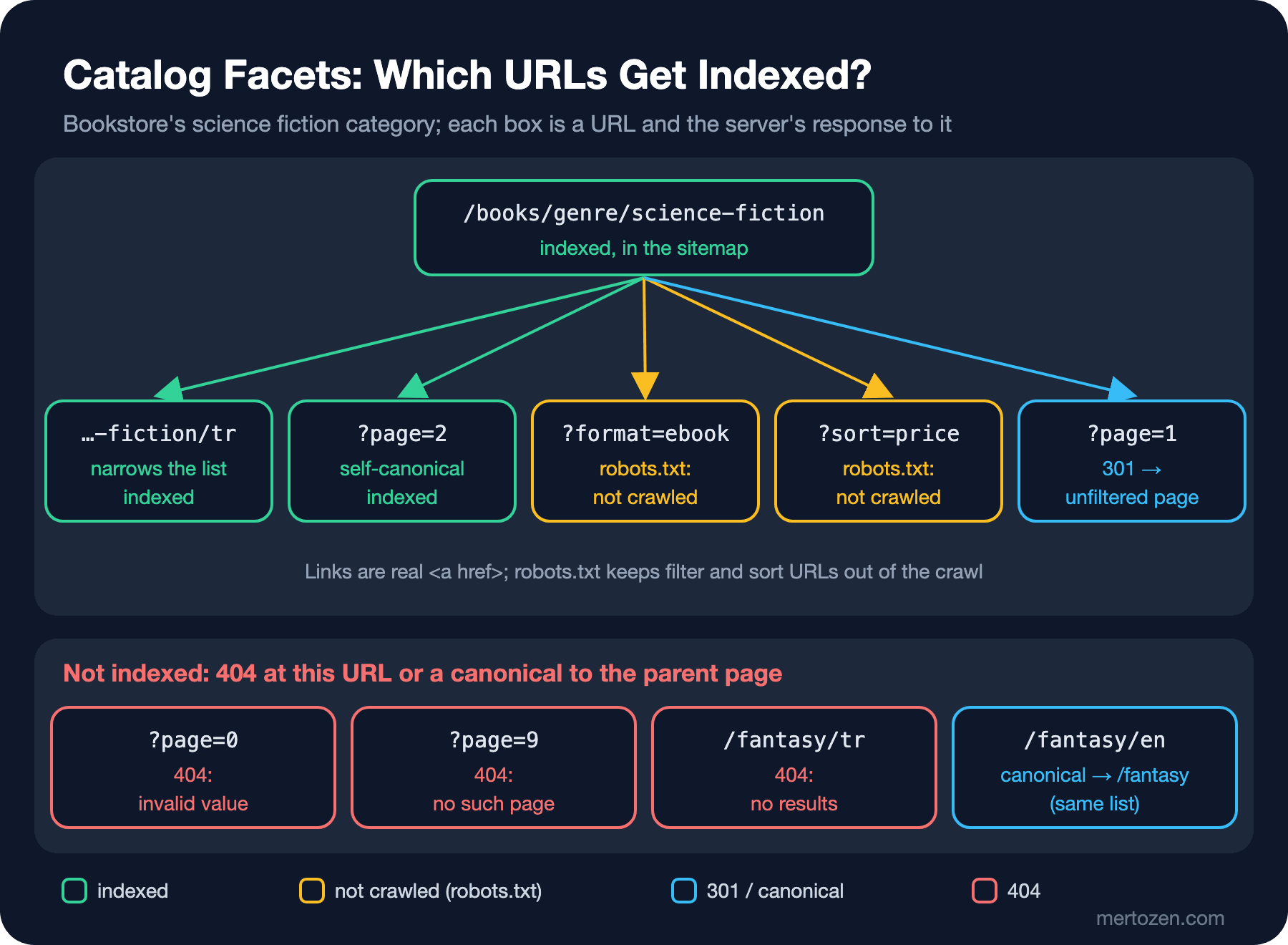
| Filter | URL form | Indexed | Mechanism |
|---|---|---|---|
| Genre | /books/genre/science-fiction | Yes | In the sitemap, its own canonical |
| Genre + language | /books/genre/science-fiction/tr | Yes, if it narrows the list | Fixed order in the path |
| Page | ?page=2 | Yes | Its own canonical, sequential links |
| Edition, sorting | ?format=ebook, ?sort=price | No | robots.txt Disallow |
Keeping Them out of the Crawl: robots.txt, Fragments, canonical, nofollow
For filters that don't need to be indexed, the documentation shows two effective ways. The first is blocking the filter parameters with robots.txt; according to the documentation, there's often no good reason to have filtered listings crawled, and allowing the individual item pages plus one unfiltered listing page is enough. The second is putting filters in the URL fragment (#format=ebook); since Google generally doesn't support fragments in crawling and indexing, these filters have no effect on crawling at all. Bookstore chose the first, because the filtered pages are supposed to be rendered on the server and be shareable:
// filter and sort URLs are not crawled; genre and page URLs are allowed
app.MapGet("/robots.txt", () => Results.Text("""
    User-agent: *
    Disallow: /*?*format=
    Disallow: /*?*sort=

    Sitemap: https://bookstore.example/sitemap.xml

    """, "text/plain; charset=utf-8"));
The /*?*format= rule covers every URL with format= anywhere in the query string; it doesn't touch URLs that only carry a page, such as ?page=2. The other two tools the documentation lists, rel="canonical" and rel="nofollow", are less effective in the long run. A canonical from the filtered page to the unfiltered one may reduce crawling of the filtered URLs over time. For nofollow to work, it has to be on every link pointing to that URL; one forgotten link is enough to undo it. And the contradiction from the third post of the series applies here as well: Google never sees the noindex or canonical on a page blocked by robots.txt. Bookstore's filtered pages still carry a canonical to the unfiltered genre, but that's only for crawlers that don't follow robots.txt.
Filters to Be Indexed: One Spelling, Fixed Order
For filter URLs you want indexed, the documentation sets three rules: separate parameters with the industry standard & (commas, semicolons and brackets aren't characters a crawler will recognize as separators); if you put filters in the path, keep their logical order the same and make sure the same filter can't appear twice; and return 404 for combinations without results.
In Bookstore the route itself fixes the order of the indexed filters: /books/genre/{genre}/{language?}. Genre first, language second; a repeated segment such as /books/genre/science-fiction/tr/tr matches no route, so it's a 404. For the filters in the query there's a single CatalogQuery: it validates the request, drops the defaults and produces the one correct spelling of the URL:
// null: invalid request (404). Normalized: the one correct spelling of the URL; 301 if the request differs
public static (CatalogQuery? Query, string? Normalized) Parse(string genre, string? language, IQueryCollection query)
{
    if (!BookCatalog.Genres.Any(g => g.Slug == genre) || (language is not null && !Languages.Contains(language)))
        return (null, null);

    // the same filter twice (?format=ebook&format=ebook) or a meaningless value: 404, not a redirect
    if (query.Any(p => p.Value.Count > 1))
        return (null, null);
    // ... format, sort and page are validated the same way

    CatalogQuery result = new(genre, language, format, sort, page);
    // defaults (?page=1, ?sort=title) are dropped, the parameter order is fixed
    string normalized = result.ToUrl();
    return (result, BuildRequested(genre, language, query) == normalized ? null : normalized);
}

// parameters always in the same order, joined with &: format, sort, page
public string ToUrl(string prefix = "")
{
    List<string> parts = [];
    if (Format is BookFormat format) parts.Add($"format={format.ToString().ToLowerInvariant()}");
    if (Sort != "title") parts.Add($"sort={Sort}");
    if (Page > 1) parts.Add($"page={Page}");
    string path = Language is null ? $"{prefix}/books/genre/{Genre}" : $"{prefix}/books/genre/{Genre}/{Language}";
    return parts.Count == 0 ? path : $"{path}?{string.Join('&', parts)}";
}
All filter and page links on the page are produced with ToUrl too; since the site always uses the same spelling in its own links, a request with a different spelling can only come from outside, and it lands on the single address with a 301. Tracking parameters (such as utm_source) aren't part of this comparison; the canonical from the fifth post of the series already drops them.
Combinations Without Results: 404 at That URL
The documentation's third rule directly rejects the second proposal from the opening: if a filter combination returns no results, users and crawlers alike should get a "not found" response with the proper status code at that URL. Instead of redirecting to a shared error page, the 404 should be served at the same URL. The same goes for repeated or meaningless filters and page numbers that don't exist.
Order matters here. In the first draft the 301 check came before the results check: a ?page=2&format=ebook request first got a 301 to ?format=ebook&page=2, and the target returned 404, because ten ebooks fit on a single page. Finding a 404 at the end of a redirect is a wasted hop, and it also breaks the documentation's "error at the URL where it was encountered" rule. In the handler the results check comes first:
(CatalogQuery? query, string? normalized) = CatalogQuery.Parse(genre, language, Request.Query);
if (query is null)
    return NotFound();

Query = query;
List<Book> all = [.. Query.Apply(catalog.Books)];
TotalPages = (int)Math.Ceiling(all.Count / (double)CatalogQuery.PageSize);
// combination without results and nonexistent page: 404 at this URL, not a redirect to a "not found" page
if (all.Count == 0 || Query.Page > TotalPages)
    return NotFound();
// after the results check: the target of a 301 is never a 404
if (normalized is not null)
    return RedirectPermanent(Prefix + normalized);
$ B=http://127.0.0.1:52213
$ while read -r u; do printf "%-55s %s %s\n" "$u" "$(curl -s -o /dev/null -w '%{http_code}' "$B$u")" "$(curl -sI "$B$u" | grep -i '^location' | tr -d '\r')"; done < urls.txt
/books/genre/science-fiction?page=2 200
/books/genre/science-fiction?page=1 301 Location: /books/genre/science-fiction
/books/genre/science-fiction?sort=year&format=ebook 301 Location: /books/genre/science-fiction?format=ebook&sort=year
/books/genre/science-fiction?page=2&format=ebook 404
/books/genre/science-fiction?page=9 404
/books/genre/science-fiction?format=ebook&format=ebook 404
/books/genre/fantasy/tr 404
/books/genre/science-fiction/tr/tr 404urls.txt holds the eight URLs in the first column. A wider version of the same table lives in CatalogFacetTests as a Theory: the expected status and Location for each of 14 URLs.
There's one more subtle point: a filter that doesn't narrow the list. All of Bookstore's fantasy books are in English; /books/genre/fantasy/en returns results, but it shows exactly the same list as /books/genre/fantasy. That page isn't a 404, but it shouldn't be indexed as a separate page either: its canonical points to the parent genre and it stays out of the sitemap. The list produced by the genre sitemap:
$ curl -s http://127.0.0.1:52213/sitemaps/genres.xml | xmllint --format - | grep "<loc>" | grep -v "/en/books"
    <loc>https://bookstore.example/books/genre/science-fiction</loc>
    <loc>https://bookstore.example/books/genre/science-fiction/tr</loc>
    <loc>https://bookstore.example/books/genre/science-fiction/en</loc>
    <loc>https://bookstore.example/books/genre/fantasy</loc>
    <loc>https://bookstore.example/books/genre/classics</loc>
    <loc>https://bookstore.example/books/genre/classics/tr</loc>
    <loc>https://bookstore.example/books/genre/classics/en</loc>
Pagination: Every Page Has Its Own URL
Google's pagination documentation lists three rules. Link pages sequentially: link from each page to the next with <a href>; linking from every page back to the first page also hints to Google that the first page may be a better landing page. Use URLs correctly: give each page a unique URL (such as ?page=n), don't make the first page the canonical for the whole sequence, give each page its own canonical, and don't use fragments for page numbers; Google ignores everything after #, so it may not follow a next-page link that differs only in its fragment. Avoid indexing filtered and alternatively sorted lists: with noindex or robots.txt.
Two proposals from the opening fall here. Canonicalizing every page to the first page weakens discovery of the books on the second and later pages. And according to the documentation, rel="next" and rel="prev" are signals Google no longer uses; other search engines may, but for Google they mean nothing. There's one relief too: pages in a paginated sequence may share the same title and description, and Google tries to recognize such pages as a sequence.
Bookstore's page navigation is built from real links coming from ToUrl:
<nav aria-label="@(tr ? "Sayfalar" : "Pages")">
    @if (Model.Query.Page > 1)
    {
        <a href="@Model.Query.WithPage(1).ToUrl(p)">@(tr ? "İlk sayfa" : "First page")</a>
        <a href="@Model.Query.WithPage(Model.Query.Page - 1).ToUrl(p)">@(tr ? "Önceki" : "Previous")</a>
    }
    @for (int i = 1; i <= Model.TotalPages; i++)
    {
        @if (i == Model.Query.Page)
        {
            <span aria-current="page">@i</span>
        }
        else
        {
            <a href="@Model.Query.WithPage(i).ToUrl(p)">@i</a>
        }
    }
    @if (Model.Query.Page < Model.TotalPages)
    {
        <a href="@Model.Query.WithPage(Model.Query.Page + 1).ToUrl(p)" data-load-more>@(tr ? "Sonraki" : "Next")</a>
    }
</nav>
$ curl -s "http://127.0.0.1:52213/books/genre/science-fiction?page=2" | grep -E "canonical|<nav|href=\"/books/genre|aria-current|</nav>"
<link rel="canonical" href="https://bookstore.example/books/genre/science-fiction?page=2">
<nav aria-label="Sayfalar">
<a href="/books/genre/science-fiction">İlk sayfa</a>
<a href="/books/genre/science-fiction">Önceki</a>
<a href="/books/genre/science-fiction">1</a>
<span aria-current="page">2</span>
<a href="/books/genre/science-fiction?page=3">3</a>
<a href="/books/genre/science-fiction?page=3" data-load-more>Sonraki</a>
</nav>Load More and Infinite Scroll
The pagination documentation compares three UI patterns: pagination, a "load more" button and infinite scroll. Whichever you pick, the rule is the same: Google generally crawls the URLs in the href of <a> elements, doesn't click buttons and generally doesn't trigger JavaScript functions that need a user action. If a "load more" button works only through JavaScript, there's no second page for Google.
The lazy-loading documentation describes a crawlable counterpart for infinite scroll: give every chunk a persistent, unique URL; make that URL show the same content every time it's loaded, so use absolute page numbers instead of relative values such as ?date=yesterday; link to the chunks sequentially; and as the user scrolls and a new chunk becomes the main content on screen, update the displayed URL with the History API. In Bookstore the "Next" link does this: without JavaScript it's a normal page change, with JavaScript it's a "load more" on the same page:
// with JavaScript the "Next" link works like "load more"; without it, it's a normal page change.
// The crawler follows the link (?page=n), the user stays on the page and the address bar is updated.
document.addEventListener('click', async (event) => {
  const link = event.target.closest('a[data-load-more]');
  if (!link) return;
  event.preventDefault();
  const html = await (await fetch(link.href)).text();
  const next = new DOMParser().parseFromString(html, 'text/html');
  document.querySelector('main ul').append(...next.querySelectorAll('main ul > li'));
  document.querySelector('main nav').replaceWith(next.querySelector('main nav'));
  history.replaceState(null, '', link.href); // a refreshed or shared address opens the right page
});
The script requests the second page's HTML, appends its books to the current list and replaces the navigation with the second page's, so the next click goes to the third page. What the crawler sees is just an <a href="?page=3">.
The Same Rules in Angular SSR
In Bookstore's Angular client the catalog page is rendered on the server (RenderMode.Server); it gets its data from the ASP.NET Core API, which applies the same rules. Normalizing the query happens in a route guard:
// ?page=1 or parameters in a different order: permanent redirect to the one spelling
export const catalogQueryGuard: CanActivateFn = async (route, state) => {
  // inject() only works before the first await
  const http = inject(HttpClient);
  const api = inject(API_BASE);
  const router = inject(Router);
  const responseInit = inject(RESPONSE_INIT, { optional: true });

  const result = normalizeCatalogQuery(route.queryParams);
  if (!result.valid || !result.changed) return true; // if invalid, the page returns the 404 itself

  // don't redirect if the target has no results: serve the 404 at this URL (no 301 -> 404 chain)
  const path = [route.params['genre'], route.params['language']].filter(Boolean).join('/');
  try {
    await firstValueFrom(http.get(`${api}/api/catalog/${path}`, { params: result.params }));
  } catch {
    return true;
  }

  if (responseInit) responseInit.status = 301;
  return new RedirectCommand(router.createUrlTree([state.url.split('?')[0]], { queryParams: result.params }));
};
This guard is the result of two attempts. The first version had no API check; on a ?page=2&format=ebook request the guard set 301 and redirected, the target page's component got a 404 from the API and changed the status to 404, and the server answered with this:
$ curl -sI "http://127.0.0.1:52214/books/genre/science-fiction?page=2&format=ebook" | grep -iE "^(HTTP|content-type|location)"
HTTP/1.1 404 Not Found
content-type: text/html;charset=UTF-8
location: /books/genre/science-fiction?format=ebook&page=2
A 404 with an empty body and a Location header: neither a redirect nor a proper error page. In the second attempt I added the API check but left the inject() calls for Router and RESPONSE_INIT after the await. inject() only works inside an injection context, and that context is gone after the first await; the redirect branch never ran and every URL that needed normalizing returned 404. Moving the inject() calls to the top of the function fixed it. The result is the same table as the ASP.NET Core version:
# Angular SSR server
$ B=http://127.0.0.1:52214
$ while read -r u; do printf "%-55s %s %s\n" "$u" "$(curl -s -o /dev/null -w '%{http_code}' "$B$u")" "$(curl -sI "$B$u" | grep -i '^location' | tr -d '\r')"; done < urls.txt
/books/genre/science-fiction?page=2                     200
/books/genre/science-fiction?page=1                     301 location: /books/genre/science-fiction
/books/genre/science-fiction?sort=year&format=ebook     301 location: /books/genre/science-fiction?format=ebook&sort=year
/books/genre/science-fiction?page=2&format=ebook        404
/books/genre/science-fiction?page=9                     404
/books/genre/science-fiction?format=ebook&format=ebook  404
/books/genre/fantasy/tr                                 404
/books/genre/science-fiction/tr/tr                      404
The component returns the 404: if the API has no results, the status becomes 404 through RESPONSE_INIT (the technique from the sixth post of the series). Page links are rendered with routerLink and appear as real hrefs in the SSR output. There's a limit too: server rendering can only set a status on the first request. If the user moves to a filter without results inside the app, on the client side, there's no HTTP response at all; the documentation acknowledges that this may not be possible in single-page apps and points to the general JavaScript SEO recommendations (the eighth post of the series).
In Production
Write down which filters get indexed as a product decision. "Turkish science fiction" is something people search for; "ebooks sorted by price" isn't. The decision should live in one place in the code (IsIndexable and the route in Bookstore), and the sitemap, canonical and robots.txt should derive from it.
Measure what filter pages cost. The documentation points out that crawling filtered URLs costs the server a lot of resources. Before increasing the number of indexed filters, check in the logs (the eleventh post of the series) how much crawling these URLs get.
Test robots.txt rules. What a wildcard rule blocks and what it leaves isn't obvious at first glance; in Bookstore a test verifies the expected allow state for five sample URLs.
Common Pitfalls
Canonicalizing all paginated and filtered pages to the first page.
Showing an empty list with 200 for a filter without results (a soft 404, the sixth post of the series) or redirecting to the home page.
Running the normalizing redirect before the results check and landing on a 404 after a 301.
Putting the page number in a fragment (#page=2).
Writing "load more" as a button with no <a href> counterpart.
Adding noindex to pages blocked by robots.txt and expecting it to work.
Adding rel="next"/rel="prev" for Google and forgetting the real links.
A Small Experiment
★☆☆ Open the second page of a listing on your own site and check three things in its source: does the canonical point to itself, is there an <a href> to the next page, is there a link to the first page?
★★☆ Add a price range filter to CatalogQuery (?min=100&max=300). Make min > max return 404, block the filter in robots.txt and add new rows to the two Theory tests in CatalogFacetTests.
★★★ Build infinite scroll with a real scroll event: let an IntersectionObserver load the next page when the end of the list is reached, and for every page that comes into view, set the address bar to that page's ?page=n address with history.replaceState. Verify that the "Next" link still works with JavaScript turned off.
Throughout this post we pinned every rule down with a test; but tests only check the URLs we thought of in advance. In the last post of the series we'll set up an audit that walks the site end to end like a crawler: we'll compare what Screaming Frog, Lighthouse's SEO audits, Bing Site Scan and the URL Inspection API see, and write our own crawler that runs in CI.