

Buying and Owning a Domain: Registry, Registrar, Nameserver Delegation and Not Losing Your Domain

A registry runs the TLD, a registrar sells the domain and you own it as the registrant; where its DNS lives is decided by the nameservers you enter at the registrar, after which the registrar's own DNS screen has no effect. In a two-container BIND lab we look at referrals, glue records and lame delegation, write a script that tracks expiry via RDAP, and build a checklist of lock, MFA and auto-renew so you don't lose the domain.
Version note: The examples in this post were run with BIND 9.20 and dig 9.20 (a two-container lab on Docker 29), curl and jq 1.7; the RDAP and public DNS queries were made on 14 November 2026.
Guess First
Bookstore, the online bookstore used as the shared example across this site's series, is about to go live on its own domain: bookstore.example. Emre bought the domain from a registrar. Ayşe suggested hosting DNS with a separate DNS provider instead of the registrar's panel, so they pointed the nameservers there. Two weeks later a new team member adds an A record for staging.bookstore.example in the registrar's panel for the staging environment. The panel accepts the record and shows it in the list.
Guess: does staging.bookstore.example resolve? If it doesn't, why does the record show up in the panel? In this post we build the ownership chain of a domain (registry, registrar, registrant) and the way a domain's DNS is "handed over" to someone else in a lab, and the answer falls out of it.
The Roles: Registry, Registrar and Registrant
Three parties are involved in buying a domain, and most confusion comes from mixing them up:
- Registry: the organisation that runs a TLD such as
.com,.orgor.tr. Verisign runs.com; TRABİS, part of Türkiye's Information and Communication Technologies Authority (BTK), runs.tr. The registry holds the TLD zone and its nameservers, but it does not sell domains to you directly. - Registrar: a seller accredited by the registry. You buy the domain in its panel, and it creates the registration at the registry on your behalf using EPP, the protocol registrars use to send create, renew and transfer commands to registries. There may also be a reseller in between; then your contract is with the reseller while the registration sits with the registrar behind it.
- Registrant: the holder of the domain. For Bookstore this should be the company itself, not the employee who happened to buy it.
TLDs fall into two groups. The rules for gTLDs like .com, .net, .org and .dev are set by ICANN contracts. ccTLDs like .tr and .de follow each country's own rules. This difference matters for WHOIS/RDAP, transfers and expiry, which we look at below: a rule that holds for gTLDs may not hold for .com.tr.
.com.tr and .tr: the TRABİS Process
Since 14 September 2022, .tr domains have been allocated through TRABİS via registrars authorised by BTK. According to TRABİS's announcement, the old document requirement for com.tr, org.tr and net.tr was dropped on that date and those extensions moved to first come, first served. Extensions such as gov.tr, edu.tr and k12.tr still require documents and are restricted to institutions. Names directly under .tr, such as bookstore.tr (called "a.tr" in TRABİS), were opened in phases that first gave priority to holders of existing .tr domains, with 25 August 2023 as the reference date for that priority.
In practice this means getting bookstore.com.tr for Bookstore's Turkish brand is now as quick as getting a .com. But the rules can change with BTK decisions, so check TRABİS's current announcements and your registrar's page before you buy. The ICANN-specific periods in this post (grace periods, transfer locks) do not apply to .tr; their equivalents are in TRABİS's own rules.
From WHOIS to RDAP: Reading a Domain's Identity
For years we used the whois command to find out who holds a domain, at which registrar, and until when. WHOIS returned plain text, and every registry formatted it differently. ICANN announced that from 28 January 2025, RDAP is the definitive source for gTLD registration data. RDAP has two advantages: it returns machine-readable JSON over HTTPS, and which server to ask is published in a bootstrap file maintained by IANA.
$ curl -s https://data.iana.org/rdap/dns.json | jq -r '.services[] | select(.[0] | index("com")) | .[1][0]'
https://rdap.verisign.com/com/v1/
$ curl -s https://rdap.verisign.com/com/v1/domain/example.com | jq '{status,
    events: [.events[] | "\(.eventAction): \(.eventDate)"],
    nameservers: [.nameservers[].ldhName],
    registrar: (.entities[] | select(.roles | index("registrar")) | .vcardArray[1][] | select(.[0] == "fn") | .[3]),
    ds: .secureDNS.delegationSigned}'
{
  "status": [
    "client delete prohibited",
    "client transfer prohibited",
    "client update prohibited"
  ],
  "events": [
    "registration: 1995-08-14T04:00:00Z",
    "expiration: 2027-08-13T04:00:00Z",
    "last changed: 2026-08-14T08:01:43Z",
    "last update of RDAP database: 2026-11-14T01:50:04Z"
  ],
  "nameservers": [
    "ELLIOTT.NS.CLOUDFLARE.COM",
    "HERA.NS.CLOUDFLARE.COM"
  ],
  "registrar": "RESERVED-Internet Assigned Numbers Authority",
  "ds": true
}
This output is a summary of the whole post. The registrar of example.com is IANA, but its nameservers are at Cloudflare: the domain is registered in one place and its DNS lives in another. The three "client ... prohibited" codes in status show that registrar lock is on; we come back to them shortly. expiration is the date you need to watch.
The registry's RDAP does not contain registrant data; that lives on the registrar's RDAP server and is mostly redacted. Following the related link in the registry response for google.com returns the registrant as REDACTED REGISTRANT and the organisation as REDACTED FOR PRIVACY. Since the GDPR, this is the default for gTLDs. If Bookstore's registrar also offers a privacy/proxy service, even the contact e-mail becomes a forwarding address. That has a side effect: legal notices and transfer confirmations for your domain go to that address, so make sure the forwarding actually works.
One note: IANA's bootstrap file lists 1203 TLDs, but not tr. So you cannot query .com.tr domains over RDAP; you have to use your registrar's panel or TRABİS's lookup page. The expiry check script we write below reports this case separately.
The Registrar Is Not the DNS Host: Nameserver Delegation
Registrars usually offer free DNS as well, and a new domain's nameservers default to the registrar's own servers. But the two services are not tied together. Whatever you enter in the registrar's "nameservers" field, the registry writes as NS records for the domain into the TLD zone, and resolvers follow only that chain. We covered how DNS is resolved, resolvers and record types in the Networking and HTTP series post "How DNS Works: Resolvers, Record Types, TTL and Querying with dig". Here we look at the side of that chain that concerns the domain owner.
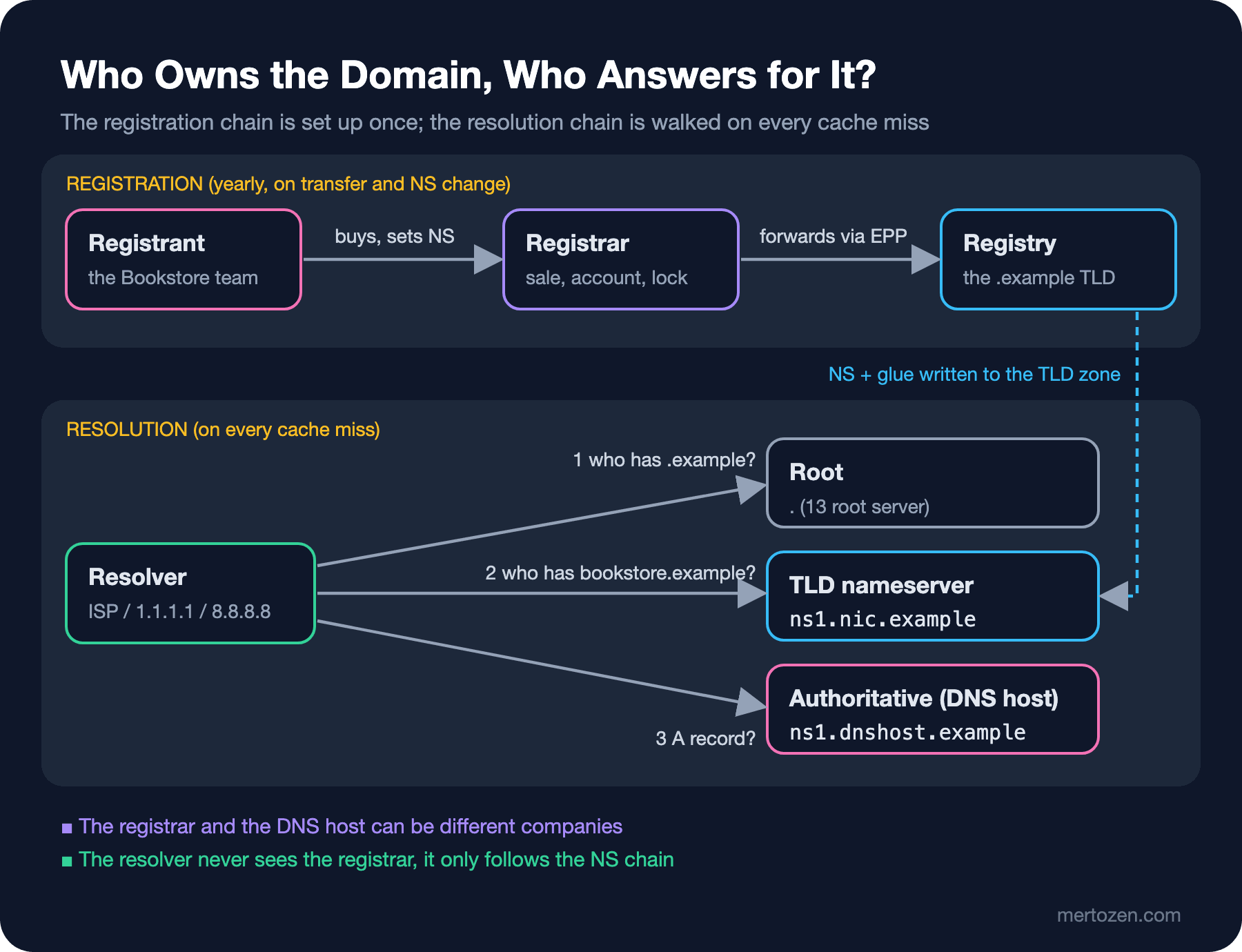
To see this without touching the real internet I built a two-container lab. One container is the registry nameserver for an imaginary .example TLD, the other is the provider that hosts Bookstore's DNS. The containers run in the 192.0.2.0/24 documentation block. It works the same way with Docker Desktop on Windows.
# compose.yaml
name: dnsseries
services:
  registry:
    image: internetsystemsconsortium/bind9:9.20
    container_name: dnsseries-registry
    command: ["-g", "-c", "/etc/bind/named.conf"]
    volumes:
      - ./registry:/etc/bind
      - ./scripts:/scripts:ro
    networks:
      dnslab:
        ipv4_address: 192.0.2.10
  dnshost:
    image: internetsystemsconsortium/bind9:9.20
    container_name: dnsseries-dnshost
    command: ["-g", "-c", "/etc/bind/named.conf"]
    volumes:
      - ./dnshost:/etc/bind
    networks:
      dnslab:
        ipv4_address: 192.0.2.20
networks:
  dnslab:
    ipam:
      config:
        - subnet: 192.0.2.0/24
The registry's zone has a single line for Bookstore: the NS record at the bottom. The registry does not hold Bookstore's records, only the fact that "this nameserver answers for this domain". The two lines in the middle delegate the DNS provider's own domain, dnshost.example; its nameserver lives inside that domain, so the registry also holds its address:
; registry/example.zone
$TTL 172800
@               IN SOA  ns1.nic.example. hostmaster.nic.example. (
                        2026111401 ; serial
                        1800       ; refresh
                        900        ; retry
                        604800     ; expire
                        86400 )    ; negative caching TTL
@               IN NS   ns1.nic.example.
ns1.nic         IN A    192.0.2.10

dnshost         IN NS   ns1.dnshost.example.
ns1.dnshost     IN A    192.0.2.20

bookstore       IN NS   ns1.dnshost.example.
The actual records are in the zone at the DNS provider:
; dnshost/bookstore.example.zone
$TTL 3600
@       IN SOA  ns1.dnshost.example. hostmaster.bookstore.example. 2026111401 7200 3600 1209600 300
@       IN NS   ns1.dnshost.example.
@       IN A    203.0.113.10
@       IN AAAA 2001:db8:10::10
www     IN CNAME bookstore.example.
api     IN A    203.0.113.20
After docker compose up -d I ask the registry the way a resolver does, without requesting recursion (+norec). I ran the commands with dig 9.20 inside the container via docker exec dnsseries-registry:
$ dig @192.0.2.10 bookstore.example A +norec
;; ->>HEADER<<- opcode: QUERY, status: NOERROR, id: 33936
;; flags: qr; QUERY: 1, ANSWER: 0, AUTHORITY: 1, ADDITIONAL: 2
;; QUESTION SECTION:
;bookstore.example.		IN	A
;; AUTHORITY SECTION:
bookstore.example.	172800	IN	NS	ns1.dnshost.example.
;; ADDITIONAL SECTION:
ns1.dnshost.example.	172800	IN	A	192.0.2.20
The answer section is empty and there is no aa (authoritative answer) flag. The registry is saying "I don't have the answer for this name, ask that server"; this is called a referral. The NS record's TTL is 172800 seconds, two days. Delegation records in TLDs are usually this long, and that is the real reason nameserver changes spread slowly. We cover this in detail in the fourth post of the series. Now let's ask the DNS provider:
$ dig @192.0.2.20 bookstore.example A +norec +noall +comments +answer
;; flags: qr aa; QUERY: 1, ANSWER: 1, AUTHORITY: 1, ADDITIONAL: 1
bookstore.example.	3600	IN	A	203.0.113.10
Here is the aa flag. This server owns the answer. The answer to Guess First is hidden in these two steps: the registry sends the resolver to the DNS provider and never to the DNS in the registrar's panel. The record may well sit on the registrar's server, but since nobody asks there, it has no effect. Asked at the DNS provider, the answer is:
$ dig @192.0.2.20 staging.bookstore.example A +norec +noall +comments +authority
;; ->>HEADER<<- opcode: QUERY, status: NXDOMAIN, id: 37110
;; flags: qr aa; QUERY: 1, ANSWER: 0, AUTHORITY: 1, ADDITIONAL: 1
bookstore.example.	300	IN	SOA	ns1.dnshost.example. hostmaster.bookstore.example. 2026111401 7200 3600 1209600 300
NXDOMAIN: "no such name". The record had to be added at the provider the nameservers point to. The panel accepting the record without a warning is what makes this mistake sneaky. Good registrars show a "your nameservers are not with us" banner, but do not rely on it.
Glue Records: When the Nameserver Lives Inside Its Own Domain
The registry's referral had an extra line: the IP address of ns1.dnshost.example. That is a glue record. When the nameserver's name is inside the delegated domain (if Bookstore's nameserver were ns1.bookstore.example), you get a chicken-and-egg problem: to learn the address of ns1.bookstore.example you need to ask the nameserver of bookstore.example, which is ns1.bookstore.example. Glue breaks the loop: the registry keeps the nameserver's address in its own zone and sends it along with the referral.
In the lab, ns1.dnshost.example sits inside dnshost.example, so glue is mandatory for that delegation. The same address came back in Bookstore's referral too, because the registry adds the address it holds in the same zone as extra information. Real .com servers behave the same way:
$ dig @a.gtld-servers.net google.com NS +norec +noall +comments +authority +additional
;; flags: qr; QUERY: 1, ANSWER: 0, AUTHORITY: 4, ADDITIONAL: 9
;; AUTHORITY SECTION:
google.com.		172800	IN	NS	ns2.google.com.
google.com.		172800	IN	NS	ns1.google.com.
google.com.		172800	IN	NS	ns3.google.com.
google.com.		172800	IN	NS	ns4.google.com.
;; ADDITIONAL SECTION:
ns2.google.com.		172800	IN	AAAA	2001:4860:4802:34::a
ns2.google.com.		172800	IN	A	216.239.34.10
ns1.google.com.		172800	IN	AAAA	2001:4860:4802:32::a
ns1.google.com.		172800	IN	A	216.239.32.10
ns3.google.com.		172800	IN	AAAA	2001:4860:4802:36::a
ns3.google.com.		172800	IN	A	216.239.36.10
ns4.google.com.		172800	IN	AAAA	2001:4860:4802:38::a
ns4.google.com.		172800	IN	A	216.239.38.10
Google's nameservers are in its own domain, and the glue is in the .com zone. These addresses are kept as "host" or "child nameserver" records in the registrar's panel. If you run your own nameservers inside your own domain and change a server's IP, you must update it both in your zone and in the host record at the registrar; forget the second and some resolvers keep going to the old address. For someone like Bookstore who hosts DNS with a provider, the provider manages glue and you just enter the nameserver names it gives you at the registrar.
Verifying the Delegation
After a nameserver change you need to check two things: does the NS set in the parent zone (the registry) match the NS set in the child zone (the DNS provider), and does every server in the set actually answer with aa? A short script that does both:
#!/bin/sh
# Usage: check-delegation.sh <domain> <parent-nameserver>
domain=$1; parent=$2
referral=$(dig @"$parent" "$domain" NS +norec +noall +authority +additional)
parent_ns=$(echo "$referral" | awk '$4 == "NS" {print tolower($5)}' | sort)
echo "parent ($parent) says: $(echo $parent_ns)"
for ns in $parent_ns; do
    # use the glue address if the parent sent one, otherwise the system resolver
    addr=$(echo "$referral" | awk -v n="$ns" 'tolower($1) == n && $4 == "A" {print $5; exit}')
    [ -n "$addr" ] || addr=$(dig +short "$ns" A | head -1)
    answer=$(dig @"$addr" "$domain" NS +norec +noall +comments +answer)
    flags=$(echo "$answer" | grep -o 'flags: [a-z ]*' | head -1)
    child_ns=$(echo "$answer" | awk '$4 == "NS" {print tolower($5)}' | sort)
    case "$flags" in
        *aa*) ;;
        *) echo "LAME  $ns ($addr) does not answer authoritatively for $domain"; continue ;;
    esac
    if [ "$child_ns" = "$parent_ns" ]; then
        echo "OK    $ns ($addr) child NS set matches the parent"
    else
        echo "DIFF  $ns ($addr) child says: $(echo $child_ns)"
    fi
done
First on a real domain, then in the lab:
$ ./check-delegation.sh example.com a.gtld-servers.net
parent (a.gtld-servers.net) says: elliott.ns.cloudflare.com. hera.ns.cloudflare.com.
OK    elliott.ns.cloudflare.com. (108.162.195.228) child NS set matches the parent
OK    hera.ns.cloudflare.com. (108.162.192.162) child NS set matches the parent
$ ./check-delegation.sh bookstore.example 192.0.2.10
parent (192.0.2.10) says: ns1.dnshost.example.
OK    ns1.dnshost.example. (192.0.2.20) child NS set matches the parent
Now let's produce two real failure scenarios in the lab. The first: a second nameserver was added to the zone at the DNS provider, but never entered at the registrar.
$ ./check-delegation.sh bookstore.example 192.0.2.10
parent (192.0.2.10) says: ns1.dnshost.example.
DIFF  ns1.dnshost.example. (192.0.2.20) child says: ns1.dnshost.example. ns2.dnshost.example.
This does not cause an outage right away, but your redundancy is not what you think it is: resolvers start from the parent's list and may never go to ns2. The second is more serious: the account at the DNS provider was closed or the zone was deleted, while the registrar still delegates there.
$ ./check-delegation.sh bookstore.example 192.0.2.10
parent (192.0.2.10) says: ns1.dnshost.example.
LAME  ns1.dnshost.example. (192.0.2.20) does not answer authoritatively for bookstore.example
$ dig @192.0.2.20 bookstore.example A +norec | grep -E "status|flags"
;; ->>HEADER<<- opcode: QUERY, status: REFUSED, id: 32770
;; flags: qr; QUERY: 1, ANSWER: 0, AUTHORITY: 0, ADDITIONAL: 1
This is a lame delegation. The server returns REFUSED because it no longer has the zone, and resolvers show users SERVFAIL; the website and mail go down at the same time. Worse, at some DNS providers another customer can recreate a deleted zone in their own account. Since the delegation still points at that provider, that person now answers for your domain. That is why the order when switching providers is always the same: set up the zone at the new provider first, change NS at the registrar, and delete the old zone only after the old TTLs have expired. The details are in the fourth post of the series.
Not Losing Your Domain
It is easy to forget that a domain is an administrative asset, not a technical one. The most common way to lose one is not an attack but a forgotten renewal or an account nobody can get into. A checklist for Bookstore:
- Keep auto-renew on and a valid payment method on the account. When the card expires, auto-renew fails silently. Renew for several years where you can.
- Use a shared team address for the registrar account and the registrant contact, not a personal one (a role account like
domains@...). When the employee who bought the domain leaves, the account should not leave with them. There is a subtlety: if that address lives only on the same domain and the domain lapses, you also stop receiving the registrar's warnings and password reset mails. Keep the recovery address on a different domain. - Turn on MFA for the registrar account, preferably with an authenticator app or a hardware key. Anyone who gets into the account can change NS and take all of your traffic and mail.
- Keep registrar lock on. That is
client transfer prohibitedin the RDAP output; the domain cannot move to another registrar until the lock is removed. Registry lock, a stronger protection shown by theserver ... prohibitedcodes, is offered as a paid service by some registrars and requires a manual confirmation at the registry for changes. Banks and big brands use it. - Treat the transfer auth code (EPP code, TAC under the newer rules) like a password. Generate and share it only during a transfer. ICANN's working group reviewing the gTLD transfer policy recommended making the code single-use; check in your registrar's panel how long it keeps a code valid.
An unrenewed gTLD domain does not change hands immediately. After the expiry date there is an auto-renew grace period of up to 45 days offered by the registrar, then a 30-day redemption grace period during which you can recover the domain for an extra fee, then a 5-day pending delete. After that the domain is released and is often picked up in the first seconds by drop-catch services. These periods vary by registrar and TLD; for .tr, TRABİS's own rules apply. The consequences of an expired domain go beyond "the site is down":
E-mail: whoever takes the domain can add an MX record and receive mail sent to support@ or a former employee's address. Password reset mails for every account opened with those addresses now go to them.
OAuth and SSO: redirect URIs registered at the identity provider and rules like "e-mail addresses on this domain belong to this tenant" now work for the domain's new owner.
Subdomains and trust: scripts pointing at the old domain, CSP allowances and webhook URLs are now under someone else's control. In the next post we look at the little sibling of this problem, dangling CNAMEs and subdomain takeover.
In Production
Don't leave the expiry date to a calendar reminder; measure it. RDAP reduced this to a single HTTP request. The script below finds the right RDAP server from the bootstrap file and computes the days left for each domain; below the threshold it returns a non-zero exit code, so it can raise an alert from a CI/CD job or a scheduled task:
#!/usr/bin/env bash
# Usage: ./check-domain-expiry.sh 30 example.com example.net
set -euo pipefail
warn_days=$1; shift
bootstrap=$(curl -s https://data.iana.org/rdap/dns.json)
now=$(date -u +%s)
status=0
for domain in "$@"; do
    tld=${domain##*.}
    base=$(jq -r --arg t "$tld" '.services[] | select(.[0] | index($t)) | .[1][0]' <<<"$bootstrap")
    if [[ -z "$base" ]]; then
        echo "$domain: no RDAP service for .$tld, check the registrar panel"
        status=2; continue
    fi
    expires=$(curl -s "${base%/}/domain/$domain" | jq -r '.events[] | select(.eventAction == "expiration") | .eventDate')
    days=$(( ($(date -u -j -f "%Y-%m-%dT%H:%M:%SZ" "$expires" +%s 2>/dev/null || date -u -d "$expires" +%s) - now) / 86400 ))
    if (( days < warn_days )); then
        echo "WARN $domain expires in $days days ($expires)"; status=1
    else
        echo "OK   $domain expires in $days days ($expires)"
    fi
done
exit $status
$ ./check-domain-expiry.sh 30 example.com example.net example.com.tr; echo "exit=$?"
OK example.com expires in 272 days (2027-08-13T04:00:00Z)
OK example.net expires in 289 days (2027-08-30T04:00:00Z)
example.com.tr: no RDAP service for .tr, check the registrar panel
exit=2
$ ./check-domain-expiry.sh 400 example.com; echo "exit=$?"
WARN example.com expires in 272 days (2027-08-13T04:00:00Z)
exit=1The date line tries both the date on macOS and the one on Linux, WSL and Git Bash, because their options differ; on Windows, run it in Git Bash or WSL. RDAP servers apply rate limits; if you have hundreds of domains, slow the requests down, and checking once a day is enough. For .tr domains the registrar's API or panel is the only source.
Keep an inventory. For every domain the company owns, keep the registrar, the role address that owns the account, the DNS provider, the nameservers, the expiry date and what the domain is used for in one place. The bookstore-campaign.example the marketing team bought for a campaign usually slips off this list, then expires, and the links in old campaign mails start pointing at someone else's site.
Watch NS changes. When a registrar account is taken over, the attacker's first move is to change the nameservers. A job that compares check-delegation.sh against the expected NS set lets you notice such a change within minutes.
Common Pitfalls
Adding the record in the wrong panel: the mistake from Guess First. Once the nameservers are delegated to another provider, the DNS screen in the registrar's panel is a dead screen. Make sure everyone on the team knows the answer to "where is our DNS?", and if possible delete the DNS zone at the registrar so it doesn't confuse anyone.
Buying the domain with an employee's personal account: to get started quickly a developer buys the domain with their own card and personal e-mail. Years later, when that person leaves, recovering the domain means applying to the registrar with company documents, which can take weeks.
A single nameserver or a single network: I used one nameserver in the lab to keep it simple. In reality you need at least two, on different networks. Large DNS providers already do this with anycast networks; if you run your own BIND servers, put the second one in another data centre.
Trying to change the registrar and the DNS provider together: a registrar transfer and a DNS provider change are two separate operations. Doing both on the same day makes it hard to tell which one caused a problem when something goes wrong. Move DNS first, and change the registrar later if needed, once things have settled. Nameservers are kept during a transfer; records are not moved by it.
Losing expiry warnings to the spam folder: registrar warning mails look like marketing and can get caught by filters. That is why you need a check that does not depend on you, like the script above.
A Small Experiment
★☆☆ Query RDAP for three domains you use or know well. In which of them are the registrar and the DNS provider different? Is the transfer lock on in the status field?
★★☆ Build the lab and make Bookstore's nameserver ns1.bookstore.example (an in-bailiwick delegation). Look at the referral without adding glue to the registry zone, then add it. What does check-delegation.sh report in each case?
★★★ Extend check-delegation.sh to take an expected NS set as a parameter and run it once a day in a CI/CD job. The job should go red if the set changes. Add a step that also checks the IPv6 addresses of the NS servers.
The domain is ours now and its DNS is at the provider we chose. The next job is to fill in the zone. In the next post we draw Bookstore's target map: the Angular app on the apex, a redirect from www to the apex, the api subdomain, why we can't use a CNAME at the apex and what CNAME flattening does, App Service verification TXT records, CAA, and how a forgotten CNAME turns into a subdomain takeover.