

mTLS and Internal Certificates: Client Certificate Authentication in ASP.NET Core and Running Your Own CA
In mTLS the client also proves its identity with a certificate and a signature made with its private key; because public CAs are dropping the client authentication EKU, you need your own internal CA with an offline root. In ASP.NET Core we set up AddCertificate with CustomRootTrust and issuer-and-CN partner mapping, and with real runs we see Kestrel's silent rejection at the TLS layer, revocation, and how Nginx forwarding the certificate in a header can be faked without the private key.
Version note: The examples in this post were run with .NET 10 (SDK 10.0.402, ASP.NET Core runtime 10.0.15), Microsoft.AspNetCore.Authentication.Certificate 10.0.15, OpenSSL 3.5, Nginx 1.30.6 and step-ca 0.30.2 on Docker 29; Windows-specific behavior was not run in this environment.
Guess First
Bookstore is building an order integration with Acme Books, a book distributor. Acme's system will send orders to Bookstore.Api's /api/partner/orders endpoint and prove its identity with a client certificate instead of an API key. In other words, TLS will work both ways: mTLS (mutual TLS). The team terminates TLS at Nginx; Nginx validates the client certificate and passes it to Kestrel in a header. Kestrel sits on the same Docker network, listening on port 8080 with plain HTTP.
Guess: can someone with access to another container on the same network send an order to Bookstore on Acme's behalf, without ever having Acme's private key? What would they need? We'll try it in the middle of the post.
When mTLS, and Why an Internal CA?
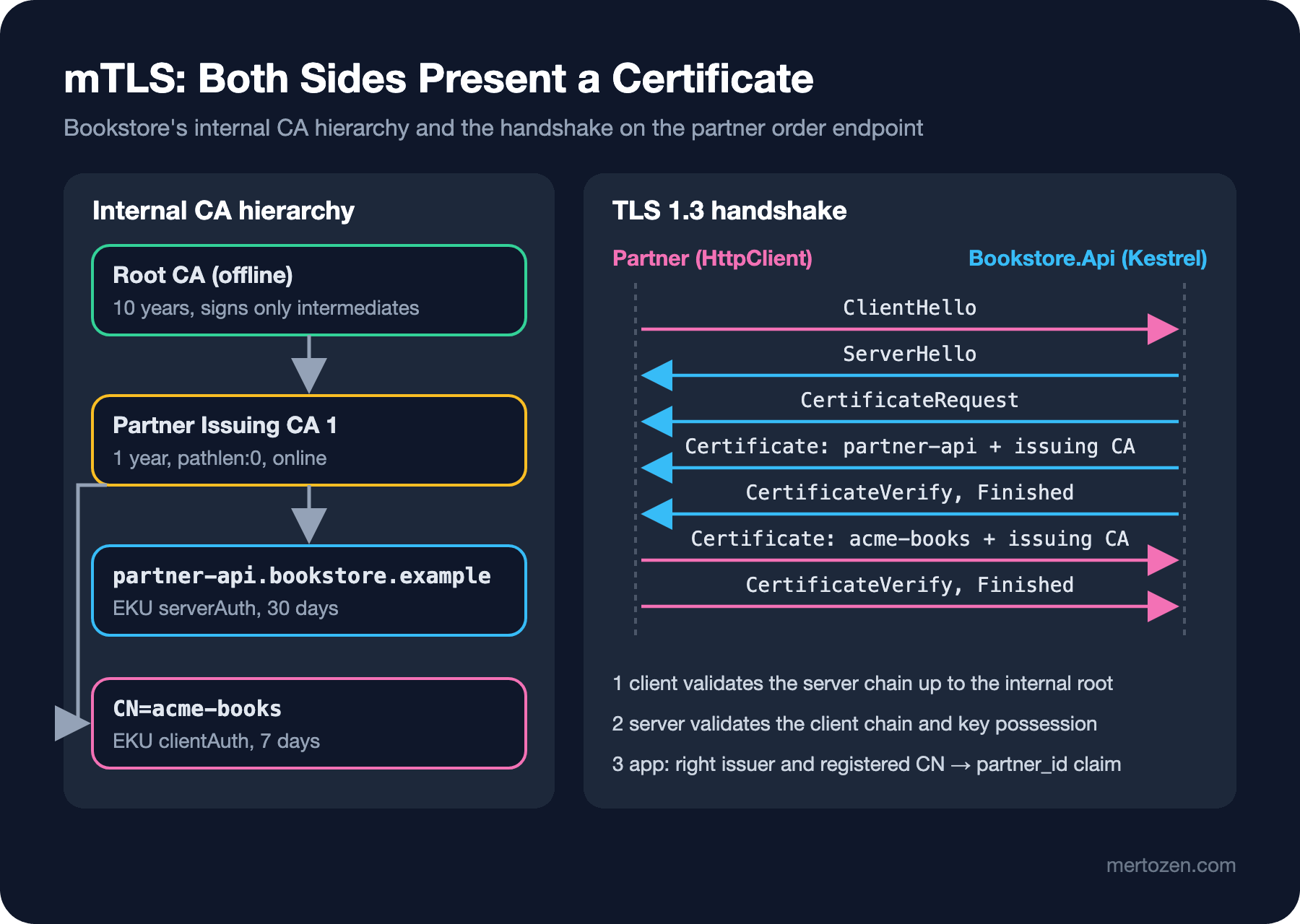
In normal TLS only the server presents a certificate. In mTLS the server sends a CertificateRequest during the handshake, and the client sends its own certificate plus a signature made with its private key (CertificateVerify). Identity is proven before anything reaches the HTTP layer. It shines in three places. First, service-to-service traffic: services in a cluster recognizing each other. Second, B2B (business-to-business) integrations: a partner like Acme connecting from a fixed system. Third, devices: a warehouse scanner or a kiosk connecting with an identity installed at the factory. The difference from a bearer token is that the secret is never sent. The certificate is a public document; the proof is the signature made with the private key, and the key never leaves the machine.
So who issues the certificate? Public CAs are stepping away from this. As we saw in the third post, Let's Encrypt has left the client authentication EKU out of its default profile since 11 February 2026. Version 1.8 of the Chrome Root Program Policy requires public TLS certificates issued from 15 March 2027 onward to carry only the server authentication EKU. Public PKI is for web servers; for client identity you need your own CA. That has an upside too: when the only CA you trust is your own, the answer to "who issued this certificate" becomes an authorization decision.
Internal CA: Offline Root, Online Intermediate
The basic rule of an internal CA is the same as for public CAs: the root key is used only to sign intermediates and is then put offline, on a machine not connected to the network or in an HSM. Day-to-day certificates are issued by the intermediate. If the intermediate's key leaks you revoke it and sign a new one with the root; if the root leaks you have to redistribute all trust from scratch. I built Bookstore's hierarchy with OpenSSL:
#!/bin/sh
# Bookstore internal CA: offline root -> partner issuing CA -> short-lived client certificates
set -e
cd /certs

# 1) root: 10 years, kept offline, signs only intermediates
openssl req -x509 -newkey ec -pkeyopt ec_paramgen_curve:P-384 -nodes -keyout root.key -out root.crt -days 3650 \
    -subj "/O=Bookstore/CN=Bookstore Internal Root CA" \
    -addext "basicConstraints=critical,CA:TRUE,pathlen:1" -addext "keyUsage=critical,keyCertSign,cRLSign"

# 2) issuing CA for partners: 1 year, cannot create further CAs
openssl req -newkey ec -pkeyopt ec_paramgen_curve:P-256 -nodes -keyout issuing.key -out issuing.csr \
    -subj "/O=Bookstore/CN=Bookstore Partner Issuing CA 1"
printf "basicConstraints=critical,CA:TRUE,pathlen:0\nkeyUsage=critical,keyCertSign,cRLSign\n" > issuing.ext
openssl x509 -req -in issuing.csr -CA root.crt -CAkey root.key -CAcreateserial -days 365 -out issuing.crt -extfile issuing.ext

# 3) leaf certificates from the issuing CA
# leaf: name subject days eku [san]
leaf() {
    openssl req -newkey ec -pkeyopt ec_paramgen_curve:P-256 -nodes -keyout "$1.key" -out "$1.csr" -subj "$2"
    printf "basicConstraints=critical,CA:FALSE\nkeyUsage=critical,digitalSignature\nextendedKeyUsage=%s\n" "$4" > "$1.ext"
    [ -n "$5" ] && printf "subjectAltName=%s\n" "$5" >> "$1.ext"
    openssl x509 -req -in "$1.csr" -CA issuing.crt -CAkey issuing.key -CAcreateserial -days "$3" -out "$1.crt" -extfile "$1.ext"
}
leaf acme-books  "/O=Acme Books/CN=acme-books"   7 clientAuth
leaf other-books "/O=Other Books/CN=other-books" 7 clientAuth
leaf partner-api "/O=Bookstore/CN=partner-api.bookstore.example" 30 serverAuth "DNS:partner-api.bookstore.example"
cat partner-api.crt issuing.crt > partner-api.fullchain.pem
$ openssl verify -CAfile root.crt -untrusted issuing.crt acme-books.crt partner-api.crt
acme-books.crt: OK
partner-api.crt: OK
$ openssl verify -CAfile root.crt acme-books.crt
O=Acme Books, CN=acme-books
error 20 at 0 depth lookup: unable to get local issuer certificate
error acme-books.crt: verification failed
$ openssl x509 -in acme-books.crt -noout -issuer -dates -ext basicConstraints,keyUsage,extendedKeyUsage
issuer=O=Bookstore, CN=Bookstore Partner Issuing CA 1
notBefore=Nov 13 22:50:16 2026 GMT
notAfter=Nov 20 22:50:16 2026 GMT
X509v3 Basic Constraints: critical
CA:FALSE
X509v3 Key Usage: critical
Digital Signature
X509v3 Extended Key Usage:
TLS Web Client AuthenticationThere are three design decisions. pathlen:0 ensures that no new CA can be created under the issuing CA even if its key is stolen. Partners get their own issuing CA; service-to-service certificates will come from another intermediate, and the app can check "is this certificate from the partner CA". Leaves are 7 days. The second verify command also shows something important: a party that knows only the root can't build the chain without seeing the intermediate. That means the client must also send the intermediate in the handshake, or the server must know it separately.
In real life you don't want this script run by hand. step-ca, HashiCorp Vault's PKI engine, Active Directory Certificate Services or the cloud providers' private CA services automate this. Which one you choose depends on your infrastructure. As an example I started step-ca in a container; it comes with JWK and ACME provisioners:
$ step ca certificate acme-books acme-books.crt acme-books.key --provisioner admin --provisioner-password-file /tmp/prov-pass
✔ Certificate: acme-books.crt
✔ Private Key: acme-books.key
$ step certificate inspect acme-books.crt --short
X.509v3 TLS Certificate (ECDSA P-256) [Serial: 3391...3031]
  Subject:     acme-books
  Issuer:      Bookstore Internal CA Intermediate CA
  Provisioner: admin [ID: 04Pc...-xoo]
  Valid from:  2026-11-13T22:52:46Z
          to:  2026-11-14T22:53:46Z
$ step ca renew acme-books.crt acme-books.key --force
Your certificate has been saved in acme-books.crt.
The default lifetime is 24 hours, and the certificate carries both server and client authentication EKUs. Renewal is done over mTLS to the CA with the existing certificate; a service that has obtained an identity once can get the next certificate on its own. Thanks to the ACME provisioner, the Certbot and cert-manager from earlier posts in the series can talk to this CA as if it were Let's Encrypt. One warning: the container's quick setup mode generates the root key on the same machine. In production, create the root offline and give step-ca only the intermediate.
Client Certificate Authentication in Kestrel
First let's set up the case where TLS terminates at Kestrel. The endpoint asks for a certificate:
{
  "Kestrel": {
    "Endpoints": {
      "Partner": {
        "Url": "https://*:8443",
        "ClientCertificateMode": "RequireCertificate",
        "Certificate": {
          "Path": "/certs/partner-api.fullchain.pem",
          "KeyPath": "/certs/partner-api.key"
        }
      }
    }
  }
}
The other values of ClientCertificateMode are AllowCertificate (requested but not required) and DelayCertificate (not requested in the handshake; the app asks when it needs it). Validation is done by the authentication handler in the Microsoft.AspNetCore.Authentication.Certificate package:
builder.Services.AddAuthentication(CertificateAuthenticationDefaults.AuthenticationScheme)
    .AddCertificate(options =>
    {
        options.ChainTrustValidationMode = X509ChainTrustMode.CustomRootTrust;
        options.CustomTrustStore = [internalRoot];
        options.AdditionalChainCertificates = [partnerIssuingCa];
        options.RevocationMode = mtls.RevocationMode;
        options.Events = new CertificateAuthenticationEvents
        {
            OnCertificateValidated = context =>
            {
                X509Certificate2 certificate = context.ClientCertificate;
                string partnerId = certificate.GetNameInfo(X509NameType.SimpleName, forIssuer: false);

                // the chain is valid; identity = CN, but only from the partner issuing CA and only if registered
                if (certificate.Issuer != partnerIssuingCa.Subject || !mtls.Partners.Contains(partnerId))
                {
                    context.Fail($"certificate '{certificate.Subject}' is not a registered partner");
                    return Task.CompletedTask;
                }

                context.Principal = new ClaimsPrincipal(new ClaimsIdentity(
                    [new Claim("partner_id", partnerId), new Claim(ClaimTypes.Name, certificate.Subject)],
                    context.Scheme.Name));
                context.Success();
                return Task.CompletedTask;
            }
        };
    });

builder.Services.AddAuthorizationBuilder()
    .AddPolicy("Partner", policy => policy.RequireClaim("partner_id"));
app.UseAuthentication();
app.UseAuthorization();
app.MapPost("/api/partner/orders", (ClaimsPrincipal user) =>
$"order accepted for partner {user.FindFirstValue("partner_id")}\n")
.RequireAuthorization("Partner");By default the handler looks at the operating system's trust store. With CustomRootTrust it trusts only the internal root, so a certificate obtained from any public CA is useless on this endpoint. I supplied the intermediate through AdditionalChainCertificates because, as the verify attempt above showed, the chain can't be built without it. The identity mapping deliberately relies on the issuer and the CN, not the thumbprint. The thumbprint changes on every renewal, and with 7-day certificates you'd have to update config every week. Here the registry is the Partners list that says which partners are accepted. When you stop working with a partner you remove it from the list, and its certificate becomes useless before it expires.
The client side adds the client certificate on top of the CustomRootTrust client from the fourth post:
X509Certificate2 clientCertificate = X509Certificate2.CreateFromPemFile(
    $"/certs/{certificateName}.crt", $"/certs/{certificateName}.key");
X509Certificate2 issuingCa = X509CertificateLoader.LoadCertificateFromFile("/certs/issuing.crt");

// send leaf + intermediate so the server can build the chain
ssl.ClientCertificateContext = SslStreamCertificateContext.Create(clientCertificate, [issuingCa], offline: true);

using HttpClient client = new(new SocketsHttpHandler { SslOptions = ssl });
SslStreamCertificateContext sends the certificate together with its chain. If you only add the leaf to the ClientCertificates collection, whether the intermediate is sent is left to the client's store. On Windows, the PKCS #12 conversion from the fourth post may be needed here too for an ephemeral key loaded from a PEM file; I didn't try this on Windows.
Three Failures, Three Settings
On the first run both requests, the one without a certificate and Acme's, failed with the same error:
$ dotnet Bookstore.PartnerClient.dll https://partner-api.bookstore.example:8443/api/partner/orders acme-books
[acme-books] An error occurred while sending the request. The response ended prematurely. (ResponseEnded)
There was nothing in the server log at Information level. When I raised Kestrel's log level to Debug, the reason showed up:
dbug: Microsoft.AspNetCore.Server.Kestrel.Https.Internal.HttpsConnectionMiddleware[1]
      Failed to authenticate HTTPS connection.
      System.Security.Authentication.AuthenticationException: The remote certificate was rejected by the provided RemoteCertificateValidationCallback.
Kestrel validates the client certificate at the TLS layer against the operating system's trust store. The internal root isn't there, so the handshake breaks before reaching HTTP and the authentication handler never runs. There are two options: add the internal root to the server's system store (then everything on the machine trusts this root), or accept the certificate at the TLS layer and leave validation to the handler:
builder.WebHost.ConfigureKestrel(kestrel => kestrel.ConfigureHttpsDefaults(https =>
{
    https.ClientCertificateMode = ClientCertificateMode.RequireCertificate;
    // TLS layer accepts the certificate; the authentication handler validates it
    https.AllowAnyClientCertificate();
}));
This setting looks dangerous on its own, but as long as the endpoint is protected with RequireAuthorization, validation happens in the handler. The second run failed again, this time with 403:
[acme-books] 403
warn: Microsoft.AspNetCore.Authentication.Certificate.CertificateAuthenticationHandler[2]
      Certificate validation failed, subject was CN=acme-books, O=Acme Books. RevocationStatusUnknown unable to get certificate CRL, OfflineRevocation unable to get certificate CRL
The handler's default RevocationMode is Online. Our certificates have no CRL address, so revocation status can't be determined and the handler stays on the safe side and rejects. Again there are two ways. The first is publishing a CRL: you add a crlDistributionPoints to the issuing CA, serve the CRL from an HTTP address on the internal network and refresh it regularly. The second is short lifetimes: with 7-day certificates, or 24-hour ones as in step-ca, the need for revocation largely disappears. If you need to cut off a partner urgently, there's the Partners list. In the second post we saw why OCSP was abandoned on the public side; the same reasoning applies here. I chose the second way, set RevocationMode = NoCheck, and tried three different certificates on the third run:
[acme-books] 200 order accepted for partner acme-books
[other-books] 403
[fake-acme] 403
info: Microsoft.AspNetCore.Authentication.Certificate.CertificateAuthenticationHandler[7]
      Certificate was not authenticated. Failure message: certificate 'CN=other-books, O=Other Books' is not a registered partner
warn: Microsoft.AspNetCore.Authentication.Certificate.CertificateAuthenticationHandler[1]
Self signed certificate rejected, subject was CN=acme-books, O=Acme Books.other-books' certificate is from the same CA and valid, but it isn't a registered partner. fake-acme is a self-signed certificate someone made, with a CN of exactly acme-books; it's rejected because no chain can be built. Whether the CN means anything depends entirely on your trust in the CA. One thing to note: when validation fails the handler returns 403, not 401. Microsoft's documentation explains this by the certificate having been obtained in the handshake, so the request can't be retried at that point.
When TLS Terminates at Nginx: Certificate Forwarding
Now the setup from Guess First. Nginx requests the client certificate, validates it and puts it into a header as URL-encoded PEM:
server {
    listen 443 ssl;
    server_name partner-api.bookstore.example;
    ssl_certificate     /certs/partner-api.fullchain.pem;
    ssl_certificate_key /certs/partner-api.key;

    ssl_verify_client      on;
    ssl_client_certificate /certs/partner-ca-bundle.pem;
    ssl_verify_depth       2;

    location / {
        proxy_pass http://api:8080;
        proxy_set_header X-Forwarded-Proto $scheme;
        proxy_set_header X-Client-Cert $ssl_client_escaped_cert;
    }
}
On the app side AddCertificateForwarding reads the header and turns it into a certificate, and the handler validates it as if it had come from TLS:
// the handler only runs for HTTPS requests: the scheme must come from the proxy
builder.Services.Configure<ForwardedHeadersOptions>(options =>
{
    options.ForwardedHeaders = ForwardedHeaders.XForwardedProto;
    options.KnownIPNetworks.Add(System.Net.IPNetwork.Parse("172.29.0.0/16"));
});
builder.Services.AddCertificateForwarding(options =>
{
    options.CertificateHeader = mtls.ForwardedHeader;
    options.HeaderConverter = value => X509Certificate2.CreateFromPem(WebUtility.UrlDecode(value));
});
app.UseForwardedHeaders();
app.UseCertificateForwarding();
app.UseAuthentication();
app.UseAuthorization();On my first attempt the forwarded headers part was missing and Acme got 403. The reason in the log ties back to the previous post's topic: Not https, skipping certificate authentication. The handler only runs when Request.IsHttps is true. Since Kestrel sees the request as plain HTTP, the handler never looks at the certificate. With X-Forwarded-Proto added, the result is right:
$ curl -sS --cacert root.crt --cert acme-books.crt --key acme-books.key -X POST https://partner-api.bookstore.example/api/partner/orders
order accepted for partner acme-books
$ curl -sS --cacert root.crt -X POST https://partner-api.bookstore.example/api/partner/orders | grep -o "<title>.*</title>"
<title>400 No required SSL certificate was sent</title>
Now the question from Guess First. From a container on the same network I sent a request directly to Kestrel, bypassing Nginx. What I put in the header is Acme's certificate; not its private key, only the certificate:
$ CERT=$(tr -d '\n' < acme-books.crt | sed -e 's/+/%2B/g' -e 's/ /%20/g')
$ curl -sS -X POST -H "X-Forwarded-Proto: https" -H "X-Client-Cert: $CERT" http://api:8080/api/partner/orders
order accepted for partner acme-books
The order was accepted on Acme's behalf. The answer: yes, they can, and all they need is Acme's certificate. A certificate isn't a secret. The partner emails it, it ends up in logs, and in TLS 1.2 it travels unencrypted during the handshake. The guarantee of mTLS is that the other side can sign with that certificate's private key; only Nginx, which terminated TLS, saw that signature. Once it's in a header we have no signature, only a claim that "Nginx validated this". And anyone who can write the header can make that claim. AddCertificateForwarding doesn't check where the header came from; since KnownIPNetworks covered the whole Docker network here, the fake X-Forwarded-Proto was accepted too.
The protections must be applied together. Only Nginx should be able to reach Kestrel: a separate network, a NetworkPolicy on Kubernetes, or Kestrel listening only on loopback. KnownIPNetworks should contain only the proxy's address, not the whole subnet. Nginx should always write the header itself. I tried that too: with ssl_verify_client optional, when the client sent no certificate and set the header itself, Nginx's proxy_set_header with an empty value didn't forward the header at all, and the request got 403. If your setup allows it, the strongest solution is to make the hop between Nginx and Kestrel mTLS as well, or to terminate TLS directly at Kestrel.
A Service Mesh's Automatic mTLS
As the number of services grows, distributing certificates to each service, renewing them and configuring their HttpClients becomes a workload of its own. Service meshes like Istio and Linkerd move this out of the app. The proxy next to each pod (or, in Istio's ambient mode, a node-level component) obtains its own certificate from the mesh's CA and encrypts pod-to-pod traffic with mTLS automatically. Identity isn't an IP address but the pod's Kubernetes service account; Istio writes it into the certificate as a URI in SPIFFE format. Certificates are 24 hours by default and renew themselves. The app keeps speaking plain HTTP, and authorization is done with mesh policies like "the orders service accepts requests only from the checkout service account". The price is one more proxy in every request's path and a mesh to operate. For in-cluster traffic a mesh can replace this post's handmade setup; for a partner coming from outside like Acme, you still need an internal CA and the handler shown here.
In Production
Design partner onboarding as a process. The partner generates its own key on its side and sends you only a CSR; the private key never travels by email. You sign the CSR with the partner CA. If you use short-lived certificates, offer the partner a way to automate renewal (ACME or renewal with the existing certificate); otherwise you've created a weekly manual chore.
Cache the results of certificate authentication. The handler rebuilds the chain on every request. AddCertificateCache is off by default; if you turn it on, the result of OnCertificateValidated must depend only on the certificate. A decision like removing a partner from the list then takes effect with a delay of up to the cache duration.
Make failures visible. Kestrel logs the rejection at the TLS layer only at Debug level; when a partner says "we can't connect", you'll find no trace in the logs. Keep the handler's OnAuthenticationFailed event and Kestrel's HTTPS (HTTP Secure) log category at a readable level in production too. Also monitor when each partner's certificate expires; that's the subject of the last post in the series.
Plan for the root. A 10-year root will expire on a date nobody on the team remembers. Keep the root's expiry, the intermediate's yearly renewal and where the CA keys are stored in a written runbook.
Common Pitfalls
Trusting a forwarded certificate header unconditionally: the fake order above. A certificate header only makes sense in an app that can't be reached from anywhere but the proxy. If Kestrel's port is open to the outside or to a shared network, anyone can impersonate any partner.
Authorizing by thumbprint: the thumbprint is the certificate's hash and changes on every renewal. A system that keeps a thumbprint list with 7-day certificates will cut off a partner every week. Tie identity to the issuer and the subject, and limit the issuer to a CA under your control.
Trusting the system trust store: if you leave ChainTrustValidationMode at its default (System), anyone who got a certificate with the client authentication EKU from a public CA passes chain validation. Even if your partner list catches it at the last moment, it may be possible to get a certificate from another CA with the same CN as a registered partner. The issuer check and CustomRootTrust must work together.
Misunderstanding revocation: RevocationMode.Online rejects every request for certificates without a CRL address; we saw it above. Switching it to NoCheck "temporarily" and leaving it with long-lived certificates keeps a leaked key valid for years. NoCheck only makes sense together with short lifetimes and an application-level allow list.
Forgetting the intermediate: if the server doesn't know the intermediate and the client doesn't send it, the chain can't be built. This is the client-side mirror of the missing intermediate problem on the server side from the first post.
A Small Experiment
★☆☆ Run this post's ca.sh and try using partner-api.crt as a client certificate. What does the handler say? (Hint: ValidateCertificateUse and the EKU.)
★★☆ Add a crlDistributionPoints to the issuing CA, produce a CRL that revokes acme-books with openssl ca, and serve it over HTTP from an Nginx container. Set RevocationMode back to Online: with what log line is the revoked certificate rejected, and what happens when the CRL server is down?
★★★ Make the forwarding setup safe: reduce KnownIPNetworks to Nginx's IP only, move Kestrel to a separate Docker network, and repeat the fake header attempt both from another container and through Nginx. Then make the hop between Nginx and Kestrel mTLS as well, and discuss whether you still need AddCertificateForwarding.
Now both servers and clients have certificates, and all of them have an expiry date. In the last post of the series we'll put them into an inventory: expiry alerts, TLS config tests and a runbook drawn from real incidents.