

How Does a CDN Work? Edge, Origin, Cache Keys, s-maxage and the Right Cache Strategy for Angular + an API
A CDN stores answers at the edge by cache key and follows the origin's headers, so hashed Angular files get immutable, index.html gets no-cache, the catalog API gets s-maxage and CDN-Cache-Control, and personalised answers get private, no-store. On an Nginx edge we see with real requests how a public header shows Ada's orders to Grace, how a cache key without the query string mixes up pages, and how stale directives keep the site up while the origin is down.
Version note: The examples in this post were run with .NET 10, Angular 22.2 (TypeScript 6.0) and Nginx 1.30.6 as the edge on Docker 29; Cloudflare's behaviour is taken from its official documentation as of 14 November 2026 and was not run in a Cloudflare account.
Guess First
Bookstore, the online bookstore used as the shared example across this site's series, now sits behind a CDN. In one sprint, after "the API is slow" complaints, Emre adds Cache-Control: public, max-age=60 to a shared helper, and one of the endpoints using that helper is GET /api/orders/mine: the signed-in customer's own orders. Requests carry an Authorization header.
Guess: if Ada opens her orders and Grace opens hers ten seconds later, what does Grace see? Since the Authorization header differs, won't the CDN keep them apart? In this post we build a CDN edge with Nginx in the lab and answer this and a few similar questions with real requests.
The Parts of a CDN: Edge, Origin, Shield and Hit Ratio
In a CDN, the server the user connects to is called the edge, and edges sit in PoPs spread around the world. The origin is where the answer is actually produced: for Bookstore, Bookstore.Api and the build output of bookstore-web. If the edge finds the answer in its cache (HIT) it never goes to the origin; if it doesn't (MISS) it asks the origin, stores the answer and returns it. There is usually one more layer in between: the origin shield (Tiered Cache on Cloudflare). On a MISS the edge asks not the origin directly but an upper tier chosen close to the origin. This stops hundreds of PoPs from each coming to the origin for the same file. Cloudflare's Smart Tiered Cache is available on all plans.
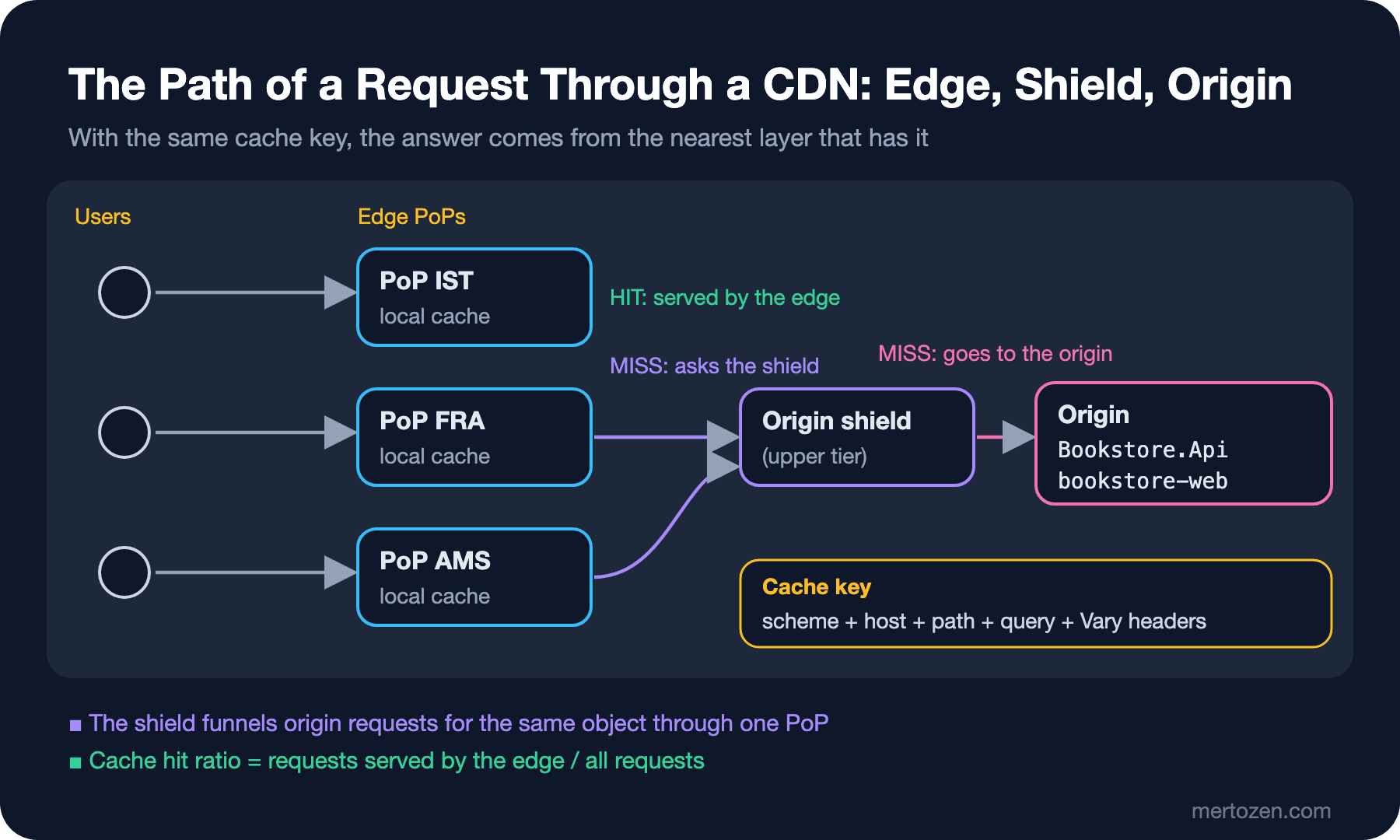
The key metric to watch is the cache hit ratio: the share of all requests the edge answered itself. Above 95% is normal for static files; for an API it is much lower, and it should be. Two things decide the hit ratio: the cache key (whether two requests count as "the same") and the response headers (whether the answer is stored, and for how long).
The Lab: One Edge and One Origin
To see the behaviour without going into a real CDN account, I built a single-PoP edge with Nginx's proxy_cache. The origin is Bookstore.Api running on the machine; the edge is a container in front of it. The edge's config:
# edge.conf: a single CDN edge node in front of the Bookstore origin
proxy_cache_path /var/cache/nginx/edge levels=1:2 keys_zone=edge:10m max_size=200m inactive=1d use_temp_path=off;

upstream origin {
    server host.docker.internal:5180;
}

server {
    listen 8080;
    server_name bookstore.example;

    proxy_cache edge;
    proxy_cache_key $scheme$host$request_uri;
    proxy_cache_lock on;
    proxy_cache_background_update on;
    proxy_cache_use_stale error timeout updating http_500 http_502 http_503 http_504;

    proxy_set_header Host $host;
    add_header X-Cache-Status $upstream_cache_status always;

    location / {
        proxy_pass http://origin;
    }
}
proxy_cache_key is the cache key itself: scheme, host and the full path including the query string. proxy_cache_lock makes sure only one of several simultaneous MISSes for the same key goes to the origin; it is the edge's counterpart of the cache stampede we covered in the Caching series. The X-Cache-Status header shows whether each answer is a HIT or a MISS. On the origin side, the first version of Bookstore.Api:
using Bookstore.Api;

var builder = WebApplication.CreateBuilder(args);
var app = builder.Build();

var originRequests = 0;
app.Use(async (context, next) =>
{
    // which responses really reached the origin
    context.Response.Headers["X-Origin-Request"] = Interlocked.Increment(ref originRequests).ToString();
    await next();
});

app.UseDefaultFiles();
app.UseStaticFiles(new StaticFileOptions { OnPrepareResponse = CacheHeaders.ForStaticFile });

Book[] catalog =
[
    new("9780441172719", "Dune", 450.00m),
    new("9780141439587", "Emma", 190.00m),
    new("9780547928227", "The Hobbit", 320.00m),
    new("9780141439549", "Middlemarch", 280.00m),
];

var api = app.MapGroup("/api");

api.MapGet("/books", (HttpContext http, int page = 1) =>
{
    http.Response.Headers.CacheControl = CacheHeaders.Catalog;
    return catalog.Skip((page - 1) * 2).Take(2);
});

api.MapGet("/books/featured", (HttpContext http) =>
{
    // browsers revalidate every time, the CDN keeps it for 5 minutes (RFC 9213)
    http.Response.Headers.CacheControl = "no-cache";
    http.Response.Headers["CDN-Cache-Control"] = "max-age=300";
    return catalog[0];
});

api.MapGet("/cart", (HttpContext http) =>
{
    http.Response.Headers.CacheControl = "private, no-store";
    http.Response.Cookies.Append("cart-id", "c-1042", new CookieOptions { HttpOnly = true, Secure = true });
    return new Cart(2, 640.00m);
});

api.MapGet("/orders/mine", (HttpContext http) =>
{
    // lab only: the bearer token is just the customer name
    var customer = http.Request.Headers.Authorization.ToString().Replace("Bearer ", "");
    if (customer.Length == 0)
    {
        return Results.Unauthorized();
    }

    http.Response.Headers.CacheControl = CacheHeaders.PerUser;
    return Results.Ok(new OrderSummary(customer, customer == "ada" ? ["BK-1042"] : ["BK-2001", "BK-2002"]));
});

app.MapFallbackToFile("index.html", new StaticFileOptions { OnPrepareResponse = CacheHeaders.ForStaticFile });

app.Run();

record Book(string Isbn, string Title, decimal Price);
record Cart(int Items, decimal Total);
record OrderSummary(string Customer, string[] Orders);
using System.Text.RegularExpressions;
using Microsoft.AspNetCore.StaticFiles;
namespace Bookstore.Api;
public static partial class CacheHeaders
{
// browsers 1 minute, shared caches 5 minutes, then serve stale while refreshing or when the origin is down
public const string Catalog = "public, max-age=60, s-maxage=300, stale-while-revalidate=60, stale-if-error=86400";
public const string PerUser = "public, max-age=60";
public static void ForStaticFile(StaticFileResponseContext context) =>
context.Context.Response.Headers.CacheControl = HashedAsset().IsMatch(context.File.Name)
? "public, max-age=31536000, immutable"
: "no-cache";
// Angular build output: main-STNEDLO4.js, chunk-GFHEENPR.js, styles-5INURTSO.css
[GeneratedRegex(@"-[A-Z0-9]{8}\.(js|css)$")]
private static partial Regex HashedAsset();
}PerUser is the bug from Guess First itself. wwwroot holds the ng build output of Angular 22. I started the origin with dotnet run --urls http://127.0.0.1:5180 and the edge with docker run -p 127.0.0.1:8080:8080 -v ./edge.conf:/etc/nginx/conf.d/edge.conf:ro nginx:1.30-alpine. To keep the headers short I use a small shell function:
# h <url> [curl args...]: prints status, cache headers and the body
h() {
    local url=$1; shift
    curl -s -D /tmp/h.hdr -o /tmp/h.body -H "Host: bookstore.example" "$@" "$url"
    grep -iE "^(HTTP|cache-control|cdn-cache-control|x-origin-request|x-cache-status|set-cookie)" /tmp/h.hdr | tr -d '\r'
    head -c 160 /tmp/h.body; echo
}
The answer to Guess First:
$ h http://127.0.0.1:8080/api/orders/mine -H "Authorization: Bearer ada"
HTTP/1.1 200 OK
Cache-Control: public, max-age=60
X-Origin-Request: 8
X-Cache-Status: MISS
{"customer":"ada","orders":["BK-1042"]}
$ h http://127.0.0.1:8080/api/orders/mine -H "Authorization: Bearer grace"
HTTP/1.1 200 OK
Cache-Control: public, max-age=60
X-Origin-Request: 8
X-Cache-Status: HIT
{"customer":"ada","orders":["BK-1042"]}
Grace sees Ada's orders. X-Origin-Request didn't change: the request never reached the origin. The cache key has no Authorization in it, and the answer says "public, keep it for a minute". The edge obeyed both. Per RFC 9111, a shared cache should normally not store the answer to a request carrying Authorization; but it may if the answer has public, s-maxage or must-revalidate. Whoever writes public opens that door themselves. Cloudflare applies the same rule with its default settings. We fix it in the API section.
Cache Keys and Vary
The cache key answers "can these two requests get the same answer?". A key that is too narrow (containing a part unique to each request) lowers the hit ratio. A key that is too wide mixes different content up. The second is far more dangerous. On a second port I tried an edge that drops the query string from the key to raise the hit ratio:
# a misconfigured edge: the query string is left out of the cache key
server {
    listen 8081;
    server_name bookstore.example;

    proxy_cache edge;
    proxy_cache_key $scheme$host$uri;
    proxy_set_header Host $host;
    add_header X-Cache-Status $upstream_cache_status always;

    location / {
        proxy_pass http://origin;
    }
}
$ h "http://127.0.0.1:8081/api/books?page=1"
HTTP/1.1 200 OK
Cache-Control: public, max-age=60, s-maxage=300, stale-while-revalidate=60, stale-if-error=86400
X-Origin-Request: 11
X-Cache-Status: MISS
[{"isbn":"9780441172719","title":"Dune","price":450.00},{"isbn":"9780141439587","title":"Emma","price":190.00}]
$ h "http://127.0.0.1:8081/api/books?page=2"
HTTP/1.1 200 OK
Cache-Control: public, max-age=60, s-maxage=300, stale-while-revalidate=60, stale-if-error=86400
X-Origin-Request: 11
X-Cache-Status: HIT
[{"isbn":"9780441172719","title":"Dune","price":450.00},{"isbn":"9780141439587","title":"Emma","price":190.00}]Page two came back with page one's content. On the edge with the correct key (8080), the same two requests produced two separate MISSes and returned The Hobbit and Middlemarch. Dropping the query string from the key only makes sense for parameters that never change the content, such as campaign parameters like utm_source. The "ignore these parameters" option in CDNs' cache rules exists exactly for this. Dropping the whole query string breaks paging, search and filtering all at once.
To add headers to the key there is Vary. If the origin returns Vary: Accept-Language, the edge keeps a separate copy per language. Low-cardinality headers like Accept-Encoding are fine. But Vary: User-Agent or Vary: Cookie means a separate copy per user and drives the hit ratio towards zero. Some CDNs support Vary only for specific headers; don't rely on Vary for personalised content, just don't cache those responses.
Shared Cache Directives: s-maxage, stale-while-revalidate, stale-if-error
We covered what HTTP caching headers mean in the Networking and HTTP series post "HTTP Caching and Conditional Requests". Here we look at the directives that matter to a CDN. The catalog's first header says: 60 seconds for the browser (max-age), 300 seconds for shared caches (s-maxage); for 60 seconds after expiry the edge may serve the old answer while refreshing in the background (stale-while-revalidate, RFC 5861); if the origin errors it may serve the old answer for a day (stale-if-error). I measured all four behaviours in turn:
[02:26:03]
HTTP/1.1 200 OK
X-Origin-Request: 12
X-Cache-Status: HIT
[02:27:09]
HTTP/1.1 200 OK
X-Origin-Request: 12
X-Cache-Status: HIT
[02:31:06] page=1, s-maxage expired, origin up
HTTP/1.1 200 OK
X-Origin-Request: 12
X-Cache-Status: STALE
[02:31:07] page=1 again
HTTP/1.1 200 OK
X-Origin-Request: 16
X-Cache-Status: HIT
[02:32:07] origin stopped, page=2 expired
HTTP/1.1 200 OK
X-Origin-Request: 13
X-Cache-Status: STALE
[02:32:07] page=3, never cached
HTTP/1.1 502 Bad Gateway
X-Cache-Status: MISS
The answer was cached at the end of 02:25. At 02:27:09 max-age=60 had long passed, yet the edge returns HIT, because s-maxage=300 is what applies to a shared cache. At 02:31:06 the 300 seconds were up too: the edge returned the old answer immediately as STALE and went to the origin in the background; the request a second later was a HIT with the new answer (X-Origin-Request: 16). At 02:32 I stopped the origin. The expired second page still came back as STALE, while the third page, never cached, got a 502. stale-if-error keeps catalog pages up during a bad origin deploy.
But this header may not give the same result on a real CDN. Per RFC 9111, s-maxage also carries the meaning of proxy-revalidate for a shared cache, that is "don't serve it stale without revalidating". Cloudflare's documentation says so plainly: with s-maxage present, stale-while-revalidate is disabled and stale-if-error is ignored. Nginx doesn't apply this detail, Cloudflare does; two "CDNs" behave differently with the same header. So it is better to move CDN-specific behaviour into a separate header: CDN-Cache-Control from RFC 9213. CDNs that support it use it and ignore Cache-Control; other caches and browsers ignore it. Cloudflare supports CDN-Cache-Control and passes it on to downstream caches; there is also Cloudflare-CDN-Cache-Control for values only Cloudflare should read. The Nginx in the lab, however, doesn't implement RFC 9213:
$ h http://127.0.0.1:8080/api/books/featured
HTTP/1.1 200 OK
Cache-Control: no-cache
X-Origin-Request: 9
CDN-Cache-Control: max-age=300
X-Cache-Status: MISS
{"isbn":"9780441172719","title":"Dune","price":450.00}
$ h http://127.0.0.1:8080/api/books/featured
HTTP/1.1 200 OK
Cache-Control: no-cache
X-Origin-Request: 10
CDN-Cache-Control: max-age=300
X-Cache-Status: MISS
{"isbn":"9780441172719","title":"Dune","price":450.00}
Every request goes to the origin. The catalog's final version sends two headers so it works in both worlds:
public static void ForCatalog(HttpResponse response)
{
    // browsers: 1 minute; any shared cache: 5 minutes
    response.Headers.CacheControl = "public, max-age=60, s-maxage=300";
    // CDNs that implement RFC 9213: 5 minutes, then stale while refreshing or while the origin is down
    response.Headers["CDN-Cache-Control"] = "max-age=300, stale-while-revalidate=60, stale-if-error=86400";
}
$ curl -s -D - -o /dev/null http://127.0.0.1:5180/api/books | grep -i cache-control
Cache-Control: public, max-age=60, s-maxage=300
CDN-Cache-Control: max-age=300, stale-while-revalidate=60, stale-if-error=86400The lesson: read the header table in your CDN's documentation and measure the behaviour on your own edge. A header that works on one CDN may not work on another.
Purge or Versioned URLs?
There are two ways to change something in the cache. Purging is telling the CDN "delete this". Cloudflare offers purge by URL, cache tag, hostname, prefix and "everything" on all plans, but rate limits vary by plan; for example, on the Free plan tag/hostname/prefix/everything purges are limited to 5 requests per minute. A purge must work across more than one layer: you clean the CDN, but you can't touch the copy with max-age=31536000 in the user's browser.
A versioned URL changes the name instead of the content: when main-STNEDLO4.js changes, it becomes main-ZVLSC526.js. The old name stays in the cache but nobody asks for it anymore; the new name is a MISS on its first request and enters the cache. No purge, no ordering, no rate limits, and the browser cache is no problem either. That is why versioned URLs are more reliable than purging for every static file that changes. Keep purging for things that can't be versioned: index.html, API responses, an image re-uploaded under the same name.
Angular: Hashed Bundles Are immutable, index.html Is no-cache
The Angular CLI adds a hash of the content to the file names in its build output:
Lazy chunk files    | Names         |  Raw size | Estimated transfer size
chunk-GFHEENPR.js   | book-list     | 590 bytes |               590 bytes
CacheHeaders.ForStaticFile recognises this pattern and gives hashed files public, max-age=31536000, immutable and everything else (including index.html) no-cache. immutable tells the browser "don't even try to revalidate this, even on reload". At the edge:
$ curl -s -o /dev/null -D - -H "Host: bookstore.example" http://127.0.0.1:8080/main-STNEDLO4.js | grep -iE "^(HTTP|cache-control|x-origin|x-cache)"
HTTP/1.1 200 OK
Cache-Control: public, max-age=31536000, immutable
X-Origin-Request: 5
X-Cache-Status: HIT
$ h http://127.0.0.1:8080/ | head -4
HTTP/1.1 200 OK
Cache-Control: no-cache
X-Origin-Request: 4
X-Cache-Status: MISS
Nginx doesn't store the no-cache response at all and goes to the origin every time. Per RFC 9111, no-cache means "you may store it, but revalidate on every use"; according to Cloudflare's documentation, with Origin Cache Control on (always on for the Free, Pro and Business plans) Cloudflare stores it and revalidates every time. Either way the result is the same: index.html is always current. Going to the origin for a small file is cheap.
At deploy time, though, there is a classic problem. A user has loaded the old index.html and the page is still open. We deployed with a copy that deletes the old files. When the user clicks /books, the browser asks for the lazy chunk the old main knows about:
$ curl -s -o /dev/null -D - -H "Host: bookstore.example" http://127.0.0.1:8080/chunk-GFHEENPR.js | grep -iE "^(HTTP|content-type|x-cache|cache-control)"
HTTP/1.1 404 Not Found
X-Cache-Status: MISS
It is not at the edge (nobody had asked for it until then), and not at the origin either. In the browser this is a ChunkLoadError. The fix we covered in the Deployment Strategies series post on the prerequisites of zero downtime applies here too: don't delete old hashed files on deploy, keep at least the previous version's. The immutable copy at the edge sometimes saves you, but you can't count on it; not every PoP has every file. One good detail: ASP.NET Core's MapFallbackToFile only catches paths without a file extension by default, which is why the missing .js got a 404 instead of index.html. If you write the SPA fallback to catch everything, like try_files $uri /index.html, a missing JavaScript file gets a 200 text/html, and with a configuration that isn't no-cache that HTML settles into the edge under the JavaScript URL.
The API: What Can You Cache at the Edge?
Bookstore's API has three groups. Answers that are the same for everyone and can be a few minutes old: the book catalog, the category list, book details. These suit the edge well. Personalised answers: the cart, orders, the profile. These must never enter a shared cache. Writes: POST/PUT/DELETE aren't cached anyway. The cart's headers are right:
$ h http://127.0.0.1:8080/api/cart
HTTP/1.1 200 OK
Cache-Control: private, no-store
Set-Cookie: cart-id=c-1042; path=/; secure; httponly
X-Origin-Request: 6
X-Cache-Status: MISS
{"items":2,"total":640.00}
Every request is a MISS. private tells shared caches "don't store this". In addition, both Nginx and Cloudflare (with default settings) don't cache a response containing Set-Cookie. This second rule is a safety net, but don't lean on it: according to Cloudflare's documentation, with some settings the response can be cached with the Set-Cookie stripped.
The fix for orders has two layers. The first is at the origin, the right header:
public const string PerUser = "private, no-store";$ h http://127.0.0.1:8081/api/orders/mine -H "Authorization: Bearer ada"
HTTP/1.1 200 OK
Cache-Control: private, no-store
X-Origin-Request: 7
X-Cache-Status: MISS
{"customer":"ada","orders":["BK-1042"]}
$ h http://127.0.0.1:8081/api/orders/mine -H "Authorization: Bearer grace"
HTTP/1.1 200 OK
Cache-Control: private, no-store
X-Origin-Request: 8
X-Cache-Status: MISS
{"customer":"grace","orders":["BK-2001","BK-2002"]}The second is at the edge, a rule in case the origin gets it wrong again one day: a request carrying credentials is neither answered from the cache nor written to it.
    location /api/ {
        # never serve or store a cached answer for a request that carries credentials
        proxy_cache_bypass $http_authorization;
        proxy_no_cache $http_authorization;
        proxy_pass http://origin;
    }
I added this rule while the origin bug was still in place and tried it; both requests were BYPASS and Grace saw her own orders:
$ h http://127.0.0.1:8080/api/orders/mine -H "Authorization: Bearer grace"
HTTP/1.1 200 OK
Cache-Control: public, max-age=60
X-Origin-Request: 15
X-Cache-Status: BYPASS
{"customer":"grace","orders":["BK-2001","BK-2002"]}
On Cloudflare the equivalent is a Cache Rule for /api/ paths; we set it up in the sixth post. Let's also clear up a common confusion here: ASP.NET Core's Output Cache is a cache held in the server's own memory (or in Redis); it doesn't set the response's Cache-Control header on its own. Defining an Output Cache policy does not mean the CDN will store that response, and vice versa. Output Cache is covered in detail in the Caching series post on ASP.NET Core Output Cache. Always state what the CDN should do separately, with headers.
In Production
Read what the CDN does from its headers. Every CDN returns a cache status header (CF-Cache-Status on Cloudflare, X-Cache on Azure Front Door). Add a few curl -I calls to your post-deploy smoke test: is the hashed file a HIT, is index.html always current, is /api/orders/mine never a HIT?
Watch the hit ratio and origin traffic. If the hit ratio drops suddenly, there is usually a cache key change (a new query parameter, a Vary header) or a short TTL. If origin traffic jumps, maybe a purge or a cache rule mistake that spread. These two graphs on the CDN's analytics screen are the first candidates for the alerts we set up in the Observability series.
Test personalised responses. The bug from Guess First typically arrives with a refactoring: a header added to a shared helper spreads to every endpoint. An integration test that calls the same endpoint as two different users and checks that the answers differ and the cache status is not HIT catches this before production.
Use stale directives deliberately. stale-if-error keeps the site up during an origin outage, but it can also mean showing a wrong price for a whole day. For critical data like prices, keep the duration short or don't use the directive.
Common Pitfalls
Writing public on a personalised response: the situation from Guess First. public explicitly allows the answer to a request carrying Authorization into a shared cache.
Dropping the query string from the cache key: paging, search and filters get mixed up. Only remove parameters that don't affect the content (such as campaign parameters) from the key.
Carrying one CDN's header behaviour over to another: the s-maxage + stale-while-revalidate combination that works on Nginx doesn't give the same result on Cloudflare. Read each CDN's table and measure.
Deleting old chunks on deploy: open tabs keep asking for the files the old main wants and get 404s. Keep at least the previous version's hashed files.
Relying on purge instead of versioning: no purge can delete a year-long immutable copy in a browser. Every static file that changes must change its name too.
A Small Experiment
★☆☆ Request the home page, a CSS file and an API call of a site you know well with curl -I. Which cache status headers come back? Do the Cache-Control values match the recommendations in this post?
★★☆ Write a cache key for the lab edge that drops the utm_source and utm_campaign parameters but keeps the rest of the query string (hint: clean $args with a map). Do ?page=2&utm_source=mail and ?page=2 get the same copy?
★★★ Write an integration test for Bookstore.Api: call /api/orders/mine as two different users and verify both that the answers differ and that Cache-Control contains private or no-store. Then break CacheHeaders.PerUser on purpose and watch the test fail.
Bookstore's responses now tell a CDN correctly what to do. In the next post we move to a real CDN: moving nameservers to Cloudflare, proxied and DNS-only records, SSL/TLS modes, the Cache Rules and Redirect Rules that replace Page Rules, and reading the real client IP correctly at the origin.