

Changing DNS Without Downtime: TTL Strategy, Moving Nameservers, DNSSEC and DNS as Code
DNS doesn't propagate, resolvers cache: to change a record without downtime you lower the TTL at least one old TTL in advance, make the change and keep the old target running until its logs go quiet. In a lab we watch a resolver cache and negative caching second by second, switch providers with DNSSEC on and get SERVFAIL from the stale DS, compare going insecure with a multi-signer move, and manage the zone as code with DNSControl.
Version note: The examples in this post were run with BIND 9.20, dig and delv 9.20 and DNSControl 5.8.2 in a lab on Docker 29; the public resolver queries were made on 14 November 2026.
Guess First
Bookstore, the online bookstore used as the shared example across this site's series, is moving to a new server: the apex IP changes from 203.0.113.10 to 203.0.113.12. Emre updates the record on Friday evening and writes to the team: "DNS propagation takes 24-48 hours, everyone will be on the new server by Monday." Ayşe suggests lowering the TTL from 3600 to 60 seconds ten minutes before the change, "so it spreads within a minute".
Guess: where does "24-48 hours" come from, and is it right? Does Ayşe's suggestion work? In this post we watch a resolver's cache second by second in the lab, and it becomes clear why both are wrong.
There Is No "Propagation", There Is Caching
A change in DNS does not "propagate". The authoritative server serves the change immediately; resolvers around the world that asked for the name before answer from their cache until the TTL runs out. This time the lab has two roles: the DNS provider holding Bookstore's zone (192.0.2.20) and a resolver that users ask (192.0.2.10). I ask the resolver first, then change the IP on the authoritative server and ask both:
[02:15:42] resolver
bookstore.example.	3600	IN	A	203.0.113.10
[02:15:44] authoritative after the change
bookstore.example.	3600	IN	A	203.0.113.12
[02:15:45] resolver after the change
bookstore.example.	3597	IN	A	203.0.113.10
The authoritative server returns the new IP, the resolver the old one. The 3597 in the resolver's answer is the number of seconds the record has left in its cache; until it reaches zero, everyone using this resolver goes to the old server. Nobody is "spreading" anything; everyone is waiting for their own cache to expire. The "24-48 hours" myth has two sources: the 86400-second (1 day) TTLs that used to be common, and the 172800-second (2 day) TTL of NS records in the TLD when nameservers change. For an A record, your record's TTL sets the wait.
In the real world it is normal for different resolvers to see different things at the same moment, because each cached the answer at a different time. A script that asks the authoritative servers and a few public resolvers side by side:
#!/bin/sh
# Usage: compare-resolvers.sh <name> <type>
# Asks the authoritative servers and a few public resolvers, prints what each one sees.
name=$1; type=$2
for ns in $(dig +short "$name" NS @1.1.1.1 | head -2) ; do
    printf '%-28s %s\n' "auth $ns" "$(dig +norec +short "$name" "$type" @"$ns" | tr '\n' ' ')"
done
for r in 1.1.1.1 8.8.8.8 9.9.9.9; do
    printf '%-28s %s\n' "resolver $r" "$(dig +noall +answer "$name" "$type" @"$r" | awk '{print "ttl=" $2, $5}' | tr '\n' ' ')"
done
$ ./compare-resolvers.sh example.com A
auth hera.ns.cloudflare.com. 172.66.147.243 104.20.23.154
auth elliott.ns.cloudflare.com. 104.20.23.154 172.66.147.243
resolver 1.1.1.1 ttl=230 172.66.147.243 ttl=230 104.20.23.154
resolver 8.8.8.8 ttl=300 172.66.147.243 ttl=300 104.20.23.154
resolver 9.9.9.9 ttl=297 172.66.147.243 ttl=297 104.20.23.154 The three resolvers hold copies of the same record at different ages: the one at 1.1.1.1 was cached 70 seconds ago, the one at 8.8.8.8 just now. To skip resolvers and walk the chain from the root yourself, there is dig +trace; it is the shortest answer to "is it right on the authoritative side?":
$ dig @1.1.1.1 +trace example.com A | grep -E "^;; Received|IN	A	"
;; Received 525 bytes from 1.1.1.1#53(1.1.1.1)
;; Received 1171 bytes from 198.41.0.4#53(a.root-servers.net)
;; Received 506 bytes from 192.52.178.30#53(k.gtld-servers.net)
example.com.		300	IN	A	172.66.147.243
example.com.		300	IN	A	104.20.23.154
;; Received 179 bytes from 108.162.195.228#53(elliott.ns.cloudflare.com)
From the root to .com, from there to Cloudflare's nameserver; the answer's TTL is exactly 300 because it came from the source, not from a cache. These two tools are enough to tell where a problem is: if +trace shows the new value but a resolver returns the old one, the only thing to wait for is that resolver's TTL. On Windows you can ask the same questions with Resolve-DnsName -Server 1.1.1.1 in PowerShell; for the equivalent of +trace you need to run dig in WSL or Docker.
TTL Strategy: Lower It First, Then Change
The logic of Ayşe's suggestion is right; the timing is wrong. The moment you lower the TTL to 60, copies cached with 3600 are still out there; resolvers learn the new TTL only when the old copy expires. So lowering the TTL takes effect at the earliest one old TTL later. The right order:
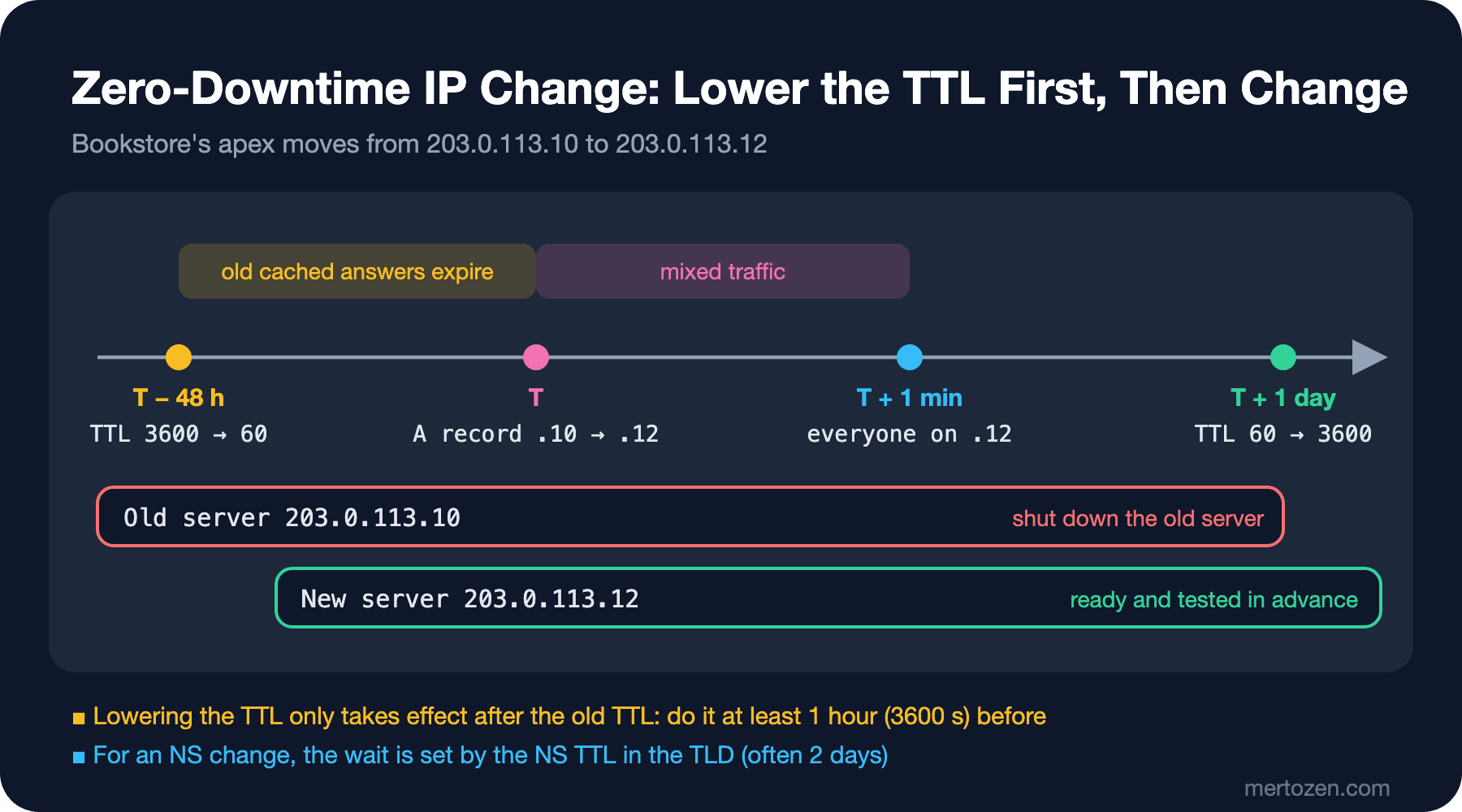
In the lab I made the same change with a record whose TTL had been lowered in advance. To simulate the old 3600-second copies expiring, I emptied the resolver's cache with rndc flush before starting:
[02:15:53] resolver, TTL already lowered
bookstore.example.	60	IN	A	203.0.113.10
[02:15:56] resolver right after the change
bookstore.example.	57	IN	A	203.0.113.10
[02:16:54] resolver a minute later
bookstore.example.	60	IN	A	203.0.113.12
A minute after the change, the resolver returns the new IP. The plan for Bookstore:
- T−48 hours: lower the TTL of the apex and
wwwrecords from 3600 to 60 or 300. 48 hours may look like a lot; the rule is at least one old TTL before. But some resolvers don't honour TTLs exactly, and it is good to leave slack so the change doesn't land on a risky time like a weekend. - Before T: the new server is up, its certificate is installed, and it has been tested without touching DNS using
curl --resolve bookstore.example:443:203.0.113.12 https://bookstore.example/. - T: change the IP. For about one TTL both servers take traffic; they must be connected to the same database and run the same version.
- T+1 day: check that the old server's logs have gone quiet, shut it down and raise the TTL back to 3600.
Some clients don't honour TTLs. An HttpClient in a long-running .NET service can keep using an open connection to the old IP; we saw this with PooledConnectionLifetime in the DNS post of the Networking and HTTP series. Shut the old server down when its logs go quiet, not the moment the TTL expires.
Negative Caching: "No" Gets Cached Too
When adding a new name, people often work in the wrong order: they first go and look at the site, then add the record. In the lab I asked for beta.bookstore.example, which didn't exist yet, and then added the record:
[02:16:58] resolver asks for a name that does not exist yet
;; ->>HEADER<<- opcode: QUERY, status: NXDOMAIN, id: 48421
bookstore.example.	300	IN	SOA	ns1.dnshost.example. hostmaster.bookstore.example. 2026111414 7200 3600 1209600 300
[02:17:01] authoritative after adding beta
beta.bookstore.example.	3600	IN	A	203.0.113.14
[02:17:01] resolver after adding beta
;; ->>HEADER<<- opcode: QUERY, status: NXDOMAIN, id: 14991
bookstore.example.	298	IN	SOA	ns1.dnshost.example. hostmaster.bookstore.example. 2026111414 7200 3600 1209600 300
The record exists on the authoritative server, but the resolver still says "no" and will keep saying it for another 298 seconds. Per RFC 2308, the cache lifetime of an NXDOMAIN answer is the smaller of the SOA record's own TTL and the last field of the SOA (300 here). That is why it makes sense to keep that field around 300 in your zones; large values like 86400 can keep new names invisible for a whole day. The practical rule: add a new name to DNS first, then test it.
Scenarios: Changing the IP, the Platform and the Provider
A server IP change is the plan above. Two more scenarios come up often.
Moving from App Service to Container Apps: api.bookstore.example currently points at bookstore-api.azurewebsites.net with a CNAME. Build the new environment in parallel, add the custom domain there as well (Container Apps asks for the asuid.api TXT for verification; as we saw in the second post it is the same name as for App Service, though the value may differ), and get the managed certificate there too. Because the verification record and the traffic record are separate, these steps do not affect traffic. Then switch only the CNAME to the new address. Keep App Service running until the CNAME's TTL has passed and its logs go quiet; your rollback plan should be a single record change. This is the DNS-level version of blue-green from the Deployment Strategies series; the difference is that resolvers, not you, decide how long the switch takes.
Changing the DNS provider: the rule here is "copy the records first, then change NS". Export the zone from the old provider in BIND format (most providers have an "export" in the panel; AXFR, the zone transfer, is usually disabled), import it at the new provider and compare every name by asking both providers' nameservers directly. The first loop of compare-resolvers.sh does this; give it the old and new nameservers as parameters and differences show up right away. Change NS at the registrar only when everything matches. After that, do not delete the zone at the old provider for at least two days (the NS TTL in the TLD), and if you change something, change it at the new provider too. The lame delegation we saw in the first post is what deleting the old zone before those two days are up looks like.
DNSSEC: What It Protects and What It Doesn't
DNSSEC guarantees one thing: the answer the resolver receives is the answer the zone owner published, unchanged in transit. It prevents poisoning a resolver into returning a fake IP (cache poisoning). It provides no privacy; queries and answers are still plain text (that is what DoH/DoT are for). It doesn't protect against your registrar account being taken over and NS being changed, because an attacker can change the DS record too. Nor does it protect the path between the user and the resolver; validation usually happens at the resolver.
The chain works like this: the zone is signed with its own keys (DNSKEY); the parent zone (the TLD) holds a DS record, which is a digest of that key; the parent is signed with its own key, and the chain goes up to the root. In the lab I signed both the imaginary .example TLD and Bookstore's zone with BIND's automatic key management:
zone "bookstore.example" {
    type primary;
    file "/etc/bind/bookstore.example.zone";
    dnssec-policy default;
    inline-signing yes;
    key-directory "/var/cache/bind";
};
On the first attempt the registry's zone didn't load and gave an instructive error:
dns_master_load: /etc/bind/example.zone:2: TTL 172800 exceeds configured max-zone-ttl 86400BIND's default policy caps the largest TTL in the zone at one day, because key rollover timing is computed from that value. Real TLDs use two-day TTLs with their own policies; in the lab I lowered the zone's TTL to 86400. Then I generated the DS record from Bookstore's DNSKEY and added it to the registry's zone, next to the NS record:
$ dig @192.0.2.20 bookstore.example DNSKEY +norec +noall +answer | dnssec-dsfromkey -2 -f - bookstore.example
bookstore.example. IN DS 34401 13 2 CDDADB1A3D9BF83ABF836685FA05D57EF090BD1986C0A720E0366B688278283D
In real life you enter this line in the DNSSEC/DS field of the registrar's panel and the registrar passes it to the TLD. 34401 is the key tag, 13 the algorithm (ECDSA P-256), 2 the digest type (SHA-256). I gave the lab resolver the .example key as its trust anchor; in real resolvers the root's key plays that role. The result:
$ dig @192.0.2.10 bookstore.example A +dnssec +noall +comments | grep -E "status|flags"
;; ->>HEADER<<- opcode: QUERY, status: NOERROR, id: 15397
;; flags: qr rd ra ad; QUERY: 1, ANSWER: 2, AUTHORITY: 0, ADDITIONAL: 1
$ delv @192.0.2.10 -a anchor.conf +root=example bookstore.example A
; fully validated
bookstore.example.	3593	IN	A	203.0.113.10
bookstore.example.	3593	IN	RRSIG	A 13 2 3600 20261127172728 20261114011247 34401 bookstore.example. cgmW3avmu1b024pS0nM/...
The ad (authenticated data) flag says the resolver validated the chain. delv is a tool that does the validation itself; "fully validated" is the clearest answer. The two dates in the RRSIG record are the signature's validity window: signatures expire and the server must renew them regularly. This is where the risk of running DNSSEC by hand lies: signatures that aren't renewed make the whole domain unresolvable once they expire. So use either an automatic mechanism like BIND's dnssec-policy or a provider that does the signing. Azure DNS made DNSSEC generally available for public zones in February 2025; on Cloudflare it is a single toggle.
Moving Providers with DNSSEC On
DNSSEC's classic breaking point is a provider change. The new provider signs the zone with its own keys. If you change NS and leave the old DS in the TLD, resolvers try to validate the new provider's signatures with the old DS and fail. In the lab I simulated this by deleting the DNS provider's keys and having it re-sign the zone with a new key. The new key's DS is different, while the TLD still has the old one:
$ dig @192.0.2.20 bookstore.example DNSKEY +norec +noall +answer | dnssec-dsfromkey -2 -f - bookstore.example
bookstore.example. IN DS 48386 13 2 9C30FDED4A8E7189E72C072B6F814B09C2F945E8D2B006241914CEE988F8E702
$ rndc flush
$ dig @192.0.2.10 bookstore.example A +dnssec +noall +comments | grep -E "status|flags"
;; ->>HEADER<<- opcode: QUERY, status: SERVFAIL, id: 43128
;; flags: qr rd ra; QUERY: 1, ANSWER: 0, AUTHORITY: 0, ADDITIONAL: 1
$ delv @192.0.2.10 -a anchor.conf +root=example bookstore.example A
;; resolution failed: failure
The resolver's log states the reason plainly:
validating bookstore.example/DNSKEY: no valid signature found (DS)
no valid RRSIG resolving 'bookstore.example/DNSKEY/IN': 192.0.2.20#53
broken trust chain resolving 'bookstore.example/A/IN': 192.0.2.20#53
For users this means the whole domain disappears: website, API and mail. And only for users of validating resolvers; 1.1.1.1, 8.8.8.8 and 9.9.9.9 all validate. The fastest diagnosis is asking with +cd (checking disabled):
$ dig @192.0.2.10 bookstore.example A +dnssec +cd +noall +comments +answer | grep -E "status|flags|IN	A"
;; ->>HEADER<<- opcode: QUERY, status: NOERROR, id: 8640
;; flags: qr rd ra cd; QUERY: 1, ANSWER: 2, AUTHORITY: 0, ADDITIONAL: 1
bookstore.example.	3595	IN	A	203.0.113.10
If the normal query returns SERVFAIL and the +cd query returns an answer, the problem is DNSSEC. There are two correct ways:
Going insecure: before moving, remove the DS at the registrar and wait for the DS TTL in the TLD (usually a day or two). The zone now counts as unsigned and you can move NS safely. Enable DNSSEC at the new provider and add the new DS. I did both steps in the lab; with the DS removed the answer comes back without ad, and with the new DS added ad returns:
# step 1: the DS line was removed from the registry zone
$ rndc reload example && rndc flush
zone reload queued
$ dig @192.0.2.10 bookstore.example A +dnssec +noall +comments | grep -E "status|flags"
;; ->>HEADER<<- opcode: QUERY, status: NOERROR, id: 48500
;; flags: qr rd ra; QUERY: 1, ANSWER: 2, AUTHORITY: 0, ADDITIONAL: 1
# step 2: the new key's DS was added
$ grep "^bookstore" example.zone
bookstore       IN NS   ns1.dnshost.example.
bookstore       IN DS   48386 13 2 9C30FDED4A8E7189E72C072B6F814B09C2F945E8D2B006241914CEE988F8E702
$ rndc reload example && rndc flush
zone reload queued
$ dig @192.0.2.10 bookstore.example A +dnssec +noall +comments | grep -E "status|flags"
;; ->>HEADER<<- opcode: QUERY, status: NOERROR, id: 38755
;; flags: qr rd ra ad; QUERY: 1, ANSWER: 2, AUTHORITY: 0, ADDITIONAL: 1
Simple and safe; the cost is a few days unsigned. Multi-signer migration: the method in RFC 8901. Each provider publishes the other's zone signing key as a DNSKEY in its own zone, and the new provider's DS is added at the registrar as well. For a while, both providers' answers validate. Cloudflare documents this flow: first the keys are added to both sides, then the new DS and the new NS are entered at the registrar, finally the old provider's DS and NS are removed, and after waiting at least 1.5 times the old DS's TTL the old key is deleted. The prerequisite is that the old provider lets you add a foreign DNSKEY at the apex. Many providers don't; then going insecure is the only way.
DNS as Code: Keeping the Zone in a Repo
In a zone managed through a panel, "who added this record, when and why?" has no answer. With the zone as code in a repo, every change becomes a pull request, goes through review and leaves history. When changing providers, applying the same definition to the new provider is much safer than copying records by hand. The general-purpose tool for this is Terraform; managing DNS with providers' Terraform providers is covered in the Infrastructure as Code: Terraform series. There are also tools focused only on DNS: OctoDNS (defined in YAML) and DNSControl (defined in a JavaScript-like file). In the lab I tried DNSControl with its official container image and the provider that writes BIND-format zone files:
var REG_NONE = NewRegistrar("none");
var DNS_HOST = NewDnsProvider("bind");

D("bookstore.example", REG_NONE, DnsProvider(DNS_HOST),
    DefaultTTL(3600),
    NAMESERVER("ns1.dnshost.example."),
    SOA("@", "ns1.dnshost.example.", "hostmaster.bookstore.example.", 7200, 3600, 1209600, 300),
    A("@", "203.0.113.10"),
    AAAA("@", "2001:db8:10::10"),
    CNAME("www", "bookstore.example."),
    A("staging", "203.0.113.11"),
    // App Service: CNAME + asuid verification TXT
    CNAME("api", "bookstore-api.azurewebsites.net."),
    TXT("asuid.api", "9ABEB8D35A69D8E0F4A0BFF18E629B9F43A21C43C122B267F86E53CCD94D5DDD"),
    CAA("@", "issue", "letsencrypt.org"),
    CAA("@", "issue", "digicert.com"),
    CAA("@", "issuewild", ";"),
    // owner: marketing, Search Console
    TXT("@", "google-site-verification=pX3c9QeLr0vT2mWb8yKdN5hJ7sFa1uZo4iGyE6"),
    MX("@", 10, "mx1.corpmail.example."),
    MX("@", 20, "mx2.corpmail.example."),
    TXT("@", "v=spf1 include:_spf.corpmail.example -all"),
    TXT("_dmarc", "v=DMARC1; p=none; rua=mailto:dmarc-reports@bookstore.example")
);
# creds.json
{
"none": { "TYPE": "NONE" },
"bind": { "TYPE": "BIND", "directory": "zones" }
}The "write the owner next to every verification TXT" rule from the second post is a comment line here. Making the IP change above in this file (A("@", "203.0.113.12", TTL(300))), the command a CI job runs on the pull request and its output are:
$ docker run --rm -v "$PWD:/dns" -w /dns ghcr.io/dnscontrol/dnscontrol:5.8.2 preview --no-colors
******************** Domain: bookstore.example
1 correction (bind)
#1: ± MODIFY bookstore.example A (203.0.113.10 ttl=3600) -> (203.0.113.12 ttl=300)
Done. 1 corrections.
The single line the reviewer sees: what changes to what, and the TTL. After the merge, push runs on the main branch. On Windows the same tool also runs as a single dnscontrol.exe. One warning: once the zone is in code, every change made in the panel is deleted by the next push. Making panel access read-only is part of this move.
In Production
Plan the change window around the TTL. If a record's TTL is 3600, rolling back also takes at least an hour. Lowering the TTL before risky changes speeds up not just going forward but also going back.
Verify every change from the outside. Check the authoritative side with dig +trace and the big resolvers with compare-resolvers.sh. For a change to count as done, all authoritative servers must return the new value; one of a provider's nameservers may be lagging.
Monitor DNSSEC. A zone whose signatures are about to expire, a mismatch between DS and DNSKEY or an accidentally deleted key takes the site down completely for users of validating resolvers. The zone needs regular external checks with delv or DNSSEC analysis tools. If you sign your own zone, set up an alert on signature validity.
Don't plan a provider move independently of DNSSEC. In a DNSSEC-enabled zone the first item of the migration plan should be "what do we do with the DS?". If the answer is going insecure, the DS removal happens days before the move.
Common Pitfalls
Lowering the TTL at the last minute: Ayşe's suggestion from Guess First. Lowering the TTL ten minutes before the change has no effect on resolvers that cached with 3600.
Forgetting to raise the TTL again: a TTL left at 60 seconds after a migration needlessly increases queries to the authoritative servers and the DNS bill, and shortens the time the cache protects you during a provider outage.
Testing a new name before adding it to DNS: because of negative caching, the NXDOMAIN from the first attempt stays cached for as long as the SOA says. Add the record first, then test.
Deleting the old zone right after changing NS: the NS records in the TLD are cached for two days. During that time, queries reaching the old provider get REFUSED and the domain disappears for some users.
Changing providers with DNSSEC on and forgetting the DS: the SERVFAIL we saw in the lab. In a provider change, the DS is as important a record as NS.
A Small Experiment
★☆☆ Query the A record of a site you know well with compare-resolvers.sh twice, a few minutes apart. How do the TTLs at the resolvers change? What is the TTL at the authoritative server?
★★☆ In the lab, raise the SOA's last field from 300 to 3600 and repeat the negative caching experiment. When does the resolver start seeing the new name? Does the result change when the SOA record's own TTL is also 3600?
★★★ Apply a multi-signer migration in the lab: generate a second key by hand and add it to the zone as a DNSKEY, put both DS records in the parent, then remove the old key. At every step, verify with delv that the chain is not broken.
We now know how to change and verify things at the DNS layer. In the next post we move on to the next stop for traffic: the CDN. We'll see what the edge, the origin, the origin shield and the cache key are, and build the right cache strategy for Bookstore's Angular app and API with s-maxage and CDN-Cache-Control.