

What's Inside a TLS Certificate? X.509, SAN, Chain of Trust and File Formats
A TLS certificate is an X.509 document, signed by a CA, that binds a public key to the names in its SAN list; the client trusts it because the chain of signatures reaches a root in its trust store. With real runs we read the fields with openssl and .NET's X509CertificateLoader, and see the one-level limit of wildcards, Let's Encrypt's cross-signed Generation Y chain, and how a missing intermediate breaks curl but is hidden in .NET by AIA.
Version note: The examples in this post were run with OpenSSL 3.6, Nginx 1.30.6, curl 8.5 and .NET 10 (SDK 10.0.404) on Docker 29; the Bookstore certificates are test certificates generated in the working folder, and the real chain example was captured on 14 November 2026.
Guess First
Bookstore's Nginx gets a new certificate. The padlock in the browser looks fine and nobody complains. On the same day two things happen: the curl-based health check in monitoring turns red with "SSL certificate problem", a message that still carries the SSL name, while the shipping company's .NET service running on Linux keeps pulling orders without a hitch. A week later the shipping company puts its outbound traffic behind a firewall, and their service starts failing with the same error.
Guess: is the problem in the certificate or on the server? What could a firewall possibly have to do with an HTTPS (HTTP Secure) connection? We will see the answer with a real run in the middle of the post; until then, let's open up what is actually inside a certificate.
Reading a Certificate: openssl x509 -text
The series name says SSL because the industry still says "SSL certificate". But the SSL protocol retired long ago: TLS 1.0 replaced SSL 3.0 in 1999, and the versions that should be enabled on your server today are TLS 1.2 and TLS 1.3. What we call an "SSL certificate" is really a protocol-independent X.509 certificate; the same file works with TLS 1.2 and TLS 1.3. In this series we say TLS for the protocol and certificate for the file. The on-the-wire steps of the handshake are in the "TLS 1.3 Handshake" post of the Networking and HTTP series; here we stay on the operations side: what is inside a certificate, why the client trusts it, and which file is for what.
In the working folder I set up a small three-tier PKI: a test root CA, an intermediate signed by it, and a 90-day leaf certificate the intermediate signed for bookstore.example. Let's open the leaf; I hid the public key and signature bytes with -certopt to keep the noise down:
$ openssl x509 -in bookstore.example.crt -noout -text -certopt no_pubkey,no_sigdump
Certificate:
    Data:
        Version: 3 (0x2)
        Serial Number:
            29:89:cc:0e:ad:e7:33:48:1f:4f:57:57:1b:26:6a:fe:21:b1:f9:38
        Signature Algorithm: ecdsa-with-SHA256
        Issuer: C=TR, O=Bookstore Test, CN=Bookstore Test Issuing CA 1
        Validity
            Not Before: Nov 13 21:12:32 2026 GMT
            Not After : Feb 11 21:12:32 2027 GMT
        Subject: CN=bookstore.example
        X509v3 extensions:
            X509v3 Basic Constraints: critical
                CA:FALSE
            X509v3 Key Usage: critical
                Digital Signature
            X509v3 Extended Key Usage:
                TLS Web Server Authentication
            X509v3 Subject Key Identifier:
                2A:F7:21:14:36:46:83:3F:F3:76:1C:4A:4D:C6:5E:31:F0:D6:85:9C
            X509v3 Authority Key Identifier:
                EA:24:1D:4C:8C:BB:6B:C6:3F:E2:30:0F:34:3B:B5:22:7E:00:5B:CC
            X509v3 Subject Alternative Name:
                DNS:bookstore.example, DNS:www.bookstore.example
            Authority Information Access:
                CA Issuers - URI:http://pki.bookstore.example/issuing-ca-1.crt
Read it top to bottom. Version: 3 is the X.509 version that can carry extensions; every certificate you see today is v3, and the real information lives in the extensions. Serial Number is the unique number the CA gave this certificate; revocation lists refer to certificates by this number. Issuer is the name of the CA that signed the certificate; Subject is its owner. Validity is two timestamps, and the client rejects the connection if "now" is not between them; what counts is the client's clock, not the server's. We hid the public key section, but that is where the server's ECDSA P-256 public key sits; binding that key to a name is the whole point of a certificate.
Extensions say what the certificate is for. Basic Constraints: CA:FALSE says this certificate cannot sign other certificates; on the intermediate it reads CA:TRUE, pathlen:0. Key Usage says what the key may be used for cryptographically, and Extended Key Usage (EKU) says for which application it is valid: TLS Web Server Authentication means it was issued to identify a TLS server. Subject Key Identifier (SKI) and Authority Key Identifier (AKI) are the fingerprints that link the chain together: the leaf's AKI equals the intermediate's SKI. AIA says "you can download the certificate of the CA that signed me from this address"; we will see shortly why that line matters. You can also see the same fields in the browser's certificate viewer, opened from the padlock. But the chain you see there is the chain the browser built itself, not the one the server sent; that difference becomes important in the middle of the post.
To see the same fields in a real certificate, I downloaded the certificate of Let's Encrypt's own website and selected only the extensions I cared about (with the -ext option of OpenSSL 3):
$ openssl x509 -in le-leaf.pem -noout -subject -issuer -dates \
    -ext subjectAltName,certificatePolicies,crlDistributionPoints,authorityInfoAccess
subject=CN=letsencrypt.org
issuer=C=US, O=Let's Encrypt, CN=YE2
notBefore=Nov  3 13:44:34 2026 GMT
notAfter=Feb  1 13:44:33 2027 GMT
Authority Information Access:
    CA Issuers - URI:http://ye2.i.lencr.org/
X509v3 Subject Alternative Name:
    DNS:cp.letsencrypt.org, DNS:cp.root-x1.letsencrypt.org, DNS:cps.letsencrypt.org, DNS:cps.root-x1.letsencrypt.org, DNS:lencr.org, DNS:letsencrypt.com, DNS:letsencrypt.org, DNS:www.lencr.org, DNS:www.letsencrypt.com, DNS:www.letsencrypt.org
X509v3 Certificate Policies:
    Policy: 2.23.140.1.2.1
X509v3 CRL Distribution Points:
    Full Name:
      URI:http://ye2.c.lencr.org/51.crl
One certificate covers ten different names. 2.23.140.1.2.1 is the "domain validated" policy OID of the CA/Browser Forum (the body where CAs and browser vendors write the rules together). There is a CRL address but no OCSP address; Let's Encrypt dropped OCSP in 2025. The full -text output also shows SCT records issued by Certificate Transparency (CT) logs; CT and revocation are the subject of the second post in the series.
SAN and CN: How Is the Hostname Matched?
The old habit was to look for the hostname in the CN of the Subject. Today browsers and TLS libraries look for the hostname only in the SAN extension. RFC 2818 (Request for Comments; a standards document of the IETF, the Internet Engineering Task Force), which defines HTTPS, deprecated CN years ago, the Baseline Requirements (the CA/Browser Forum rules for public CAs) have required SAN since 2012, and Chrome 58 (2017) removed the fallback to CN entirely. The practical consequence: if a certificate you generate yourself only says /CN=api.internal without a SAN, modern clients reject it. Let's Encrypt's newer tlsserver profile does not even fill in the Subject CN; SAN is the only place for names.
A wildcard certificate is also just an entry in the SAN: DNS:*.bookstore.example. The asterisk matches exactly one label. To test it, I put a wildcard certificate on Nginx and connected with three different names:
$ for h in api.bookstore.example v2.api.bookstore.example bookstore.example; do
    printf "%-26s " $h
    echo | openssl s_client -connect 127.0.0.1:19443 -servername $h \
        -CAfile root.crt -verify_hostname $h 2>&1 | grep -E '^Verify return code'
  done
api.bookstore.example      Verify return code: 0 (ok)
v2.api.bookstore.example   Verify return code: 62 (hostname mismatch)
bookstore.example          Verify return code: 62 (hostname mismatch)
Two lessons. *.bookstore.example does not cover a name two levels down such as v2.api.bookstore.example; that needs a separate *.api.bookstore.example. The apex (bare domain) bookstore.example is not inside the wildcard either, which is why wildcard certificates commonly list the apex separately in the SAN. The -servername parameter is SNI, the field where the client says at the start of the handshake which host it wants. A server presenting several certificates on the same IP address picks the right one based on it.
Chain of Trust: Leaf, Intermediate and Root
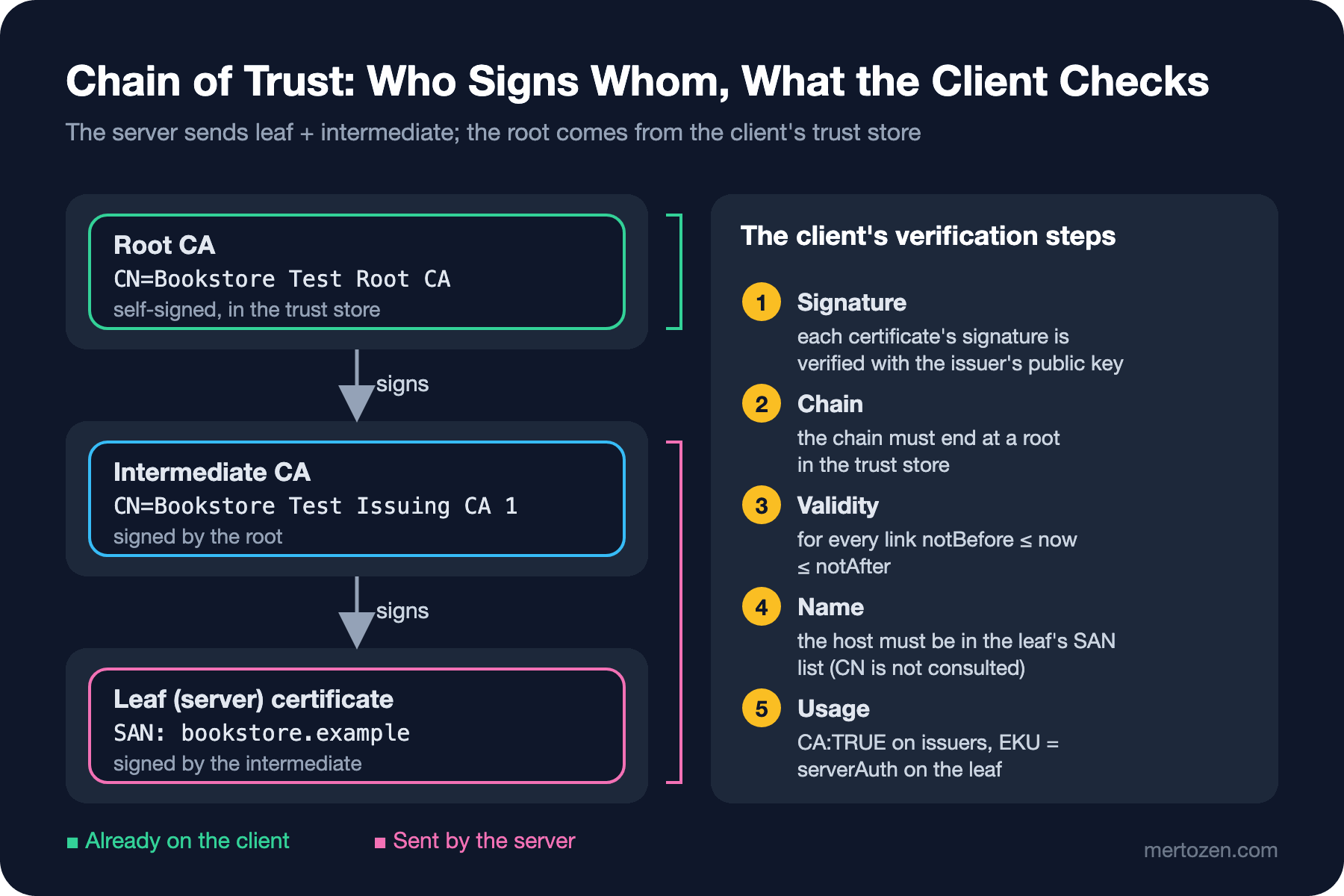
A certificate on its own proves nothing; anyone can generate a certificate claiming "I am bookstore.example". Trust is built through a chain of signatures. The intermediate CA signs the leaf certificate, the root CA signs the intermediate, and the root signs itself (self-signed). The only reason the root is trusted is that it is already in the client's trust store. The client starts from the certificates the server sends, verifies the signatures one by one, and accepts the chain if it reaches a root in its trust store; then it checks validity, name and usage. Root private keys are usually kept offline and intermediates do the day-to-day signing; if an intermediate's key leaks, only that intermediate is revoked without touching the root.
In real life the chain sometimes has four links. Connecting to Let's Encrypt's website, these are the certificates the server sends:
$ echo | openssl s_client -connect letsencrypt.org:443 -servername letsencrypt.org 2>&1 \
    | grep -E '^ *[0-9] s:|^   i:'
 0 s:CN=letsencrypt.org
   i:C=US, O=Let's Encrypt, CN=YE2
 1 s:C=US, O=Let's Encrypt, CN=YE2
   i:C=US, O=ISRG, CN=Root YE
 2 s:C=US, O=ISRG, CN=Root YE
   i:C=US, O=Internet Security Research Group, CN=ISRG Root X2
 3 s:C=US, O=Internet Security Research Group, CN=ISRG Root X2
   i:C=US, O=Internet Security Research Group, CN=ISRG Root X1
This is Let's Encrypt's "Generation Y" hierarchy. The YE2 intermediate is signed by the new Root YE. But Root YE is not yet in many trust stores, so the server sends a copy of Root YE cross-signed by ISRG Root X2, and a copy of X2 cross-signed by X1. The client stops at the first root it finds in its trust store. A newer client may end the chain at Root YE, an older one walks all the way to X1. The same server response produces chains of different lengths depending on the client.
Trust stores differ by platform: Windows has its own certificate store, macOS has the Keychain, Firefox has its own root list, Chrome has the Chrome Root Store, and Linux has the distribution's ca-certificates package. .NET does not ship a separate list; it uses the Windows store on Windows and the bundle OpenSSL points to on Linux. I looked inside the .NET 10 SDK image (Ubuntu 24.04) that Bookstore.Api is built with:
$ grep -c "BEGIN CERT" /etc/ssl/certs/ca-certificates.crt
120
$ ls /etc/ssl/certs | grep -i isrg
ISRG_Root_X1.pem
ISRG_Root_X2.pem
120 roots; X1 and X2 are there, Root YE is not. The cross-signs above exist exactly for clients like this container. An important operational rule follows: keeping a container image's base up to date also keeps its trust store up to date. An image built years ago does not know a new root.
Missing Intermediate: Who Breaks and Who Doesn't?
Back to the Guess First scenario. The most common certificate error in production is a server that sends only the leaf and forgets the intermediate. I opened two ports on Nginx: on 443 ssl_certificate points to the leaf alone, on 8443 to the fullchain file that concatenates leaf and intermediate. The root is in the client's trust store:
$ echo | openssl s_client -connect 127.0.0.1:18443 -servername bookstore.example \
    -CAfile root.crt -verify_hostname bookstore.example 2>&1 | grep -E 'verify error|Verify return'
verify error:num=20:unable to get local issuer certificate
verify error:num=21:unable to verify the first certificate
Verify return code: 21 (unable to verify the first certificate)
OpenSSL cannot complete the chain. Then I hit the same two addresses with curl and .NET HttpClient from a Linux container where I had added the test root to the trust store with update-ca-certificates. For HttpClient I left AIA downloads on once and off once:
static async Task GetAsync(string url, bool allowDownloads)
{
    SocketsHttpHandler handler = new()
    {
        SslOptions = new SslClientAuthenticationOptions
        {
            CertificateChainPolicy = new X509ChainPolicy
            {
                // false (the default): a missing intermediate is downloaded from the AIA address
                DisableCertificateDownloads = !allowDownloads,
                // the test certificates have no CRL address
                RevocationMode = X509RevocationMode.NoCheck
            }
        }
    };
    using HttpClient client = new(handler);
    try
    {
        string body = await client.GetStringAsync(url);
        Console.WriteLine($"OK: {body.Trim()}");
    }
    catch (HttpRequestException ex)
    {
        Console.WriteLine($"{ex.GetType().Name}: {ex.Message}");
        Console.WriteLine($"  inner: {ex.InnerException?.Message}");
    }
}
$ curl -sS https://bookstore.example:8443/
full chain
$ curl -sS https://bookstore.example/ 2>&1 | head -1
curl: (60) SSL certificate problem: unable to get local issuer certificate
$ dotnet Bookstore.CertInspector.dll get https://bookstore.example:8443/ aia-off
OK: full chain
$ dotnet Bookstore.CertInspector.dll get https://bookstore.example/ aia-off
HttpRequestException: The SSL connection could not be established, see inner exception.
inner: The remote certificate is invalid because of errors in the certificate chain: PartialChain
$ dotnet Bookstore.CertInspector.dll get https://bookstore.example/ aia-on
OK: leaf onlyThe last line surprises most people: with default settings, .NET on Linux completed the missing intermediate by itself. The Nginx log shows how:
172.19.0.3 - - [13/Nov/2026:21:13:48 +0000] "GET /issuing-ca-1.crt HTTP/1.1" 200 573 "-" "-" "-"
172.19.0.3 - - [13/Nov/2026:21:13:48 +0000] "GET / HTTP/1.1" 200 10 "-" "-" "-"
.NET downloaded the intermediate over plain HTTP from the leaf's AIA address, built the chain and sent the request. According to Microsoft's cross-platform cryptography documentation, downloaded intermediates are cached on Linux in the user's CurrentUser\Intermediate store. Browsers also often complete a missing intermediate, either by downloading it via AIA or by using intermediates they already know. Most curl and OpenSSL-based clients do not follow AIA.
That is the answer to Guess First. Nothing was wrong with the certificate; the server was sending an incomplete chain. The browser and the shipping company's .NET service were filling the gap via AIA. Once the firewall blocked the http:// address the intermediate was downloaded from, the .NET service ended up exactly where curl was. The lesson: always serve the fullchain, and test with a client that does not rely on AIA (openssl or curl).
DV, OV, EV: What Is Being Validated?
Public CAs issue certificates at three validation levels. DV only proves the applicant controls the domain; it is the only kind Let's Encrypt issues, and the 2.23.140.1.2.1 OID above says so. OV adds a check that the company really exists and puts an O= field into the Subject. EV is a stricter company check and was once shown as a green company name in the address bar.
Technically all three provide the same encryption; the only difference is how much the CA investigated the applicant. In 2019 Chrome 77 and Firefox 70 moved the EV indicator out of the address bar into the info panel behind the padlock. Their reasoning was that studies showed the EV UI did not protect users against phishing as intended. Today buying EV for an API or an SPA usually means just cost and a non-automated process; the need for OV/EV typically comes from a contract or a regulation.
File Formats: PEM, DER, PFX and the Extension Mess
A certificate's content is always the same ASN.1 (Abstract Syntax Notation One) structure; what changes is how that structure is written to disk. Extensions tell you almost nothing: .crt and .cer can be PEM or DER. You find out what a file is by looking at its first bytes:
$ head -c 64 bookstore.example.crt
-----BEGIN CERTIFICATE-----
MIICgjCCAgegAwIBAgIUKYnMDq3nM0gfT1dX
$ openssl x509 -in bookstore.example.crt -outform DER -out bookstore.example.cer
$ head -c 16 bookstore.example.cer | xxd
00000000: 3082 0282 3082 0207 a003 0201 0202 1429  0...0..........)
$ head -1 bookstore.example.key
-----BEGIN EC PRIVATE KEY-----| Format | Content | Typical extension | Where you see it |
|---|---|---|---|
| PEM | Base64 text with -----BEGIN ...----- headers; one file can hold several certificates | .pem, .crt, .key | Nginx, Certbot, Kestrel Path/KeyPath |
| DER | The binary form of the same structure, one certificate | .der, .cer | Exports on Windows, AIA addresses |
| PKCS#12 / PFX (Public-Key Cryptography Standards #12 / Personal Information Exchange) | Certificate, chain and private key in one password-protected file | .pfx, .p12 | Windows, IIS, Azure Key Vault, Kestrel Password |
| Private key | PKCS#8 (BEGIN PRIVATE KEY) or algorithm-specific (BEGIN EC PRIVATE KEY) | .key | Only on the server itself |
PEM is the Base64 form of DER; a binary file starting with 3082 is the typical signature of DER (an ASN.1 SEQUENCE). To convert to PFX you combine leaf, intermediate and key into one file; reading the password from an environment variable instead of typing it on the command line keeps it out of shell history:
$ openssl pkcs12 -export -in bookstore.example.crt -inkey bookstore.example.key \
    -certfile issuing-ca-1.crt -out bookstore.example.pfx -passout env:PFX_PASSWORD
$ openssl pkcs12 -in bookstore.example.pfx -passin env:PFX_PASSWORD -info -noout
MAC: sha256, Iteration 2048
MAC length: 32, salt length: 16
PKCS7 Encrypted data: PBES2, PBKDF2, AES-256-CBC, Iteration 2048, PRF hmacWithSHA256
Certificate bag
Certificate bag
PKCS7 Data
Shrouded Keybag: PBES2, PBKDF2, AES-256-CBC, Iteration 2048, PRF hmacWithSHA256
The two "Certificate bag" entries are the leaf and the intermediate; the "Shrouded Keybag" is the password-encrypted private key. OpenSSL 3 uses AES-256 (Advanced Encryption Standard) by default. Older PFX files from the OpenSSL 1.1 era may be encrypted with the old RC2 and 3DES algorithms, and newer systems can struggle to open them.
The most dangerous consequence of the format mess is treating the private key like the certificate. A certificate is a public document; it is sent to everyone on every TLS connection anyway. The private key is the server's identity itself. Putting the fullchain .crt on a wiki page does no harm; but if a .pem containing the key, or a .pfx with its password written next to it, lands in a repository, an image or a ticket, the certificate has to be revoked and reissued with a new key.
Reading Certificates in .NET: X509CertificateLoader
X509CertificateLoader, introduced in .NET 9, is the recommended way to load certificates. The old X509Certificate2 constructors looked at the content and guessed the format; with the new API you say what you are loading. LoadCertificateFromFile only accepts a single certificate (PEM or DER), and LoadPkcs12FromFile is for PFX. Bookstore's small inspection tool:
static void Inspect(X509Certificate2 cert)
{
    Console.WriteLine($"Subject      : {cert.Subject}");
    Console.WriteLine($"Issuer       : {cert.Issuer}");
    Console.WriteLine($"Serial       : {cert.SerialNumber}");
    Console.WriteLine($"Valid        : {cert.NotBefore:u} -> {cert.NotAfter:u}");
    Console.WriteLine($"Key          : {cert.PublicKey.Oid.FriendlyName}, HasPrivateKey={cert.HasPrivateKey}");
    Console.WriteLine($"Thumbprint   : {cert.Thumbprint}");

    foreach (X509Extension ext in cert.Extensions)
    {
        switch (ext)
        {
            case X509SubjectAlternativeNameExtension san:
                Console.WriteLine($"SAN (DNS)    : {string.Join(", ", san.EnumerateDnsNames())}");
                break;
            case X509EnhancedKeyUsageExtension eku:
                Console.WriteLine($"EKU          : {string.Join(", ", eku.EnhancedKeyUsages.Cast<System.Security.Cryptography.Oid>().Select(o => $"{o.FriendlyName} ({o.Value})"))}");
                break;
            case X509KeyUsageExtension ku:
                Console.WriteLine($"KeyUsage     : {ku.KeyUsages}");
                break;
            case X509BasicConstraintsExtension bc:
                Console.WriteLine($"CA           : {bc.CertificateAuthority}");
                break;
        }
    }
}
$ dotnet Bookstore.CertInspector.dll inspect /pki/bookstore.example.crt
Subject : CN=bookstore.example
Issuer : CN=Bookstore Test Issuing CA 1, O=Bookstore Test, C=TR
Serial : 2989CC0EADE733481F4F57571B266AFE21B1F938
Valid : 2026-11-13 21:12:32Z -> 2027-02-11 21:12:32Z
Key : ECC, HasPrivateKey=False
Thumbprint : A18CAED1ABDF5A2CB8EDF4B27FA013D333AF1F67
CA : False
KeyUsage : DigitalSignature
EKU : TLS Web Server Authentication (1.3.6.1.5.5.7.3.1)
SAN (DNS) : bookstore.example, www.bookstore.example
$ dotnet Bookstore.CertInspector.dll pfx /pki/bookstore.example.pfx "$PFX_PASSWORD" | head -5
Subject : CN=bookstore.example
Issuer : CN=Bookstore Test Issuing CA 1, O=Bookstore Test, C=TR
Serial : 2989CC0EADE733481F4F57571B266AFE21B1F938
Valid : 2026-11-13 21:12:32Z -> 2027-02-11 21:12:32Z
Key : ECC, HasPrivateKey=True
$ dotnet Bookstore.CertInspector.dll inspect /pki/bookstore.example.key 2>&1 | head -1
Unhandled exception. System.Security.Cryptography.CryptographicException: ASN1 corrupted data.The PEM certificate shows HasPrivateKey=False, the PFX shows True. And the "ASN1 corrupted data" message you get when loading a key file as a certificate is the most common way "you passed the wrong file" shows up in .NET. Loading a PEM certificate together with its key on the server side, handing it to Kestrel, and why the old constructors are obsolete are covered in the fourth post.
You can also build the chain in code. We tell X509Chain to trust only our own root instead of the system trust store, and try once without and once with the intermediate:
static void BuildChain(string leafPath, string rootPath, string[] extra)
{
    using X509Chain chain = new();
    chain.ChainPolicy.TrustMode = X509ChainTrustMode.CustomRootTrust;
    chain.ChainPolicy.CustomTrustStore.Add(X509CertificateLoader.LoadCertificateFromFile(rootPath));
    chain.ChainPolicy.RevocationMode = X509RevocationMode.NoCheck;
    chain.ChainPolicy.DisableCertificateDownloads = true;
    foreach (string path in extra)
    {
        chain.ChainPolicy.ExtraStore.Add(X509CertificateLoader.LoadCertificateFromFile(path));
    }

    bool ok = chain.Build(X509CertificateLoader.LoadCertificateFromFile(leafPath));
    Console.WriteLine($"Build: {ok}");
    foreach (X509ChainElement element in chain.ChainElements)
    {
        Console.WriteLine($"  {element.Certificate.Subject}");
    }
    foreach (X509ChainStatus status in chain.ChainStatus)
    {
        Console.WriteLine($"  status: {status.Status}");
    }
}
$ dotnet Bookstore.CertInspector.dll chain /pki/bookstore.example.crt /pki/root.crt
Build: False
CN=bookstore.example
status: PartialChain
$ dotnet Bookstore.CertInspector.dll chain /pki/bookstore.example.crt /pki/root.crt /pki/issuing-ca-1.crt
Build: True
CN=bookstore.example
CN=Bookstore Test Issuing CA 1, O=Bookstore Test, C=TR
CN=Bookstore Test Root CA, O=Bookstore Test, C=TRPartialChain is the same status we saw in the HttpClient error: the chain could not reach a root. CustomRootTrust also previews the right way to trust an internal CA; we will use it in the fourth and seventh posts.
In Production
Always give the server the fullchain: leaf and intermediate, in that order. There is no need to add the root, the client takes it from its own store; adding it only sends extra bytes on every handshake. The fullchain.pem that Certbot produces is exactly this file. If you buy certificates manually, you have to append the CA's "bundle" file after the leaf yourself.
Verify after deployment with a client that does not rely on AIA. Seeing Verify return code: 0 (ok) in the output of openssl s_client -connect host:443 -servername host confirms together that the chain is complete and the name matches. A green padlock in the browser does not prove it.
In egress-restricted environments (Kubernetes NetworkPolicy, corporate proxy) .NET's AIA and CRL downloads can fail silently and add latency to the handshake. If a partner's server sends an incomplete chain, the right fix is on their side; adding the intermediate to your container's trust store as a root, as a workaround, breaks again when that intermediate changes.
Rebuild container images regularly. A base image update also updates ca-certificates; that is the only way new roots (like Root YE) arrive and distrusted roots leave. An image that has not been rebuilt for years can one day start throwing TLS errors without a single code change.
Common Pitfalls
Serving only the leaf: it works in desktop browsers and breaks in curl, in many mobile and IoT clients, and in .NET services whose egress is closed. In Nginx, ssl_certificate must always point to the fullchain file.
Wrong order: if the fullchain file has the intermediate first and the leaf second, Nginx cannot match the key to the certificate and refuses to start with key values mismatch. The order is always the leaf, then the intermediates.
Putting the hostname in CN and forgetting SAN: the most common mistake in self-generated certificates. Use -addext "subjectAltName=DNS:api.internal" or an extension file in OpenSSL.
Assuming a wildcard covers everything: *.bookstore.example covers neither the apex nor two-level subdomains.
Trusting the extension: a .cer file can be PEM or DER; if the loading tool says "corrupt file", check the format first with head -c 64.
Moving the private key around like the certificate: sharing the key over email, chat or a repository means reissuing the certificate. The certificate is public, the key is not.
A Small Experiment
★☆☆ Look at the certificates of three sites you use with openssl s_client -connect site:443 -servername site -showcerts. How many links does the chain have, which CA does it come from, how many days is the leaf valid? Use openssl x509 -noout -ext certificatePolicies to find out whether it is DV or OV.
★★☆ Set up a three-tier test PKI like the one in this post. Generate a leaf with only a CN and no SAN, and connect with both openssl s_client -verify_hostname and HttpClient. Which error messages do you get?
★★★ Repeat the missing-intermediate experiment, but instead of blocking the AIA address, add the intermediate manually to .NET's CurrentUser\Intermediate store. Does the connection succeed? What happens when you start a new container from the same image? Write a paragraph on why this "workaround" is a time bomb in production.
We have seen what is inside a certificate and how the chain is built. In the next post we follow the certificate's life from start to finish: generating a CSR, how the CA validates the domain, Certificate Transparency logs, why revocation moved from OCSP to CRLs, and what it means that certificate lifetimes drop to 47 days by 2029.