

The Certificate Lifecycle: CSR, Domain Validation, Certificate Transparency, Revocation and the 47-Day Future
A certificate is requested with a CSR, the CA validates the domain with HTTP-01, DNS-01 or TLS-ALPN-01, the certificate is written to CT logs, and revocation now rests on CRLs and short lifetimes rather than OCSP. With SC-081v3 the maximum lifetime drops to 200 days on 15 March 2026, 100 in 2027 and 47 in 2029; through crt.sh, a real CRL and CSR generation in .NET we see why manual renewal is over.
Version note: The examples in this post were run with OpenSSL 3.6, .NET 10 (SDK 10.0.402), curl and jq; the Certificate Transparency, crt.sh and CRL data were captured on 14 November 2026, and the schedule dates were rechecked that day against CA/Browser Forum and Let's Encrypt announcements.
Guess First
Bookstore's certificate was bought in November 2025 from a commercial CA for one year. It is about to expire, and the purchasing team places an order for a "one-year certificate" just like last year. They will do the same again in spring 2029.
Guess: how many days will the certificate ordered today be valid? How many renewals per year will 2029 require? Does the CA check again on every renewal that the domain is yours? The answers are in the schedule at the end of this post. Before we get there, let's follow the steps a certificate goes through from birth to death, in order.
Key Pair and CSR: The Document That Asks for a Certificate
Everything starts with a key pair, and the private key never leaves the machine where it was generated. What goes to the CA is a CSR: the public key, the requested names, and a signature over that information made with the private key. That signature proves the sender actually holds the private key. With OpenSSL:
$ openssl genpkey -algorithm EC -pkeyopt ec_paramgen_curve:P-256 -out bookstore.example.key
$ openssl req -new -key bookstore.example.key -subj "/CN=bookstore.example" \
    -addext "subjectAltName=DNS:bookstore.example,DNS:www.bookstore.example" \
    -out bookstore.example.csr
$ openssl req -in bookstore.example.csr -noout -text -verify -reqopt no_pubkey,no_sigdump
Certificate request self-signature verify OK
Certificate Request:
    Data:
        Version: 1 (0x0)
        Subject: CN=bookstore.example
        Attributes:
            Requested Extensions:
                X509v3 Subject Alternative Name:
                    DNS:bookstore.example, DNS:www.bookstore.example
The self-signature verify OK line says the signature inside the CSR verifies with the public key inside it. As we saw in the previous post, hostnames belong in the SAN, so we request them with -addext. Not everything you put in a CSR ends up in the certificate. The CA ignores fields that don't fit its policy. A DV CA like Let's Encrypt takes only the public key and the names from the CSR; even if you write O= or L=, it does not put them into the certificate.
You can do the same in .NET with CertificateRequest. It is handy for a service that runs its own PKI in code, or for a provisioning tool:
using System.Security.Cryptography;
using System.Security.Cryptography.X509Certificates;

string[] names = ["bookstore.example", "www.bookstore.example"];

using ECDsa key = ECDsa.Create(ECCurve.NamedCurves.nistP256);

CertificateRequest request = new($"CN={names[0]}", key, HashAlgorithmName.SHA256);
SubjectAlternativeNameBuilder san = new();
foreach (string name in names)
{
    san.AddDnsName(name);
}
request.CertificateExtensions.Add(san.Build());

File.WriteAllText("bookstore.example.csr", request.CreateSigningRequestPem());
// the private key stays on this machine; only the CSR goes to the CA
File.WriteAllText("bookstore.example.key", key.ExportPkcs8PrivateKeyPem());

Console.WriteLine($"CSR for {string.Join(", ", names)} written; key stays on this machine.");
$ dotnet run
CSR for bookstore.example, www.bookstore.example written; key stays on this machine.
$ openssl req -in bookstore.example.csr -noout -text -verify -reqopt no_pubkey,no_sigdump
Certificate request self-signature verify OK
Certificate Request:
Data:
Version: 1 (0x0)
Subject: CN=bookstore.example
Attributes:
Requested Extensions:
X509v3 Subject Alternative Name:
DNS:bookstore.example, DNS:www.bookstore.exampleThe CSR .NET produced has the same structure as OpenSSL's. In practice, generating CSRs by hand is becoming rare: ACME clients generate the key and the CSR themselves on every renewal. Still, you need to know this step when you buy a certificate through a commercial CA's portal or send a request to an internal CA. And the rule never changes: you can share the CSR, never the key.
Domain Validation: How Does the CA Know the Domain Is Yours?
For every name in the CSR, the CA must verify that the applicant really controls that domain. This is called DCV. In the ACME world there are three standard methods, working over HTTP, DNS and TLS:
| Method | What the CA checks | Port | Wildcard | When it fits |
|---|---|---|---|---|
| HTTP-01 | The expected content at http://domain/.well-known/acme-challenge/TOKEN | 80 | No | A single server with port 80 open to the internet |
| DNS-01 | The expected value in the _acme-challenge.domain TXT record | None | Yes | Wildcards, servers closed to the internet, many servers |
| TLS-ALPN-01 | A special validation certificate served on 443 with the acme-tls/1 ALPN | 443 | No | Servers that terminate TLS themselves with port 80 closed (like Caddy) |
HTTP-01 is the simplest but needs port 80 and cannot issue wildcards. DNS-01 needs write access to your DNS provider's API; in return it makes wildcards and certificates for servers never exposed to the internet possible. TLS-ALPN-01 (RFC 8737) works over 443 alone using ALPN. Applying these methods with Certbot and Nginx is the subject of the next post.
Two details matter in operations. First, large CAs no longer validate from a single point but from several points in different regions of the internet. The CA/Browser Forum (the body where CAs and browser vendors write the rules together) made this mandatory with ballot SC-067, adopted in 2024; it is called MPIC. The goal is to make it harder for an attacker who controls one network path to pass validation falsely. The consequence for you: trying to make HTTP-01 work by allowing only "the CA's IP address" in your firewall does not work.
Second, a validation result is reused for a while. A CA that validated a domain today may rely on that validation for subsequent certificates for some time. That period is shrinking along with certificate lifetimes, as we will see in the schedule shortly. As it shrinks, the "I added the DNS record by hand once, it will last for years" approach stops working too.
Issuance and Certificate Transparency
Once validation is done, the CA signs the certificate. But there is one more intermediate step first: CT. Before signing the final certificate, the CA produces a "precertificate" and submits it to public, append-only logs. In return the logs issue an SCT, a signed receipt saying "I have recorded this certificate". The SCTs are embedded in the certificate. Chrome and Safari reject public certificates without SCTs. In the Let's Encrypt certificate we downloaded in the previous post:
$ openssl x509 -in le-leaf.pem -noout -text | grep -E "Log ID|Timestamp|Not Before"
            Not Before: Nov  3 13:44:34 2026 GMT
                Signed Certificate Timestamp:
                    Log ID    : 4C:63:DC:98:E5:9C:1D:AB:88:F6:1E:8A:3D:DE:AE:8F:
                    Timestamp : Nov  3 14:43:04.256 2026 GMT
                Signed Certificate Timestamp:
                    Log ID    : 46:A2:39:67:C6:0D:B6:46:87:C6:6F:3D:F9:99:94:76:
                    Timestamp : Nov  3 14:43:06.252 2026 GMT
Two SCTs, two different logs. The Log ID is the SHA-256 (Secure Hash Algorithm) hash of the log's public key. To find out which log it is, you can look it up in the log list Chrome publishes. The full form of the first ID, which is cut off above, is on the next line of the -text output:
$ curl -s https://www.gstatic.com/ct/log_list/v3/log_list.json -o log_list.json
$ id=$(echo 4C63DC98E59C1DAB88F61E8A3DDEAE8FAB44A3377B5F9B94C3FBA19CFCC1BE26 | xxd -r -p | base64)
$ jq -r --arg id "$id" '.operators[] | .name as $op | ((.logs // []) + (.tiled_logs // []))[]
    | select(.log_id == $id) | "\($op): \(.description)"' log_list.json
Cloudflare: Cloudflare Nimbus2027
The second SCT comes from DigiCert's Sphinx2027h1 log. A Let's Encrypt certificate sits in Cloudflare's and DigiCert's logs; the companies running the logs are independent of the CA. That independence is the system's strength: if a CA quietly issues a certificate for your domain, the record stays in other companies' logs where anyone can see it. One more small detail: Not Before is about an hour earlier than the SCT. Let's Encrypt backdates the start time a little so that clients whose clocks are slightly behind don't reject a fresh certificate as "not yet valid".
Watching Your Own Domain with crt.sh
Because CT logs are public, there are services that crawl them and make them searchable; the best known is crt.sh. You can see who obtained a certificate for your domain and when. As an example, the unexpired certificates for example.com, the test domain run by IANA:
$ curl -s 'https://crt.sh/?q=example.com&output=json&exclude=expired&deduplicate=Y' \
    | jq -r 'sort_by(.not_before) | reverse | .[:6][]
        | "\(.id)  \(.not_before)  \(.not_after)  \(.common_name)  \(.issuer_name)"'
29581274041  2026-09-26T22:49:11  2026-12-25T22:56:35  example.com  C=US, O=SSL Corporation, CN=Cloudflare TLS Issuing ECC CA 3
29598205284  2026-09-26T22:34:50  2026-12-25T22:43:20  example.com  C=US, O=SSL Corporation, CN=Cloudflare TLS Issuing ECC CA 3
29557945233  2026-09-24T00:00:00  2026-12-21T09:32:54  example.com  C=GB, O=Sectigo Limited, CN=Sectigo Public Server Authentication CA DV E36
22853391369  2025-12-02T00:00:00  2026-12-02T23:59:59  example.com  C=GB, O=Sectigo Limited, CN=Sectigo Public Server Authentication CA OV R36
22648245559  2025-11-21T00:00:00  2026-11-21T23:59:59  example.com  C=GB, O=Sectigo Limited, CN=Sectigo Public Server Authentication CA OV R36
22625564176  2025-11-20T00:00:00  2026-11-20T23:59:59  example.com  C=GB, O=Sectigo Limited, CN=Sectigo Public Server Authentication CA OV R36
These six lines sum up this post on their own. The certificates obtained in November and December 2025 are one-year OV certificates. Those obtained in September 2026 last about 90 days and are DV. Behind the same domain there are certificates from two different CAs and a CDN provider. If, looking at this list for your own domain, you see a certificate from a CA you don't recognize or issued on a date you didn't expect, someone obtained a certificate in your name. Either a forgotten team or an attacker. Monitoring this continuously and restricting which CAs may issue with the CAA DNS record are subjects of the last post in this series and of the Domain, DNS and CDN series. crt.sh is a free, volunteer-run service; it can return 502 at busy times, so put a retry in your automation.
Revocation: CRL, OCSP and Why It Was Abandoned
If the private key leaks or the certificate was issued wrongly, it has to be cancelled before it expires. This is called revocation. There are two classic ways for a client to learn about a revocation. With a CRL, the CA publishes the serial numbers of the certificates it revoked as a signed list. With OCSP, the client asks the CA about a single certificate in real time. The Let's Encrypt certificate from the previous post only had a CRL address. Let's download that list:
$ curl -s -o le.crl http://ye2.c.lencr.org/51.crl -w '%{http_code} %{size_download} %{content_type}\n'
200 100729 application/pkix-crl
$ openssl crl -in le.crl -inform DER -noout -issuer -lastupdate -nextupdate -crlnumber
issuer=C=US, O=Let's Encrypt, CN=YE2
lastUpdate=Nov 13 20:59:02 2026 GMT
nextUpdate=Nov 22 20:59:01 2026 GMT
crlNumber=0x18E7B669D78C2870
$ openssl crl -in le.crl -inform DER -noout -text | grep -c "Serial Number"
2347
$ openssl x509 -in le-leaf.pem -noout -serial
serial=05688C92AD512A3678DB6355831A0BFBBD32
$ openssl crl -in le.crl -inform DER -noout -text | grep -c 05688C92AD512A3678DB6355831A0BFBBD32
0
This list is one of YE2's many "shards" and contains 2347 revoked serial numbers. Our certificate is not on it, so it is not revoked. nextUpdate says when the list will be refreshed at the latest, and clients cache it accordingly.
Why was OCSP abandoned? The biggest problem is privacy: every OCSP query tells the CA "this IP address is connecting to this site right now". Let's Encrypt put that risk front and center when it dropped OCSP. Their timeline: in May 2025 OCSP URLs were removed from new certificates, and in August 2025 the responders were shut down. The CA/Browser Forum, with ballot SC-063 adopted in 2023, made OCSP optional for public CAs and CRLs mandatory. So OCSP is no longer a requirement but the CA's choice. I looked at the certificates of three different CAs:
$ for h in letsencrypt.org www.digicert.com www.microsoft.com; do
    printf "%-20s ocsp=[%s]\n" $h "$(echo | openssl s_client -connect $h:443 -servername $h 2>/dev/null \
        | openssl x509 -noout -ocsp_uri)"
  done
letsencrypt.org      ocsp=[]
www.digicert.com     ocsp=[http://ocsp.digicert.com]
www.microsoft.com    ocsp=[http://oneocsp.microsoft.com/ocsp]
Let's Encrypt has no OCSP, while DigiCert's and Microsoft's CAs still include an OCSP URL. So it is too early to say "OCSP is dead"; the accurate statement is that you can no longer rely on it. Browsers have long either skipped online checks or done them with lists they compile themselves: CRLSet in Chrome, CRLite in Firefox. On the .NET side, HttpClient does not check revocation by default, as I saw in my own run:
Console.WriteLine(new HttpClientHandler().CheckCertificateRevocationList);
Console.WriteLine(new SocketsHttpHandler().SslOptions.CertificateRevocationCheckMode);
Console.WriteLine(new System.Security.Cryptography.X509Certificates.X509ChainPolicy().RevocationMode);
False
NoCheck
OnlineHttpClient does not look at revocation on its own, but if you build an X509ChainPolicy yourself, its default is Online. That is why we wrote RevocationMode = NoCheck into the policy in the AIA experiment of the previous post. If you turn on online CRL checking, the connection fails when the CRL address is unreachable. In egress-restricted environments you have to turn it on deliberately.
The industry's real answer to revocation's weakness is shorter lifetimes. If the key of a six-day certificate leaks, there is practically no difference between revoking it and waiting for it to expire. CA/Browser Forum rules also make revocation information optional for very short-lived certificates. Let's Encrypt's 6-day shortlived profile is a product of that idea, and we will use it in the third post.
The 47-Day Future: The SC-081v3 Schedule
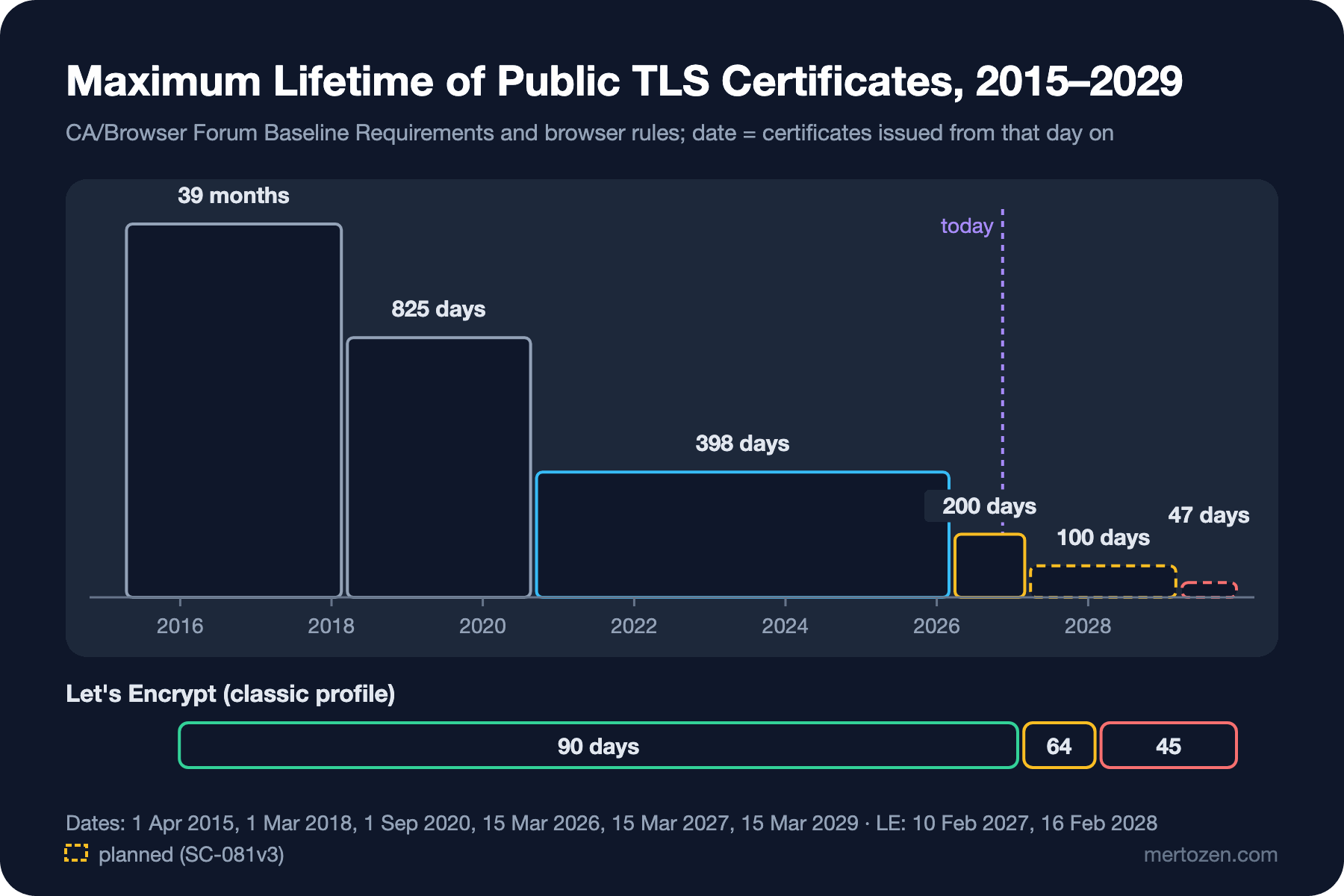
The maximum lifetime of public certificates has been shrinking step by step for a decade: 39 months in April 2015, 825 days in March 2018, 398 days in September 2020. The latest step is ballot SC-081v3, proposed by Apple and adopted by the CA/Browser Forum in April 2025. Among CAs the vote was 25 yes, 0 no and 5 abstentions; Apple, Google, Microsoft and Mozilla all voted yes. The schedule:
- Certificates issued from 15 March 2026 are valid for at most 200 days; domain validation reuse is also 200 days.
- From 15 March 2027, at most 100 days; validation reuse 100 days.
- From 15 March 2029, at most 47 days; validation reuse only 10 days.
Here is the answer to Guess First. A "one-year certificate" ordered today yields a certificate of at most 200 days. Some CAs sell a one-year "subscription" and reissue the certificate several times during the year, but someone still has to put the file on the server each time. In 2029, if you renew a 47-day certificate at two thirds of its lifetime as Let's Encrypt recommends, that is roughly one renewal a month, twelve a year. And since validation can be reused for at most 10 days, the domain will be revalidated on almost every renewal.
Let's Encrypt is ahead of this schedule. The default 90-day classic profile drops to 64 days on 10 February 2027 and to 45 days on 16 February 2028. The authorization reuse period is 30 days today; it drops to 10 days in February 2027 and to 7 hours in February 2028. For those who want 45-day certificates, the tlsserver profile has already been issuing them since May 2026. Let's Encrypt says the changes reach the staging environment about a month before production; that is where you can test your automation. These dates are announced plans. They may change after publication, so keep an eye on the letsencrypt.org/ca/upcoming-features page.
The End of Manual Renewal
The practical meaning of this schedule is simple: putting a yearly reminder in the calendar and renewing a certificate by hand will no longer work. Renewal must stop being a human task and become a routine job the server does itself. The pieces needed for that are the rest of this series: obtaining and renewing automatically with ACME (03), the application picking up the new certificate without a restart (04), managed platforms doing this job for you (05), and an alert noticing before you do when renewal silently stops one day (08).
Let's Encrypt's advice points the same way. Instead of a fixed "renew every 60 days" cron, renew when the CA suggests through ARI. If ARI is not supported, renew at about two thirds of the lifetime. Day 60 worked for a 90-day certificate; for a 45-day certificate that period is longer than the certificate itself.
In Production
Take the inventory now. There should be a list of every manually renewed certificate: domain, CA, where it is installed, who renews it. In the 200-day period this list is a nuisance twice a year, at 100 days four times, at 47 days every month. Every item that cannot be automated is an outage candidate.
If you use a commercial CA, ask whether it supports ACME. Large CAs such as DigiCert and Sectigo offer ACME endpoints; for OV certificates too, organization validation can be done separately and renewals automated with ACME. When renewing the contract, "an ACME endpoint and EAB credentials" should be a requirement.
Set up CT monitoring. Monitoring that notifies you when a new certificate is issued for your domains (a job that queries crt.sh periodically, or a CT monitoring service) surfaces both unexpected issuance and forgotten systems.
Don't rely on revocation, rely on short lifetimes. When a key leaks, revocation is necessary, but how quickly clients will see it is uncertain. The real protection is not leaking the key and keeping the certificate's lifetime short.
Common Pitfalls
Sending the key along with the CSR: some teams upload the key as well because "the CA asked for it". No CA ever needs your private key; a portal that asks for it is a red flag.
Keeping the same key on every renewal: reusing the old CSR on manual renewal is tempting, but when the key lives longer than the certificate, the security benefit of a short lifetime shrinks. ACME clients generate a new key on every renewal by default. You need a good reason to turn that off (such as key pinning, which is itself one of the pitfalls in the fifth post).
Forgetting that CT is a privacy leak: every name you put in a certificate goes into public logs. If you get a public certificate for a name like staging-payments-v2.internal.bookstore.example, you also publish a map of your internal systems. Use an internal CA for internal names; that is the subject of the seventh post.
Fiddling with "is OCSP stapling on?": Let's Encrypt certificates have no OCSP URL, and leaving ssl_stapling on in Nginx only produces the "ssl_stapling" ignored, no OCSP responder URL in the certificate warning; I tried it with Nginx 1.30. Clean that line out of old configs.
Thinking the schedule is only the CA's problem: the CA follows the rule and issues short certificates. Getting the short certificate onto the server in time is your job.
A Small Experiment
★☆☆ List the certificates of the last year on crt.sh for a domain of yours (or your company's). How many different CAs are there, how have the lifetimes changed, is there a name or issuer you don't recognize?
★★☆ Add an IP address with AddIpAddress and a Subject field other than CN (O=Bookstore) to the .NET CSR example in this post. Inspect the resulting CSR with openssl req -text. Then, using Let's Encrypt's profiles page, write down which of these fields would end up in the certificate under which profile.
★★★ Extract the CRL address of a Let's Encrypt certificate, download the CRL and compute the difference between nextUpdate and lastUpdate. Repeat an hour later: did crlNumber change? If you had a certificate revoked today, compute the latest time a client that caches this CRL would see it.
We have seen the certificate's lifecycle and why automation is now mandatory. In the next post we build that automation: the ACME flow step by step, Certbot with Nginx, DNS-01 for wildcards, renewing when the CA suggests with ARI, and Let's Encrypt's profiles.