

How TCP Works: 3-Way Handshake, Congestion Control and HttpClient Socket Exhaustion
TCP opens a connection with a 3-way handshake for a reliable byte stream, starts slowly with slow start and waits in TIME_WAIT on close; that's why new HttpClient per request exhausts ports. 500 TIME_WAITs for 500 requests, 6x slower with TLS, IHttpClientFactory, PooledConnectionLifetime and handler defaults, with real output.
Version note: The code in this post was built with .NET 10 (ASP.NET Core 10 Kestrel) and Microsoft.Extensions.Http 10.0.14 and run on macOS; the TCP (Transmission Control Protocol) description follows RFC (Request for Comments) 9293.
Guess First
Bookstore's order service gets stock information from the catalog service. The developer who wrote the code was afraid of resource leaks, so they create a new client for every request and dispose it when done:
for (var i = 0; i < count; i++)
{
    using var client = new HttpClient();
    var info = await client.GetFromJsonAsync<ConnectionInfo>(url);
    ids.Add(info!.Id);
}
Right after the code sends 500 requests, you look at the operating system's TCP table. There's a using, every client was disposed. How many sockets belonging to this service do you see in the table: zero, one, five hundred? And how much would the time change if you sent the same 500 requests with a single shared client?
What TCP Guarantees
IP (Internet Protocol) carries packets one by one, each unaware of the others: they can get lost, duplicated or reordered. On top of that TCP builds a reliable, ordered byte stream between two applications. The application says "send these 600 bytes"; TCP splits them into segments, gives every byte a sequence number, waits for the other side's acknowledgment (ACK), resends segments that aren't acknowledged (retransmission) and, on the receiving side, puts segments back in order and hands them to the application as an uninterrupted stream.
That guarantee has a cost: both sides must keep the connection's state (which byte has been sent, which has been acknowledged, how big the window is). That state is built with a handshake and cleaned up with a teardown. That's why the HTTP (Hypertext Transfer Protocol) versions HTTP/1.1 and HTTP/2 are connection-oriented; every new connection means a round trip before a request can be sent.
The 3-Way Handshake and Teardown
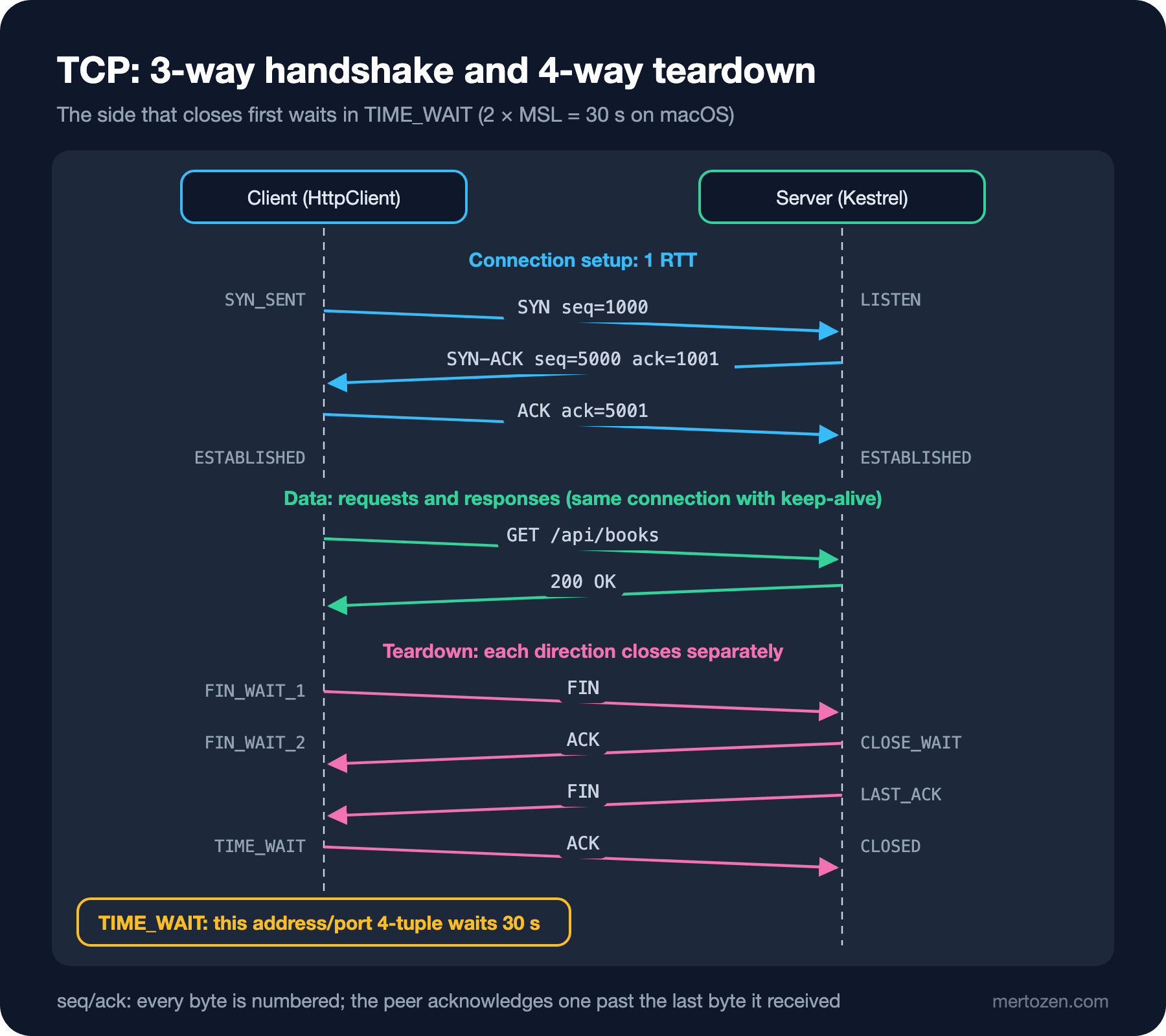
The side opening the connection sends a SYN (synchronize) announcing its initial sequence number. The server answers with a SYN-ACK, both acknowledging that number and announcing its own. The client acknowledges the server's number with a final ACK. Three messages, one RTT (round-trip time): the client can send its first data together with the ACK, i.e. after one RTT. Initial numbers are chosen randomly so that late segments from an old connection using the same ports don't get mixed into the new one.
Teardown is four messages, because the two directions close independently. The side closing first sends a FIN (finish) and the other side acknowledges it; when the other side is done it sends its own FIN, and the final ACK follows. The side that closed first then enters TIME_WAIT and waits for 2 × MSL (Maximum Segment Lifetime). That wait protects two things: being able to answer if the final ACK is lost and the other side resends its FIN, and keeping old segments still wandering the network from mixing into a new connection opened with the same address and port 4-tuple. The MSL on macOS:
$ sysctl net.inet.tcp.msl
net.inet.tcp.msl: 15000
15 seconds, so TIME_WAIT lasts 30 seconds. On Linux it's compiled in as 60 seconds. Each of those waiting connections holds an ephemeral port on the client side. The answer to the guessing question is right here.
If you have Wireshark installed, you can see the handshake on your own machine by capturing the loopback interface with the filter tcp.port == 5491 && tcp.flags.syn == 1; every new connection shows up as a SYN and a SYN-ACK row. For the measurements in this post I used the operating system's socket table (netstat) and connection IDs on the application side instead of capturing packets.
Flow Control and Congestion Control: Why a New Connection Is Slow
TCP slows the sender with two separate brakes. Flow control protects the receiver: with every ACK the receiver announces how much more data it can take (the receive window), and the sender keeps no more than that in flight. Congestion control protects the network: the sender can keep as much unacknowledged data in flight as its own congestion window (cwnd), and grows or shrinks that window according to how the network reacts.
A new connection doesn't know the network's capacity, so it starts small: this is called slow start. The initial window on most systems today is around 10 segments (RFC 6928, experimental in status but widespread), about 14 KB. For every segment acknowledged the window grows by one segment; in practice it doubles every RTT. Sending a 100 KB JSON (JavaScript Object Notation) response on a new connection takes about 14 + 28 + 56 KB, i.e. three RTTs; the same response can go in one RTT on a warm connection whose window has already grown. If a packet is lost, the sender takes it as a sign of congestion and shrinks the window (RFC 5681). Linux's default, CUBIC (RFC 9438), regrows the window after a loss along a more aggressive curve.
For an application developer the takeaway is simple: a new connection is slow not only because of the handshake but also because of slow start. Reusing long-lived, warmed-up connections saves you from both costs.
Compared with UDP
UDP (User Datagram Protocol) does none of this. No handshake, no ordering, no retransmission, no congestion control; every datagram travels independently and either arrives or doesn't. For some jobs those gaps are an advantage:
| Property | TCP | UDP |
|---|---|---|
| Connection setup | 3-way handshake (1 RTT) | none |
| Reliability and ordering | guaranteed, via retransmission | none; the application handles it |
| Congestion control | in the operating system | none; the application handles it |
| Typical use | HTTP/1.1, HTTP/2, database protocols | DNS (Domain Name System) queries, QUIC (HTTP/3), video, games |
A DNS query is one question and one answer; there's no need to pay for a handshake, and a lost query is simply asked again. QUIC rebuilds TCP's guarantees on top of UDP, on the application side rather than in the operating system; that lets it merge its handshake with TLS (Transport Layer Security) and escape TCP behaviors that take years to change. That's the topic of the ninth post in the series.
.NET: new HttpClient per Request
I ran the code from the guessing section against my own Kestrel server. The server's /conn endpoint returns Kestrel's ID for the connection the request arrived on; the client collects those IDs in a HashSet. Then I sent the same 500 requests with a single shared client:
// One shared client: the handler pools and reuses connections
public static async Task<HashSet<string>> SharedClientAsync(HttpClient client, string url, int count)
{
    var ids = new HashSet<string>();
    for (var i = 0; i < count; i++)
    {
        var info = await client.GetFromJsonAsync<ConnectionInfo>(url);
        ids.Add(info!.Id);
    }
    return ids;
}
$ netstat -anp tcp | grep "127.0.0.1.5491" | grep -c TIME_WAIT
1
$ dotnet Bookstore.Net.Lab.dll conns new http://127.0.0.1:5491/conn 500
new requests=500 distinct connections=500 elapsed=118 ms
$ netstat -anp tcp | grep "127.0.0.1.5491" | grep -c TIME_WAIT
501
$ dotnet Bookstore.Net.Lab.dll conns shared http://127.0.0.1:5491/conn 500
shared requests=500 distinct connections=1 elapsed=65 ms
$ netstat -anp tcp | grep "127.0.0.1.5491" | grep -c TIME_WAIT
502
$ netstat -anp tcp | grep "127.0.0.1.5491" | grep TIME_WAIT | head -3
tcp4 0 0 127.0.0.1.62447 127.0.0.1.5491 TIME_WAIT
tcp4 0 0 127.0.0.1.62448 127.0.0.1.5491 TIME_WAIT
tcp4 0 0 127.0.0.1.62449 127.0.0.1.5491 TIME_WAIT500 requests, 500 separate connections and 500 new TIME_WAITs. Every HttpClient creates its own SocketsHttpHandler, and with it its own connection pool; when disposed it closes the connection in its pool. Because the client is the side that closes the connection, TIME_WAIT piles up on the client side, each one holding an ephemeral port for 30 seconds. The shared client sent all 500 requests over a single connection; the single extra TIME_WAIT in the last count is that connection, closed when the program ended. After 30 seconds the table was empty:
t+20s TIME_WAIT=502
t+25s TIME_WAIT=0
On loopback and unencrypted HTTP the difference is twofold. I repeated the experiment with 200 requests against Kestrel in a Linux container over TLS 1.3; the client uses a handler that trusts my own local CA (Certificate Authority) as a root:
$ LOCAL_CA=certs/ca.crt dotnet Bookstore.Net.Lab.dll conns new https://127.0.0.1:5592/conn 200
new    requests=200 distinct connections=200 elapsed=674 ms
$ LOCAL_CA=certs/ca.crt dotnet Bookstore.Net.Lab.dll conns shared https://127.0.0.1:5592/conn 200
shared requests=200 distinct connections=1 elapsed=111 ms
Six times. Every new connection means a TCP handshake, a TLS handshake and certificate validation, and this measurement is still inside a single machine. On a real network with a 50-millisecond RTT every new connection adds at least 100 milliseconds. Under load, though, the real problem isn't speed but ports: macOS's ephemeral range is 16,384 ports; a service sending a few hundred requests a second this way fills the range with 30-second TIME_WAITs, and new connections start failing with a SocketException saying "address already in use" or "cannot assign requested address." This is called socket exhaustion.
The Right Way: A Shared Client and IHttpClientFactory
Microsoft's "HttpClient guidelines" document recommends two options: a long-lived (static or singleton) HttpClient with PooledConnectionLifetime, or short-lived clients produced by IHttpClientFactory. In the second, the factory pools the handlers; no matter how often you create a client, the connections are shared. With a typed client:
// Typed client: the factory owns and recycles the handler, the client itself is cheap
public sealed class CatalogClient(HttpClient http)
{
    public Task<ConnectionInfo?> GetConnectionAsync() => http.GetFromJsonAsync<ConnectionInfo>("/conn");
}

public static class CatalogClientRegistration
{
    public static IServiceCollection AddCatalogClient(this IServiceCollection services, Uri baseAddress) =>
        services.AddHttpClient<CatalogClient>(client => client.BaseAddress = baseAddress)
            .ConfigurePrimaryHttpMessageHandler(() => new SocketsHttpHandler
            {
                PooledConnectionLifetime = TimeSpan.FromMinutes(2)
            })
            .SetHandlerLifetime(Timeout.InfiniteTimeSpan)
            .Services;
}
$ dotnet Bookstore.Net.Lab.dll factory http://127.0.0.1:5491
client #0 connection=0HNPTG1A9A64H
client #1 connection=0HNPTG1A9A64H
client #2 connection=0HNPTG1A9A64HThree separate CatalogClient instances, one connection. Here I left recycling connections to PooledConnectionLifetime rather than the factory's handler rotation, which is why I made the handler lifetime infinite. Why does PooledConnectionLifetime matter? HttpClient resolves DNS only when it opens a new connection; a connection that never closes keeps going to the old address even when the target's IP address changes. I sent one request per second with a handler whose lifetime is 2.5 seconds:
$ dotnet Bookstore.Net.Lab.dll lifetime http://127.0.0.1:5491/conn 2.5 7
t=0s connection=0HNPTG1A9A64E clientPort=63500
t=1s connection=0HNPTG1A9A64E clientPort=63500
t=2s connection=0HNPTG1A9A64E clientPort=63500
t=3s connection=0HNPTG1A9A64F clientPort=63513
t=4s connection=0HNPTG1A9A64F clientPort=63513
t=5s connection=0HNPTG1A9A64F clientPort=63513
t=6s connection=0HNPTG1A9A64G clientPort=63522
When the connection reached its lifetime it was retired, and a new one was opened with a fresh DNS resolution and a new source port. In production this value is chosen in minutes; the documentation's example is 2 minutes. We open up the DNS side of this with a blue-green switchover scenario in the next post. I also read the defaults themselves in code:
PooledConnectionLifetime    : -00:00:00.0010000
PooledConnectionIdleTimeout : 00:01:00
ConnectTimeout              : -00:00:00.0010000
MaxConnectionsPerServer     : 2147483647
-00:00:00.0010000 is Timeout.InfiniteTimeSpan itself: in a default handler connections live forever and there's no separate timeout for connecting. An idle connection, on the other hand, is closed after one minute.
In Production
Keep-alive timeouts must match on both sides. Kestrel's KeepAliveTimeout is 130 seconds in the source code; as the comment there says, it was chosen to be slightly longer than the client's old 2-minute idle timeout. Trouble starts when a load balancer with a shorter idle timeout sits in between: the load balancer silently closes an idle connection, the client uses the pooled connection without knowing, and the first request fails with "connection reset." The rule: the client's PooledConnectionIdleTimeout should be shorter than the idle timeout of every component in between.
Watch who closes. TIME_WAIT piles up on the side that closes the connection first. If clients close connections the problem shows on the clients; if the server closes them it shows on the server. If you see tens of thousands of TIME_WAITs on a server, check whether clients use keep-alive or whether the server sends Connection: close after every response.
Monitor the number of connections. A shared handler's MaxConnectionsPerServer is unlimited; a sudden burst of load can open thousands of connections to the target service. If you know the target's capacity, cap this value; the resilience side is the topic of the upcoming External Service Integration and Resilience series.
Common Pitfalls
Using HttpClient short-lived with using. Being IDisposable doesn't mean you should create it per request; every instance is a connection pool.
Using a static client without PooledConnectionLifetime. Socket exhaustion is solved, but you end up with connections that never see DNS changes.
Treating TIME_WAIT as an error. TIME_WAIT is a sign that TCP is working correctly; the problem is its count exploding, i.e. connections opened and closed needlessly.
Settling for a loopback measurement. On the local machine a new connection costs less than a millisecond; on a real network each is at least two RTTs plus slow start.
Culture-dependent parsing. In this post's demo double.Parse("2.5") returned 25 under the Turkish culture and the connection lifetime became 25 seconds; parse command-line arguments with CultureInfo.InvariantCulture.
A Small Experiment
★☆☆ On your machine, send 200 requests to an ASP.NET Core app with new HttpClient() in a for loop and watch the TIME_WAIT count with netstat. After how many seconds does it reset?
★★☆ Lower Kestrel's KeepAliveTimeout to 5 seconds and set PooledConnectionIdleTimeout to 30 seconds on the client. What happens when you wait 10 seconds between two requests? How does the client experience the error, and does SocketsHttpHandler retry it automatically?
★★★ Send 10 concurrent requests to the /slow?ms=500 endpoint with a handler whose MaxConnectionsPerServer = 2. What's the total time, and why? Repeat the experiment over HTTP/2.
The first step in opening a connection was finding an address, and in this post we saw that HttpClient resolves DNS only when it opens a connection. In the next post we go down into DNS itself: the resolver chain, record types, TTL (Time To Live) and querying with dig.