

SBOM and VEX: Knowing What You Ship with CycloneDX 1.7 and SPDX 3
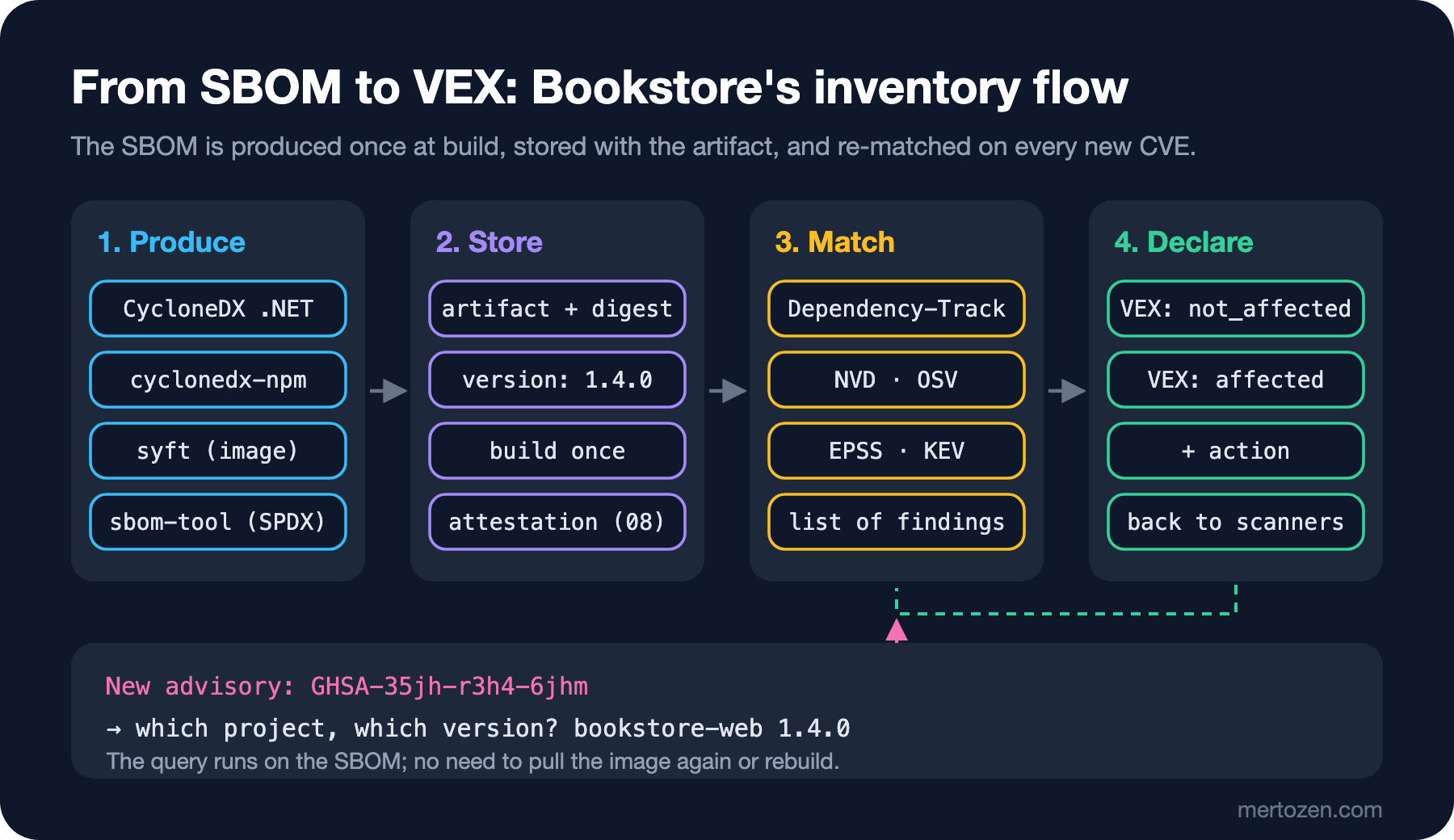
An SBOM is the machine-readable list of components in a release, and its real value is querying which version of which product is affected when a new CVE arrives, without building anything; VEX then states, with a justification, whether it is affected. For Bookstore we produce and verify .NET, Angular and image SBOMs, query them in Dependency-Track and apply OpenVEX and CycloneDX VEX with real output.
Version note: The code in this post was built and run with .NET 10; the SBOMs were produced with CycloneDX .NET 6.3.1, Microsoft sbom-tool 4.1.5, @cyclonedx/cyclonedx-npm 7.0.1 (npm 11.19) and syft 1.57.1, and processed with Dependency-Track 5.2.1, vexctl 0.4.4, Trivy 0.76.2 and Grype 0.121.3 using vulnerability data from 13 November 2026.
Guess First
One morning an advisory about lodash's template function hits the news and the product owner asks: "Is Bookstore 1.4.0, running at the customer, affected?" The 1.4.0 tag is still there; you can check out the repo and run npm ls. But which ASP.NET Core runtime version is in the production image? Can you read that from the project file? And if the answer is "the package is there but we never call that function", do you have to explain it again in every scan report?
In this post we build a setup that answers these questions in minutes with an SBOM and VEX: producing SBOMs for .NET, Angular and the container, checking that the tool's output is actually correct, storing the SBOM with the artifact, turning it into a queryable inventory with Dependency-Track, and turning the sentence "we are not affected, because..." into a machine-readable statement.
What an SBOM Is For and Which Format
An SBOM is the list of components inside a software release: package name, version, an identifier such as a PURL, hash, license and the dependency relationships between components. The OWASP series post "OWASP A03: Software Supply Chain Failures — NuGetAudit, npm audit and SRI" introduced SBOMs; here let us state the purpose more sharply: an SBOM is not a compliance document but a query source. Its value is answering "which version of which of our products contains this package?" without building or pulling an image when a new CVE is published.
There are two common formats, CycloneDX and SPDX, and both are machine-readable:
| CycloneDX 1.7 | SPDX 3.0.1 | |
|---|---|---|
| Backed by | OWASP; version 1.6 was standardized as ECMA-424 | Linux Foundation; version 2.2.1 is ISO/IEC 5962:2021 |
| Origin | Security and supply chain | License compliance, then a general-purpose model |
| Vulnerabilities and VEX | vulnerabilities and analysis in the same document | Through the Security profile |
| What is new | October 2025: citations, patents, cryptography catalog | JSON-LD graph, profiles (Software, Security, Build, AI, Dataset) |
| At Bookstore | CycloneDX .NET, cyclonedx-npm, syft | Microsoft sbom-tool |
A practical rule: for vulnerability management and VEX, CycloneDX's tool ecosystem is broader today; if a customer or an organization asks for SPDX, producing both with sbom-tool or syft is cheap. Whichever you pick, staying consistent in one format beats keeping two formats half-done.
The .NET Side: CycloneDX .NET and sbom-tool
CycloneDX's .NET tool reads the restored package graph from a project file (or a solution). I install the tool into a folder in the repo, not globally:
dotnet tool install CycloneDX --version 6.3.1 --tool-path .tools
.tools/dotnet-CycloneDX src/Bookstore.Api/Bookstore.Api.csproj -o sbom -fn bookstore-api.cdx.json -F Json -sv 1.4.0
Found 27 packages
Creating CycloneDX BOMThe default format is CycloneDX 1.7. Among the 27 packages is Azure.Identity 1.7.0, brought in transitively by SqlClient 5.1.1; each comes with a PURL, a SHA-512 (Secure Hash Algorithm) hash and a license. One thing is missing: ASP.NET Core itself. Because the application runs on a framework reference, the shared framework is not a NuGet package and does not appear in the project SBOM. We will take the runtime version from the image SBOM.
Microsoft's sbom-tool answers a different question: which files are in the build output, and what are their hashes? I gave it the publish folder and the source code and asked for SPDX 3.0:
dotnet publish src/Bookstore.Api -c Release -o out/api
sbom-tool generate -b out/api -bc src/Bookstore.Api -pn Bookstore.Api -pv 1.4.0 -ps Bookstore \
  -nsb https://sbom.bookstore.example -mi SPDX:3.0
In three seconds it created out/api/_manifest/spdx_3.0/manifest.spdx.json: a JSON-LD graph with an SPDX 3.0.1 context, containing 28 packages, each of the 46 files in the publish folder with its hash, and 230 relationships. That file list answers "what was in the zip we shipped to the customer?"; think of it as proof of the contents of the immutable artifact from the CI/CD Fundamentals series post "Build Once, Deploy Many: Artifacts, Versioning and Immutable Packages".
The Angular Side: What npm sbom Does Not Count
npm's own npm sbom command is the first thing that comes to mind. I asked for the production dependencies:
npm sbom --sbom-format cyclonedx --omit dev | jq -r '.components[] | "\(.name)@\(.version)"'@angular/forms@22.2.6
@angular/router@22.2.6
@standard-schema/spec@1.1.0
lodash-es@4.17.20Four packages. @angular/core, rxjs and tslib are missing, even though the application does not start without them. I counted the same tree with npm's own query: npm query .prod | jq length returned 12 including the root package. In npm 11.19.1, this command combined with --omit dev left out production packages that development dependencies also use. I ran CycloneDX's npm tool on the same node_modules:
npx --yes @cyclonedx/cyclonedx-npm@7.0.1 --omit dev --spec-version 1.7 \
  --output-format JSON --output-file ../sbom/bookstore-web.cdx.json
@angular/common@22.2.6
@angular/compiler@22.2.6
@angular/core@22.2.6
@angular/forms@22.2.6
@angular/platform-browser@22.2.6
@angular/router@22.2.6
lodash-es@4.17.20
rxjs@7.8.2
tslib@2.9.1
@standard-schema/spec@1.1.0
zod@4.6.6Eleven packages, exactly matching npm query's list. The lesson is not the tool's name: verify the SBOM once against an independent source. An incomplete SBOM is more dangerous than no SBOM, because it lets you say "it is not on the list, so we are not affected" with confidence. The reason for running npm ci with --ignore-scripts is in the Frontend Security series post "Hardening the npm Supply Chain".
The Image SBOM and Storing It in the Pipeline
Since what gets deployed is the image, the real inventory is the image's SBOM. I scanned bookstore-api:1.4.0, built with the chiseled Dockerfile from the previous post, with syft:
syft scan docker:bookstore-api:1.4.0 -o cyclonedx-json=sbom/bookstore-api-image.cdx.json
jq -r '.components[] | (.purl // .type) | split("/")[0]' sbom/bookstore-api-image.cdx.json | sort | uniq -c | sort -rn
351 file
29 pkg:nuget
9 pkg:deb
1 operating-system27 of the 29 NuGet packages are the same as in the project SBOM; the two extra ones are Microsoft.AspNetCore.App.Runtime.linux-x64 and Microsoft.NETCore.App.Runtime.linux-x64, both 10.0.15. When a .NET runtime advisory is published, the answer is in these lines. The nine deb packages are the Ubuntu parts of the chiseled image; the 351 files are the runtime and application files syft hashed.
When you produce the SBOM matters as much as where: it must be produced from the output of the same build and stored with the same artifact. Producing an SBOM later by "checking out the 1.4.0 tag" can give a different restore, a different base image digest and therefore a different list. The SBOM job in Bookstore's main workflow:
name: sbom

on:
  push:
    branches: [main]

permissions:
  contents: read

jobs:
  sbom:
    runs-on: ubuntu-latest
    env:
      VERSION: 1.4.${{ github.run_number }}
      SYFT_VERSION: 1.57.1
    steps:
      - uses: actions/checkout@3d3c42e5aac5ba805825da76410c181273ba90b1 # v7.0.1
      - uses: actions/setup-dotnet@0f4a354dd5547a28c70b7853dbd95d5b67886e73 # v6.1.0
        with:
          dotnet-version: 10.0.x
      - uses: actions/setup-node@949feb2413d6458794dcd2491c4babbbce0c15c1 # v7.1.0
        with:
          node-version: 24
      - uses: sigstore/cosign-installer@756fe2d284c7292c4e9b62c8a28f1e5629c59532 # v4.1.3
      - name: Install SBOM tools
        run: |
          dotnet tool install CycloneDX --version 6.3.1 --tool-path .tools
          base="https://github.com/anchore/syft/releases/download/v${SYFT_VERSION}"
          for f in checksums.txt checksums.txt.sigstore.json linux_amd64.tar.gz; do
            curl -sSfLO "$base/syft_${SYFT_VERSION}_$f"
          done
          cosign verify-blob "syft_${SYFT_VERSION}_checksums.txt" \
            --bundle "syft_${SYFT_VERSION}_checksums.txt.sigstore.json" \
            --certificate-oidc-issuer https://token.actions.githubusercontent.com \
            --certificate-identity-regexp '^https://github.com/anchore/syft/'
          sha256sum --ignore-missing -c "syft_${SYFT_VERSION}_checksums.txt"
          tar -xzf "syft_${SYFT_VERSION}_linux_amd64.tar.gz" -C .tools syft
      - name: SBOM for the API project
        run: .tools/dotnet-CycloneDX src/Bookstore.Api/Bookstore.Api.csproj -o sbom -fn bookstore-api.cdx.json -F Json -sv "$VERSION"
      - name: SBOM for the web app
        working-directory: web
        run: |
          npm ci --ignore-scripts
          npx --yes @cyclonedx/cyclonedx-npm@7.0.1 --omit dev --spec-version 1.7 \
            --output-format JSON --output-file ../sbom/bookstore-web.cdx.json
      - name: SBOM for the image
        run: |
          docker build -t "bookstore-api:$VERSION" .
          .tools/syft scan "docker:bookstore-api:$VERSION" -o "cyclonedx-json=sbom/bookstore-api-image.cdx.json"
      - uses: actions/upload-artifact@cf430e030ddbb5b0abf93d22962f4752f3646cd9 # v7.0.2
        with:
          name: sbom-${{ env.VERSION }}
          path: sbom/
      - name: Upload to Dependency-Track
        env:
          DT_URL: ${{ vars.DEPENDENCY_TRACK_URL }}
          DT_API_KEY: ${{ secrets.DEPENDENCY_TRACK_API_KEY }}
        run: |
          for p in bookstore-api:sbom/bookstore-api-image.cdx.json bookstore-web:sbom/bookstore-web.cdx.json; do
            curl -sSf -X POST "$DT_URL/api/v1/bom" -H "X-Api-Key: $DT_API_KEY" \
              -F autoCreate=true -F "projectName=${p%%:*}" -F "projectVersion=$VERSION" -F "bom=@${p#*:}"
          done
I validated the workflow with actionlint 1.7.12. I ran the steps one by one locally with their macOS equivalents: the Sigstore signature on syft's checksum file gave Verified OK in cosign, and the upload loop pushed both SBOMs to the local Dependency-Track. We verify the syft binary by its signature, just like Trivy in the previous post; the tool that produces the SBOM is part of the supply chain too. Keep the artifact for as long as the oldest version you support at customers; if the default retention of GitHub artifacts is too short for that, store the SBOM as a release asset or next to the image in the registry. In the eighth post we will bind the SBOM to the image as a signed attestation.
Dependency-Track: Turning SBOMs into a Queryable Inventory
Leaving SBOMs in an artifact folder is like shelving a library without a catalog. Dependency-Track is an open source OWASP project that stores SBOMs per project and version and keeps matching them against vulnerability sources. I ran version 5.2.1 locally as two containers with PostgreSQL. On first start it mirrored the NVD in 3 minutes 36 seconds with 440,922 records; EPSS, the CISA (Cybersecurity and Infrastructure Security Agency) KEV list and KEV data from ENISA (European Union Agency for Cybersecurity) came by default too. I enabled OSV separately for npm and NuGet packages; mirroring both ecosystems took 50 seconds.
This is what the upload step in the pipeline does:
curl -s -X POST "$DT_URL/api/v1/bom" -H "X-Api-Key: $DT_API_KEY" \
  -F autoCreate=true -F projectName=bookstore-web -F projectVersion=1.4.0 \
-F "bom=@sbom/bookstore-web.cdx.json"{"token":"01a1d71d-6225-7409-b1b4-d2db06819d9e","projectUuid":"1a9c7239-a8aa-4306-8d5e-809059fa2fd1"}The upload is asynchronous; you can ask with the token whether processing has finished. The API key belongs to the "Automation" team, which has only BOM_UPLOAD, PROJECT_CREATION_UPLOAD and VIEW_PORTFOLIO. Dependency-Track 5's API also defines workload identity bindings that trust GitHub Actions' OIDC (OpenID Connect) token instead; prefer that to avoid storing a long-lived API key (I could not try this locally, I only saw it in the API schema).
Now the question from the beginning. I queried the portfolio with the advisory's GHSA (GitHub Security Advisory) identifier:
curl -s -H "X-Api-Key: $DT_API_KEY" \
  "$DT_URL/api/v1/vulnerability/source/GITHUB/vuln/GHSA-35jh-r3h4-6jhm/projects" | jq -r '.[] | "\(.name) \(.version)"'
curl -s -H "X-Api-Key: $DT_API_KEY" \
  "$DT_URL/api/v1/component/identity?purl=pkg:nuget/Microsoft.AspNetCore.App.Runtime.linux-x64" \
  | jq -r '.[] | "\(.name) \(.version) \(.project.name) \(.project.version)"'
bookstore-web 1.4.0
Microsoft.AspNetCore.App.Runtime.linux-x64 10.0.15 bookstore-api 1.4.0The first query took 37 milliseconds. The second looks at a package identity rather than a vulnerability ID: it also works for an issue that has no CVE yet and is only announced as "these versions are affected".
A warning. For the image project, Dependency-Track showed 49 findings: four in NuGet packages, 45 in Ubuntu's openssl package, and the source of all 45 was NVD. When I scanned the same SBOM with Grype, openssl got five medium findings. The difference is the matching method: NVD's CPE match looks at the upstream version (3.0.13) and does not know the fixes Ubuntu backported under the same version number; Grype uses the distribution's own security data. Do not wire the inventory tool's result to a gate without seeing which data source it matched against; for operating system packages a scanner that uses distribution data is more accurate, and for application packages OSV or the GitHub Advisory Database.
VEX: "We Are Not Affected, Because..."
In the third post we did a reachability analysis: Bookstore's web side imports only debounce from lodash-es and never calls template, unset or omit; the Entra ID authentication path through which SqlClient uses Azure.Identity does not run either, because we use SQL login. These decisions do not belong in a wiki page or a scanner's ignore file. VEX is a document that states, in machine-readable form and with a justification, whether a specific version of a product is affected by a specific vulnerability. There are four statuses: not_affected, affected, fixed and under_investigation; for not_affected the justification is chosen from a fixed list.
I created the document in OpenVEX format with vexctl:
vexctl create --file vex/bookstore-web-1.4.0.openvex.json --author "Bookstore Security Champions" \
  --product "pkg:npm/bookstore-web@1.4.0" --subcomponents "pkg:npm/lodash-es@4.17.20" \
  --vuln CVE-2021-23337 --aliases GHSA-35jh-r3h4-6jhm --status not_affected \
  --justification vulnerable_code_not_in_execute_path \
  --impact-statement "Bookstore web imports only debounce from lodash-es; _.template is never called."
I added the remaining three lodash findings with vexctl add; the justification for the ReDoS finding is different: debounce calls the vulnerable toNumber, but only the constant value 300 reaches it, so vulnerable_code_cannot_be_controlled_by_adversary. I gave the document to Trivy:
trivy sbom -f json --vex vex/bookstore-web-1.4.0.openvex.json --show-suppressed \
  sbom/bookstore-web.cdx.json -o trivy-web-vex.json
jq -r '.Results[] | "vulnerabilities: \(.Vulnerabilities // [] | length)",
  (.ExperimentalModifiedFindings // [] | .[] | "\(.Status) \(.Finding.VulnerabilityID) \(.Statement)")' trivy-web-vex.json
vulnerabilities: 0
not_affected CVE-2021-23337 vulnerable_code_not_in_execute_path
not_affected CVE-2026-4800 vulnerable_code_not_in_execute_path
not_affected CVE-2020-28500 vulnerable_code_cannot_be_controlled_by_adversary
not_affected CVE-2025-13465 vulnerable_code_not_in_execute_pathNo open findings were left in the report; all four were listed as "suppressed" with their justification. When I gave the same document to Grype with --vex, however, all four findings stayed. Grype's documentation matches the VEX product as a container image (pkg:oci with a digest); my product was an npm package. The VEX product identifier has to fit the matching rule of the tool that will read it; verify this once by really running it.
For Dependency-Track I wrote a VEX in CycloneDX format; in this document findings are attached with an analysis field and linked to the affected component with a bom-ref:
{
  "id": "GHSA-5mfx-4wcx-rv27",
  "source": {
    "name": "GITHUB",
    "url": "https://github.com/advisories/GHSA-5mfx-4wcx-rv27"
  },
  "analysis": {
    "state": "not_affected",
    "justification": "code_not_reachable",
    "detail": "SQL authentication only; the Entra ID authentication paths in SqlClient that load Azure.Identity are never used."
  },
  "affects": [
    {
      "ref": "pkg:nuget/Azure.Identity@1.7.0?package-id=512f2c7dd50681fb"
    }
  ]
}
On the first upload nothing changed, and the server log contained the warning Unable to locate affected element ... based on the BOM reference four times. Dependency-Track looks up the reference in affects in the VEX document's own components list; after I added the two components to the document with the same bom-ref values, it matched. The SqlClient finding I wrote as exploitable, with the update response and the note "upgrading to SqlClient 7 in 1.5.0"; VEX is not only for saying "we are not affected" but also for saying "we are affected and this is our plan":
Azure.Identity GHSA-m5vv-6r4h-3vj9 NOT_AFFECTED suppressed=true
Azure.Identity GHSA-5mfx-4wcx-rv27 NOT_AFFECTED suppressed=true
Azure.Identity GHSA-wvxc-855f-jvrv NOT_AFFECTED suppressed=true
Microsoft.Data.SqlClient GHSA-98g6-xh36-x2p7 EXPLOITABLE suppressed=false
Two more details came up. Uploading the VEX with the Automation team's API key returned 403; because VEX is an analysis decision it needs a separate permission (VULNERABILITY_ANALYSIS), and it is better to leave that permission with the team that makes the decision than to give it to the key that uploads SBOMs. Second, when I uploaded the same SBOM as 1.4.1, none of the four findings in the new version had an analysis. VEX belongs to a version; that is why the documents live in the repo, are versioned with the product and are applied again for every version.
Regulation: The EU Cyber Resilience Act
For manufacturers who put digital products on the European Union market, an SBOM is now more than a good practice. Regulation (EU) 2024/2847, the CRA, entered into force on 10 December 2024. Reporting of actively exploited vulnerabilities and severe incidents (Article 14) has applied since 11 September 2026; the main obligations on product design start on 11 December 2027. The vulnerability handling requirements in Annex I ask the manufacturer to document the components in the product with an SBOM in a commonly used, machine-readable format covering at least the top-level dependencies; the SBOM does not have to be public, but as part of the technical documentation it must be available on a reasoned request from a market surveillance authority. I checked the dates against the CRA page of Ireland's National Cyber Security Centre and summaries from several law firms; look at the official text on EUR-Lex before acting on them. This paragraph is not legal advice; work with your legal team for your own product. Technically the conclusion is simple: a pipeline that produces an SBOM for every Bookstore version and stores it with the artifact already covers the engineering side of this obligation.
Production Notes
Measure SBOM quality. A small check that compares the component count with an independent source (npm query, dotnet list package --include-transitive) prevents an incomplete SBOM from being produced silently. The share of components without a PURL is a good signal too: a component without a PURL matches no advisory.
Keep the inventory current. In Dependency-Track, deactivate versions that no longer run in production; otherwise, when a new CVE arrives, the "affected" list fills up with versions nobody uses and hides the real answer.
Give VEX an owner. Every not_affected statement should have a reachability justification and someone who wrote it behind it; when the code changes (someone imports template), the statement becomes wrong. Like the expiring exceptions in the third post, put VEX documents through code review and include them in the exception metrics of the ninth post.
If you share an SBOM with customers, look at its contents: internal package names, registry URLs and file paths can leak information. The filter options of the CycloneDX tools exist for this.
Common Pitfalls
First, trusting an SBOM without verifying the tool's output. In this post npm sbom --omit dev listed only four of eleven production packages.
Second, producing only a project SBOM. The runtime, the base image and the operating system packages are not in the project file; without the SBOM of the deployed image you cannot answer a .NET runtime advisory.
Third, regenerating the SBOM later from source. The same tag gives a different list with a different restore and a different base image; the SBOM is an output of the build.
Fourth, confusing VEX with a scanner's ignore file. An ignore file changes the behavior of one tool; VEX is a statement about the product, with a justification, tied to a version, and it can be shared with customers.
Fifth, interpreting the finding count in an inventory tool without knowing the data source. All 45 openssl findings came from NVD's upstream version match.
A Small Experiment
★☆☆ Produce the output of npm sbom --omit dev and @cyclonedx/cyclonedx-npm --omit dev for your project's web side and compare the component counts with npm query .prod.
★★☆ Produce the project SBOM and the image SBOM of the application. List the components that are in the image but not in the project; find the runtime version.
★★★ Upload the SBOMs of two versions to a local Dependency-Track, write a CycloneDX VEX for one finding and apply it to the first version. See that the second version has no analysis, then design a step that applies the VEX for every version in your pipeline.
We now know what we use. But how will a customer or a Kubernetes cluster know that the image and SBOM in their hands really came out of Bookstore's pipeline? In the next post we look at keyless signing with Sigstore, GitHub artifact attestations and SLSA (Supply-chain Levels for Software Artifacts) v1.2.