

What Is DevSecOps? Putting Security Controls in the Right Place in the Pipeline
DevSecOps means putting each security control where the information it needs first appears in the pipeline and returning findings to the team that wrote the code right then: secrets at pre-commit, SAST and SCA in the PR, image scanning on main, DAST after deploy. We map the Bookstore pipeline before and after, show failing only on new findings with a Semgrep baseline using real output, and map the controls to NIST SSDF and OWASP DSOMM.
Version note: The code in this post was built and run with .NET 10; the workflow was validated with actionlint 1.7.12 and the scans were run with Semgrep 1.168 and gitleaks 8.30.1.
Guess First
The Bookstore team decides in one sprint to "add security to the pipeline". On the same day a developer adds SAST, SCA, image scanning and DAST steps to the workflow and configures all of them to fail the build from the lowest severity up. The first run produces hundreds of findings; most are old problems that have lived in the code for years, and some are false positives. Guess: what does this pipeline look like two weeks later?
In most teams the outcome is the same: continue-on-error: true has appeared next to the steps, or someone has "temporarily" commented the job out. Nobody is acting in bad faith; the team rightly treats a check that turns every PR red because of hundreds of findings they did not write as noise. The hard part of DevSecOps is not installing tools but putting the controls in the right place, with the right threshold and in the right order. This post is the map of the series: which control sits where in the pipeline, why it sits there, and how you budget for noise.
What DevSecOps Actually Is
DevSecOps (Development, Security, Operations) is the idea of adding security to the short feedback loop of DevOps. It is neither a product nor a separate team. In practice it means three things: security controls are automated and run in the pipeline, findings reach the team that wrote the code while they are writing it, and that team owns the fix. The central security team defines the rules and thresholds and maintains the tools; but the PR that closes a finding is opened by the team that writes the application.
The term "shift-left" comes from testing; it is attributed to Larry Smith's article "Shift-Left Testing", published in Dr. Dobb's Journal in September 2001. The idea is simple: the earlier you catch a defect in the lifecycle, the cheaper it is to fix. In security that means catching a secret before the commit and SQL injection in the PR. But shift-left alone is incomplete. Some risks only become visible on the right: a new CVE is published tomorrow for an image that passes cleanly today, and a wrong configuration only shows up in the running environment. That is why you also need "shift-right": continuous scanning in the registry, runtime monitoring and an inventory that quickly answers "does this affect us?" for a new vulnerability. The two are not rivals; they are the two ends of the same line.
Every Control Has a Place
Three questions decide where a control goes. First, where does the information the control needs first appear? SAST needs source code, which is ready in the PR; image scanning needs an image, which does not exist before the build; DAST needs a running application, which does not exist before deploy. Second, who can fix the finding, and how cheaply? The author fixes a finding in the PR on the same branch in ten minutes; the same finding discovered in production means an incident, a hotfix and a release. Third, does the control fit the time budget of that stage? If a twenty-minute active DAST scan runs on every PR, the team either delays opening PRs or turns the scan off.
The place of secret scanning is the clearest example of these questions. A secret counts as leaked the moment it is pushed: it keeps living in Git history, forks, CI caches and clones. That is why the secret check goes as far left as possible, onto the developer machine and the moment of push; the scan further right is only a net that catches what slipped through.
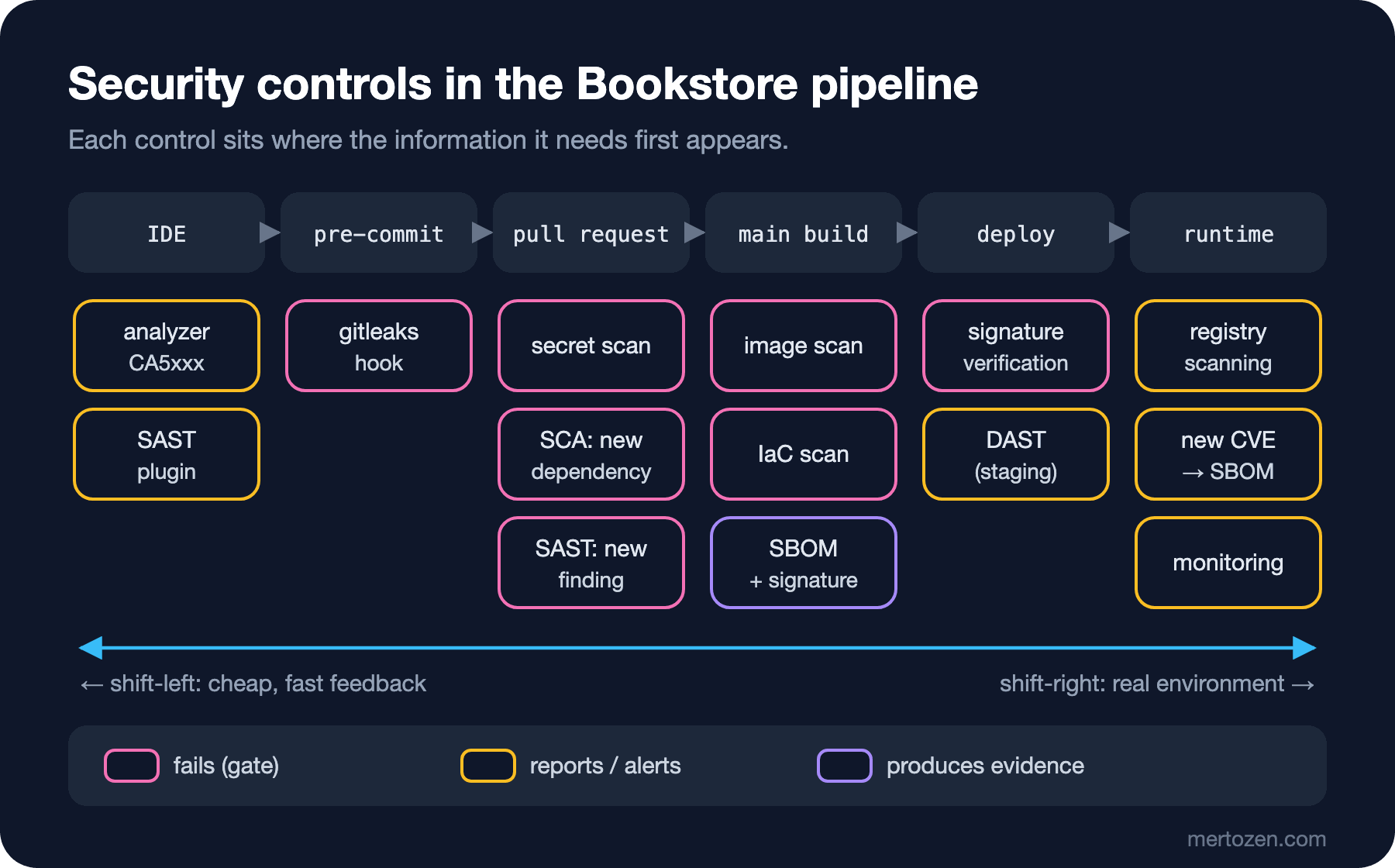
| Stage | Control | Why here | Behaviour in Bookstore |
|---|---|---|---|
| IDE | .NET analyzers (CA5xxx), SAST plugin | Cheapest feedback, while the code is being written | Warning, does not fail |
| pre-commit | Secret scanning (gitleaks) | A secret must stop before it enters a commit | Stops the commit |
| Pull request | Secrets, SCA (new dependency), SAST (new finding) | Source and diff are ready, the author is present | Only new findings fail |
| main build | Image and IaC scanning, SBOM, signing | Image and manifests only exist after the build | Critical/high with a fix fails |
| Deploy | Signature verification, DAST in staging | The running application and the artifact to deploy are here | Unsigned artifact is rejected, DAST reports |
| Runtime | Registry scanning, CVE matching with the SBOM, monitoring | New vulnerabilities are published after the release | Alert and backlog item |
The distinction between "fails" and "reports" in the table is deliberate. Not every control has to be a gate; sometimes a control's job is just to provide visibility. You use a gate only where the finding is fixable and high-risk, and as long as the fix is in the hands of the PR author.
The Bookstore Pipeline: Before and After
The workflow we built for Bookstore in the CI/CD Fundamentals and GitHub Actions series did restore, build and test; its only security control was the NuGetAudit warnings. We covered NuGetAudit, npm audit and SRI (Subresource Integrity) in the OWASP series post "OWASP A03: Software Supply Chain Failures — NuGetAudit, npm audit and SRI"; in Bookstore those warnings stayed in the log. The skeleton below shows the layout of the "after" state: which job runs on which event, which one fails and which one produces a report. Tool installation steps, artifact passing between jobs and setting details are deliberately left out; each one opens up in the corresponding post of the series, and the whole thing comes together in a single workflow in the last post.
name: bookstore-ci

on:
  pull_request:
  push:
    branches: [main]

permissions:
  contents: read

jobs:
  # PR and main: fast checks
  secrets:
    runs-on: ubuntu-latest
    steps:
      - uses: actions/checkout@3d3c42e5aac5ba805825da76410c181273ba90b1 # v7.0.1
        with:
          fetch-depth: 0
      # gitleaks install and history scan: post 2
      - run: gitleaks git --redact --exit-code 1 .

  dependencies:
    runs-on: ubuntu-latest
    steps:
      - uses: actions/checkout@3d3c42e5aac5ba805825da76410c181273ba90b1 # v7.0.1
      - uses: actions/setup-dotnet@0f4a354dd5547a28c70b7853dbd95d5b67886e73 # v6.1.0
        with:
          dotnet-version: 10.0.x
      # NU1903 (high) and NU1904 (critical) fail the restore: post 3
      - run: dotnet restore Bookstore.slnx -warnaserror:NU1903,NU1904
      - run: npm ci --prefix web
      - run: npm audit --prefix web --audit-level=high

  sast:
    runs-on: ubuntu-latest
    steps:
      - uses: actions/checkout@3d3c42e5aac5ba805825da76410c181273ba90b1 # v7.0.1
        with:
          fetch-depth: 0
      # only findings introduced by this PR fail: post 4
      - if: github.event_name == 'pull_request'
        run: semgrep scan --config p/csharp --error --baseline-commit "origin/$BASE_REF"
        env:
          BASE_REF: ${{ github.base_ref }}
      # main: full scan as a report, legacy findings go to the backlog
      - if: github.event_name == 'push'
        run: semgrep scan --config p/csharp --sarif --output semgrep.sarif

  build:
    runs-on: ubuntu-latest
    steps:
      - uses: actions/checkout@3d3c42e5aac5ba805825da76410c181273ba90b1 # v7.0.1
      - uses: actions/setup-dotnet@0f4a354dd5547a28c70b7853dbd95d5b67886e73 # v6.1.0
        with:
          dotnet-version: 10.0.x
      - run: dotnet build Bookstore.slnx -c Release
      - run: dotnet test Bookstore.slnx -c Release --no-build

  # main only: slow, deep checks
  image:
    if: github.event_name == 'push'
    needs: build
    runs-on: ubuntu-latest
    steps:
      - uses: actions/checkout@3d3c42e5aac5ba805825da76410c181273ba90b1 # v7.0.1
      - run: docker build -t "bookstore-api:$GITHUB_SHA" -f src/Bookstore.Api/Dockerfile .
      # image scanning: post 5, SBOM: post 7
      - run: trivy image --exit-code 1 --severity CRITICAL,HIGH --ignore-unfixed "bookstore-api:$GITHUB_SHA"
      - run: syft "bookstore-api:$GITHUB_SHA" -o cyclonedx-json=sbom.cdx.json

  dast:
    if: github.event_name == 'push'
    needs: build
    runs-on: ubuntu-latest
    steps:
      - uses: actions/checkout@3d3c42e5aac5ba805825da76410c181273ba90b1 # v7.0.1
      # ephemeral environment + passive ZAP scan: post 6
      - run: docker compose up -d --wait
      - run: docker run --rm --network host ghcr.io/zaproxy/zaproxy:stable zap-baseline.py -t http://localhost:8080
These are the decisions in the layout. secrets, dependencies and sast run in parallel with the build; they do not wait for each other, so the total PR time is that of the slowest job. You make these four jobs required status checks in branch protection or a ruleset; building a sequential needs chain only makes things slower. image and dast run only on push to main, because both are slower and both can produce findings the PR author cannot fix alone; a vulnerable OS package in the base image has nothing to do with the PR's diff. The sast job runs in two modes: on a PR only new findings fail, on main the full scan stays as a SARIF report. Passing github.base_ref into the run line through an environment variable instead of directly, and pinning actions to a full commit SHA, are the rules of the post "GitHub Actions Security: SHA Pinning, Lockfiles, pull_request_target and Preventing Script Injection"; we will not repeat them here.
To validate the skeleton structurally before running it, I used actionlint:
actionlint
echo $?0No output, exit code 0: the syntax, expressions, needs references and if conditions are consistent. actionlint does not prove that the workflow will work, but it stops a typo from going unnoticed all the way to main.
The Noise Budget: Block New Findings, Backlog the Old Ones
Every control has a noise budget: the amount of false positives and "not my problem" findings a team will tolerate before turning the control off. A gate that exceeds this budget is disabled sooner or later, and a disabled gate is worse than no gate at all, because everyone believes they are protected. The most effective rule for protecting the budget is this: block new findings, put existing findings in the backlog.
Let's try it on Bookstore with Semgrep. The main branch has a SearchByTitle method from 2019 that builds SQL by string concatenation. On a new branch someone adds a search by author name and repeats the same mistake with an interpolated string:
public List<string> SearchByAuthor(string author)
{
    using var connection = new SqlConnection(connectionString);
    connection.Open();
    using var command = new SqlCommand(
        $"SELECT b.Title FROM Books b JOIN Authors a ON a.Id = b.AuthorId WHERE a.Name = '{author}'",
        connection);
    using var reader = command.ExecuteReader();
    var titles = new List<string>();
    while (reader.Read())
    {
        titles.Add(reader.GetString(0));
    }
    return titles;
}
A full scan on the branch gives two findings; one belongs to this PR, the other to 2019:
semgrep scan --config p/csharp --metrics=off • Findings: 2 (2 blocking)
Ran 27 rules on 2 files: 2 findings.If you fail the PR on this result, the author waits because of a method they did not write. With --baseline-commit Semgrep first scans the state on main and removes the findings that already exist there:
semgrep scan --config p/csharp --metrics=off --error --baseline-commit main
echo $?
Creating git worktree from 'main' to scan baseline.
• Findings: 1 (1 blocking)
• Scan was limited to files changed since baseline commit.
Ran 27 rules on 2 files: 1 finding.
src/Bookstore.Api/BookQueries.cs
❯❯❱ csharp.lang.security.sqli.csharp-sqli.csharp-sqli
❰❰ Blocking ❱❱
Detected a formatted string in a SQL statement. This could lead to SQL injection if variables in the
SQL statement are not properly sanitized. Use a prepared statements instead. You can obtain a
PreparedStatement using 'SqlCommand' and 'SqlParameter'.
Details: https://sg.run/d2Xd
29┆ $"SELECT b.Title FROM Books b JOIN Authors a ON a.Id = b.AuthorId WHERE a.Name =
'{author}'",
1Now only line 29 is reported and exit code 1 fails the PR. The author turns the query into a parameter:
using var command = new SqlCommand(
    "SELECT b.Title FROM Books b JOIN Authors a ON a.Id = b.AuthorId WHERE a.Name = @author",
    connection);
command.Parameters.Add("@author", SqlDbType.NVarChar, 200).Value = author;
Creating git worktree from 'main' to scan baseline.
• Findings: 0 (0 blocking)
• Scan was limited to files changed since baseline commit.
Ran 27 rules on 2 files: 0 findings.The old finding on line 15 has not gone away; it is just not this PR's responsibility. The full scan on main keeps reporting it every time, and a backlog item with an owner and a target date is opened for it. There is an important detail here: the baseline mechanism matches a finding by the content of the line. In my test, changing LIKE '% to LIKE N'% on the old line brought line 15 back as a "new" finding as well. That is good behaviour: whoever touches old code also owns the finding there. The "leave the campground cleaner than you found it" rule then works automatically.
The other settings that protect the budget will recur throughout the series: a severity threshold (critical and high fail, medium is reported), failing only on vulnerabilities that have a fix, pruning the rule set for Bookstore, and giving every exception a reason, an owner and an expiry date. We build exception handling and measurement end to end in the last post of the series.
Who Fixes It? Sharing Responsibility
Tools produce findings; people close them. A model that works usually looks like this. The central security team (AppSec, Application Security) defines rule sets, thresholds and the exception policy, and manages the tools' versions and their own security. Every product team has a security champion: a developer who does not need to be a security expert, but who first assesses whether a finding is real or a false positive, explains the rules to the team and bridges to AppSec. The owner of the fix is always the team that owns the code.
This needs technical support too. If workflow files, the Semgrep rule file and suppression lists are protected with CODEOWNERS, a developer cannot quietly loosen a gate in their own PR; the change lands in the security champion's review. Findings should flow into the team's own issue tracker; nobody opens a separate security portal to look at findings waiting there.
Frameworks: Mapping SSDF, SAMM and DSOMM
We are not inventing these controls from scratch; three frameworks give us a shared language. NIST's SSDF, SP 800-218, is current at version 1.1, published in February 2022; it groups its practices into four: preparing the organization (PO, Prepare the Organization), protecting the software (PS, Protect the Software), producing well-secured software (PW, Produce Well-Secured Software) and responding to vulnerabilities (RV, Respond to Vulnerabilities). SSDF version 1.2 (SP 800-218 Rev. 1) was published as a draft in December 2025 and its comment period closed in January 2026; at the time of writing the NIST page still shows it as a draft, so we map against 1.1.
OWASP SAMM 2.0 defines fifteen practices under five business functions (Governance, Design, Implementation, Verification, Operations), with three maturity levels per practice; the topic of this series falls mostly into the Secure Build and Defect Management practices under Implementation and the Security Testing practice under Verification. OWASP DSOMM (DevSecOps Maturity Model) looks directly at the pipeline: it lists concrete activities spread over five levels across the Build and Deployment, Culture and Organization, Implementation, Information Gathering, and Test and Verification dimensions. The table below maps the posts of the series to SSDF practices and DSOMM activities; the number in parentheses is the DSOMM level.
| Post | SSDF 1.1 | DSOMM activity (level) |
|---|---|---|
| 2. Secret scanning | PS.1, PW.7 | Test for stored secrets in code (1) |
| 3. Dependency scanning and prioritization | PW.4, RV.1, RV.2 | Software Composition Analysis (server side) (2), Exploit likelihood estimation (2) |
| 4. SAST | PW.7 | Static analysis for important server side components (3) |
| 5. Container and IaC scanning | PW.7, RV.1 | Test of virtualized environments (2), Test the definition of virtualized environments (2) |
| 6. DAST | PW.8 | Simple Scan (2), Usage of different roles (2) |
| 7. SBOM and VEX | PS.3 | SBOM of components (2), Inventory of production dependencies (3) |
| 8. Signing and provenance | PS.2 | Signing of artifacts (5) |
| 9. Gates, exceptions, metrics | PO.4, RV.2 | Treatment of defects with high or critical severity (1), Simple false positive treatment (1) |
The levels in the table also hint at an order: DSOMM puts testing for secrets in code at level one and signing artifacts at level five. That is not a value judgement but a dependency order: if a signed artifact still contains a leaked connection string, the signature only proves to you who that secret came from.
Ordering: Don't Turn Everything On at Once
The mistake of the team in Guess First was not the choice of tools but the order. Here is the order I suggest for Bookstore. First secret scanning and SCA: both have a low false positive rate, their findings are clear and the action is obvious (rotate the secret, update the package), and they correspond to the risks that are easiest to exploit. Then SAST, with a baseline from day one: only new findings fail, old findings go to the backlog and the team gets used to the rule set over a few sprints. Then image and IaC scanning, on main and failing only on critical/high with a fix. DAST last: it needs a running ephemeral environment, a test user and a maintained rules file, and it is normal for it to stay in report mode for the first months. SBOM and signing can progress in parallel with this order; they fail nobody but add new steps to the release process.
When should you not install DevSecOps tools? If a team already cannot work through a full security backlog, giving it a new scanner does nothing but grow the backlog. First establish an owner and a processing capacity for the existing findings, then add controls.
In Production
Every scanner you add to the pipeline is new software with access to your secrets and artifacts. In March 2026 the redirection of Trivy's GitHub Action tags to malicious commits was a concrete example of this; we look at the details and the defences in the fifth post of the series. Pin scanner actions to a full SHA, give jobs only the permissions they need, and verify scanner binaries with checksums.
Measure the time budget. In Bookstore's small repository the baseline Semgrep scan took under two seconds and the gitleaks scan around 80 milliseconds; in a real repository these numbers grow. When the PR checks start to exceed a few minutes in total, parallelize, use caching or move the deep scan to main. The general methods for measuring pipeline speed with DORA (DevOps Research and Assessment) metrics are in the CI/CD Fundamentals series post "Measuring and Speeding Up a Pipeline: DORA Metrics, Caching and Parallelism".
Finally, decide up front where findings flow. Uploading the SARIF output to GitHub's code scanning tab shows the finding as an annotation on the line in the PR and keeps its history; a finding that stays in the log is ignored in practice.
Common Pitfalls
First, making every tool a gate with the lowest threshold from day one. The result is a gate that gets turned off. Measure in report mode first, then tighten the threshold step by step.
Second, using the baseline to sweep things under the rug. A baseline only says "this is not this PR's responsibility"; without a backlog item with an owner and a date for old findings, you have just made them invisible.
Third, running security checks only on main. When a finding appears on main the author has moved on to other work and the fix gets more expensive. Fast and precise checks belong in the PR.
Fourth, treating tool output as the only measure. SAST does not find business logic flaws, SCA does not find a badly written authorization check; code review, threat modeling and authorization regression tests like those in the API Security series post "Continuously Testing and Monitoring API Security: Authorization Regression, OpenAPI-Driven Scanning and Abuse Telemetry" keep their place.
A Small Experiment
★☆☆ Open the CI workflow of your own project and place every security control in one of the stages in the table. Note the stages with no control at all, and the steps where it is unclear whether they "fail" or "report".
★★☆ Run a full scan on a .NET project with semgrep scan --config p/csharp --metrics=off, then make a small change on a new branch and repeat the scan with --baseline-commit main. Write down the difference between the two numbers and which findings should go to the backlog.
★★★ Draft a one-page "control placement policy" for your team: for each control the stage, the failing threshold, the exception owner and the target time. Compare it with practice PO.4 in SSDF 1.1 and find the missing item.
We have drawn the map; in the next post we start with the leftmost and most urgent control: secret scanning. We will build the layers from a pre-commit hook to GitHub push protection, and use Bookstore's connection string to see what to do, in what order, in the first 30 minutes after a secret leaks.