

Dependency Scanning in Depth: NuGetAudit, npm audit, Dependabot and Prioritizing Findings
Sorting dependency findings by CVSS score is not enough: urgency is set by exploitation evidence in KEV, EPSS's 30-day exploitation probability and whether your code actually reaches the vulnerable function. At Bookstore we configure NuGetAudit at the repo level and show with real output how .NET 10 package pruning removes false positives, an expiring NuGetAuditSuppress, a triage tool that queries EPSS and KEV, and separating security from version updates in Dependabot.
Version note: The code in this post was built and run with .NET 10 (SDK 10.0.402); the web side was tried with Angular 22.2, Node.js 24 and npm 11.19, and EPSS and KEV data were queried with the records dated 13 November 2026.
Guess First
Bookstore's main branch has dependency findings for nine distinct CVEs: five on the .NET side (one of them shows up in two separate packages) and four in a single npm package on the web side. You do not have time to fix them all today. Do you start with the finding that has the highest CVSS score, 8.8, or with the one most likely to be exploited in the next 30 days? And one more: if your code never calls the vulnerable function of that package, does the order change?
In the OWASP series post "OWASP A03: Software Supply Chain Failures — NuGetAudit, npm audit and SRI", where we also covered SRI (Subresource Integrity), we saw how NuGetAudit works, that .NET 10 audits transitive packages by default, dotnet package list --vulnerable and the basics of npm audit. This post builds on top of them: making auditing consistent at the repo level, reducing false positives, writing exceptions that expire and, most importantly, prioritizing findings beyond CVSS.
NuGetAudit at the Repo Level
We added a Bookstore.Contracts library to Bookstore that targets netstandard2.0, because it is also shared with an old .NET Framework client. It uses Microsoft.Extensions.Configuration.Json 8.0.0 to read configuration. The restore was clean. The problem is that it should not have been: the all default in .NET 10 applies only to projects targeting net10.0 and later, while netstandard2.0 is still in direct mode and does not look at transitive packages. That is why we keep the settings not per project but in Directory.Build.props at the repo root:
<Project>
  <PropertyGroup>
    <NuGetAuditMode>all</NuGetAuditMode>
    <NuGetAuditLevel>low</NuGetAuditLevel>
    <NuGetAuditCodes>NU1903;NU1904</NuGetAuditCodes>
    <WarningsAsErrors Condition="'$(CI)' == 'true'">$(WarningsAsErrors);$(NuGetAuditCodes)</WarningsAsErrors>
    <Today>$([System.DateTime]::UtcNow.ToString('yyyyMMdd'))</Today>
  </PropertyGroup>
</Project>
We leave NuGetAuditLevel at low because visibility is cheap; we keep the failing threshold separate. Since GitHub Actions runners set the CI=true environment variable, high (NU1903) and critical (NU1904) turn into errors only in the pipeline and stay warnings on the developer machine. This distinction matters: a newly published advisory should not break the local build of a developer shipping an urgent bug fix. The NuGet documentation recommends this approach too, with its "dedicated audit pipeline" example. The restore now gives the expected warnings (paths shortened):
src/Bookstore.Contracts/Bookstore.Contracts.csproj : warning NU1903: Package 'System.Text.Json' 8.0.0 has a known high severity vulnerability, https://github.com/advisories/GHSA-8g4q-xg66-9fp4
src/Bookstore.Contracts/Bookstore.Contracts.csproj : warning NU1903: Package 'System.Text.Json' 8.0.0 has a known high severity vulnerability, https://github.com/advisories/GHSA-hh2w-p6rv-4g7w
Running the same restore with CI=true turns the lines into error NU1903: Warning As Error and returns exit code 1. In corporate networks packages often come from an internal feed instead of nuget.org; if that feed does not serve vulnerability data, the audit silently comes back empty. Since NuGet 6.12 you can take vulnerability data from nuget.org separately with auditSources in nuget.config; the documentation also gives https://data.nuget.org/v3/index.json, which serves only vulnerability data, for this scenario. If an audit source provides no data you get warning NU1905; do not ignore that either.
Package Pruning: .NET 10's Answer to False Positives
The interesting part is that Bookstore.Api (net10.0), which references the same Bookstore.Contracts, gives none of these warnings:
dotnet nuget why src/Bookstore.Contracts System.Text.Json
dotnet nuget why src/Bookstore.Api System.Text.Json
Project 'Bookstore.Contracts' has the following dependency graph(s) for 'System.Text.Json':
[netstandard2.0]
└── Microsoft.Extensions.Configuration.Json (v8.0.0)
└── System.Text.Json (v8.0.0)
Project 'Bookstore.Api' does not have a dependency on 'System.Text.Json'.The reason is package pruning in the .NET 10 SDK. In net10.0 System.Text.Json is already part of the shared framework; when an older version of a package the framework provides enters the graph, restore removes it because it would not be used at runtime anyway. This used to be a classic false positive: the warning was for 8.0.0 in the package graph, while the application ran on the framework's patched version. When I repeated the experiment in a separate project targeting net8.0, the two NU1903 warnings came back; in this SDK pruning is on by default for net10.0 targets. There is a side effect: if a net10.0 project references a package the framework already provides, you get warning NU1510, because that reference is now unnecessary.
Bookstore.Contracts, on the other hand, is netstandard2.0, so it really carries 8.0.0, and the risk is real for the client that uses it on .NET Framework. For the fix we follow the order the NuGet documentation recommends: first update the package closest to the direct reference. Microsoft.Extensions.Configuration.Json 8.0.1 depends on System.Text.Json 8.0.5:
dotnet add src/Bookstore.Contracts package Microsoft.Extensions.Configuration.Json --version 8.0.1
dotnet nuget why src/Bookstore.Contracts System.Text.Json
[netstandard2.0]
└── Microsoft.Extensions.Configuration.Json (v8.0.1)
└── System.Text.Json (v8.0.5)Pinning the transitive package with a direct reference is the last resort we saw in the OWASP series; we did not need it here.
Exceptions with an Expiry and a Reason
Not every finding has a fix right away. When there is no fix, or the upgrade does not fit into this sprint, you use NuGetAuditSuppress; but that item has neither a reason nor an expiry date of its own. Once added, a suppression stays for years because nobody remembers it. With MSBuild property functions we can give the exception an expiry date:
<ItemGroup>
<!-- GHSA-hh2w-p6rv-4g7w: Bookstore.Contracts does not call DeserializeAsyncEnumerable.
Owner: Ada. Ticket: SEC-151. Expires: 2026-12-15. -->
<NuGetAuditSuppress Include="https://github.com/advisories/GHSA-hh2w-p6rv-4g7w"
Condition="$(Today) < 20261215" />
</ItemGroup>$(Today) is produced above as a number in yyyyMMdd format, so MSBuild can compare two numbers. Today (14 November) the restore reported only GHSA-8g4q-xg66-9fp4; when I set the date to 20261101, as if the exception had expired, the second advisory came back. An expired exception does not linger silently; it starts failing the build again and tells its owner to make a decision. The reason comment matters too: CVE-2024-30105 is a DoS that appears when JsonSerializer.DeserializeAsyncEnumerable is called with untrusted input; if your code does not call that method, the risk drops but does not vanish. In this example the right move was upgrading the package as above; I used the same advisory to show the exception mechanism for cases without a fix. Managing all exceptions and their expiry in one place is something we build in the last post of the series.
Prioritizing Findings: CVSS Is Not Enough
Now back to the opening question. Bookstore.Api carries Microsoft.Data.SqlClient 5.1.1, added years ago:
dotnet package list --project src/Bookstore.Api --vulnerable --include-transitive Top-level Package Requested Resolved Severity Advisory URL
> Microsoft.Data.SqlClient 5.1.1 5.1.1 High https://github.com/advisories/GHSA-98g6-xh36-x2p7
Transitive Package Resolved Severity Advisory URL
> Azure.Identity 1.7.0 Moderate https://github.com/advisories/GHSA-m5vv-6r4h-3vj9
Moderate https://github.com/advisories/GHSA-wvxc-855f-jvrv
High https://github.com/advisories/GHSA-5mfx-4wcx-rv27
> Microsoft.IdentityModel.JsonWebTokens 6.24.0 Moderate https://github.com/advisories/GHSA-59j7-ghrg-fj52
> System.IdentityModel.Tokens.Jwt 6.24.0 Moderate https://github.com/advisories/GHSA-59j7-ghrg-fj52On the web side there is lodash-es 4.17.20, and npm audit shows four advisories in a single package:
lodash-es  <=4.17.23
Severity: high
Command Injection in lodash - https://github.com/advisories/GHSA-35jh-r3h4-6jhm
Regular Expression Denial of Service (ReDoS) in lodash - https://github.com/advisories/GHSA-29mw-wpgm-hmr9
lodash vulnerable to Code Injection via `_.template` imports key names - https://github.com/advisories/GHSA-r5fr-rjxr-66jc
Lodash has Prototype Pollution Vulnerability in `_.unset`, `_.omit`, and `_.pullAt` functions - https://github.com/advisories/GHSA-xxjr-mmjv-4gpg
fix available via `npm audit fix --force`
Will install lodash-es@4.18.1, which is outside the stated dependency range
node_modules/lodash-es

1 high severity vulnerability
CVSS describes the technical weight of a vulnerability: is it exploitable over the network, does it need privileges, what is the impact. But it does not answer "will it be used against us this week". CVSS v4.0, published in 2023, went as far as naming this distinction: a score from base metrics alone is called CVSS-B, and as threat and environmental metrics are added it becomes CVSS-BT, CVSS-BE, CVSS-BTE. The number you see in advisories is almost always CVSS-B. We add three more signals to prioritization.
EPSS is FIRST's (Forum of Incident Response and Security Teams) estimate, published every day for every CVE, of the probability that the CVE will be exploited in the wild in the next 30 days. KEV is CISA's (Cybersecurity and Infrastructure Security Agency) catalog of CVEs known to be exploited in the wild; the 13 November 2026 version had 1781 entries. One is a probability, the other is evidence. The third signal is reachability: does your code actually reach the vulnerable function? No external database can tell you that; you derive it from your own code.
I wrote a small .NET 10 file-based app that queries the first two signals; it sends both requests in parallel, and because file-based apps are set up by default to publish with Native AOT, it reads the JSON (JavaScript Object Notation) with the source generator:
using System.Globalization;
using System.Net.Http.Json;
using System.Text.Json.Serialization;

CultureInfo.CurrentCulture = CultureInfo.InvariantCulture;
string[] cves = args;
using HttpClient http = new();
http.DefaultRequestHeaders.UserAgent.ParseAdd("bookstore-triage/1.0");

Task<EpssResponse?> epssTask = http.GetFromJsonAsync(
    $"https://api.first.org/data/v1/epss?cve={string.Join(',', cves)}", TriageJson.Default.EpssResponse);
Task<KevCatalog?> kevTask = http.GetFromJsonAsync(
    "https://www.cisa.gov/sites/default/files/feeds/known_exploited_vulnerabilities.json", TriageJson.Default.KevCatalog);
await Task.WhenAll(epssTask, kevTask);

EpssResponse epss = await epssTask ?? throw new InvalidOperationException("EPSS response was empty");
KevCatalog kev = await kevTask ?? throw new InvalidOperationException("KEV catalog was empty");
HashSet<string> exploited = kev.Vulnerabilities.Select(v => v.CveId).ToHashSet();

Console.WriteLine($"KEV catalog {kev.CatalogVersion}, EPSS date {epss.Data.FirstOrDefault()?.Date}");
foreach (EpssScore score in epss.Data.OrderByDescending(s => s.Probability))
{
    string inKev = exploited.Contains(score.Cve) ? "YES" : "no";
    Console.WriteLine($"{score.Cve,-16} EPSS {score.Probability,7:P2}  percentile {score.PercentileValue:F3}  KEV {inKev}");
}

record EpssResponse(List<EpssScore> Data);

record EpssScore(string Cve, string Epss, string Percentile, string Date)
{
    public double Probability => double.Parse(Epss, CultureInfo.InvariantCulture);
    public double PercentileValue => double.Parse(Percentile, CultureInfo.InvariantCulture);
}

record KevCatalog(string CatalogVersion, List<KevEntry> Vulnerabilities);

record KevEntry([property: JsonPropertyName("cveID")] string CveId);

[JsonSourceGenerationOptions(PropertyNamingPolicy = JsonKnownNamingPolicy.CamelCase)]
[JsonSerializable(typeof(EpssResponse))]
[JsonSerializable(typeof(KevCatalog))]
partial class TriageJson : JsonSerializerContext;
dotnet run triage.cs -- CVE-2024-0056 CVE-2023-36414 CVE-2024-35255 CVE-2024-29992 CVE-2024-21319 CVE-2021-23337 CVE-2020-28500 CVE-2026-4800 CVE-2025-13465KEV catalog 2026.11.13, EPSS date 2026-11-13
CVE-2021-23337 EPSS 20.16 % percentile 0.975 KEV no
CVE-2020-28500 EPSS 7.42 % percentile 0.945 KEV no
CVE-2024-21319 EPSS 2.89 % percentile 0.871 KEV no
CVE-2026-4800 EPSS 2.81 % percentile 0.867 KEV no
CVE-2023-36414 EPSS 2.38 % percentile 0.841 KEV no
CVE-2025-13465 EPSS 1.82 % percentile 0.791 KEV no
CVE-2024-0056 EPSS 1.18 % percentile 0.682 KEV no
CVE-2024-35255 EPSS 0.83 % percentile 0.581 KEV no
CVE-2024-29992 EPSS 0.72 % percentile 0.544 KEV noThe order is very different from CVSS's. By CVSS the heaviest finding is CVE-2023-36414 in Azure.Identity at 8.8; it is fifth in the EPSS list. The command injection in lodash's template function (CVE-2021-23337), far ahead at the top of EPSS, is 7.2 in CVSS. None of them are in KEV. Now let's look at reachability.
Reachability: Does the Code Actually Call It?
On the web side the question is simple: what do we import from lodash-es?
grep -rn "lodash-es" src --include='*.ts'src/app/books/book-search.ts:2:import { debounce } from 'lodash-es';Only debounce in the search box. The two injection advisories belong to _.template, the prototype pollution to _.unset, _.omit and _.pullAt; Bookstore does not call them. The ReDoS advisory covers toNumber, trim and trimEnd, and debounce passes its wait time through toNumber internally; but in our code that value is a constant 300, not user input. Result: the vulnerable code sits in the package but is not reached from our call paths. The bundler's tree shaking putting only the used functions from lodash-es into the bundle supports this too, but base the reachability decision on the code itself, not on bundle analysis.
On the .NET side dotnet nuget why shows the path: SqlClient 5.1.1 brings in Azure.Identity. SqlClient uses this package for Microsoft Entra ID authentication modes; since Bookstore's connection string uses a SQL login, that code path does not run. SqlClient's own advisory (CVE-2024-0056, a security feature bypass in Microsoft's classification), however, is directly on our connection path: every request goes to the database through SqlClient.
We put these three signals into a matrix in Bookstore's policy. The thresholds are our decision, not a standard; your team picks its own:
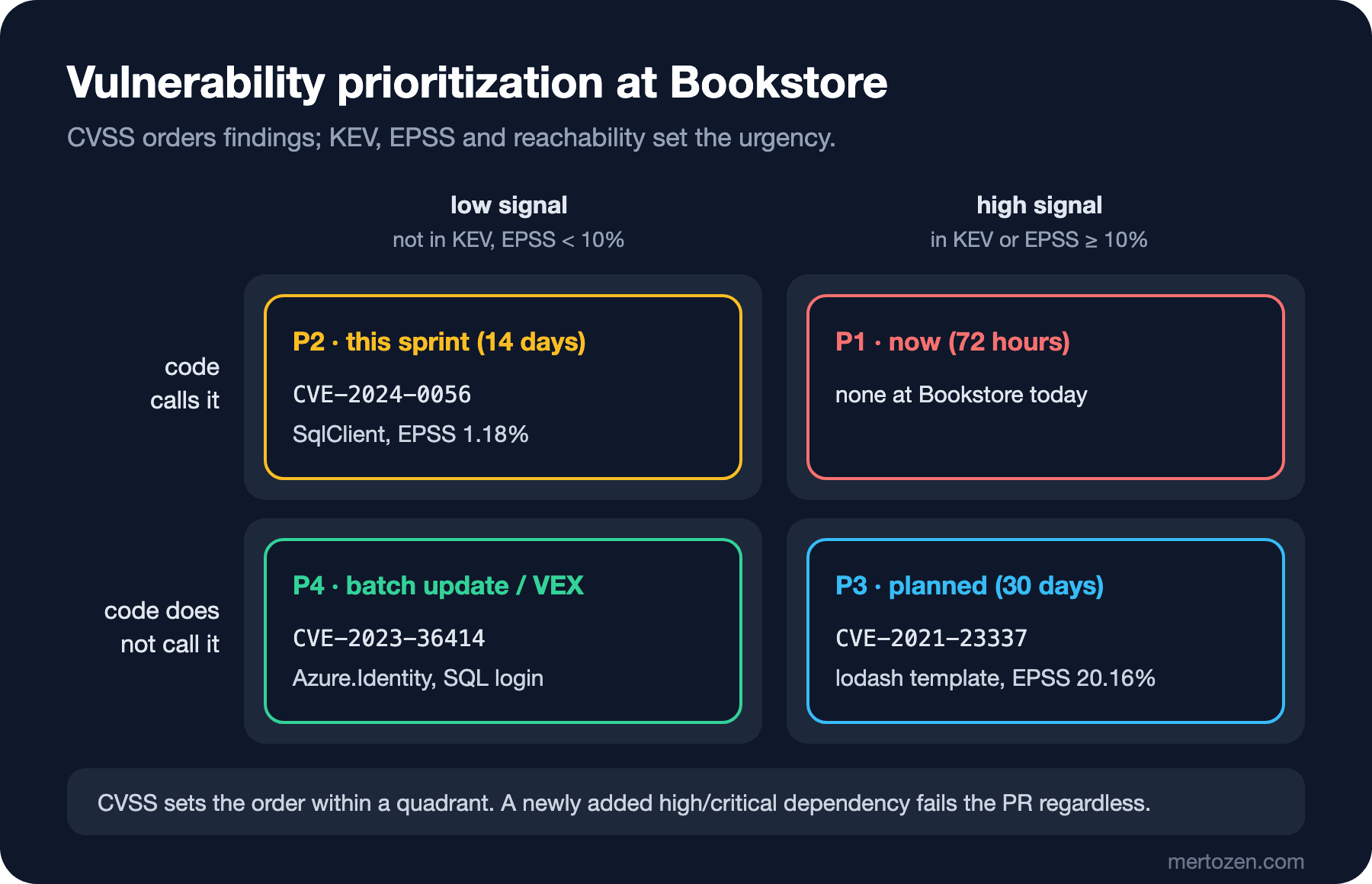
The matrix reads like this: a vulnerability that is in KEV or has an EPSS above 10 percent and that your code reaches is closed within 72 hours; Bookstore has no such finding today. The SqlClient finding, reached by our code but with a low signal, goes into this sprint. The lodash finding, with a high EPSS but not reached, is closed with a planned update within 30 days; reachability can change one day, so it is "planned", not "never". The Azure.Identity findings, low on both, go into a batch update; for such a finding without a fix, we will make the "we are not affected, because..." statement machine-readable with VEX in the seventh post of the series.
Fixing: Start with the Closest Package
The .NET 10 SDK brought the dotnet package update --vulnerable command. Let's see what it does:
dotnet package update --vulnerable --project src/Bookstore.ApiUpdating packages with security advisories in .../src/Bookstore.Api
Bookstore.Api:
Updating Azure.Identity 1.7.0 to 1.11.4.
Updating Microsoft.Data.SqlClient 5.1.1 to 5.1.3.
Updating Microsoft.IdentityModel.JsonWebTokens 6.24.0 to 6.34.0.
Updating System.IdentityModel.Tokens.Jwt 6.24.0 to 6.34.0.
Updated 4 packages in 23 scanned packages.The warnings dropped to zero, but look at the .csproj: the command moved each package to its first non-vulnerable version and added three transitive packages as direct PackageReference entries. You now own them; if SqlClient one day wants other versions, these pins come back as conflicts or unnecessary references. It works for a quick patch, not as a permanent fix. Moving the package closest to the direct reference, SqlClient, to the current version is cleaner:
<ItemGroup>
  <PackageReference Include="Microsoft.Data.SqlClient" Version="7.1.2" />
</ItemGroup>
Project 'Bookstore.Api' does not have a dependency on 'Azure.Identity'.SqlClient 7 does not depend on Azure.Identity; the transitive findings left the graph together with the package. Since this is a major version upgrade the tests have to pass; that is why the upgrade's own risk is handled in a separate PR. On the web side, moving lodash-es to 4.18.1 made npm audit say "found 0 vulnerabilities". In the pipeline we use npm audit --audit-level=high --omit=dev: only high and critical findings in production dependencies fail, and in the run before the fix it returned exit code 1.
Dependabot: Separating Security and Version Updates
Finding the issue is half the job; a bot that brings updates regularly is the other half. Dependabot has two separate flows: security updates open a PR in response to an advisory, while version updates bring current versions on a schedule. Putting both into the same group means losing an urgent patch among fifteen routine updates:
version: 2
updates:
  - package-ecosystem: nuget
    directory: "/"
    schedule:
      interval: weekly
    groups:
      nuget-security:
        applies-to: security-updates
        patterns: ["*"]
      nuget-minor-patch:
        applies-to: version-updates
        update-types: [minor, patch]
    cooldown:
      default-days: 3

  - package-ecosystem: npm
    directory: "/web"
    schedule:
      interval: weekly
    groups:
      npm-security:
        applies-to: security-updates
        patterns: ["*"]
      angular:
        applies-to: version-updates
        patterns: ["@angular/*", "@angular-devkit/*"]
    cooldown:
      default-days: 7
      semver-major-days: 30
I validated the file against the Dependabot schema on SchemaStore; with an invalid value in applies-to, validation stopped with "'security' is not one of ['version-updates', 'security-updates']". I did not run Dependabot on a repository. cooldown is the waiting period we covered in the Frontend Security series post "Hardening the npm Supply Chain: Lifecycle Scripts, Release Cooldowns, Provenance and Trusted Publishing"; according to the Dependabot documentation it applies only to version updates, and security updates do not wait. The two rules do not conflict: let a new version wait a few days, but never let a patch wait.
As for auto-merge, keep the limits clear. Patch versions of dev dependencies can be merged automatically once the tests pass. For production dependencies and major versions a human review is required; a security update is no exception, because the version that brings the patch can break something else. The workflow that enables auto-merge carries permissions of its own; apply the rules from the GitHub Actions series security post when you set it up.
A Look at Licenses
Dependency scanning finds licenses, not only vulnerabilities. A package that comes with a copyleft license such as the GPL can change the license obligations of the software you distribute; that effect differs between a web service and a desktop application shipped to customers. The practical approach is to define the allowed licenses (such as MIT, Apache-2.0 and BSD) as a list and route every new license outside it to review. The cleanest place to read package license information is the SBOM; we will produce one in the seventh post of the series. This is not legal advice: your legal team decides what a license means in your distribution model.
In Production
The advisory database changes every day, so a build that was green on main yesterday can be red today. Treat that not as a bug but as proof that the system works; but so that it does not block the release, also run the audit as a separate scheduled job and tie its findings to the backlog and to the matrix's SLA. The failing rule on a PR should apply only to the dependencies that PR adds or upgrades; the "block new findings" principle from the first post is the same here.
Know your data sources. nuget.org's vulnerability data comes from the GitHub Advisory Database; npm audit uses the same database. OSV merges many sources by ecosystem and package names, while NVD adds CVSS and product mapping to CVEs but does not always match package ecosystem names one to one. If two tools give different results for the same package, the first place to look is the data source they use.
EPSS is a probability and changes every day. Run the triage tool weekly, so that when a finding changes quadrant (for example, when it enters KEV), its SLA changes too.
Common Pitfalls
First, forgetting projects other than net10.0. netstandard2.0 and net8.0 projects are still in direct mode; set NuGetAuditMode explicitly to all in Directory.Build.props.
Second, prioritizing by CVSS alone. A CVSS-B score carries no context; without KEV and EPSS you cannot tell the urgent from the merely heavy-looking.
Third, reading "not reachable" as "no need to fix". Reachability lowers urgency; code changes, and tomorrow someone may call _.template.
Fourth, leaving the transitive pins added by dotnet package update --vulnerable in place forever. Clean up these references when the top-level package is updated.
Fifth, suppressions without an expiry. An exception without a reason, an owner and an expiry date is a silenced alarm.
A Small Experiment
★☆☆ Find a project in your solution that targets netstandard2.0 or net8.0, restore it with -p:NuGetAuditMode=all and count how many new warnings appear compared to the default mode.
★★☆ List the CVEs of your project's dependency findings, query their EPSS and KEV status with the triage tool above and place each finding in a quadrant of the matrix. Note how it differs from the CVSS order.
★★★ Write an expiry condition for a NuGetAuditSuppress, then move the date into the past and confirm with the pipeline setting (CI=true) that the restore really fails. Then write a small script that lists exceptions about to expire.
We found our dependencies' issues and prioritized them; now it is the turn of the code we write ourselves. In the next post we set up SAST for Bookstore with CodeQL, Semgrep and the .NET security analyzers, and see what source-to-sink taint analysis finds and what it cannot find.