

Wiring Sass into the Build: Source Maps, Angular, Vite and ASP.NET Core Settings, Load Paths and Compile Performance
Turn source maps on in development, make them hidden in production and split the .map files off from the release; in Vite, install sass-embedded and put only @use lines that produce no CSS into additionalData. We show a Release build after Debug in Bookstore never running Sass and shipping the map with its Brotli and gzip copies, fix the MSBuild target, check that DevTools finds the .scss line, and try our own build script with the pkg: importer.
Version note: The examples in this post were tested with Dart Sass 1.108.2 (sass and sass-embedded), Angular 22.2 (TypeScript 6.0; Sass 1.104.1 inside the Angular CLI), Vite 8.3, .NET 10 and the Chromium build of Playwright 1.65.
Guess First
In Bookstore.Web, the ASP.NET Core project of Bookstore, the online bookstore used as the shared example across this site's series, we wired Sass into an MSBuild target in the first post of the series. A teammate wanted source maps in Debug builds and changed the target like this:
<!-- runs only when an .scss file is newer than site.css -->
<Target Name="CompileSass" BeforeTargets="BeforeBuild" Inputs="@(SassSource)" Outputs="wwwroot/css/site.css">
    <Exec Command="npm run css:dev" Condition="'$(Configuration)' == 'Debug'" />
    <Exec Command="npm run css:build" Condition="'$(Configuration)' != 'Debug'" />
    <ItemGroup>
        <Content Include="wwwroot/css/site.css" Exclude="@(Content)" />
    </ItemGroup>
</Target>
css:dev produces readable CSS with a source map, css:build runs --style=compressed --no-source-map. The developer worked with dotnet build all day and in the evening prepared a release package with dotnet publish -c Release. Which site.css goes out? What else is in wwwroot/css?
In the last post of the series we look at how Sass is wired into the build: source maps and DevTools, Angular and Vite settings, the Debug and Release split in ASP.NET Core, and your own build script with the modern JS API. The overall architecture of build tools is covered in the Build Tools series; here we look only at the points where Sass enters that chain.
Source Maps: Generating and Embedding Them in the CLI
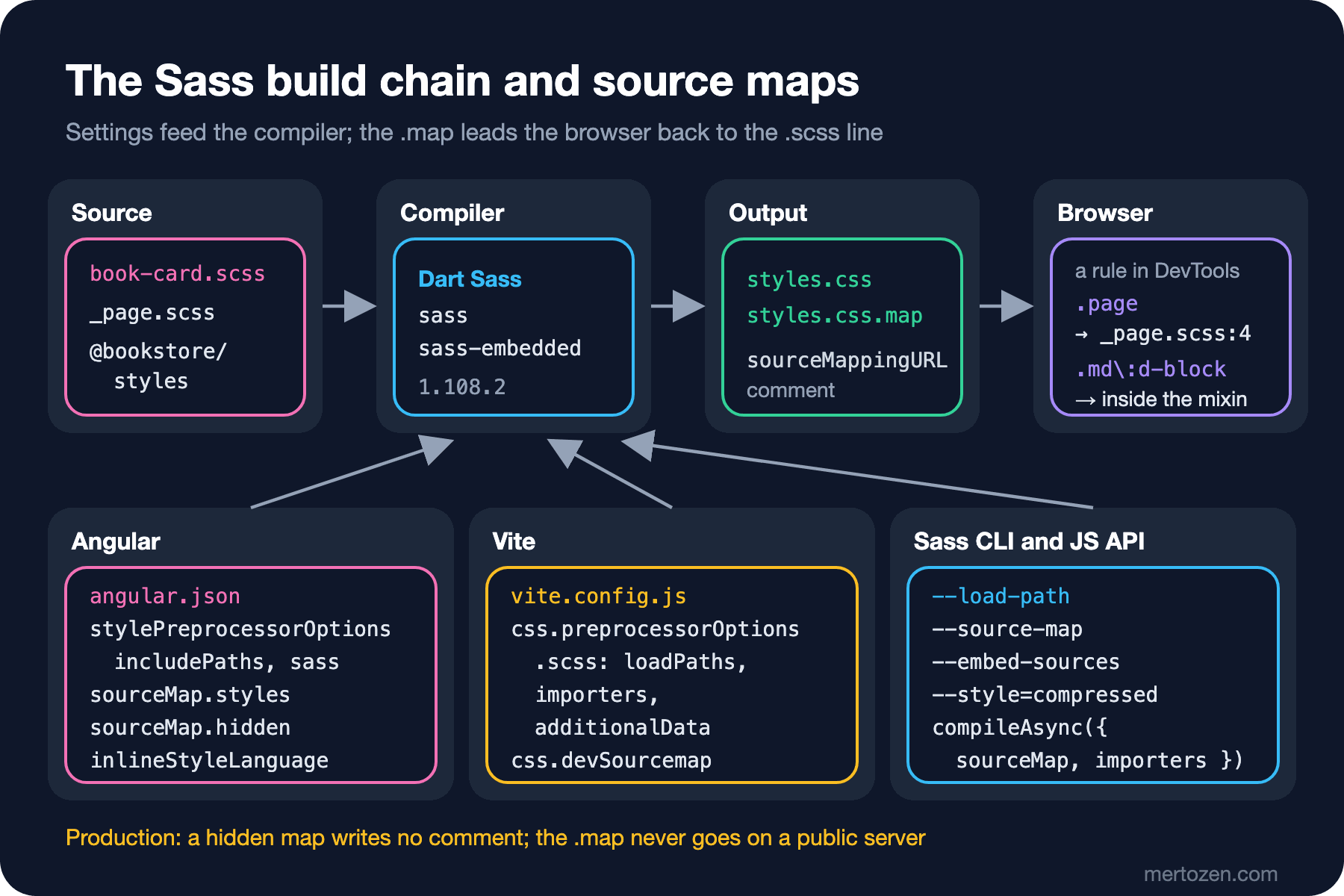
A source map is a JSON file that records, for every position in the compiled CSS, which source file and line it came from. When the browser sees the sourceMappingURL comment at the end of the CSS, it downloads the map, and DevTools shows the .scss line next to a rule instead of the .css line. The figure below sums up the chain and where the settings come in:
The Sass CLI generates a source map by default when writing to a file. With a small file that uses the previous post's package:
npx sass --load-path=node_modules 12/src/main.scss 12/out/main.cssmain.css
main.css.map
/*# sourceMappingURL=main.css.map */
{"version":3,"sourceRoot":"","sources":["../src/_card.scss"],"names":[],"mappings":"AAEA;EACI;;AAEA;EACI","file":"main.css"}sources only lists the file that produces CSS; main.scss contains only @use and the package's files produce no CSS, so they are not on the list. The other flags:
--embed-sources: puts the content of the.scssfiles into the map'ssourcesContentfield; DevTools can show the source without requesting it from the server.--embed-source-map: embeds the map as base64 in the comment at the end of the CSS instead of a separate file; one file, but bigger CSS.--no-source-map: no map; together with--style=compressedthis is the production output.
npx sass --load-path=node_modules --no-source-map --style=compressed 12/src/main.scss 12/out/prod.css.book-card{padding:16px}.book-card__title{font-size:1.125rem}Jumping to the .scss Line in DevTools
I checked whether DevTools finds the map through the Chrome DevTools Protocol. The script opens the development build of bookstore-web, reads the sourceMapURL the browser reports for the style sheet, and maps a few rules back to their source the way DevTools does:
npx ng build --configuration development
node scripts/12-devtools-map.mjs
style sheet: /styles.css
sourceMapURL: styles.css.map
.page -> src/styles/layout/_page.scss:4
.md\:d-block -> ../packages/styles/src/_utilities.scss:12The second line is instructive: .md\:d-block is the output of a utility generator, and the map takes it not to the call in utilities/_index.scss but to the mixin line that wrote the rule, inside the package. When you click a rule generated by a mixin in DevTools, you see the generator; to find the call that produced it, you have to work back from the class name. The map's sources list also contains Angular Material's _system.scss and modern-normalize.css; in the development build Angular fills in sourcesContent as well.
Angular: sourceMap.styles, hidden and the Sass Settings
In Angular, every Sass-related setting lives in the build target in angular.json. The list, checked against the schema of @angular/build itself:
styles: global style sheets (src/styles.scss);inlineStyleLanguage: "scss": the language of inline styles in a component'sstylesfield.stylePreprocessorOptions.includePaths: load paths (the fourth post of the series);stylePreprocessorOptions.sass: onlyfatalDeprecations,silenceDeprecationsandfutureDeprecations(details in the seventh post).sourceMap:true/false, or an object withscripts,styles,hidden,vendorandsourcesContentfields.
In a new project the development configuration comes with sourceMap: true and production without source maps. If you want to send maps to an error tracker in production, the right setting is a hidden source map: the map is generated, but no sourceMappingURL comment is written into the CSS or JavaScript. I added it to Bookstore's production configuration:
"production": {
  "sourceMap": {
    "scripts": true,
    "styles": true,
    "hidden": true
  },
  ...
}
main-4WYDE7X7.js
main-4WYDE7X7.js.map
styles-LOGIWG2J.css
styles-LOGIWG2J.css.mapOn the production build the same script printed sourceMapURL: (none): the browser does not know the map exists. But the files are in dist, and if you copy dist to the server as is, anyone can request styles-LOGIWG2J.css.map and read your Sass source; sourcesContent is on by default in the map. The idea behind hidden source maps and uploading them to error trackers is covered in the source map post of the Build Tools series; for Sass the rule is the same: .map files must be split off in the deploy step.
Vite: sass-embedded, preprocessorOptions and devSourcemap
I tried the Vite side in a separate small project in the vite folder: Vite 8.3, sass-embedded and the previous post's package. To give the compiler some work, a script generates 40 small component style sheets:
import { NodePackageImporter } from "sass-embedded";
import { defineConfig } from "vite";

export default defineConfig({
    css: {
        // CSS source maps in the dev server (off by default)
        devSourcemap: true,
        preprocessorOptions: {
            scss: {
                // every .scss file starts with this line: it must not produce CSS
                additionalData: '@use "pkg:@bookstore/styles" as bs;\n',
                loadPaths: ["src/styles"],
                importers: [new NodePackageImporter()],
            },
        },
    },
});
node scripts/generate-components.mjs
npx vite builddist/index.html 0.32 kB │ gzip: 0.22 kB
dist/assets/index-RGmfAxUY.css 4.79 kB │ gzip: 0.63 kB
dist/assets/index-Bh-ertQ-.js 0.67 kB │ gzip: 0.38 kBpreprocessorOptions.scss takes Sass's modern API options as they are: loadPaths, importers, silenceDeprecations and so on. Vite 7 removed the legacy API, so a setting like api: "modern" is no longer needed. additionalData is Vite's own addition: it puts the given text at the start of every style file. That is how the bs.space(3) calls in the component files work without a @use line.
Choosing the compiler: Vite uses sass-embedded if it is installed and sass otherwise. I ran the same build six times with each package. With sass-embedded the time Vite reported was 49–66 ms and the whole command took 0.16–0.20 seconds; with sass it was 189–311 ms and 0.33–0.58 seconds. In the first post's measurement with one large file the difference was 30–45 percent; here there are many small files, and the fixed cost of each compilation dominates. sass-embedded picks the native package for its platform on its own (Windows x64 has its own package). css.preprocessorMaxWorkers defaults to true, meaning one worker fewer than the number of CPUs; most projects never need to touch it.
devSourcemap is still marked "experimental" in the Vite docs and is off by default. I started the dev server on 127.0.0.1 and requested a component's CSS: with the setting off, the response has no sourceMappingURL; with it on, there is a base64 map at the end of the CSS. Decoding the map gave sources of ["card-01.scss", "../../node_modules/@bookstore/styles/src/_breakpoints.scss"] and x_google_ignoreList: [1]: Vite puts the file from node_modules on DevTools' ignore list, so stepping through in the debugger does not go into the package.
ASP.NET Core: --watch, Debug/Release and the Map That Ships
The answer to the guess. In a clean folder: dotnet build, then dotnet build -c Release and dotnet publish -c Release -o out:
## debug
  > css:dev
  > sass Styles/site.scss wwwroot/css/site.css --embed-sources
Build succeeded.
## release
Build succeeded.
## publish
site.css
site.css.br
site.css.gz
site.css.map
site.css.map.br
site.css.map.gz
In the Release build css:build never ran. The target's Outputs is site.css; the Debug build had just produced it, so as far as MSBuild is concerned it is up to date. Debug's readable CSS, the sourceMappingURL comment at its end and the map all went out; MapStaticAssets even produced Brotli and gzip versions of the map. The problem is that two configurations share the same output file.
In the fix, every configuration has its own stamp file and every compile deletes the others; whichever configuration produced site.css last is the one whose stamp exists. On top of that, the map never becomes Content outside Debug:
<ItemGroup>
    <SassSource Include="Styles/**/*.scss" />
    <!-- source maps are for Debug only: never published -->
    <Content Remove="wwwroot/css/**/*.map" Condition="'$(Configuration)' != 'Debug'" />
</ItemGroup>

<!-- one stamp per configuration; the last configuration to compile owns site.css,
     so switching between Debug and Release always recompiles -->
<Target Name="CompileSass" BeforeTargets="BeforeBuild" Inputs="@(SassSource);package.json" Outputs="$(IntermediateOutputPath)sass.stamp">
    <Exec Command="npm run css:dev" Condition="'$(Configuration)' == 'Debug'" />
    <Exec Command="npm run css:build" Condition="'$(Configuration)' != 'Debug'" />
    <Delete Files="wwwroot/css/site.css.map" Condition="'$(Configuration)' != 'Debug'" />
    <ItemGroup>
        <_SassStamp Include="$(BaseIntermediateOutputPath)**/sass.stamp" />
    </ItemGroup>
    <Delete Files="@(_SassStamp)" />
    <MakeDir Directories="$(IntermediateOutputPath)" />
    <Touch Files="$(IntermediateOutputPath)sass.stamp" AlwaysCreate="true" />
    <ItemGroup>
        <Content Include="wwwroot/css/site.css" Exclude="@(Content)" />
        <Content Include="wwwroot/css/site.css.map" Exclude="@(Content)" Condition="'$(Configuration)' == 'Debug'" />
    </ItemGroup>
</Target>
## debug
> css:dev
site.css site.css.map
## debug again
site.css site.css.map
## release
> css:build
site.css
## publish
site.css site.css.br site.css.gz
## debug
> css:dev
site.css site.css.mapA second Debug build without changes does not run Sass, switching configurations always does, and the release package has no map. The MakeDir line is needed for the first build: because the target runs before BeforeBuild, obj/Debug/net10.0 does not exist yet, and Touch stopped with an MSB3371 error. Starting the app in Debug and requesting the files returned 200 text/css for /css/site.css and 200 for /css/site.css.map.
While developing, running Sass in watch mode in a separate terminal is faster than waiting for dotnet build after every change:
npm run css:watchSass is watching for changes. Press Ctrl-C to stop.
[2026-11-15 00:54] Compiled Styles/site.scss to wwwroot/css/site.css.Your Own Script: compileAsync, the pkg: Importer and Writing the Source Map to Disk
If you do not use a build tool, or you need to compile a few theme files separately, the modern JS API is enough. I load the previous post's package with a pkg: URL; NodePackageImporter (Sass 1.71.0) resolves the URL following Node.js package resolution and the sass export in the package's package.json:
// pkg: resolves through node_modules and the package's "sass" export
@use "pkg:@bookstore/styles" as bs;

.book-list {
    display: grid;
    gap: bs.space(3);

    @include bs.up("md") {
        grid-template-columns: repeat(3, 1fr);
    }
}
In the CLI the importer has to be turned on; without it you get Error: Can't find stylesheet to import., while npx sass --pkg-importer=node 12/src/app.scss compiles. The script:
// a small build script with the modern JS API: pkg: importer, source map written next to the CSS
import { mkdir, writeFile } from "node:fs/promises";
import { dirname, relative } from "node:path";
import { fileURLToPath } from "node:url";
import * as sass from "sass";

const input = "12/src/app.scss";
const output = "12/out/app.css";

const result = await sass.compileAsync(input, {
    importers: [new sass.NodePackageImporter()],
    style: "compressed",
    sourceMap: true,
    sourceMapIncludeSources: false,
});

console.log(`first source as returned: ${result.sourceMap.sources[0]}`);
// the API returns absolute file: URLs; make them relative to the CSS file
const map = {
    ...result.sourceMap,
    file: "app.css",
    sources: result.sourceMap.sources.map((url) => relative(dirname(output), fileURLToPath(url))),
};

await mkdir(dirname(output), { recursive: true });
await writeFile(output, `${result.css}\n/*# sourceMappingURL=app.css.map */\n`);
await writeFile(`${output}.map`, JSON.stringify(map));
console.log(`${output}: ${result.css.length} bytes, ${result.loadedUrls.length} files loaded`);
console.log(`sources: ${map.sources.join(", ")}`);
first source as returned: file:///home/user/bookstore/lab/12/src/app.scss
12/out/app.css: 105 bytes, 7 files loaded
sources: ../src/app.scss, ../../node_modules/@bookstore/styles/src/_breakpoints.scssTwo details differ from the CLI. First, the API does not write files: you write the CSS, the map and the sourceMappingURL comment yourself. Second, sources: the API returns absolute file: URLs from the machine that compiled. If you write the map as it is, it does not work on another machine and it exposes the build server's folder layout, sometimes a user name too. That is why the script makes the paths relative to the CSS file. loadedUrls tells anyone building a watch mode which files to watch.
In Production
Keep maps out of the release. Angular's hidden source map only removes the comment; the .map files are in dist. The deploy script should not copy *.map files to the server, and should upload them to the error tracker in a separate step. In ASP.NET Core the Content Remove above does the same job.
Verify the production CSS. You can check in CI with one line that the CSS in the release package is compressed and contains no sourceMappingURL: grep -L sourceMappingURL out/wwwroot/css/*.css should list every file. The bug at the start of this post could only be caught with a check like that; the build said "succeeded" every time.
Choose the compiler on purpose. Angular uses sass-embedded on its own; in Vite and in your own scripts, installing sass-embedded cuts build time noticeably in projects with many files. Where the native binary cannot run, the sass package produces the same CSS.
Common Pitfalls
Injecting a file that produces CSS through additionalData. When I added @use "theme"; to additionalData (the theme file produces :root custom properties), Vite's unminified output contained 41 :root blocks and the CSS grew from 7.55 kB to 10.71 kB; every style file got its own copy of the theme. In the production build, Lightning CSS, Vite's default CSS minifier, merged these identical blocks and the size did not change. That is not a guarantee but an optimization the minifier happens to make: the dev server still has 41 copies, Sass still compiles the theme 41 times, and as we saw in the fourth post of the series, in Angular the copies cannot be merged because of component-specific selectors. Only @use lines that produce no CSS belong in additionalData. Line numbers in error messages shift too: because of the added line, an error on the first line of a file is reported as 2:1.
Putting source maps on production in public. A map exposes the whole Sass source if sourcesContent is on, and at least the file and folder layout if it is not. In the ASP.NET Core example at the start of this post, even the Brotli and gzip versions of the map shipped.
~-prefixed imports left over from the webpack era. In older projects, lines like @use "~@bookstore/styles" told webpack's sass-loader to "look in node_modules". In both Vite 8 and Angular 22.2 this line fails with Can't find stylesheet to import. The fix is to drop the prefix: Angular finds the package without it, while in Vite and in your own script you need the pkg: importer or node_modules as a load path.
A Small Experiment
★☆☆ Compile 12/src/main.scss with and without --embed-sources and compare the size of the two .map files. In which case does DevTools have to request the .scss file from the server to show the source?
★★☆ In the Vite project, turn additionalData into a function with the signature (source, filename) => … that adds the @use line only to files under src/components. Watch what happens when main.scss needs the package, and how the line number in the error message changes.
★★★ Write a deploy step for bookstore-web: it should move the .map files in dist to a separate folder, verify that no remaining CSS or JS file contains sourceMappingURL, and stop with a non-zero exit code if it finds even one. Turn off the hidden source map and show that the step really breaks.
This post completes the Sass/SCSS series. In the first seven posts we saw why Sass is still needed, the module system, theming, style architecture and preparing for Dart Sass 2.0; in the last five we added the built-in modules, responsive mixins and utility generation, a tested internal library and build integration. You will find the utility-first approach in the Tailwind CSS series and the rest of the bundler story in the Build Tools series.