

How to Read a Regular Expression: Literals, Metacharacters, Character Classes, Anchors and Escaping
The engine tries the pattern from left to right at every start position in the input and returns the leftmost match, which is why escaping metacharacters, writing class ranges correctly and knowing the anchors matter. We show with real output that in .NET \d accepts Arabic-Indic digits and $ accepts a trailing \n, and validate ISBN-13 and order numbers with .NET, JavaScript and grep.
Version note: The examples in this post were run with .NET 10 (SDK 10.0.404), Node.js 26.13 LTS, GNU grep 3.12 built with PCRE2 10.49, pcre2test 10.49 and ripgrep 15.2.0. The grep, rg and pcre2test commands run on Linux, in WSL or in Git Bash.
Guess First
In Bookstore, the online bookstore used as the shared example across this site's series, a customer types an order number into the returns form. The number looks like BKS-2026-000123: a prefix, the year and a six-digit sequence. The Angular form checks it with JavaScript, the API checks the same number with .NET, and both sides use the same pattern:
^BKS-\d{4}-\d{6}$Two customers fill in the form slightly differently. The first one copies the number from an email and a line feed comes along at the end: "BKS-2026-000123\n". The second one has an Arabic keyboard active on the phone and types the digits as Arabic-Indic digits: "BKS-2026-٠٠٠١٢٣". What do .NET and JavaScript say for these two inputs? Do they give the same answer? Make a guess; the answer, with real output, is in the middle of the post.
How Does the Engine Try a Pattern?
The shortest way to learn to read regular expressions is to watch once, step by step, what the engine does. The "JavaScript RegEx Basics" post of the JavaScript Basics series covered test, match, replace, the basic character classes, quantifiers and the g/i/m flags; we will not repeat them here but look at the mechanism underneath. This is not a language series: for every topic we run the .NET, JavaScript and command-line versions side by side.
The pcre2test tool that ships with PCRE2, the Perl-compatible regex library behind grep -P and Nginx, can print every step of the engine with the auto_callout option. Pattern BKS-\d, input BK BKS-7:
$ cat shell/trace.txt
/BKS-\d/auto_callout,no_start_optimize
BK BKS-7
$ pcre2test shell/trace.txt
PCRE2 version 10.49 2026-09-28 (8-bit)
/BKS-\d/auto_callout,no_start_optimize
BK BKS-7
--->BK BKS-7
 +0 ^            B
 +1 ^^           K
 +2 ^ ^          S
 +0  ^           B
 +0   ^          B
 +0    ^         B
 +1    ^^        K
 +2    ^ ^       S
 +3    ^  ^      -
 +4    ^   ^     \d
 +6    ^    ^    End of pattern
 0: BKS-7
On each line the left ^ marks where the attempt started, the second ^ shows where the engine currently is in the input, and the right column shows the next piece of the pattern. The engine starts at position 0: B matches, K matches, S runs into the space. That attempt is over and the engine moves the start one position to the right. At position 1 there is a K, so B fails. Position 2 holds a space and fails too. At position 3 every piece of the pattern matches in turn and the match is BKS-7.
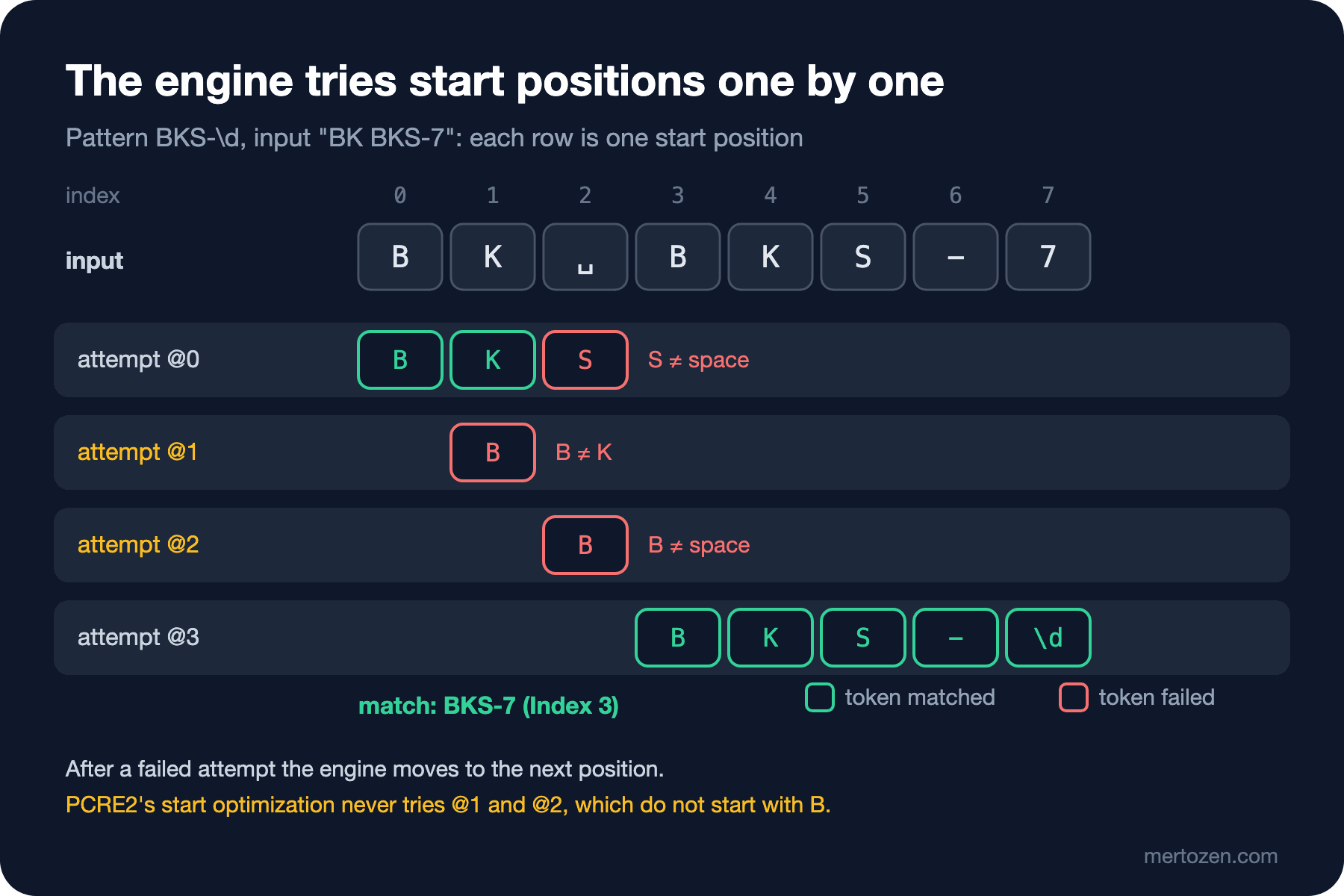
This simple mechanism has two important consequences. First, unless you use an anchor, the pattern can match anywhere in the input and the leftmost match wins. Second, failed attempts have a cost, and that cost grows with the input. Remove the no_start_optimize option and you see how PCRE2 shortens the work:
$ pcre2test shell/trace-optimized.txt
PCRE2 version 10.49 2026-09-28 (8-bit)
/BKS-\d/auto_callout
BK BKS-7
--->BK BKS-7
 +0 ^            B
 +1 ^^           K
 +2 ^ ^          S
 +0    ^         B
 +1    ^^        K
 +2    ^ ^       S
 +3    ^  ^      -
 +4    ^   ^     \d
 +6    ^    ^    End of pattern
 0: BKS-7
Because the pattern must start with the letter B, the engine did not try positions 1 and 2 at all. .NET and V8, the JavaScript engine of Chrome and Node.js, have similar optimizations. So the number of steps depends on the engine, but the logic is the same: pick a start position, try the pattern piece by piece, and move to the next position if it fails. .NET, JavaScript and PCRE2 do this with backtracking engines; when a piece fails, they go back and try another path. We will see that in detail with quantifiers in the next post.
Literals and Metacharacters: Which Characters Are Not Themselves?
Most characters in a pattern are literals: B matches only B. Characters with a special meaning are called metacharacters and the list is short: . ^ $ * + ? ( ) [ ] { } | \. In a JavaScript regex literal / ends the pattern, so it needs escaping as well. To search for one of them as itself, put a \ in front of it.
The most common mistake is the dot. Filtering customer emails by domain:
$ cat data/emails.txt
orders@example.com
orders@exampleXcom
$ grep -E '@example.com$' data/emails.txt
orders@example.com
orders@exampleXcom
$ grep -E '@example\.com$' data/emails.txt
orders@example.com
$ grep -F '@example.com' data/emails.txt
orders@example.com
An unescaped dot means "any character", so exampleXcom passed too. If what you are looking for is fixed text, the best option is not to use regex at all: grep -F, string.Contains in C# and includes in JavaScript search the text exactly as written.
If part of the pattern comes from the user, you do not escape it by hand; both platforms have a function for it:
using System.Text.RegularExpressions;

string term = "Dune (1965).";
string text = "Dune (1965). Frank Herbert";

Console.WriteLine(Regex.Escape(term));
Console.WriteLine(Regex.IsMatch(text, "^" + Regex.Escape(term)));

try
{
    Regex.IsMatch(text, "^" + "Dune (1965");
}
catch (ArgumentException ex)
{
    Console.WriteLine(ex.Message);
}
$ dotnet run dotnet/escape.cs
Dune\ \(1965\)\.
True
Invalid pattern '^Dune (1965' at offset 11. Not enough )'s.
$ node js/escape.mjs
\x44une\x20\(1965\)\.
true
SyntaxError: Invalid regular expression: /^Dune (1965/: Unterminated groupThe C# examples run as single .cs files with the file-based app feature of .NET 10; no project file is needed. RegExp.escape on the JavaScript side has been available in all current browsers since May 2025. Escaping the leading D as \x44 may look odd; it prevents a digit or letter from merging with an escape such as \1 when the escaped text is appended right after it. The outputs differ, but both functions do the same job: they turn every metacharacter in the text into a literal. The same reason is why C# patterns are written as @"..." verbatim strings: the backslash in \d reaches the engine without being interpreted by the C# string.
Character Classes: Inside the Square Brackets
[...] matches a single character, any one from the list inside. [^...] means any character that is not in the list. Ranges are written as [0-9] or [a-f]. Inside the brackets the rules change: most metacharacters from outside are ordinary characters here. [.] is a real dot and [+*?] is one of those three signs. Only four characters are special inside: \, the closing ], a ^ at the start and a - between two characters. If you want a literal hyphen, put it first or last: [0-9-] means a digit or a hyphen.
Ranges work on character codes, and this is where a well-known trap sits. [A-z] looks like "all letters", but in the ASCII table there are six more characters between Z and a:
// [A-z] is not "all letters": it also spans [ \ ] ^ _ `
Console.WriteLine(string.Concat(Regex.Matches("A_z^`[", "[A-z]").Select(m => m.Value)));
$ dotnet run dotnet/shorthand.cs | sed -n 6p
A_z^`[
$ printf 'A_z^`[\n' | grep -oP '[A-z]' | tr -d '\n'
A_z^`[
$ printf 'A_z^`[\n' | grep -oE '[A-z]'
grep: Invalid range end
$ printf 'A_z^`[\n' | LC_ALL=C grep -oE '[A-z]' | tr -d '\n'
A_z^`[.NET, JavaScript and PCRE2 counted all six characters as letters. GNU grep's -E mode, the extended regular expression syntax that POSIX defines, did not accept the range at all in the en_US.UTF-8 locale and behaved like the others in the C locale. The GNU grep manual also states that outside the C locale the behavior of ranges is unspecified. If you want letters, write [A-Za-z]; if you also need Turkish letters, look at the Unicode options we will see shortly.
\d, \w, \s: What the Shorthands Mean in Each Flavor
\d means a digit, \w a letter, digit or underscore, \s a whitespace character, and the uppercase versions mean the opposite. Up to this point the whole regex world agrees. Where it splits is the alphabet used to decide what counts as a "digit" or a "letter". Such syntax and behavior differences between regex engines are called flavors, and the fifth post of this series is entirely about them. Here we only look at the shorthands:
using System.Text.RegularExpressions;

// \d, \w and \s are Unicode-aware in .NET unless RegexOptions.ECMAScript is set
Console.WriteLine(Regex.IsMatch("٣", @"^\d$"));                               // Arabic-Indic three
Console.WriteLine(Regex.IsMatch("٣", @"^\d$", RegexOptions.ECMAScript));
Console.WriteLine(Regex.IsMatch("Şükrü", @"^\w+$"));
Console.WriteLine(Regex.IsMatch("Şükrü", @"^\w+$", RegexOptions.ECMAScript));
Console.WriteLine(Regex.IsMatch("\u00A0", @"^\s$"));                          // no-break space
$ dotnet run dotnet/shorthand.cs | head -5
True
False
True
False
True
$ node js/shorthand.mjs | head -3
false false true
false false true
trueThe first two lines of the JavaScript file test \d and \w without a flag and with the u flag, and then with \p{Nd} and \p{L}. The command-line tools give these results:
$ printf '٣\n' | grep -cP '^\d$'
0
$ printf 'Şükrü\n' | grep -cP '^\w+$'
1
$ grep -E '^BKS-\d{4}-\d{6}$' data/order-numbers.txt
grep: warning: stray \ before d
grep: warning: stray \ before d
$ printf 'Şükrü\n' | grep -cE '^\w+$'
1
$ printf 'Şükrü\n' | LC_ALL=C grep -cE '^\w+$'
0
$ rg '^BKS-\d{4}-\d{6}$' data/order-numbers.txt
BKS-2026-000123
BKS-2026-٠٠٠١٢٣
In a table the difference is clear:
| Shorthand | .NET | JavaScript | grep -P (PCRE2) | grep -E (POSIX ERE) | ripgrep |
|---|---|---|---|---|---|
\d | Unicode digits (incl. ٣) | only 0-9, also with u | only 0-9 | none; \d becomes a plain d | Unicode digits |
\w | Unicode letters | ASCII only | Unicode letters | depends on the locale | Unicode letters |
| If you want Unicode | default | \p{Nd}, \p{L} with u | default (\w) | [[:digit:]], [[:alpha:]] | default |
Here is half of the answer to the guess: in .NET \d also counts Arabic-Indic digits as digits, JavaScript does not. The PCRE2 library can widen \d in Unicode mode on its own (the ucp option), but GNU grep -P deliberately keeps \d ASCII, and its manual says so. For order numbers, postal codes, phone numbers and similar fields you almost always mean 0-9, so writing [0-9] in validation patterns gives the same result in every flavor. In .NET, RegexOptions.ECMAScript also restricts \d and \w to ASCII, but that option can only be combined with IgnoreCase, Multiline and Compiled; any other option throws an exception.
Anchors: ^, $, \A, \z and \b
An anchor matches a position, not a character. ^ marks the start, $ the end and \b a word boundary. In multiline mode ^ and $ mark the start and end of every line. The second half of the guess hides in the details of $:
using System.Text.RegularExpressions;

string batch = "BKS-2026-000123\nBKS-2026-000124\nBKS-2026-000125\n";

// without Multiline, ^ and $ refer to the whole string
Console.WriteLine(Regex.Matches(batch, @"^BKS-\d+-\d+$").Count);
Console.WriteLine(Regex.Matches(batch, @"^BKS-\d+-\d+$", RegexOptions.Multiline).Count);

// $ also matches before a final \n; \z does not, \Z behaves like $
string input = "BKS-2026-000123\n";
Console.WriteLine($"{Regex.IsMatch(input, @"^BKS-\d+-\d+$")} {Regex.IsMatch(input, @"\ABKS-\d+-\d+\Z")} {Regex.IsMatch(input, @"\ABKS-\d+-\d+\z")}");

// \b uses .NET's Unicode \w, so "kitapçı" has no boundary after "kitap"
Console.WriteLine(Regex.IsMatch("kitapçı", @"\bkitap\b"));
$ dotnet run dotnet/anchors.cs
0
3
True True False
False
$ node js/anchors.mjs
null
3
false
true trueIn .NET and PCRE2, $ also matches right before a single \n at the end of the string. The rule comes from Perl and makes it easy to process text that ends with a newline; for validation it is an open door. In .NET, when you really mean "the string ends here", use \z. \A and \z ignore Multiline, while \Z allows the final \n just like $. PCRE2 has the same \A, \z and \Z. JavaScript has no \A or \z, but without the m flag its $ already means the very end, which is why JavaScript said false for the input above.
The last lines show a flavor difference in \b. JavaScript's \w is ASCII, so ç is not a letter for it and it sees a "word boundary" between kitap and ç; the u flag does not change that. .NET, grep -E, grep -P and ripgrep found no match in the same input. Before trusting \b in Turkish text, check which engine you are running on; we cover Unicode and Turkish characters in detail in the fourth post.
Now the full answer to the guess. The same pattern and its fixed version in .NET:
using System.Text.RegularExpressions;

string[] inputs =
[
    "BKS-2026-000123",
    "BKS-2026-000123\n",
    "BKS-2026-٠٠٠١٢٣",
];

string[] patterns = [@"^BKS-\d{4}-\d{6}$", @"^BKS-[0-9]{4}-[0-9]{6}\z"];

foreach (string pattern in patterns)
{
    Console.WriteLine(pattern);
    foreach (string input in inputs)
    {
        bool ok = Regex.IsMatch(input, pattern);
        Console.WriteLine($"  {Show(input),-26} {ok}");
    }
}

// show \n visibly
static string Show(string s) => "\"" + s.Replace("\n", "\\n") + "\"";
$ dotnet run dotnet/order-number.cs
^BKS-\d{4}-\d{6}$
"BKS-2026-000123" True
"BKS-2026-000123\n" True
"BKS-2026-٠٠٠١٢٣" True
^BKS-[0-9]{4}-[0-9]{6}\z
"BKS-2026-000123" True
"BKS-2026-000123\n" False
"BKS-2026-٠٠٠١٢٣" False
$ node js/order-number.mjs
/^BKS-\d{4}-\d{6}$/
"BKS-2026-000123" true
"BKS-2026-000123\n" false
"BKS-2026-٠٠٠١٢٣" false
/^BKS-\d{4}-\d{6}$/u
"BKS-2026-000123" true
"BKS-2026-000123\n" false
"BKS-2026-٠٠٠١٢٣" falseThe same pattern accepted all three inputs in .NET and only the first in JavaScript. The API accepts a number that the Angular form rejects; it could just as well have been the other way round. The second pattern, written with [0-9] and \z, gives the same result on both sides.
Bookstore: ISBN-13 and the Order Number
An ISBN-13 written with hyphens has five parts: the 978 or 979 prefix, the registration group, the registrant, the publication and the check digit. In Dune's 978-0-441-17271-9 the part lengths are 3-1-3-5-1. The lengths of the three middle parts vary; the total number of digits does not. The regex checks the shape, and computing the check digit is the code's job:
using System.Text.RegularExpressions;

string[] inputs = ["978-0-441-17271-9", "978-0-141-43958-7", "978-0-441-17271-8", "978-0441-17271-9", "978-0-441-17271-9\n", "977-0-441-17271-9"];

foreach (string input in inputs)
    Console.WriteLine($"{input.Replace("\n", "\\n"),-20} {IsIsbn13(input)}");

static bool IsIsbn13(string input)
{
    // format: 978/979 prefix, four hyphens, 17 characters in total
    if (!Regex.IsMatch(input, @"^97[89]-[0-9]{1,5}-[0-9]{1,7}-[0-9]{1,7}-[0-9]\z") || input.Length != 17)
        return false;

    // the check digit is not a regex job: weights 1 and 3, mod 10
    string digits = input.Replace("-", "");
    int sum = 0;
    for (int i = 0; i < 12; i++)
        sum += (digits[i] - '0') * (i % 2 == 0 ? 1 : 3);
    return (10 - sum % 10) % 10 == digits[12] - '0';
}
$ dotnet run dotnet/isbn.cs
978-0-441-17271-9 True
978-0-141-43958-7 True
978-0-441-17271-8 False
978-0441-17271-9 False
978-0-441-17271-9\n False
977-0-441-17271-9 FalseRead the pattern from left to right: ^ be at the start, 97 literal, [89] an 8 or a 9, - a literal hyphen (not a metacharacter outside brackets), [0-9]{1,5} one to five digits, two [0-9]{1,7} groups, the last digit and \z. The total length of 17, "13 digits and 4 hyphens", can also be expressed in regex, but that needs the lookahead from the fourth post; for now input.Length does it more readably. The third line has the right shape but the wrong check digit; the regex let it through and the checksum caught it. That is the limit of what regex can do: it validates the format, not the meaning.
Use the same pattern without anchors and with \b, and you can extract ISBNs from text. An email to customer service:
$ cat data/support-mail.txt
From: ada@example.com
Subject: Order BKS-2026-000123 is missing a book
Hi, order BKS-2026-000123 arrived without Dune (ISBN 978-0-441-17271-9).
Emma (978-0-141-43958-7) was in the box. My old order BKS-2025-98765 was late too.
$ grep -oE '\b97[89]-[0-9]{1,5}-[0-9]{1,7}-[0-9]{1,7}-[0-9]\b' data/support-mail.txt
978-0-441-17271-9
978-0-141-43958-7
$ grep -onE '\bBKS-[0-9]{4}-[0-9]{6}\b' data/support-mail.txt
2:BKS-2026-000123
3:BKS-2026-000123
$ node js/isbn.mjs
true false false
978-0-441-17271-9 at 124 true
978-0-141-43958-7 at 150 true
-o prints only the matched part and -n the line number. The old five-digit order number BKS-2025-98765 does not fit the format, so it was not returned. On the JavaScript side the same job is done with matchAll, which also gives the index of each match; the full code is in js/isbn.mjs in the repo.
In Production
If you write a validation pattern once and use it in two places, such as the Angular form and the API, stay within a small subset of syntax that behaves the same across flavors: [0-9], [A-Za-z], explicit anchors. On the .NET side close the pattern with \z; in JavaScript do not use the m flag. The check in the browser is there for quick feedback to the user; the real decision is always made on the server.
Do not try to silently fix an input you do not accept. Arabic-Indic digits are a real customer case: either you convert them to ASCII digits and store them that way, or you return a clear error such as "please type the digits as 0-9". Which one is a business decision; the regex's only job is to say correctly which case you are in.
If text from the user goes into a pattern, Regex.Escape or RegExp.escape is mandatory. An unescaped parenthesis throws an exception as shown above; worse, someone with bad intentions can send a pattern that keeps the engine busy for seconds. That attack is called ReDoS; timeouts and the NonBacktracking option in .NET come in the seventh post, and measurements in the eighth.
When searching logs or a codebase, know which flavor each tool uses. When we wrote \d with grep -E we got a warning instead of an error, and the pattern silently searched for something else. In scripts that warning is easy to miss.
Common Pitfalls
The unescaped dot
The pattern @example.com also matches @exampleXcom. Instead of memorizing the metacharacter list, make this a habit: for every dot you see in a pattern, ask yourself whether it means "any character" or "a dot".
The [A-z] range
It also covers the six characters between Z and a in the ASCII table, and in GNU grep it may even fail depending on the locale. Write [A-Za-z].
The dot not matching a line break
The pattern Dune.Emma does not match the input "Dune\nEmma"; RegexOptions.Singleline in .NET and the s flag in JavaScript make the dot match line breaks too. Forgetting this while searching for a multi-line block in a file is the most common reason for "the pattern is right but the result is empty".
Validating with $
In .NET and PCRE2, $ allows a final \n. Use \z for validation.
Reminders from JavaScript Basics
The pitfalls from "JavaScript RegEx Basics" still apply: calling test with a g-flagged pattern can return false on the second call because of lastIndex; a validation pattern without anchors accepts the whole text when only a part of it fits; the single backslash in new RegExp("\d+") is swallowed by the string.
A Small Experiment
★☆☆ Bookstore's campaign codes start with PROMO-, followed by two uppercase letters and three digits (PROMO-TR250). Write a validation pattern that gives the same result in .NET and JavaScript; PROMO-TR250\n and PROMO-tr250 must fail.
★★☆ Run the pattern /[0-9]+-[0-9]/auto_callout,no_start_optimize on BKS-2026-000123 with pcre2test. At which positions does the engine start an attempt, and at which index is the first match? Draw the output on paper before you run it.
★★★ Find all ISBNs in data/support-mail.txt, but print only the ones with a correct check digit. Extract the candidates with grep -oE on the command line and pipe them into the IsIsbn13 function in C# or JavaScript.
In this post we learned to read a pattern from left to right and saw how the engine tries start positions. In the next post we look at how the engine goes back inside a single position: greedy and lazy quantifiers, backtracking, possessive quantifiers and atomic groups, with the example of extracting the endpoint, status and duration from Bookstore's access log.