

Quantifiers and Backtracking: Greedy, Lazy, Possessive and Atomic Groups

A greedy quantifier first takes all it can and gives characters back one by one when the rest of the pattern fails; a lazy one takes little and adds one at a time, yet both spend steps searching for the delimiter, and the correct and fastest option is usually a negated class. We compare greedy, lazy, possessive and atomic groups with PCRE2 step counts and extract endpoint, status and duration from Bookstore's access log with .NET, JavaScript and sed.
Version note: The examples in this post were run with .NET 10 (SDK 10.0.404), Node.js 26.13 LTS, GNU grep 3.12, PCRE2 10.49, GNU sed 4.10 and ripgrep 15.2.0. Step counts come from PCRE2's pcre2test tool; the grep, sed, rg and pcre2test commands run on Linux, in WSL or in Git Bash.
Guess First
The web server in front of Bookstore, the online bookstore used as the shared example across this site's series, writes every request to the access log as one line:
203.0.113.24 - - [15/Nov/2026:10:42:07 +0000] "GET /api/books/978-0-441-17271-9 HTTP/1.1" 200 1532 "-" "Mozilla/5.0" 0.042The first quoted field in the line is the request itself: method, path and protocol. The first pattern that comes to mind for it is ".*": a quote, whatever is in between, another quote. What exactly does this pattern capture in the line above? And one more question: if ".*?" gives the right result, is the job done?
Quantifiers: How Many Times?
A quantifier says how many times the piece before it repeats. * zero or more, + one or more, ? zero or one, {n} exactly n, {n,} at least n, {n,m} between n and m. These were covered in the "JavaScript RegEx Basics" post of the JavaScript Basics series and they are the same in every flavor.
One form is not the same: {,3}. Perl 5.34 started to accept it as "at most three", and PCRE2 followed in version 10.43. The others disagree:
using System.Text.RegularExpressions;

// is {,3} "at most three" or four literal characters?
Console.WriteLine($"{Regex.IsMatch("xx", "^x{,3}$")} {Regex.IsMatch("x{,3}", "^x{,3}$")}");
$ dotnet run dotnet/brace-quantifier.cs
False True
$ node js/brace-quantifier.mjs
false true
SyntaxError: Invalid regular expression: /^x{,3}$/u: Incomplete quantifier
$ printf 'xx\nx{,3}\n' | grep -E '^x{,3}$'
xx
$ printf 'xx\nx{,3}\n' | grep -P '^x{,3}$'
xx
$ printf 'xx\nx{,3}\n' | rg '^x{,3}$'
rg: regex parse error:
(?:^x{,3}$)
^
error: repetition quantifier expects a valid decimal.NET and JavaScript without flags read {,3} as four ordinary characters and found the text x{,3}. JavaScript with the u flag threw an error, GNU grep and PCRE2 said "at most three", and ripgrep rejected the pattern. The same pattern means four different things. If you want portable patterns, always write the lower bound: {0,3}.
Greedy: Take Everything First, Then Give Back
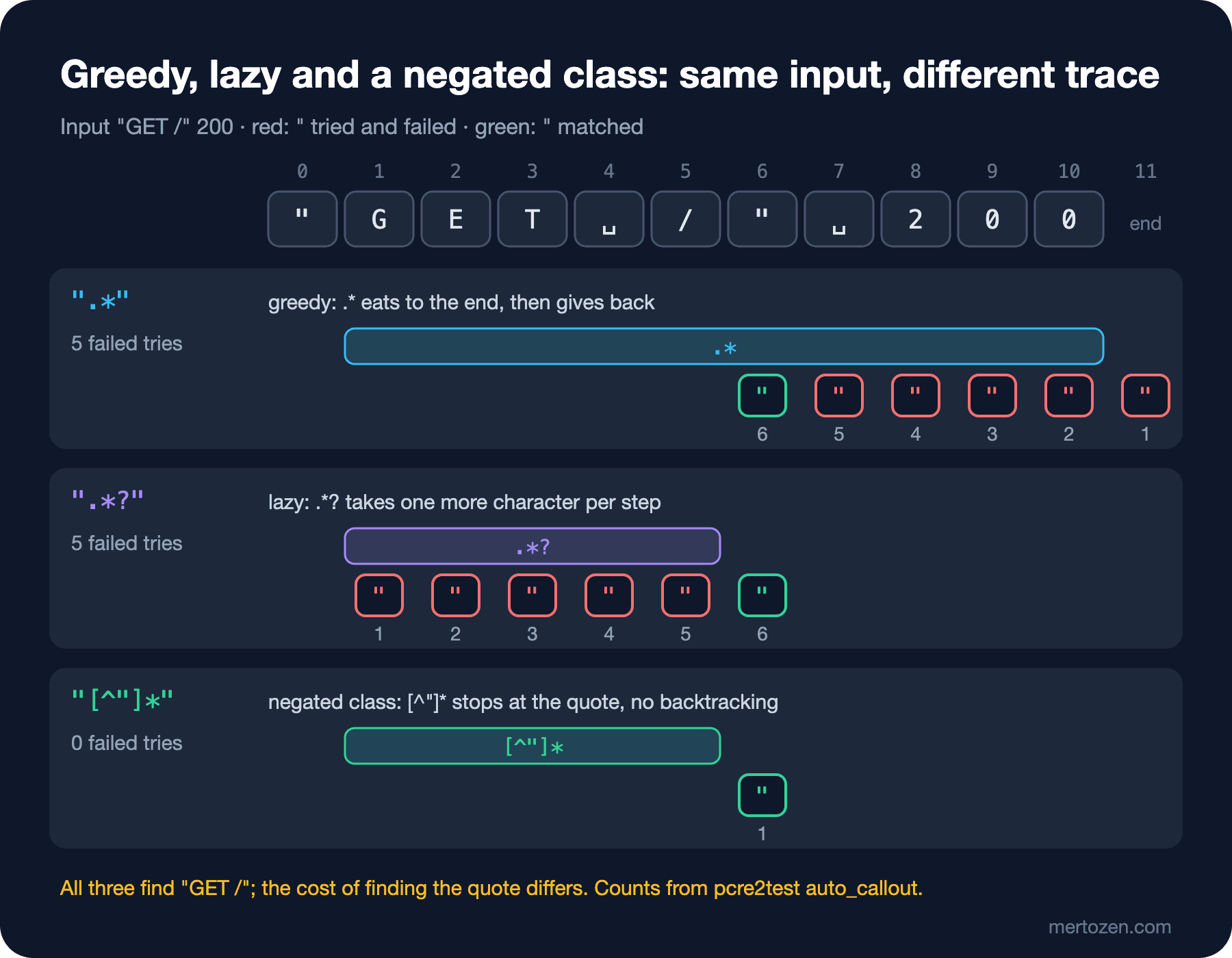
By default quantifiers are greedy: they take as many characters as they can. That does not mean they never give any back when the rest of the pattern fails. When a piece fails, the engine returns to its last decision and asks the quantifier to give back one character; this is called backtracking. Let PCRE2 print the trace of three patterns on a short input:
$ cat shell/trace-quotes.txt
/".*"/auto_callout
"GET /" 200

/".*?"/auto_callout
"GET /" 200

/"[^"]*"/auto_callout
"GET /" 200
$ pcre2test shell/trace-quotes.txt
PCRE2 version 10.49 2026-09-28 (8-bit)
/".*"/auto_callout
"GET /" 200
--->"GET /" 200
 +0 ^               "
 +1 ^^              .*
 +3 ^          ^    "
 +3 ^         ^     "
 +3 ^        ^      "
 +3 ^       ^       "
 +3 ^      ^        "
 +3 ^     ^         "
 +4 ^      ^        End of pattern
 0: "GET /"

/".*?"/auto_callout
"GET /" 200
--->"GET /" 200
 +0 ^               "
 +1 ^^              .*?
 +4 ^^              "
 +4 ^ ^             "
 +4 ^  ^            "
 +4 ^   ^           "
 +4 ^    ^          "
 +4 ^     ^         "
 +5 ^      ^        End of pattern
 0: "GET /"

/"[^"]*"/auto_callout
"GET /" 200
--->"GET /" 200
 +0 ^               "
 +1 ^^              [^"]*
 +6 ^     ^         "
 +7 ^      ^        End of pattern
 0: "GET /"
In the first trace .* goes to the end of the line in one move; the second ^ marker is at position 11. Then the closing quote is searched for: it is not at the end of the line, so the engine takes one character back from .*, tries at position 10, fails again. This repeats five times and the quote is found only at position 6. On this short input the result is right, because the line contains only two quotes.
That also gives the answer to the guess. The real log line has six quotes. While greedy .* goes to the end and gives back, it stops at the first quote it meets, which is the second-to-last quote:
$ cat shell/steps.sh
#!/usr/bin/env bash
# how many steps does PCRE2 report for each pattern on one log line?
line=${1:-$(head -1 data/access.log)}
input=$(mktemp)
for p in '".*"' '".*?"' '"[^"]*"' '^.*" ([0-9]{3}) ' '^.*?" ([0-9]{3}) ' '^[^"]*"[^"]*" ([0-9]{3}) '; do
    printf '/%s/auto_callout%s\n%s\n' "$p" "${OPTS:-}" "$line" > "$input"
    out=$(pcre2test "$input")
    steps=$(grep -c '^ *+[0-9]' <<< "$out")
    match=$(grep -m1 '^ 0:' <<< "$out" | cut -c5-)
    printf '%-26s %4s  %s\n' "$p" "$steps" "${match:-no match}"
done
rm -f "$input"
$ bash shell/steps.sh
".*"                         11  "GET /api/books/978-0-441-17271-9 HTTP/1.1" 200 1532 "-" "Mozilla/5.0"
".*?"                        45  "GET /api/books/978-0-441-17271-9 HTTP/1.1"
"[^"]*"                       4  "GET /api/books/978-0-441-17271-9 HTTP/1.1"
^.*" ([0-9]{3})              51  203.0.113.24 - - [15/Nov/2026:10:42:07 +0000] "GET /api/books/978-0-441-17271-9 HTTP/1.1" 200
^.*?" ([0-9]{3})             98  203.0.113.24 - - [15/Nov/2026:10:42:07 +0000] "GET /api/books/978-0-441-17271-9 HTTP/1.1" 200
^[^"]*"[^"]*" ([0-9]{3})     11  203.0.113.24 - - [15/Nov/2026:10:42:07 +0000] "GET /api/books/978-0-441-17271-9 HTTP/1.1" 200
".*" did not capture the request but everything from the request to the user agent. The numbers are the count of lines that pcre2test prints for every token attempt; not an absolute cost, but a good measure for comparing patterns on the same engine.
Lazy: Take Little, One More If Needed
Put a ? after a quantifier and it becomes lazy: *?, +?, ??, {n,m}?. A lazy quantifier first takes as few characters as possible and tries the rest of the pattern; if that fails, it takes one more character. In the second trace .*? starts with zero characters and tries the closing quote at positions 1, 2, 3 in turn; it finds it on the sixth try. The direction is reversed but the work is the same: the number of tries depends on how far away the quote is.
On the real line ".*?" found the right field but took 45 steps; the greedy one took 11 steps for a wrong result. ^.*?" ([0-9]{3}) , written to get the status code, is the most expensive at 98 steps. A lazy quantifier fixes the correctness problem, not the performance problem. When there is a direct way to say "up to the closing quote", you are making the engine ask "is it over here?" at every character.
Negated Class: Correct and Fast
In the third trace [^"]* takes every character that is not a quote and stops at the quote. Where it stops, the closing quote is already there; no backtracking is needed. On the real line that is 4 steps. The negated-class version of the status pattern also finishes in 11 steps.
The difference grows when there is no match. Say the log file was cut somewhere and the last line ends without a closing quote. PCRE2's optimizations reject this line without trying it at all, because it knows in advance that there can be no match without a second quote; to see how much work the engine really does, run it with no_start_optimize:
$ OPTS=,no_start_optimize bash shell/steps.sh '203.0.113.24 - - [15/Nov/2026:10:42:20 +0000] "GET /api/books/978-0-441-17271-9 HTTP/1.1'
".*"                        132  no match
".*?"                       132  no match
"[^"]*"                      91  no match
^.*" ([0-9]{3})              92  no match
^.*?" ([0-9]{3})             92  no match
^[^"]*"[^"]*" ([0-9]{3})      5  no match
In a failed search there is no difference between greedy and lazy: both try every possibility and give up. The anchored pattern with negated classes gives up after 5 steps, because the characters [^"]* can take are fixed and no character it gives back is of any use. When you take a field that ends with a delimiter, the rule is simple: everything that is not the delimiter, then the delimiter. "[^"]*" for quotes, \[[^\]]*\] for square brackets, \S+ for a space-separated field.
Possessive Quantifiers and Atomic Groups
Sometimes you want to tell the engine "once you have taken this, do not give it back". In PCRE2 the way to do that is a possessive quantifier: *+, ++, ?+. .NET has no possessive quantifiers; the atomic group (?>...) does the same job, and PCRE2 supports both. Once the inside of an atomic group has matched, the engine never goes back into it:
using System.Text.RegularExpressions;

// \d+ gives back the last digit so that 0 can match; the atomic group does not give anything back
Console.WriteLine(Regex.IsMatch("1230", @"^\d+0$"));
Console.WriteLine(Regex.IsMatch("1230", @"^(?>\d+)0$"));

// .NET has atomic groups but no possessive quantifiers
try
{
    Regex.IsMatch("1230", @"^\d++0$");
}
catch (ArgumentException ex)
{
    Console.WriteLine(ex.Message);
}
$ dotnet run dotnet/atomic.cs
True
False
Invalid pattern '^\d++0$' at offset 5. Nested quantifier '+'.
$ node js/atomic.mjs
^\d+0$ true
^(?>\d+)0$ SyntaxError: Invalid regular expression: /^(?>\d+)0$/: Invalid group
^\d++0$ SyntaxError: Invalid regular expression: /^\d++0$/: Nothing to repeat
^(?=(\d+))\1(?:0)$ false
$ printf '1230\n' | grep -P '^[0-9]++0$'
$ printf '1230\n' | grep -P '^(?>[0-9]+)0$'
$ printf '1230\n' | grep -E '^[0-9]++0$'
1230
$ printf '1230\n' | rg '^[0-9]++0$'
1230^\d+0$ matches because after \d+ takes four digits and 0 fails, it gives back the last digit. In the atomic version \d+ takes the four digits and locks them, nothing is left for 0 and there is no match. The example is artificial, but the logic matters: atomic groups and possessive quantifiers can change the result, not only the speed.
JavaScript supports neither and throws a clear syntax error. (?=(\d+))\1 in the last line is the well-known JavaScript equivalent of an atomic group: the text captured inside the lookahead is consumed by a backreference, and the engine does not go back into the lookahead. We will see lookahead in the fourth post and backreferences in the third. The last two command-line lines show a more dangerous case: GNU grep -E and ripgrep interpreted ++ as an ordinary greedy quantifier without an error and found 1230. When you move a pattern that works in PCRE2 to another tool, not getting an error does not mean it does the same thing.
In practice possessive and atomic constructs are most useful for telling the engine something that is already true, for example with a negated class where backtracking is pointless anyway. "[^"]*+" gives the same result as "[^"]*" when it matches; the only difference is that the engine does not backtrack in vain when there is no match. We will measure why this matters with the catastrophic backtracking examples in the eighth post.
Bookstore: Endpoint, Status and Duration from the Access Log
Now read the whole line. The goal: method, path, status and duration for every request, and a mark on requests that take longer than one second. Each field uses a negated class or a bounded character class; there is no .*:
using System.Globalization;
using System.Text.RegularExpressions;

// method, path, status and duration from one access log line
Regex line = new(@"^\S+ \S+ \S+ \[[^\]]*\] ""([A-Z]+) ([^ ""]+) [^""]*"" ([0-9]{3}) [0-9-]+ ""[^""]*"" ""[^""]*"" ([0-9]+\.[0-9]+)$");

foreach (string text in File.ReadLines("data/access.log"))
{
    Match m = line.Match(text);
    if (!m.Success)
    {
        Console.WriteLine($"no match: {text}");
        continue;
    }

    double seconds = double.Parse(m.Groups[4].Value, CultureInfo.InvariantCulture);
    string flag = seconds >= 1 ? "  <-- slow" : "";
    Console.WriteLine($"{m.Groups[3].Value} {m.Groups[1].Value,-4} {m.Groups[2].Value,-36} {m.Groups[4].Value}s{flag}");
}
$ dotnet run dotnet/access-log.cs
200 GET /api/books/978-0-441-17271-9 0.042s
201 POST /api/orders 0.318s
200 GET /api/books?q=dune 0.087s
404 GET /api/orders/BKS-2026-000123 0.006s
200 GET /api/books/978-0-141-43958-7 1.204s <-- slowRead the pattern field by field. \S+ \S+ \S+ is the IP address and two user fields. \[[^\]]*\] is the time in square brackets. "([A-Z]+) ([^ "]+) [^"]*" is the request line: a method of uppercase letters, a path without spaces or quotes, then the protocol up to the quote. ([0-9]{3}) is the status, [0-9-]+ the byte count (it can be - when there is no response body), the two quoted fields are the referer and the user agent, and ([0-9]+\.[0-9]+)$ at the end is the duration. In the C# string a quote is written as ""; the pattern itself contains a single quote. CultureInfo.InvariantCulture is required when converting the duration to double: in the Turkish culture the decimal separator is a comma, so "1.204" would turn into a different number.
The same pattern on the JavaScript side, with unescaped quotes:
const line = /^\S+ \S+ \S+ \[[^\]]*\] "([A-Z]+) ([^ "]+) [^"]*" ([0-9]{3}) [0-9-]+ "[^"]*" "[^"]*" ([0-9]+\.[0-9]+)$/;$ node js/access-log.mjs
200 GET /api/books/978-0-441-17271-9 0.042s
201 POST /api/orders 0.318s
200 GET /api/books?q=dune 0.087s
404 GET /api/orders/BKS-2026-000123 0.006s
200 GET /api/books/978-0-141-43958-7 1.204s <-- slowOn the command line we ask the same question with sed: slowest requests first.
$ cat shell/access-log.sh
#!/usr/bin/env bash
# status, method, path and duration for every request; slowest first
sed -E 's/^[^"]*"([A-Z]+) ([^ "]+) [^"]*" ([0-9]{3}) .* ([0-9.]+)$/\4 \3 \1 \2/' data/access.log | sort -rn
$ bash shell/access-log.sh
1.204 200 GET /api/books/978-0-141-43958-7
0.318 201 POST /api/orders
0.087 200 GET /api/books?q=dune
0.042 200 GET /api/books/978-0-441-17271-9
0.006 404 GET /api/orders/BKS-2026-000123
I left one .* in on purpose: in the .* ([0-9.]+)$ part after the status, greedy behavior is exactly what we want, because the duration is the last field and .* must extend to the last space. The problem is not .* itself but using it without knowing its boundary. The POSIX engine sed uses does not backtrack and picks the longest match; on this line the result is the same, and we will see the difference with alternation in the third post. The \1-\4 references in sed are also a topic of that post.
In Production
Log files are long lines and millions of lines. A few dozen steps per line turn into seconds on a large file. Use negated classes for fields that end with a delimiter and start the pattern with ^ when you can; a pattern without an anchor is retried at every start position.
If the log is structured, do not write a regex. If the application logs of the Bookstore API are JSON, give the line to a parser. Reading JSON with regex works on the first try and breaks on the first nested object:
using System.Text.Json;
using System.Text.RegularExpressions;

string json = """{"orderId":"BKS-2026-000123","shipment":{"status":"Delayed"},"status":"Paid"}""";

// the regex finds the first "status" key, whichever object it belongs to
Console.WriteLine(Regex.Match(json, @"""status"":""([^""]*)""").Groups[1].Value);

// the parser knows which "status" belongs to the order
Console.WriteLine(JsonDocument.Parse(json).RootElement.GetProperty("status").GetString());
$ dotnet run dotnet/json-status.cs
Delayed
PaidThe order status is Paid; what the regex found is the shipment status. You get more errors when the key order changes, when whitespace appears or when a value contains an escaped quote. The same holds for HTML and CSV; the System.Text.Json and CSV posts of the I/O in .NET series show how to read these formats correctly. Regex is the right tool for input whose format is plain text and whose line structure stays fixed: access logs, text output of older systems, commit messages.
If you wonder what a pattern costs, measure instead of guessing. Counting steps with pcre2test is a quick method; measuring real time in .NET and seeing how a bad pattern can lock up a server is the topic of the seventh and eighth posts.
Common Pitfalls
Taking a lazy quantifier for a performance fix
.*? fixes over-capturing, but it makes the engine stop and ask at every character, and when there is no match it takes as many steps as the greedy one. If the delimiter is known, write a negated class.
Starting a pattern with .*
.*ERROR and ERROR find the same lines; the first one goes to the end of every line and comes back. grep ERROR is enough to find the line; if you want the whole line as the match, say so explicitly with ^.*ERROR.*$.
Writing {,n}
A literal in .NET, a literal or an error in JavaScript depending on the u flag, "at most n" in PCRE2 and GNU grep, an error in ripgrep. Always write {0,n}.
Moving a possessive pattern to another tool
[0-9]++ is possessive in PCRE2, an error in .NET and silently greedy in GNU grep -E and ripgrep. Always test the pattern you move in the target tool.
Parsing HTML, JSON and CSV with regex
It works on a simple example and breaks on real data. If the format has a parser, use it.
A Small Experiment
★☆☆ Extract only the time in square brackets from every line of data/access.log with grep -oE. Try \[.*\] first, then a negated class, and compare the results.
★★☆ Add the patterns "[^"]*+" and ^[^"]*+"[^"]*+" ([0-9]{3}) to shell/steps.sh. Are the step counts on the full line and on the cut line the same as for their non-possessive versions?
★★★ Add a line to the access log whose referer contains quotes inside quotes (e.g. "https://bookstore.example.com/search?q=\"dune\""). What does our .NET pattern do with that line? Rewrite the field as "(?:[^"\\]|\\.)*" and explain the result.
In this post we saw how the engine goes back inside a position and how the choice of quantifier changes both the result and the cost. We took the fields of the access log with numbered groups; in the next post we look at groups in detail: named groups, non-capturing groups, the precedence of alternation, finding a repeated word with a backreference, and $1 and ${name} in replacements, with the example of turning author names like "Herbert, Frank" in a CSV file into "Frank Herbert".