

Regex Flavors: How .NET, JavaScript, PCRE2, POSIX BRE/ERE and RE2 Differ, and Telling Globs from Regex
The same pattern works, fails or silently matches something else depending on the flavor: the Perl family (.NET, JavaScript, PCRE2) offers lookaround through backtracking, RE2 and Rust regex give it up for linear time, and POSIX picks the longest match. We run one probe list in five engines, show Prometheus's full-match =~ with promtool, and the difference between globs and regex with .gitignore and PowerShell.
Version note: The examples in this post were run with .NET 10 (SDK 10.0.404), Node.js 26.13 LTS, GNU grep 3.12, GNU sed 4.10, PCRE2 10.49, ripgrep 15.2.0, git 2.43, PowerShell 7.7, promtool 3.16 and Python 3.14. The grep, sed, rg and git commands run on Linux, in WSL or in Git Bash.
Guess First
To find declined payments in the payment logs of Bookstore, the online bookstore used as the shared example across this site's series, Emre has a pattern he tested in .NET:
Payment [0-9]+(?= declined)The production server has no .NET; Emre runs the same pattern first with grep -E, then with rg and finally with grep -P. He also writes path=~"/api/books" in Prometheus to count requests to the book endpoints; the metrics contain two paths, /api/books and /api/books/9780441172719.
Which of the three commands finds the result, which reports an error and which comes back empty without a word? How many series does the Prometheus query count?
What Is a Flavor, and Where Do the Families Come From?
Regex syntax is not one standard. Many engines implement the same idea (characters, repetition, alternatives), and each differs in which constructs it supports and how it reads the same symbol. The sum of these differences is what we call a flavor. Instead of memorizing flavors, it helps to sort them into three families:
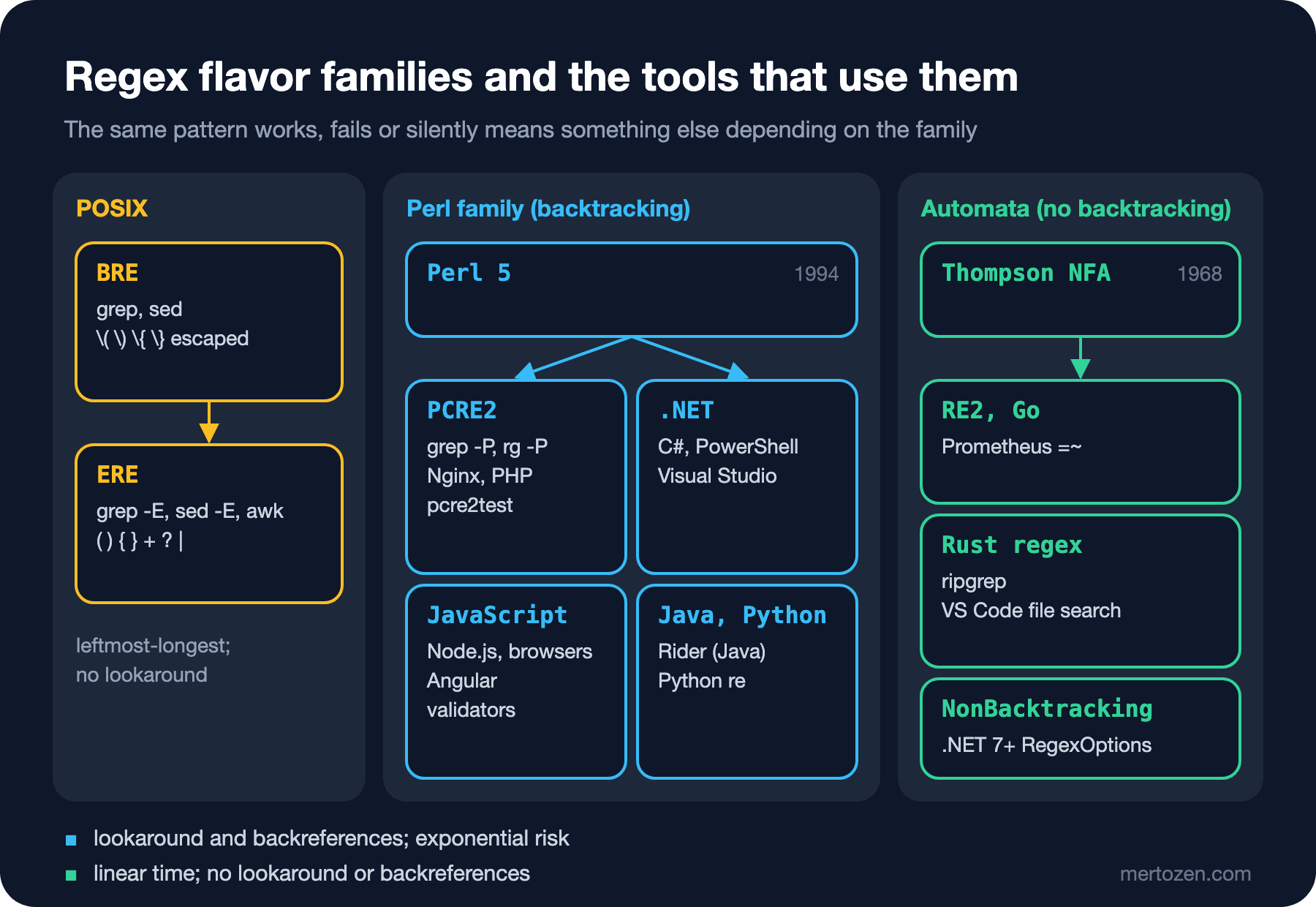
The first family is POSIX. The default syntax of grep and sed is BRE, the basic regular expression syntax; grep -E and awk use ERE, the extended syntax. The second family comes from Perl. Perl 5 brought constructs such as lookahead, lazy quantifiers and non-capturing groups in 1994; PCRE2, .NET, JavaScript, Java and Python build on that syntax, and all of them use a backtracking engine. The third family rests on the automata approach Ken Thompson published in 1968, which reads the input once from left to right: Google's RE2, a backtracking-free regex library written in C++, Go's regexp package, Rust's regex crate (which ripgrep uses) and RegexOptions.NonBacktracking, which arrived with .NET 7.
This split also answers the questions in the guess. When you move a pattern to another tool, one of three things happens: it works the same, it reports an error, or it matches something else without an error. The third is the most expensive.
POSIX BRE and ERE: Where Does the Backslash Go?
In BRE the symbols { } ( ) + ? | need a backslash in front to become special; bare, they are literal characters. ERE is the other way round. +, ? and | do not exist in the POSIX BRE definition at all; GNU grep and sed accept them as \+, \? and \| as an extension.
$ cat shell/bre-ere.sh
#!/usr/bin/env bash
line=$(tail -1 data/app.log)
# BRE: { } ( ) + ? | need a backslash; bare, they are literal characters
echo "$line" | grep -o 'BKS-[0-9]\{4\}-[0-9]\{6\}'
echo "$line" | grep -o 'BKS-[0-9]{4}' || echo "BRE {4}: no match"
# ERE: the same metacharacters without backslashes
echo "$line" | grep -oE 'BKS-[0-9]{4}-[0-9]{6}'
# sed is BRE by default, ERE with -E
echo "$line" | sed 's/.*Payment \([0-9]*\) \(declined\).*/\2: \1/'
echo "$line" | sed -E 's/.*Payment ([0-9]+) (declined).*/\2: \1/'
# ERE has no lookahead: grep warns and finds no match
echo "$line" | grep -oE 'Payment [0-9]+(?= declined)' || echo "ERE lookahead: no match"
$ bash shell/bre-ere.sh
BKS-2026-000126
BRE {4}: no match
BKS-2026-000126
declined: 4713
declined: 4713
grep: warning: ? at start of expression
ERE lookahead: no match
The second line is the BRE trap: here {4} means a brace, a 4 and a brace, and the log has no such text. The two sed lines give the same result; -E only removes the backslashes before the parentheses. Use grep -E and sed -E in every script you write today; being able to read BRE is enough, because you will keep running into it in old scripts and Stack Overflow answers.
The last line is the first answer to the guess. ERE has no lookahead; when GNU grep sees (? it prints a warning, interprets the pattern by its own rules and finds no line. If stderr is redirected somewhere else inside a script you never see the warning and reach the wrong conclusion that "there are no declined payments in the log".
POSIX has one more difference: among alternatives it picks the longest match, not the leftmost one. This rule, which we saw with BKS|BKS-2026 in the third post, shows up again in the table below.
The Perl Family: PCRE2, .NET and JavaScript Do Not Speak the Same Language
The engines in the Perl family agree on the basic syntax and differ in the details. The fastest way to see the differences is to give the same list of patterns to every engine. Each line holds a probe name, a pattern and an input, separated by tab characters:
$ cat data/flavor-probes.tsv
lookahead	[0-9]+(?= TRY)	450 TRY
lookbehind	(?<=BKS-)[0-9]{4}	BKS-2026-000123
backref	\b(\w+) \1\b	is is
atomic	(?>[0-9]+)0	1230
possessive	[0-9]++0	1230
named	(?<year>[0-9]{4})	2026
named-P	(?P<year>[0-9]{4})	2026
unicode-prop	\p{Lu}+	ÇALIKUŞU
digit	\d	٣
recursion	\((?:[^()]|(?R))*\)	f(a(b)c)
inline-i	(?i)bks	BKS
posix-class	[[:digit:]]+	2026
alternation	BKS|BKS-2026	BKS-2026
portable	^BKS-[0-9]{4}-[0-9]{6}$	BKS-2026-000123
On the .NET and JavaScript side there are short programs that read the file and try each line:
using System.Text.RegularExpressions;

// the same probe file in .NET: first matched text, "-" or the end of the exception message
Console.WriteLine($"{"probe",-14}.NET");
foreach (string line in File.ReadLines("data/flavor-probes.tsv"))
{
    string[] parts = line.Split('\t');
    string result;
    try
    {
        Match m = Regex.Match(parts[2], parts[1]);
        result = m.Success ? m.Value : "-";
    }
    catch (ArgumentException ex)
    {
        result = "error: " + ex.Message.Split(". ")[^1].TrimEnd('.');
    }
    Console.WriteLine($"{parts[0],-14}{result}");
}
import { readFileSync } from "node:fs";
// the same probe file in JavaScript: without flags and with the u flag
const lines = readFileSync("data/flavor-probes.tsv", "utf8").trim().split("\n");
const cell = (pattern, flags, input) => {
try {
const m = new RegExp(pattern, flags).exec(input);
return m ? m[0] : "-";
} catch (e) {
return "error: " + e.message.split(": ").at(-1);
}
};
console.log("probe".padEnd(14) + "no flag".padEnd(28) + "u flag");
for (const line of lines) {
const [name, pattern, input] = line.split("\t");
console.log(name.padEnd(14) + cell(pattern, "", input).padEnd(28) + cell(pattern, "u", input));
}$ dotnet run dotnet/flavor-probes.cs
probe .NET
lookahead 450
lookbehind 2026
backref is is
atomic -
possessive error: Nested quantifier '+'
named 2026
named-P error: Unrecognized grouping construct
unicode-prop ÇALIKUŞU
digit ٣
recursion error: Unrecognized grouping construct
inline-i BKS
posix-class -
alternation BKS
portable BKS-2026-000123
$ node js/flavor-probes.mjs
probe no flag u flag
lookahead 450 450
lookbehind 2026 2026
backref is is is is
atomic error: Invalid group error: Invalid group
possessive error: Nothing to repeat error: Nothing to repeat
named 2026 2026
named-P error: Invalid group error: Invalid group
unicode-prop - ÇALIKUŞU
digit - -
recursion error: Invalid group error: Invalid group
inline-i error: Invalid group error: Invalid group
posix-class - error: Lone quantifier brackets
alternation BKS BKS
portable BKS-2026-000123 BKS-2026-000123On the command line a script tries the same file with grep -E, grep -P and rg. Each cell holds the first matched text, - if there is no match, warning if the tool warned and found nothing, and error if it rejected the pattern:
$ cat shell/flavor-probes.sh
#!/usr/bin/env bash
# run every probe with grep -E, grep -P and rg: first matched text, "-" (no match),
# "warning" (warned and found nothing) or "error"
cell() {
    local out err
    out=$(printf '%s\n' "$2" | "${@:3}" -o -e "$1" 2>/dev/null | head -1)
    err=$(printf '%s\n' "$2" | "${@:3}" -o -e "$1" 2>&1 >/dev/null)
    if [[ -n $err && -z $out ]]; then
        [[ $err == *warning:* ]] && out=warning || out=error
    fi
    out=${out:--}
    printf '%s%*s' "$out" $((17 - ${#out})) ''
}
printf '%-14s%-17s%-17s%s\n' probe grep-E grep-P rg
while IFS=$'\t' read -r name pattern input; do
    printf '%-14s' "$name"
    cell "$pattern" "$input" grep -E
    cell "$pattern" "$input" grep -P
    cell "$pattern" "$input" rg
    echo
done < data/flavor-probes.tsv | sed "s/ *$//"
$ bash shell/flavor-probes.sh
probe         grep-E           grep-P           rg
lookahead     warning          450              error
lookbehind    warning          2026             error
backref       is is            is is            error
atomic        warning          -                error
possessive    1230             -                1230
named         warning          2026             2026
named-P       warning          2026             2026
unicode-prop  warning          ÇALIKUŞU         ÇALIKUŞU
digit         warning          -                ٣
recursion     warning          (a(b)c)          (b)
inline-i      warning          BKS              BKS
posix-class   2026             2026             2026
alternation   BKS-2026         BKS              BKS
portable      BKS-2026-000123  BKS-2026-000123  BKS-2026-000123
Let us read the differences within the Perl family. The atomic group (?>...) exists in .NET and PCRE2; as we saw in the second post it does not match 1230, because the group does not give back the digits it took. JavaScript has no atomic groups. The possessive quantifier ++ exists only in PCRE2; .NET rejects it with Nested quantifier and JavaScript with Nothing to repeat. PCRE2 accepts the Python-style named group (?P<year>...); .NET and JavaScript do not.
Recursion exists only in PCRE2: (?R) calls the whole pattern again inside itself and captures the nested parentheses as one piece, (a(b)c). In .NET you can do the same with balancing groups, but they are hard to read; if you really need balanced parentheses, the right tool is usually a small parser. PCRE2 recognizes POSIX classes such as [[:digit:]]; .NET reads it as a different class without an error and finds no match, JavaScript does the same without the u flag and rejects it with u. JavaScript has no inline (?i); the (?i:...) modifier we saw in the fourth post is the only option.
Nginx is in this family too. location ~ blocks and their case-insensitive form location ~* use Perl-compatible syntax; since 1.21.5 Nginx can be built with PCRE2. According to the Nginx documentation, an exact match with = is checked first, then the longest prefix; if that prefix is marked with ^~ the regexes are not consulted at all, otherwise the regex locations are tried in the order they appear in the file and the first one that matches wins. So order matters for regex locations, not for prefixes. The details are in the "Nginx Fundamentals" post of the Web Servers and Hosting series.
RE2 and Rust regex: What Do You Lose Without Backtracking?
The answer to the second command in the guess is in ripgrep's error message:
$ cat shell/rg-engines.sh
#!/usr/bin/env bash
# default engine (Rust regex): no lookaround, it reports an error
rg -o 'Payment [0-9]+(?= declined)' data/app.log
# -P for PCRE2, --engine auto for "PCRE2 when needed"
rg -oP 'Payment [0-9]+(?= declined)' data/app.log
rg -o --engine auto 'Payment [0-9]+(?= declined)' data/app.log
# syntax that is accepted but means something else
printf 'f(a(b)c)\n' | rg -o '\((?:[^()]|(?R))*\)'
printf 'f(a(b)c)\n' | rg -oP '\((?:[^()]|(?R))*\)'
printf '1230\n' | rg -o '[0-9]++0'
printf '1230\n' | rg -oP '[0-9]++0' || echo "PCRE2 possessive: no match"
$ bash shell/rg-engines.sh
rg: regex parse error:
    (?:Payment [0-9]+(?= declined))
                     ^^^
error: look-around, including look-ahead and look-behind, is not supported

Consider enabling PCRE2 with the --pcre2 flag, which can handle backreferences
and look-around.
Payment 4713
Payment 4713
(b)
(a(b)c)
1230
PCRE2 possessive: no match
These engines turn the pattern into an automaton and read the input once from left to right. Because they never return to a character more than once, the running time stays proportional to the input length; the Rust regex documentation bounds the worst case by the product of the pattern and input sizes. The price is every construct that needs backtracking: backreferences, lookahead, lookbehind, atomic groups and recursion. RE2's syntax page lists them explicitly as not supported. The gain is that the exponential slowdown, the subject of the eighth post, never happens.
That is why ripgrep carries two engines: Rust regex by default, PCRE2 with -P, and with --engine auto whichever engine the pattern needs. If you need lookaround, write -P; otherwise use the default, which is usually faster on large repos.
The place to watch is the last four lines. In Rust regex R is an inline flag: the mode that recognizes \r\n line endings. That is why (?R) raises no error; it is read as an empty flag group, and the pattern comes to mean "text in parentheses that contains no parentheses", so the result is (b), not (a(b)c). [0-9]++0 raises no error either: two quantifiers can be stacked, and the result is an ordinary greedy match, 1230. The same thing happens in grep -E. In PCRE2 there is no match, because the possessive quantifier does not give digits back. Getting no error when you move a pattern to another flavor does not mean it does the same thing.
In Prometheus, =~ Is Always a Full Match
Prometheus is written in Go and uses Go's RE2 syntax in its label matchers. According to its documentation there is one more difference: =~ anchors the pattern from start to end automatically, so path=~"/api/books" really is ^(?:/api/books)$. You can see this without setting up a Prometheus server, with promtool's rule tests:
# promtool test rules prometheus/anchoring-test.yml
rule_files: []
evaluation_interval: 1m
tests:
  - interval: 1m
    input_series:
      - series: 'http_requests_total{path="/api/books"}'
        values: '1+1x5'
      - series: 'http_requests_total{path="/api/books/9780441172719"}'
        values: '1+1x5'
      - series: 'http_requests_total{path="/api/orders"}'
        values: '1+1x5'
    promql_expr_test:
      # expectation: "contains /api/books", so 2 series
      - expr: count(http_requests_total{path=~"/api/books"})
        eval_time: 5m
        exp_samples:
          - value: 2
      # written as a full match, the same expectation holds
      - expr: count(http_requests_total{path=~"/api/books.*"})
        eval_time: 5m
        exp_samples:
          - value: 2
      # negative lookahead: "everything under /api except orders"
      - expr: count(http_requests_total{path=~"/api/(?!orders).*"})
        eval_time: 5m
        exp_samples:
          - value: 2
$ promtool test rules prometheus/anchoring-test.yml
Processing test file: prometheus/anchoring-test.yml
FAILED:
expr: "count(http_requests_total{path=~\"/api/books\"})", time: 5m,
exp: {} 2E+00
got: {} 1E+00
expr: "count(http_requests_total{path=~\"/api/(?!orders).*\"})", time: 5m, err: 1:27: parse error: error parsing regexp: invalid or unsupported Perl syntax: `(?!`The Prometheus answer to the guess is 1: /api/books/9780441172719 was not counted. The second test passes once .* is added, so it does not show up in the output. The third test shows that Go's regexp package rejects lookahead. When you write =~ in Grafana dashboards and alert rules, do not think of the pattern as "occurs somewhere" like grep; think of it as an expression that describes the whole value.
Comparison Table
Let us collect the outputs above and what we saw in earlier posts in one table. The columns are .NET, JavaScript (with the u flag), PCRE2 (grep -P), POSIX ERE (grep -E) and the RE2 family (ripgrep's default engine and Go):
| Feature | .NET | JavaScript | PCRE2 | POSIX ERE | RE2 / Rust |
|---|---|---|---|---|---|
| Lookahead | yes | yes | yes | no | no |
| Lookbehind | any length | any length | bounded length | no | no |
| Backreference | yes | yes | yes | GNU extension | no |
| Atomic group | yes | no | yes | no | no |
Possessive ++ | error | error | yes | becomes greedy | becomes greedy |
| Named group | (?<n>) | (?<n>) | (?<n>), (?P<n>) | no | (?<n>), (?P<n>) |
\d | Unicode digits | 0-9 | 0-9 | no | Rust: Unicode, RE2: 0-9 |
Unicode property \p{Lu} | yes | with u | yes | no | yes |
| Recursion | balancing groups | no | (?R) | no | no |
Inline (?i) | yes | only (?i:...) | yes | no | yes |
| Alternation | first that matches | first that matches | first that matches | longest | first that matches |
| Linear-time guarantee | only NonBacktracking | no | no | depends on the implementation | yes |
Two rows deserve a note. In the linear-time row I wrote "depends on the implementation" for POSIX, because the standard does not describe an engine; GNU grep uses a fast automata-based matcher for most patterns and switches to a slower fallback matcher when it sees a backreference. Prometheus has no column, but it has the same rows as Go, plus the automatic full match.
Telling Globs from Regex
The thing most often confused with regex is the glob: the shell's file name patterns such as *.cs. Both use a star, but the meanings differ. In a glob * on its own means "any text" and ? means "a single character". In regex * repeats what precedes it, ? makes what precedes it optional and . is any character. Python's fnmatch module shows which regex a glob corresponds to:
import fnmatch

# fnmatch turns a glob into the regex it stands for
for glob in ["*.cs", "Order?.cs", "[!.]*.log"]:
    print(f"{glob:12} {fnmatch.translate(glob)}")
$ python3 python/glob-translate.py
*.cs (?s:.*\.cs)\z
Order?.cs (?s:Order.\.cs)\z
[!.]*.log (?s:[^.].*\.log)\zA glob is a full match automatically; a dot is a literal dot; [!...] is regex's [^...]. PowerShell puts the two worlds side by side: -like takes a wildcard (glob-like) pattern and -match a .NET regex:
$files = 'OrderService.cs', 'OrderService.cs.bak', 'Orders.csv', 'app.log'

# -like takes a wildcard pattern, -match a .NET regex
$files | Where-Object { $_ -like '*.cs' }
'---'
$files | Where-Object { $_ -match '.cs' }
'---'
$files | Where-Object { $_ -match '\.cs$' }
'---'
# a glob given to -match is an invalid regex
try { 'OrderService.cs' -match '*.cs' } catch { $_.Exception.Message }
$ pwsh -NoProfile -File powershell/glob-vs-regex.ps1
OrderService.cs
---
OrderService.cs
OrderService.cs.bak
Orders.csv
---
OrderService.cs
---
Invalid pattern '*.cs' at offset 1. Quantifier '*' following nothing.-match '.cs' also found Orders.csv: the dot is any character and the pattern is not anchored to the end. Writing a glob where a regex belongs sometimes gives an error and sometimes, as here, too many matches. The mistake in the other direction is sneakier, because there is no error message at all. .gitignore lines are globs; if you write a regex there, Git silently reads it as a glob that matches nothing:
$ cat shell/gitignore-glob.sh
#!/usr/bin/env bash
# .gitignore lines are globs: a regex there silently matches nothing
repo=$(mktemp -d)
cd "$repo" && git init -q
mkdir -p src/Bookstore.Api/bin logs
touch src/Bookstore.Api/Program.cs src/Bookstore.Api/bin/Bookstore.Api.dll logs/app.log logs/app.log.1
printf '%s\n' '.*\.log$' 'bin' > .gitignore
git check-ignore -v --no-index src/Bookstore.Api/bin/Bookstore.Api.dll logs/app.log logs/app.log.1
echo '---'
printf '%s\n' '*.log' '*.log.[0-9]' 'bin/' > .gitignore
git check-ignore -v --no-index src/Bookstore.Api/bin/Bookstore.Api.dll logs/app.log logs/app.log.1
rm -rf "$repo"
$ bash shell/gitignore-glob.sh
.gitignore:2:bin	src/Bookstore.Api/bin/Bookstore.Api.dll
---
.gitignore:3:bin/	src/Bookstore.Api/bin/Bookstore.Api.dll
.gitignore:1:*.log	logs/app.log
.gitignore:2:*.log.[0-9]	logs/app.log.1
The .*\.log$ line in the first .gitignore caught no file; the log files are ready to go into the commit. git check-ignore -v shows which line catches a file, which makes it the shortest way to find this kind of mistake.
The branches and paths filters of GitHub Actions are a mix of the two; I did not run them, and I am writing from the filter table in GitHub's workflow syntax documentation. * means anything except / and ** anything including /; but ? and + mean, as in regex, zero or one and one or more of the preceding character. So v2.? does not mean "v2. followed by one character" as a glob habit would read it, but "v2 or v2.". Because the same file holds two different mini-languages, check the example table in the documentation when in doubt.
A Portable Pattern in Bookstore
In Bookstore the order number pattern lives in many places: the validator in the Angular form is in JavaScript, the validation in the API is in .NET, the log searches are in grep and ripgrep, and the order endpoint's metrics are in Prometheus. If you want the same behavior everywhere, write the pattern in the subset all flavors share. That is why the last line of the probe file, ^BKS-[0-9]{4}-[0-9]{6}$, gave the same result in every engine. The rules of the shared subset are short:
[0-9]instead of\dfor digits; explicit ranges for letters, or, if you really need Unicode,\p{L}tested separately in every engine.- No lookaround, backreferences, atomic groups, possessive quantifiers or recursion.
- No inline flags; set case-insensitivity with each platform's own option.
- Write anchors explicitly: Prometheus does a full match automatically, grep and .NET do not; writing
^...$gives the same result in both. - If you need a named group, use
(?<name>...); PCRE2, .NET, JavaScript and the RE2 family all accept it, POSIX ERE does not.
If the pattern is defined in one place and copied to the others (for example when the API sends the validator pattern to Angular from an endpoint), these rules are mandatory. On the .NET side RegexOptions.ECMAScript pulls \d and \w down to ASCII like JavaScript, but as we saw in the first post it does not imitate all of JavaScript's behavior; the real safeguard is to try the pattern on both sides with the same list of test cases.
In Production
Next to a pattern that lives in configuration, write down which engine runs it. A log filter in appsettings.json runs in .NET, an alert rule in Go, a rewrite in Nginx in PCRE2. The same team edits all three as "regex", and nobody notices that a pattern that works in one place will raise an error in another or, worse, match something else.
Do not swallow grep warnings in scripts. A grep -E silenced with 2>/dev/null returns empty for a pattern with lookahead, and you lose the difference between "no results" and "the pattern did not work". set -o pipefail and checking the exit code help catch it: grep returns 1 when there is no match and 2 on an error.
If you are designing a feature that searches with text typed by users (advanced search, a log viewer filter), do not run that text directly as regex. Offer users a simple wildcard syntax such as globs and translate it to regex yourself; fnmatch.translate above is an example. If the input itself is untrusted, for example when you scan long texts that come from outside, pick a backtracking-free engine: RegexOptions.NonBacktracking in .NET, the standard regexp package in Go. We measure why this matters in the seventh and eighth posts.
Common Pitfalls
Mistaking a shell glob for regex
-match '*.cs' raises an error, -match '.cs' matches too much. File name filters such as -like, rg -g and find -name want a glob; if you want regex, write \.cs$.
Running a pattern you tried in grep -P with ripgrep
Lookaround and backreferences do not exist in ripgrep's default engine. The error message is clear and so is the fix: rg -P or --engine auto.
Taking the absence of an error for correct behavior
In ripgrep (?R) is a flag and [0-9]++ a greedy repetition; in grep -E (?=...) is a warning and an empty result; in .NET [[:digit:]] is a different class. If you moved a pattern, compare its results too.
Reading =~ in Prometheus as "contains"
=~ always matches the whole label value. If you want "contains", write .*/api/books.*.
Writing regex in .gitignore
Git raises no error; it just ignores no file. Check with git check-ignore -v.
A Small Experiment
★☆☆ Find the number BKS-2026-000126 in data/app.log with three grep commands written separately in BRE, ERE and PCRE2. Which one has the most backslashes?
★★☆ Add two lines for \bBKS\b and [\w-]+ to data/flavor-probes.tsv and run the three scripts again. Which columns change when you put Turkish characters in the input?
★★★ Rewrite Emre's Payment [0-9]+(?= declined) pattern without lookaround so that it works in ripgrep's default engine and in grep -E. Hint: look for a way to output a group instead of the whole match (rg -r).
We now know the flavors and the tools. In the next post we do real work with these tools: repo-wide search and bulk changes with grep, ripgrep, sed, git grep and PowerShell, regex find/replace in VS Code, Visual Studio and Rider, a refactor in Bookstore that turns log calls with string interpolation into message templates, and the unexpected behavior of $ in files with CRLF line endings.