

The Cost of Regex: ReDoS, Catastrophic Backtracking, Readability and Testing Regex

A pattern with nested quantifiers, overlapping alternation or adjacent .* makes an exponential or polynomial number of attempts on an input that almost matches; in our measurement ^(a+)+$ took 10 seconds at 28 letters in .NET and 0.07 ms with NonBacktracking. We recognize dangerous constructs with PCRE2 step counts and cover Cloudflare's 2019 outage, the Angular validator and server validation, readable patterns with (?x), a test table with xUnit [Theory] and the MailAddress decision for email.
Version note: The examples in this post were run with .NET 10 (SDK 10.0.404), xUnit v3 4.0.3, Node.js 26.13 LTS, PCRE2 10.49, GNU grep 3.12 and ripgrep 15.2.0. The timings were measured on a single machine; absolute values will differ on yours, the growth rates stay the same.
Guess First
In the Angular front end of Bookstore, the online bookstore used as the shared example across this site's series, the customer name field of the sign-up form is validated with a pattern found on the internet: letters, an optional space after them, repeated. The same pattern is in the API too:
^([a-zA-Z]+\s?)*$Three customers fill in the form: Ada Lovelace, Grace Hopper-Smith and Maximiliane Josephine Vanderbilt-Rockefeller. The second and the third are rejected because of the hyphen; that is the expected behavior. The real question is time: how many milliseconds does the browser spend on each? What would happen if the third name had three more letters?
Measuring Catastrophic Backtracking
The core of the pattern in the guess shows up in a shorter pattern: ^(a+)+$. The inner a+ takes one or more a, the outer + repeats that one or more times. For a four-character input aaaa the engine has eight different ways to split it, such as (aaaa), (aaa)(a), (a)(aaa) and (aa)(aa); every extra character doubles that number. If the input matches there is no problem; the engine finishes on the first try. When the match fails because of the trailing !, the backtracking we saw in the second post tries every split one by one before accepting that $ does not match. Let us measure:
using System.Diagnostics;
using System.Globalization;
using System.Text.RegularExpressions;

CultureInfo.CurrentCulture = CultureInfo.InvariantCulture;

// ^(a+)+$ on n letters followed by "!": the backtracking engine tries every way to split the letters
Regex backtracking = new(@"^(a+)+$");
Regex nonBacktracking = new(@"^(a+)+$", RegexOptions.NonBacktracking);
Regex rewritten = new(@"^a+$");
foreach (Regex regex in new[] { backtracking, nonBacktracking, rewritten })
    regex.IsMatch("aaaa!"); // warm-up

Console.WriteLine($"{"n",3} {"backtracking ms",16} {"NonBacktracking ms",19} {"^a+$ ms",8}");
for (int n = 16; n <= 28; n += 2)
{
    string input = new string('a', n) + "!";
    Console.WriteLine($"{n,3} {Time(backtracking, input),16:F1} {Time(nonBacktracking, input),19:F3} {Time(rewritten, input),8:F3}");
}

static double Time(Regex regex, string input)
{
    Stopwatch sw = Stopwatch.StartNew();
    regex.IsMatch(input);
    return sw.Elapsed.TotalMilliseconds;
}
// the same pattern in V8: no timeout option exists, the call blocks the thread until it finishes
const backtracking = /^(a+)+$/;
console.log("n".padStart(3), "backtracking ms".padStart(16));
for (let n = 16; n <= 28; n += 2) {
const input = "a".repeat(n) + "!";
const start = performance.now();
backtracking.test(input);
console.log(String(n).padStart(3), (performance.now() - start).toFixed(1).padStart(16));
}$ dotnet run dotnet/catastrophic.cs
n backtracking ms NonBacktracking ms ^a+$ ms
16 2.4 0.001 0.000
18 9.4 0.001 0.000
20 37.6 0.001 0.000
22 155.2 0.003 0.000
24 635.1 0.014 0.001
26 2527.2 0.006 0.001
28 10147.4 0.068 0.001
$ node js/catastrophic.mjs
n backtracking ms
16 2.4
18 1.2
20 4.6
22 16.8
24 67.2
26 288.0
28 1101.9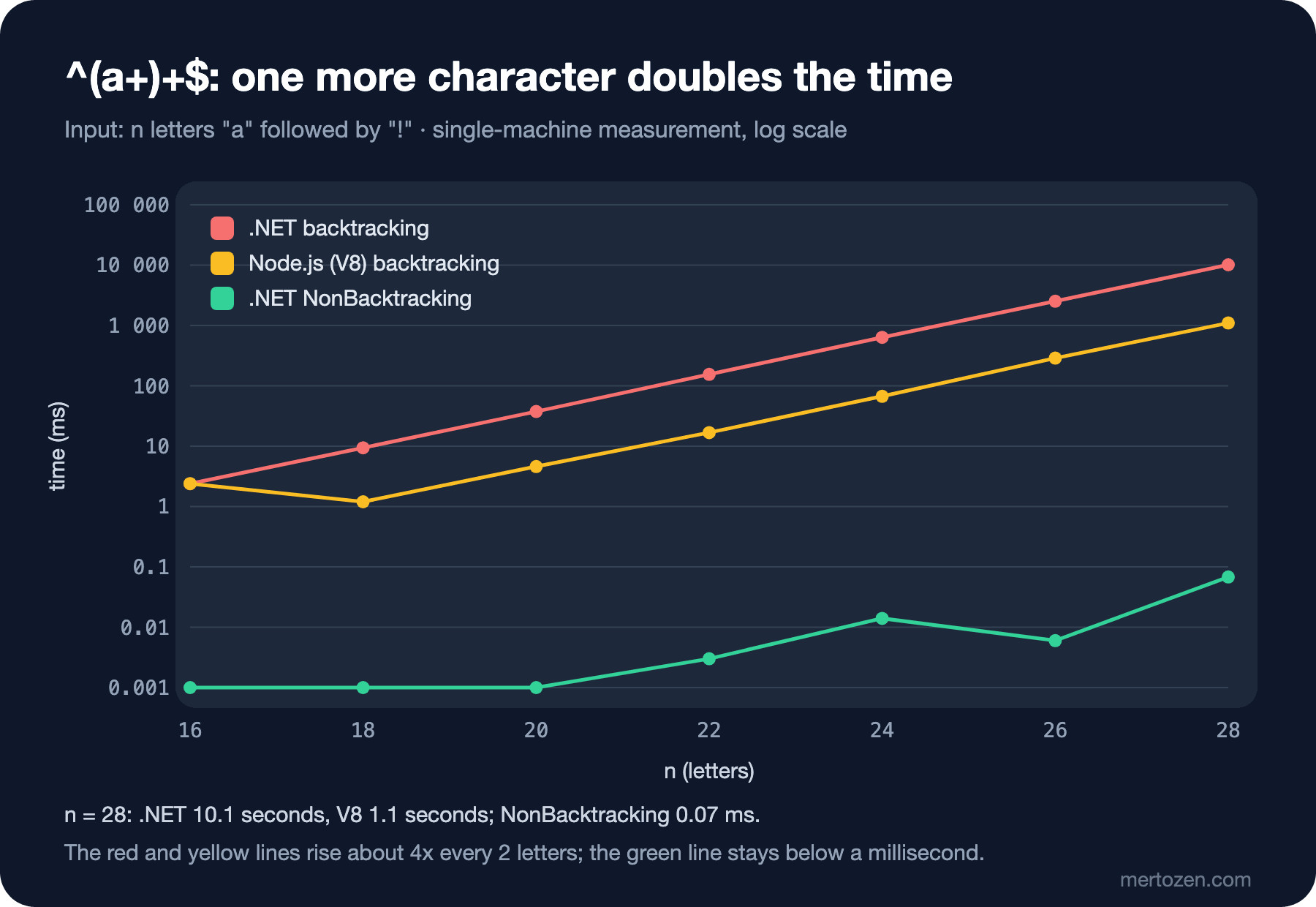
The time goes up four times every two letters: 28 letters take 10 seconds in .NET's backtracking engine and 1.1 seconds in V8. V8 is about ten times faster here, but the curve is the same; at the same rate V8 would be expected to pass fifteen seconds at 32 letters. NonBacktracking finished the same pattern at 28 letters in 0.07 milliseconds, and rewriting the pattern as ^a+$ stayed below a microsecond. Two stacked + mean that within a match a single letter can belong to either the inner or the outer repetition. That ambiguity is the source of the problem.
Recognizing Dangerous Patterns
Time changes from machine to machine, step counts do not. PCRE2's pcre2test tool can print how many internal steps an input needs with the find_limits option. Let us put three dangerous constructs and three safe counterparts in the same table:
$ cat shell/redos-limits.sh
#!/usr/bin/env bash
# PCRE2's "minimum match limit": how many internal match steps a failing input needs
# limit PATTERN UNIT COUNT TAIL: the subject is UNIT repeated COUNT times, then TAIL
limit() {
    local subject
    subject=$(printf "%${3}s" '' | sed "s/ /$2/g")$4
    printf '/%s/\n%s\\=find_limits\n' "$1" "$subject" > /tmp/limits.txt
    pcre2test /tmp/limits.txt | sed -n 's/^Minimum match limit = //p'
}
printf '%-28s %8s %8s %10s\n' pattern n=10 n=15 n=20
while IFS=$'\t' read -r pattern unit tail; do
    printf '%-28s %8s %8s %10s\n' "$pattern" "$(limit "$pattern" "$unit" 10 "$tail")" \
        "$(limit "$pattern" "$unit" 15 "$tail")" "$(limit "$pattern" "$unit" 20 "$tail")"
done <<'PATTERNS'
^(a+)+$	a	!
^(\w+\s?)*$	a	!
^(\d|\d\d)+$	1	x
^.*.*=.*;$	x	=;x
^(?>a+)+$	a	!
^a+$	a	!
^\w+(?:\s\w+)*$	a	!
PATTERNS
rm -f /tmp/limits.txt
# grep -P stops at PCRE2's default limit instead of hanging
printf '%040d!\n' 0 | tr 0 a | grep -cP '^(a+)+$'
$ bash shell/redos-limits.sh
pattern                          n=10     n=15       n=20
^(a+)+$                          2560    81920    2621440
^(\w+\s?)*$                      2561    81921    2621441
^(\d|\d\d)+$                      697     7750      85969
^.*.*=.*;$                        128      223        343
^(?>a+)+$                           6        6          6
^a+$                                2        2          2
^\w+(?:\s\w+)*$                     3        3          3
grep: (standard input): exceeded PCRE's backtracking limit
The first four rows show three dangerous constructs. Nested quantifiers: (a+)+ and the guess's (\w+\s?)*. In the second, \s? is optional, so a word without spaces can be split in countless ways just like (a+)+; the step count is almost the same. Overlapping alternation: in (\d|\d\d)+ two digits can be one piece or two separate pieces; the growth is slower but still exponential. Adjacent .*: .*.*=.* splits the input in more than one way; the growth is polynomial, not exponential, but with long input and thousands of requests per second that is enough as well.
The bottom three rows are spellings that do the same job safely. The atomic group (?>a+) does not give back what it took, so the number of splits drops to one. ^a+$ matches in only one way anyway. ^\w+(?:\s\w+)*$ is the correct form of the guess's pattern: because the space between words is mandatory, it is never ambiguous which repetition a letter belongs to. The rule: every place where one character can belong to two different repetitions of the pattern is a risk; look for it when you read a regex.
The last line is PCRE2's own defense. PCRE2 has a default step limit, and instead of waiting forever on a 40-letter input, grep -P hits that limit and reports an error. ripgrep's default engine from the fifth post does no backtracking on the same input in the first place.
Cloudflare, July 2, 2019
The best-known production example is Cloudflare's outage on July 2, 2019. According to the company's official postmortem, the regex in a new XSS rule added to the WAF drove the CPUs handling HTTP traffic on servers around the world to almost 100 percent, and visitors got 502 errors for 27 minutes. The part the report identifies as the problem is .*(?:.*=.*): the adjacent .* construct from the table above. Because the rule was deployed worldwide at once, its effect also showed up everywhere at once. Among the measures listed in the report are bringing back a CPU protection mechanism that had been removed, rolling out rules gradually, measuring rule performance in the test phase, and moving to the re2 or Rust regex engine, which guarantee running time. So the defense is not a single thing: engine choice, measurement and the deployment process together.
The Angular Validator and Validating Again on the Server
Back to the guess. Angular's Validators.pattern uses the browser's regex engine; according to the Angular documentation, a pattern given as a string gets ^ prepended and $ appended. Let us run the same measurement with the pattern from the form field:
// the pattern of an Angular Validators.pattern(...) on the customer name field
const naive = /^([a-zA-Z]+\s?)*$/;
const safe = /^[a-zA-Z]+(?: [a-zA-Z]+)*$/;

for (const name of ["Ada Lovelace", "Grace Hopper-Smith", "Maximiliane Josephine Vanderbilt-Rockefeller"]) {
  for (const [label, re] of [["naive", naive], ["safe", safe]]) {
    const start = performance.now();
    const ok = re.test(name);
    console.log(`${label.padEnd(5)} ${String(ok).padEnd(5)} ${(performance.now() - start).toFixed(1).padStart(8)} ms  ${name}`);
  }
}
$ node js/name-validator.mjs
naive true 0.0 ms Ada Lovelace
safe true 0.0 ms Ada Lovelace
naive false 0.0 ms Grace Hopper-Smith
safe false 0.0 ms Grace Hopper-Smith
naive false 976.9 ms Maximiliane Josephine Vanderbilt-Rockefeller
safe false 0.0 ms Maximiliane Josephine Vanderbilt-RockefellerThe answer to the guess: the first two names take too little time to measure, the third takes about a second on this machine. There are 30 letters before the hyphen and each extra letter doubles the time; three more letters mean eight times as long, about eight seconds. Because the Angular validator runs on every keystroke, the page freezes a little longer with every letter while the customer types the name. JavaScript has no timeout for regex; in the browser the only defense is the pattern itself.
This locks the customer's own tab, not the server. The real risk is on the server side. Client-side validation is a convenience; someone who sends requests to the API directly never runs it. The API must validate the same field again, and it must not copy the same pattern while doing so: in .NET, a safe pattern with [GeneratedRegex], a timeout and a length limit. A length limit alone is not enough: the table shows that even 30 letters take seconds for (a+)+. A length limit helps with patterns that grow polynomially; with exponential ones it only helps together with fixing the pattern. The l flag that comes with V8's experimental --enable-experimental-regexp-engine option uses a linear engine; I tried it in Node.js 26 and even an input of 100 thousand letters took milliseconds. But it is experimental and not available in browsers; it is not something you can rely on in production.
Readability: (?x), Named Groups and Building from Parts
The precondition for catching ReDoS in code review is being able to read the pattern. Let us write the pattern that parses a line of Bookstore's access log in three ways:
using System.Text.RegularExpressions;

string line = File.ReadLines("data/access.log").First();

// 1. one line: correct, but hard to review
Regex dense = new(@"^(?<ip>\S+) \S+ \S+ \[(?<time>[^\]]+)\] ""(?<method>[A-Z]+) (?<path>\S+) [^""]*"" (?<status>[0-9]{3}) (?<bytes>[0-9]+) ""[^""]*"" ""[^""]*"" (?<seconds>[0-9.]+)$");

// 2. IgnorePatternWhitespace: spaces are ignored, # starts a comment, a real space is written as \x20
Regex commented = new("""
    ^(?<ip>\S+)                  # client address
    \x20\S+\x20\S+               # identity and user, always "-"
    \x20\[(?<time>[^\]]+)\]      # [15/Nov/2026:10:42:07 +0000]
    \x20"(?<method>[A-Z]+)       # "GET
    \x20(?<path>\S+)             #  /api/books/978-0-441-17271-9
    \x20[^"]*"                   #  HTTP/1.1"
    \x20(?<status>[0-9]{3})      # 200
    \x20(?<bytes>[0-9]+)         # response size
    \x20"[^"]*"\x20"[^"]*"       # referer and user agent
    \x20(?<seconds>[0-9.]+)$     # duration in seconds
    """, RegexOptions.IgnorePatternWhitespace);

// 3. built from named parts at compile time: AccessLog.Line below
foreach (Regex regex in new[] { dense, commented, AccessLog.Line })
{
    Match m = regex.Match(line);
    Console.WriteLine($"{m.Groups["method"].Value} {m.Groups["path"].Value} {m.Groups["status"].Value} {m.Groups["seconds"].Value}");
}

// in (?x) a plain space is ignored: this pattern looks for "GET/api"
Console.WriteLine($"(?x) with a plain space: {Regex.IsMatch(line, "(?x)GET /api")}");

static partial class AccessLog
{
    private const string Ip = @"(?<ip>\S+)";
    private const string Identity = @"\S+ \S+";
    private const string Time = @"\[(?<time>[^\]]+)\]";
    private const string Request = @"""(?<method>[A-Z]+) (?<path>\S+) [^""]*""";
    private const string Status = "(?<status>[0-9]{3})";
    private const string Bytes = "(?<bytes>[0-9]+)";
    private const string Quoted = @"""[^""]*""";
    private const string Seconds = @"(?<seconds>[0-9.]+)";

    [GeneratedRegex($"^{Ip} {Identity} {Time} {Request} {Status} {Bytes} {Quoted} {Quoted} {Seconds}$")]
    public static partial Regex Line { get; }
}
$ dotnet run dotnet/readable-pattern.cs
GET /api/books/978-0-441-17271-9 200 0.042
GET /api/books/978-0-441-17271-9 200 0.042
GET /api/books/978-0-441-17271-9 200 0.042
(?x) with a plain space: FalseThe three patterns give the same result, but they do not say the same thing in a review. The second is the (?x) mode from the fourth post, given as RegexOptions.IgnorePatternWhitespace: next to each piece it says what that piece captures. Because C# 11's raw string literal removes the escaping of quotes and backslashes, the pattern reads as it is. There is a trap in this mode: the space character is ignored, so a real space has to be written as \x20 or [ ]; the last line shows a pattern with a plain space silently looking for GET/api. The third builds the pattern from named constants; since C# 10 an interpolation made of constant strings is itself a constant, so it can be used inside the [GeneratedRegex] attribute. Writing and testing a piece such as Quoted once and using it in two places is safer than copying a long pattern by hand.
To understand a pattern, the explanation and step-counting features of sites such as regex101 or regexr help a lot. One rule: do not paste real data there. Use made-up text like Bookstore's sample data instead of customer emails, tokens or production log lines; you do not control where the text you paste is stored.
Testing Regex: A Table of Examples with xUnit [Theory]
The only way to say a regex is correct is to try it with positive and negative examples. Bookstore's order number and customer name patterns are in the src/Bookstore.Text library:
using System.Text.RegularExpressions;

namespace Bookstore.Text;

public static partial class BookstorePatterns
{
    // \z, not $: a trailing \n must not pass
    [GeneratedRegex(@"^BKS-[0-9]{4}-[0-9]{6}\z")]
    private static partial Regex OrderNumber { get; }

    // letters, single separators between words; no nested quantifier, so no catastrophic backtracking
    [GeneratedRegex(@"^\p{L}+(?:[ '-]\p{L}+)*\z", RegexOptions.None, matchTimeoutMilliseconds: 100)]
    private static partial Regex CustomerName { get; }

    public static bool IsOrderNumber(string input) => OrderNumber.IsMatch(input);

    public static bool IsCustomerName(string input) => input.Length <= 100 && CustomerName.IsMatch(input);
}
The tests are written as a table of examples with [Theory] and [InlineData]. Each row is an input and the expected result; the \n and Arabic-Indic digit traps from the first post are in the table too:
using System.Text.RegularExpressions;
using Bookstore.Text;
using Xunit;

namespace Bookstore.Text.Tests;

public class BookstorePatternsTests
{
    [Theory]
    [InlineData("BKS-2026-000123", true)]
    [InlineData("BKS-2026-000123\n", false)]   // trailing newline, the $ trap from the first post
    [InlineData("BKS-2026-٠٠٠١٢٣", false)]      // Arabic-Indic digits
    [InlineData("bks-2026-000123", false)]
    [InlineData("BKS-26-000123", false)]
    [InlineData(" BKS-2026-000123", false)]
    public void OrderNumber(string input, bool expected) =>
        Assert.Equal(expected, BookstorePatterns.IsOrderNumber(input));

    [Theory]
    [InlineData("Ada Lovelace", true)]
    [InlineData("Ayşe Gül", true)]
    [InlineData("Jean-Luc", true)]
    [InlineData("O'Brien", true)]
    [InlineData("Ada  Lovelace", false)]
    [InlineData("Ada1", false)]
    [InlineData(" Ada", false)]
    [InlineData("", false)]
    public void CustomerName(string input, bool expected) =>
        Assert.Equal(expected, BookstorePatterns.IsCustomerName(input));

    [Fact]
    public void CustomerName_LongNearMiss_FinishesQuickly() =>
        Assert.False(BookstorePatterns.IsCustomerName(new string('a', 99) + "!"));

    // a regression test for the pattern we replaced: it must keep failing with a timeout
    [Fact]
    public void NaiveNamePattern_TimesOut() =>
        Assert.Throws<RegexMatchTimeoutException>(() =>
            Regex.IsMatch(new string('a', 30) + "!", @"^([a-zA-Z]+\s?)*$", RegexOptions.None, TimeSpan.FromMilliseconds(50)));
}
$ dotnet test --project tests/Bookstore.Text.Tests 2>&1 | tail -6
Test run summary: Passed!
total: 16
failed: 0
succeeded: 16
skipped: 0
duration: 288msxUnit v3 runs on Microsoft.Testing.Platform; for dotnet test to use this mode on the .NET 10 SDK, the global.json at the repo root contains the setting "test": { "runner": "Microsoft.Testing.Platform" }. Two details of the table matter. CustomerName_LongNearMiss_FinishesQuickly is a test against ReDoS: the safe pattern returns False instantly on 99 letters and an exclamation mark; if the pattern one day turns into a form with nested quantifiers, thanks to matchTimeoutMilliseconds the test does not hang but turns red with RegexMatchTimeoutException. The Ayşe Gül row records why we chose \p{L} instead of [a-zA-Z].
This table is the acceptance criterion for every pattern taken from an AI assistant or Stack Overflow. Before you put a suggested pattern into the product, run it through these tests and add the edge cases you know: Turkish letters, a trailing line break, the empty string, a very long input that almost matches. The pattern in the guess also came from an answer on the internet; tried with the first two names, it showed no problem at all.
Email: MailAddress and a Confirmation Mail Instead of Regex
Email addresses are at the top of the list of fields people want to validate with regex. Let us put .NET's MailAddress class next to a typical pattern:
using System.Net.Mail;
using System.Text.RegularExpressions;

// a typical "email regex" next to MailAddress.TryCreate
Regex emailRegex = new(@"^[^@\s]+@[^@\s]+\.[^@\s]+$");

string[] addresses =
[
    "ada@example.com",
    "ada.lovelace+books@example.com",
    "ada@example",
    "\"Ada Lovelace\"@example.com",
    "Ada Lovelace <ada@example.com>",
    "ada@example..com",
    "ada@@example.com",
];

Console.WriteLine($"{"address",-34} {"regex",-6} MailAddress");
foreach (string address in addresses)
{
    bool parsed = MailAddress.TryCreate(address, out MailAddress? mail);
    string result = parsed ? $"True  -> {mail!.Address}" : "False";
    Console.WriteLine($"{address,-34} {emailRegex.IsMatch(address),-6} {result}");
}
$ dotnet run dotnet/email-check.cs
address regex MailAddress
ada@example.com True True -> ada@example.com
ada.lovelace+books@example.com True True -> ada.lovelace+books@example.com
ada@example False True -> ada@example
"Ada Lovelace"@example.com False True -> "Ada Lovelace"@example.com
Ada Lovelace <ada@example.com> False True -> ada@example.com
ada@example..com True False
ada@@example.com False FalseThe two disagree on four rows, and neither answers the question "does mail to this address arrive?". MailAddress accepts the quoted addresses and dotless domains the standard allows, but it also counts a text with a display name such as Ada Lovelace <ada@example.com> as an address; if you use it as a validator you need to add a mail.Address == input check. The regex, on the other hand, rejects valid addresses and accepts one with ... Bookstore's decision is this: only a rough check in the sign-up form (one @, non-empty text on both sides), MailAddress.TryCreate plus a comparison of the whole address on the server, and the real validation is a confirmation link sent to the address. Only that shows the address really exists and belongs to the customer.
In Production
Do not look for ReDoS only in your own code. The patterns inside the NuGet and npm packages you use carry the same risk, and such flaws are published as CVEs. The way to find them is dependency scanning; the details are in the "Dependency Scanning in Depth" post of the DevSecOps series.
Make timeouts visible. Wherever you catch RegexMatchTimeoutException, log the pattern name and the input length and keep a metric for it. A timeout is the first sign of either an attack or a bug in the pattern; in both cases you want to know.
Look at regex in code review. The checklist is short: are there nested quantifiers ((x+)+, (x*)*, (x+\s?)*), can the branches of an alternation match the same text, are there adjacent .*, is the input trusted, is there a timeout or NonBacktracking, are there positive and negative tests. If the pattern is large, is it split into parts or commented with (?x).
Separate the places where regex is not the right tool. There are standard parsers for HTML, JSON, CSV, email and URLs; as we said in the second post, regex there not only gives wrong results but also carries the risks of this post.
Common Pitfalls
Looking for ReDoS only in your own code
The patterns in your dependencies run too. Add dependency scanning to your CI pipeline.
Settling for short test inputs
^(a+)+$ takes 2 milliseconds at 16 letters and shows nothing in a test. For every pattern, also test a long input that almost matches.
Trusting client-side validation
The Angular validator is a convenience for the user, not security. The server must validate the same field again with a safe pattern, a timeout and a length limit.
Taking a lazy quantifier for the fix
(a+?)+ is exponential too: 3,145,728 steps at 20 letters with the method from redos-limits.sh. As we said in the second post, a lazy quantifier changes the order of attempts, not their number. The fix is removing the ambiguity.
Using a pattern from an AI or an answer without testing it
A pattern looks right on the first few examples. Add Turkish letters, line breaks and long inputs that almost match to the test table.
A Small Experiment
★☆☆ Add the rows ^(a|a)+$ and ^(a|b)+$ to redos-limits.sh. Which of the two alternations is dangerous, and why?
★★☆ Add a [Theory] for ISBN-13 to BookstorePatternsTests. Move IsIsbn13 from the seventh post into the library; put examples with a wrong check digit, with spaces and ending in \n in the table.
★★★ Wire Bookstore API's customer name validation into an ASP.NET Core endpoint, return 400 and log the event when RegexMatchTimeoutException occurs. Then switch to a version written with (?x) and see that the tests stay the same.
The series ends here. Over eight posts we started from how the engine tries a pattern position by position; then quantifiers and backtracking, groups and replacement, lookaround and Turkish characters, the differences between flavors, bulk changes on the command line and in the IDE, .NET's Regex APIs and finally the cost of regex. The habit to keep is short: write the pattern by reading it, know which engine runs it, test it with a table of examples, and do not process untrusted input without a timeout or a backtracking-free engine. You can now read a regex copied from Stack Overflow and test what it matches and why.