

MVCC, VACUUM and Autovacuum: Dead Tuples, Bloat, HOT Updates and Transaction ID Wraparound

In PostgreSQL an UPDATE doesn't change a row in place but writes a new version; VACUUM removes the old one but doesn't shrink the file, it makes the space reusable. A single UPDATE that doubles a 40,000-row table, the lock of VACUUM FULL that stops even reads, 100% HOT updates with fillfactor 80, per-table autovacuum thresholds, an open transaction stopping VACUUM, and freezing against transaction ID wraparound.
Version note: The examples in this post were run on PostgreSQL 18.7 (the official postgres:18 Docker image), in the Bookstore lab we set up in post 02, right after reloading the schema.
Guess First
Every night Bookstore, the online bookstore used as the shared example across this site's series, updates all 40,000 rows of the stock_items table with the count from the warehouse. We turned autovacuum off for the table so it wouldn't step in during the test, and ran a single UPDATE:
ALTER TABLE stock_items SET (autovacuum_enabled = off);
SELECT pg_size_pretty(pg_relation_size('stock_items')) AS heap, pg_relation_size('stock_items') / 8192 AS pages;
UPDATE stock_items SET quantity_reserved = quantity_reserved + 1;
SELECT pg_size_pretty(pg_relation_size('stock_items')) AS heap, pg_relation_size('stock_items') / 8192 AS pages;
The number of rows didn't change, and neither did the column types or lengths. In SQL Server this update changes the rows in place and the table keeps its size. How many pages will the table have in PostgreSQL? And if you then run VACUUM, does the file go back to its old size?
  heap   | pages
---------+-------
 2040 kB |   255

UPDATE 40000
  heap   | pages
---------+-------
 4080 kB |   510
The table doubled. This is the bulk version of the MVCC behavior we saw with two sessions in post 01: every UPDATE writes a new row version and the old one stays where it is. In this post we look at what happens to those old versions, what VACUUM does and doesn't do with them, when autovacuum kicks in, what stops it, and transaction ID wraparound, a risk specific to PostgreSQL. The second half of the answer is in the second section.
xmin, xmax and Dead Tuples
In PostgreSQL every row version (tuple) carries two transaction IDs in its header: xmin, the transaction that created it, and xmax, the transaction that deleted or updated it. An UPDATE writes its own ID into the old version's xmax and adds a new version; a DELETE only fills in xmax. A query decides which version to see based on its own snapshot. When no transaction that could see the old version is left, that version becomes a dead tuple: it takes up space but is invisible to everyone.
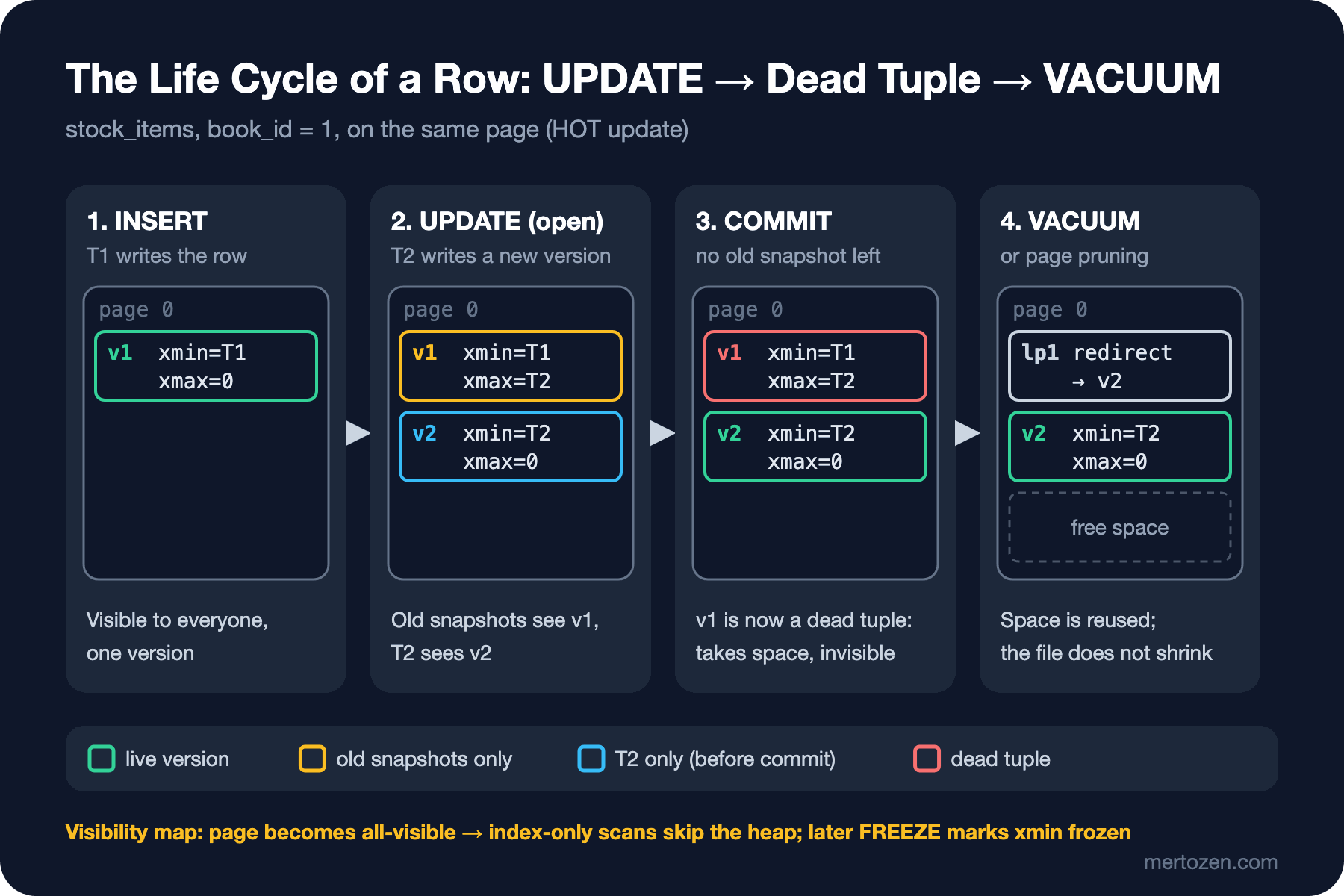
After the update, the statistics view and the pgstattuple extension (installed in post 03) say the same thing:
SELECT n_live_tup, n_dead_tup, n_tup_upd, n_tup_hot_upd FROM pg_stat_user_tables WHERE relname = 'stock_items';
SELECT tuple_count, dead_tuple_count, round(dead_tuple_percent::numeric, 1) AS dead_pct,
       round(free_percent::numeric, 1) AS free_pct
FROM pgstattuple('stock_items');
n_live_tup | n_dead_tup | n_tup_upd | n_tup_hot_upd
------------+------------+-----------+---------------
40000 | 40000 | 40000 | 0
tuple_count | dead_tuple_count | dead_pct | free_pct
-------------+------------------+----------+----------
40000 | 40000 | 46.0 | 0.140,000 live rows, 40,000 dead rows; 46% of the file is dead tuples. A note: the pg_stat_user_tables counters aren't updated right after each statement but when the session reports them at short intervals; to read them right away inside a script we ran SELECT pg_stat_force_next_flush(); first. pgstattuple, on the other hand, reads the whole table; it's expensive on a large table, and in production pg_stat_user_tables is enough.
What VACUUM Does and Doesn't Do
VACUUM (VERBOSE) stock_items;
SELECT pg_size_pretty(pg_relation_size('stock_items')) AS heap;
INFO: finished vacuuming "bookstore.public.stock_items": index scans: 1
pages: 0 removed, 510 remain, 510 scanned (100.00% of total), 0 eagerly scanned
tuples: 40000 removed, 40000 remain, 0 are dead but not yet removable
...
visibility map: 510 pages set all-visible, 254 pages set all-frozen (0 were all-visible)
index scan needed: 255 pages from table (50.00% of total) had 40000 dead item identifiers removed
heap
---------
4080 kBVACUUM removed the 40,000 dead tuples, cleaned up the index entries pointing to them and marked the pages all-visible in the visibility map (the index-only scan in post 06 could say Heap Fetches: 0 because of this). But the file stayed at 4080 kB. That's the second half of the answer: VACUUM makes space reusable, it doesn't give it back to the operating system. The exception is when pages at the end of the table become completely empty; then it can cut off the end of the file. The freed space stays in the table, and later writes use it:
UPDATE stock_items SET quantity_reserved = quantity_reserved + 1;
SELECT pg_size_pretty(pg_relation_size('stock_items')) AS heap;
SELECT n_tup_upd, n_tup_hot_upd FROM pg_stat_user_tables WHERE relname = 'stock_items';
heap
---------
4080 kB
n_tup_upd | n_tup_hot_upd
-----------+---------------
80000 | 105The second bulk update didn't grow the file; the new versions were written into the pages freed after the first update. The table settles at this size. That's why it's normal for a frequently updated table to be larger than its live rows need; the problem is when that empty space keeps growing (bloat).
To really shrink the file, the table has to be rewritten:
VACUUM FULL stock_items;
SELECT pg_size_pretty(pg_relation_size('stock_items')) AS heap, pg_size_pretty(pg_relation_size('stock_items_pkey')) AS pkey;
heap | pkey
---------+--------
2040 kB | 896 kBThe table went back to 2040 kB and its primary key index from 1768 kB to 896 kB. The price is the lock: VACUUM FULL writes a new copy of the table and holds an ACCESS EXCLUSIVE lock the whole time; even reads wait. While one session ran VACUUM FULL on the 2.5-million-row order_items, we tried to read from another:
SELECT l.mode, l.granted, a.query FROM pg_locks l JOIN pg_stat_activity a ON a.pid = l.pid
WHERE l.relation = 'order_items'::regclass;
SET lock_timeout = '200ms';
SELECT count(*) FROM order_items WHERE order_id = 42;
mode | granted | query
---------------------+---------+-------------------------
AccessExclusiveLock | t | VACUUM FULL order_items
ERROR: canceling statement due to lock timeoutIt also needs free disk space as large as the table for the new copy. In production VACUUM FULL belongs in a maintenance window; the usual replacement is the third-party pg_repack extension, which works without blocking. PostgreSQL 19 brings a REPACK command into core for this job, with a REPACK (CONCURRENTLY) option that doesn't block; more in the last post of the series.
HOT Updates and fillfactor
In the second update only 105 of 80,000 updates were HOT, Heap-Only Tuple updates where the new version goes onto the same page and no new index entry is added. HOT has two conditions: the updated column must not be indexed (we saw that in post 06), and the new version must fit on the same page as the old one. The problem here is the second. After the first update the live rows sat on completely full pages, and the free space was on other pages. When the new version went to another page, a new index entry had to be written too.
A real workload isn't one bulk update but updates in small groups during the day. We made two copies of the table: one with the default fillfactor = 100, the other with fillfactor = 80, which leaves 20% of each page empty. On each we updated a tenth of the rows, in ten rounds:
CREATE TABLE stock_ff100 AS SELECT * FROM stock_items;
CREATE TABLE stock_ff80 WITH (fillfactor = 80) AS SELECT * FROM stock_items;
ALTER TABLE stock_ff100 ADD PRIMARY KEY (book_id);
ALTER TABLE stock_ff80 ADD PRIMARY KEY (book_id);
DO $$
BEGIN
    FOR r IN 0..9 LOOP
        UPDATE stock_ff100 SET quantity_reserved = quantity_reserved + 1 WHERE book_id % 10 = r;
        UPDATE stock_ff80 SET quantity_reserved = quantity_reserved + 1 WHERE book_id % 10 = r;
        COMMIT;
    END LOOP;
END $$;
relname | n_tup_upd | n_tup_hot_upd | hot_pct | heap
-------------+-----------+---------------+---------+---------
stock_ff100 | 40000 | 33218 | 83 | 2392 kB
stock_ff80 | 40000 | 40000 | 100 | 2560 kBEven in the default table 83% of the updates were HOT. Page pruning makes that possible: when PostgreSQL touches a page and finds dead tuples it can remove, it cleans that page itself without waiting for VACUUM. In the first rounds the full pages had no room; those updates went to other pages and the table grew from 2048 kB to 2392 kB. With fillfactor = 80 the table starts 25% larger, but every update was HOT and the table didn't grow at all. For tables with frequently updated columns such as stock, order status or counters, a fillfactor between 80 and 90 is a good start. For tables that only get inserts and are never updated (order_items), the default of 100 is right.
Autovacuum: Thresholds and Per-Table Settings
The autovacuum launcher (a background process from post 01) looks at each database once a minute by default (autovacuum_naptime = 60s) and starts workers for tables over their threshold (3 workers by default). A table's vacuum threshold is:
vacuum threshold = min(autovacuum_vacuum_max_threshold,
                       autovacuum_vacuum_threshold + autovacuum_vacuum_scale_factor * reltuples)
The defaults are 50 + 20%; autovacuum_vacuum_max_threshold arrived in 18 with a default of 100 million. Since 13 there is a separate insert threshold for insert-heavy tables (1000 + 20%). For the tables in the lab:
   relname   | reltuples | vacuum_threshold
-------------+-----------+------------------
 order_items |   2500496 |           500149
 orders      |   1000000 |           200050
 stock_items |     40000 |              500
Autovacuum won't run on orders until 200 thousand dead tuples pile up; that number grows with the table and reaches 200 million on a billion-row table (the cap in 18 is for exactly that case). Lower the threshold per table for frequently updated tables. For stock_items we set 1% + 100, which is 500, and also had this table's autovacuum runs logged regardless of duration (the default of log_autovacuum_min_duration is 10 minutes):
ALTER TABLE stock_items SET (autovacuum_enabled = on, autovacuum_vacuum_scale_factor = 0.01,
    autovacuum_vacuum_threshold = 100, log_autovacuum_min_duration = 0);
UPDATE stock_items SET quantity_reserved = quantity_reserved + 1 WHERE book_id <= 1000;
LOG: automatic vacuum of table "bookstore.public.stock_items": index scans: 1
pages: 0 removed, 262 remain, 15 scanned (5.73% of total), 0 eagerly scanned
tuples: 1000 removed, 39966 remain, 0 are dead but not yet removable
...
index scan needed: 7 pages from table (2.67% of total) had 965 dead item identifiers removed
relname | n_dead_tup | last_autovacuum | autovacuum_count
-------------+------------+-------------------------------+------------------
stock_items | 0 | 2026-11-14 02:20:02.333379+00 | 11000 dead tuples crossed the threshold and autovacuum ran within a minute. Note that it scanned only 15 of 262 pages. Pages marked all-visible in the visibility map can't contain dead tuples, so it skips them; that's why an autovacuum that runs regularly is cheap. In the index 965 entries were removed instead of 1000; some of the updates were HOT and had no index entry.
Autovacuum throttles itself so it doesn't slow down production: after a certain amount of work (vacuum_cost_limit, 200) it sleeps for autovacuum_vacuum_cost_delay (2 ms). If you see autovacuum failing to keep up with the rate of dead tuples on large, busy tables, the first knobs are raising that limit and adding workers. In 18, thanks to autovacuum_worker_slots, autovacuum_max_workers can be raised up to that ceiling without a restart.
A Long Transaction Stops VACUUM
A dead tuple can only be removed when no transaction that could see it is left. An endpoint in the Bookstore API opens a transaction, updates the order and then calls the payment service before committing. We reproduced that in one session and left the transaction open:
BEGIN;
UPDATE orders SET status = status WHERE order_id = 42;
In another session we updated 1000 rows in stock_items and ran VACUUM:
tuples: 0 removed, 41000 remain, 1000 are dead but not yet removable

 pid |    usename    |        state        | backend_xid | backend_xmin |    xact_age    |                     last_query
-----+---------------+---------------------+-------------+--------------+----------------+----------------------------------------------------
 358 | bookstore_app | idle in transaction |        1063 |              | 00:00:02.01194 | UPDATE orders SET status = status WHERE order_id =
Even though the open transaction touched another table, VACUUM couldn't remove any of the 1000 dead tuples. The limit is database-wide: no row version that died after that transaction's ID (1063) can be removed until the transaction ends. After the first session committed, the same command said 1000 removed. If such a session stays open for hours in production, updates pile up across the whole database and tables and indexes bloat.
Other sources have the same effect: a long report in a REPEATABLE READ transaction, an abandoned replication slot, and a long query on a replica with hot_standby_feedback = on. The last one is sneaky: the replica tells the primary "I still need these rows" and VACUUM on the primary doesn't remove them. A reporting query on the replica causes bloat on the primary. To check, watch backend_xid and backend_xmin in pg_stat_activity and xmin in pg_replication_slots. As a safeguard, idle_in_transaction_session_timeout (off by default) can end transactions that sit idle; this and the other timeouts are in post 09.
Transaction ID Wraparound and Freezing
Transaction IDs are 32 bits and compared in a circle: for every ID, about two billion IDs count as "in the past" and two billion as "in the future". If the xmin of a row nobody touches gets old enough, one day it appears to be "in the future" and the row seems to vanish. PostgreSQL prevents this by freezing: VACUUM marks sufficiently old rows as "frozen", and those are visible to every transaction from then on. The oldest unfrozen ID of each table is in relfrozenxid, and the database's in datfrozenxid:
SELECT datname, age(datfrozenxid) AS xid_age FROM pg_database ORDER BY 2 DESC;
SELECT c.relname, age(c.relfrozenxid) AS xid_age, pg_size_pretty(pg_table_size(c.oid)) AS size
FROM pg_class c JOIN pg_namespace n ON n.oid = c.relnamespace
WHERE c.relkind IN ('r', 'm', 't') AND n.nspname = 'public'
ORDER BY age(c.relfrozenxid) DESC LIMIT 3;
datname | xid_age
-----------+---------
postgres | 588
template1 | 588
template0 | 588
bookstore | 588
relname | xid_age | size
-----------+---------+---------
authors | 68 | 304 kB
books | 67 | 3592 kB
customers | 66 | 9360 kBSince the lab is new, the ages are in the hundreds. These are the thresholds that matter. Once a table's age passes autovacuum_freeze_max_age (200 million), autovacuum starts an "anti-wraparound" vacuum that scans the whole table, even if autovacuum is disabled for that table; on a large table this can take hours, and it starts again if cancelled. If vacuum_failsafe_age (1.6 billion) is passed, VACUUM skips work such as throttling and index cleanup and focuses only on freezing. Warnings appear in the log 40 million transactions before wraparound, and 3 million before it PostgreSQL refuses to assign new transaction IDs: every command that writes gets the error database is not accepting commands that assign new transaction IDs. The way out is to clean up open transactions, old prepared transactions and unused replication slots, and then run VACUUM in the database.
In 18, normal vacuums started freezing some of the all-visible but not yet frozen pages ahead of time (eager freezing; the rate is vacuum_max_eager_freeze_failure_rate, default 0.03). That leaves less work for the big scan at the 200 million threshold. The eagerly scanned field in the VACUUM VERBOSE output above shows this mechanism.
Production Notes
Four things to monitor: per-table n_dead_tup and last_autovacuum in pg_stat_user_tables, plus total_autovacuum_time, added in 18, for how much time autovacuum spent on that table; database age, age(datfrozenxid), with an alert once it passes half of 200 million; the oldest open transaction, pg_stat_activity.xact_start; and the xmin of replication slots. pg_stat_progress_vacuum shows the progress of long vacuums.
Lower log_autovacuum_min_duration from 10 minutes, for example to 1 second, so the log shows which table gets cleaned how often and how long it takes. For large, frequently updated tables, set the scale factor and fillfactor per table without touching the global settings.
After a bulk delete or bulk update, run VACUUM (ANALYZE) by hand if needed. If most of a table will be deleted, TRUNCATE or dropping a partition (covered in the Veritabanı Performansı ve Scaling series) instead of DELETE produces no dead tuples.
Common Pitfalls
Turning off autovacuum because "it hurts performance": dead tuples pile up, tables bloat, the visibility map isn't updated and index-only scans fall apart. Wraparound protection still runs, but at the worst moment and at its biggest. If autovacuum is slow, the fix is to run it more often and faster.
Treating VACUUM FULL as routine maintenance: it locks the table, needs extra disk for the new copy, and a frequently updated table gets back to the same size within days. The lasting fix is autovacuum settings and fillfactor. In our lab n_dead_tup stayed at 40,000 after VACUUM FULL; since it doesn't reset that statistics counter, we ran a plain VACUUM (ANALYZE) after it.
Calling an external service inside a transaction: the example above is exactly that. Move the HTTP call outside the transaction; if needed, send it later through an outbox (the outbox post of the Message Queue'larla Çalışmak series).
Looking for bloat only in tables: indexes bloat too, and VACUUM doesn't shrink them. The way to rebuild a bloated index without blocking is REINDEX INDEX CONCURRENTLY.
A Small Experiment
★☆☆ Update a single row in stock_items and use SELECT ctid, xmin, xmax FROM stock_items WHERE book_id = 1 before and after the update to see that the row's physical address changes. Run the same query in another session before the updating transaction commits.
★★☆ Delete 10% of the Delivered orders in orders and watch pg_stat_user_tables to see whether autovacuum runs. Why didn't it? Lower the threshold for the table and try again.
★★★ In one session open a transaction with BEGIN ISOLATION LEVEL REPEATABLE READ; and run a SELECT. In another session update stock_items and run VACUUM VERBOSE; check which column in pg_stat_activity is filled this time instead of backend_xid, and explain the difference.
In the next post we get into the topic we brushed past here: transactions in PostgreSQL, isolation levels, a job queue in the database with SELECT ... FOR UPDATE SKIP LOCKED, advisory locks and retrying serialization failures on the .NET side.