

Integration Testing Infrastructure in .NET 10: What Runs Real and What Is Faked?
In this series an integration test runs the API inside the test process with its production pipeline and the database as a real SQL Server container; only external services such as payment, shipping and email are faked at the boundary. We show with real runs how SQLite and InMemory differ in collation, length, precision and transactions, then set up an xUnit v3 + Testcontainers skeleton kept apart from unit tests.
Version note: The code in this post was built and run with .NET 10, xUnit.net v3 4.0.3, Microsoft.AspNetCore.Mvc.Testing 10.0.15, Testcontainers for .NET 4.16 and SQL Server 2025.
Guess First
Bookstore API's integration tests have been running against an in-memory SQLite database for years. They are all green, and the CI pipeline finishes in two minutes. Then three bug reports arrive from production: a customer cannot register a second time with the same email, a user typing "clean code" in the catalog search gets results while the tests claim "search is case-sensitive", and a book's price on screen differs from what was entered.
To see why, I wrote a small program that runs the same EF Core model and the same operations against three providers. SQL Server is a real container started with Testcontainers; the other two are the in-memory SQLite and the EF Core InMemory provider you know from the Web API and EF Core series:
Dictionary<string, Func<BookstoreDbContext>> providers = new()
{
    ["SqlServer"] = () => new BookstoreDbContext(new DbContextOptionsBuilder<BookstoreDbContext>()
        .UseSqlServer(sql.GetConnectionString().Replace("Database=master", "Database=Diff")).Options),
    ["Sqlite"] = () => new BookstoreDbContext(new DbContextOptionsBuilder<BookstoreDbContext>()
        .UseSqlite(sqlite).Options),
    ["InMemory"] = () => new BookstoreDbContext(new DbContextOptionsBuilder<BookstoreDbContext>()
        .UseInMemoryDatabase("Diff").Options),
};

// The same scenarios for every provider; two of them as an example:
await Run("email case", async () =>
{
    await using BookstoreDbContext db = create();
    db.Customers.Add(new Customer { Email = "ada@example.com", Name = "Ada" });
    db.Customers.Add(new Customer { Email = "Ada@Example.com", Name = "Ada" });
    await db.SaveChangesAsync();
    return "saved both";
});
await Run("search", async () =>
{
    await using BookstoreDbContext db = create();
    db.Books.Add(new Book { Isbn = "978-0132350884", Title = "Clean Code", Price = 54.905m, Stock = 12 });
    await db.SaveChangesAsync();
    string term = "clean code";
    int found = await db.Books.CountAsync(b => b.Title.Contains(term));
    return $"found {found}";
});
In the model, Title is limited to 200 characters, Customer.Email has a unique index, books are unique by ISBN and Price is configured with HasPrecision(10, 2). The scenarios: saving a 250-character title, saving two emails that differ only in letter case, saving two identical emails, searching for "clean code", reading back a price saved as 54.905, and rolling back a transaction. Before reading on, guess: in how many of these six scenarios do SQLite and InMemory behave like SQL Server?
The Answer: Same Code, Three Behaviors
The real output of the program (I shortened the long value in SQL Server's truncation message):
== SqlServer
  long title: DbUpdateException -> String or binary data would be truncated in table 'Diff.dbo.Books', column 'Title'. Truncated value: 'xxxx...'.
  email case: DbUpdateException -> Cannot insert duplicate key row in object 'dbo.Customers' with unique index 'IX_Customers_Email'. The duplicate key value is (Ada@Example.com).
  exact duplicate: DbUpdateException -> Cannot insert duplicate key row in object 'dbo.Customers' with unique index 'IX_Customers_Email'. The duplicate key value is (grace@example.com).
  search: found 1
  price roundtrip: 54.91
  rollback: rows after rollback: 0
== Sqlite
  long title: saved
  email case: saved both
  exact duplicate: DbUpdateException -> SQLite Error 19: 'UNIQUE constraint failed: Customers.Email'.
  search: found 0
  price roundtrip: 54.905
  rollback: rows after rollback: 0
== InMemory
  long title: saved
  email case: saved both
  exact duplicate: saved both
  search: found 0
  price roundtrip: 54.905
rollback: InvalidOperationException -> An error was generated for warning 'Microsoft.EntityFrameworkCore.Database.Transaction.TransactionIgnoredWarning': Transactions are not supported by the in-memory store. ...| Scenario | SQL Server 2025 | SQLite in-memory | EF Core InMemory |
|---|---|---|---|
| 250-character title | error (truncation) | saved | saved |
| Ada@Example.com a second time | error (unique index) | saved | saved |
| identical email | error | error | saved |
| "clean code" search | 1 result | 0 results | 0 results |
| reading back 54.905 | 54.91 | 54.905 | 54.905 |
| transaction rollback | works | works | exception |
SQLite matched SQL Server in two of the six scenarios, InMemory in only one. Every difference lines up with one of the three production bugs.
The letter-case difference comes from collation. When I queried the server collation of the SQL Server container Testcontainers started, it returned SQL_Latin1_General_CP1_CI_AS; the CI in the name means "case-insensitive". That is why the unique index treats "ada@example.com" and "Ada@Example.com" as the same value and why the Contains search finds "Clean Code". SQLite compares text in binary by default, and the InMemory provider uses C#'s ordinal string comparison. A test written against SQLite can therefore record the exact opposite of production as "correct behavior".
Length and precision settings only mean something in a real database as well. SQL Server refuses to write 250 characters into an nvarchar(200) column and rounds 54.905 to 54.91 for a decimal(10,2) column. In SQLite neither the length limit nor this precision is applied; the value comes back exactly as written. The InMemory provider goes one step further and does not enforce the unique index at all: even two identical emails were saved.
The transaction difference breaks the tests themselves. InMemory does not support transactions, so the BeginTransactionAsync call turns into an exception by default; if you silence that warning, the rollback does not undo anything. The EF Core series post "Testing with EF Core: SQLite In-Memory and InMemory Provider Pitfalls" explained how these providers work inside; this series goes one step further and runs tests on the same database engine as production.
What Does "Integration Test" Mean in This Series?
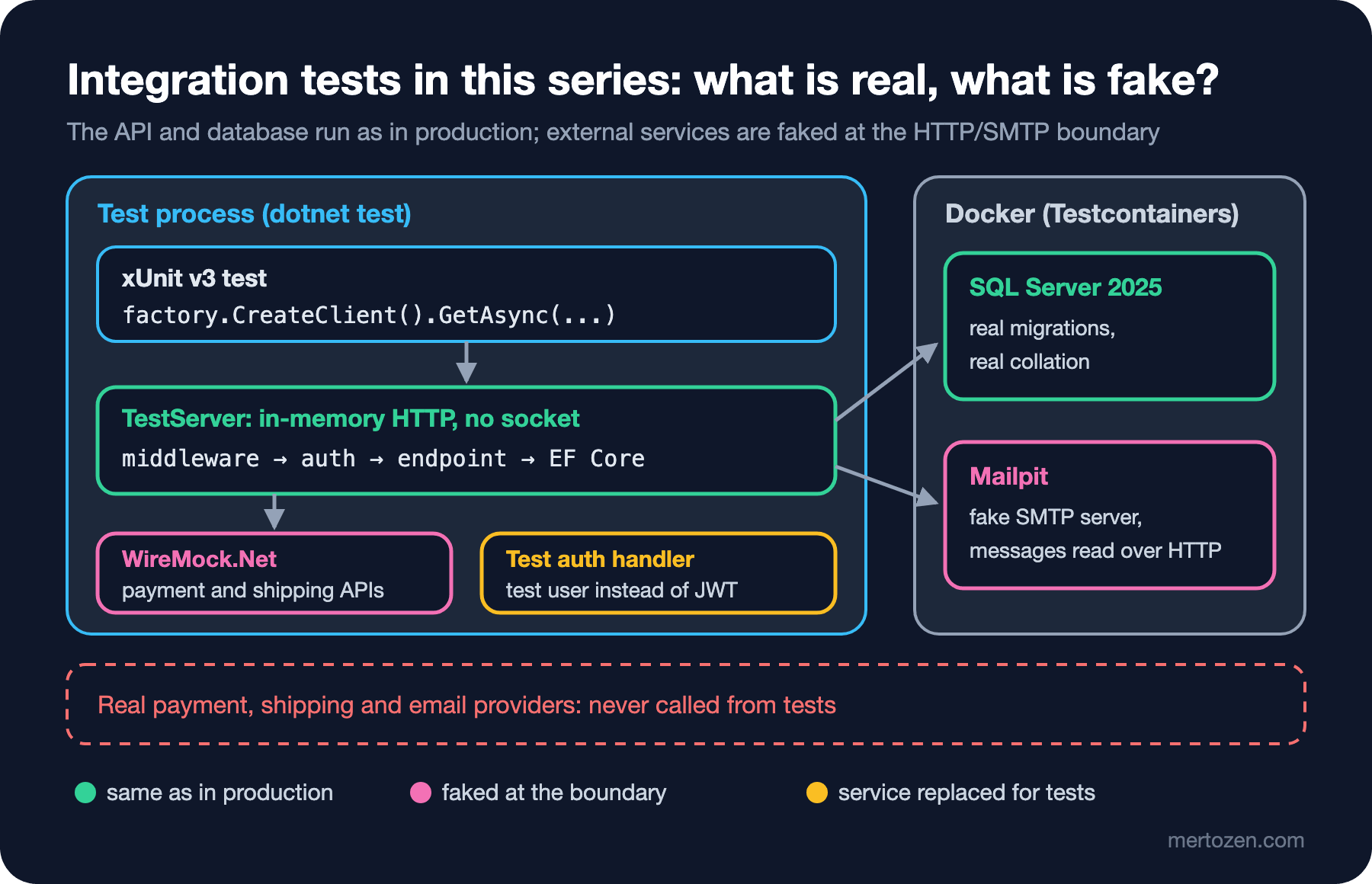
"Integration test" means different things to different teams. Telling test types apart and deciding what to test at which level is the subject of the Test Strategy series; I won't reopen that discussion here. The definition this series uses is narrow and concrete: the API runs inside the test process with its production middleware pipeline, routing, authorization, endpoints and EF Core; the database is a real instance of the same engine as in production; external services such as payment, shipping and email are faked at the HTTP or SMTP boundary.
The distinction in Martin Fowler's 2018 IntegrationTest article fits this definition well. Fowler calls tests that exercise only the code in your service that talks to the outside world, with test doubles standing in for other services, "narrow integration tests"; tests that need live versions of all services he considers "broad" and prefers to call system or end-to-end tests. The first five posts of this series stay on the narrow side. Tests that bring up the whole system with a browser and the Angular UI are in the E2E block from post 6 on.
The colors in the figure are the map for this post and the next four. The green parts are the same code and engine as production: the real ASP.NET Core pipeline behind TestServer and the SQL Server 2025 container started by Testcontainers. The pink parts are fakes at the boundary: WireMock.Net for the payment and shipping APIs in post 4, and a fake SMTP server for email. The yellow part is the only service we deliberately replace for tests: the test authentication handler from post 2 instead of JWT validation. The real providers in the red frame are never called from a test.
Where TestServer sits matters. WebApplicationFactory does not start Kestrel by default; requests go to an in-memory HttpMessageHandler instead of a socket. No port is opened and no network stack is involved, but the request pipeline is the same as in production. That is why an integration test can send an HTTP-level request and exercise a slice all the way down to a real database in a fraction of a second.
What is out of scope is clear too: RabbitMQ and MassTransit tests were covered in post 13 of the Message Queue series, and Pact tests between services in post 7 of the Microservices series. These posts only deal with the HTTP API itself, the database and the external services at the boundary.
What Changed Since Web API 30?
The ASP.NET Core Web API series post "Integration Testing an ASP.NET Core Web API: End-to-End Tests with WebApplicationFactory" set up the first integration test on .NET 6: WebApplicationFactory, a DbContext replaced with in-memory SQLite, and xUnit v2. That foundation is not repeated here; this is what changed:
| Topic | Web API 30 (.NET 6) | This series (.NET 10) |
|---|---|---|
| Database | SQLite in-memory | SQL Server 2025 with Testcontainers |
| Test framework | xUnit v2 + VSTest | xUnit v3 4.0 + Microsoft Testing Platform |
| Access to Program | hand-written public partial class Program | generated by a source generator |
| Sharing | class fixture | assembly fixture + class fixture |
| External services | none | WireMock.Net, fake SMTP, FakeTimeProvider |
The Test Project Skeleton
The solution layout is deliberately plain. Unit tests and integration tests live in separate projects; we will see why, with timings, below:
Bookstore.slnx
global.json
src/
    Bookstore.Api/
        Program.cs
        Data/                 // DbContext, entities, migrations
        Endpoints/
        Integrations/         // PaymentClient, ShippingClient, SMTP sender
tests/
    Bookstore.Api.UnitTests/
    Bookstore.Api.IntegrationTests/
In the .NET 10 SDK, dotnet test can run with two runners. As in the Unit Test series post "A Test Project with xUnit v3: Microsoft Testing Platform, dotnet test and First Tests", we select Microsoft Testing Platform in global.json:
{
  "sdk": { "version": "10.0.402", "rollForward": "latestFeature" },
  "test": { "runner": "Microsoft.Testing.Platform" }
}
The integration test project's csproj comes down to three packages:
<Project Sdk="Microsoft.NET.Sdk">

  <PropertyGroup>
    <TargetFramework>net10.0</TargetFramework>
    <OutputType>Exe</OutputType>
    <Nullable>enable</Nullable>
    <ImplicitUsings>enable</ImplicitUsings>
    <IsPackable>false</IsPackable>
  </PropertyGroup>

  <ItemGroup>
    <PackageReference Include="Microsoft.AspNetCore.Mvc.Testing" Version="10.0.15" />
    <PackageReference Include="Testcontainers.MsSql" Version="4.16.0" />
    <PackageReference Include="xunit.v3.mtp-v2" Version="4.0.3" />
  </ItemGroup>

  <ItemGroup>
    <ProjectReference Include="..\..\src\Bookstore.Api\Bookstore.Api.csproj" />
  </ItemGroup>

  <ItemGroup>
    <Using Include="Xunit" />
  </ItemGroup>

</Project>
The version of Microsoft.AspNetCore.Mvc.Testing should come from the same family as the ASP.NET Core version the API targets. 11.0.0 is also on NuGet, but the 11.0 package targets net11.0; in a .NET 10 project, stay on the 10.0.x line.
Accessing Program is no longer manual
In a Program.cs with top-level statements, the compiler-generated Program class is internal. From .NET 6 to .NET 9, a test project could only write WebApplicationFactory<Program> if you added this line at the end of the file:
// Unnecessary in .NET 10: a source generator already emits this declaration
public partial class Program;
A source generator that ships with ASP.NET Core 10 now emits this public partial declaration itself for apps that use top-level statements. Bookstore's Program.cs has no such line, and the test project compiles without problems. If the line is still there after you upgrade an older project, the analyzer with code ASP0027 flags it as an unnecessary declaration. Its severity is Information, so it does not show up in dotnet build output but appears as a suggestion in the IDE; removing it does not change behavior.
The First Test: Fixture, Factory and a Real Request
There are three pieces: an assembly fixture that manages the container, a factory that connects the API to this database, and the test itself. Container lifecycle, migrations and cleanup between tests are the subject of post 3; here is the smallest working version of the skeleton.
using Bookstore.Api.Data;
using Microsoft.Data.SqlClient;
using Microsoft.EntityFrameworkCore;
using Testcontainers.MsSql;

[assembly: AssemblyFixture(typeof(Bookstore.Api.IntegrationTests.SqlServerFixture))]
[assembly: Trait("Category", "Integration")]

namespace Bookstore.Api.IntegrationTests;

public sealed class SqlServerFixture : IAsyncLifetime
{
    private readonly MsSqlContainer container = new MsSqlBuilder("mcr.microsoft.com/mssql/server:2025-latest").Build();

    public string ConnectionString { get; private set; } = "";

    public async ValueTask InitializeAsync()
    {
        await container.StartAsync();
        ConnectionString = new SqlConnectionStringBuilder(container.GetConnectionString())
        {
            InitialCatalog = "BookstoreDb"
        }.ConnectionString;

        // The schema is created once per test assembly, with the real migrations
        DbContextOptions<BookstoreDbContext> options = new DbContextOptionsBuilder<BookstoreDbContext>()
            .UseSqlServer(ConnectionString)
            .Options;
        await using BookstoreDbContext db = new(options);
        await db.Database.MigrateAsync();
    }

    public async ValueTask DisposeAsync() => await container.DisposeAsync();
}
xUnit v3's AssemblyFixture creates the fixture once for the whole test assembly; every test class uses the same container. The Unit Test series post "The xUnit Test Lifecycle: Constructors, IAsyncLifetime, Fixtures and Full Parallelism in 4.0" covered the kinds of fixtures. In an integration test the value of an assembly fixture is concrete: starting a SQL Server container takes seconds, and you don't want to pay that per test class.
using Microsoft.AspNetCore.Hosting;
using Microsoft.AspNetCore.Mvc.Testing;

namespace Bookstore.Api.IntegrationTests;

public sealed class BookstoreApiFactory(SqlServerFixture sql) : WebApplicationFactory<Program>
{
    protected override void ConfigureWebHost(IWebHostBuilder builder)
    {
        builder.UseEnvironment("Testing");
        // Override the connection string from appsettings.json with the container's
        builder.UseSetting("ConnectionStrings:Bookstore", sql.ConnectionString);
    }
}
The factory takes the assembly fixture through its constructor; xUnit v3 can inject assembly fixtures into the constructors of class fixtures too. Unlike Web API 30, we don't remove the DbContext registration and add a new one; since the database engine is the same, changing the connection string is enough. The other ways of supplying configuration, and when each becomes visible in Program.cs, are in post 2.
using System.Net;
using System.Net.Http.Json;
using Bookstore.Api.Data;
using Bookstore.Api.Endpoints;
using Microsoft.Extensions.DependencyInjection;

namespace Bookstore.Api.IntegrationTests;

public sealed class BookCatalogTests(BookstoreApiFactory factory) : IClassFixture<BookstoreApiFactory>
{
    [Fact]
    public async Task Search_is_case_insensitive_like_production()
    {
        using (IServiceScope scope = factory.Services.CreateScope())
        {
            BookstoreDbContext db = scope.ServiceProvider.GetRequiredService<BookstoreDbContext>();
            db.Books.Add(new Book { Isbn = "978-0132350884", Title = "Clean Code", Price = 54.90m, Stock = 12 });
            await db.SaveChangesAsync(TestContext.Current.CancellationToken);
        }

        HttpClient client = factory.CreateClient();
        List<BookDto>? books = await client.GetFromJsonAsync<List<BookDto>>(
            "/api/books?search=clean code", TestContext.Current.CancellationToken);

        // Only look at the book this test added; the table is shared with other tests
        BookDto book = Assert.Single(books!, b => b.Isbn == "978-0132350884");
        Assert.Equal("Clean Code", book.Title);
        Assert.Equal(54.90m, book.Price);
    }

    [Fact]
    public async Task Unknown_book_returns_404_problem_details()
    {
        HttpClient client = factory.CreateClient();

        HttpResponseMessage response = await client.GetAsync("/api/books/999999", TestContext.Current.CancellationToken);

        Assert.Equal(HttpStatusCode.NotFound, response.StatusCode);
        Assert.Equal("application/problem+json", response.Content.Headers.ContentType?.MediaType);
    }
}
The first test verifies a behavior that could never pass on SQLite: a lowercase search finds a title stored with capital letters. The second checks that an unknown book returns 404 with a ProblemDetails body; this also proves that the AddProblemDetails and UseStatusCodePages middleware are really in the pipeline. Running the solution (I shortened the file paths):
$ dotnet test --solution Bookstore.slnx
Test run summary: Passed!
  .../Bookstore.Api.UnitTests.dll passed (290ms)
  .../Bookstore.Api.IntegrationTests.dll passed (18s 776ms)

  total: 5
  failed: 0
  succeeded: 5
  skipped: 0
  duration: 19s 128ms
Keeping Unit and Integration Tests Apart
Those two lines sum up why I don't put the two kinds of tests in the same project. The three tests in the unit test project finished in 290 milliseconds. The two tests in the integration project took 18.8 seconds, and almost all of that was starting the container and applying the migration; the tests themselves took milliseconds. If they lived in one project, a developer changing a calculation rule would wait for Docker to bring up SQL Server on every save. On a machine without Docker even the unit tests could not run, because the assembly fixture is set up before the first test in the assembly starts.
Separate projects also mean separate CI steps: unit tests as the first job on every push, integration tests as the second job on a runner with Docker. Test ordering in the pipeline and quality gates are in the CI/CD Fundamentals series post "Testing in the Pipeline: Fast Feedback, Quality Gates and Flaky Tests"; setting it up on GitHub Actions is in post 5 of the GitHub Actions series.
The [assembly: Trait("Category", "Integration")] line at the top of the fixture file lets you filter out integration tests when running the whole solution. xUnit v3 accepts the Trait attribute at assembly level too. The first time I tried the filter, this happened:
$ dotnet test --solution Bookstore.slnx --filter-not-trait "Category=Integration"
Test run summary: Failed!
  .../Bookstore.Api.IntegrationTests.dll Zero tests ran (333ms)
  .../Bookstore.Api.UnitTests.dll passed (450ms)

  error: 1

  total: 3
  failed: 0
  succeeded: 3
  skipped: 0
  duration: 633ms
Test run completed with non-success exit code: 8 (see: https://aka.ms/testingplatform/exitcodes)
No test failed, yet the run counted as failed. Microsoft Testing Platform ends a test application that ran zero tests with exit code 8, and dotnet test treats that as an error. When the filter deliberately excludes an entire project, you need to ignore that code:
$ dotnet test --solution Bookstore.slnx --filter-not-trait "Category=Integration" --ignore-exit-code 8
Test run summary: Passed!
  .../Bookstore.Api.UnitTests.dll passed (165ms)
  .../Bookstore.Api.IntegrationTests.dll passed (106ms)

  total: 3
  failed: 0
  succeeded: 3
  skipped: 0
  duration: 283ms
A nice side note: the integration project closed in 106 milliseconds. When no test is selected, the assembly fixture is not set up, so the container never starts.
In Production
Give the integration suite a time budget and measure it. In Bookstore the budget reads like this: a fixed startup cost for the container and the migration, then a few tens of milliseconds per test. Because the fixed cost does not depend on the number of tests, keeping the tests in one assembly and starting the container once per assembly keeps the duration from growing linearly. In the environment I measured, the container took a few seconds to become ready and a full run took between 10 and 19 seconds. Measure on your own machine and on your CI runner; whether the image is pulled in advance on CI can make a difference of tens of seconds on its own.
What blows the time budget is usually not the number of tests but expensive work per test: a new factory per test, a new database per test, starting a container inside a test. We will measure the cost of each in posts 2 and 3.
Integration tests now depend on Docker in CI. If the runner has no Docker, Testcontainers fails when the tests start; that is better than tests that are silently skipped. But if someone on the team has no Docker, keeping the unit test project independent is their only safe feedback loop.
Common Pitfalls
Tests that depend on order and on each other's data. In the first version, the search test ended with Assert.Single(books!). Then this test was added in another class:
public sealed class BookEditionTests(BookstoreApiFactory factory) : IClassFixture<BookstoreApiFactory>
{
    [Fact]
    public async Task Second_edition_is_listed_with_its_own_price()
    {
        using (IServiceScope scope = factory.Services.CreateScope())
        {
            BookstoreDbContext db = scope.ServiceProvider.GetRequiredService<BookstoreDbContext>();
            db.Books.Add(new Book { Isbn = "978-0135398579", Title = "Clean Code, 2nd Edition", Price = 61.50m, Stock = 4 });
            await db.SaveChangesAsync(TestContext.Current.CancellationToken);
        }

        HttpClient client = factory.CreateClient();
        List<BookDto>? books = await client.GetFromJsonAsync<List<BookDto>>(
            "/api/books?search=2nd edition", TestContext.Current.CancellationToken);

        Assert.Equal(61.50m, Assert.Single(books!).Price);
    }
}
The old search test failed in all three runs:
failed Bookstore.Api.IntegrationTests.BookCatalogTests.Search_is_case_insensitive_like_production (16ms)
  Assert.Single() Failure: The collection contained 2 items
  Collection: [BookDto { Id = 2, Isbn = 978-0132350884, Title = Clean Code, Price = 54,90, Stock = 12 }, BookDto { Id = 1, Isbn = 978-0135398579, Title = Clean Code, 2nd Edition, Price = 61,50, Stock = 4 }]
(The comma decimal separator comes from the Turkish culture of the machine I ran it on.) Each test was correct on its own; run together, they shared the same table. The failing test saw a row it had not inserted and blew up. Here the order happened to be the same every time, but that is luck: when the order changes or one more test is added, the same problem hits another test. The short-term fix is to narrow the assertion to the data the test created itself; the final version above does that with an ISBN filter. The lasting fix is cleanup between tests, covered in post 3 with Respawn and the other options.
Trying business rule combinations in integration tests. In Bookstore an order can be cancelled within 30 minutes. Tests that check zero minutes, exactly the limit and one minute past it finished in 290 milliseconds at unit level:
[Theory]
[InlineData(0, true)]
[InlineData(30, true)]
[InlineData(31, false)]
public void Order_can_be_cancelled_only_within_30_minutes(int minutesLater, bool expected)
{
    Assert.Equal(expected, OrderRules.CanCancel(PlacedAt, PlacedAt.AddMinutes(minutesLater)));
}
Trying the same three cases over HTTP means creating an order, faking the payment and moving the clock for each one. The integration test's job is not the rule itself but showing that the rule is wired to the endpoint correctly: one "200 within the window" and one "409 outside the window" are enough. We will do that in post 4 with FakeTimeProvider.
Connecting to a copy of the production database, or to the team's shared development server, and calling it a "real database". Then tests see someone else's data, and two CI jobs running in parallel delete each other's records. The test database should belong to the test run, start with the run and die with it.
Using the InMemory provider as a "fast integration test". The table above shows why it isn't one: without unique indexes, transactions, length and precision rules, the data layer has not really been tested.
A Small Experiment
★☆☆ Add a scenario with a DateTimeOffset to the provider comparison program: run a query that does OrderBy on Order.CreatedAt and compare the results of the three providers. Note the message you get on SQLite.
★★☆ Remove the UseSetting line from BookstoreApiFactory and run the tests. Read at which step and with which message the error arrives; where did the connection string in appsettings.json try to connect during the test?
★★★ Write a second factory that runs the search test against in-memory SQLite as well, and run the same test with both factories. If you have to change the search query to make it pass on SQLite (EF.Functions.Like, ToLower), examine in the execution plan how that change affects index usage on SQL Server.
The skeleton is ready, but the factory only changes a connection string so far. In the next post we go inside WebApplicationFactory: replacing services in a custom factory, the moment configuration reaches Program.cs, telling 401 and 403 apart with a test authentication handler, and background services running in tests when you didn't mean them to.